Understanding ladder skill
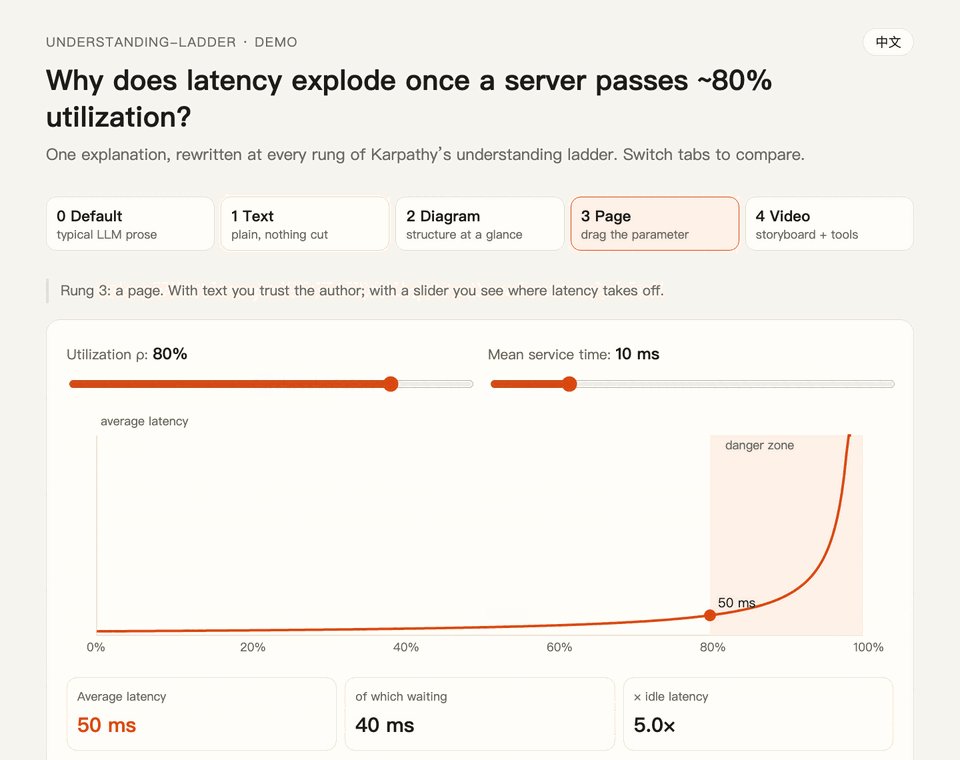
Illustration · not a resultFrom the ChangWenC/understanding-ladder README — shows the whole collection, not only this skill.source ↗
Pick the output format that makes an explanation easiest to understand, following Karpathy's understanding ladder — (1) plain controlled text, (2) diagram, (3) interactive HTML page, (4) 3Blue1Brown-style explainer video.
by ChangWenC·MIT license·★ 108 Stars on the repo·GitHub ↗
npx degit ChangWenC/understanding-ladder/skills/understanding-ladder#main ~/.claude/skills/understanding-ladderChecked ·commit main
Files of Understanding ladder
Show the full text111 lines
Understanding ladder
This skill decides which format to explain in. Writing quality inside every format is handled by level 1 rules (below).
Source: Andrej Karpathy, 2026-10-02 https://x.com/karpathy/status/2105819303471976479. LLM output is nearly free; human understanding is the bottleneck. So ask for formats that are easier to understand. He ranked four, each "even better" than the last — and each more expensive.
Language: reply in the user's language. These instructions are in English; the output is not.
The four rungs
| Rung | Format | Why it is easier | Cost |
|---|---|---|---|
| 1 | Plain controlled text | One idea per sentence, one meaning per term; read once, no misreading | lowest |
| 2 | Diagram | Text is linear; a diagram lays the structure out at once | low |
| 3 | Interactive HTML page | The reader moves a parameter and sees the result change | medium |
| 4 | Explainer video (3b1b style) | Animation shows the process while narration explains it | high |
Step 1: classify the content, pick a rung
| Content type | Signals | Rung |
|---|---|---|
| Definition, fact, comparison, procedure | "what is X", "how do I install", "A vs B" | 1 |
| Process, causal chain, hierarchy, state changes, component relations | "how does X work", "how does data flow", "who calls whom" | 2 |
| A parameter changes an outcome; trade-offs; distributions | "what happens if utilization rises", "how does learning rate affect convergence" | 3 |
| A derivation or geometric intuition that unfolds over time | "why do sine waves add up to a square wave", "how does gradient descent move on a surface" | 4 |
Rules:
- If the user names a format, use it. "Draw a diagram" means rung 2.
- Pick the lowest rung that fully answers. If a paragraph is enough, do not build a page.
- Mixed content: pick by the core difficulty. If the hard part is "how a parameter changes the result", pick rung 3 even if there is a definition inside.
- When unsure, go one rung lower and offer the next. End with one line, e.g. "If you want to drag the parameter yourself, I can make this a rung-3 interactive page."
Open with one line that states the choice, then produce it. Do not ask "which rung do you want?" unless the user asked for a recommendation:
Rung 3 (interactive page): the core question is how utilization changes latency — dragging a slider shows this faster than text.
Step 2: produce the rung
Every rung starts from a rung-1 draft. Write the plain text first, then turn it into a diagram, page, or video. The draft is what you check for correctness before spending effort on richer formats.
Rung 1: plain controlled text
Pick the rules by output language:
- Chinese → use the
plain-chineseskill (as a plugin it may be namedunderstanding-ladder:plain-chinese). Chinese has no "ASD-STE100" to invoke, so that skill spells the rules out. - English → write "about 80% of the way to ASD-STE100" (Karpathy's phrasing), with these rules made explicit:
- One idea per sentence. Aim for ≤20 words in instructions, ≤25 in descriptions.
- One term per meaning. Define a term the first time; never rotate synonyms.
- Active voice; name who does what. Simple tenses.
- Steps as a numbered list, imperative verb first.
- Conditions before actions ("If X, do Y").
- No filler ("It's worth noting", "Great question", "In summary…").
- Nothing cut. Keep every fact, number, condition, and hedge ("usually", "may"). Simple language, not less content — the rewrite may be longer.
- Do not touch code, commands, paths, quoted errors, or proper names.
- Other languages → apply the English rules in that language.
Rung 2: diagram
See references/level-2-diagram.md. In short:
- Choose the diagram type first: flowchart, sequence, state, hierarchy, causal graph, comparison table.
- Default to Mermaid (renders in most chat UIs and on GitHub). Use a single-file SVG/HTML when layout matters.
- ≤8 words (or ≤8 Chinese characters) per box. Below the diagram, 2–4 sentences on how to read it.
Rung 3: interactive HTML page
See references/level-3-html.md. In short:
- One self-contained HTML file. No build step; double-click to open.
- One job: let the reader move the 1–3 parameters that matter and see the result update live.
- Layout: one-line takeaway → interactive area → rung-1 text → "try this" prompts → limits and what to check.
- Save it in the working directory, tell the user the path, open it if the environment allows.
Rung 4: explainer video
See references/level-4-video.md. This skill does not render video. It delivers:
- A storyboard: per shot — visual, narration (rung-1 rules), duration.
- Tool links, e.g. showtime (open source, early; v0.4.0+ reads the storyboard table directly), Manim, local TTS Kokoro.
- A ready-to-paste prompt for those tools. With showtime ≥ 0.4.0, the storyboard table goes in as-is:
showtime new <template> <dir> --from-storyboard storyboard.md.
Demo mode: same content, every rung
When the user says "show all rungs", "walk this from rung 1 to 4", 「逐级演示」:
- Rung 0: the usual default prose, as a baseline.
- Rung 1: plain text.
- Rung 2: diagram.
- Rung 3: interactive page (can hold rungs 0–2 as tabs in the same HTML file).
- Rung 4: storyboard.
This is the best way to feel how much the format itself changes understanding.
Always append "What to check"
End every output with 1–3 things the reader should verify: key numbers, formulas, assumptions, anything that disagrees with a source.
Why: the ladder lowers the cost of understanding, not the cost of verification. The clearer and prettier the artifact, the more it lowers the reader's guard. An error in an animation is more convincing than the same error in text.
Do not
- Climb rungs to look thorough. If rung 1 is enough, stop at rung 1.
- Add facts in the diagram, page, or video that are not in the rung-1 draft. New facts go into the draft first.
- Invent data to make a page look real. Label sample data as sample data.
| 1 | |
| 2 | name understanding-ladder |
| 3 | description Pick the output format that makes an explanation easiest to understand, following Karpathy's understanding ladder — (1) plain controlled text, (2) diagram, (3) interactive HTML page, (4) 3Blue1Brown-style explainer video. Classify the content (definition/steps, process/causality, parameter→outcome, unfolding derivation), recommend the lowest rung that fully answers, then produce it. Works in English and Chinese. Use when the user says "explain this clearly", "help me understand", "draw a diagram", "make it interactive", "make an explainer video", "what's the best way to explain X", "understanding ladder", "Karpathy ladder", or 「讲清楚」「帮我理解」「画个图」「做个交互页」「做个讲解视频」「用哪种方式讲最好懂」「理解阶梯」; also when explaining a non-trivial concept, mechanism, algorithm, or an AI agent's output. |
| 4 | |
| 5 | |
| 6 | # Understanding ladder |
| 7 | |
| 8 | This skill decides **which format** to explain in. Writing quality inside every format is handled by level 1 rules (below). |
| 9 | |
| 10 | Source: Andrej Karpathy, 2026-10-02 <https://x.com/karpathy/status/2105819303471976479>. LLM output is nearly free; human understanding is the bottleneck. So ask for formats that are easier to understand. He ranked four, each "even better" than the last — and each more expensive. |
| 11 | |
| 12 | **Language:** reply in the user's language. These instructions are in English; the output is not. |
| 13 | |
| 14 | ## The four rungs |
| 15 | |
| 16 | | Rung | Format | Why it is easier | Cost | |
| 17 | |---|---|---|---| |
| 18 | | 1 | Plain controlled text | One idea per sentence, one meaning per term; read once, no misreading | lowest | |
| 19 | | 2 | Diagram | Text is linear; a diagram lays the structure out at once | low | |
| 20 | | 3 | Interactive HTML page | The reader moves a parameter and sees the result change | medium | |
| 21 | | 4 | Explainer video (3b1b style) | Animation shows the process while narration explains it | high | |
| 22 | |
| 23 | ## Step 1: classify the content, pick a rung |
| 24 | |
| 25 | | Content type | Signals | Rung | |
| 26 | |---|---|---| |
| 27 | | Definition, fact, comparison, procedure | "what is X", "how do I install", "A vs B" | 1 | |
| 28 | | Process, causal chain, hierarchy, state changes, component relations | "how does X work", "how does data flow", "who calls whom" | 2 | |
| 29 | | A parameter changes an outcome; trade-offs; distributions | "what happens if utilization rises", "how does learning rate affect convergence" | 3 | |
| 30 | | A derivation or geometric intuition that unfolds over time | "why do sine waves add up to a square wave", "how does gradient descent move on a surface" | 4 | |
| 31 | |
| 32 | Rules: |
| 33 | |
| 34 | **If the user names a format, use it.** "Draw a diagram" means rung 2. |
| 35 | **Pick the lowest rung that fully answers.** If a paragraph is enough, do not build a page. |
| 36 | **Mixed content: pick by the core difficulty.** If the hard part is "how a parameter changes the result", pick rung 3 even if there is a definition inside. |
| 37 | **When unsure, go one rung lower and offer the next.** End with one line, e.g. "If you want to drag the parameter yourself, I can make this a rung-3 interactive page." |
| 38 | |
| 39 | Open with one line that states the choice, then produce it. Do not ask "which rung do you want?" unless the user asked for a recommendation: |
| 40 | |
| 41 | > Rung 3 (interactive page): the core question is how utilization changes latency — dragging a slider shows this faster than text. |
| 42 | |
| 43 | ## Step 2: produce the rung |
| 44 | |
| 45 | **Every rung starts from a rung-1 draft.** Write the plain text first, then turn it into a diagram, page, or video. The draft is what you check for correctness before spending effort on richer formats. |
| 46 | |
| 47 | ### Rung 1: plain controlled text |
| 48 | |
| 49 | Pick the rules by output language: |
| 50 | |
| 51 | **Chinese** → use the `plain-chinese` skill (as a plugin it may be named `understanding-ladder:plain-chinese`). Chinese has no "ASD-STE100" to invoke, so that skill spells the rules out. |
| 52 | **English** → write "about 80% of the way to ASD-STE100" (Karpathy's phrasing), with these rules made explicit: |
| 53 | One idea per sentence. Aim for ≤20 words in instructions, ≤25 in descriptions. |
| 54 | One term per meaning. Define a term the first time; never rotate synonyms. |
| 55 | Active voice; name who does what. Simple tenses. |
| 56 | Steps as a numbered list, imperative verb first. |
| 57 | Conditions before actions ("If X, do Y"). |
| 58 | No filler ("It's worth noting", "Great question", "In summary…"). |
| 59 | **Nothing cut.** Keep every fact, number, condition, and hedge ("usually", "may"). Simple language, not less content — the rewrite may be longer. |
| 60 | Do not touch code, commands, paths, quoted errors, or proper names. |
| 61 | **Other languages** → apply the English rules in that language. |
| 62 | |
| 63 | ### Rung 2: diagram |
| 64 | |
| 65 | See [references/level-2-diagram.md]. In short: |
| 66 | |
| 67 | Choose the diagram type first: flowchart, sequence, state, hierarchy, causal graph, comparison table. |
| 68 | Default to Mermaid (renders in most chat UIs and on GitHub). Use a single-file SVG/HTML when layout matters. |
| 69 | ≤8 words (or ≤8 Chinese characters) per box. Below the diagram, 2–4 sentences on how to read it. |
| 70 | |
| 71 | ### Rung 3: interactive HTML page |
| 72 | |
| 73 | See [references/level-3-html.md]. In short: |
| 74 | |
| 75 | One self-contained HTML file. No build step; double-click to open. |
| 76 | One job: let the reader move the **1–3 parameters that matter** and see the result update live. |
| 77 | Layout: one-line takeaway → interactive area → rung-1 text → "try this" prompts → limits and what to check. |
| 78 | Save it in the working directory, tell the user the path, open it if the environment allows. |
| 79 | |
| 80 | ### Rung 4: explainer video |
| 81 | |
| 82 | See [references/level-4-video.md]. This skill **does not render video**. It delivers: |
| 83 | |
| 84 | A storyboard: per shot — visual, narration (rung-1 rules), duration. |
| 85 | Tool links, e.g. [showtime] (open source, early; v0.4.0+ reads the storyboard table directly), [Manim], local TTS [Kokoro]. |
| 86 | A ready-to-paste prompt for those tools. With showtime ≥ 0.4.0, the storyboard table goes in as-is: `showtime new <template> <dir> --from-storyboard storyboard.md`. |
| 87 | |
| 88 | ## Demo mode: same content, every rung |
| 89 | |
| 90 | When the user says "show all rungs", "walk this from rung 1 to 4", 「逐级演示」: |
| 91 | |
| 92 | Rung 0: the usual default prose, as a baseline. |
| 93 | Rung 1: plain text. |
| 94 | Rung 2: diagram. |
| 95 | Rung 3: interactive page (can hold rungs 0–2 as tabs in the same HTML file). |
| 96 | Rung 4: storyboard. |
| 97 | |
| 98 | This is the best way to feel how much the format itself changes understanding. |
| 99 | |
| 100 | ## Always append "What to check" |
| 101 | |
| 102 | End every output with 1–3 things the reader should verify: key numbers, formulas, assumptions, anything that disagrees with a source. |
| 103 | |
| 104 | Why: the ladder lowers the cost of **understanding**, not the cost of **verification**. The clearer and prettier the artifact, the more it lowers the reader's guard. An error in an animation is more convincing than the same error in text. |
| 105 | |
| 106 | ## Do not |
| 107 | |
| 108 | Climb rungs to look thorough. If rung 1 is enough, stop at rung 1. |
| 109 | Add facts in the diagram, page, or video that are not in the rung-1 draft. New facts go into the draft first. |
| 110 | Invent data to make a page look real. Label sample data as sample data. |
| 111 |
Discussion
Alternatives
 Make a demo video with OpenScreenMake a polished video of an app or a feature with OpenScreen's MCP tools, from storyboard to recording, editing and export, then either attach it to a pull request or draft a post on X. Use when the user asks for a demo, a demo video, a screen recording, a product video, a launch clip, a video for X/Twitter, LinkedIn or a README, or to show a change in a pull request ("add a video to the PR", "show the feature to reviewers"). Also use to set OpenScreen up for an agent, and to continue an OpenScreen demo in a new session.
 FFmpeg for Video ProductionVideo and audio processing with FFmpeg. Use for format conversion, resizing, compression, audio extraction, and preparing assets for Remotion. Triggers include converting GIF to MP4, resizing video, extracting audio, compressing files, or any media transformation task.fake-screencast — screenshots → simulated screen recordingTurn static SCREENSHOTS into a simulated screen recording (TSX) — a fake screencast with an animated cursor that eases to targets and clicks, a browser URL bar that updates per page, hard-cut navigations, in-page filter crossfades, smooth scroll, and a ken-burns zoom onto the payoff. Use when a beat needs to show a walkthrough of a web app / dashboard / settings page and you'd rather build it from screenshots than get (or ask for) a real screen recording — "fake a screen recording", "turn these screenshots into a screencast", "simulate clicking through the dashboard", "animate this UI walkthrough", "cursor moving through the app". Built on remotion/src/lib/screencast.tsx. This is a technique WITHIN step 2 (make-tsx): defer timeline/render/bake orchestration to make-tsx and raw crash-free TSX rules to vidtsx-2d-generator. Not for a single static page clone (use WebBrowserFrame directly) and not when the point is genuine proof of real speed/output (use a real recording).Khan explainerUse when the user wants a Khan Academy style explainer video, a blackboard or whiteboard lesson, a hand-drawn chalk-talk animation, a short narrated video that teaches a concept ("explain X in a video", "explainer video", "teach X in 30 seconds"), or a tutorial that draws hand-written arrows, circles and captions over product screenshots ("draw over the UI", "annotated walkthrough"), or clips cut from a YouTube video or podcast where the speaker's real audio plays under a blackboard drawn to it ("khanify this video", "clip this with the Khan visual"), especially when it must be free, local, and use no paid APIs or keys. macOS only.
Browse more free Claude skills or everything in Content creator.