Line Art Animation
Line art animation
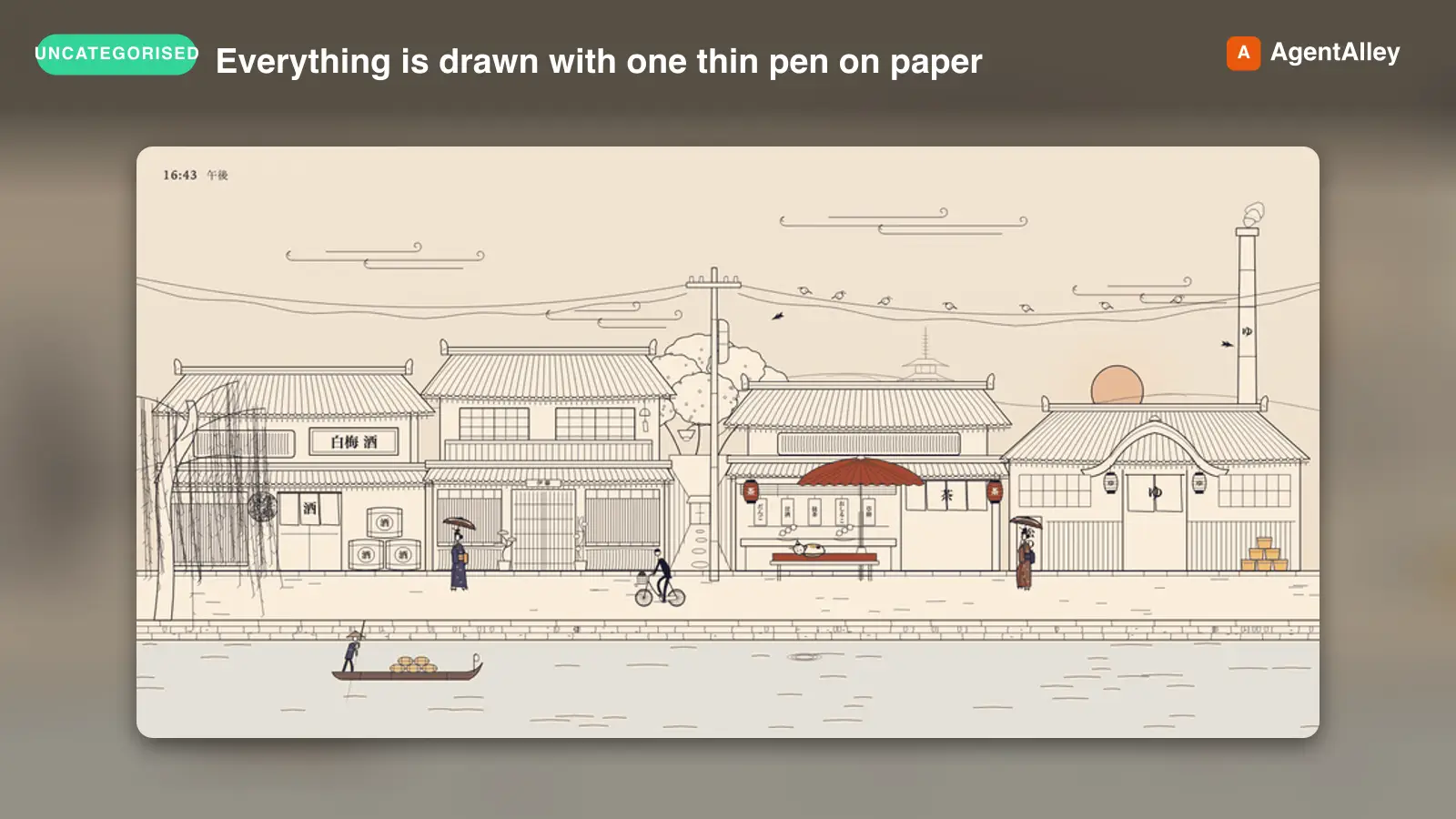
Build animated line-art components in SVG and TypeScript — thin ink lines on paper, people and animals that walk, run, cycle and react, scenes with wind, lit windows and a day/night cycle, exported to video if needed. Use this whenever…
---
name: line-art-animation
description: Build animated line-art components in SVG and TypeScript — thin ink lines on paper, people and animals that walk, run, cycle and react, scenes with wind, lit windows and a day/night cycle, exported to video if needed. Use this whenever someone asks for a line art (or ink, pen, doodle, hand-drawn) animation, an animated illustration or scene component, little characters doing everyday things, a living street/village/shop/park, a day-night cycle illustration, "make it like this clip" for a drawn animation, or a video of such a component — even if they never say "SVG" or "line art".
---

# Line-art animation

Animated illustration components: everything is drawn with one thin pen on paper,
built live in SVG from TypeScript, so it stays crisp at any size, responds to the
pointer, and can be stepped frame by frame for checking or video export.

This skill ships a small library (`lib/`), two examples (`examples/walker`, a single
figure in ~150 lines; `examples/village`, a full scene) and tools (`scripts/`).
Read the example that's closest to the request before writing anything.

## How people judge this work

They look at it like an animator would: frame by frame, at zoom, against life or
Overview
Animated illustration components: everything is drawn with one thin pen on paper, built live in SVG from TypeScript, so it stays crisp at any size, responds to the pointer, and can be stepped frame by frame for checking or video export.
Manual install (npx, ZIP)
npx skills add JDhruv14/line-art-animation -g -a claude-codeConnects with Agent Alley MCP · agentalley.io/mcp
Files included
SKILL.md6.4 KB
Read SKILL.md here
JDhruv14/
Show the full text98 lines
Line-art animation
Animated illustration components: everything is drawn with one thin pen on paper, built live in SVG from TypeScript, so it stays crisp at any size, responds to the pointer, and can be stepped frame by frame for checking or video export.
This skill ships a small library (lib/), two examples (examples/walker, a single
figure in ~150 lines; examples/village, a full scene) and tools (scripts/).
Read the example that's closest to the request before writing anything.
How people judge this work
They look at it like an animator would: frame by frame, at zoom, against life or against a reference. These were all rejected in practice, and each has a rule below:
- walks that bob on a sine wave, feet that slide, gaits sped up to fit a time-lapse
- limbs drawn as closed tubes; ruler-straight lines; rigid clothes that ignore the legs
- a whole set of components built in one go that all look alike ("AI slop")
- interactions that feel like UI instead of the world reacting
- a page whose background changes with the scene ("looks like a video, not a component")
- reusing characters from a reference clip when asked for something new
- leftover props nobody asked for (they asked to remove hanging laundry)
Workflow
- Pin the look before anything moves. Read
references/style.md. Decide the pen weight, paper colour, figure proportions and the one or two flat accent colours. - Set up the project. Copy
lib/into the project (it's four dependency-free.tsfiles) and use Vite + TypeScript (package.json,tsconfig.jsonandvite.config.tsin this repo show the setup). Components are plain DOM/SVG — no framework needed. - Build one figure or one corner first and show it (screenshot or a short clip, next to the reference if there is one). Get a yes before building the rest. A full set built at once comes back as generic; one good piece shows the bar.
- Make it move with
references/motion.md:gait()for walking and running,spring()/pendulum()for anything attached or hanging, keyed poses withcurve()orsequence()for gestures. Never animate a figure with free sines. - Compose the scene with
references/scenes.md: a self-contained card on a fixed page background, layers, a time-of-day palette fromlib/daynight.ts, lights, wind, people arriving on schedules, interactions that are reactions. - Verify with
references/verify.mdbefore showing anything: typecheck,?debugstepping, zoomed frame strips of every moving thing, interactions triggered and stepped through, 60 fps in a real tab. - If there's a reference clip to match, follow
references/matching.md— measure timing and poses from the clip instead of guessing, and check with an overlay. - If they want a video, follow
references/video.md(deterministic headless capture withscripts/capture.ts, then ffmpeg).
Rules that make it work
- Limbs are two open strokes.
limb()draws a paper-filled band between two pen lines that stop short of each other at the far end. This is the style's signature. - Lines curve. Joints are rounded, edges bow slightly, nothing is ruler-straight.
- Draw each figure in its own space — ~95 units tall, feet on y = 120, facing +x,
standing at x = 40 — and place it with
place(g, x, y, dir, scale). Proportions, pen weight and the gait presets all assume this space. - Clothes are drawn around the skeleton. Solve the legs (even if hidden), then draw the coat or kimono hem from the forward knee and the ankles so the cloth opens and closes with the stride. Sleeves, scarves and bags swing on springs.
- Feet are planted. Move a walker by exactly
gait.speed × scaleper second and the stance foot stays still on the ground. Don't speed a gait up to match a compressed clock; compress arrivals instead. - Ink is
currentColor, paper is.pp. Retint the whole drawing withapplyPalette()(day: dark ink on warm paper; night: pale ink on indigo, warm windows). Solid-colour limb fills must usesolid(), or the paper CSS wins. - The component is a card. The page around it never changes colour.
- Interactions are the world reacting: a person bows or tips a hat, a cat wakes and stretches, a lantern swings, birds scatter, a fish jumps. Pointer movement is wind. No buttons inside the scene; a single faint hint line is enough.
- New means new. If the brief is "like this but new", keep the medium, pen, proportions and timing feel; invent the characters, activities and props.
Library at a glance
| module | what it gives you |
|---|---|
lib/ink.ts |
pen shape blot paint limb solid joint hang curve shoe place toScene inkDefs run |
lib/gait.ts |
gait({ kind: 'walk' | 'shuffle' | 'run', …overrides }) → { speed, period, pose(phase, go) } |
lib/motion.ts |
spring pendulum pointerWind sequence seeded wobble ease minJerk … |
lib/daynight.ts |
palette(τ) → sky, paper, ink, lamp, night, sunset; applyPalette nightTint |
run(draw) drives everything with draw(t, dt). Two URL flags matter for checking:
?t=1.25 freezes time; ?debug disables rAF and exposes window.__step(seconds)
for exact stepping (background and headless tabs throttle rAF, so always verify in debug mode).
Scripts
scripts/capture.ts <url?debug> <outDir> <frames> <fps> [w] [h] [setupJs] [frameJs]— deterministic PNG frames from headless Chromescripts/clip.ts period|blobs …— loop length of a region; dark-blob tracking per framescripts/frames.sh <clip> x y w h outDir— grid-overlaid frames for reading poses off a clip
All run with Node ≥ 22.18 (TypeScript is stripped natively) plus ffmpeg; capture.ts
finds a local Chrome/Chromium or uses $CHROME.
| 1 | |
| 2 | name line-art-animation |
| 3 | description Build animated line-art components in SVG and TypeScript — thin ink lines on paper, people and animals that walk, run, cycle and react, scenes with wind, lit windows and a day/night cycle, exported to video if needed. Use this whenever someone asks for a line art (or ink, pen, doodle, hand-drawn) animation, an animated illustration or scene component, little characters doing everyday things, a living street/village/shop/park, a day-night cycle illustration, "make it like this clip" for a drawn animation, or a video of such a component — even if they never say "SVG" or "line art". |
| 4 | |
| 5 | |
| 6 | # Line-art animation |
| 7 | |
| 8 | Animated illustration components: everything is drawn with one thin pen on paper, |
| 9 | built live in SVG from TypeScript, so it stays crisp at any size, responds to the |
| 10 | pointer, and can be stepped frame by frame for checking or video export. |
| 11 | |
| 12 | This skill ships a small library (`lib/`), two examples (`examples/walker`, a single |
| 13 | figure in ~150 lines; `examples/village`, a full scene) and tools (`scripts/`). |
| 14 | Read the example that's closest to the request before writing anything. |
| 15 | |
| 16 | ## How people judge this work |
| 17 | |
| 18 | They look at it like an animator would: frame by frame, at zoom, against life or |
| 19 | against a reference. These were all rejected in practice, and each has a rule below: |
| 20 | |
| 21 | walks that bob on a sine wave, feet that slide, gaits sped up to fit a time-lapse |
| 22 | limbs drawn as closed tubes; ruler-straight lines; rigid clothes that ignore the legs |
| 23 | a whole set of components built in one go that all look alike ("AI slop") |
| 24 | interactions that feel like UI instead of the world reacting |
| 25 | a page whose background changes with the scene ("looks like a video, not a component") |
| 26 | reusing characters from a reference clip when asked for something new |
| 27 | leftover props nobody asked for (they asked to remove hanging laundry) |
| 28 | |
| 29 | ## Workflow |
| 30 | |
| 31 | **Pin the look** before anything moves. Read `references/style.md`. Decide the pen |
| 32 | weight, paper colour, figure proportions and the one or two flat accent colours. |
| 33 | **Set up the project.** Copy `lib/` into the project (it's four dependency-free |
| 34 | `.ts` files) and use Vite + TypeScript (`package.json`, `tsconfig.json` and |
| 35 | `vite.config.ts` in this repo show the setup). Components are plain DOM/SVG — no framework needed. |
| 36 | **Build one figure or one corner first** and show it (screenshot or a short clip, |
| 37 | next to the reference if there is one). Get a yes before building the rest. A |
| 38 | full set built at once comes back as generic; one good piece shows the bar. |
| 39 | **Make it move** with `references/motion.md`: `gait()` for walking and running, |
| 40 | `spring()` / `pendulum()` for anything attached or hanging, keyed poses with |
| 41 | `curve()` or `sequence()` for gestures. Never animate a figure with free sines. |
| 42 | **Compose the scene** with `references/scenes.md`: a self-contained card on a fixed |
| 43 | page background, layers, a time-of-day palette from `lib/daynight.ts`, lights, |
| 44 | wind, people arriving on schedules, interactions that are reactions. |
| 45 | **Verify** with `references/verify.md` before showing anything: typecheck, |
| 46 | `?debug` stepping, zoomed frame strips of every moving thing, interactions |
| 47 | triggered and stepped through, 60 fps in a real tab. |
| 48 | **If there's a reference clip to match**, follow `references/matching.md` — measure |
| 49 | timing and poses from the clip instead of guessing, and check with an overlay. |
| 50 | **If they want a video**, follow `references/video.md` (deterministic headless |
| 51 | capture with `scripts/capture.ts`, then ffmpeg). |
| 52 | |
| 53 | ## Rules that make it work |
| 54 | |
| 55 | **Limbs are two open strokes.** `limb()` draws a paper-filled band between two pen |
| 56 | lines that stop short of each other at the far end. This is the style's signature. |
| 57 | **Lines curve.** Joints are rounded, edges bow slightly, nothing is ruler-straight. |
| 58 | **Draw each figure in its own space** — ~95 units tall, feet on y = 120, facing +x, |
| 59 | standing at x = 40 — and place it with `place(g, x, y, dir, scale)`. Proportions, |
| 60 | pen weight and the gait presets all assume this space. |
| 61 | **Clothes are drawn around the skeleton.** Solve the legs (even if hidden), then |
| 62 | draw the coat or kimono hem from the forward knee and the ankles so the cloth opens |
| 63 | and closes with the stride. Sleeves, scarves and bags swing on springs. |
| 64 | **Feet are planted.** Move a walker by exactly `gait.speed × scale` per second and |
| 65 | the stance foot stays still on the ground. Don't speed a gait up to match a |
| 66 | compressed clock; compress arrivals instead. |
| 67 | **Ink is `currentColor`, paper is `.pp`.** Retint the whole drawing with |
| 68 | `applyPalette()` (day: dark ink on warm paper; night: pale ink on indigo, warm |
| 69 | windows). Solid-colour limb fills must use `solid()`, or the paper CSS wins. |
| 70 | **The component is a card.** The page around it never changes colour. |
| 71 | **Interactions are the world reacting**: a person bows or tips a hat, a cat wakes and |
| 72 | stretches, a lantern swings, birds scatter, a fish jumps. Pointer movement is wind. |
| 73 | No buttons inside the scene; a single faint hint line is enough. |
| 74 | **New means new.** If the brief is "like this but new", keep the medium, pen, |
| 75 | proportions and timing feel; invent the characters, activities and props. |
| 76 | |
| 77 | ## Library at a glance |
| 78 | |
| 79 | | module | what it gives you | |
| 80 | |---|---| |
| 81 | | `lib/ink.ts` | `pen` `shape` `blot` `paint` `limb` `solid` `joint` `hang` `curve` `shoe` `place` `toScene` `inkDefs` `run` | |
| 82 | | `lib/gait.ts` | `gait({ kind: 'walk' \| 'shuffle' \| 'run', …overrides })` → `{ speed, period, pose(phase, go) }` | |
| 83 | | `lib/motion.ts` | `spring` `pendulum` `pointerWind` `sequence` `seeded` `wobble` `ease` `minJerk` … | |
| 84 | | `lib/daynight.ts` | `palette(τ)` → sky, paper, ink, `lamp`, `night`, `sunset`; `applyPalette` `nightTint` | |
| 85 | |
| 86 | `run(draw)` drives everything with `draw(t, dt)`. Two URL flags matter for checking: |
| 87 | `?t=1.25` freezes time; `?debug` disables rAF and exposes `window.__step(seconds)` |
| 88 | for exact stepping (background and headless tabs throttle rAF, so always verify in debug mode). |
| 89 | |
| 90 | ## Scripts |
| 91 | |
| 92 | `scripts/capture.ts <url?debug> <outDir> <frames> <fps> [w] [h] [setupJs] [frameJs]` — deterministic PNG frames from headless Chrome |
| 93 | `scripts/clip.ts period|blobs …` — loop length of a region; dark-blob tracking per frame |
| 94 | `scripts/frames.sh <clip> x y w h outDir` — grid-overlaid frames for reading poses off a clip |
| 95 | |
| 96 | All run with Node ≥ 22.18 (TypeScript is stripped natively) plus ffmpeg; `capture.ts` |
| 97 | finds a local Chrome/Chromium or uses `$CHROME`. |
| 98 |
Details
- License
- MIT
- Stars on the repo
- ★ 1,174
- Checked
- Source
- JDhruv14/line-art-animation ↗
- Creator
- JDhruv14 · 1 listing
Similar skills
See all → Cel-Shaded Video Creator
 edenfunf/reelmimic · by edenfunfMake Japanese TV-anime style videos (MP4) with code — cel-shaded characters with tapered line art, big detailed eyes, hair clumps with a specular band, comedic anime reactions (sweat drop, anger vein, sparkle eyes, ≥< eyes, dot eyes, tears), painted skies with cumulus clouds, school/street/classroom/rooftop sets with time-of-day palettes, speed/focus lines, impact frames, dramatic zooms, smears, sakura petals and anime subtitles (CJK). Canvas 2D rendered frame by frame in headless Chrome, encoded with ffmpeg. Use when a reference video or brief calls for anime / 動畫 / 日系動畫 / アニメ / cel-shaded / slice-of-life / school romance / shōnen-style reactions, or when the video-clone router picks the anime-cel style. 2D only; characters are original (Hina, Ren) or new ones built on the same rig.★ 3.6k GitHub stars
 Opuscar Film Director
 lemomo-ai/lemo-opuscar · by lemomo-aiDirect and produce a short film made entirely in code, in one of the styles of the Lemo-Opuscar library (e.g. Impasto Oil Painting 油画厚涂, Watercolor Brush 水彩笔刷, Ukiyo-e 浮世绘, Satellite Briefing 卫星简报, Exploded Teardown 产品拆解, Microscope Story 显微叙事). Use when the user asks for a video, film, short, promo, explainer or animation (视频、短片、动画、宣传片) in a named style, including data, science and product explainers built from real material such as satellite imagery, laser scans, CAD files or archive scans (数据解说、科普、产品拆解); when they want a film made about their own topic and haven't chosen a style (help them choose); or when they ask which film styles there are. Not for editing or converting existing video files.★ 3k GitHub stars
 Xiaohei Illustration Generator
 dzhng/skills · by dzhngGenerate Ian-style Xiaohei illustrations for articles, posts, blogs, Notion documents, workflows, methods, processes, structures, states, metaphors, and opinions. Use when the user asks for weird, hand-drawn, Xiaohei, article, editorial, body illustrations, illustration ideas, shot lists, title removal, image edits, or image regeneration. By default, all image text and annotations are English, even when the source article is Chinese; only use another language when the user explicitly asks.★ 1.3k GitHub stars
 Game Asset Generator
 scenario-labs/skills · by scenario-labsUse when creating game art through Scenario MCP: sprites, sprite sheets, icons, props, loot, tilesets and autotile terrain transitions, seamless tiles, isometric buildings, top-down maps, pixel art, UI buttons and panels, parallax background layers or depth planes for side-scrollers, and character or concept art; or when assets need transparent backgrounds, background removal, style-consistent variation batches, upscaling, pixel-grid cleanup, or PNG export for Unity, Godot, or Unreal.★ 854 GitHub stars
 AI-Toolkit LoRA Trainer
 artokun/comfyui-mcp · by artokunTrain custom LoRAs with ostris AI-Toolkit. Covers WAN 2.2/2.1 (people, styles, video motion) and Z-Image (Turbo & Base, low-VRAM image LoRAs). Use when the user wants to train a WAN or Z-Image LoRA; covers local + RunPod setup, dataset prep, key params, and using the result in a ComfyUI workflow.★ 759 GitHub stars
 ANIMA 1.0 Anime Generatorartokun/comfyui-mcp · by artokunAnime/illustration text-to-image (ANIMA 1.0, ~2B Cosmos DiT). Use for anime, manga, illustrated characters; accepts Danbooru tags + natural language; runs/trains on <6GB VRAM; includes anime inpainting via Anima-LLLite ControlNet★ 759 GitHub stars