Anime cel skill

Illustration · not a resultFrom the edenfunf/reelmimic README — shows the whole collection, not only this skill.source ↗
Make Japanese TV-anime style videos (MP4) with code — cel-shaded characters with tapered line art, big detailed eyes, hair clumps with a specular band, comedic anime reactions (sweat drop, anger vein, sparkle eyes, ≥< eyes, dot eyes, tears), painted skies with cumulus clouds, school/street/classroom/rooftop sets with time-of-day palettes, speed/focus lines, impact frames, dramatic zooms, smears, sakura petals and anime subtitles (CJK).
by edenfunf·MIT license·★ 3,630 Stars on the repo·GitHub ↗
npx degit edenfunf/reelmimic/.claude/skills/anime-cel#main ~/.claude/skills/anime-celChecked ·commit main

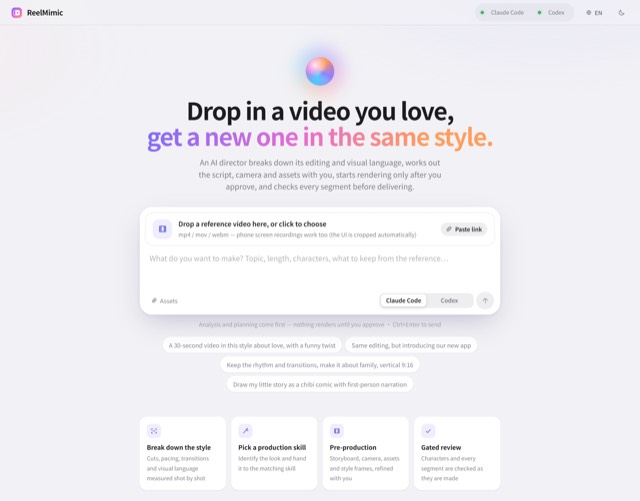
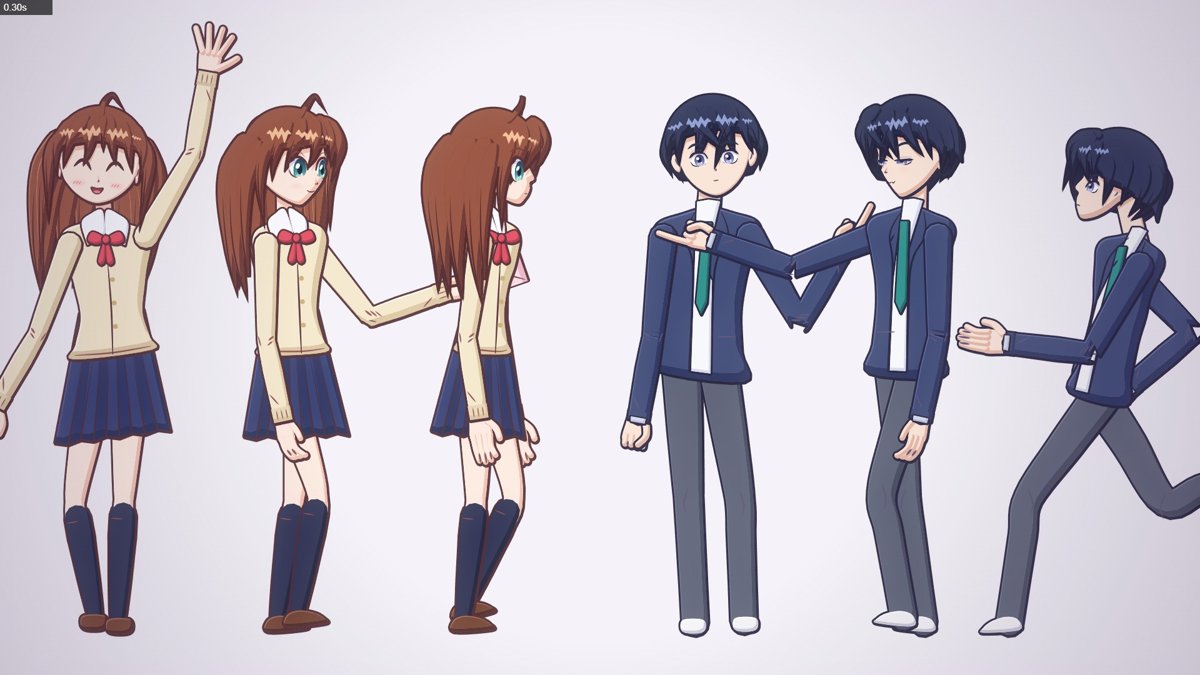
Illustration · not a resultImages 1–4: From the edenfunf/reelmimic README — shows the whole collection, not only this skill.view on GitHub
Illustration · not a resultImage 5: From the edenfunf/reelmimic README — shows the whole collection, not only this skill.view on GitHub
Files of Anime cel
Show the full text77 lines
anime-cel
Modern TV-anime look drawn entirely by code: characters with confident tapered line art (heavier on the shadow side),
flat cel colour + one hard-edged shadow tone + a rim highlight, large layered eyes, hair built from pointed locks with
an "angel ring" highlight; line-free painted backgrounds; anime staging effects. Every frame is a pure function of t.
Read GUIDE.md in full before building anything. Model sheets in docs/: faces-hina.jpg,
faces-ren.jpg (19 expressions each), turns.jpg (front → 3/4 → profile), bodies.jpg, motion.jpg (stances, walk, run), hands.jpg, sets.jpg,
fx.jpg, and demo-sheet.jpg (the demo film).
Workflow
- Scaffold
bash .claude/skills/anime-cel/scripts/new_project.sh <project-dir>(--keep-demokeeps the example). It copiestemplate/, unhooks the demo, runsnpm install, checks node/ffmpeg/Chrome. - Storyboard each shot with its reads (what the viewer must understand, in order, with times) and the anime
staging you will use (establishing pan, cut on action, focus-line BG for the emotional beat, impact frame, reaction
close-up…). Set
durationinsrc/config.js. - Build one file per shot in
src/scenes/(IIFE ending inshots([[t0, fn]]), add its<script>tostudio.html). A shot paints the whole frame:setTOD()→SET.<set>(cam, t)(opens the camera) → characters →camEnd()→ screen effects → transition. Captions go inwindow.overlayHookwithsubtitle(). - Look at it (from the project dir), open every image with Read:
node render.mjs --sheet=0.5,1.5,2.5,3.5 --cols=4 --w=480 --out=out/check/a.jpg # key frames node render.mjs --strip=3.8:4.5 --cols=6 --w=320 --out=out/check/s.jpg # every frame of an action node render.mjs --stills=4.4 --out=out/check/st # full-res PNG to judge faces node render.mjs --loop=faces_hina --sheet=0 --cols=1 --w=1920 --out=out/check/f.jpg # model sheets (faces_ren, turns, bodies, motion, hands, sets, fx, close_hina, close_ren) - Render
node render.mjs --frames --workers=4 && node render.mjs --encode --out=out/video.mp4 [--audio=...].
API summary
hina(x, y, u, o) / ren(x, y, u, o) → { head, handL, handR, footL, footR, top, u }   // (x, y) ground point, u = head height px
bust(DESIGNS.ren, x, y, u, o)                       // close-up: (x, y) = head centre
o = { t, turn (-1..1: 0 front, ±.5 3/4, ±1 profile), headTurn, bodyTurn, face ('happy' …), look [x,y], blink, mouth, talk,
      armL/armR [shoulder°, elbow°, hand, wrist°, foreshorten], legL/legR [hip°, knee°], walk: phase, run: phase,
      lean°, bend°, tilt°, sq, dy, flip, sway [x,y], fx ['sweat','vein','steam','gloom','sparkles'], blush,
      prop { hand:'L'|'R', draw: PROPS.envelope, rot°, s, at }, armsOver, ground:false,
      stance:'contra'|'straight', weight:'L'|'R', contra }   // hands: open relax fist point peace spread hold grip pocket
faceAt(t, [[0,'neutral'],[1.2,'surprised']]) · autoBlink(t, seed) · talk(t) · follow(t, f) · walkPose/runPose · stroll
setTOD('day'|'morning'|'evening'|'night') · setLight(x, y) · SET.street / SET.classroom / SET.rooftop (cam, t, o)
focusLines · speedLines · impactFrame · flash · dramaticZoom · smear · smearLines · blurBand · sparkle(s) · petals
slashWipe · irisWipe · subtitle(c, txt, o) · onTwos(t) · kit: kf, seg, ease*, spring, jump, take, camBegin/camEnd
drawing primitives: ink (tapered line), tubePts, ribbonPts, crPts, cel, drawGroup, layer (cache), paintPoly
Rules that matter most
- Pure function of t — no
Math.random(), no state between frames (rnd(key)/hash();follow()for springs). - Scenes never draw body parts. Characters are one call. New characters = a new entry in
DESIGNS+HAIR(+ clothes branch) incast.js, never ad-hoc drawing in a scene. - Animate characters on twos (
const ta = onTwos(lt)for poses/faces), keep camera moves smooth (lt). - Anime timing: quick actions with a held pose after; anticipation → snap → overshoot (
spring,take); faces change on a drawing viafaceAt(it adds the blink + pop), never by crossfading. - Staging: establish → react. Emotional peaks cut the BG to a flat gradient +
focusLines; hits get animpactFrame(2–3 frames) +dramaticZoom; fast moves getsmearLines. - Sizes: full body u≈110–150, knees-up 180–260, bust 380–560. Keep faces ≥ u 150 when they carry a read.
- Transitions at every seam (
slashWipe,irisWipestar,flash, impact cut, cut on action). - Captions: only via
overlayHook+subtitle()(white, dark outline, CJK font). Push new caption text intowindow.EXTRA_FONTSso the glyphs load before rendering.
Engine gotchas
SET.*leaves the camera open; draw characters in the same world coords and callcamEnd()before screen effects. Screen-space effects (blurBand,impactFrame,slashWipe) usesetTransformand ignore the camera.- Characters face screen-right with positive
turn. With|turn| > .3limb angles are "forward/back" in the facing direction; in front view they are "outward/inward". The near arm when facing right isarmL. - Props in hands: use hand
'hold'(pinch, prop extends past the fingertips) or'grip'(handle in the fist).rotrotates the prop about the grip point. layer(key, …)caches static paintings per page; include the time-of-day name in the key if colours depend on it.- Speed: ~5–25 ms to draw a frame, ~100 ms/frame effective incl. JPEG with 4 workers (first frame ~0.6 s builds caches).
| 1 | |
| 2 | name anime-cel |
| 3 | description Make Japanese TV-anime style videos (MP4) with code — cel-shaded characters with tapered line art, big detailed eyes, hair clumps with a specular band, comedic anime reactions (sweat drop, anger vein, sparkle eyes, ≥< eyes, dot eyes, tears), painted skies with cumulus clouds, school/street/classroom/rooftop sets with time-of-day palettes, speed/focus lines, impact frames, dramatic zooms, smears, sakura petals and anime subtitles (CJK). Canvas 2D rendered frame by frame in headless Chrome, encoded with ffmpeg. Use when a reference video or brief calls for anime / 動畫 / 日系動畫 / アニメ / cel-shaded / slice-of-life / school romance / shōnen-style reactions, or when the video-clone router picks the anime-cel style. 2D only; characters are original (Hina, Ren) or new ones built on the same rig. |
| 4 | |
| 5 | |
| 6 | # anime-cel |
| 7 | |
| 8 | Modern TV-anime look drawn entirely by code: characters with confident tapered line art (heavier on the shadow side), |
| 9 | flat cel colour + one hard-edged shadow tone + a rim highlight, large layered eyes, hair built from pointed locks with |
| 10 | an "angel ring" highlight; line-free painted backgrounds; anime staging effects. Every frame is a pure function of `t`. |
| 11 | |
| 12 | Read **[GUIDE.md]** in full before building anything. Model sheets in `docs/`: `faces-hina.jpg`, |
| 13 | `faces-ren.jpg` (19 expressions each), `turns.jpg` (front → 3/4 → profile), `bodies.jpg`, `motion.jpg` (stances, walk, run), `hands.jpg`, `sets.jpg`, |
| 14 | `fx.jpg`, and `demo-sheet.jpg` (the demo film). |
| 15 | |
| 16 | ## Workflow |
| 17 | |
| 18 | **Scaffold** `bash .claude/skills/anime-cel/scripts/new_project.sh <project-dir>` (`--keep-demo` keeps the example). |
| 19 | It copies `template/`, unhooks the demo, runs `npm install`, checks node/ffmpeg/Chrome. |
| 20 | **Storyboard** each shot with its reads (what the viewer must understand, in order, with times) and the anime |
| 21 | staging you will use (establishing pan, cut on action, focus-line BG for the emotional beat, impact frame, reaction |
| 22 | close-up…). Set `duration` in `src/config.js`. |
| 23 | **Build one file per shot** in `src/scenes/` (IIFE ending in `shots([[t0, fn]])`, add its `<script>` to |
| 24 | `studio.html`). A shot paints the whole frame: `setTOD()` → `SET.<set>(cam, t)` (opens the camera) → characters → |
| 25 | `camEnd()` → screen effects → transition. Captions go in `window.overlayHook` with `subtitle()`. |
| 26 | **Look at it** (from the project dir), open every image with Read: |
| 27 | |
| 28 | node render.mjs --sheet=0.5,1.5,2.5,3.5 --cols=4 --w=480 --out=out/check/a.jpg # key frames |
| 29 | node render.mjs --strip=3.8:4.5 --cols=6 --w=320 --out=out/check/s.jpg # every frame of an action |
| 30 | node render.mjs --stills=4.4 --out=out/check/st # full-res PNG to judge faces |
| 31 | node render.mjs --loop=faces_hina --sheet=0 --cols=1 --w=1920 --out=out/check/f.jpg # model sheets (faces_ren, turns, bodies, motion, hands, sets, fx, close_hina, close_ren) |
| 32 | |
| 33 | **Render** `node render.mjs --frames --workers=4 && node render.mjs --encode --out=out/video.mp4 [--audio=...]`. |
| 34 | |
| 35 | ## API summary |
| 36 | |
| 37 | |
| 38 | hina(x, y, u, o) / ren(x, y, u, o) → { head, handL, handR, footL, footR, top, u } // (x, y) ground point, u = head height px |
| 39 | bust(DESIGNS.ren, x, y, u, o) // close-up: (x, y) = head centre |
| 40 | o = { t, turn (-1..1: 0 front, ±.5 3/4, ±1 profile), headTurn, bodyTurn, face ('happy' …), look [x,y], blink, mouth, talk, |
| 41 | armL/armR [shoulder°, elbow°, hand, wrist°, foreshorten], legL/legR [hip°, knee°], walk: phase, run: phase, |
| 42 | lean°, bend°, tilt°, sq, dy, flip, sway [x,y], fx ['sweat','vein','steam','gloom','sparkles'], blush, |
| 43 | prop { hand:'L'|'R', draw: PROPS.envelope, rot°, s, at }, armsOver, ground:false, |
| 44 | stance:'contra'|'straight', weight:'L'|'R', contra } // hands: open relax fist point peace spread hold grip pocket |
| 45 | faceAt(t, [[0,'neutral'],[1.2,'surprised']]) · autoBlink(t, seed) · talk(t) · follow(t, f) · walkPose/runPose · stroll |
| 46 | setTOD('day'|'morning'|'evening'|'night') · setLight(x, y) · SET.street / SET.classroom / SET.rooftop (cam, t, o) |
| 47 | focusLines · speedLines · impactFrame · flash · dramaticZoom · smear · smearLines · blurBand · sparkle(s) · petals |
| 48 | slashWipe · irisWipe · subtitle(c, txt, o) · onTwos(t) · kit: kf, seg, ease*, spring, jump, take, camBegin/camEnd |
| 49 | drawing primitives: ink (tapered line), tubePts, ribbonPts, crPts, cel, drawGroup, layer (cache), paintPoly |
| 50 | |
| 51 | |
| 52 | ## Rules that matter most |
| 53 | |
| 54 | **Pure function of t** — no `Math.random()`, no state between frames (`rnd(key)`/`hash()`; `follow()` for springs). |
| 55 | **Scenes never draw body parts.** Characters are one call. New characters = a new entry in `DESIGNS` + `HAIR` |
| 56 | (+ clothes branch) in `cast.js`, never ad-hoc drawing in a scene. |
| 57 | **Animate characters on twos** (`const ta = onTwos(lt)` for poses/faces), keep camera moves smooth (`lt`). |
| 58 | **Anime timing**: quick actions with a held pose after; anticipation → snap → overshoot (`spring`, `take`); faces |
| 59 | change on a drawing via `faceAt` (it adds the blink + pop), never by crossfading. |
| 60 | **Staging**: establish → react. Emotional peaks cut the BG to a flat gradient + `focusLines`; hits get an |
| 61 | `impactFrame` (2–3 frames) + `dramaticZoom`; fast moves get `smearLines`. |
| 62 | **Sizes**: full body u≈110–150, knees-up 180–260, bust 380–560. Keep faces ≥ u 150 when they carry a read. |
| 63 | **Transitions at every seam** (`slashWipe`, `irisWipe` star, `flash`, impact cut, cut on action). |
| 64 | **Captions**: only via `overlayHook` + `subtitle()` (white, dark outline, CJK font). Push new caption text into |
| 65 | `window.EXTRA_FONTS` so the glyphs load before rendering. |
| 66 | |
| 67 | ## Engine gotchas |
| 68 | |
| 69 | `SET.*` leaves the camera **open**; draw characters in the same world coords and call `camEnd()` before screen |
| 70 | effects. Screen-space effects (`blurBand`, `impactFrame`, `slashWipe`) use `setTransform` and ignore the camera. |
| 71 | Characters face screen-right with positive `turn`. With `|turn| > .3` limb angles are "forward/back" in the facing |
| 72 | direction; in front view they are "outward/inward". The near arm when facing right is `armL`. |
| 73 | Props in hands: use hand `'hold'` (pinch, prop extends past the fingertips) or `'grip'` (handle in the fist). |
| 74 | `rot` rotates the prop about the grip point. |
| 75 | `layer(key, …)` caches static paintings per page; include the time-of-day name in the key if colours depend on it. |
| 76 | Speed: ~5–25 ms to draw a frame, ~100 ms/frame effective incl. JPEG with 4 workers (first frame ~0.6 s builds caches). |
| 77 |
Discussion
Alternatives
 Scenario game assetsUse when creating game art through Scenario MCP: sprites, sprite sheets, icons, props, loot, tilesets and autotile terrain transitions, seamless tiles, isometric buildings, top-down maps, pixel art, UI buttons and panels, parallax background layers or depth planes for side-scrollers, and character or concept art; or when assets need transparent backgrounds, background removal, style-consistent variation batches, upscaling, pixel-grid cleanup, or PNG export for Unity, Godot, or Unreal.AI-Toolkit LoRA Trainer (WAN 2.2 & Z-Image)Train custom LoRAs with ostris AI-Toolkit. Covers WAN 2.2/2.1 (people, styles, video motion) and Z-Image (Turbo & Base, low-VRAM image LoRAs). Use when the user wants to train a WAN or Z-Image LoRA; covers local + RunPod setup, dataset prep, key params, and using the result in a ComfyUI workflow.
Browse more free Claude skills or everything in Content creator.