Lemo opuscar skill
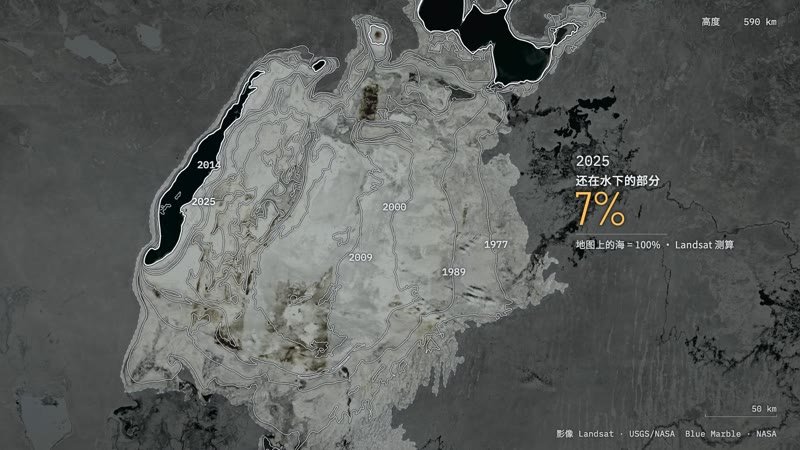
Illustration · not a resultFrom the lemomo-ai/lemo-opuscar README — shows the whole collection, not only this skill.source ↗
Direct and produce a short film made entirely in code, in one of the styles of the Lemo-Opuscar library (e.g.
by lemomo-ai·MIT license·★ 2,965 Stars on the repo·GitHub ↗
Use now
npx degit lemomo-ai/lemo-opuscar/plugin/skills/lemo-opuscar#main ~/.claude/skills/lemo-opuscarChecked ·commit main
Files of Lemo opuscar
SKILL.md
Show the full text25 lines
Lemo-Opuscar
The styles, guides and tools live in the Lemo-Opuscar library (github.com/lemomo-ai/lemo-opuscar). This skill fetches it and hands you over to it.
- Get the library. Run
sh "<skill base directory>/scripts/setup.sh". It clones or updates the library (default~/lemo-opuscar; a clone the user is standing in is used as it is) and printsLIB=<path>on its last line. - Install the core tools early. Start
sh "<skill base directory>/scripts/setup.sh" depsright away, in the background if you can: it takes a few minutes the first time. Adddeps voiceordeps musiclater, only if the film needs them ($LIB/TECHNIQUE.md§1). Report missing system tools (Node, ffmpeg, Python) in your one round of questions; don't install system software yourself. Packages a style needs (itsSTYLE.mdlists them) you install yourself, into the project folder. - Follow the library. Read
$LIB/AGENTS.mdand do what it says: finding the style, the one round of questions, the treatment, production and delivery.
What changes in skill mode:
| Project folder | <name>/ in the folder the user started from (lowercase letters, digits, hyphens; avoid # and ? in the path). Wherever the guides say films/<name>/, read this folder |
| Running tools | from $LIB, with the project's absolute path: cd "$LIB" && node core/render/still.mjs "<project>" 1.5 3 |
| Library files in pages | absolute URLs: /core/lib.js, /node_modules/three/… (the project is served at /@film/) |
Library files in scripts and build.sh |
$LIB/…, with LIB=<path> at the top of build.sh; never ../.. |
| Demo source | not downloaded. sh "<skill base directory>/scripts/setup.sh" demo <slug>, only after your TREATMENT.md is written, to read its techniques; it is not meant to be rendered |
Deliver what $LIB/DIRECTOR.md §11 lists, in the project folder, and tell the user where it is.
| 1 | |
| 2 | name lemo-opuscar |
| 3 | description Direct and produce a short film made entirely in code, in one of the styles of the Lemo-Opuscar library (e.g. Impasto Oil Painting 油画厚涂, Watercolor Brush 水彩笔刷, Ukiyo-e 浮世绘, Satellite Briefing 卫星简报, Exploded Teardown 产品拆解, Microscope Story 显微叙事). Use when the user asks for a video, film, short, promo, explainer or animation (视频、短片、动画、宣传片) in a named style, including data, science and product explainers built from real material such as satellite imagery, laser scans, CAD files or archive scans (数据解说、科普、产品拆解); when they want a film made about their own topic and haven't chosen a style (help them choose); or when they ask which film styles there are. Not for editing or converting existing video files. |
| 4 | |
| 5 | |
| 6 | # Lemo-Opuscar |
| 7 | |
| 8 | The styles, guides and tools live in the Lemo-Opuscar library (github.com/lemomo-ai/lemo-opuscar). This skill fetches it and hands you over to it. |
| 9 | |
| 10 | **Get the library.** Run `sh "<skill base directory>/scripts/setup.sh"`. It clones or updates the library (default `~/lemo-opuscar`; a clone the user is standing in is used as it is) and prints `LIB=<path>` on its last line. |
| 11 | **Install the core tools early.** Start `sh "<skill base directory>/scripts/setup.sh" deps` right away, in the background if you can: it takes a few minutes the first time. Add `deps voice` or `deps music` later, only if the film needs them (`$LIB/TECHNIQUE.md` §1). Report missing system tools (Node, ffmpeg, Python) in your one round of questions; don't install system software yourself. Packages a style needs (its `STYLE.md` lists them) you install yourself, into the project folder. |
| 12 | **Follow the library.** Read `$LIB/AGENTS.md` and do what it says: finding the style, the one round of questions, the treatment, production and delivery. |
| 13 | |
| 14 | What changes in skill mode: |
| 15 | |
| 16 | | | | |
| 17 | |---|---| |
| 18 | | Project folder | `<name>/` in the folder the user started from (lowercase letters, digits, hyphens; avoid `#` and `?` in the path). Wherever the guides say `films/<name>/`, read this folder | |
| 19 | | Running tools | from `$LIB`, with the project's absolute path: `cd "$LIB" && node core/render/still.mjs "<project>" 1.5 3` | |
| 20 | | Library files in pages | absolute URLs: `/core/lib.js`, `/node_modules/three/…` (the project is served at `/@film/`) | |
| 21 | | Library files in scripts and `build.sh` | `$LIB/…`, with `LIB=<path>` at the top of `build.sh`; never `../..` | |
| 22 | | Demo source | not downloaded. `sh "<skill base directory>/scripts/setup.sh" demo <slug>`, only after your `TREATMENT.md` is written, to read its techniques; it is not meant to be rendered | |
| 23 | |
| 24 | Deliver what `$LIB/DIRECTOR.md` §11 lists, in the project folder, and tell the user where it is. |
| 25 |
Discussion
Alternatives
Anime celMake Japanese TV-anime style videos (MP4) with code — cel-shaded characters with tapered line art, big detailed eyes, hair clumps with a specular band, comedic anime reactions (sweat drop, anger vein, sparkle eyes, ≥< eyes, dot eyes, tears), painted skies with cumulus clouds, school/street/classroom/rooftop sets with time-of-day palettes, speed/focus lines, impact frames, dramatic zooms, smears, sakura petals and anime subtitles (CJK). Canvas 2D rendered frame by frame in headless Chrome, encoded with ffmpeg. Use when a reference video or brief calls for anime / 動畫 / 日系動畫 / アニメ / cel-shaded / slice-of-life / school romance / shōnen-style reactions, or when the video-clone router picks the anime-cel style. 2D only; characters are original (Hina, Ren) or new ones built on the same rig.Xiaohei illustrationsGenerate Ian-style Xiaohei illustrations for articles, posts, blogs, Notion documents, workflows, methods, processes, structures, states, metaphors, and opinions. Use when the user asks for weird, hand-drawn, Xiaohei, article, editorial, body illustrations, illustration ideas, shot lists, title removal, image edits, or image regeneration. By default, all image text and annotations are English, even when the source article is Chinese; only use another language when the user explicitly asks. Scenario game assetsUse when creating game art through Scenario MCP: sprites, sprite sheets, icons, props, loot, tilesets and autotile terrain transitions, seamless tiles, isometric buildings, top-down maps, pixel art, UI buttons and panels, parallax background layers or depth planes for side-scrollers, and character or concept art; or when assets need transparent backgrounds, background removal, style-consistent variation batches, upscaling, pixel-grid cleanup, or PNG export for Unity, Godot, or Unreal.AI-Toolkit LoRA Trainer (WAN 2.2 & Z-Image)Train custom LoRAs with ostris AI-Toolkit. Covers WAN 2.2/2.1 (people, styles, video motion) and Z-Image (Turbo & Base, low-VRAM image LoRAs). Use when the user wants to train a WAN or Z-Image LoRA; covers local + RunPod setup, dataset prep, key params, and using the result in a ComfyUI workflow.
Scenario game assetsUse when creating game art through Scenario MCP: sprites, sprite sheets, icons, props, loot, tilesets and autotile terrain transitions, seamless tiles, isometric buildings, top-down maps, pixel art, UI buttons and panels, parallax background layers or depth planes for side-scrollers, and character or concept art; or when assets need transparent backgrounds, background removal, style-consistent variation batches, upscaling, pixel-grid cleanup, or PNG export for Unity, Godot, or Unreal.AI-Toolkit LoRA Trainer (WAN 2.2 & Z-Image)Train custom LoRAs with ostris AI-Toolkit. Covers WAN 2.2/2.1 (people, styles, video motion) and Z-Image (Turbo & Base, low-VRAM image LoRAs). Use when the user wants to train a WAN or Z-Image LoRA; covers local + RunPod setup, dataset prep, key params, and using the result in a ComfyUI workflow.Browse more free Claude skills or everything in Content creator.