Legible explainer skill
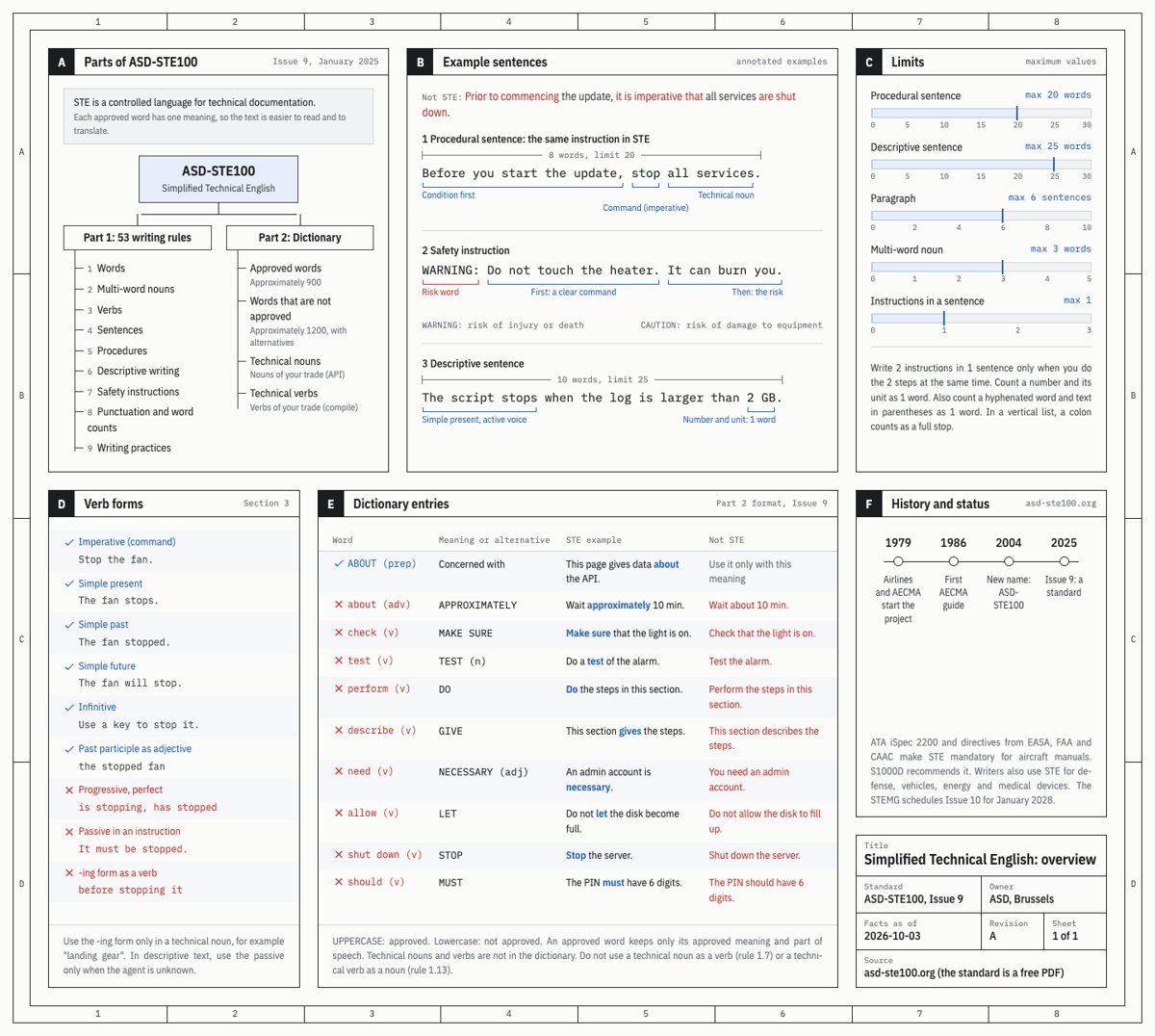
Illustration · not a resultFrom the FutureAtoms/karpathy-ladder README — shows the whole collection, not only this skill.source ↗
Explain a subject in the format that is easiest to understand, following Karpathy's output-format ladder: ASD-STE100 Simplified Technical English prose, then a diagram, then a self-contained HTML spec sheet drawn like an engineering drawing, then a narrated explainer video.
by FutureAtoms·MIT license·★ 9 Stars on the repo·GitHub ↗
npx degit FutureAtoms/karpathy-ladder/skills/legible-explainer#main ~/.claude/skills/legible-explainerChecked ·commit main
Files of Legible explainer
Show the full text160 lines
Legible explainer
As agents do more of the work, the human job moves toward oversight and understanding. The format of an explanation decides how fast a reader understands it. Karpathy's ladder, from cheapest to richest:
- STE prose: ASD-STE100 rules (short sentences, one meaning for each word, active voice, approved verb forms) make text much easier to read. Default to about 80% of the way to strict STE, because full STE is stiff.
- Diagram: structure, sequence and state are faster to see than to read.
- HTML page: a dense, self-contained page with several views of the same subject. Here it is a "spec sheet" in the visual language of an engineering drawing: zone frame, lettered panels, title block.
- Explainer video: narration plus motion, for subjects that unfold in time.
Each tier reuses the one below it. Sheet text is STE. Video scenes come from sheet panels. A good result at a lower tier is a better answer than a weak result at a higher tier.
Pick the tier
An explicit request for a format always wins ("in HTML", "draw", "video", "in STE"). Otherwise choose the lowest tier that fully serves the reader:
| Signal in the request | Tier | Output |
|---|---|---|
| A direct question, a procedure, a short concept, or "explain in STE" | 1 STE prose | The answer in chat, sized to the question |
| The subject is a sequence, flow, hierarchy, state machine or architecture; "draw", "diagram", "something to keep open" | 2 Diagram | One .html page with an inline SVG diagram |
| Several facets (parts, rules, numbers, history, risks); "overview", "one-pager", "explainer page", an explanation "in HTML"; or "help me understand this long output / plan / diff / spec" | 3 Spec sheet | One self-contained .html sheet, sized to the subject |
| "Video", "3b1b style", "narrated", "animated explainer" | 4 Video | An .mp4 with narration: Manim for a 3Blue1Brown look, otherwise the hyperframes skill |
Neighbouring skills, when they are installed: a production page, app UI or dashboard belongs to
frontend-design; a diagram the user will keep editing belongs to
excalidraw-diagrams; a promo or product video belongs to hyperframes on
its own. Use this skill when the reader's understanding of a subject is the
product.
Offer the next tier in one line only when the subject shows that tier's signal and the user named no format (a request for STE is a writing style, not a format): a diagram when the answer has a sequence, flow or state; a sheet when it has several facets; a video only when the subject unfolds in time. Do not offer after a short tier 1 answer, after a video, or a video for a document review.
Answer first (every tier)
The reader asked a question. Whatever the tier, the first thing they read is the answer: the difference, the verdict, the cause, in one or two sentences. Then the support. Answer the topics the user named, at the depth they asked for; give a side topic one line, or leave it out. A longer answer is not a better answer.
Write in STE (every tier)
Read references/ste-writing.md before you write the first sentence. The core:
- At most 20 words in an instruction, 25 in a descriptive sentence, 6 sentences in a paragraph, one topic in a paragraph. A number and its unit count as one word.
- One instruction in each sentence. Put a condition first. Start a WARNING or CAUTION with the command, then give the risk.
- Verb forms: imperative, simple present, simple past, simple future, infinitive, and the past participle as an adjective. No -ing verb forms (progressive, gerund, participle) except inside a technical noun. No perfect tenses. No phrasal verbs ("set up", "carry out").
- Active voice. No passive in instructions. In descriptions, the passive only when the agent is not known.
- One word for one meaning, the same word for the same thing every time. Technical nouns and technical verbs of the subject are allowed, each only in its own part of speech. Multi-word nouns of 3 words at most. No semicolons. American spelling.
The dial. "80%" (default) keeps all the grammar above and relaxes the word list: keep a non-STE word when the STE word is clumsy or changes the meaning. "Strict" (when the user asks for it) also replaces every unapproved word you know of; when a sentence cannot be both strict and clear, rewrite it, and if that fails, tell the user which sentence breaks which rule.
Keep the meaning. When you simplify a source, keep its certainty ("should" stays an expectation), conditions, negations, attributions, numbers and units. A simpler sentence that says more or less than the source is wrong.
House style (opinionated defaults on top of STE; edit them to taste): no em dashes; never the word "caveat"; never open with a headcount ("three things to check"), introduce a list by its subject ("What to check:"); no "X, not Y" framing, state what is true as its own sentence; no emoji; add an as-of date to a number that can change.
Lint what you write, with the mode you are writing in:
python3 <skill-dir>/scripts/ste_lint.py <file> --mode 80          # or --mode strict
printf '%s' "$DRAFT" | python3 <skill-dir>/scripts/ste_lint.py - --mode 80   # a chat answer (stdin is read as Markdown)
The linter fails on grammar errors (length, verb forms, voice, semicolons,
dashes, house style) and warns on word-level findings. It knows a short list
of common unapproved words; the STE dictionary is the authority. PASS means
the floor is met: fix every finding that is not a false alarm, and keep an
unapproved word only on purpose. Quote non-STE text on purpose (an "original
text" in a before-and-after, a line from a source document) inside
data-ste="ignore" in HTML, or between <!-- ste-ignore-start --> and
<!-- ste-ignore-end --> in Markdown. Pass technical nouns of the subject with
--allow word1,word2.
Be right before you are clear
A clear explanation of a wrong fact is worse than no explanation.
- Verify facts that can drift (versions, dates, limits, prices) before you write them, and add an as-of date.
- Do not copy a fact from an example or reference image without checking it. Examples can be wrong.
- When you explain a document the user gave you (a plan, a diff, an agent's output), every claim must trace to that source: name the section or line. When the source does not say something, write "Not stated in the source". Then check the document against itself (
references/spec-sheet.md, "Sheets that explain a document"): the gaps it does not name are what the reader most needs. Keep your own assessment visibly separate from what the source says. - Do not pad. Each panel, sentence and diagram node must answer a question the reader has.
Tier workflows
- Tier 1: write the answer in STE, in chat. Open with the answer to the question, then the detail for each topic the user named. A question with a few named topics usually needs 500 to 1,000 words; count them before you send. Use a vertical list for steps or parallel items; headings name the subject. Lint the draft through stdin. Write a
.mdfile as well only when the user asks for one or the answer is a reference they will keep; the chat still carries the full answer. - Tier 2: read
references/diagram.md. Hand-draw the SVG (no diagram libraries, no CDN scripts) in the sheet's visual language, with STE labels and numbered steps. - Tier 3: read
references/spec-sheet.md, then copyassets/spec-sheet-template.htmland replace all its demo content, including the<title>. Plan the panels first: one panel for each question the reader has. - Tier 4: read
references/video.md. Choose the engine (Manim for a 3Blue1Brown look, hyperframes for other styles) and the voice, plan a title card with a one-line intro, the body and a recap card, write the narration and a scene plan, build at a calm pace with burned-in captions and a quiet music bed, and check the render.
Deliver
Write the file into the user's current project:
docs/reports/when it exists, otherwise the project root, with a short descriptive filename. Do not publish it as an Artifact or upload it anywhere.Pages are self-contained: CSS, JavaScript and images inline (images as data URIs). The only network request allowed is Google Fonts, with a real fallback font stack. The file must open from
file://.Check every page before you hand it over. Keep the check output out of the project:
python3 <skill-dir>/scripts/check_page.py <page.html> --out <scratch-dir>/<page>-check python3 <skill-dir>/scripts/ste_lint.py <page.html> --mode 80 # or strictcheck_page.pyrenders at 1440, 1280, 1024, 800 and 390 px and prints to A4. It fails on network requests, overflow, clipped content, annotation labels that collide or sit on text, SVG labels that collide or leave the SVG,text-wrap: balance|pretty,max-widthon text, one-sided accent marks, dashes, emoji, JavaScript errors, and a sheet that needs more than one A4 page. Fix every error, then read the screenshot tiles it lists at full size. A pass does not prove the page is good: look for text that wraps while space remains, dead space, and labels that point at the wrong thing.When the user will print or pin the page, ship the PDFs that
check_page.pywrites: copyprint.pdfto<slug>.pdf, and for a spec sheet alsoprint-a3.pdfto<slug>-A3.pdf(the A3 sheet has readable type on a wall; the A4 one fits a desk printer with small type). Say which is which.
The chat reply is the answer. The user reads the chat first and may never open the file. For every tier:
- The answer in one or two sentences (the verdict, the difference, the key fact). For a document review, include what the document proposes, the conditions written as checks the user can make ("Confirm that ..."), the questions to ask the author, and a sentence the user can say at their meeting.
- The few points that support it, in STE.
- The file path(s), and one line on what the file adds (the diagram, the full risk table).
- Only then, and only if they change what the user does: assumptions you made, one at most, and the next-tier offer when the offer rule allows it.
Leave out how you worked: linter results, test widths, tool installs, git state. One short line ("Checked at five widths and in print.") is enough. When the user asked for an STE level in a longer answer, end with one line on what you kept and what you relaxed ("80% STE: the grammar rules kept, a few non-STE words kept for clarity."). Leave it out of a short answer. When a shape is the point (a curve over time, a sawtooth), put a small inline text sketch in the tier 1 answer instead of only offering a diagram. For a reference sheet, the reply gives the few rules or facts the reader will use most, then the paths. Do not paste a whole page into chat, but never make the user open a file to get the answer.
- The STE label is for the user who asked for STE. Write in STE always; put "80% ASD-STE100" in a title block or a reply only when the user asked for STE.
Files in this skill
references/ste-writing.md: STE rules by section, the dial, substitution table, before-and-after examples.references/diagram.md: tier 2 diagram rules and SVG patterns.references/spec-sheet.md: tier 3 layout, panel catalogue, document sheets, design rules.references/video.md: tier 4 structure (title, body, recap), voice and pace, music, captions, scene plan and hyperframes hand-off.assets/spec-sheet-template.html: a working sheet with every component (demo topic: HTTP caching).scripts/ste_lint.py,scripts/check_page.py: checkers. Both have--self-test.
| 1 | |
| 2 | name legible-explainer |
| 3 | description "Explain a subject in the format that is easiest to understand, following Karpathy's output-format ladder: ASD-STE100 Simplified Technical English prose, then a diagram, then a self-contained HTML spec sheet drawn like an engineering drawing, then a narrated explainer video. Use it when the user asks for an explanation as the deliverable: explain a concept, protocol, system, codebase, spec, plan, diff or a long agent-written output; help them understand text they cannot follow or have no time to read; or asks for STE, ASD-STE100, Simplified Technical English, controlled language, 'explain it 80% STE', a diagram to keep open while they work, an explainer page or one-page overview, a cheat sheet or spec sheet, an explanation 'in HTML', or a 3Blue1Brown-style explainer video. Not for production UI, landing pages, dashboards, slide decks, promo videos or diagrams the user wants to edit." |
| 4 | |
| 5 | |
| 6 | # Legible explainer |
| 7 | |
| 8 | As agents do more of the work, the human job moves toward oversight and |
| 9 | understanding. The format of an explanation decides how fast a reader |
| 10 | understands it. Karpathy's ladder, from cheapest to richest: |
| 11 | |
| 12 | **STE prose**: ASD-STE100 rules (short sentences, one meaning for each word, |
| 13 | active voice, approved verb forms) make text much easier to read. Default to |
| 14 | about 80% of the way to strict STE, because full STE is stiff. |
| 15 | **Diagram**: structure, sequence and state are faster to see than to read. |
| 16 | **HTML page**: a dense, self-contained page with several views of the same |
| 17 | subject. Here it is a "spec sheet" in the visual language of an engineering |
| 18 | drawing: zone frame, lettered panels, title block. |
| 19 | **Explainer video**: narration plus motion, for subjects that unfold in time. |
| 20 | |
| 21 | Each tier reuses the one below it. Sheet text is STE. Video scenes come from |
| 22 | sheet panels. A good result at a lower tier is a better answer than a weak |
| 23 | result at a higher tier. |
| 24 | |
| 25 | ## Pick the tier |
| 26 | |
| 27 | An explicit request for a format always wins ("in HTML", "draw", "video", |
| 28 | "in STE"). Otherwise choose the lowest tier that fully serves the reader: |
| 29 | |
| 30 | | Signal in the request | Tier | Output | |
| 31 | |---|---|---| |
| 32 | | A direct question, a procedure, a short concept, or "explain in STE" | 1 STE prose | The answer in chat, sized to the question | |
| 33 | | The subject is a sequence, flow, hierarchy, state machine or architecture; "draw", "diagram", "something to keep open" | 2 Diagram | One `.html` page with an inline SVG diagram | |
| 34 | | Several facets (parts, rules, numbers, history, risks); "overview", "one-pager", "explainer page", an explanation "in HTML"; or "help me understand this long output / plan / diff / spec" | 3 Spec sheet | One self-contained `.html` sheet, sized to the subject | |
| 35 | | "Video", "3b1b style", "narrated", "animated explainer" | 4 Video | An `.mp4` with narration: Manim for a 3Blue1Brown look, otherwise the `hyperframes` skill | |
| 36 | |
| 37 | Neighbouring skills, when they are installed: a production page, app UI or dashboard belongs to |
| 38 | `frontend-design`; a diagram the user will keep editing belongs to |
| 39 | `excalidraw-diagrams`; a promo or product video belongs to `hyperframes` on |
| 40 | its own. Use this skill when the reader's understanding of a subject is the |
| 41 | product. |
| 42 | |
| 43 | **Offer the next tier** in one line only when the subject shows that tier's |
| 44 | signal and the user named no format (a request for STE is a writing style, |
| 45 | not a format): a diagram when the answer has a sequence, |
| 46 | flow or state; a sheet when it has several facets; a video only when the |
| 47 | subject unfolds in time. Do not offer after a short tier 1 answer, after a |
| 48 | video, or a video for a document review. |
| 49 | |
| 50 | ## Answer first (every tier) |
| 51 | |
| 52 | The reader asked a question. Whatever the tier, the first thing they read is |
| 53 | the answer: the difference, the verdict, the cause, in one or two sentences. |
| 54 | Then the support. Answer the topics the user named, at the depth they asked |
| 55 | for; give a side topic one line, or leave it out. A longer answer is not a |
| 56 | better answer. |
| 57 | |
| 58 | ## Write in STE (every tier) |
| 59 | |
| 60 | Read `references/ste-writing.md` before you write the first sentence. The core: |
| 61 | |
| 62 | At most 20 words in an instruction, 25 in a descriptive sentence, 6 sentences in a paragraph, one topic in a paragraph. A number and its unit count as one word. |
| 63 | One instruction in each sentence. Put a condition first. Start a WARNING or CAUTION with the command, then give the risk. |
| 64 | Verb forms: imperative, simple present, simple past, simple future, infinitive, and the past participle as an adjective. No -ing verb forms (progressive, gerund, participle) except inside a technical noun. No perfect tenses. No phrasal verbs ("set up", "carry out"). |
| 65 | Active voice. No passive in instructions. In descriptions, the passive only when the agent is not known. |
| 66 | One word for one meaning, the same word for the same thing every time. Technical nouns and technical verbs of the subject are allowed, each only in its own part of speech. Multi-word nouns of 3 words at most. No semicolons. American spelling. |
| 67 | |
| 68 | **The dial.** "80%" (default) keeps all the grammar above and relaxes the word |
| 69 | list: keep a non-STE word when the STE word is clumsy or changes the meaning. |
| 70 | "Strict" (when the user asks for it) also replaces every unapproved word you |
| 71 | know of; when a sentence cannot be both strict and clear, rewrite it, and if |
| 72 | that fails, tell the user which sentence breaks which rule. |
| 73 | |
| 74 | **Keep the meaning.** When you simplify a source, keep its certainty |
| 75 | ("should" stays an expectation), conditions, negations, attributions, numbers |
| 76 | and units. A simpler sentence that says more or less than the source is wrong. |
| 77 | |
| 78 | **House style** (opinionated defaults on top of STE; edit them to taste): no em dashes; never the word |
| 79 | "caveat"; never open with a headcount ("three things to check"), introduce a |
| 80 | list by its subject ("What to check:"); no "X, not Y" framing, state what is |
| 81 | true as its own sentence; no emoji; add an as-of date to a number that can |
| 82 | change. |
| 83 | |
| 84 | Lint what you write, with the mode you are writing in: |
| 85 | |
| 86 | |
| 87 | python3 <skill-dir>/scripts/ste_lint.py <file> --mode 80 # or --mode strict |
| 88 | printf '%s' "$DRAFT" | python3 <skill-dir>/scripts/ste_lint.py - --mode 80 # a chat answer (stdin is read as Markdown) |
| 89 | |
| 90 | |
| 91 | The linter fails on grammar errors (length, verb forms, voice, semicolons, |
| 92 | dashes, house style) and warns on word-level findings. It knows a short list |
| 93 | of common unapproved words; the STE dictionary is the authority. PASS means |
| 94 | the floor is met: fix every finding that is not a false alarm, and keep an |
| 95 | unapproved word only on purpose. Quote non-STE text on purpose (an "original |
| 96 | text" in a before-and-after, a line from a source document) inside |
| 97 | `data-ste="ignore"` in HTML, or between `<!-- ste-ignore-start -->` and |
| 98 | `<!-- ste-ignore-end -->` in Markdown. Pass technical nouns of the subject with |
| 99 | `--allow word1,word2`. |
| 100 | |
| 101 | ## Be right before you are clear |
| 102 | |
| 103 | A clear explanation of a wrong fact is worse than no explanation. |
| 104 | |
| 105 | Verify facts that can drift (versions, dates, limits, prices) before you write them, and add an as-of date. |
| 106 | Do not copy a fact from an example or reference image without checking it. Examples can be wrong. |
| 107 | When you explain a document the user gave you (a plan, a diff, an agent's output), every claim must trace to that source: name the section or line. When the source does not say something, write "Not stated in the source". Then check the document against itself (`references/spec-sheet.md`, "Sheets that explain a document"): the gaps it does not name are what the reader most needs. Keep your own assessment visibly separate from what the source says. |
| 108 | Do not pad. Each panel, sentence and diagram node must answer a question the reader has. |
| 109 | |
| 110 | ## Tier workflows |
| 111 | |
| 112 | **Tier 1**: write the answer in STE, in chat. Open with the answer to the question, then the detail for each topic the user named. A question with a few named topics usually needs 500 to 1,000 words; count them before you send. Use a vertical list for steps or parallel items; headings name the subject. Lint the draft through stdin. Write a `.md` file as well only when the user asks for one or the answer is a reference they will keep; the chat still carries the full answer. |
| 113 | **Tier 2**: read `references/diagram.md`. Hand-draw the SVG (no diagram libraries, no CDN scripts) in the sheet's visual language, with STE labels and numbered steps. |
| 114 | **Tier 3**: read `references/spec-sheet.md`, then copy `assets/spec-sheet-template.html` and replace all its demo content, including the `<title>`. Plan the panels first: one panel for each question the reader has. |
| 115 | **Tier 4**: read `references/video.md`. Choose the engine (Manim for a 3Blue1Brown look, hyperframes for other styles) and the voice, plan a title card with a one-line intro, the body and a recap card, write the narration and a scene plan, build at a calm pace with burned-in captions and a quiet music bed, and check the render. |
| 116 | |
| 117 | ## Deliver |
| 118 | |
| 119 | Write the file into the user's current project: `docs/reports/` when it exists, otherwise the project root, with a short descriptive filename. Do not publish it as an Artifact or upload it anywhere. |
| 120 | Pages are self-contained: CSS, JavaScript and images inline (images as data URIs). The only network request allowed is Google Fonts, with a real fallback font stack. The file must open from `file://`. |
| 121 | Check every page before you hand it over. Keep the check output out of the project: |
| 122 | |
| 123 | |
| 124 | python3 <skill-dir>/scripts/check_page.py <page.html> --out <scratch-dir>/<page>-check |
| 125 | python3 <skill-dir>/scripts/ste_lint.py <page.html> --mode 80 # or strict |
| 126 | |
| 127 | |
| 128 | `check_page.py` renders at 1440, 1280, 1024, 800 and 390 px and prints to A4. It fails on network requests, overflow, clipped content, annotation labels that collide or sit on text, SVG labels that collide or leave the SVG, `text-wrap: balance|pretty`, `max-width` on text, one-sided accent marks, dashes, emoji, JavaScript errors, and a sheet that needs more than one A4 page. Fix every error, then read the screenshot tiles it lists at full size. A pass does not prove the page is good: look for text that wraps while space remains, dead space, and labels that point at the wrong thing. |
| 129 | When the user will print or pin the page, ship the PDFs that `check_page.py` writes: copy `print.pdf` to `<slug>.pdf`, and for a spec sheet also `print-a3.pdf` to `<slug>-A3.pdf` (the A3 sheet has readable type on a wall; the A4 one fits a desk printer with small type). Say which is which. |
| 130 | |
| 131 | **The chat reply is the answer.** The user reads the chat first and may never |
| 132 | open the file. For every tier: |
| 133 | |
| 134 | The answer in one or two sentences (the verdict, the difference, the key fact). For a document review, include what the document proposes, the conditions written as checks the user can make ("Confirm that ..."), the questions to ask the author, and a sentence the user can say at their meeting. |
| 135 | The few points that support it, in STE. |
| 136 | The file path(s), and one line on what the file adds (the diagram, the full risk table). |
| 137 | Only then, and only if they change what the user does: assumptions you made, one at most, and the next-tier offer when the offer rule allows it. |
| 138 | |
| 139 | Leave out how you worked: linter results, test widths, tool installs, git |
| 140 | state. One short line ("Checked at five widths and in print.") is enough. |
| 141 | When the user asked for an STE level in a longer answer, end with one line on |
| 142 | what you kept and what you relaxed ("80% STE: the grammar rules kept, a few |
| 143 | non-STE words kept for clarity."). Leave it out of a short answer. |
| 144 | When a shape is the point (a curve over time, a sawtooth), put a small inline |
| 145 | text sketch in the tier 1 answer instead of only offering a diagram. For a reference sheet, the reply gives the few rules or facts |
| 146 | the reader will use most, then the paths. |
| 147 | Do not paste a whole page into chat, but never make the user open a file to |
| 148 | get the answer. |
| 149 | |
| 150 | The STE label is for the user who asked for STE. Write in STE always; put "80% ASD-STE100" in a title block or a reply only when the user asked for STE. |
| 151 | |
| 152 | ## Files in this skill |
| 153 | |
| 154 | `references/ste-writing.md`: STE rules by section, the dial, substitution table, before-and-after examples. |
| 155 | `references/diagram.md`: tier 2 diagram rules and SVG patterns. |
| 156 | `references/spec-sheet.md`: tier 3 layout, panel catalogue, document sheets, design rules. |
| 157 | `references/video.md`: tier 4 structure (title, body, recap), voice and pace, music, captions, scene plan and hyperframes hand-off. |
| 158 | `assets/spec-sheet-template.html`: a working sheet with every component (demo topic: HTTP caching). |
| 159 | `scripts/ste_lint.py`, `scripts/check_page.py`: checkers. Both have `--self-test`. |
| 160 |
Discussion
Alternatives
Browse more free Claude skills or everything in Design.