GPT Image 2 Style Library
GPT image 2 style library
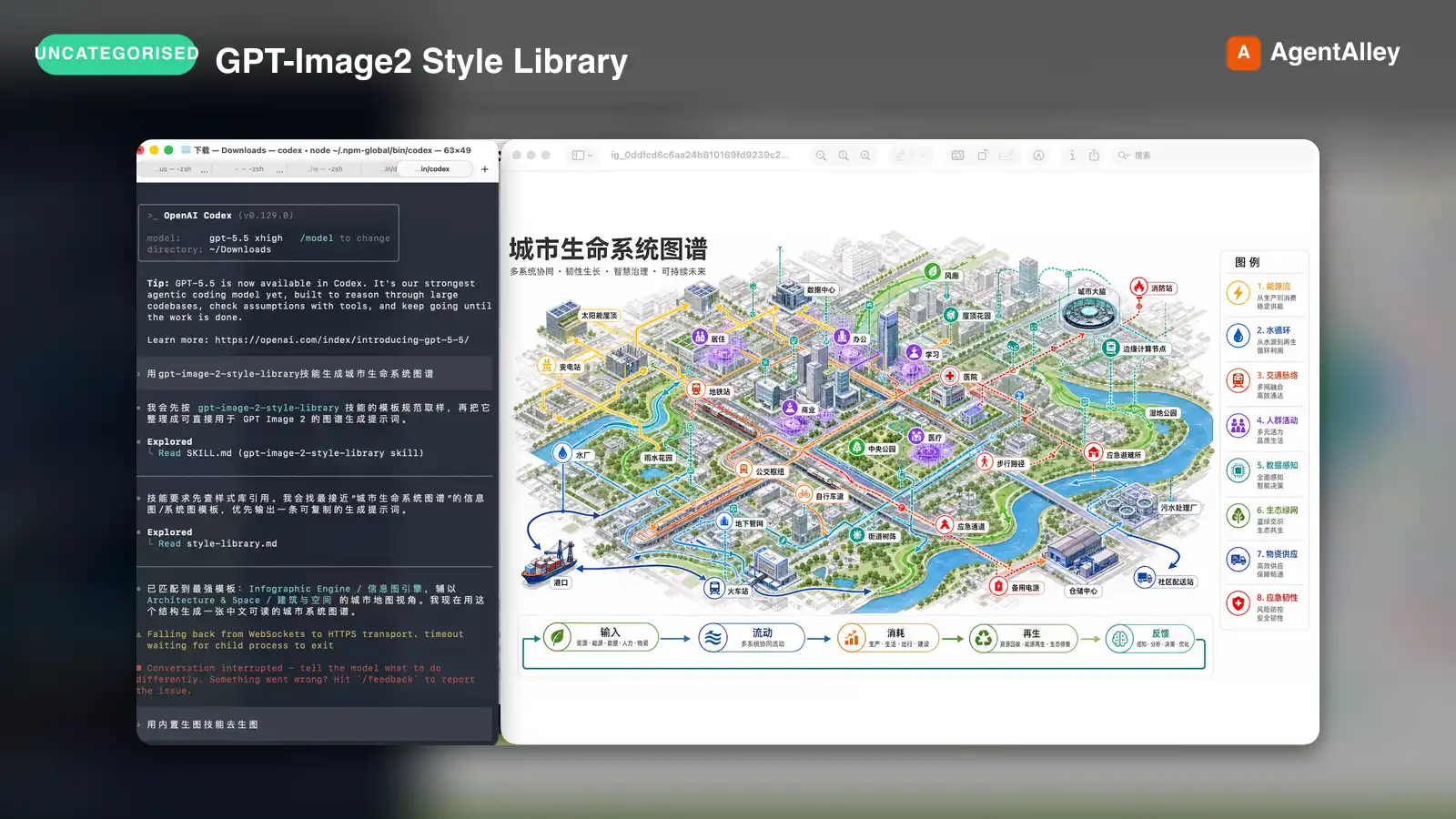
Choose GPT-Image2 / gpt-image-2 visual styles and industrial prompt templates from the awesome-gpt-image-2 style library. Use when an agent needs to create, rewrite, classify, or improve image-generation prompts with repository-backed…
--- name: gpt-image-2-style-library description: Choose GPT-Image2 / gpt-image-2 visual styles and industrial prompt templates from the awesome-gpt-image-2 style library. Use when an agent needs to create, rewrite, classify, or improve image-generation prompts with repository-backed templates, categories, style tags, scene tags, pitfalls, and example cases. --- # GPT-Image2 Style Library Use this skill to turn a user's image-generation intent into a production-ready GPT-Image2 prompt using the awesome-gpt-image-2 style library. ## Example Output  Example request: `用 gpt-image-2-style-library 技能生成城市生命系统图谱` ## Reference - Read `references/style-library.md` before choosing a template or style.
Overview
Use this skill to turn a user's image-generation intent into a production-ready GPT-Image2 prompt using the awesome-gpt-image-2 style library.
What you get
Provide a copyable prompt first.
Keep constraints concrete: exact text, aspect ratio, readable labels, layout hierarchy, and avoided artifacts.
For Chinese requests, write the final prompt in Chinese unless the user asks for English.
For English requests, write the final prompt in English unless the user asks for Chinese.
When the user asks for multiple concepts, reuse one template and vary subject, composition, palette, and scene.
Manual install (npx, ZIP)
npx skills add freestylefly/awesome-gpt-image-2 --skill gpt-image-2-style-library -g -a claude-codenpx degit freestylefly/awesome-gpt-image-2/agents/skills/gpt-image-2-style-library#main ~/.claude/skills/gpt-image-2-style-libraryConnects with Agent Alley MCP · agentalley.io/mcp
Files included
SKILL.md2.4 KB
Read SKILL.md here
Show the full text58 lines
GPT-Image2 Style Library
Use this skill to turn a user's image-generation intent into a production-ready GPT-Image2 prompt using the awesome-gpt-image-2 style library.
Example Output
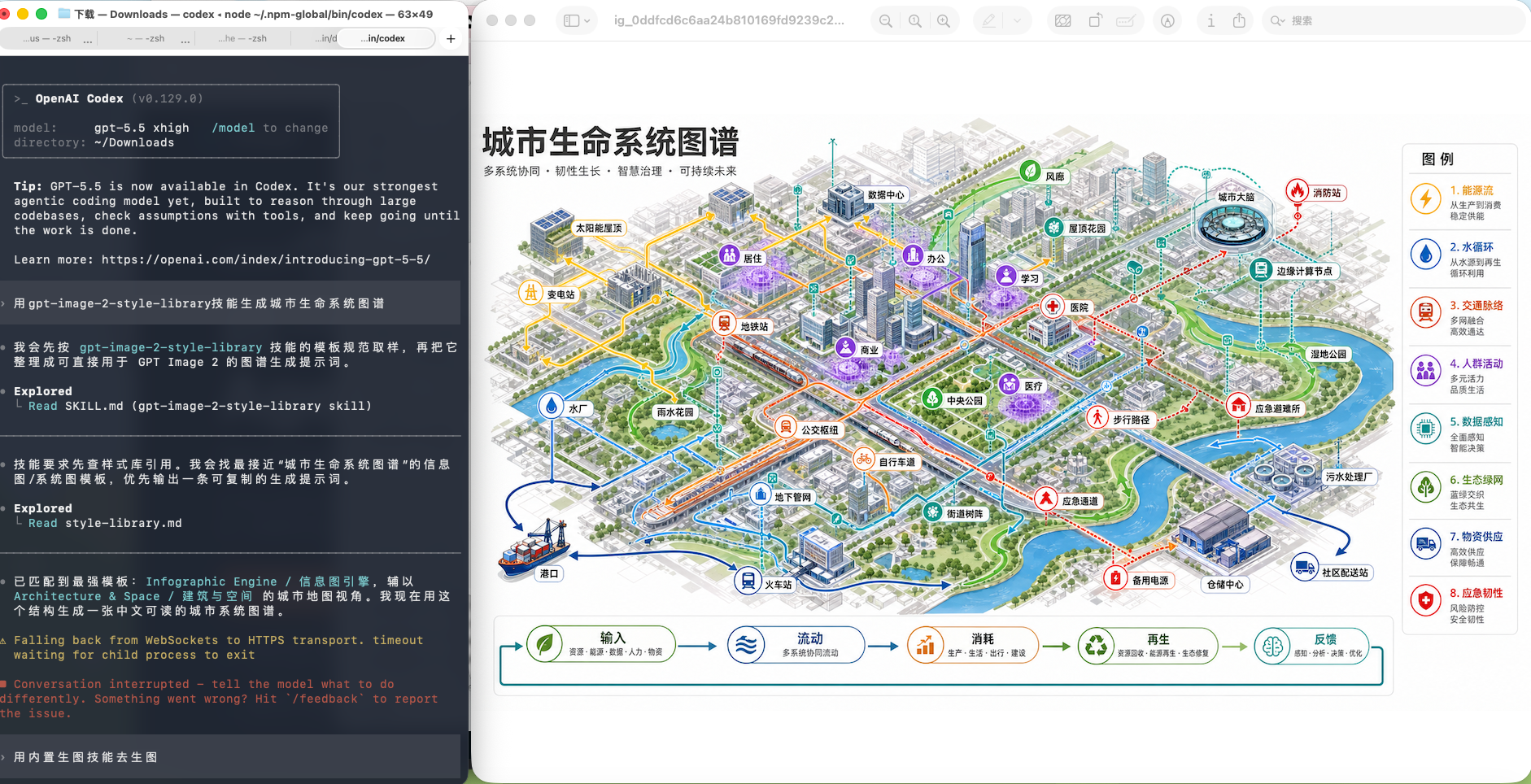
Example request: 用 gpt-image-2-style-library 技能生成城市生命系统图谱
Reference
- Read
references/style-library.mdbefore choosing a template or style. - The reference is generated from
data/style-library.jsonin the repository. - Prefer the reference over memory when template names, categories, covers, or style tags matter.
Workflow
- Detect the user's language and answer in that language.
- Identify the user's target output: product, poster, UI, infographic, brand, photo, illustration, character, scene, history, document, or special task.
- Match the request in this order: template category, visual style tag, scene tag, then nearest example cases.
- If one template is clearly strongest, use it directly. If several are plausible, present 2-3 options with short reasons and ask the user to choose.
- Build the final prompt with these blocks:
- subject and task
- composition and layout
- visual style and materials
- text and label requirements
- aspect ratio and output format
- constraints and negative details
- Include the selected template name and any useful example case IDs.
Output Defaults
- Provide a copyable prompt first.
- Keep constraints concrete: exact text, aspect ratio, readable labels, layout hierarchy, and avoided artifacts.
- For Chinese requests, write the final prompt in Chinese unless the user asks for English.
- For English requests, write the final prompt in English unless the user asks for Chinese.
- When the user asks for multiple concepts, reuse one template and vary subject, composition, palette, and scene.
Maintenance
When the source repository changes, run:
npm run generate:style-skill
To install the skill into the local Codex skill folder, run:
npm run install:skill
| 1 | |
| 2 | name gpt-image-2-style-library |
| 3 | description Choose GPT-Image2 / gpt-image-2 visual styles and industrial prompt templates from the awesome-gpt-image-2 style library. Use when an agent needs to create, rewrite, classify, or improve image-generation prompts with repository-backed templates, categories, style tags, scene tags, pitfalls, and example cases. |
| 4 | |
| 5 | |
| 6 | # GPT-Image2 Style Library |
| 7 | |
| 8 | Use this skill to turn a user's image-generation intent into a production-ready GPT-Image2 prompt using the awesome-gpt-image-2 style library. |
| 9 | |
| 10 | ## Example Output |
| 11 | |
| 12 | ![City life system map example] |
| 13 | |
| 14 | Example request: `用 gpt-image-2-style-library 技能生成城市生命系统图谱` |
| 15 | |
| 16 | ## Reference |
| 17 | |
| 18 | Read `references/style-library.md` before choosing a template or style. |
| 19 | The reference is generated from `data/style-library.json` in the repository. |
| 20 | Prefer the reference over memory when template names, categories, covers, or style tags matter. |
| 21 | |
| 22 | ## Workflow |
| 23 | |
| 24 | Detect the user's language and answer in that language. |
| 25 | Identify the user's target output: product, poster, UI, infographic, brand, photo, illustration, character, scene, history, document, or special task. |
| 26 | Match the request in this order: template category, visual style tag, scene tag, then nearest example cases. |
| 27 | If one template is clearly strongest, use it directly. If several are plausible, present 2-3 options with short reasons and ask the user to choose. |
| 28 | Build the final prompt with these blocks: |
| 29 | subject and task |
| 30 | composition and layout |
| 31 | visual style and materials |
| 32 | text and label requirements |
| 33 | aspect ratio and output format |
| 34 | constraints and negative details |
| 35 | Include the selected template name and any useful example case IDs. |
| 36 | |
| 37 | ## Output Defaults |
| 38 | |
| 39 | Provide a copyable prompt first. |
| 40 | Keep constraints concrete: exact text, aspect ratio, readable labels, layout hierarchy, and avoided artifacts. |
| 41 | For Chinese requests, write the final prompt in Chinese unless the user asks for English. |
| 42 | For English requests, write the final prompt in English unless the user asks for Chinese. |
| 43 | When the user asks for multiple concepts, reuse one template and vary subject, composition, palette, and scene. |
| 44 | |
| 45 | ## Maintenance |
| 46 | |
| 47 | When the source repository changes, run: |
| 48 | |
| 49 | |
| 50 | npm run generate:style-skill |
| 51 | |
| 52 | |
| 53 | To install the skill into the local Codex skill folder, run: |
| 54 | |
| 55 | |
| 56 | npm run install:skill |
| 57 | |
| 58 |
Details
- License
- MIT
- Stars on the repo
- ★ 36,045
- Checked
- Source
- freestylefly/awesome-gpt-image-2 ↗
- Creator
- freestylefly · 1 listing
Similar skills
See all → Cross-Platform Reverse Engineer
 morluto/rea · by morlutoReverse engineer native, managed, Electron/JavaScript, packaged, firmware, and browser targets with REA. Use shipped-artifact or requested runtime evidence to explain features, compare versions, decompile code, or guide a reconstruction. Skip REA for ordinary source-repository architecture analysis.★ 316k GitHub stars
 Brainstorm Ideas
 obra/superpowers · by obraYou MUST use this before any creative work - creating features, building components, adding functionality, or modifying behavior. Explores user intent, requirements and design before implementation.★ 290k GitHub stars
 Code Review Feedback Analyzerobra/superpowers · by obraUse when receiving code review feedback, before implementing suggestions, especially if feedback seems unclear or technically questionable - requires technical rigor and verification, not performative agreement or blind implementation★ 290k GitHub stars
 Bug Diagnosis Framework
 mattpocock/skills · by mattpocockDiagnosis loop for hard bugs and performance regressions. Use when the user says "diagnose"/"debug this", or reports something broken/throwing/failing/slow.★ 267k GitHub stars
 Implement Specmattpocock/skills · by mattpocockImplement the result of /to-spec and /to-tickets in code.★ 267k GitHub stars
 PR Description Writermattpocock/skills · by mattpocockUse when writing a PR body.★ 267k GitHub stars