Data visualisation design skill
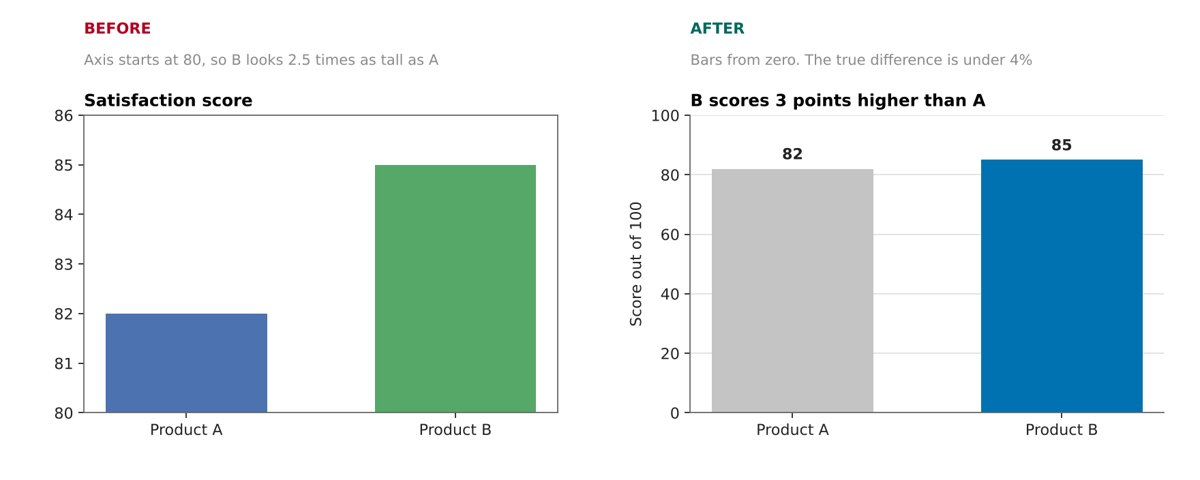
Illustration · not a resultFrom the Dheemant19/dataviz-design-skill README — shows the whole collection, not only this skill.source ↗
Design rules, chart selection and review checklists for charts, graphs, plots and dashboards.
by Dheemant19·MIT license·★ 2 Stars on the repo·GitHub ↗
npx degit Dheemant19/dataviz-design-skill/skills/dataviz-design#main ~/.claude/skills/dataviz-designChecked ·commit main
Files of Data visualisation design
Show the full text242 lines
Data visualisation design
This skill helps you decide what a chart should say, choose the view that proves it, build it cleanly, and check it before it reaches anyone. The design rules apply to any tool. The bundled scripts add automated checks and finishing helpers for matplotlib.
The one rule everything else follows from: pick the representation that lets this reader answer this question accurately, with the context they need and the least effort. A chart that looks good but makes the comparison hard, or that leaves a false impression, has failed.
Rules here have different strengths. Some are arithmetic (bubble area must be proportional to the value). Some are strong defaults (bars start at zero). Some are heuristics (keep categorical colours few). When you break a default, have a reason you could say out loud to the reader.
Workflow
Work through these steps in order. They are quick for a simple chart. Go back a step when something does not fit. A legend that is hard to read often means too many categories. A total that looks impossible often means a bad join. A title the chart does not prove means the wrong view.
1. Write the brief
Finish this sentence before choosing a chart:
For [reader], this chart should make it easy to see [comparison or pattern], so that they can [decision or understanding].
"Visualise the dataset" is not a brief. If the user has not said what the chart is for, infer the most likely question from the data and say which question you chose. Note where the chart will be seen (slide, report, web page, phone), because that sets its size, font sizes and how much text fits. If nobody says, assume a web page.
Decide whether the chart is exploratory (you are looking for what is there, so show distributions and exceptions) or explanatory (the reader should get one supported finding, so edit hard and label directly).
2. Profile and check the data
A chart cannot fix a wrong number. Print a quick profile first: columns and types, distinct values of the key columns, the date range, and missing values per column. Then confirm:
- Grain. What does one row represent? What will one mark represent?
- Rows that are not entities. Totals, regions, groups, "Other" and "Unknown" rows mixed in with real entities. Find them before ranking or summing.
- Scale type of each variable. Nominal, ordinal, interval or ratio. A numeric ID is still a label. This decides which channels, palettes and baselines are valid.
- Aggregation and denominator. Is each value a count, sum, mean, share or rate, and a share of what? Do not let the library aggregate silently.
- Missing values and the latest period. Missing is not zero. The most recent period is often incomplete or provisional.
- Units and order. Thousands or millions, 0 to 1 or 0 to 100. Dates sorted as dates, ordinal levels in their real order.
Read references/data-and-preparation.md for the details, and whenever the task involves joins, reshaping, outliers, percentages, or time, map, hierarchy or network data.
3. Write the headline, then choose the evidence
Write the finding as one sentence with a number before writing chart code, and compute the numbers you will quote. Then choose the view that lets the reader check that sentence at a glance. This is the step that most separates a good chart from a merely tidy one.
- Pick the measure the headline is about: level, absolute change, percent change, index, share, or per-person rate. They can point in different directions.
- Make the evidence match the claim. "Largest" needs every item ranked on one scale. "Grew fastest" needs the change itself for every item, not just the levels. "Overtook" needs both lines and the crossing. "Slowing" needs the growth rate.
- Superlatives (most, fastest, first, only, record) claim something about every item, so every item must be visible in that measure.
- Use a second panel when the headline makes a second claim the first view cannot prove: levels plus ranked change, share plus total, level plus growth rate.
- Series of very different sizes squash the small ones into a band. Index them, use a log scale, use small multiples or add a panel, depending on the question.
Read references/claims-and-evidence.md before choosing the form for any explanatory chart.
4. Choose the form
Most questions are a comparison, a composition (what the whole is made of), a relationship or a distribution. Use the chart chooser below. If the reader needs exact values, a table may beat any chart. A single number with context can beat a gauge.
5. Encode the key comparison with the strongest channel
People judge some visual properties much more accurately than others. From most to least precise for quantities:
- Position on a common scale
- Position on separate but identical scales (small multiples)
- Length
- Angle and slope
- Area
- Volume, colour lightness and colour saturation
Put the most important comparison on position or length. Use hue and shape for categories, never for amounts. Use area and colour intensity for patterns where rough reading is enough. Read references/encoding-and-perception.md when a mapping is not obvious, when there are more than three variables, or when layout and grouping matter.
6. Choose colour by meaning
- Unordered categories: distinct hues (qualitative palette).
- Ordered or numeric low to high: one ramp that gets steadily lighter or darker (sequential palette).
- Two directions around a meaningful midpoint: two ramps meeting at a neutral centre (diverging palette).
- One thing matters: grey for context and one accent colour for the focus. This is the right default for most explanatory charts.
Keep the same colour for the same category in every chart. Never let colour be the only cue for something essential. Read references/colour.md for palette choice, accessibility and legends, and run scripts/check_palette.py on any custom palette.
7. Write the text, within a budget
- Title: the finding from step 3, one line.
- Subtitle: what is plotted (measure, unit, scope, period), one line.
- Labels: label lines and bars directly. Use a legend only when direct labels would collide.
- Annotations: at most two, for the things the reader must not miss.
- Footer: a note only if it changes the reading, then the source.
Everything else (methods, definitions, extra numbers) goes in your reply, not on the chart. Match wording to evidence: "rose after" is not "rose because of". Read references/layout-and-typography.md for sizes, the type scale, label placement and number formats, and references/explanation-and-honesty.md when the chart supports a claim someone will act on.
8. Build it
For matplotlib, use the bundled helpers. They apply the type scale and canvas size for the destination, add a left-aligned title block and footer, place direct labels without collisions, space value labels evenly, and run the linter when saving.
import sys; sys.path.insert(0, "<this skill>/scripts")
import chartkit as ck

ck.apply_style("web")                     # slide, report, web, social, square
fig, ax = ck.figure()
for name, s in series.items():
    ax.plot(s.index, s.values, label=name, **ck.emphasis(name, focus="North"))
ck.label_lines(ax, focus="North", values=True)
ck.tidy(ax)
ck.finish(fig, "chart.png", title="...", subtitle="...", source="Source: ...", alt="...")
Other helpers: ck.bar_labels (value labels, with an optional second label), ck.grid (small multiples), ck.callout, ck.reference_line, ck.plain_log_ticks, ck.colours_for and ck.fmt (number formatting). For other libraries, apply the same specs by hand and read references/library-notes.md, because library defaults often change the meaning of a chart.
9. Lint, look, critique, fix
A first render is a draft. Before delivering:
- Lint. Run
python scripts/chartlint.py your_script.py(ck.finishdoes this for you). It finds overlapping and clipped text, small fonts, bars that do not start at zero, unequal bar widths, squashed series, too many colours, oversized legends, crowded pies, dual axes, rainbow or off-centre colour maps, and colour pairs that fail colour-vision checks. Fix every FAIL. Fix each WARN or be able to say why it does not apply. - Look. Open the saved image and view it at its real size. Never judge a chart from its code.
- Critique as a sceptical reader. Cover the title: does the chart alone say what the title says? Is every number in the title visible? Where does the eye land first? Can every series that matters be read? Is there text that belongs in the reply?
- Fix and render again, up to three rounds. Change the design, not just the styling, when the critique demands it.
The full critique questions and final review are in references/review-checklist.md.
10. Deliver
Give the image at the destination size, its alt text, and a short reply: the answer to the question, any choice that changes the reading (filters, exclusions, smoothing, scale), and the caveats you kept off the chart.
Chart chooser
Use this to get candidates, then read the named reference for the pitfalls of the form you pick. The files in the last column are in references/. "Few" and "many" are judgments, not thresholds.
| The reader needs to | Start with | Watch for | Reference |
|---|---|---|---|
| Compare one value across categories | Bars or dots, sorted by value | Zero baseline for bars, long labels (go horizontal) | comparison.md |
| Compare many categories | Horizontal sorted bars, or small multiples | Do not give every bar its own colour | comparison.md |
| Compare several values within each category | Grouped bars, or small multiples | Which grouping is primary changes what is easy to compare | comparison.md |
| See change over a few periods | Bars per period, or a slope chart | Keep periods in time order | comparison.md |
| See change over many periods | Line | Real time spacing, gaps for missing data, no line across unrelated groups | comparison.md |
| Compare many series over time | Lines with one highlighted, or small multiples | A tangle of coloured lines with a long legend | comparison.md |
| Compare against a target | Bullet chart, or bar with a target line | Gauges waste space and use angle | comparison.md |
| Show shares of one whole | Sorted bar, 100% bar, or a pie with up to about five slices | Parts must be disjoint and sum to the whole | composition.md |
| Show shares across groups or periods | 100% stacked bars | Hides group size, so add totals | composition.md |
| Show amounts and shares together | Stacked bars or stacked area | Only the bottom segment sits on a common baseline | composition.md |
| Show how a total was built up or reduced | Waterfall | Distinguish totals from changes | composition.md |
| Show stages of a process | Funnel as plain bars | Stages are nested, not parts of a whole | composition.md |
| Show hierarchy with sizes | Treemap | Area is imprecise, tiny cells are unreadable | composition.md |
| Relate two numeric variables | Scatterplot | Overplotting, outliers, fitting a line too early | relationships.md |
| Add a third numeric variable | Bubble chart | Scale area, not radius | relationships.md |
| Show a value for every row and column pair | Heatmap | Palette type, missing cells, row or column normalisation | relationships.md |
| Show pairwise links between entities | Matrix, or node-link diagram for small sparse networks | Dense node-link diagrams become unreadable | relationships.md |
| Show one distribution | Histogram, or ECDF | Bin width changes the story | distributions.md |
| Compare distributions across groups | Box plots, violins, small-multiple histograms, or raw points | Group sizes, shared bins and scales | distributions.md |
| Show values across places | Choropleth for rates, proportional symbols for counts | Raw counts on a choropleth mostly show population | data-and-preparation.md |
Defaults that prevent most bad charts
Each of these exists because breaking it changes what the reader believes.
- Bars start at zero. Bar length is the value. If small differences matter, use dots or a line, which can use a narrower range.
- Bars in one chart have equal width. Otherwise area becomes a second, unintended encoding.
- Size means area. For circles, radius must scale with the square root of the value. Doubling the radius shows four times the amount.
- No decorative 3D. Perspective and occlusion change apparent sizes and add no data.
- Avoid dual y-axes. Their scales can be tuned to show any relationship. Use two aligned panels or index both series.
- Stack only disjoint parts of one whole. Never stack a total with its own subsets, or metrics with different meanings.
- Sort categories by value unless they have a natural order (time, rank, age bands). Never sort a time axis or a histogram by height.
- Connect points with a line only when the order between them is real and they belong to the same series.
- Palette type follows data type. No rainbow for numeric data. No ramp for unordered categories.
- Colour is never the only cue for anything essential. Add labels, shapes, line styles or position.
- Say what was done to the data. Smoothing, binning, log scales, exclusions, imputation and normalisation all change the reading.
- Show estimated values differently from observed ones. Forecasts, fits and imputed points need their own style and a label.
- Plot the raw data before trusting a summary. Very different datasets can share the same mean, spread and correlation.
- Remove what does not help reading (heavy frames, fills, shadows, redundant legends). Keep axes, units, reference lines and uncertainty.
- The chart proves its title. Every number and comparison in the title can be read from the marks or labels.
- Text has a budget. One-line title, one-line subtitle, at most two annotations, a short footer. The rest goes in the reply.
- Ask two questions before finishing. Are the numbers right? What will a reasonable reader conclude at a glance? Both answers must be defensible.
Critiquing or fixing an existing chart
Read the chart as an encoding before judging its style: what question it answers, what one mark represents, which variable sits on which channel, what was aggregated or filtered, which comparison is easy and which needs angle, area or memory, and what impression it leaves. If you have the code, run it through scripts/chartlint.py. Then name the specific problem and the specific repair. Common symptoms, with the file in references/ to read:
| Symptom | Likely cause | Read |
|---|---|---|
| Small difference looks huge | Truncated bar axis, or a tall narrow aspect ratio | comparison.md |
| Totals look too large after combining tables | Join multiplied rows | data-and-preparation.md |
| A gap in the data shows as a dip to zero | Missing values filled with zero | data-and-preparation.md |
| Cannot compare the middle segments of a stack | Floating baselines | composition.md |
| Two groups with the same share look equally important | Normalisation hid the group sizes | composition.md |
| Big bubbles look far too big | Value mapped to radius | relationships.md |
| Legend has many colours that are hard to match | Too many categories on hue | colour.md |
| Colours change when the data is filtered | Colour mapping not fixed to category | colour.md |
| Density curve extends below zero or past a hard limit | Kernel smoothing ignores bounds | distributions.md |
| Box plots look the same but the groups differ | Quartiles hide shape | distributions.md |
| Smooth curve shows peaks that were never measured | Decorative curve interpolation | comparison.md |
| "Growth is slowing" read as "it is falling" | Rate confused with level | explanation-and-honesty.md |
| Event marker read as proof of cause | Timing is not causation | explanation-and-honesty.md |
| Front slice or front bar looks largest | 3D perspective | comparison.md |
| Several lines tangled in a band at the bottom | Series of very different sizes on one linear axis | claims-and-evidence.md |
| The title says "fastest" or "most" but the chart shows levels | Evidence does not match the claim | claims-and-evidence.md |
| A region or "World" row ranked as if it were an entity | Aggregate rows mixed with entities | data-and-preparation.md |
| A dip in the latest period | Incomplete or provisional data | data-and-preparation.md |
| Paragraphs of notes under the chart | Text over budget | layout-and-typography.md |
references/worked-redesigns.md has before and after cases with numbers. Read it when you want a pattern to follow for a redesign.
Reference files
Read only what the task needs.
| File | Read it when |
|---|---|
references/claims-and-evidence.md |
Before choosing the form of any explanatory chart: writing the headline, picking the measure, matching evidence to the claim, composite panels, series of very different sizes, choosing context |
references/data-and-preparation.md |
Profiling a dataset, aggregate rows, incomplete periods, units, classifying variables, joins and reshaping, missing values, outliers, shares and rates, time, map, hierarchy or network data |
references/encoding-and-perception.md |
Choosing marks and channels, encoding more than three variables, grouping and layout, emphasis, gridlines |
references/colour.md |
Choosing or checking any palette, accessibility, legends and colour bars |
references/comparison.md |
Bars, grouped bars, lines, time series, axes, baselines, log scales, aspect ratio, smoothing, small multiples, 3D |
references/composition.md |
Pies, donuts, stacked bars and areas, 100% stacks, treemaps, waterfalls, funnels |
references/relationships.md |
Scatterplots, trend lines, LOWESS, uncertainty bands, bubbles, heatmaps, matrices, correlation and causation |
references/distributions.md |
Histograms, bins, density, box plots, violins, ECDFs, comparing groups |
references/explanation-and-honesty.md |
Titles, labels, annotation, emphasis, levels versus rates, and the list of misleading patterns with repairs |
references/worked-redesigns.md |
You want a concrete before and after example for a common problem |
references/layout-and-typography.md |
Sizing for the destination, type scale, text budget, direct and value labels, legends, number formats, annotations, small multiples, dark backgrounds, export, alt text |
references/review-checklist.md |
The design brief, per-chart recipes, the critique loop and the final review |
references/library-notes.md |
Writing code in matplotlib, seaborn, pandas, plotly, ggplot2, Vega-Lite or D3, where library defaults affect meaning |
references/sources.md |
The user asks where a rule comes from, or you need to cite the research |
Scripts
All three need only Python 3. chartkit and chartlint also need matplotlib 3.7 or later.
| Script | What it does |
|---|---|
scripts/chartkit.py |
Matplotlib helpers: destination presets, type scale, title block and footer, collision-free line labels, evenly spaced bar labels, small multiples, number formatting, saving with alt text. Runs the linter on save |
scripts/chartlint.py |
Checks drawn matplotlib figures for layout and encoding problems. python scripts/chartlint.py make_chart.py runs a plotting script and checks every figure it saves or shows, without changes to the script |
scripts/check_palette.py |
Checks a palette for contrast, distinctness under simulated colour-vision deficiency and in greyscale, and ordering of sequential and diverging ramps |
python scripts/chartlint.py make_chart.py
python scripts/check_palette.py "#0072B2" "#D55E00" "#009E73" --background "#FFFFFF"
python scripts/check_palette.py "#f7fbff" "#6baed6" "#08306b" --type sequential
Both checkers report FAIL, WARN or NOTE and exit with status 1 on a failure. Their thresholds are heuristics: a warning is a prompt to look at the rendered chart, not a verdict.
| 1 | |
| 2 | name dataviz-design |
| 3 | description "Design rules, chart selection and review checklists for charts, graphs, plots and dashboards. Use this skill whenever you are about to create, choose, critique or fix a data visualisation (visualization) in any tool, including matplotlib, seaborn, plotly, ggplot2, D3, Vega-Lite, Recharts, Excel, Tableau and Power BI. It covers picking a chart type, colours and palettes, axes and baselines, stacked charts, pies, bubbles, heatmaps, histograms, box and violin plots, trend lines and smoothing, titles and annotations, accessibility, and checking whether a chart is misleading. Also use it when a user says a chart looks wrong, confusing, cluttered or ugly, or asks which chart to use, even if they do not ask for design advice. Includes matplotlib helpers and a layout linter that catch overlapping labels, misleading axes and unreadable series before a chart is delivered." |
| 4 | license MIT |
| 5 | metadata |
| 6 | author Dheemant Rastogi |
| 7 | version "1.1.0" |
| 8 | |
| 9 | |
| 10 | # Data visualisation design |
| 11 | |
| 12 | This skill helps you decide what a chart should say, choose the view that proves it, build it cleanly, and check it before it reaches anyone. The design rules apply to any tool. The bundled scripts add automated checks and finishing helpers for matplotlib. |
| 13 | |
| 14 | The one rule everything else follows from: pick the representation that lets this reader answer this question accurately, with the context they need and the least effort. A chart that looks good but makes the comparison hard, or that leaves a false impression, has failed. |
| 15 | |
| 16 | Rules here have different strengths. Some are arithmetic (bubble area must be proportional to the value). Some are strong defaults (bars start at zero). Some are heuristics (keep categorical colours few). When you break a default, have a reason you could say out loud to the reader. |
| 17 | |
| 18 | ## Workflow |
| 19 | |
| 20 | Work through these steps in order. They are quick for a simple chart. Go back a step when something does not fit. A legend that is hard to read often means too many categories. A total that looks impossible often means a bad join. A title the chart does not prove means the wrong view. |
| 21 | |
| 22 | ### 1. Write the brief |
| 23 | |
| 24 | Finish this sentence before choosing a chart: |
| 25 | |
| 26 | > For [reader], this chart should make it easy to see [comparison or pattern], so that they can [decision or understanding]. |
| 27 | |
| 28 | "Visualise the dataset" is not a brief. If the user has not said what the chart is for, infer the most likely question from the data and say which question you chose. Note where the chart will be seen (slide, report, web page, phone), because that sets its size, font sizes and how much text fits. If nobody says, assume a web page. |
| 29 | |
| 30 | Decide whether the chart is exploratory (you are looking for what is there, so show distributions and exceptions) or explanatory (the reader should get one supported finding, so edit hard and label directly). |
| 31 | |
| 32 | ### 2. Profile and check the data |
| 33 | |
| 34 | A chart cannot fix a wrong number. Print a quick profile first: columns and types, distinct values of the key columns, the date range, and missing values per column. Then confirm: |
| 35 | |
| 36 | **Grain.** What does one row represent? What will one mark represent? |
| 37 | **Rows that are not entities.** Totals, regions, groups, "Other" and "Unknown" rows mixed in with real entities. Find them before ranking or summing. |
| 38 | **Scale type of each variable.** Nominal, ordinal, interval or ratio. A numeric ID is still a label. This decides which channels, palettes and baselines are valid. |
| 39 | **Aggregation and denominator.** Is each value a count, sum, mean, share or rate, and a share of what? Do not let the library aggregate silently. |
| 40 | **Missing values and the latest period.** Missing is not zero. The most recent period is often incomplete or provisional. |
| 41 | **Units and order.** Thousands or millions, 0 to 1 or 0 to 100. Dates sorted as dates, ordinal levels in their real order. |
| 42 | |
| 43 | Read `references/data-and-preparation.md` for the details, and whenever the task involves joins, reshaping, outliers, percentages, or time, map, hierarchy or network data. |
| 44 | |
| 45 | ### 3. Write the headline, then choose the evidence |
| 46 | |
| 47 | Write the finding as one sentence with a number before writing chart code, and compute the numbers you will quote. Then choose the view that lets the reader check that sentence at a glance. This is the step that most separates a good chart from a merely tidy one. |
| 48 | |
| 49 | **Pick the measure the headline is about:** level, absolute change, percent change, index, share, or per-person rate. They can point in different directions. |
| 50 | **Make the evidence match the claim.** "Largest" needs every item ranked on one scale. "Grew fastest" needs the change itself for every item, not just the levels. "Overtook" needs both lines and the crossing. "Slowing" needs the growth rate. |
| 51 | **Superlatives** (most, fastest, first, only, record) claim something about every item, so every item must be visible in that measure. |
| 52 | **Use a second panel** when the headline makes a second claim the first view cannot prove: levels plus ranked change, share plus total, level plus growth rate. |
| 53 | **Series of very different sizes** squash the small ones into a band. Index them, use a log scale, use small multiples or add a panel, depending on the question. |
| 54 | |
| 55 | Read `references/claims-and-evidence.md` before choosing the form for any explanatory chart. |
| 56 | |
| 57 | ### 4. Choose the form |
| 58 | |
| 59 | Most questions are a comparison, a composition (what the whole is made of), a relationship or a distribution. Use the chart chooser below. If the reader needs exact values, a table may beat any chart. A single number with context can beat a gauge. |
| 60 | |
| 61 | ### 5. Encode the key comparison with the strongest channel |
| 62 | |
| 63 | People judge some visual properties much more accurately than others. From most to least precise for quantities: |
| 64 | |
| 65 | Position on a common scale |
| 66 | Position on separate but identical scales (small multiples) |
| 67 | Length |
| 68 | Angle and slope |
| 69 | Area |
| 70 | Volume, colour lightness and colour saturation |
| 71 | |
| 72 | Put the most important comparison on position or length. Use hue and shape for categories, never for amounts. Use area and colour intensity for patterns where rough reading is enough. Read `references/encoding-and-perception.md` when a mapping is not obvious, when there are more than three variables, or when layout and grouping matter. |
| 73 | |
| 74 | ### 6. Choose colour by meaning |
| 75 | |
| 76 | Unordered categories: distinct hues (qualitative palette). |
| 77 | Ordered or numeric low to high: one ramp that gets steadily lighter or darker (sequential palette). |
| 78 | Two directions around a meaningful midpoint: two ramps meeting at a neutral centre (diverging palette). |
| 79 | One thing matters: grey for context and one accent colour for the focus. This is the right default for most explanatory charts. |
| 80 | |
| 81 | Keep the same colour for the same category in every chart. Never let colour be the only cue for something essential. Read `references/colour.md` for palette choice, accessibility and legends, and run `scripts/check_palette.py` on any custom palette. |
| 82 | |
| 83 | ### 7. Write the text, within a budget |
| 84 | |
| 85 | **Title:** the finding from step 3, one line. |
| 86 | **Subtitle:** what is plotted (measure, unit, scope, period), one line. |
| 87 | **Labels:** label lines and bars directly. Use a legend only when direct labels would collide. |
| 88 | **Annotations:** at most two, for the things the reader must not miss. |
| 89 | **Footer:** a note only if it changes the reading, then the source. |
| 90 | |
| 91 | Everything else (methods, definitions, extra numbers) goes in your reply, not on the chart. Match wording to evidence: "rose after" is not "rose because of". Read `references/layout-and-typography.md` for sizes, the type scale, label placement and number formats, and `references/explanation-and-honesty.md` when the chart supports a claim someone will act on. |
| 92 | |
| 93 | ### 8. Build it |
| 94 | |
| 95 | For matplotlib, use the bundled helpers. They apply the type scale and canvas size for the destination, add a left-aligned title block and footer, place direct labels without collisions, space value labels evenly, and run the linter when saving. |
| 96 | |
| 97 | |
| 98 | import sys; sys.path.insert(0, "<this skill>/scripts") |
| 99 | import chartkit as ck |
| 100 | |
| 101 | ck.apply_style("web") # slide, report, web, social, square |
| 102 | fig, ax = ck.figure() |
| 103 | for name, s in series.items(): |
| 104 | ax.plot(s.index, s.values, label=name, **ck.emphasis(name, focus="North")) |
| 105 | ck.label_lines(ax, focus="North", values=True) |
| 106 | ck.tidy(ax) |
| 107 | ck.finish(fig, "chart.png", title="...", subtitle="...", source="Source: ...", alt="...") |
| 108 | |
| 109 | |
| 110 | Other helpers: `ck.bar_labels` (value labels, with an optional second label), `ck.grid` (small multiples), `ck.callout`, `ck.reference_line`, `ck.plain_log_ticks`, `ck.colours_for` and `ck.fmt` (number formatting). For other libraries, apply the same specs by hand and read `references/library-notes.md`, because library defaults often change the meaning of a chart. |
| 111 | |
| 112 | ### 9. Lint, look, critique, fix |
| 113 | |
| 114 | A first render is a draft. Before delivering: |
| 115 | |
| 116 | **Lint.** Run `python scripts/chartlint.py your_script.py` (`ck.finish` does this for you). It finds overlapping and clipped text, small fonts, bars that do not start at zero, unequal bar widths, squashed series, too many colours, oversized legends, crowded pies, dual axes, rainbow or off-centre colour maps, and colour pairs that fail colour-vision checks. Fix every FAIL. Fix each WARN or be able to say why it does not apply. |
| 117 | **Look.** Open the saved image and view it at its real size. Never judge a chart from its code. |
| 118 | **Critique as a sceptical reader.** Cover the title: does the chart alone say what the title says? Is every number in the title visible? Where does the eye land first? Can every series that matters be read? Is there text that belongs in the reply? |
| 119 | **Fix and render again,** up to three rounds. Change the design, not just the styling, when the critique demands it. |
| 120 | |
| 121 | The full critique questions and final review are in `references/review-checklist.md`. |
| 122 | |
| 123 | ### 10. Deliver |
| 124 | |
| 125 | Give the image at the destination size, its alt text, and a short reply: the answer to the question, any choice that changes the reading (filters, exclusions, smoothing, scale), and the caveats you kept off the chart. |
| 126 | |
| 127 | ## Chart chooser |
| 128 | |
| 129 | Use this to get candidates, then read the named reference for the pitfalls of the form you pick. The files in the last column are in `references/`. "Few" and "many" are judgments, not thresholds. |
| 130 | |
| 131 | | The reader needs to | Start with | Watch for | Reference | |
| 132 | |---|---|---|---| |
| 133 | | Compare one value across categories | Bars or dots, sorted by value | Zero baseline for bars, long labels (go horizontal) | `comparison.md` | |
| 134 | | Compare many categories | Horizontal sorted bars, or small multiples | Do not give every bar its own colour | `comparison.md` | |
| 135 | | Compare several values within each category | Grouped bars, or small multiples | Which grouping is primary changes what is easy to compare | `comparison.md` | |
| 136 | | See change over a few periods | Bars per period, or a slope chart | Keep periods in time order | `comparison.md` | |
| 137 | | See change over many periods | Line | Real time spacing, gaps for missing data, no line across unrelated groups | `comparison.md` | |
| 138 | | Compare many series over time | Lines with one highlighted, or small multiples | A tangle of coloured lines with a long legend | `comparison.md` | |
| 139 | | Compare against a target | Bullet chart, or bar with a target line | Gauges waste space and use angle | `comparison.md` | |
| 140 | | Show shares of one whole | Sorted bar, 100% bar, or a pie with up to about five slices | Parts must be disjoint and sum to the whole | `composition.md` | |
| 141 | | Show shares across groups or periods | 100% stacked bars | Hides group size, so add totals | `composition.md` | |
| 142 | | Show amounts and shares together | Stacked bars or stacked area | Only the bottom segment sits on a common baseline | `composition.md` | |
| 143 | | Show how a total was built up or reduced | Waterfall | Distinguish totals from changes | `composition.md` | |
| 144 | | Show stages of a process | Funnel as plain bars | Stages are nested, not parts of a whole | `composition.md` | |
| 145 | | Show hierarchy with sizes | Treemap | Area is imprecise, tiny cells are unreadable | `composition.md` | |
| 146 | | Relate two numeric variables | Scatterplot | Overplotting, outliers, fitting a line too early | `relationships.md` | |
| 147 | | Add a third numeric variable | Bubble chart | Scale area, not radius | `relationships.md` | |
| 148 | | Show a value for every row and column pair | Heatmap | Palette type, missing cells, row or column normalisation | `relationships.md` | |
| 149 | | Show pairwise links between entities | Matrix, or node-link diagram for small sparse networks | Dense node-link diagrams become unreadable | `relationships.md` | |
| 150 | | Show one distribution | Histogram, or ECDF | Bin width changes the story | `distributions.md` | |
| 151 | | Compare distributions across groups | Box plots, violins, small-multiple histograms, or raw points | Group sizes, shared bins and scales | `distributions.md` | |
| 152 | | Show values across places | Choropleth for rates, proportional symbols for counts | Raw counts on a choropleth mostly show population | `data-and-preparation.md` | |
| 153 | |
| 154 | ## Defaults that prevent most bad charts |
| 155 | |
| 156 | Each of these exists because breaking it changes what the reader believes. |
| 157 | |
| 158 | **Bars start at zero.** Bar length is the value. If small differences matter, use dots or a line, which can use a narrower range. |
| 159 | **Bars in one chart have equal width.** Otherwise area becomes a second, unintended encoding. |
| 160 | **Size means area.** For circles, radius must scale with the square root of the value. Doubling the radius shows four times the amount. |
| 161 | **No decorative 3D.** Perspective and occlusion change apparent sizes and add no data. |
| 162 | **Avoid dual y-axes.** Their scales can be tuned to show any relationship. Use two aligned panels or index both series. |
| 163 | **Stack only disjoint parts of one whole.** Never stack a total with its own subsets, or metrics with different meanings. |
| 164 | **Sort categories by value** unless they have a natural order (time, rank, age bands). Never sort a time axis or a histogram by height. |
| 165 | **Connect points with a line only when the order between them is real** and they belong to the same series. |
| 166 | **Palette type follows data type.** No rainbow for numeric data. No ramp for unordered categories. |
| 167 | **Colour is never the only cue** for anything essential. Add labels, shapes, line styles or position. |
| 168 | **Say what was done to the data.** Smoothing, binning, log scales, exclusions, imputation and normalisation all change the reading. |
| 169 | **Show estimated values differently from observed ones.** Forecasts, fits and imputed points need their own style and a label. |
| 170 | **Plot the raw data before trusting a summary.** Very different datasets can share the same mean, spread and correlation. |
| 171 | **Remove what does not help reading** (heavy frames, fills, shadows, redundant legends). Keep axes, units, reference lines and uncertainty. |
| 172 | **The chart proves its title.** Every number and comparison in the title can be read from the marks or labels. |
| 173 | **Text has a budget.** One-line title, one-line subtitle, at most two annotations, a short footer. The rest goes in the reply. |
| 174 | **Ask two questions before finishing.** Are the numbers right? What will a reasonable reader conclude at a glance? Both answers must be defensible. |
| 175 | |
| 176 | ## Critiquing or fixing an existing chart |
| 177 | |
| 178 | Read the chart as an encoding before judging its style: what question it answers, what one mark represents, which variable sits on which channel, what was aggregated or filtered, which comparison is easy and which needs angle, area or memory, and what impression it leaves. If you have the code, run it through `scripts/chartlint.py`. Then name the specific problem and the specific repair. Common symptoms, with the file in `references/` to read: |
| 179 | |
| 180 | | Symptom | Likely cause | Read | |
| 181 | |---|---|---| |
| 182 | | Small difference looks huge | Truncated bar axis, or a tall narrow aspect ratio | `comparison.md` | |
| 183 | | Totals look too large after combining tables | Join multiplied rows | `data-and-preparation.md` | |
| 184 | | A gap in the data shows as a dip to zero | Missing values filled with zero | `data-and-preparation.md` | |
| 185 | | Cannot compare the middle segments of a stack | Floating baselines | `composition.md` | |
| 186 | | Two groups with the same share look equally important | Normalisation hid the group sizes | `composition.md` | |
| 187 | | Big bubbles look far too big | Value mapped to radius | `relationships.md` | |
| 188 | | Legend has many colours that are hard to match | Too many categories on hue | `colour.md` | |
| 189 | | Colours change when the data is filtered | Colour mapping not fixed to category | `colour.md` | |
| 190 | | Density curve extends below zero or past a hard limit | Kernel smoothing ignores bounds | `distributions.md` | |
| 191 | | Box plots look the same but the groups differ | Quartiles hide shape | `distributions.md` | |
| 192 | | Smooth curve shows peaks that were never measured | Decorative curve interpolation | `comparison.md` | |
| 193 | | "Growth is slowing" read as "it is falling" | Rate confused with level | `explanation-and-honesty.md` | |
| 194 | | Event marker read as proof of cause | Timing is not causation | `explanation-and-honesty.md` | |
| 195 | | Front slice or front bar looks largest | 3D perspective | `comparison.md` | |
| 196 | | Several lines tangled in a band at the bottom | Series of very different sizes on one linear axis | `claims-and-evidence.md` | |
| 197 | | The title says "fastest" or "most" but the chart shows levels | Evidence does not match the claim | `claims-and-evidence.md` | |
| 198 | | A region or "World" row ranked as if it were an entity | Aggregate rows mixed with entities | `data-and-preparation.md` | |
| 199 | | A dip in the latest period | Incomplete or provisional data | `data-and-preparation.md` | |
| 200 | | Paragraphs of notes under the chart | Text over budget | `layout-and-typography.md` | |
| 201 | |
| 202 | `references/worked-redesigns.md` has before and after cases with numbers. Read it when you want a pattern to follow for a redesign. |
| 203 | |
| 204 | ## Reference files |
| 205 | |
| 206 | Read only what the task needs. |
| 207 | |
| 208 | | File | Read it when | |
| 209 | |---|---| |
| 210 | | `references/claims-and-evidence.md` | Before choosing the form of any explanatory chart: writing the headline, picking the measure, matching evidence to the claim, composite panels, series of very different sizes, choosing context | |
| 211 | | `references/data-and-preparation.md` | Profiling a dataset, aggregate rows, incomplete periods, units, classifying variables, joins and reshaping, missing values, outliers, shares and rates, time, map, hierarchy or network data | |
| 212 | | `references/encoding-and-perception.md` | Choosing marks and channels, encoding more than three variables, grouping and layout, emphasis, gridlines | |
| 213 | | `references/colour.md` | Choosing or checking any palette, accessibility, legends and colour bars | |
| 214 | | `references/comparison.md` | Bars, grouped bars, lines, time series, axes, baselines, log scales, aspect ratio, smoothing, small multiples, 3D | |
| 215 | | `references/composition.md` | Pies, donuts, stacked bars and areas, 100% stacks, treemaps, waterfalls, funnels | |
| 216 | | `references/relationships.md` | Scatterplots, trend lines, LOWESS, uncertainty bands, bubbles, heatmaps, matrices, correlation and causation | |
| 217 | | `references/distributions.md` | Histograms, bins, density, box plots, violins, ECDFs, comparing groups | |
| 218 | | `references/explanation-and-honesty.md` | Titles, labels, annotation, emphasis, levels versus rates, and the list of misleading patterns with repairs | |
| 219 | | `references/worked-redesigns.md` | You want a concrete before and after example for a common problem | |
| 220 | | `references/layout-and-typography.md` | Sizing for the destination, type scale, text budget, direct and value labels, legends, number formats, annotations, small multiples, dark backgrounds, export, alt text | |
| 221 | | `references/review-checklist.md` | The design brief, per-chart recipes, the critique loop and the final review | |
| 222 | | `references/library-notes.md` | Writing code in matplotlib, seaborn, pandas, plotly, ggplot2, Vega-Lite or D3, where library defaults affect meaning | |
| 223 | | `references/sources.md` | The user asks where a rule comes from, or you need to cite the research | |
| 224 | |
| 225 | ## Scripts |
| 226 | |
| 227 | All three need only Python 3. `chartkit` and `chartlint` also need matplotlib 3.7 or later. |
| 228 | |
| 229 | | Script | What it does | |
| 230 | |---|---| |
| 231 | | `scripts/chartkit.py` | Matplotlib helpers: destination presets, type scale, title block and footer, collision-free line labels, evenly spaced bar labels, small multiples, number formatting, saving with alt text. Runs the linter on save | |
| 232 | | `scripts/chartlint.py` | Checks drawn matplotlib figures for layout and encoding problems. `python scripts/chartlint.py make_chart.py` runs a plotting script and checks every figure it saves or shows, without changes to the script | |
| 233 | | `scripts/check_palette.py` | Checks a palette for contrast, distinctness under simulated colour-vision deficiency and in greyscale, and ordering of sequential and diverging ramps | |
| 234 | |
| 235 | |
| 236 | python scripts/chartlint.py make_chart.py |
| 237 | python scripts/check_palette.py "#0072B2" "#D55E00" "#009E73" --background "#FFFFFF" |
| 238 | python scripts/check_palette.py "#f7fbff" "#6baed6" "#08306b" --type sequential |
| 239 | |
| 240 | |
| 241 | Both checkers report FAIL, WARN or NOTE and exit with status 1 on a failure. Their thresholds are heuristics: a warning is a prompt to look at the rendered chart, not a verdict. |
| 242 |
Discussion
Alternatives
Browse more free Claude skills or everything in Science.