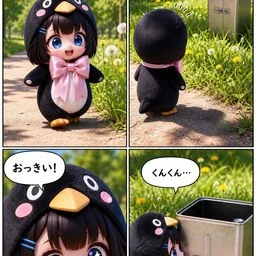


| 1 | A four-panel vertical comic strip featuring a cute chibi girl character wearing a fluffy black penguin costume with a large pink satin bow tie. The art style is hyper-realistic 3D render (Pixar/Blender style) with soft lighting and shallow depth of field. |
| 2 | |
| 3 | Panel 1: Medium shot of the girl walking on a sunny park path, smiling happily. Speech bubble text: "いい天気だな〜♪" (Nice weather~). |
| 4 | Panel 2: Rear view of the girl looking at a silver metal trash can in the grass. Speech bubble text: "……あれ?なんだろう" (...Huh? What's that?). |
| 5 | Panel 3: Extreme close-up of the girl's face with wide blue eyes and an open mouth, looking surprised. Speech bubble text: "おっきい!" (It's big!). |
| 6 | Panel 4: Side view of the girl sniffing the trash can curiously. The can has a label reading "一斗缶 18L". Speech bubble text: "くんくん…" (Sniff sniff...). |
Discussion
Alternatives
 Make a demo video with OpenScreenMake a polished video of an app or a feature with OpenScreen's MCP tools, from storyboard to recording, editing and export, then either attach it to a pull request or draft a post on X. Use when the user asks for a demo, a demo video, a screen recording, a product video, a launch clip, a video for X/Twitter, LinkedIn or a README, or to show a change in a pull request ("add a video to the PR", "show the feature to reviewers"). Also use to set OpenScreen up for an agent, and to continue an OpenScreen demo in a new session.
 FFmpeg for Video ProductionVideo and audio processing with FFmpeg. Use for format conversion, resizing, compression, audio extraction, and preparing assets for Remotion. Triggers include converting GIF to MP4, resizing video, extracting audio, compressing files, or any media transformation task.fake-screencast — screenshots → simulated screen recordingTurn static SCREENSHOTS into a simulated screen recording (TSX) — a fake screencast with an animated cursor that eases to targets and clicks, a browser URL bar that updates per page, hard-cut navigations, in-page filter crossfades, smooth scroll, and a ken-burns zoom onto the payoff. Use when a beat needs to show a walkthrough of a web app / dashboard / settings page and you'd rather build it from screenshots than get (or ask for) a real screen recording — "fake a screen recording", "turn these screenshots into a screencast", "simulate clicking through the dashboard", "animate this UI walkthrough", "cursor moving through the app". Built on remotion/src/lib/screencast.tsx. This is a technique WITHIN step 2 (make-tsx): defer timeline/render/bake orchestration to make-tsx and raw crash-free TSX rules to vidtsx-2d-generator. Not for a single static page clone (use WebBrowserFrame directly) and not when the point is genuine proof of real speed/output (use a real recording).Khan explainerUse when the user wants a Khan Academy style explainer video, a blackboard or whiteboard lesson, a hand-drawn chalk-talk animation, a short narrated video that teaches a concept ("explain X in a video", "explainer video", "teach X in 30 seconds"), or a tutorial that draws hand-written arrows, circles and captions over product screenshots ("draw over the UI", "annotated walkthrough"), or clips cut from a YouTube video or podcast where the speaker's real audio plays under a blackboard drawn to it ("khanify this video", "clip this with the Khan visual"), especially when it must be free, local, and use no paid APIs or keys. macOS only.
Browse more free AI prompts or everything in Content creator.