Run Codex CLI or references OpenAI Codex for code analysis
Codex Skill Guide
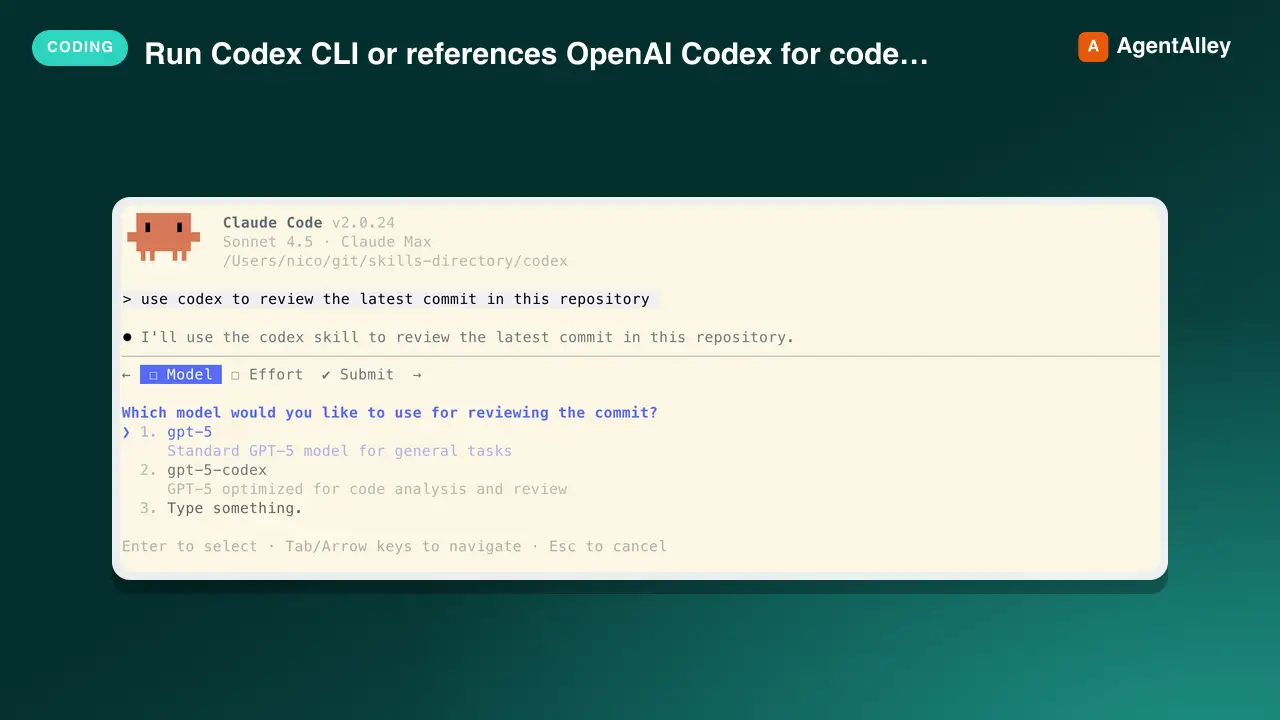
Use when the user asks to run Codex CLI (codex exec, codex resume) or references OpenAI Codex for code analysis, refactoring, or automated editing. Uses GPT-5.2 by default for state-of-the-art software engineering.
---
name: codex
description: Use when the user asks to run Codex CLI (codex exec, codex resume) or references OpenAI Codex for code analysis, refactoring, or automated editing. Uses GPT-5.2 by default for state-of-the-art software engineering.
permissions:
  - exec: "Runs the Codex CLI only when the user explicitly asks to use Codex."
  - file_write: "Allows Codex to update workspace files only for user-approved edit tasks."
---

# Codex Skill Guide

## Running a Task
1. Default to `gpt-5.2` model. Ask the user (via `AskUserQuestion`) which reasoning effort to use (`xhigh`,`high`, `medium`, or `low`). User can override model if needed (see Model Options below).
2. Select the sandbox mode required for the task; default to `--sandbox read-only` unless edits or network access are necessary.
3. Assemble the command with the appropriate options:
   - `-m, --model <MODEL>`
   - `--config model_reasoning_effort="<high|medium|low>"`
   - `--sandbox <read-only|workspace-write|danger-full-access>`
   - `--full-auto`
Overview
GPT-5.2 Advantages: 76.3% SWE-bench (vs 72.8% GPT-5), 30% faster on average tasks, better tool handling, reduced hallucinations, improved code quality. Knowledge cutoff: September 30, 2024.
Manual install (npx, ZIP)
npx skills add jdrhyne/agent-skills --skill codex -g -a claude-codemkdir -p ~/.claude/skills && curl -sL https://codeload.github.com/jdrhyne/agent-skills/tar.gz/439cd3a9da78 \
| tar -xz -C ~/.claude/skills --strip-components=2 agent-skills-439cd3a9da78/codex/codexNew-Item -ItemType Directory -Force "$HOME\.claude\skills" | Out-Null; Invoke-WebRequest "https://m.agentalley.io/zip/bf1d5c04eed545816fce/codex.zip" -OutFile "$env:TEMP\codex.zip"; Expand-Archive "$env:TEMP\codex.zip" -DestinationPath "$HOME\.claude\skills" -ForceConnects with Agent Alley MCP · agentalley.io/mcp
Files included
SKILL.md5.6 KBREADME.md2.1 KB
Read the files here
jdrhyne/
Show the full text77 lines
Codex Skill Guide
Running a Task
- Default to
gpt-5.2model. Ask the user (viaAskUserQuestion) which reasoning effort to use (xhigh,high,medium, orlow). User can override model if needed (see Model Options below). - Select the sandbox mode required for the task; default to
--sandbox read-onlyunless edits or network access are necessary. - Assemble the command with the appropriate options:
-m, --model <MODEL>--config model_reasoning_effort="<high|medium|low>"--sandbox <read-only|workspace-write|danger-full-access>--full-auto-C, --cd <DIR>--skip-git-repo-check
- Always use --skip-git-repo-check.
- When continuing a previous session, use
codex exec --skip-git-repo-check resume --lastvia stdin. When resuming don't use any configuration flags unless explicitly requested by the user e.g. if he species the model or the reasoning effort when requesting to resume a session. Resume syntax:echo "your prompt here" | codex exec --skip-git-repo-check resume --last 2>/dev/null. All flags have to be inserted between exec and resume. - IMPORTANT: By default, append
2>/dev/nullto allcodex execcommands to suppress thinking tokens (stderr). Only show stderr if the user explicitly requests to see thinking tokens or if debugging is needed. - Run the command, capture stdout/stderr (filtered as appropriate), and summarize the outcome for the user.
- After Codex completes, inform the user: "You can resume this Codex session at any time by saying 'codex resume' or asking me to continue with additional analysis or changes."
Safety Boundaries
- Do not run
codex execuntil the user has explicitly asked to use Codex for the task. - Do not select
--full-autoor a broader sandbox mode than the task requires. - Do not overwrite user files, create commits, or perform destructive operations without explicit user approval.
- Do not use networked or danger-full-access runs unless the user requested work that actually needs them.
Quick Reference
| Use case | Sandbox mode | Key flags |
|---|---|---|
| Read-only review or analysis | read-only |
--sandbox read-only 2>/dev/null |
| Apply local edits | workspace-write |
--sandbox workspace-write --full-auto 2>/dev/null |
| Permit network or broad access | danger-full-access |
--sandbox danger-full-access --full-auto 2>/dev/null |
| Resume recent session | Inherited from original | echo "prompt" | codex exec --skip-git-repo-check resume --last 2>/dev/null (no flags allowed) |
| Run from another directory | Match task needs | -C <DIR> plus other flags 2>/dev/null |
Model Options
| Model | Best for | Context window | Key features |
|---|---|---|---|
gpt-5.2-max |
Max model: Ultra-complex reasoning, deep problem analysis | 400K input / 128K output | 76.3% SWE-bench, adaptive reasoning |
gpt-5.2 ⭐ |
Flagship model: Software engineering, agentic coding workflows | 400K input / 128K output | 76.3% SWE-bench, adaptive reasoning |
gpt-5.2-mini |
Cost-efficient coding (4x more usage allowance) | 400K input / 128K output | Near SOTA performance |
gpt-5.1-thinking |
Ultra-complex reasoning, deep problem analysis | 400K input / 128K output | Adaptive thinking depth, runs 2x slower on hardest tasks |
GPT-5.2 Advantages: 76.3% SWE-bench (vs 72.8% GPT-5), 30% faster on average tasks, better tool handling, reduced hallucinations, improved code quality. Knowledge cutoff: September 30, 2024.
Reasoning Effort Levels:
xhigh- Ultra-complex tasks (deep problem analysis, complex reasoning, deep understanding of the problem)high- Complex tasks (refactoring, architecture, security analysis, performance optimization)medium- Standard tasks (refactoring, code organization, feature additions, bug fixes)low- Simple tasks (quick fixes, simple changes, code formatting, documentation)
Cached Input Discount: Cached context is substantially cheaper than first-pass context. Check current vendor pricing before quoting costs.
Following Up
- After every
codexcommand, immediately useAskUserQuestionto confirm next steps, collect clarifications, or decide whether to resume withcodex exec resume --last. - When resuming, pipe the new prompt via stdin:
echo "new prompt" | codex exec resume --last 2>/dev/null. The resumed session automatically uses the same model, reasoning effort, and sandbox mode from the original session. - Restate the chosen model, reasoning effort, and sandbox mode when proposing follow-up actions.
Error Handling
- Stop and report failures whenever
codex --versionor acodex execcommand exits non-zero; request direction before retrying. - Before you use high-impact flags (
--full-auto,--sandbox danger-full-access,--skip-git-repo-check) ask the user for permission using AskUserQuestion unless it was already given. - When output includes warnings or partial results, summarize them and ask how to adjust using
AskUserQuestion.
CLI Version
Requires Codex CLI v0.57.0 or later for GPT-5.2 model support. The CLI defaults to gpt-5.2 on macOS/Linux and gpt-5.2 on Windows. Check version: codex --version
Use /model slash command within a Codex session to switch models, or configure default in ~/.codex/config.toml.
| 1 | |
| 2 | name codex |
| 3 | description Use when the user asks to run Codex CLI (codex exec, codex resume) or references OpenAI Codex for code analysis, refactoring, or automated editing. Uses GPT-5.2 by default for state-of-the-art software engineering. |
| 4 | permissions |
| 5 | - exec: "Runs the Codex CLI only when the user explicitly asks to use Codex." |
| 6 | - file_write: "Allows Codex to update workspace files only for user-approved edit tasks." |
| 7 | |
| 8 | |
| 9 | # Codex Skill Guide |
| 10 | |
| 11 | ## Running a Task |
| 12 | Default to `gpt-5.2` model. Ask the user (via `AskUserQuestion`) which reasoning effort to use (`xhigh`,`high`, `medium`, or `low`). User can override model if needed (see Model Options below). |
| 13 | Select the sandbox mode required for the task; default to `--sandbox read-only` unless edits or network access are necessary. |
| 14 | Assemble the command with the appropriate options: |
| 15 | `-m, --model <MODEL>` |
| 16 | `--config model_reasoning_effort="<high|medium|low>"` |
| 17 | `--sandbox <read-only|workspace-write|danger-full-access>` |
| 18 | `--full-auto` |
| 19 | `-C, --cd <DIR>` |
| 20 | `--skip-git-repo-check` |
| 21 | Always use --skip-git-repo-check. |
| 22 | When continuing a previous session, use `codex exec --skip-git-repo-check resume --last` via stdin. When resuming don't use any configuration flags unless explicitly requested by the user e.g. if he species the model or the reasoning effort when requesting to resume a session. Resume syntax: `echo "your prompt here" | codex exec --skip-git-repo-check resume --last 2>/dev/null`. All flags have to be inserted between exec and resume. |
| 23 | **IMPORTANT**: By default, append `2>/dev/null` to all `codex exec` commands to suppress thinking tokens (stderr). Only show stderr if the user explicitly requests to see thinking tokens or if debugging is needed. |
| 24 | Run the command, capture stdout/stderr (filtered as appropriate), and summarize the outcome for the user. |
| 25 | **After Codex completes**, inform the user: "You can resume this Codex session at any time by saying 'codex resume' or asking me to continue with additional analysis or changes." |
| 26 | |
| 27 | ## Safety Boundaries |
| 28 | |
| 29 | Do not run `codex exec` until the user has explicitly asked to use Codex for the task. |
| 30 | Do not select `--full-auto` or a broader sandbox mode than the task requires. |
| 31 | Do not overwrite user files, create commits, or perform destructive operations without explicit user approval. |
| 32 | Do not use networked or danger-full-access runs unless the user requested work that actually needs them. |
| 33 | |
| 34 | ### Quick Reference |
| 35 | | Use case | Sandbox mode | Key flags | |
| 36 | | --- | --- | --- | |
| 37 | | Read-only review or analysis | `read-only` | `--sandbox read-only 2>/dev/null` | |
| 38 | | Apply local edits | `workspace-write` | `--sandbox workspace-write --full-auto 2>/dev/null` | |
| 39 | | Permit network or broad access | `danger-full-access` | `--sandbox danger-full-access --full-auto 2>/dev/null` | |
| 40 | | Resume recent session | Inherited from original | `echo "prompt" \| codex exec --skip-git-repo-check resume --last 2>/dev/null` (no flags allowed) | |
| 41 | | Run from another directory | Match task needs | `-C <DIR>` plus other flags `2>/dev/null` | |
| 42 | |
| 43 | ## Model Options |
| 44 | |
| 45 | | Model | Best for | Context window | Key features | |
| 46 | | --- | --- | --- | --- | |
| 47 | | `gpt-5.2-max` | **Max model**: Ultra-complex reasoning, deep problem analysis | 400K input / 128K output | 76.3% SWE-bench, adaptive reasoning | |
| 48 | | `gpt-5.2` ⭐ | **Flagship model**: Software engineering, agentic coding workflows | 400K input / 128K output | 76.3% SWE-bench, adaptive reasoning | |
| 49 | | `gpt-5.2-mini` | Cost-efficient coding (4x more usage allowance) | 400K input / 128K output | Near SOTA performance | |
| 50 | | `gpt-5.1-thinking` | Ultra-complex reasoning, deep problem analysis | 400K input / 128K output | Adaptive thinking depth, runs 2x slower on hardest tasks | |
| 51 | |
| 52 | **GPT-5.2 Advantages**: 76.3% SWE-bench (vs 72.8% GPT-5), 30% faster on average tasks, better tool handling, reduced hallucinations, improved code quality. Knowledge cutoff: September 30, 2024. |
| 53 | |
| 54 | **Reasoning Effort Levels**: |
| 55 | `xhigh` - Ultra-complex tasks (deep problem analysis, complex reasoning, deep understanding of the problem) |
| 56 | `high` - Complex tasks (refactoring, architecture, security analysis, performance optimization) |
| 57 | `medium` - Standard tasks (refactoring, code organization, feature additions, bug fixes) |
| 58 | `low` - Simple tasks (quick fixes, simple changes, code formatting, documentation) |
| 59 | |
| 60 | **Cached Input Discount**: Cached context is substantially cheaper than first-pass context. Check current vendor pricing before quoting costs. |
| 61 | |
| 62 | ## Following Up |
| 63 | After every `codex` command, immediately use `AskUserQuestion` to confirm next steps, collect clarifications, or decide whether to resume with `codex exec resume --last`. |
| 64 | When resuming, pipe the new prompt via stdin: `echo "new prompt" | codex exec resume --last 2>/dev/null`. The resumed session automatically uses the same model, reasoning effort, and sandbox mode from the original session. |
| 65 | Restate the chosen model, reasoning effort, and sandbox mode when proposing follow-up actions. |
| 66 | |
| 67 | ## Error Handling |
| 68 | Stop and report failures whenever `codex --version` or a `codex exec` command exits non-zero; request direction before retrying. |
| 69 | Before you use high-impact flags (`--full-auto`, `--sandbox danger-full-access`, `--skip-git-repo-check`) ask the user for permission using AskUserQuestion unless it was already given. |
| 70 | When output includes warnings or partial results, summarize them and ask how to adjust using `AskUserQuestion`. |
| 71 | |
| 72 | ## CLI Version |
| 73 | |
| 74 | Requires Codex CLI v0.57.0 or later for GPT-5.2 model support. The CLI defaults to `gpt-5.2` on macOS/Linux and `gpt-5.2` on Windows. Check version: `codex --version` |
| 75 | |
| 76 | Use `/model` slash command within a Codex session to switch models, or configure default in `~/.codex/config.toml`. |
| 77 |
Details
- Updated
- Aug 30, 2026
- License
- MIT
- Stars on the repo
- ★ 240
- Checked
- Source
- jdrhyne/agent-skills ↗
- Creator
- jdrhyne · 24 listings
Similar skills
See all → SkillReverse engineer native, managed, Electron/JavaScriptREA
 morluto/rea · by morlutoReverse engineer native, managed, Electron/JavaScript, packaged, firmware, and browser targets with REA. Use shipped-artifact or requested runtime evidence to explain features, compare versions, decompile code, or guide a reconstruction. Skip REA for ordinary source-repository architecture analysis.★ 316k GitHub stars
 SkillBrainstorms ideas into designs before any creative workBrainstorming Ideas Into Designs
 obra/superpowers · by obraYou MUST use this before any creative work - creating features, building components, adding functionality, or modifying behavior. Explores user intent, requirements and design before implementation.★ 290k GitHub stars
 SkillRequires technical rigor and verificationCode Review Receptionobra/superpowers · by obraUse when receiving code review feedback, before implementing suggestions, especially if feedback seems unclear or technically questionable - requires technical rigor and verification, not performative agreement or blind implementation★ 290k GitHub stars
 SkillDiagnosis loop for hard bugs and performance regressionsDiagnosing bugs
 mattpocock/skills · by mattpocockDiagnosis loop for hard bugs and performance regressions. Use when the user says "diagnose"/"debug this", or reports something broken/throwing/failing/slow.★ 267k GitHub stars
 SkillImplement the result of /to-spec and /to-tickets in codeImplement specmattpocock/skills · by mattpocockImplement the result of /to-spec and /to-tickets in code.★ 267k GitHub stars
 SkillWriting a PR bodymattpocock/skills · by mattpocockUse when writing a PR body.★ 267k GitHub stars
More from jdrhyne
 SkillCreating a Claude Code slash commandCommand creator
 jdrhyne/agent-skills · by jdrhyneThis skill should be used when creating a Claude Code slash command. Use when users ask to "create a command", "make a slash command", "add a command", or want to document a workflow as a reusable command. Essential for creating optimized, agent-executable slash commands with proper structure and best practices.★ 240 GitHub stars
 SkillRecover missing conversation context after explicitContext recoveryjdrhyne/agent-skills · by jdrhyneRecover missing conversation context after explicit compaction or truncation, or when the user explicitly asks to recover prior work. Use for requests such as "where were we before compaction?" when the current thread is insufficient. Do not trigger on a generic "continue" when the current thread already provides an actionable next step.★ 240 GitHub stars
 SkillGenerate beautifully designed PDF reportsElegant reportsjdrhyne/agent-skills · by jdrhyneGenerate beautifully designed PDF reports with a Nordic/Scandinavian aesthetic. Use when creating polished executive briefings, analysis reports, or presentation-style PDF outputs from markdown and HTML via Nutrient DWS.★ 240 GitHub stars
 SkillRead Google Analytics 4 reporting data through the GA4 DataGA4 Data APIjdrhyne/agent-skills · by jdrhyneRead Google Analytics 4 reporting data through the GA4 Data API. Use for explicit GA4 property metadata, compatible metric/dimension reports, traffic analysis, key events, quotas, and bounded exports.★ 240 GitHub stars
 SkillBulk download images from login-protected gallery websitesGallery scraperjdrhyne/agent-skills · by jdrhyneBulk download images from login-protected gallery websites using an attached browser session. Use when asked to scrape, download, or save images from authenticated gallery pages, extract full-size images from thumbnails, or batch download from multi-page galleries.★ 240 GitHub stars
 SkillRun Gemini CLI for code review, plan reviewGemini Skill Guidejdrhyne/agent-skills · by jdrhyneUse when the user asks to run Gemini CLI for code review, plan review, or big context (>200k) processing. Ideal for comprehensive analysis requiring large context windows. Uses Gemini 3 Pro by default for state-of-the-art reasoning and coding.★ 240 GitHub stars