Cinematic Film
Cinematic film
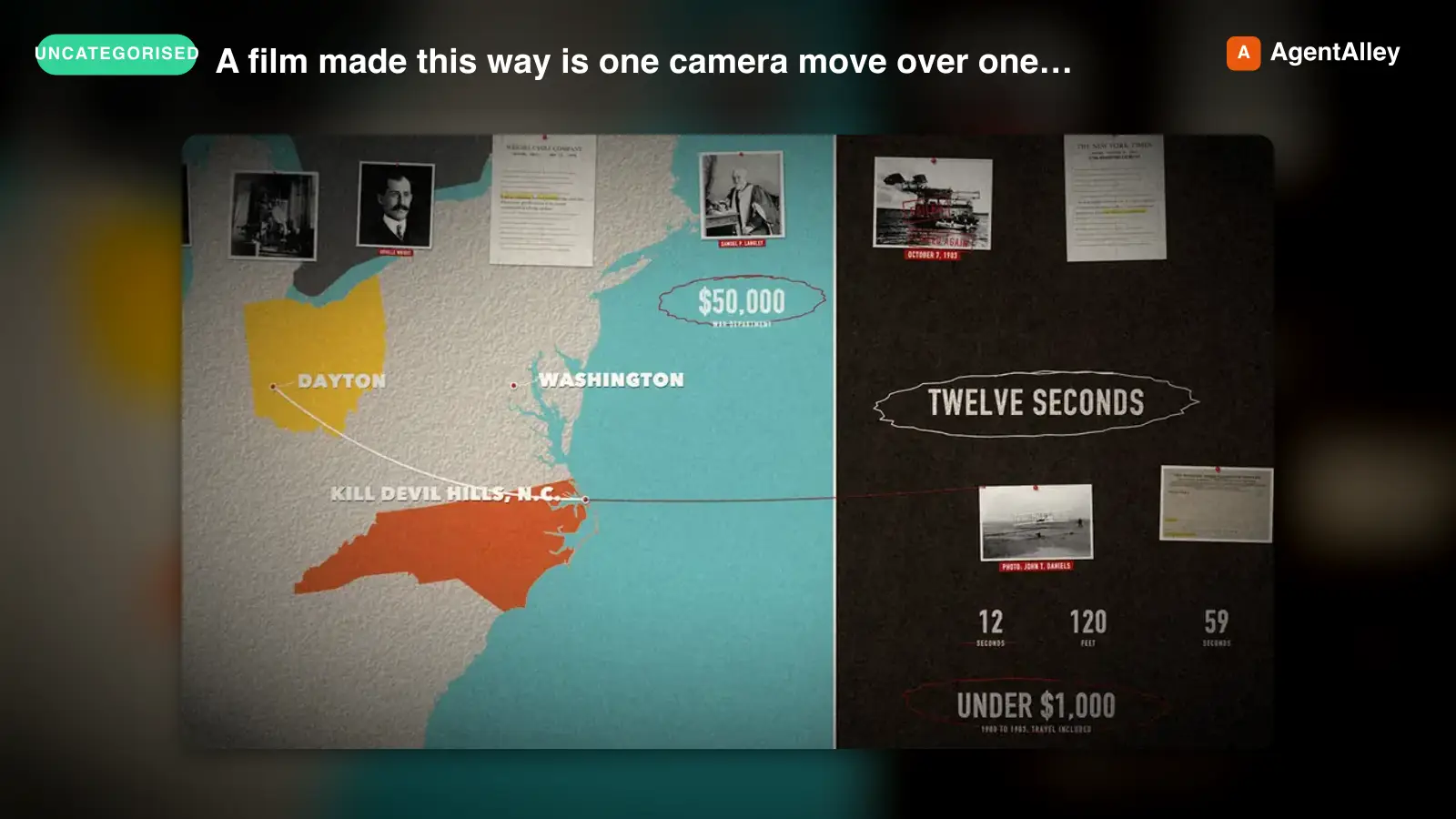
Makes narrated cinematic films entirely from code, on any subject. One continuous camera glides over one designed world of photos, documents, cards, maps with routes and big numbers, with every stamp, highlight and number landing on the…
---
name: cinematic-film
description: Makes narrated cinematic films entirely from code, on any subject. One continuous camera glides over one designed world of photos, documents, cards, maps with routes and big numbers, with every stamp, highlight and number landing on the narrator's word, then sound effects, an optional score and burned-in captions. For documentaries and history, product launches, brand and founder stories, science and tech explainers, biographies and true crime. Covers the script, voiceover from any TTS split into timed lines, images (archives with their licences, your own photos, AI stills), a beat table, the scene, self-review stills and a memory-safe parallel render. Use for "make a cinematic video about", "documentary about", "explainer video", "launch film", "Vox-style video", "evidence board animation", or turning a story into a video for X, YouTube or TikTok.
---

# Cinematic film

A film made this way is one camera move over one world. Every photo, card, clipping, map and number lives on one big board, and the camera travels between them along string, routes and arrows as the story moves. Every visual hit is timed to the word the narrator says. It is all code (Skia in Python), so it renders the same every time, any topic fits, and a new voice re-times the whole film by itself.

Built from a 5:22 documentary about Al Capone, then opened up to any subject. The rules here were written from what broke while making it.

## Tools

| File | What it does |
| --- | --- |
| `scripts/check_setup.py` | Checks Python, skia-python, ffmpeg, fonts and memory; says what to install |
| `scripts/get_fonts.py` | Fetches open-licensed fonts (Bebas Neue, Homemade Apple) for any text role this machine lacks |
| `scripts/new_project.py` | Starts a project from `assets/template/` (a runnable explainer), or the documentary example with `--example` |
Overview
A film made this way is one camera move over one world. Every photo, card, clipping, map and number lives on one big board, and the camera travels between them along string, routes and arrows as the story moves. Every visual hit is timed to the word the narrator says. It is all code (Skia in Python), so it renders the same every time, any topic fits, and a new voice re-times the whole film by itself.
Manual install (npx, ZIP)
npx skills add Moh4696/cinematic-skill --skill cinematic-film -g -a claude-codenpx degit Moh4696/cinematic-skill/skills/cinematic-film#main ~/.claude/skills/cinematic-filmConnects with Agent Alley MCP · agentalley.io/mcp
Files included
SKILL.md9.4 KB
Read SKILL.md here
Show the full text102 lines
Cinematic film
A film made this way is one camera move over one world. Every photo, card, clipping, map and number lives on one big board, and the camera travels between them along string, routes and arrows as the story moves. Every visual hit is timed to the word the narrator says. It is all code (Skia in Python), so it renders the same every time, any topic fits, and a new voice re-times the whole film by itself.
Built from a 5:22 documentary about Al Capone, then opened up to any subject. The rules here were written from what broke while making it.
Tools
| File | What it does |
|---|---|
scripts/check_setup.py |
Checks Python, skia-python, ffmpeg, fonts and memory; says what to install |
scripts/get_fonts.py |
Fetches open-licensed fonts (Bebas Neue, Homemade Apple) for any text role this machine lacks |
scripts/new_project.py |
Starts a project from assets/template/ (a runnable explainer), or the documentary example with --example |
scripts/make_beats.py |
Writes beats.md, the table you approve; lints chronology, line length, digits in spoken text |
scripts/tts_say.py |
Free scratch voice (macOS say, espeak-ng, or any TTS command) to time the film before the final voice |
scripts/split_takes.py |
Cuts whole-section takes into one clip per line and flags suspect cuts |
scripts/build_narration.py |
Joins the lines into audio/narration.m4a and audio/timing.json, which the film is built on |
scripts/fetch_commons.py |
Searches Wikimedia Commons, downloads with licence and credit, refuses non-free files, writes credits.md |
scripts/make_map.py |
Projects public-domain boundaries (any country or region) for the map |
scripts/prep_assets.py |
Grades every image into one look (black and white, sepia or natural colour); generates the board textures |
scripts/engine.py |
The film engine: camera, spotlight, items, maps, looks, film finish |
scripts/render.py |
Stills, contact strips, the cue list, and the parallel MP4 render |
scripts/build_sfx.py |
Synthesises every sound effect from the cue list (no samples, nothing to license) |
scripts/mix_soundtrack.py |
Voice, effects and optional music, ducked and loudness-normalised |
scripts/burn_captions.py |
Burns one of four caption styles into the finished film and writes an SRT |
Needs Python 3.9+, pip install skia-python numpy pillow (scipy optional) and ffmpeg. Run scripts/check_setup.py first; on Linux or Windows, also run scripts/get_fonts.py per project. All commands take --project <folder>.
Pick the film
| Kind | Look | Images | Typical items |
|---|---|---|---|
| History, true crime, investigation | wall, slate |
Archive photos and documents, graded bw |
Prints, torn clippings, stamps, red string, map routes |
| Product launch, brand or founder story | studio, charcoal |
Your product shots and team photos, graded natural |
Cards, big numbers, counters, arrows |
| Science, engineering, how it works | blueprint, paper |
Diagrams, archive or AI stills | Cards, counters, pen marks, maps |
| Tech, space, trailers | night |
Screenshots, renders, AI stills | Big type, counters, routes, cards |
Mix freely: the looks are a board and a finish, and every item works on every look. references/story.md has a story shape for each kind.
The rules
- One hero per line. Each narration line has exactly one thing the camera is on. The spotlight dims everything else.
- Hits land on the spoken word. A stamp slams on "charged", not on the line start. Time everything with
doc.W(line, "word"). - Show a phrase one way. Either type it on screen or show it on a real document, never both. Body copy on documents is grey rows, never filler words.
- Time only moves forward after the opening. A cold open may jump ahead. After one bridge line ("Four years earlier..."), story time only goes forward.
- Type you can read on a phone in one second. Big condensed caps. A typed label on screen should be about 3% or more of frame height.
- Less is more. Strings fade after their beat, and old items dim. The final pull-back should look composed, not cluttered.
- Nothing invented that looks real. Real photos and documents get credits. A document drawn in code is labelled a recreation and quotes only words that were really written. AI images are fine for illustration, but never as evidence of a real event or a real person.
Workflow
Stop for the user's approval at the four gates (marked Gate).
- Story. Research, then write
script.json: takes (sections) of lines, each withtext,spoken(numbers as words),heroandtyped. Keep fact notes alongside. 60 to 90 seconds is about 150 to 230 words. Details are inreferences/story.md. - Beat table. Run
scripts/make_beats.pyand fix every lint warning. Gate: the user approvesbeats.md, including the facts. - Images. List every image in
photos.json: its id, kind and where it comes from.- Archive images:
fetch_commons.py search,categoryandget. - The user's own files: drop them in
<project>/assets/photos/. - AI stills: generate them in one style (the
motion-assetsskill plans and prices them). references/archive.mdcovers other archives and the rights rules.
- Archive images:
- Scratch voice. Run
tts_say.py, thensplit_takes.py, thenbuild_narration.py. Listen to every linesplit_takes.pyflags. Now the timings are real. - Assets. Run
make_map.pyif the story travels, thenprep_assets.py. - Scene. Write
scene.py: lay out the board in clusters per section, add items ondoc.L/doc.Wtimes, then camera and spotlight keys (film.shot). Readreferences/film.md. Both shipped projects show the patterns:assets/template/scene.py(explainer, studio look) andassets/wright-flyer/scene.py(documentary, every item type). - Look test. Run
render.py --probeon one still per line at 1280x720 and look at all of them, then--stripon every big camera move. Gate: show the user stills of the opening and the look. - Draft. Render the first 30 seconds at 1280x720 with the scratch voice. Gate: the user watches it.
- Final voice. Record it with any TTS or a person (
references/voice.md). Run split, build, and probes again; nothing in the scene changes. - Sound. Run
render.py --cues, thenbuild_sfx.py, thenmix_soundtrack.py, adding a score if wanted. Readreferences/sound.md. - Finish. Do the full render, then
burn_captions.pyand the SRT. Readreferences/performance.mdbefore rendering at 1440p or 4K. Hand overcredits.mdwith the film.
Self-review, every time
Look at the stills before you claim anything works. These are the mistakes that showed up, every one in a real render:
- Dark ink on a dark board: invisible. Use light type on dark looks, or
bar_h=0.92for a full label block behind dark type. - The camera moved on but the spotlight stayed behind, leaving a dark frame. Use
film.shot()unless they should part. - Map scale too small: a whole coast smaller than one photo. Pick
Kso each place with prints gets its own room (references/film.md). - Map labels colliding. Put the label on the side away from its neighbour.
- A cluster straddling the map's edge. Keep clusters either on the map or clearly off it.
- Highlights a few pixels off their words. Use
PaperDoc.phrase_spans, anddoc.on(print, fx, fy)with fractions read off a grid overlay of the image.
Shipped projects
assets/template/: "From Cherry to Cup", a 25 second explainer in the studio look, made of cards, arrows and a counter, with no images.new_project.py my-filmcopies it. Give it a scratch voice and it renders.assets/wright-flyer/: "Twelve Seconds", a 90 second documentary about the first flight and the $50,000 rival who crashed twice. It uses seven public-domain photos, the US map, two typeset documents and every item type.
python3 scripts/new_project.py wright --example
python3 scripts/fetch_commons.py get --project wright
python3 scripts/make_map.py --project wright && python3 scripts/prep_assets.py --project wright
python3 scripts/tts_say.py --project wright && python3 scripts/split_takes.py --project wright && python3 scripts/build_narration.py --project wright
python3 scripts/render.py --project wright --size 1280x720 --out out/draft.mp4 --audio audio/narration.m4a
Related skills
From Open 3D Skills: motion-assets plans and prices AI stills when a film needs illustration, and frame-capture records web pages instead of code-drawn films.
| 1 | |
| 2 | name cinematic-film |
| 3 | description Makes narrated cinematic films entirely from code, on any subject. One continuous camera glides over one designed world of photos, documents, cards, maps with routes and big numbers, with every stamp, highlight and number landing on the narrator's word, then sound effects, an optional score and burned-in captions. For documentaries and history, product launches, brand and founder stories, science and tech explainers, biographies and true crime. Covers the script, voiceover from any TTS split into timed lines, images (archives with their licences, your own photos, AI stills), a beat table, the scene, self-review stills and a memory-safe parallel render. Use for "make a cinematic video about", "documentary about", "explainer video", "launch film", "Vox-style video", "evidence board animation", or turning a story into a video for X, YouTube or TikTok. |
| 4 | |
| 5 | |
| 6 | # Cinematic film |
| 7 | |
| 8 | A film made this way is one camera move over one world. Every photo, card, clipping, map and number lives on one big board, and the camera travels between them along string, routes and arrows as the story moves. Every visual hit is timed to the word the narrator says. It is all code (Skia in Python), so it renders the same every time, any topic fits, and a new voice re-times the whole film by itself. |
| 9 | |
| 10 | Built from a 5:22 documentary about Al Capone, then opened up to any subject. The rules here were written from what broke while making it. |
| 11 | |
| 12 | ## Tools |
| 13 | |
| 14 | | File | What it does | |
| 15 | | --- | --- | |
| 16 | | `scripts/check_setup.py` | Checks Python, skia-python, ffmpeg, fonts and memory; says what to install | |
| 17 | | `scripts/get_fonts.py` | Fetches open-licensed fonts (Bebas Neue, Homemade Apple) for any text role this machine lacks | |
| 18 | | `scripts/new_project.py` | Starts a project from `assets/template/` (a runnable explainer), or the documentary example with `--example` | |
| 19 | | `scripts/make_beats.py` | Writes `beats.md`, the table you approve; lints chronology, line length, digits in spoken text | |
| 20 | | `scripts/tts_say.py` | Free scratch voice (macOS `say`, espeak-ng, or any TTS command) to time the film before the final voice | |
| 21 | | `scripts/split_takes.py` | Cuts whole-section takes into one clip per line and flags suspect cuts | |
| 22 | | `scripts/build_narration.py` | Joins the lines into `audio/narration.m4a` and `audio/timing.json`, which the film is built on | |
| 23 | | `scripts/fetch_commons.py` | Searches Wikimedia Commons, downloads with licence and credit, refuses non-free files, writes `credits.md` | |
| 24 | | `scripts/make_map.py` | Projects public-domain boundaries (any country or region) for the map | |
| 25 | | `scripts/prep_assets.py` | Grades every image into one look (black and white, sepia or natural colour); generates the board textures | |
| 26 | | `scripts/engine.py` | The film engine: camera, spotlight, items, maps, looks, film finish | |
| 27 | | `scripts/render.py` | Stills, contact strips, the cue list, and the parallel MP4 render | |
| 28 | | `scripts/build_sfx.py` | Synthesises every sound effect from the cue list (no samples, nothing to license) | |
| 29 | | `scripts/mix_soundtrack.py` | Voice, effects and optional music, ducked and loudness-normalised | |
| 30 | | `scripts/burn_captions.py` | Burns one of four caption styles into the finished film and writes an SRT | |
| 31 | |
| 32 | Needs Python 3.9+, `pip install skia-python numpy pillow` (scipy optional) and ffmpeg. Run `scripts/check_setup.py` first; on Linux or Windows, also run `scripts/get_fonts.py` per project. All commands take `--project <folder>`. |
| 33 | |
| 34 | ## Pick the film |
| 35 | |
| 36 | | Kind | Look | Images | Typical items | |
| 37 | | --- | --- | --- | --- | |
| 38 | | History, true crime, investigation | `wall`, `slate` | Archive photos and documents, graded `bw` | Prints, torn clippings, stamps, red string, map routes | |
| 39 | | Product launch, brand or founder story | `studio`, `charcoal` | Your product shots and team photos, graded `natural` | Cards, big numbers, counters, arrows | |
| 40 | | Science, engineering, how it works | `blueprint`, `paper` | Diagrams, archive or AI stills | Cards, counters, pen marks, maps | |
| 41 | | Tech, space, trailers | `night` | Screenshots, renders, AI stills | Big type, counters, routes, cards | |
| 42 | |
| 43 | Mix freely: the looks are a board and a finish, and every item works on every look. `references/story.md` has a story shape for each kind. |
| 44 | |
| 45 | ## The rules |
| 46 | |
| 47 | **One hero per line.** Each narration line has exactly one thing the camera is on. The spotlight dims everything else. |
| 48 | **Hits land on the spoken word.** A stamp slams on "charged", not on the line start. Time everything with `doc.W(line, "word")`. |
| 49 | **Show a phrase one way.** Either type it on screen or show it on a real document, never both. Body copy on documents is grey rows, never filler words. |
| 50 | **Time only moves forward after the opening.** A cold open may jump ahead. After one bridge line ("Four years earlier..."), story time only goes forward. |
| 51 | **Type you can read on a phone in one second.** Big condensed caps. A typed label on screen should be about 3% or more of frame height. |
| 52 | **Less is more.** Strings fade after their beat, and old items dim. The final pull-back should look composed, not cluttered. |
| 53 | **Nothing invented that looks real.** Real photos and documents get credits. A document drawn in code is labelled a recreation and quotes only words that were really written. AI images are fine for illustration, but never as evidence of a real event or a real person. |
| 54 | |
| 55 | ## Workflow |
| 56 | |
| 57 | Stop for the user's approval at the four gates (marked **Gate**). |
| 58 | |
| 59 | **Story.** Research, then write `script.json`: takes (sections) of lines, each with `text`, `spoken` (numbers as words), `hero` and `typed`. Keep fact notes alongside. 60 to 90 seconds is about 150 to 230 words. Details are in `references/story.md`. |
| 60 | **Beat table.** Run `scripts/make_beats.py` and fix every lint warning. **Gate:** the user approves `beats.md`, including the facts. |
| 61 | **Images.** List every image in `photos.json`: its id, kind and where it comes from. |
| 62 | Archive images: `fetch_commons.py search`, `category` and `get`. |
| 63 | The user's own files: drop them in `<project>/assets/photos/`. |
| 64 | AI stills: generate them in one style (the `motion-assets` skill plans and prices them). |
| 65 | `references/archive.md` covers other archives and the rights rules. |
| 66 | **Scratch voice.** Run `tts_say.py`, then `split_takes.py`, then `build_narration.py`. Listen to every line `split_takes.py` flags. Now the timings are real. |
| 67 | **Assets.** Run `make_map.py` if the story travels, then `prep_assets.py`. |
| 68 | **Scene.** Write `scene.py`: lay out the board in clusters per section, add items on `doc.L`/`doc.W` times, then camera and spotlight keys (`film.shot`). Read `references/film.md`. Both shipped projects show the patterns: `assets/template/scene.py` (explainer, studio look) and `assets/wright-flyer/scene.py` (documentary, every item type). |
| 69 | **Look test.** Run `render.py --probe` on one still per line at 1280x720 and look at all of them, then `--strip` on every big camera move. **Gate:** show the user stills of the opening and the look. |
| 70 | **Draft.** Render the first 30 seconds at 1280x720 with the scratch voice. **Gate:** the user watches it. |
| 71 | **Final voice.** Record it with any TTS or a person (`references/voice.md`). Run split, build, and probes again; nothing in the scene changes. |
| 72 | **Sound.** Run `render.py --cues`, then `build_sfx.py`, then `mix_soundtrack.py`, adding a score if wanted. Read `references/sound.md`. |
| 73 | **Finish.** Do the full render, then `burn_captions.py` and the SRT. Read `references/performance.md` before rendering at 1440p or 4K. Hand over `credits.md` with the film. |
| 74 | |
| 75 | ## Self-review, every time |
| 76 | |
| 77 | Look at the stills before you claim anything works. These are the mistakes that showed up, every one in a real render: |
| 78 | |
| 79 | Dark ink on a dark board: invisible. Use light type on dark looks, or `bar_h=0.92` for a full label block behind dark type. |
| 80 | The camera moved on but the spotlight stayed behind, leaving a dark frame. Use `film.shot()` unless they should part. |
| 81 | Map scale too small: a whole coast smaller than one photo. Pick `K` so each place with prints gets its own room (`references/film.md`). |
| 82 | Map labels colliding. Put the label on the side away from its neighbour. |
| 83 | A cluster straddling the map's edge. Keep clusters either on the map or clearly off it. |
| 84 | Highlights a few pixels off their words. Use `PaperDoc.phrase_spans`, and `doc.on(print, fx, fy)` with fractions read off a grid overlay of the image. |
| 85 | |
| 86 | ## Shipped projects |
| 87 | |
| 88 | `assets/template/`: "From Cherry to Cup", a 25 second explainer in the studio look, made of cards, arrows and a counter, with no images. `new_project.py my-film` copies it. Give it a scratch voice and it renders. |
| 89 | `assets/wright-flyer/`: "Twelve Seconds", a 90 second documentary about the first flight and the $50,000 rival who crashed twice. It uses seven public-domain photos, the US map, two typeset documents and every item type. |
| 90 | |
| 91 | |
| 92 | python3 scripts/new_project.py wright --example |
| 93 | python3 scripts/fetch_commons.py get --project wright |
| 94 | python3 scripts/make_map.py --project wright && python3 scripts/prep_assets.py --project wright |
| 95 | python3 scripts/tts_say.py --project wright && python3 scripts/split_takes.py --project wright && python3 scripts/build_narration.py --project wright |
| 96 | python3 scripts/render.py --project wright --size 1280x720 --out out/draft.mp4 --audio audio/narration.m4a |
| 97 | |
| 98 | |
| 99 | ## Related skills |
| 100 | |
| 101 | From [Open 3D Skills]: `motion-assets` plans and prices AI stills when a film needs illustration, and `frame-capture` records web pages instead of code-drawn films. |
| 102 |
Details
- License
- MIT
- Stars on the repo
- ★ 920
- Checked
- Source
- Moh4696/cinematic-skill ↗
- Creator
- Moh4696 · 1 listing
Similar skills
See all → Scroll Experience Builder
 davila7/claude-code-templates · by davila7Expert in building immersive scroll-driven experiences - parallax storytelling, scroll animations, interactive narratives, and cinematic web experiences. Like NY Times interactives, Apple product pages, and award-winning web experiences. Makes websites feel like experiences, not just pages. Use when: scroll animation, parallax, scroll storytelling, interactive story, cinematic website.★ 32.3k GitHub stars
 Product Photography Variants
 AgriciDaniel/claude-ads · by AgriciDanielGenerate rights-cleared paid-ad product photography variants from an authorized source image and validated brand profile. Triggers on: product photo, product photography, virtual photoshoot, photoshoot, enhance product image, studio shot, lifestyle shot, lifestyle product image, floating product image, ingredient shot.★ 9.5k GitHub stars
 Cinematic Video Director
 SamurAIGPT/Generative-Media-Skills · by SamurAIGPTDirect high-fidelity cinematic video with AI — translates creative intent into technical cinematographic directives for Veo3, Kling, and Luma video models via muapi.ai★ 4.3k GitHub stars
 Product Video MakerSamurAIGPT/Generative-Media-Skills · by SamurAIGPTCreate a high-end cinematic product video advertisement starting from a simple product photo.★ 4.3k GitHub stars
 Social Media Video CreatorSamurAIGPT/Generative-Media-Skills · by SamurAIGPTBrand-aware social media video creator. Reads brand-identity.md, ICP.md, and messaging.md to write a post/storyboard, craft an optimized Seedance 2.0 Director prompt, generate reference frames with the best available image model, and produce platform-ready video.★ 4.3k GitHub stars
 LinkedIn Pinned Comment Writer
 charlie947/social-media-skills · by charlie947Write deadpan LinkedIn pinned comments AND matching image generation prompts in the user’s voice. Use when the user asks for a pinned comment, pin comment, or first comment for a LinkedIn post. ALWAYS produce the image prompt FIRST, then caption it with the 4-line comment. Output both together unless told otherwise.★ 3.7k GitHub stars