Vocaloid-style MV pipeline (手書き / 文字PV) skill
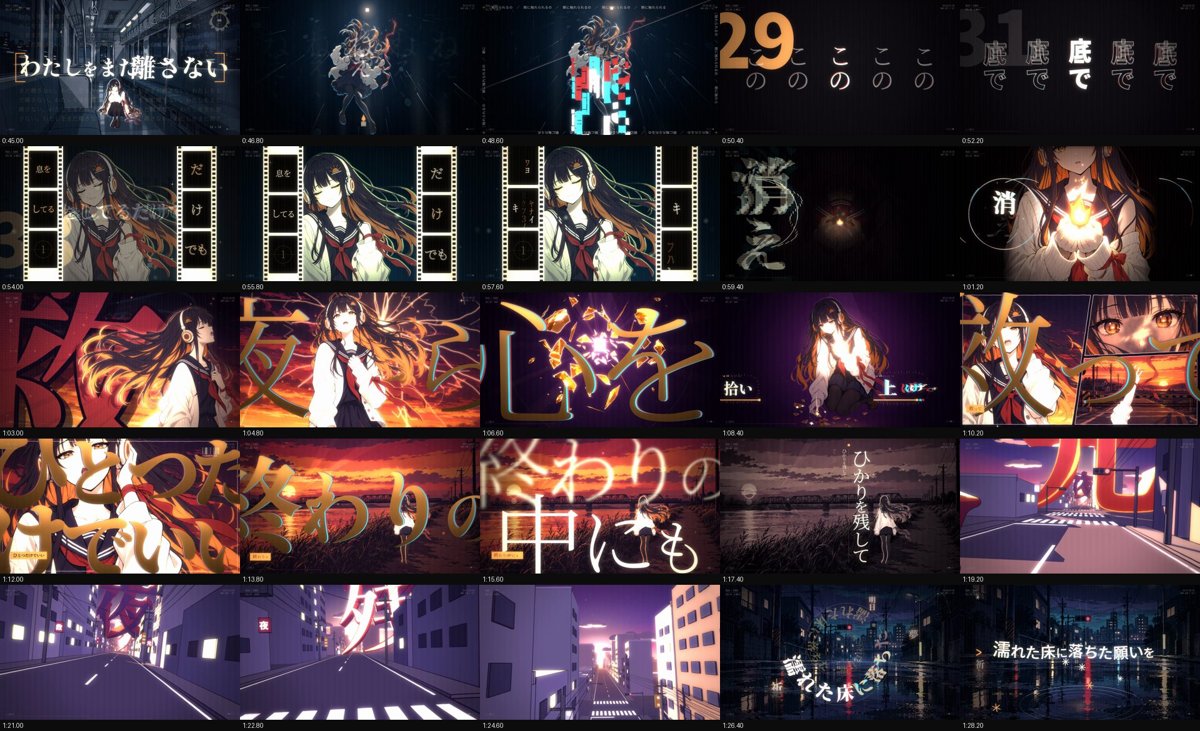
Illustration · not a resultFrom the EGSECDA/vocaloid-style-mv-pipeline README — shows the whole collection, not only this skill.source ↗
Make an original animated music video (MV / PV) for a song from its audio file plus lyrics, in the Vocaloid / J-pop lyric-video tradition: 手書き/tegaki (V家手书, 手描きMV, ボカロPV), 文字PV and kinetic typography (リリックモーション, リリックビデオ, 歌詞動画, 歌词视频, 动态歌词), anime-illustration MVs with an original character — for any mood, from dark ballads to bright upbeat summer pop.
by EGSECDA·MIT license·★ 169 Stars on the repo·GitHub ↗
npx degit EGSECDA/vocaloid-style-mv-pipeline/skills/vocaloid-style-mv#main ~/.claude/skills/vocaloid-style-mvChecked ·commit main
Files of Vocaloid-style MV pipeline (手書き / 文字PV)
Show the full text83 lines
Vocaloid-style MV pipeline (手書き / 文字PV)
This skill turns a song + its lyrics into a finished, showreel-quality lyric MV (16:9 master, 9:16 vertical version, share encodes). It packages a pipeline that was used to make 「残光」 (Music / Lyrics / Movie:NikusonP) — a 3:46 MV with an original V家-style singer, a cracked-sky / afterglow concept, JIZURA typography, two Blender 3D sequences and ~70 beat-locked shots, rendered in ~4 minutes on an RTX 3080.
The goal is a film of similar craft, not a copy. Every song gets its own concept, character, palette, motifs and storyboard derived from its lyrics and structure. The scene library and the 残光 case study are a toolbox and a worked example; reusing their look wholesale defeats the point. references/02-creative-direction.md explains how to find a new concept and gives a variation matrix.
What you have
template/— a complete project: the engine (engine/), scene library (engine/scenes/*.js), JIZURA adapter (jizura/), all tools (tools/), Blender shot scripts (blender/), palettes/LUTs, a procedural demo (demo/, synthetic song) and a default commented timeline.scripts/new_project.py— scaffold a project from the template (--song,--lyrics,--title,--title-sub,--artist,--credit,--setup).scripts/check_env.py— what's installed.references/— the method. Read the ones you need, when you need them (table at the end).- The 残光 case study (storyboard, timeline, prompts, contact sheets) is not inside this skill folder. In a repo checkout it is
examples/zanko/(two levels above this file). With only the installed skill, read it online: https://github.com/EGSECDA/vocaloid-style-mv-pipeline/tree/main/examples/zanko (raw:https://raw.githubusercontent.com/EGSECDA/vocaloid-style-mv-pipeline/main/examples/zanko/<FILE>). Everyexamples/zanko/...path inreferences/means this folder.
Requirements
Required: Node 20+, Python 3.10+, ffmpeg/ffprobe, Microsoft Edge or Chrome (Playwright drives it headless with the GPU).
Optional but used for full quality: NVIDIA GPU (WebGL + NVENC), an image generator (the kit wraps the Codex CLI's native image tool; any model works with the chroma-key method), Blender 5.x (3D shots), the lyric-timing set (faster-whisper, onnxruntime, pykakasi + CPU torch/torchaudio 2.8; only when the lyrics have no timestamps).
Run python <skill>/scripts/check_env.py first (<skill> = the folder containing this SKILL.md) and tell the user what is missing and what that costs (e.g. "no Blender → I'll do the 3D moments as 2.5D").
The workflow (phases, deliverables, checkpoints)
Work in phases; each ends with something on disk you can show. Details, commands and acceptance criteria: references/01-workflow.md.
- Scaffold —
python <skill>/scripts/new_project.py <dir> --song <song.wav> --lyrics <lyrics> --title <title> --title-sub <Latin subtitle> --artist <artist> --credit "Music / Lyrics / Movie:<artist>" --setup. The four strings setZ.TITLE,Z.TITLE_SUB,Z.ARTISTandZ.CREDITinengine/timeline.js(HUD, end card, 9:16 header and footer); ask the user for the exact credit line.--creditwithout--artisttakes the artist from after the credit's colon;--titlewithout--title-subclears the demo's subtitle. Setup installs deps, fetches fonts, clones JIZURA (pinned to the tested commit) and builds it.- Plain-text lyrics (no timestamps — the usual case) need forced alignment for the timings: add
--setup-args "-Lyrics"(macOS / Linux:--setup-args "--lyrics"), then install the alignment deps once inside the project:python -m pip install --target vendor/pydeps_torch torch==2.8.0 torchaudio==2.8.0 --index-url https://download.pytorch.org/whl/cpu. - Smoke test (recommended on a new machine): run the demo in a separate throwaway project —
python <skill>/scripts/new_project.py _smoke --setup, then the steps it prints (demo/README.md). Never run it in the film's project:demo/make_demo_song.pywritesaudio/song.wav(it refuses to replace an existing file unless--force), and the demo steps overwriteanalysis/lyrics_mv.lrcandanalysis/sections.json. Run it before scaffolding the film and the film's project can reuse its fonts:--setup-args "-FontsFrom ../_smoke/engine/fonts"(bash:--fonts-from; sibling folders; combine as"-Lyrics -FontsFrom …").
- Plain-text lyrics (no timestamps — the usual case) need forced alignment for the timings: add
- Listen —
python tools/analyze_audio.py→analysis/audio.json(beats, downbeats, bars, sections, stops, impacts) +envelope_30fps.json. Curate section labels. Lyrics: always ask for / use the official lyrics; transcription is only for when nothing else exists, forced alignment gives plain-text lyrics their timings. Produceanalysis/lyrics_mv.lrcwith JIZURA markup. →references/03-audio-and-lyrics.md - Concept — from the lyrics: thesis, logline, emotional arc, colour script, master shapes/motifs, character bible, signature moments. Write
docs/CONCEPT.md. Checkpoint: show the user the concept in a few lines before generating art. →references/02-creative-direction.md - Character & assets — write the character bible, generate 3 master candidates, let the user (or you) pick
REF_master.png, then every pose with the master as reference + a shared style block; backgrounds from the storyboard's locations; chroma-key to RGBA. Checkpoint: contact sheet of masters. →references/04-asset-generation.md - Storyboard → timeline — shot list mapped to bars and lyric lines (
docs/STORYBOARD.md), thenengine/timeline.js(shots with scene/args/lyric plan/post/transition). Times come fromaudio.json(B(n)bar starts,nb(t)nearest beat) so every cut lands on the music. →references/01-workflow.md,references/05-engine.md - Build — reuse/adapt scenes from the library, write new ones for the song's signature moments, set up JIZURA plans + curation (
references/06-jizura.md), optional Blender sequences (references/07-blender-3d.md). Parallelise: one agent per scene file (disjoint ownership), each with a test timeline and a visual review loop. - Review — stills at shot midpoints → contact sheets → fix; then full render (~4 min) → review sheets every 1.5–2 s → fix → re-render. Use the checklist and known failure modes in
references/09-qa-and-lessons.md. This loop is where most of the quality comes from; budget for 2–3 passes. - Deliver — 16:9 master (NVENC CQ16), share encode (x264 CRF 19), 9:16 vertical re-layout, previews; credits in the title lockup, outro and end card (ask the user for the exact credit line, e.g. "Music / Lyrics / Movie:NikusonP"). Optional upload (
tools/gigafile_upload.mjs). →references/08-render-and-delivery.md
Principles that make it look like a showreel (why they matter)
- Everything is a pure function of song time
t. Parallel render workers seek arbitrary frames; any wall-clock or unseeded randomness makes frames differ between workers and flicker at segment joins. Particles are closed-form; noise is seeded (Z.rnd,Z.rng,Z.noise1). - The beat grid is law. Tempo drifts (128→132 BPM in 残光), so cuts use real beat/bar times from
audio.json, nevern * 60/bpm. Lyrics appear ~0.2 s before the voice; cuts land on downbeats; big moments on chorus downbeats, stops and post-chorus hits. - Layers, not one canvas. Scene layer (illustration, boil + palette grade) → text layer (JIZURA lyrics, custom type, HUD; stays crisp) → foreground layer (a character drawn in front of the lyrics — text passing behind the singer is one of the strongest looks) → WebGL post (line boil on 2s, gradient-map LUTs, bloom, CA, grain, flashes).
- Restraint, then bursts. Quiet verses with long holds and one effect at a time make choruses hit. Escalate per section; the last chorus brings back earlier ideas "on fire" plus one new move. End on an idea (the 残光 ending is a hard cut on the song's dead stop and a cyan retinal afterimage).
- Typography is half the film. JIZURA gives a huge vocabulary, but it must be curated (some parts draw opaque cards, the wrong colour schemes vanish — dark text at night, ivory text on a daylight sky — gimmick layouts break the mood). Custom typographic scenes carry the キメ lines.
- Match the film's key. The template, the scene library and the 残光 notes are tuned for low-key dusk/night frames: dark-scheme lyrics (light text), bloom from a 0.72 threshold, amber rims and glows, black type cards, the dusk palettes P1–P5. For a bright film (summer, noon, sea, snow) change those defaults before the first still:
references/02-creative-direction.md§13. - Original character, consistent. Never imitate an existing character (no Hatsune Miku likeness). One master reference image anchors every pose.
- Look at every result. Render stills, view them (images are readable), critique like an art director, fix, repeat. Don't trust that code "should" look right.
Working style
- Keep the user in the loop at the checkpoints (concept, character master, first stills, first full render) — a 3–6 line summary plus an image is enough.
- Prefer parallel subagents for independent scene files / asset batches / Blender shots, each owning disjoint files and saving work to disk early (long runs can be interrupted by usage limits; on-disk work survives and can be resumed).
- Measure, don't guess: per-frame render cost (
tools/stills.mjsprints ms), render throughput, asset counts. - Credit the artist on screen and in README files; ask for the credit line if not given.
References (read when the phase needs it)
| file | read when |
|---|---|
references/01-workflow.md |
starting a project; planning phases, commands, acceptance criteria, time budget |
references/02-creative-direction.md |
turning lyrics into a concept, colour script, motifs, storyboard; making it different (variation matrix); bright / daytime films (§13) |
references/03-audio-and-lyrics.md |
audio analysis fields, section curation, lyrics (official / transcription / alignment), LRC markup |
references/04-asset-generation.md |
character bible, prompts, Codex image generation, chroma key, consistency |
references/05-engine.md |
engine API, layers, post params, transitions, scene library catalogue, writing new scenes |
references/06-jizura.md |
JIZURA lyric layer: plans, styles, curation deny-lists, centre-free, vertical, debugging |
references/07-blender-3d.md |
toon 3D sequences keyed to the beat, line art, timings |
references/08-render-and-delivery.md |
rendering, encodes, vertical 9:16 re-layout, review tooling, upload |
references/09-qa-and-lessons.md |
review checklist and every failure mode we hit (with fixes) |
references/effect-cookbook.md |
menu of motion/FX recipes, palette and typography systems |
Author of the kit and of 「残光」: NikusonP. JIZURA 字面: github.com/852wa/JIZURA, MIT licence (Copyright (c) 2026 hakoniwa).
| 1 | |
| 2 | name vocaloid-style-mv |
| 3 | description >- |
| 4 | Make an original animated music video (MV / PV) for a song from its audio file plus lyrics, in the Vocaloid / |
| 5 | J-pop lyric-video tradition: 手書き/tegaki (V家手书, 手描きMV, ボカロPV), 文字PV and kinetic typography (リリックモーション, |
| 6 | リリックビデオ, 歌詞動画, 歌词视频, 动态歌词), anime-illustration MVs with an original character — for any mood, from |
| 7 | dark ballads to bright upbeat summer pop. Renders to MP4 with a deterministic Canvas2D/WebGL2 engine in a headless |
| 8 | browser JIZURA lyric motion, AI-generated art, optional Blender toon 3D, beat-locked editing, 9:16 vertical/Shorts |
| 9 | version. Use it whenever the user wants a music video, MV, PV, lyric video or beat-synced animation for a song, e.g. |
| 10 | "make an MV for my song", "turn this track into a lyric video", "给这首歌做个MV/PV", "做个V家手书", "この曲のMVを作って", |
| 11 | "ボカロPV作って", "縦型ショートも" — even if they only give a .wav/.mp3 and say "make a cool video for it". Not for |
| 12 | editing existing footage or clip compilations. |
| 13 | |
| 14 | |
| 15 | # Vocaloid-style MV pipeline (手書き / 文字PV) |
| 16 | |
| 17 | This skill turns **a song + its lyrics** into a finished, showreel-quality lyric MV (16:9 master, 9:16 vertical version, share encodes). It packages a pipeline that was used to make 「残光」 (Music / Lyrics / Movie:**NikusonP**) — a 3:46 MV with an original V家-style singer, a cracked-sky / afterglow concept, JIZURA typography, two Blender 3D sequences and ~70 beat-locked shots, rendered in ~4 minutes on an RTX 3080. |
| 18 | |
| 19 | **The goal is a film of similar craft, not a copy.** Every song gets its own concept, character, palette, motifs and storyboard derived from *its* lyrics and structure. The scene library and the 残光 case study are a toolbox and a worked example; reusing their look wholesale defeats the point. `references/02-creative-direction.md` explains how to find a new concept and gives a variation matrix. |
| 20 | |
| 21 | ## What you have |
| 22 | |
| 23 | `template/` — a complete project: the engine (`engine/`), scene library (`engine/scenes/*.js`), JIZURA adapter (`jizura/`), all tools (`tools/`), Blender shot scripts (`blender/`), palettes/LUTs, a procedural **demo** (`demo/`, synthetic song) and a default commented timeline. |
| 24 | `scripts/new_project.py` — scaffold a project from the template (`--song`, `--lyrics`, `--title`, `--title-sub`, `--artist`, `--credit`, `--setup`). `scripts/check_env.py` — what's installed. |
| 25 | `references/` — the method. Read the ones you need, when you need them (table at the end). |
| 26 | The 残光 case study (storyboard, timeline, prompts, contact sheets) is **not** inside this skill folder. In a repo checkout it is `examples/zanko/` (two levels above this file). With only the installed skill, read it online: https://github.com/EGSECDA/vocaloid-style-mv-pipeline/tree/main/examples/zanko (raw: `https://raw.githubusercontent.com/EGSECDA/vocaloid-style-mv-pipeline/main/examples/zanko/<FILE>`). Every `examples/zanko/...` path in `references/` means this folder. |
| 27 | |
| 28 | ## Requirements |
| 29 | |
| 30 | Required: Node 20+, Python 3.10+, ffmpeg/ffprobe, Microsoft Edge or Chrome (Playwright drives it headless with the GPU). |
| 31 | Optional but used for full quality: NVIDIA GPU (WebGL + NVENC), an image generator (the kit wraps the **Codex CLI**'s native image tool; any model works with the chroma-key method), Blender 5.x (3D shots), the lyric-timing set (faster-whisper, onnxruntime, pykakasi + CPU torch/torchaudio 2.8; only when the lyrics have no timestamps). |
| 32 | Run `python <skill>/scripts/check_env.py` first (`<skill>` = the folder containing this SKILL.md) and tell the user what is missing and what that costs (e.g. "no Blender → I'll do the 3D moments as 2.5D"). |
| 33 | |
| 34 | ## The workflow (phases, deliverables, checkpoints) |
| 35 | |
| 36 | Work in phases; each ends with something on disk you can show. Details, commands and acceptance criteria: `references/01-workflow.md`. |
| 37 | |
| 38 | **Scaffold** — `python <skill>/scripts/new_project.py <dir> --song <song.wav> --lyrics <lyrics> --title <title> --title-sub <Latin subtitle> --artist <artist> --credit "Music / Lyrics / Movie:<artist>" --setup`. The four strings set `Z.TITLE`, `Z.TITLE_SUB`, `Z.ARTIST` and `Z.CREDIT` in `engine/timeline.js` (HUD, end card, 9:16 header and footer); ask the user for the exact credit line. `--credit` without `--artist` takes the artist from after the credit's colon; `--title` without `--title-sub` clears the demo's subtitle. Setup installs deps, fetches fonts, clones JIZURA (pinned to the tested commit) and builds it. |
| 39 | **Plain-text lyrics** (no timestamps — the usual case) need forced alignment for the timings: add `--setup-args "-Lyrics"` (macOS / Linux: `--setup-args "--lyrics"`), then install the alignment deps once inside the project: `python -m pip install --target vendor/pydeps_torch torch==2.8.0 torchaudio==2.8.0 --index-url https://download.pytorch.org/whl/cpu`. |
| 40 | **Smoke test** (recommended on a new machine): run the demo in a **separate throwaway project** — `python <skill>/scripts/new_project.py _smoke --setup`, then the steps it prints (`demo/README.md`). Never run it in the film's project: `demo/make_demo_song.py` writes `audio/song.wav` (it refuses to replace an existing file unless `--force`), and the demo steps overwrite `analysis/lyrics_mv.lrc` and `analysis/sections.json`. Run it before scaffolding the film and the film's project can reuse its fonts: `--setup-args "-FontsFrom ../_smoke/engine/fonts"` (bash: `--fonts-from`; sibling folders; combine as `"-Lyrics -FontsFrom …"`). |
| 41 | **Listen** — `python tools/analyze_audio.py` → `analysis/audio.json` (beats, downbeats, bars, sections, stops, impacts) + `envelope_30fps.json`. Curate section labels. Lyrics: **always ask for / use the official lyrics**; transcription is only for when nothing else exists, forced alignment gives plain-text lyrics their timings. Produce `analysis/lyrics_mv.lrc` with JIZURA markup. → `references/03-audio-and-lyrics.md` |
| 42 | **Concept** — from the lyrics: thesis, logline, emotional arc, colour script, master shapes/motifs, character bible, signature moments. Write `docs/CONCEPT.md`. **Checkpoint:** show the user the concept in a few lines before generating art. → `references/02-creative-direction.md` |
| 43 | **Character & assets** — write the character bible, generate 3 master candidates, let the user (or you) pick `REF_master.png`, then every pose with the master as reference + a shared style block; backgrounds from the storyboard's locations; chroma-key to RGBA. **Checkpoint:** contact sheet of masters. → `references/04-asset-generation.md` |
| 44 | **Storyboard → timeline** — shot list mapped to bars and lyric lines (`docs/STORYBOARD.md`), then `engine/timeline.js` (shots with scene/args/lyric plan/post/transition). Times come from `audio.json` (`B(n)` bar starts, `nb(t)` nearest beat) so every cut lands on the music. → `references/01-workflow.md`, `references/05-engine.md` |
| 45 | **Build** — reuse/adapt scenes from the library, write new ones for the song's signature moments, set up JIZURA plans + curation (`references/06-jizura.md`), optional Blender sequences (`references/07-blender-3d.md`). Parallelise: one agent per scene file (disjoint ownership), each with a test timeline and a visual review loop. |
| 46 | **Review** — stills at shot midpoints → contact sheets → fix; then full render (~4 min) → review sheets every 1.5–2 s → fix → re-render. Use the checklist and known failure modes in `references/09-qa-and-lessons.md`. This loop is where most of the quality comes from; budget for 2–3 passes. |
| 47 | **Deliver** — 16:9 master (NVENC CQ16), share encode (x264 CRF 19), 9:16 vertical re-layout, previews; credits in the title lockup, outro and end card (ask the user for the exact credit line, e.g. "Music / Lyrics / Movie:NikusonP"). Optional upload (`tools/gigafile_upload.mjs`). → `references/08-render-and-delivery.md` |
| 48 | |
| 49 | ## Principles that make it look like a showreel (why they matter) |
| 50 | |
| 51 | **Everything is a pure function of song time `t`.** Parallel render workers seek arbitrary frames; any wall-clock or unseeded randomness makes frames differ between workers and flicker at segment joins. Particles are closed-form; noise is seeded (`Z.rnd`, `Z.rng`, `Z.noise1`). |
| 52 | **The beat grid is law.** Tempo drifts (128→132 BPM in 残光), so cuts use real beat/bar times from `audio.json`, never `n * 60/bpm`. Lyrics appear ~0.2 s before the voice; cuts land on downbeats; big moments on chorus downbeats, stops and post-chorus hits. |
| 53 | **Layers, not one canvas.** Scene layer (illustration, boil + palette grade) → text layer (JIZURA lyrics, custom type, HUD; stays crisp) → foreground layer (a character drawn *in front of* the lyrics — text passing behind the singer is one of the strongest looks) → WebGL post (line boil on 2s, gradient-map LUTs, bloom, CA, grain, flashes). |
| 54 | **Restraint, then bursts.** Quiet verses with long holds and one effect at a time make choruses hit. Escalate per section; the last chorus brings back earlier ideas "on fire" plus one new move. End on an idea (the 残光 ending is a hard cut on the song's dead stop and a cyan retinal afterimage). |
| 55 | **Typography is half the film.** JIZURA gives a huge vocabulary, but it must be curated (some parts draw opaque cards, the wrong colour schemes vanish — dark text at night, ivory text on a daylight sky — gimmick layouts break the mood). Custom typographic scenes carry the キメ lines. |
| 56 | **Match the film's key.** The template, the scene library and the 残光 notes are tuned for low-key dusk/night frames: dark-scheme lyrics (light text), bloom from a 0.72 threshold, amber rims and glows, black type cards, the dusk palettes P1–P5. For a bright film (summer, noon, sea, snow) change those defaults before the first still: `references/02-creative-direction.md` §13. |
| 57 | **Original character, consistent.** Never imitate an existing character (no Hatsune Miku likeness). One master reference image anchors every pose. |
| 58 | **Look at every result.** Render stills, view them (images are readable), critique like an art director, fix, repeat. Don't trust that code "should" look right. |
| 59 | |
| 60 | ## Working style |
| 61 | |
| 62 | Keep the user in the loop at the checkpoints (concept, character master, first stills, first full render) — a 3–6 line summary plus an image is enough. |
| 63 | Prefer parallel subagents for independent scene files / asset batches / Blender shots, each owning disjoint files and saving work to disk early (long runs can be interrupted by usage limits; on-disk work survives and can be resumed). |
| 64 | Measure, don't guess: per-frame render cost (`tools/stills.mjs` prints ms), render throughput, asset counts. |
| 65 | Credit the artist on screen and in README files; ask for the credit line if not given. |
| 66 | |
| 67 | ## References (read when the phase needs it) |
| 68 | |
| 69 | | file | read when | |
| 70 | |---|---| |
| 71 | | `references/01-workflow.md` | starting a project; planning phases, commands, acceptance criteria, time budget | |
| 72 | | `references/02-creative-direction.md` | turning lyrics into a concept, colour script, motifs, storyboard; making it *different* (variation matrix); bright / daytime films (§13) | |
| 73 | | `references/03-audio-and-lyrics.md` | audio analysis fields, section curation, lyrics (official / transcription / alignment), LRC markup | |
| 74 | | `references/04-asset-generation.md` | character bible, prompts, Codex image generation, chroma key, consistency | |
| 75 | | `references/05-engine.md` | engine API, layers, post params, transitions, scene library catalogue, writing new scenes | |
| 76 | | `references/06-jizura.md` | JIZURA lyric layer: plans, styles, curation deny-lists, centre-free, vertical, debugging | |
| 77 | | `references/07-blender-3d.md` | toon 3D sequences keyed to the beat, line art, timings | |
| 78 | | `references/08-render-and-delivery.md` | rendering, encodes, vertical 9:16 re-layout, review tooling, upload | |
| 79 | | `references/09-qa-and-lessons.md` | review checklist and every failure mode we hit (with fixes) | |
| 80 | | `references/effect-cookbook.md` | menu of motion/FX recipes, palette and typography systems | |
| 81 | |
| 82 | Author of the kit and of 「残光」: **NikusonP**. JIZURA 字面: github.com/852wa/JIZURA, MIT licence (Copyright (c) 2026 hakoniwa). |
| 83 |
Discussion
Alternatives
Browse more free Claude skills or everything in Sales.