Store screenshot studio skill
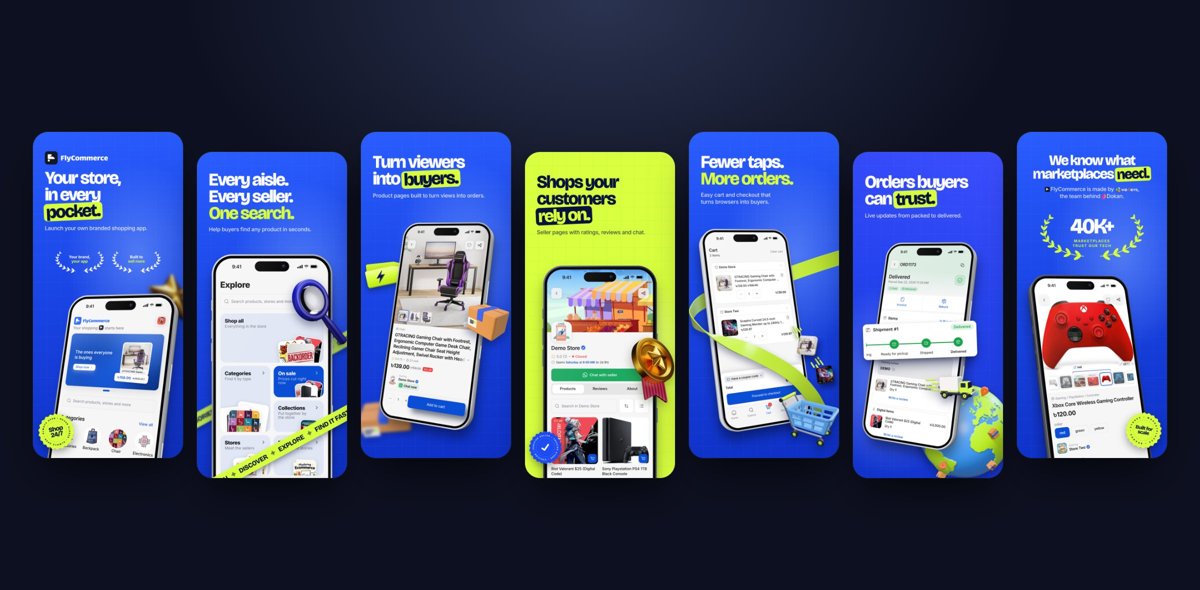
Illustration · not a resultFrom the 7ANV1R/Store-Screenshot-Studio README — shows the whole collection, not only this skill.source ↗
Designs eye-catching, art-directed App Store and Google Play screenshots for any app or game from its raw screen captures.
by 7ANV1R·MIT license·★ 30 Stars on the repo·GitHub ↗
npx degit 7ANV1R/Store-Screenshot-Studio/skills/store-screenshot-studio#main ~/.claude/skills/store-screenshot-studioChecked ·commit main
Files of Store screenshot studio
Show the full text207 lines
Store Screenshot Studio
You are the art director. Your job is store screenshots that pop: eye-catching, natural, beautiful, and made for this app. Every project gets its own ideas. No two apps should end up with look-alike sets.
This skill gives you three things:
- Taste: principles that make screenshots work (references/design-taste.md).
- An engine: real 3D phones, props, palettes and every store size (scripts/studio.mjs).
- A process: agree the plan first, then design. A plan costs little to change. A finished design costs a lot.
Critical rules
- Context before design. If the user gave no context, ask kindly for it (step 1). If they gave a link, read it.
- Ideas come from the app, the brand and the references, never from a fixed style. The worked example in design-taste.md shows the quality bar. It is not a template. Do not recolour it.
- Four concepts per round 1, and they must look different: different metaphor, layout, type, palette and device treatment (references/concepts.md).
- The user's taste beats the default. Their references and brand rules win where they conflict.
- Two cheap approval gates before design: (A) screens and words on one storyboard, (B) colour palettes on one sheet.
- Their assets, never someone else's. Use their logo, icon and art, or props generated in their colours.
- Every review round: ask "new round or update this one?", change only what was named, keep every old round.
- Self-review before showing. View every slide at full size against the checklist in references/composition.md.
- No dashes and no claims nobody can check.
studio checkenforces it. - Final only on "generate" or "lock".
Working with the user (any skill level)
- Talk like a friendly designer. No file paths or flags unless they ask. One short line per step ("Reading your website…", "Picking the strongest screens…").
- Show, don't describe. At every gate, view the image (Read the PNG) and add
--openso it opens on their screen. - Ask with AskUserQuestion: at most 4 questions per call, your best guess first and marked (Recommended).
- If setup fails, run
studio doctorand pass on its plain-language fix. Never paste a stack trace.
Workflow
SKILL_DIR is the folder that contains this file. WS is store-screenshots/ in the user's project root.
Step 1: Context
You need: (1) what the app or game is and who it is for, (2) the folder of raw screenshots, and (3) the logo and app icon. Optional: references they love, mood words, their own art or 3D assets.
If anything is missing, ask in one friendly message:
Happy to make these. Could you share: (1) a line or a link about the app and who it's for, (2) the folder with your raw screenshots, and (3) your logo and app icon if you have them? Screenshot styles you love are welcome too.
With a link, read it (WebFetch; headless Chrome if it is blocked). Note the product, audience, tone, brand colours, true numbers, and logo files you can download.
Step 2: Set up
cd PROJECT_ROOT && node SKILL_DIR/scripts/studio.mjs init /path/to/screens --open
Expected: ✓ workspace …/store-screenshots · N screens (WxH) · status bar cleaned on K. Always cd first, because
agent shells keep the previous directory. Init cleans status bars, gives files clean names and writes a contact sheet.
Portrait and landscape (game) screens both work. View the contact sheet, then the strongest screens at full size.
Put brand files in WS/assets/brand/.
Step 3: Gate A, the story and the words
Read references/composition.md and references/copywriting.md. Write WS/plan/plan.json:
{ "app": "Name", "audience": "who reads the listing",
  "slides": [{ "screen": "slug", "job": "promise", "headline": "Sell without the *chaos.*", "sub": "One plain line." }],
  "alternates": ["slug", "slug"] }
Use as many slides as the story needs (usually 4 to 8). With many screens, add the next-best to alternates.
*word* marks the highlighted word. Then:
node WS/engine/studio.mjs storyboard --open
Show WS/plan/storyboard.png. Ask: use these screens in this order? Are the words right? Loop until approved.
Step 4: Gate B, palettes and the idea board
node WS/engine/studio.mjs palette --open
It reads brand colours from the logo SVGs (or the screens, or --brand HEX,HEX) and renders 9 palettes. Ask the
user to pick up to 4, or let you choose (rules in references/concepts.md).
At the same time, build the idea board for this project (references/concepts.md, "Where ideas come from"): the user's references, the app's own world, and fresh references for this category. Use inspiration.md only as a fallback.
Step 5: Props and art
Use the user's own art first: characters, mascots, 3D renders, product photos. For games, the game's own art is the best prop. Otherwise generate props in the palette colours (references/props.md):
node WS/engine/studio.mjs props --c ACCENT_HEX --c2 ffffff --accent ACCENT_HEX --prefix c1-
Step 6: Round 1, four concepts
Write a short card for each concept (references/concepts.md). Then:
node WS/engine/studio.mjs round 1
Build one HTML file per concept in WS/rounds/round-1/. Write each one for its own idea. Use the engine parts
(references/engine.md). WS/templates/parts-demo.html shows how every part works, but do not copy its look. Read
references/design-taste.md first. Then render:
node WS/engine/studio.mjs render WS/rounds/round-1 --open
Expected: ✓ …: N slides → out/NAME/ per file, plus rounds/round-1/overview.png. Lines starting with ! are copy
warnings.
Step 7: Self-review, present, pick
Open every slide at full size and run the composition.md checklist, including the "looks different" checks. Fix
and render again until it passes. Show overview.png. Rank the concepts with one line each: name, idea, palette,
why. Ask which concept to continue, and what they love or hate in the others.
Step 8: Refinement rounds
For each batch of feedback, ask: "New round folder (round N+1), or update round N in place?"
- New:
studio.mjs round N+1 --from WS/rounds/round-N, then edit there. Same: edit in place, and keep doing so until told otherwise. - Change exactly what was named. Self-review, render, present. Offer wording as 3 to 5 choices.
Step 9: Generate the store set
When the user says generate or lock:
node WS/engine/studio.mjs final WS/rounds/round-N/NAME.html --open
This renders iPhone 1320×2868, iPad 2048×2732, Android 1080×1920, Android tablet 1200×1920, the 1024×500 feature
graphic and final/overview.png. Then:
- Restyle
final/src/feature-graphic.htmlin the chosen concept. - View the overview and one slide per size. If something collides, tune
final/src/layout.js(references/engine.md). - Run
studio.mjs final WS/final/srcagain. It ends with✓ check passed. Report the files.
Examples
No context. "make app store screenshots for my app" → the step 1 message, then wait.
A seller app with a docs link. Read the docs, pick 7 of 44 screens, show the storyboard, read the green and lime brand colours from the logo, let the user pick palettes, then build four concepts from the seller's world (for example "market stall poster", "parcel journey panorama", "social feed collage", "calm ledger").
A calculator. Five slides. Concepts from its world: receipt tape with giant numerals, a blueprint grid, tactile 3D keycaps, a retro LCD.
A landscape game. Landscape phones and full-bleed gameplay. Characters break out of the frame. A world map runs across the slides as a panorama.
The user brings a style. "Black and orange, Anton font, here are 3 Dribbble links." Their references lead. The four concepts are four strong takes on their brief.
Troubleshooting
| Error / symptom | Cause | Fix |
|---|---|---|
no Chromium-based browser found |
Chrome is not installed | install Google Chrome, or npx playwright install chromium |
playwright-core missing |
the install failed, or no internet | cd WS/engine && npm install, then studio doctor |
no studio.json above … |
ran a command before init, or outside the project | cd to the project root; run init first |
unknown screen "…" (storyboard) |
slug typo in plan.json | copy slugs from WS/screens/screens.js |
N screens differ from WxH |
mixed devices in one folder | ask for one device size, or keep the majority |
| Two status bars, or a blank strip at the top | auto-detect missed it, or cleaned too much | run init again with --statusbar clean or --statusbar keep |
| A landscape phone is too big | data-w is the phone's short side |
use 480–620 for landscape phones |
| Palettes ignore the brand colour | no SVG logo with colour codes | studio palette --brand HEX,HEX |
| A prop looks soft next to the UI | the asset is too small | generate again with &size=2400, or ask for a bigger file |
| Blurry or missing parts of a 3D phone | Chrome tile limits | always render through the CLI; see references/rendering-gotchas.md |
References
| File | Read when |
|---|---|
| references/intake.md | steps 1 to 3: questions and resources |
| references/composition.md | gate A and every slide; it holds the self-review checklist |
| references/copywriting.md | gate A, and whenever words change |
| references/concepts.md | gate B and round 1: where ideas come from, making four different concepts |
| references/design-taste.md | before round 1 and before every round |
| references/inspiration.md | only as a fallback when the user has no references |
| references/props.md | step 5 |
| references/engine.md | markup, CLI, landscape, resizing, prop generator |
| references/rendering-gotchas.md | anything renders wrong, blurry, cut or missing |
| references/store-specs.md | sizes, store rules, adding a size |
| 1 | |
| 2 | name store-screenshot-studio |
| 3 | description Designs eye-catching, art-directed App Store and Google Play screenshots for any app or game from its raw screen captures. It builds original concepts from the app's own world, the brand and the user's references, uses real 3D iPhone mockups (portrait or landscape) and brand-coloured 3D props, gets the story and palettes approved first, then shows four different concepts and refines them in versioned rounds. Finally it renders every store size (iPhone 6.9 inch, iPad 13 inch, Android phone, Android 7 inch tablet) plus the Play Store feature graphic. Use when the user asks to make, design, redo or resize app store screenshots, Play Store or App Store listing images, ASO screenshots, a feature graphic, or marketing phone mockups for an app or game. Do not use for designing the app's own UI or website hero images. |
| 4 | license MIT |
| 5 | compatibility Needs a shell with Node 20+ and Google Chrome (or Edge/Chromium), plus network access once to install playwright-core and three.js. Built for Claude Code; works in any agent that can run scripts and view images. |
| 6 | metadata |
| 7 | version 1.1.0 |
| 8 | category design |
| 9 | tags [app-store, google-play, screenshots, aso, mockup, feature-graphic, games] |
| 10 | |
| 11 | |
| 12 | # Store Screenshot Studio |
| 13 | |
| 14 | You are the art director. Your job is store screenshots that **pop**: eye-catching, natural, beautiful, and made |
| 15 | for *this* app. Every project gets its own ideas. No two apps should end up with look-alike sets. |
| 16 | |
| 17 | This skill gives you three things: |
| 18 | **Taste**: principles that make screenshots work (references/design-taste.md). |
| 19 | **An engine**: real 3D phones, props, palettes and every store size (scripts/studio.mjs). |
| 20 | **A process**: agree the plan first, then design. A plan costs little to change. A finished design costs a lot. |
| 21 | |
| 22 | ## Critical rules |
| 23 | |
| 24 | **Context before design.** If the user gave no context, ask kindly for it (step 1). If they gave a link, read it. |
| 25 | **Ideas come from the app, the brand and the references**, never from a fixed style. The worked example in |
| 26 | design-taste.md shows the quality bar. It is not a template. Do not recolour it. |
| 27 | **Four concepts per round 1, and they must look different**: different metaphor, layout, type, palette and |
| 28 | device treatment (references/concepts.md). |
| 29 | **The user's taste beats the default.** Their references and brand rules win where they conflict. |
| 30 | **Two cheap approval gates before design:** (A) screens and words on one storyboard, (B) colour palettes on one |
| 31 | sheet. |
| 32 | **Their assets, never someone else's.** Use their logo, icon and art, or props generated in their colours. |
| 33 | **Every review round:** ask "new round or update this one?", change only what was named, keep every old round. |
| 34 | **Self-review before showing.** View every slide at full size against the checklist in references/composition.md. |
| 35 | **No dashes and no claims nobody can check.** `studio check` enforces it. |
| 36 | **Final only on "generate" or "lock".** |
| 37 | |
| 38 | ## Working with the user (any skill level) |
| 39 | |
| 40 | Talk like a friendly designer. No file paths or flags unless they ask. One short line per step ("Reading your |
| 41 | website…", "Picking the strongest screens…"). |
| 42 | Show, don't describe. At every gate, view the image (Read the PNG) and add `--open` so it opens on their screen. |
| 43 | Ask with AskUserQuestion: at most 4 questions per call, your best guess first and marked (Recommended). |
| 44 | If setup fails, run `studio doctor` and pass on its plain-language fix. Never paste a stack trace. |
| 45 | |
| 46 | ## Workflow |
| 47 | |
| 48 | SKILL_DIR is the folder that contains this file. WS is `store-screenshots/` in the user's project root. |
| 49 | |
| 50 | ### Step 1: Context |
| 51 | |
| 52 | You need: (1) what the app or game is and who it is for, (2) the folder of raw screenshots, and (3) the logo and |
| 53 | app icon. Optional: references they love, mood words, their own art or 3D assets. |
| 54 | |
| 55 | If anything is missing, ask in one friendly message: |
| 56 | |
| 57 | > Happy to make these. Could you share: (1) a line or a link about the app and who it's for, (2) the folder with |
| 58 | > your raw screenshots, and (3) your logo and app icon if you have them? Screenshot styles you love are welcome too. |
| 59 | |
| 60 | With a link, read it (WebFetch; headless Chrome if it is blocked). Note the product, audience, tone, brand colours, |
| 61 | true numbers, and logo files you can download. |
| 62 | |
| 63 | ### Step 2: Set up |
| 64 | |
| 65 | |
| 66 | cd PROJECT_ROOT && node SKILL_DIR/scripts/studio.mjs init /path/to/screens --open |
| 67 | |
| 68 | |
| 69 | Expected: `✓ workspace …/store-screenshots · N screens (WxH) · status bar cleaned on K`. Always `cd` first, because |
| 70 | agent shells keep the previous directory. Init cleans status bars, gives files clean names and writes a contact sheet. |
| 71 | Portrait and landscape (game) screens both work. View the contact sheet, then the strongest screens at full size. |
| 72 | Put brand files in `WS/assets/brand/`. |
| 73 | |
| 74 | ### Step 3: Gate A, the story and the words |
| 75 | |
| 76 | Read references/composition.md and references/copywriting.md. Write `WS/plan/plan.json`: |
| 77 | |
| 78 | |
| 79 | { "app": "Name", "audience": "who reads the listing", |
| 80 | "slides": [{ "screen": "slug", "job": "promise", "headline": "Sell without the *chaos.*", "sub": "One plain line." }], |
| 81 | "alternates": ["slug", "slug"] } |
| 82 | |
| 83 | |
| 84 | Use as many slides as the story needs (usually 4 to 8). With many screens, add the next-best to `alternates`. |
| 85 | `*word*` marks the highlighted word. Then: |
| 86 | |
| 87 | |
| 88 | node WS/engine/studio.mjs storyboard --open |
| 89 | |
| 90 | |
| 91 | Show `WS/plan/storyboard.png`. Ask: use these screens in this order? Are the words right? Loop until approved. |
| 92 | |
| 93 | ### Step 4: Gate B, palettes and the idea board |
| 94 | |
| 95 | |
| 96 | node WS/engine/studio.mjs palette --open |
| 97 | |
| 98 | |
| 99 | It reads brand colours from the logo SVGs (or the screens, or `--brand HEX,HEX`) and renders 9 palettes. Ask the |
| 100 | user to pick up to 4, or let you choose (rules in references/concepts.md). |
| 101 | |
| 102 | At the same time, build the idea board for this project (references/concepts.md, "Where ideas come from"): the |
| 103 | user's references, the app's own world, and fresh references for this category. Use inspiration.md only as a |
| 104 | fallback. |
| 105 | |
| 106 | ### Step 5: Props and art |
| 107 | |
| 108 | Use the user's own art first: characters, mascots, 3D renders, product photos. For games, the game's own art is |
| 109 | the best prop. Otherwise generate props in the palette colours (references/props.md): |
| 110 | |
| 111 | |
| 112 | node WS/engine/studio.mjs props --c ACCENT_HEX --c2 ffffff --accent ACCENT_HEX --prefix c1- |
| 113 | |
| 114 | |
| 115 | ### Step 6: Round 1, four concepts |
| 116 | |
| 117 | Write a short card for each concept (references/concepts.md). Then: |
| 118 | |
| 119 | |
| 120 | node WS/engine/studio.mjs round 1 |
| 121 | |
| 122 | |
| 123 | Build one HTML file per concept in `WS/rounds/round-1/`. Write each one for its own idea. Use the engine parts |
| 124 | (references/engine.md). `WS/templates/parts-demo.html` shows how every part works, but do not copy its look. Read |
| 125 | references/design-taste.md first. Then render: |
| 126 | |
| 127 | |
| 128 | node WS/engine/studio.mjs render WS/rounds/round-1 --open |
| 129 | |
| 130 | |
| 131 | Expected: `✓ …: N slides → out/NAME/` per file, plus `rounds/round-1/overview.png`. Lines starting with `!` are copy |
| 132 | warnings. |
| 133 | |
| 134 | ### Step 7: Self-review, present, pick |
| 135 | |
| 136 | Open every slide at full size and run the composition.md checklist, including the "looks different" checks. Fix |
| 137 | and render again until it passes. Show `overview.png`. Rank the concepts with one line each: name, idea, palette, |
| 138 | why. Ask which concept to continue, and what they love or hate in the others. |
| 139 | |
| 140 | ### Step 8: Refinement rounds |
| 141 | |
| 142 | For each batch of feedback, ask: "New round folder (round N+1), or update round N in place?" |
| 143 | New: `studio.mjs round N+1 --from WS/rounds/round-N`, then edit there. Same: edit in place, and keep doing so until |
| 144 | told otherwise. |
| 145 | Change exactly what was named. Self-review, render, present. Offer wording as 3 to 5 choices. |
| 146 | |
| 147 | ### Step 9: Generate the store set |
| 148 | |
| 149 | When the user says generate or lock: |
| 150 | |
| 151 | |
| 152 | node WS/engine/studio.mjs final WS/rounds/round-N/NAME.html --open |
| 153 | |
| 154 | |
| 155 | This renders iPhone 1320×2868, iPad 2048×2732, Android 1080×1920, Android tablet 1200×1920, the 1024×500 feature |
| 156 | graphic and `final/overview.png`. Then: |
| 157 | Restyle `final/src/feature-graphic.html` in the chosen concept. |
| 158 | View the overview and one slide per size. If something collides, tune `final/src/layout.js` (references/engine.md). |
| 159 | Run `studio.mjs final WS/final/src` again. It ends with `✓ check passed`. Report the files. |
| 160 | |
| 161 | ## Examples |
| 162 | |
| 163 | **No context.** "make app store screenshots for my app" → the step 1 message, then wait. |
| 164 | |
| 165 | **A seller app with a docs link.** Read the docs, pick 7 of 44 screens, show the storyboard, read the green and |
| 166 | lime brand colours from the logo, let the user pick palettes, then build four concepts from the seller's world |
| 167 | (for example "market stall poster", "parcel journey panorama", "social feed collage", "calm ledger"). |
| 168 | |
| 169 | **A calculator.** Five slides. Concepts from its world: receipt tape with giant numerals, a blueprint grid, |
| 170 | tactile 3D keycaps, a retro LCD. |
| 171 | |
| 172 | **A landscape game.** Landscape phones and full-bleed gameplay. Characters break out of the frame. A world map |
| 173 | runs across the slides as a panorama. |
| 174 | |
| 175 | **The user brings a style.** "Black and orange, Anton font, here are 3 Dribbble links." Their references lead. |
| 176 | The four concepts are four strong takes on *their* brief. |
| 177 | |
| 178 | ## Troubleshooting |
| 179 | |
| 180 | | Error / symptom | Cause | Fix | |
| 181 | |---|---|---| |
| 182 | | `no Chromium-based browser found` | Chrome is not installed | install Google Chrome, or `npx playwright install chromium` | |
| 183 | | `playwright-core missing` | the install failed, or no internet | `cd WS/engine && npm install`, then `studio doctor` | |
| 184 | | `no studio.json above …` | ran a command before init, or outside the project | `cd` to the project root; run init first | |
| 185 | | `unknown screen "…"` (storyboard) | slug typo in plan.json | copy slugs from `WS/screens/screens.js` | |
| 186 | | `N screens differ from WxH` | mixed devices in one folder | ask for one device size, or keep the majority | |
| 187 | | Two status bars, or a blank strip at the top | auto-detect missed it, or cleaned too much | run init again with `--statusbar clean` or `--statusbar keep` | |
| 188 | | A landscape phone is too big | `data-w` is the phone's short side | use 480–620 for landscape phones | |
| 189 | | Palettes ignore the brand colour | no SVG logo with colour codes | `studio palette --brand HEX,HEX` | |
| 190 | | A prop looks soft next to the UI | the asset is too small | generate again with `&size=2400`, or ask for a bigger file | |
| 191 | | Blurry or missing parts of a 3D phone | Chrome tile limits | always render through the CLI; see references/rendering-gotchas.md | |
| 192 | |
| 193 | ## References |
| 194 | |
| 195 | | File | Read when | |
| 196 | |---|---| |
| 197 | | references/intake.md | steps 1 to 3: questions and resources | |
| 198 | | references/composition.md | gate A and every slide; it holds the self-review checklist | |
| 199 | | references/copywriting.md | gate A, and whenever words change | |
| 200 | | references/concepts.md | gate B and round 1: where ideas come from, making four different concepts | |
| 201 | | references/design-taste.md | before round 1 and before every round | |
| 202 | | references/inspiration.md | only as a fallback when the user has no references | |
| 203 | | references/props.md | step 5 | |
| 204 | | references/engine.md | markup, CLI, landscape, resizing, prop generator | |
| 205 | | references/rendering-gotchas.md | anything renders wrong, blurry, cut or missing | |
| 206 | | references/store-specs.md | sizes, store rules, adding a size | |
| 207 |
Discussion
Alternatives
Browse more free Claude skills or everything in Marketing.