A user wants one or several website or section references
Sl site engine
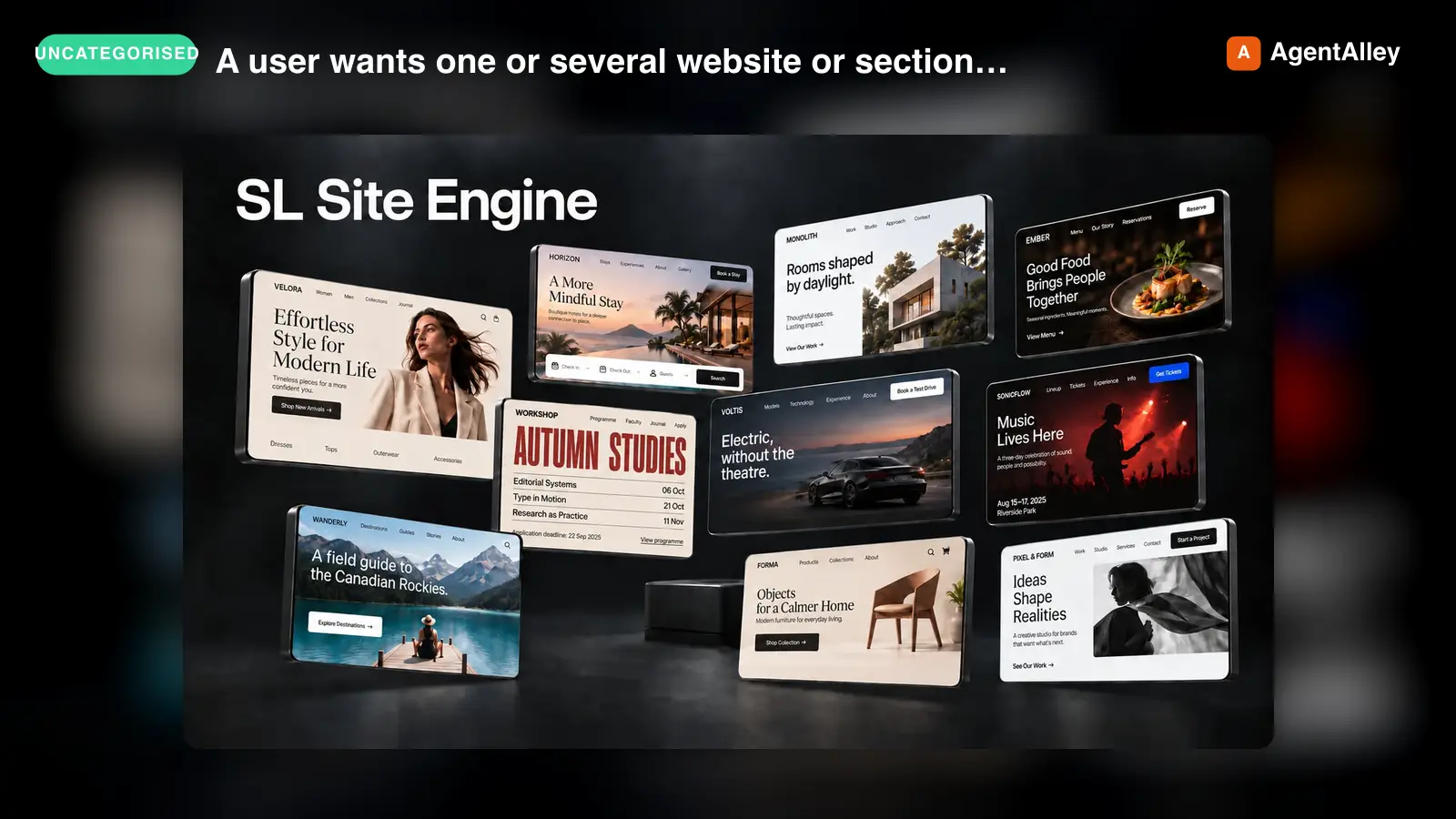
Use when a user wants one or several website or section references to explore, compare, or approve visual directions, or to build the final browser reference for a direction selected in this workflow. Not for standalone promotional…
---
name: sl-site-engine
description: Use when a user wants one or several website or section references to explore, compare, or approve visual directions, or to build the final browser reference for a direction selected in this workflow. Not for standalone promotional artwork or unrelated application development.
---

# SL Site Engine

Develop brief-specific visual ideas, not recolored templates. Preserve expressive composition, typography and imagery alongside usable UI. A sketch proposes a direction; the final reference is a screenshot of its actual browser implementation.

Default to an expressive, project-specific direction; explicit restraint or an existing brand takes precedence. Expressiveness is not a quota of ornaments or effects. Code fidelity is an acceptance gate, not a score to trade for beauty. Among faithful, usable candidates, pursue originality, beauty and clarity of the offer together.

## Brief and preferences

Read the request and relevant project material first. Complete the compact preference checkpoint in [references/briefing.md](references/briefing.md) before visual generation. Ask at most three adaptive questions; reuse supplied answers. Cover purpose/voice, colors/control shape/graphic richness, and exploration choices. A search/depth question does not replace the visual-preference question. Recommend visual-reference research for its compositional benefit and offer Quick or Thorough. Research starts only after opt-in; declining it does not block the task.

Keep user taste separate from technical correctness and this skill's explicit design exclusions. Decorative section/card numbering and small captions paired with ornamental lines are excluded from its design vocabulary, not opt-in preferences. Other explicit rejections and selected component libraries apply to the current task. “Choose for me” permits proposed choices, not a claim that the user already approved them.

Read [references/anti-slop.md](references/anti-slop.md) before creating copy or UI. It distinguishes hard failures, excluded treatments, configurable preferences and contextual warning signs.
Overview
Develop brief-specific visual ideas, not recolored templates. Preserve expressive composition, typography and imagery alongside usable UI. A sketch proposes a direction; the final reference is a screenshot of its actual browser implementation.
Manual install (npx, ZIP)
npx skills add SLtowl/sl-site-engine --skill sl-site-engine -g -a claude-codenpx degit SLtowl/sl-site-engine/skill/sl-site-engine#main ~/.claude/skills/sl-site-engineConnects with Agent Alley MCP · agentalley.io/mcp
Files included
SKILL.md8.8 KB
Read SKILL.md here
Show the full text59 lines
SL Site Engine
Develop brief-specific visual ideas, not recolored templates. Preserve expressive composition, typography and imagery alongside usable UI. A sketch proposes a direction; the final reference is a screenshot of its actual browser implementation.
Default to an expressive, project-specific direction; explicit restraint or an existing brand takes precedence. Expressiveness is not a quota of ornaments or effects. Code fidelity is an acceptance gate, not a score to trade for beauty. Among faithful, usable candidates, pursue originality, beauty and clarity of the offer together.
Brief and preferences
Read the request and relevant project material first. Complete the compact preference checkpoint in references/briefing.md before visual generation. Ask at most three adaptive questions; reuse supplied answers. Cover purpose/voice, colors/control shape/graphic richness, and exploration choices. A search/depth question does not replace the visual-preference question. Recommend visual-reference research for its compositional benefit and offer Quick or Thorough. Research starts only after opt-in; declining it does not block the task.
Keep user taste separate from technical correctness and this skill's explicit design exclusions. Decorative section/card numbering and small captions paired with ornamental lines are excluded from its design vocabulary, not opt-in preferences. Other explicit rejections and selected component libraries apply to the current task. “Choose for me” permits proposed choices, not a claim that the user already approved them.
Read references/anti-slop.md before creating copy or UI. It distinguishes hard failures, excluded treatments, configurable preferences and contextual warning signs.
Resolve the implementation target using references/implementation-targets.md before coding. Keep an existing project's stack and any explicit choice. For a new undecided project, offer HTML/CSS/JavaScript, React, Next.js (React), or help choosing. Ask once in the compact intake or selected-direction checkpoint; do not replace visual preferences with a technical questionnaire. Record the target and whether it was supplied, detected, chosen or recommended.
Explore and agree visually
Read references/visual-development.md. Without an agreed visual direction, offer the user a composition choice before detailed execution: normally 2–3 quick visual sketches for one final reference. Show a short, project-relevant selection of graphic treatments informed by actual research when opted in; integrate these into the sketches. A rough coded screen or generated composition can be a sketch; label its stage and unresolved layers. An attractive sketch is not evidence of pixel fidelity.
Separate composition-choice count from final-reference count. Honor explicit limits or delegated selection; one final reference normally still starts with a small composition choice. For a requested set, the set itself supplies the choice: do not multiply every direction into three compulsory variants. For three or more directions, use references/divergence.md and scripts/audit-direction-set.mjs. Sketch approval must not collapse ten different concepts into ten variations of one selected style.
Quick shows the first checked set. Thorough adds one internal cycle of alternatives, selection and revision before presentation. Both keep the same truth, preference and rendering checks. Do not run indefinite regeneration loops; explain an unresolved limitation or ask the user before materially expanding effort. Respect explicit delegation of visual decisions without fabricating approval.
Before detailing the selected direction, agree on a compact content/action map and show two visual density sketches of that same composition: calmer and richer. For a connected component library, independently shortlist and visually show 2–3 suitable button variants with a recommendation. Combine these decisions in one concise checkpoint; preserve already approved choices and explicit delegation. See the checkpoint contract in references/visual-development.md.
Construct the visual language
Define what carries the idea: composition, type treatment, photography, illustration, pattern, texture or a meaningful combination. Use the linked visual-system decisions in references/visual-development.md: visible subject scale, background language, control shape, action colors and icon role. An image-free page can be strong; a rich page need not justify every ornament as information. Evaluate the result, not an ornament quota.
For a website opening, also resolve the first-screen content and action map in that reference: brand, useful context, navigation and distinct next steps. A large subject and slogan alone do not establish a usable site opening. Carry requested icon treatment and component provenance through the sketch and final render.
Read references/media-strategy.md when selecting or generating assets. Generate needed subject imagery as separate reusable files; code controls crops, masks, typography and layout. Do not force different concepts to reuse an unsuitable asset merely to save a generation.
Build the final reference
After direction approval or explicit delegation, read references/fidelity.md and the selected target's section in references/implementation-targets.md. Build only the requested page/sections and viewport directly in the agreed stack. Do not expand an isolated hero into a full site. For a page, give the next requested section a meaningful continuation rather than generic filler.
Use actual fonts and local assets. Start the actual target project and render it in a real browser at the declared viewport after fonts/images load. Keep editable UI text and controls in code. Only that render is the final code-faithful reference; no whole-interface generated raster qualifies. A standalone HTML sketch is not evidence that a React or Next.js implementation works. Check the target's build and visible interactions; disclose checks that could not run.
If a UI library was selected, use its real source. For an available SL UI Library plugin, follow use-sl-ui: discover, inspect and export an appropriate component, adapt palette/geometry, preserve applicable keyboard/focus/reduced-motion behavior, and record ID/version/adaptations. Do not use an unrelated save/success animation for navigation or booking. Disclose unavailable components; do not claim lookalikes came from the library. The public skill does not require that plugin when none was selected.
Review the actual render
Apply references/anti-slop.md and the positive visual review in references/visual-development.md, even for one reference. Inspect both the full composition and readable close details. Check exact heading/CTA, user preferences, graphic integration, typography, layout and component provenance. A clean but bland result can need revision; decoration alone does not fix it.
Keep a compact review tied to the screenshot. For a local correction, change only that layer and necessary dependencies, preserving the accepted composition. For rejection of the whole direction, reopen composition choice. Map each requested change to visible evidence and compare at the same viewport; editing a token alone is not verification. Preserve requested frozen comparisons and label revisions as feedback-driven, not fresh unbiased tests. Technical validation does not prove aesthetic superiority. Fix hard failures, disclose blockers, and replace duplicates before presenting a set.
Present and hand off
Show one option large, with simple navigation to others. Each gets a project-specific name, screenshot and one sentence on the idea/tradeoff. State sketch versus final-reference status, implementation target, entry route/file, run command, viewport, exact fonts and material fidelity limits. Distinguish browser/build checks from untested production integrations. Do not dump internal review notes by default.
The screenshot records this implementation in the declared browser conditions, not every device or later production edit. After selection, implement responsive behavior and real states only within the user's requested scope; compare the resulting code to the approved reference at matching conditions.
| 1 | |
| 2 | name sl-site-engine |
| 3 | description Use when a user wants one or several website or section references to explore, compare, or approve visual directions, or to build the final browser reference for a direction selected in this workflow. Not for standalone promotional artwork or unrelated application development. |
| 4 | |
| 5 | |
| 6 | # SL Site Engine |
| 7 | |
| 8 | Develop brief-specific visual ideas, not recolored templates. Preserve expressive composition, typography and imagery alongside usable UI. A sketch proposes a direction; the final reference is a screenshot of its actual browser implementation. |
| 9 | |
| 10 | Default to an expressive, project-specific direction; explicit restraint or an existing brand takes precedence. Expressiveness is not a quota of ornaments or effects. Code fidelity is an acceptance gate, not a score to trade for beauty. Among faithful, usable candidates, pursue originality, beauty and clarity of the offer together. |
| 11 | |
| 12 | ## Brief and preferences |
| 13 | |
| 14 | Read the request and relevant project material first. Complete the compact preference checkpoint in [references/briefing.md] before visual generation. Ask at most three adaptive questions; reuse supplied answers. Cover purpose/voice, colors/control shape/graphic richness, and exploration choices. A search/depth question does not replace the visual-preference question. Recommend visual-reference research for its compositional benefit and offer Quick or Thorough. Research starts only after opt-in; declining it does not block the task. |
| 15 | |
| 16 | Keep user taste separate from technical correctness and this skill's explicit design exclusions. Decorative section/card numbering and small captions paired with ornamental lines are excluded from its design vocabulary, not opt-in preferences. Other explicit rejections and selected component libraries apply to the current task. “Choose for me” permits proposed choices, not a claim that the user already approved them. |
| 17 | |
| 18 | Read [references/anti-slop.md] before creating copy or UI. It distinguishes hard failures, excluded treatments, configurable preferences and contextual warning signs. |
| 19 | |
| 20 | Resolve the implementation target using [references/implementation-targets.md] before coding. Keep an existing project's stack and any explicit choice. For a new undecided project, offer HTML/CSS/JavaScript, React, Next.js (React), or help choosing. Ask once in the compact intake or selected-direction checkpoint; do not replace visual preferences with a technical questionnaire. Record the target and whether it was supplied, detected, chosen or recommended. |
| 21 | |
| 22 | ## Explore and agree visually |
| 23 | |
| 24 | Read [references/visual-development.md]. Without an agreed visual direction, offer the user a composition choice before detailed execution: normally 2–3 quick visual sketches for one final reference. Show a short, project-relevant selection of graphic treatments informed by actual research when opted in; integrate these into the sketches. A rough coded screen or generated composition can be a sketch; label its stage and unresolved layers. An attractive sketch is not evidence of pixel fidelity. |
| 25 | |
| 26 | Separate composition-choice count from final-reference count. Honor explicit limits or delegated selection; one final reference normally still starts with a small composition choice. For a requested set, the set itself supplies the choice: do not multiply every direction into three compulsory variants. For three or more directions, use [references/divergence.md] and `scripts/audit-direction-set.mjs`. Sketch approval must not collapse ten different concepts into ten variations of one selected style. |
| 27 | |
| 28 | Quick shows the first checked set. Thorough adds one internal cycle of alternatives, selection and revision before presentation. Both keep the same truth, preference and rendering checks. Do not run indefinite regeneration loops; explain an unresolved limitation or ask the user before materially expanding effort. Respect explicit delegation of visual decisions without fabricating approval. |
| 29 | |
| 30 | Before detailing the selected direction, agree on a compact content/action map and show two visual density sketches of that same composition: calmer and richer. For a connected component library, independently shortlist and visually show 2–3 suitable button variants with a recommendation. Combine these decisions in one concise checkpoint; preserve already approved choices and explicit delegation. See the checkpoint contract in [references/visual-development.md]. |
| 31 | |
| 32 | ## Construct the visual language |
| 33 | |
| 34 | Define what carries the idea: composition, type treatment, photography, illustration, pattern, texture or a meaningful combination. Use the linked visual-system decisions in [references/visual-development.md]: visible subject scale, background language, control shape, action colors and icon role. An image-free page can be strong; a rich page need not justify every ornament as information. Evaluate the result, not an ornament quota. |
| 35 | |
| 36 | For a website opening, also resolve the first-screen content and action map in that reference: brand, useful context, navigation and distinct next steps. A large subject and slogan alone do not establish a usable site opening. Carry requested icon treatment and component provenance through the sketch and final render. |
| 37 | |
| 38 | Read [references/media-strategy.md] when selecting or generating assets. Generate needed subject imagery as separate reusable files; code controls crops, masks, typography and layout. Do not force different concepts to reuse an unsuitable asset merely to save a generation. |
| 39 | |
| 40 | ## Build the final reference |
| 41 | |
| 42 | After direction approval or explicit delegation, read [references/fidelity.md] and the selected target's section in [references/implementation-targets.md]. Build only the requested page/sections and viewport directly in the agreed stack. Do not expand an isolated hero into a full site. For a page, give the next requested section a meaningful continuation rather than generic filler. |
| 43 | |
| 44 | Use actual fonts and local assets. Start the actual target project and render it in a real browser at the declared viewport after fonts/images load. Keep editable UI text and controls in code. Only that render is the final code-faithful reference; no whole-interface generated raster qualifies. A standalone HTML sketch is not evidence that a React or Next.js implementation works. Check the target's build and visible interactions; disclose checks that could not run. |
| 45 | |
| 46 | If a UI library was selected, use its real source. For an available SL UI Library plugin, follow `use-sl-ui`: discover, inspect and export an appropriate component, adapt palette/geometry, preserve applicable keyboard/focus/reduced-motion behavior, and record ID/version/adaptations. Do not use an unrelated save/success animation for navigation or booking. Disclose unavailable components; do not claim lookalikes came from the library. The public skill does not require that plugin when none was selected. |
| 47 | |
| 48 | ## Review the actual render |
| 49 | |
| 50 | Apply [references/anti-slop.md] and the positive visual review in [references/visual-development.md], even for one reference. Inspect both the full composition and readable close details. Check exact heading/CTA, user preferences, graphic integration, typography, layout and component provenance. A clean but bland result can need revision; decoration alone does not fix it. |
| 51 | |
| 52 | Keep a compact review tied to the screenshot. For a local correction, change only that layer and necessary dependencies, preserving the accepted composition. For rejection of the whole direction, reopen composition choice. Map each requested change to visible evidence and compare at the same viewport; editing a token alone is not verification. Preserve requested frozen comparisons and label revisions as feedback-driven, not fresh unbiased tests. Technical validation does not prove aesthetic superiority. Fix hard failures, disclose blockers, and replace duplicates before presenting a set. |
| 53 | |
| 54 | ## Present and hand off |
| 55 | |
| 56 | Show one option large, with simple navigation to others. Each gets a project-specific name, screenshot and one sentence on the idea/tradeoff. State sketch versus final-reference status, implementation target, entry route/file, run command, viewport, exact fonts and material fidelity limits. Distinguish browser/build checks from untested production integrations. Do not dump internal review notes by default. |
| 57 | |
| 58 | The screenshot records this implementation in the declared browser conditions, not every device or later production edit. After selection, implement responsive behavior and real states only within the user's requested scope; compare the resulting code to the approved reference at matching conditions. |
| 59 |
Details
- License
- MIT
- Stars on the repo
- ★ 4
- Checked
- Source
- SLtowl/sl-site-engine ↗
- Creator
- SLtowl · 1 listing
Similar skills
See all → SkillReverse engineer native, managed, Electron/JavaScriptREA
 morluto/rea · by morlutoReverse engineer native, managed, Electron/JavaScript, packaged, firmware, and browser targets with REA. Use shipped-artifact or requested runtime evidence to explain features, compare versions, decompile code, or guide a reconstruction. Skip REA for ordinary source-repository architecture analysis.★ 316k GitHub stars
 SkillBrainstorms ideas into designs before any creative workBrainstorming Ideas Into Designs
 obra/superpowers · by obraYou MUST use this before any creative work - creating features, building components, adding functionality, or modifying behavior. Explores user intent, requirements and design before implementation.★ 290k GitHub stars
 SkillRequires technical rigor and verificationCode Review Receptionobra/superpowers · by obraUse when receiving code review feedback, before implementing suggestions, especially if feedback seems unclear or technically questionable - requires technical rigor and verification, not performative agreement or blind implementation★ 290k GitHub stars
 SkillDiagnosis loop for hard bugs and performance regressionsDiagnosing bugs
 mattpocock/skills · by mattpocockDiagnosis loop for hard bugs and performance regressions. Use when the user says "diagnose"/"debug this", or reports something broken/throwing/failing/slow.★ 267k GitHub stars
 SkillImplement the result of /to-spec and /to-tickets in codeImplement specmattpocock/skills · by mattpocockImplement the result of /to-spec and /to-tickets in code.★ 267k GitHub stars
 SkillWriting a PR bodymattpocock/skills · by mattpocockUse when writing a PR body.★ 267k GitHub stars