Reverse engineering a SaaS product skill
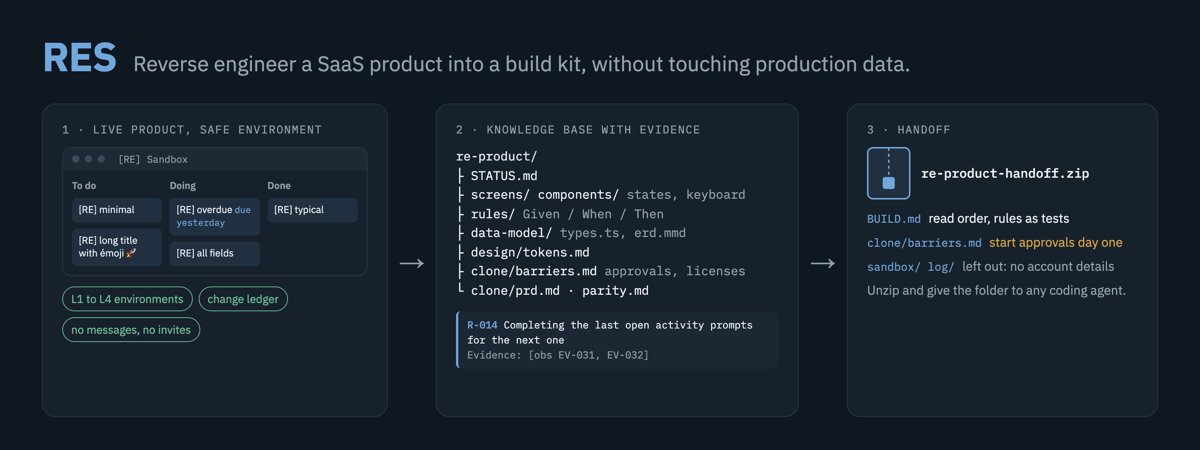
Illustration · not a resultFrom the alextnetto/res README — shows the whole collection, not only this skill.source ↗
Use when studying a SaaS web product from the outside in order to rebuild, clone or copy it (ClickUp, Pipedrive, Notion, a CRM, a project tool), when documenting its UX, screens, components, data model, business rules or API through a browser the agent drives, when assessing what would block a clone from launching (permissioned integrations, regulation, certifications), or when an agent must explore a live SaaS account without damaging production data or notifying real people.
by alextnetto·MIT license·★ 8 Stars on the repo·GitHub ↗
npx degit alextnetto/res/skills/reverse-engineering-saas#main ~/.claude/skills/reverse-engineering-saasChecked ·commit main
Files of Reverse engineering a SaaS product
Show the full text222 lines
Reverse engineering a SaaS product
Overview
The output is a knowledge base (KB) on disk from which a team that never used the product can rebuild it and take it to production. It is delivered as REPORT.html, the report a person reads, and a zip the user can hand to any coding agent. Two rules are absolute:
- The exploration never damages the user's production data and never reaches a real person.
- Every statement in the KB carries its evidence.
The KB is the only memory between sessions. Context ends before the work does, so write to disk after every feature.
<skill> below means this skill's directory. Run scripts as node <skill>/scripts/<name>.mjs.
Do not use this skill when the source code is available (read the code), for native binaries or Electron internals (use a decompiler or REA), or for a single question about one feature.
Start or resume
- KB exists: read
STATUS.md,sandbox/environment.mdand theopenrows ofsandbox/ledger.csv. Close or verify every open row before new exploration. Runnode <skill>/scripts/check-kb.mjs <kb>. - No KB: run
node <skill>/scripts/init-kb.mjs --product "<Name>" --gitfrom the working directory. It creates./re-<product>/; pass a directory first to choose another place. Then fill00-charter.mdfrom the user's request. Artifact templates (screen, component, entity, flow, rules, topic, session log) are copied to<kb>/_templates/. - Objects from earlier work that are not in this ledger (an old sandbox list, test records): do not touch them. List them in
STATUS.mdunder "Residuals" as pre-existing. - A session that ran without this skill (changes made, nothing recorded): follow "Adopting an unrecorded session" in
references/safety.mdbefore anything else.
Phases
| Phase | Output | Browser writes |
|---|---|---|
| 1 Charter | 00-charter.md: goal, scope, priorities, clone target market, unattended or attended |
None |
| 2 Environment and preflight | sandbox/environment.md |
None until the preflight passes |
| 3 Recon from public sources | sources.md, glossary.md, seeds of inventory/features.md and data-model/, barrier scan in clone/barriers.md |
None (use web fetch, not the browser) |
| 4 Map | inventory/screens.md, routes, stack, token baseline |
A0, A1 |
| 5 Deep dive, one feature at a time | screens/, components/, rules/, flows/, data-model/, api/, topics/ |
Per the matrix below |
| 6 Synthesis | clone/prd.md, clone/parity.md, clone/barriers.md, clone/implications.md, design/tokens.md |
None |
| 7 Close | Updated STATUS.md, reconciled ledger, check-kb passes; at the end of the study, the handoff zip |
Restore and teardown only |
Details per phase: references/exploration.md. KB layout, IDs and formats: references/knowledge-base.md.
Safety
Environment levels
Use the highest level available. Record it in sandbox/environment.md.
| Level | What it is | Who creates it |
|---|---|---|
| L1 Dedicated account | Trial or sandbox account with its own login, open in a separate browser profile that has no production session | The user. The agent never creates accounts and never types passwords |
| L2 Separate workspace | A new workspace or company under the user's login, with no other members | The agent, when the user asked for a test environment and creation is free (no billing step, no terms to accept). Creating it is an A4 action with a ledger row |
| L3 Sandbox container | One list, project or pipeline inside production, named 🧪 [RE] Sandbox, private where the product allows |
The agent, when the user asked for a test environment. Creating it is an A2 action with a ledger row. A container the user already designated keeps its name |
| L4 Observe only | Production, no writes | Default when the user gave no permission to write |
The user asked for a test environment when they say so, or tell you to test or try features ("test everything", "try the automations"), in any language. A request to look, read or document only is not permission to write: use L4.
When the user asked for a test environment and no L1 exists: create L2 if free, otherwise L3, and add "Needs human: dedicated trial account in a separate browser profile (L1)" to STATUS.md. If creating a workspace or company starts a subscription or a trial (Pipedrive "Add company", for example), it is A5: use L3.
At L3, "inside the sandbox" means the container plus records the agent created with the [RE] prefix that link only to sandbox records (a person created from a sandbox deal). When other members can see the container, remove all A2 records, the container included, at the end of every session, and in unattended mode finish the teardown before the team's working hours.
An unattended L3 session that starts during the team's working hours (from the charter; otherwise 08:00 to 18:00 on weekdays in the account's time zone) writes only when the team cannot see the records: a private container, or records set to operator-only visibility (references/safety.md, L3). The container's name may stay visible. Otherwise do the phases without writes first (recon, map) and put the writes under "Next actions" for a session outside working hours. In both cases keep the sandbox up as briefly as possible and tear it down in the same session. Record the start time and the choice in environment.md.
Action classes and what each level allows
| Class | Examples |
|---|---|
| A0 Read | Navigate, open, hover, read the DOM, screenshot |
| A1 Transient UI | Open a menu or dialog and cancel, unsaved filter or sort, resize the window |
| A2 Sandbox data | Create, edit, delete records the agent created inside the sandbox, including views and fields scoped to the container |
| A3 Personal preference | Theme, layout toggles, notification settings, dismissing banners, marking notifications as read |
| A4 Shared configuration | Custom fields, statuses or tags above the container (or of unknown scope), automations, integrations, webhooks, permissions, workspace settings, imports, shared templates, creating a workspace |
| A5 Outbound or irreversible | Any email, message, notification or invite that reaches anyone except the operator; assigning, mentioning, sharing with or following anyone except the operator; billing, plan or trial changes; API tokens; connecting integrations; deleting anything not in the ledger; accepting terms; entering passwords |
| L1 | L2 | L3 | L4 | |
|---|---|---|---|---|
| A0 | Yes | Yes | Yes | Yes |
| A1 | Yes | Yes | Revert in the same session | Revert in the same session |
| A2 | Yes | Yes | Inside the container only | No |
| A3 | Yes | Ledger row with before-value, restore before the session ends | Same as L2 | No |
| A4 | Yes | Creating the workspace, then changes inside it only | No | No |
| A5 | No | No | No | No |
A5 is forbidden at every level. Integrations: the agent may open an OAuth consent screen to record the scopes it asks for, then cancel; it never approves one. At L1 the user connects test accounts they own (a test mailbox, a test calendar), and the agent may then exercise the integration between those accounts only. Tests that need a second person (collaboration, permissions, notifications) go to "Needs human": they belong at L1, where the user adds a second account of their own. Adding a member to production is the user's decision (often a paid seat). Features gated by a plan the environment lacks are blocked: plan in coverage; starting a trial is the user's decision.
An automation that emails or notifies only the operator is A4, not A5. Disable time-triggered automations before the session ends.
Write gate: before every A2, A3 or A4 action
- Location. The workspace name and breadcrumb on screen match the identifiers in
environment.md. - Audience. Nobody except the operator is assigned, mentioned, followed or notified. At L3, members may see
[RE]fake data in a container the product cannot make private; nothing else. - Undo. The undo path is known.
- Ledger. The row is in
sandbox/ledger.csv, with the before-value when an existing thing changes.
If one check fails, do not act. Mark the item blocked in inventory/coverage.md with the reason and continue with another item.
Hidden writes
These change data or state without a Save button. Treat them as writes of the class they touch:
- Fields that save on blur or on change (autosave).
- Drag and drop, toggles, checkboxes, star or favorite buttons.
- Opening a notification feed or inbox (marks items as read).
- Closing onboarding checklists, tips and banners.
- View, filter, sort and column changes that persist for everyone.
- Keyboard shortcuts pressed while focus is in the page (they can complete, archive or assign).
- Opening a record in some products ("recently viewed", "seen by").
Check persistence by reloading. Never experiment on shared views: rebuild the case inside the sandbox.
Stop and skip
Do not click through. Log the item as blocked and move on when you see: billing, upgrade or trial dialogs; any "send", "invite", "notify", "share", "apply to all" or "cannot be undone"; login, 2FA or CAPTCHA prompts; a location mismatch; any change that appears outside the sandbox.
Exception: deleting your own ledger items inside the sandbox. Their delete dialogs often say the action cannot be undone. Confirm when the dialog names only those items, sends or notifies nothing, and the write gate passes. A dialog that would also delete or change anything else is still a stop.
In unattended mode never ask the user. Write the item under "Needs human" in STATUS.md and continue. "Don't ask me anything" changes how blocks are reported. It does not widen what you may touch.
After a mistake: undo it at once if the undo itself reaches nobody, then add a ledger row with class incident, what happened and what remains. If the undo would notify someone again (unassigning, deleting a comment), leave it and write it under "Needs human". Procedure: references/safety.md.
Preflight: before the first write at L2 or L3
Record in environment.md: members who could be notified; active automations, webhooks, integrations, email and calendar sync in the write scope; plan and trial end date; baseline counts of the container and of the operator's own records, by filter or count endpoint, never by pulling full record lists. If any automation, webhook, integration or sync would fire on records in the write scope, do not write there. Checklist: references/safety.md.
Data rules
- Fake data only. Prefix every created name with
[RE]. Emails atexample.com. No real customer or teammate names. - KB text never contains real personal or customer data. When documenting production configuration (field options, automation conditions, filters), replace real values with placeholders such as
[customer]or[person]. - Assign records to the operator or to nobody.
- At L3 and L4, run
scripts/page/mask.jsbefore each screenshot that can show real data. Pass the containers of popovers, menus and lists asselectors: they stay masked when they render later. Company configuration (type names, reasons, field labels) matches no pattern: pass it asnamesor crop it out. A screenshot that shows unmasked personal data is deleted at once and retaken; it never enters the KB.
Procedures for each level, the ledger format, teardown and incidents: references/safety.md.
Deep dive loop
For each feature, in the order of inventory/coverage.md:
- Fixtures. Plan one record per state you need to see (empty, typical, overdue, long text, many items, each field type). Write the plan in
sandbox/fixtures.md, create the records, add ledger rows. - Observe. Anatomy (annotated screenshot), states, interactions, keyboard, accessibility, microcopy.
- Probe rules. Vary one input at a time and record input and result. Each confirmed behavior becomes an
R-###rule in Given/When/Then form. - Persistence. Reload, open a second tab, and find the scope of each change: user, view, container, workspace, URL or browser storage.
- Network. With
api-shapes.jsinstalled, map each action to its endpoint and payload shape. - Write. Update the screen, component, rule, entity and API files, the evidence files and
coverage.md. Restore A1 and A3 state. - Checkpoint. If the KB is a git repository, commit with the feature ID.
Do not start the next feature while findings exist only in context. A finding without evidence goes to questions.md as "Confirm: ...", never into a rule.
Production barriers
A clone that cannot launch is not a clone. Scan for barriers during recon and update them during the deep dive:
- Integrations whose API needs approval, a partner program or a security review.
- Licenses and authorizations in the clone's target market (payments, banking, health, telecom, invoices), and data protection law.
- Certifications buyers require (SOC 2, ISO 27001, PCI DSS), and enterprise must-haves (SSO, audit logs).
- Distribution gatekeepers (app stores, bulk email and SMS rules).
- What code cannot copy: data, content, network effects, trademarks.
Record each one as BR-### in clone/barriers.md with category, features blocked, gatekeeper, severity (blocks launch, blocks feature, adds lead time, adds cost, moat), market weight (how much buyers in the target market need the blocked feature), lead time and cost, mitigation and evidence. Put launch blockers and long approvals first in the PRD build order. This is not legal advice: a legal reading without a source is [inf] with a question for counsel. Categories, sources and format: references/barriers.md.
Evidence tags
| Tag | Meaning |
|---|---|
[obs EV-012] |
The agent saw it in the product; the evidence file exists |
[net EV-013] |
Network capture (shape file or request list) |
[doc SRC-004] |
Public documentation listed in sources.md |
[inf] |
Inference. The same line must cite the Q-### that would confirm it |
Rules, barriers and data model fields need obs, net or doc; [inf] with a Q-### is allowed while the question is open (the checker warns). Every screen, component, flow and topic file ends with a "Not tested" list. Record each evidence file in evidence/index.csv (date, session, route, what it shows, masked).
Page scripts
Paste the file content into the browser's JavaScript tool. Each script returns JSON and stores nothing outside the page. Page scripts return structure, counts and shapes. Known exceptions, filtered but not eliminated: test-ID values and route segments that look like identifiers, and short configuration values (statuses, types) in api-shapes.js; review them before saving at L3 and L4.
| Script | Returns |
|---|---|
scripts/page/inventory.js |
Framework, component tag names, test IDs, ARIA roles, internal route patterns, third-party SDKs |
scripts/page/tokens.js |
CSS variables and the most frequent colors, type sizes, radii, spacing and shadows |
scripts/page/api-shapes.js |
Installs a recorder; __re.api.dump() returns endpoint templates and JSON shapes; set __re.api.enumSamples = false to drop the short enum values too |
scripts/page/mask.js |
Blurs emails, phones, money, Brazilian tax IDs, small avatars, given names, matching placeholders, and given selectors as CSS rules that also cover elements rendered later; __re.mask.clear() removes it |
scripts/page/annotate.js |
Numbered outlines on given elements for anatomy screenshots |
To show progress before the end, run node <skill>/scripts/build-report.mjs <kb> and send REPORT.html.
Tool-specific notes (saving screenshots, network, profiles, drag and drop): references/extraction.md and references/tools.md.
Close a session
- Restore every A1 and A3 change and verify it. Disable time-triggered automations. Update the ledger.
- Update
STATUS.md: header (date, session, phase, environment, open ledger rows), Summary, Next actions (three), Needs human, Blocked, Last session, Residuals. - Write
log/<date>-s<NN>.md. - Run
node <skill>/scripts/check-kb.mjs <kb>and fix every error. - At the end of the study only: tear down from the ledger, compare baseline counts, list residuals in
STATUS.md, then runcheck-kb --closing. - Hand off: run
node <skill>/scripts/pack-kb.mjs <kb>. It writesREPORT.html(one self-contained page for people, in reading order: overview, what the product does, screens, flows, rules, data model, API, design, build plan, what to prepare before launch, evidence; it tells agents to readBUILD.mdinstead) and the zip. Send both to the user in the chat, the report first as the main deliverable. Attach them with the agent's file-sending tool when there is one; otherwise give their paths. The zip holds the KB andBUILD.md, a brief any coding agent can follow, and leaves outsandbox/andlog/except a copy of the ledger without object IDs, locations or URLs. With them, send the three-line summary fromSTATUS.md, the "Needs human" list, and one line: "Open REPORT.html to read the study; unzip the zip and give the folder to a coding agent, starting at BUILD.md."
The study ends when coverage is complete or the user says to stop. When the user stops early, write the Phase 6 files from what exists, close, and pack: STATUS.md tells the reader what is missing. At L1 the trial account may keep its fixtures as kept ("trial kept for the developers"); ending the trial is the user's action. pack-kb runs the regular check, so rows marked human do not block the handoff; list them under "Needs human".
Every ledger row ends the session as restored, removed, fixture (test data left for the next session), kept (the user decided to keep it) or human (only the user can resolve it; the note says what to do). --closing fails on open, fixture and human.
When time or context runs short, stop exploring and do this, in order: (1) ledger rows for every change not yet recorded, unknown where the before-value is not known; (2) undo what affects other people (shared views, assignments); (3) findings to files, unverified ones as Q-###; (4) STATUS.md with next actions and needs human; (5) check-kb and commit. Stop exploring early enough to finish all five.
Clean room
Rebuild from behavior, not from assets. Do not copy source code, icons, illustrations, logos, brand names or long passages of text into the clone. Record microcopy as reference and write new copy for the clone. Use only the user's own account. Do not bypass access controls or read other customers' data. Keep request rates human.
Most SaaS terms forbid reverse engineering or using the service to build a competing product. Record the clause and its URL in 00-charter.md and add it to "Needs human" in STATUS.md. The decision belongs to the user; the study follows the user's original instruction until the user decides otherwise.
Red flags
| Thought | Reality |
|---|---|
| "I didn't click Save, so nothing changed" | Autosave, drag, toggles and read receipts write. Reload and check |
| "It's a sandbox task, assigning a teammate is harmless" | Assignments and mentions notify real people. Operator only |
| "The shared board is the best example" | Rebuild the case in the sandbox. Shared views are read-only |
| "The user said don't ask, so I'll do it in production" | "Don't ask" changes reporting, not permissions |
| "I'll remember what I changed" | Ledger row before the next action |
| "I'll write the docs at the end" | Context ends first. Write after each feature |
| "The docs say so" | That is [doc], not [obs]. Tag it |
| "It's only screens, we can copy it" | Approvals, licenses and certifications decide whether the clone can launch. Scan barriers |
| "Opening the editor is read-only" | Many editors autosave. Cancel, reload and check |
| "I'll rebuild the shared view's old filters from memory" | A guess can make it worse. Ledger incident, "Needs human" |
| "The undo is the polite thing" | Unassigning or deleting can notify the person again. Check first |
| 1 | |
| 2 | name reverse-engineering-saas |
| 3 | description Use when studying a SaaS web product from the outside in order to rebuild, clone or copy it (ClickUp, Pipedrive, Notion, a CRM, a project tool), when documenting its UX, screens, components, data model, business rules or API through a browser the agent drives, when assessing what would block a clone from launching (permissioned integrations, regulation, certifications), or when an agent must explore a live SaaS account without damaging production data or notifying real people. |
| 4 | |
| 5 | |
| 6 | # Reverse engineering a SaaS product |
| 7 | |
| 8 | ## Overview |
| 9 | |
| 10 | The output is a knowledge base (KB) on disk from which a team that never used the product can rebuild it and take it to production. It is delivered as `REPORT.html`, the report a person reads, and a zip the user can hand to any coding agent. Two rules are absolute: |
| 11 | |
| 12 | **The exploration never damages the user's production data and never reaches a real person.** |
| 13 | **Every statement in the KB carries its evidence.** |
| 14 | |
| 15 | The KB is the only memory between sessions. Context ends before the work does, so write to disk after every feature. |
| 16 | |
| 17 | `<skill>` below means this skill's directory. Run scripts as `node <skill>/scripts/<name>.mjs`. |
| 18 | |
| 19 | Do not use this skill when the source code is available (read the code), for native binaries or Electron internals (use a decompiler or REA), or for a single question about one feature. |
| 20 | |
| 21 | ## Start or resume |
| 22 | |
| 23 | **KB exists:** read `STATUS.md`, `sandbox/environment.md` and the `open` rows of `sandbox/ledger.csv`. Close or verify every open row before new exploration. Run `node <skill>/scripts/check-kb.mjs <kb>`. |
| 24 | **No KB:** run `node <skill>/scripts/init-kb.mjs --product "<Name>" --git` from the working directory. It creates `./re-<product>/`; pass a directory first to choose another place. Then fill `00-charter.md` from the user's request. Artifact templates (screen, component, entity, flow, rules, topic, session log) are copied to `<kb>/_templates/`. |
| 25 | **Objects from earlier work that are not in this ledger** (an old sandbox list, test records): do not touch them. List them in `STATUS.md` under "Residuals" as pre-existing. |
| 26 | **A session that ran without this skill** (changes made, nothing recorded): follow "Adopting an unrecorded session" in `references/safety.md` before anything else. |
| 27 | |
| 28 | ## Phases |
| 29 | |
| 30 | | Phase | Output | Browser writes | |
| 31 | |---|---|---| |
| 32 | | 1 Charter | `00-charter.md`: goal, scope, priorities, clone target market, unattended or attended | None | |
| 33 | | 2 Environment and preflight | `sandbox/environment.md` | None until the preflight passes | |
| 34 | | 3 Recon from public sources | `sources.md`, `glossary.md`, seeds of `inventory/features.md` and `data-model/`, barrier scan in `clone/barriers.md` | None (use web fetch, not the browser) | |
| 35 | | 4 Map | `inventory/screens.md`, routes, stack, token baseline | A0, A1 | |
| 36 | | 5 Deep dive, one feature at a time | `screens/`, `components/`, `rules/`, `flows/`, `data-model/`, `api/`, `topics/` | Per the matrix below | |
| 37 | | 6 Synthesis | `clone/prd.md`, `clone/parity.md`, `clone/barriers.md`, `clone/implications.md`, `design/tokens.md` | None | |
| 38 | | 7 Close | Updated `STATUS.md`, reconciled ledger, `check-kb` passes; at the end of the study, the handoff zip | Restore and teardown only | |
| 39 | |
| 40 | Details per phase: `references/exploration.md`. KB layout, IDs and formats: `references/knowledge-base.md`. |
| 41 | |
| 42 | ## Safety |
| 43 | |
| 44 | ### Environment levels |
| 45 | |
| 46 | Use the highest level available. Record it in `sandbox/environment.md`. |
| 47 | |
| 48 | | Level | What it is | Who creates it | |
| 49 | |---|---|---| |
| 50 | | L1 Dedicated account | Trial or sandbox account with its own login, open in a separate browser profile that has no production session | The user. The agent never creates accounts and never types passwords | |
| 51 | | L2 Separate workspace | A new workspace or company under the user's login, with no other members | The agent, when the user asked for a test environment and creation is free (no billing step, no terms to accept). Creating it is an A4 action with a ledger row | |
| 52 | | L3 Sandbox container | One list, project or pipeline inside production, named `🧪 [RE] Sandbox`, private where the product allows | The agent, when the user asked for a test environment. Creating it is an A2 action with a ledger row. A container the user already designated keeps its name | |
| 53 | | L4 Observe only | Production, no writes | Default when the user gave no permission to write | |
| 54 | |
| 55 | The user asked for a test environment when they say so, or tell you to test or try features ("test everything", "try the automations"), in any language. A request to look, read or document only is not permission to write: use L4. |
| 56 | |
| 57 | When the user asked for a test environment and no L1 exists: create L2 if free, otherwise L3, and add "Needs human: dedicated trial account in a separate browser profile (L1)" to `STATUS.md`. If creating a workspace or company starts a subscription or a trial (Pipedrive "Add company", for example), it is A5: use L3. |
| 58 | |
| 59 | At L3, "inside the sandbox" means the container plus records the agent created with the `[RE]` prefix that link only to sandbox records (a person created from a sandbox deal). When other members can see the container, remove all A2 records, the container included, at the end of every session, and in unattended mode finish the teardown before the team's working hours. |
| 60 | |
| 61 | An unattended L3 session that starts during the team's working hours (from the charter; otherwise 08:00 to 18:00 on weekdays in the account's time zone) writes only when the team cannot see the records: a private container, or records set to operator-only visibility (`references/safety.md`, L3). The container's name may stay visible. Otherwise do the phases without writes first (recon, map) and put the writes under "Next actions" for a session outside working hours. In both cases keep the sandbox up as briefly as possible and tear it down in the same session. Record the start time and the choice in `environment.md`. |
| 62 | |
| 63 | ### Action classes and what each level allows |
| 64 | |
| 65 | | Class | Examples | |
| 66 | |---|---| |
| 67 | | A0 Read | Navigate, open, hover, read the DOM, screenshot | |
| 68 | | A1 Transient UI | Open a menu or dialog and cancel, unsaved filter or sort, resize the window | |
| 69 | | A2 Sandbox data | Create, edit, delete records the agent created inside the sandbox, including views and fields scoped to the container | |
| 70 | | A3 Personal preference | Theme, layout toggles, notification settings, dismissing banners, marking notifications as read | |
| 71 | | A4 Shared configuration | Custom fields, statuses or tags above the container (or of unknown scope), automations, integrations, webhooks, permissions, workspace settings, imports, shared templates, creating a workspace | |
| 72 | | A5 Outbound or irreversible | Any email, message, notification or invite that reaches anyone except the operator; assigning, mentioning, sharing with or following anyone except the operator; billing, plan or trial changes; API tokens; connecting integrations; deleting anything not in the ledger; accepting terms; entering passwords | |
| 73 | |
| 74 | | | L1 | L2 | L3 | L4 | |
| 75 | |---|---|---|---|---| |
| 76 | | A0 | Yes | Yes | Yes | Yes | |
| 77 | | A1 | Yes | Yes | Revert in the same session | Revert in the same session | |
| 78 | | A2 | Yes | Yes | Inside the container only | No | |
| 79 | | A3 | Yes | Ledger row with before-value, restore before the session ends | Same as L2 | No | |
| 80 | | A4 | Yes | Creating the workspace, then changes inside it only | No | No | |
| 81 | | A5 | No | No | No | No | |
| 82 | |
| 83 | A5 is forbidden at every level. Integrations: the agent may open an OAuth consent screen to record the scopes it asks for, then cancel; it never approves one. At L1 the user connects test accounts they own (a test mailbox, a test calendar), and the agent may then exercise the integration between those accounts only. Tests that need a second person (collaboration, permissions, notifications) go to "Needs human": they belong at L1, where the user adds a second account of their own. Adding a member to production is the user's decision (often a paid seat). Features gated by a plan the environment lacks are `blocked: plan` in coverage; starting a trial is the user's decision. |
| 84 | |
| 85 | An automation that emails or notifies only the operator is A4, not A5. Disable time-triggered automations before the session ends. |
| 86 | |
| 87 | ### Write gate: before every A2, A3 or A4 action |
| 88 | |
| 89 | **Location.** The workspace name and breadcrumb on screen match the identifiers in `environment.md`. |
| 90 | **Audience.** Nobody except the operator is assigned, mentioned, followed or notified. At L3, members may see `[RE]` fake data in a container the product cannot make private; nothing else. |
| 91 | **Undo.** The undo path is known. |
| 92 | **Ledger.** The row is in `sandbox/ledger.csv`, with the before-value when an existing thing changes. |
| 93 | |
| 94 | If one check fails, do not act. Mark the item `blocked` in `inventory/coverage.md` with the reason and continue with another item. |
| 95 | |
| 96 | ### Hidden writes |
| 97 | |
| 98 | These change data or state without a Save button. Treat them as writes of the class they touch: |
| 99 | |
| 100 | Fields that save on blur or on change (autosave). |
| 101 | Drag and drop, toggles, checkboxes, star or favorite buttons. |
| 102 | Opening a notification feed or inbox (marks items as read). |
| 103 | Closing onboarding checklists, tips and banners. |
| 104 | View, filter, sort and column changes that persist for everyone. |
| 105 | Keyboard shortcuts pressed while focus is in the page (they can complete, archive or assign). |
| 106 | Opening a record in some products ("recently viewed", "seen by"). |
| 107 | |
| 108 | Check persistence by reloading. Never experiment on shared views: rebuild the case inside the sandbox. |
| 109 | |
| 110 | ### Stop and skip |
| 111 | |
| 112 | Do not click through. Log the item as `blocked` and move on when you see: billing, upgrade or trial dialogs; any "send", "invite", "notify", "share", "apply to all" or "cannot be undone"; login, 2FA or CAPTCHA prompts; a location mismatch; any change that appears outside the sandbox. |
| 113 | |
| 114 | Exception: deleting your own ledger items inside the sandbox. Their delete dialogs often say the action cannot be undone. Confirm when the dialog names only those items, sends or notifies nothing, and the write gate passes. A dialog that would also delete or change anything else is still a stop. |
| 115 | |
| 116 | In unattended mode never ask the user. Write the item under "Needs human" in `STATUS.md` and continue. "Don't ask me anything" changes how blocks are reported. It does not widen what you may touch. |
| 117 | |
| 118 | After a mistake: undo it at once if the undo itself reaches nobody, then add a ledger row with class `incident`, what happened and what remains. If the undo would notify someone again (unassigning, deleting a comment), leave it and write it under "Needs human". Procedure: `references/safety.md`. |
| 119 | |
| 120 | ### Preflight: before the first write at L2 or L3 |
| 121 | |
| 122 | Record in `environment.md`: members who could be notified; active automations, webhooks, integrations, email and calendar sync in the write scope; plan and trial end date; baseline counts of the container and of the operator's own records, by filter or count endpoint, never by pulling full record lists. If any automation, webhook, integration or sync would fire on records in the write scope, do not write there. Checklist: `references/safety.md`. |
| 123 | |
| 124 | ### Data rules |
| 125 | |
| 126 | Fake data only. Prefix every created name with `[RE]`. Emails at `example.com`. No real customer or teammate names. |
| 127 | KB text never contains real personal or customer data. When documenting production configuration (field options, automation conditions, filters), replace real values with placeholders such as `[customer]` or `[person]`. |
| 128 | Assign records to the operator or to nobody. |
| 129 | At L3 and L4, run `scripts/page/mask.js` before each screenshot that can show real data. Pass the containers of popovers, menus and lists as `selectors`: they stay masked when they render later. Company configuration (type names, reasons, field labels) matches no pattern: pass it as `names` or crop it out. A screenshot that shows unmasked personal data is deleted at once and retaken; it never enters the KB. |
| 130 | |
| 131 | Procedures for each level, the ledger format, teardown and incidents: `references/safety.md`. |
| 132 | |
| 133 | ## Deep dive loop |
| 134 | |
| 135 | For each feature, in the order of `inventory/coverage.md`: |
| 136 | |
| 137 | **Fixtures.** Plan one record per state you need to see (empty, typical, overdue, long text, many items, each field type). Write the plan in `sandbox/fixtures.md`, create the records, add ledger rows. |
| 138 | **Observe.** Anatomy (annotated screenshot), states, interactions, keyboard, accessibility, microcopy. |
| 139 | **Probe rules.** Vary one input at a time and record input and result. Each confirmed behavior becomes an `R-###` rule in Given/When/Then form. |
| 140 | **Persistence.** Reload, open a second tab, and find the scope of each change: user, view, container, workspace, URL or browser storage. |
| 141 | **Network.** With `api-shapes.js` installed, map each action to its endpoint and payload shape. |
| 142 | **Write.** Update the screen, component, rule, entity and API files, the evidence files and `coverage.md`. Restore A1 and A3 state. |
| 143 | **Checkpoint.** If the KB is a git repository, commit with the feature ID. |
| 144 | |
| 145 | Do not start the next feature while findings exist only in context. A finding without evidence goes to `questions.md` as "Confirm: ...", never into a rule. |
| 146 | |
| 147 | ## Production barriers |
| 148 | |
| 149 | A clone that cannot launch is not a clone. Scan for barriers during recon and update them during the deep dive: |
| 150 | |
| 151 | Integrations whose API needs approval, a partner program or a security review. |
| 152 | Licenses and authorizations in the clone's target market (payments, banking, health, telecom, invoices), and data protection law. |
| 153 | Certifications buyers require (SOC 2, ISO 27001, PCI DSS), and enterprise must-haves (SSO, audit logs). |
| 154 | Distribution gatekeepers (app stores, bulk email and SMS rules). |
| 155 | What code cannot copy: data, content, network effects, trademarks. |
| 156 | |
| 157 | Record each one as `BR-###` in `clone/barriers.md` with category, features blocked, gatekeeper, severity (`blocks launch`, `blocks feature`, `adds lead time`, `adds cost`, `moat`), market weight (how much buyers in the target market need the blocked feature), lead time and cost, mitigation and evidence. Put launch blockers and long approvals first in the PRD build order. This is not legal advice: a legal reading without a source is `[inf]` with a question for counsel. Categories, sources and format: `references/barriers.md`. |
| 158 | |
| 159 | ## Evidence tags |
| 160 | |
| 161 | | Tag | Meaning | |
| 162 | |---|---| |
| 163 | | `[obs EV-012]` | The agent saw it in the product; the evidence file exists | |
| 164 | | `[net EV-013]` | Network capture (shape file or request list) | |
| 165 | | `[doc SRC-004]` | Public documentation listed in `sources.md` | |
| 166 | | `[inf]` | Inference. The same line must cite the `Q-###` that would confirm it | |
| 167 | |
| 168 | Rules, barriers and data model fields need `obs`, `net` or `doc`; `[inf]` with a `Q-###` is allowed while the question is open (the checker warns). Every screen, component, flow and topic file ends with a "Not tested" list. Record each evidence file in `evidence/index.csv` (date, session, route, what it shows, masked). |
| 169 | |
| 170 | ## Page scripts |
| 171 | |
| 172 | Paste the file content into the browser's JavaScript tool. Each script returns JSON and stores nothing outside the page. Page scripts return structure, counts and shapes. Known exceptions, filtered but not eliminated: test-ID values and route segments that look like identifiers, and short configuration values (statuses, types) in `api-shapes.js`; review them before saving at L3 and L4. |
| 173 | |
| 174 | | Script | Returns | |
| 175 | |---|---| |
| 176 | | `scripts/page/inventory.js` | Framework, component tag names, test IDs, ARIA roles, internal route patterns, third-party SDKs | |
| 177 | | `scripts/page/tokens.js` | CSS variables and the most frequent colors, type sizes, radii, spacing and shadows | |
| 178 | | `scripts/page/api-shapes.js` | Installs a recorder; `__re.api.dump()` returns endpoint templates and JSON shapes; set `__re.api.enumSamples = false` to drop the short enum values too | |
| 179 | | `scripts/page/mask.js` | Blurs emails, phones, money, Brazilian tax IDs, small avatars, given names, matching placeholders, and given selectors as CSS rules that also cover elements rendered later; `__re.mask.clear()` removes it | |
| 180 | | `scripts/page/annotate.js` | Numbered outlines on given elements for anatomy screenshots | |
| 181 | |
| 182 | To show progress before the end, run `node <skill>/scripts/build-report.mjs <kb>` and send `REPORT.html`. |
| 183 | |
| 184 | Tool-specific notes (saving screenshots, network, profiles, drag and drop): `references/extraction.md` and `references/tools.md`. |
| 185 | |
| 186 | ## Close a session |
| 187 | |
| 188 | Restore every A1 and A3 change and verify it. Disable time-triggered automations. Update the ledger. |
| 189 | Update `STATUS.md`: header (date, session, phase, environment, open ledger rows), Summary, Next actions (three), Needs human, Blocked, Last session, Residuals. |
| 190 | Write `log/<date>-s<NN>.md`. |
| 191 | Run `node <skill>/scripts/check-kb.mjs <kb>` and fix every error. |
| 192 | At the end of the study only: tear down from the ledger, compare baseline counts, list residuals in `STATUS.md`, then run `check-kb --closing`. |
| 193 | Hand off: run `node <skill>/scripts/pack-kb.mjs <kb>`. It writes `REPORT.html` (one self-contained page for people, in reading order: overview, what the product does, screens, flows, rules, data model, API, design, build plan, what to prepare before launch, evidence; it tells agents to read `BUILD.md` instead) and the zip. Send both to the user in the chat, the report first as the main deliverable. Attach them with the agent's file-sending tool when there is one; otherwise give their paths. The zip holds the KB and `BUILD.md`, a brief any coding agent can follow, and leaves out `sandbox/` and `log/` except a copy of the ledger without object IDs, locations or URLs. With them, send the three-line summary from `STATUS.md`, the "Needs human" list, and one line: "Open REPORT.html to read the study; unzip the zip and give the folder to a coding agent, starting at BUILD.md." |
| 194 | |
| 195 | The study ends when coverage is complete or the user says to stop. When the user stops early, write the Phase 6 files from what exists, close, and pack: `STATUS.md` tells the reader what is missing. At L1 the trial account may keep its fixtures as `kept` ("trial kept for the developers"); ending the trial is the user's action. `pack-kb` runs the regular check, so rows marked `human` do not block the handoff; list them under "Needs human". |
| 196 | |
| 197 | Every ledger row ends the session as `restored`, `removed`, `fixture` (test data left for the next session), `kept` (the user decided to keep it) or `human` (only the user can resolve it; the note says what to do). `--closing` fails on `open`, `fixture` and `human`. |
| 198 | |
| 199 | **When time or context runs short,** stop exploring and do this, in order: (1) ledger rows for every change not yet recorded, `unknown` where the before-value is not known; (2) undo what affects other people (shared views, assignments); (3) findings to files, unverified ones as `Q-###`; (4) `STATUS.md` with next actions and needs human; (5) `check-kb` and commit. Stop exploring early enough to finish all five. |
| 200 | |
| 201 | ## Clean room |
| 202 | |
| 203 | Rebuild from behavior, not from assets. Do not copy source code, icons, illustrations, logos, brand names or long passages of text into the clone. Record microcopy as reference and write new copy for the clone. Use only the user's own account. Do not bypass access controls or read other customers' data. Keep request rates human. |
| 204 | |
| 205 | Most SaaS terms forbid reverse engineering or using the service to build a competing product. Record the clause and its URL in `00-charter.md` and add it to "Needs human" in `STATUS.md`. The decision belongs to the user; the study follows the user's original instruction until the user decides otherwise. |
| 206 | |
| 207 | ## Red flags |
| 208 | |
| 209 | | Thought | Reality | |
| 210 | |---|---| |
| 211 | | "I didn't click Save, so nothing changed" | Autosave, drag, toggles and read receipts write. Reload and check | |
| 212 | | "It's a sandbox task, assigning a teammate is harmless" | Assignments and mentions notify real people. Operator only | |
| 213 | | "The shared board is the best example" | Rebuild the case in the sandbox. Shared views are read-only | |
| 214 | | "The user said don't ask, so I'll do it in production" | "Don't ask" changes reporting, not permissions | |
| 215 | | "I'll remember what I changed" | Ledger row before the next action | |
| 216 | | "I'll write the docs at the end" | Context ends first. Write after each feature | |
| 217 | | "The docs say so" | That is `[doc]`, not `[obs]`. Tag it | |
| 218 | | "It's only screens, we can copy it" | Approvals, licenses and certifications decide whether the clone can launch. Scan barriers | |
| 219 | | "Opening the editor is read-only" | Many editors autosave. Cancel, reload and check | |
| 220 | | "I'll rebuild the shared view's old filters from memory" | A guess can make it worse. Ledger `incident`, "Needs human" | |
| 221 | | "The undo is the polite thing" | Unassigning or deleting can notify the person again. Check first | |
| 222 |
Discussion
Browse more free Claude skills.