Painted animation skill

Illustration · not a resultFrom the edenfunf/reelmimic README — shows the whole collection, not only this skill.source ↗
Make hand-painted watercolour-and-ink cartoon videos (MP4) with code — p5.js + p5.brush rendered frame by frame in headless Chrome, encoded with ffmpeg — starring Clawd or any character.
by edenfunf·MIT license·★ 3,630 Stars on the repo·GitHub ↗
npx degit edenfunf/reelmimic/.claude/skills/painted-animation#main ~/.claude/skills/painted-animationChecked ·commit main


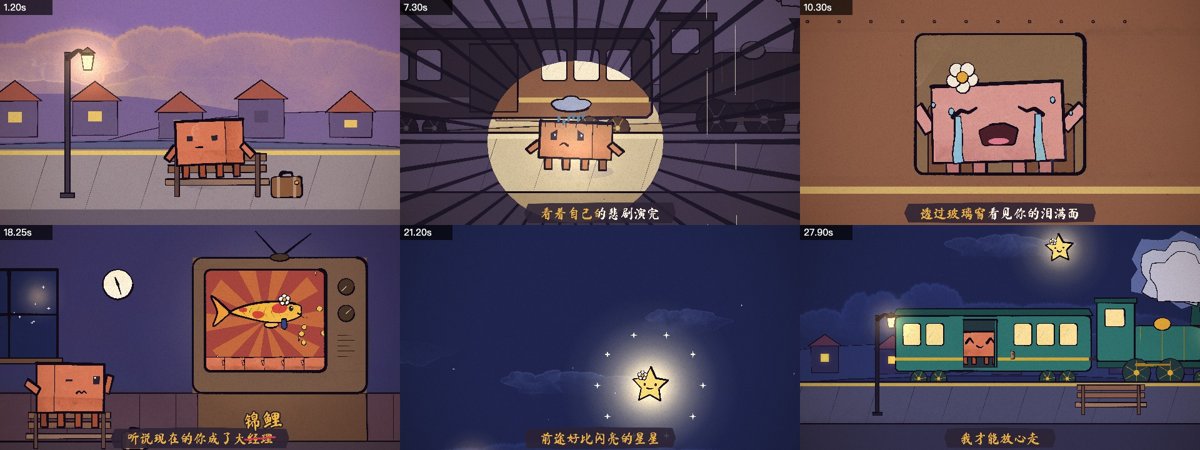
Illustration · not a resultImages 1–4: From the edenfunf/reelmimic README — shows the whole collection, not only this skill.view on GitHub
Illustration · not a resultImage 5: From the edenfunf/reelmimic README — shows the whole collection, not only this skill.view on GitHub
Files of Painted animation
Show the full text86 lines
Painted animation
A method for making short cartoons entirely in code, distilled from JohnHeibel/PDoomVideo (a 156 s music video painted by Claude Opus) and its generalised kit ClaudeAnimationBase (MIT), which is bundled here as template/.
How it works: every frame is a pure function of time t. studio.html loads p5.js + p5.brush and your scene files; each shot paints the whole 1920×1080 frame with watercolour fills and boiling ink lines. render.mjs drives headless Chrome to render contact sheets for review, or every frame in parallel, and ffmpeg encodes the MP4 (with audio if given).
Workflow
0. Scaffold
bash .claude/skills/painted-animation/scripts/new_project.sh <project-dir> # add --keep-demo to keep the example scene hooked up
This copies the template, unhooks the demo scene, runs npm install and checks node / ffmpeg / Chrome. Then read <project-dir>/ANIMATION_GUIDE.md in full before designing anything: it holds the rules, the animation principles and the complete engine / Clawd API. Look at docs/emotions.jpg and docs/views.jpg (the model sheets) with the Read tool.
For a music video or anything longer than ~20 s, also read references/music-video.md. For a lyric video, ask for the song file and an LRC first, and measure the tempo with scripts/beat_grid.py: lines are usually faster than you'd guess.
1. Storyboard before code
Write STORYBOARD.md in the project (format in the guide: logline, world + palette arc, motif, the character's emotion arc, then shots with reads — the timed list of what the viewer must understand). Worked example: examples/xiaozhen/ (a 31 s lyric video: storyboard and full scene code).
Show the storyboard to the user and let them react before building, unless they said to just go ahead.
2. Build shot by shot
- Set
duration,bpm,offset(andaudio) insrc/config.js. - One IIFE-wrapped file per scene/chapter in
src/scenes/, ending withshots([[t0, fn], ...]); add its<script>tostudio.html. - Block key poses first, check them as stills, then add the motion between them.
3. Render and look — every shot, several times
You can't see motion by reading code. From the project dir:
node render.mjs --sheet=0.1,0.8,1.6,2.4 --cols=4 --w=480 --out=out/check/a.jpg        # key frames
node render.mjs --strip=2.1:2.6 --out=out/check/strip.jpg                             # every frame of a moment
node render.mjs --sheet=2.3 --crop=760,420,500,400 --w=500 --out=out/check/face.jpg   # full-res detail
Open each image with Read and actually check it against the guide's review list: event clear? character big enough? reads timed so a first-time viewer gets them? anticipation / follow-through, no snaps? feet and held props touching? transitions at every seam? no text, no 3D, no pure black/white, no muddy glows? Fix and look again. Budget: ≥ 1 sheet per shot, a strip per key motion and transition, a crop per story-carrying face.
4. Render the video
node render.mjs --clip --out=out/video.mp4                                   # short videos, one worker
node render.mjs --frames --workers=4 && node render.mjs --encode --out=out/video.mp4 [--audio=assets/song.mp3]   # long ones, parallel + resumable
Report the output path, length and ms/frame. Offer open out/video.mp4.
The rules that matter most
These are the guide's rules condensed; the guide is authoritative.
- Handmade medium. Only
paint()/inkLine()(p5.brush) — never plain p5rect/ellipse/fill. Flat 2D only: turns go through drawn key views (turn(),spinView()), never 3D projection. Light viaglow()(additive), because pigment-mixing makes yellow-over-blue go green. - No text. No captions, labels, signs or word bubbles; show it instead. Reactions are painted emotes (
!, sweat, hearts…). The one exception is karaoke in a lyric video, and at most a few big SFX. - Something happens in every shot — an event, cause → reaction, set-ups that pay off.
- Time for the viewer. List each shot's reads; one read at a time; fast actions, held meanings; lead the eye; the reads set the shot length. This is where generated animation fails most.
- Alive. Nothing is still (idles from
feel(), drifting cameras, boil); faces change throughemotions()never by swapping; the character is big (medium shot u≈20–28, close-up 40–70); everything rides the beat. - Transitions at every seam, chosen to fit the story (brush wipe, iris / shaped iris, whip pan, match cut, cut on action, camera carry-through).
- One piece. One world, a colour arc, an emotional thread, linked scenes, an ending that rhymes with the opening.
Engine gotchas
- Pure functions of
t. Frames render in parallel and out of order: no state across frames, noMath.random(), no frame-by-frame physics.hash(i)for stable randomness,jit()for boil. boilSeed(key)before each separate background element/prop, or a moving thing makes everything drawn after it re-boil every frame (jitter).- Don't name globals after p5's. p5 defines
line,OVERLAY,text,color,scale, … as globals; a top-levelfunction line()fails withCannot redefine propertyand the page never becomes ready (the renderer times out). Keep helpers inside the scene IIFE or give them distinct names. - Layering in doorways, windows and screens: draw what's inside, then paint the surrounding wall/frame back over it, so nothing wider than the opening shows outside it (the train's
inDoor+ door jambs, the TV bezel pieces). - A
NaNin a point list throwsFailed to construct 'OffscreenCanvas'— guard degenerate geometry. - Under camera zoom ≳ 2, huge shapes lose outlines; outline weight scales with zoom, so scale
swdown in close-ups. - Cost = number of fills and strokes. Aim for ≤ ~1.5–2.5 s/frame (the log prints ms/frame). Prefer fewer, bigger shapes. On machines without a real GPU, watercolour fills are slow — consider fewer
fillshapes, or--soft-glas a last resort. - macOS: the renderer uses
--use-angle=metaland finds/Applications/Google Chrome.appautomatically; otherwise pass--chrome=<path>.
Adapting
- Clawd is the default star, not a requirement. New characters, props and emotions are drawn with the same tools (
paint,ribbon,through,glow) and kept on-model across shots; new emotions go inEMOinsrc/clawd.js. src/karaoke.js(template) adds word-by-word karaoke for lyric videos via thewindow.overlayHookhook incore.js.LOOPS.name = t => {...}; LOOPS.name.len = 4;+node render.mjs --loop=name --pngmakes a seamless loop for GIFs (ffmpeg -i out/loop_name/f%04d.png …).- Higher reasoning effort tends to give more extravagant, detailed scenes.
| 1 | |
| 2 | name painted-animation |
| 3 | description Make hand-painted watercolour-and-ink cartoon videos (MP4) with code — p5.js + p5.brush rendered frame by frame in headless Chrome, encoded with ffmpeg — starring Clawd or any character. Use when the user asks to make an animation, animated short, cartoon, music video, lyric video, animated GIF/loop or "a video of Clawd…", or mentions the PDoomVideo / ClaudeAnimationBase approach. Covers storyboarding, the engine API, the render-and-look review loop, music/lyric sync and splitting long videos across subagents. |
| 4 | |
| 5 | |
| 6 | # Painted animation |
| 7 | |
| 8 | A method for making short cartoons entirely in code, distilled from [JohnHeibel/PDoomVideo] (a 156 s music video painted by Claude Opus) and its generalised kit [ClaudeAnimationBase] (MIT), which is bundled here as `template/`. |
| 9 | |
| 10 | **How it works:** every frame is a pure function of time `t`. `studio.html` loads p5.js + p5.brush and your scene files; each shot paints the whole 1920×1080 frame with watercolour fills and boiling ink lines. `render.mjs` drives headless Chrome to render contact sheets for review, or every frame in parallel, and ffmpeg encodes the MP4 (with audio if given). |
| 11 | |
| 12 | ## Workflow |
| 13 | |
| 14 | ### 0. Scaffold |
| 15 | |
| 16 | |
| 17 | bash .claude/skills/painted-animation/scripts/new_project.sh <project-dir> # add --keep-demo to keep the example scene hooked up |
| 18 | |
| 19 | |
| 20 | This copies the template, unhooks the demo scene, runs `npm install` and checks node / ffmpeg / Chrome. Then **read `<project-dir>/ANIMATION_GUIDE.md` in full** before designing anything: it holds the rules, the animation principles and the complete engine / Clawd API. Look at `docs/emotions.jpg` and `docs/views.jpg` (the model sheets) with the Read tool. |
| 21 | |
| 22 | For a music video or anything longer than ~20 s, also read [references/music-video.md]. For a lyric video, ask for the song file and an LRC first, and measure the tempo with `scripts/beat_grid.py`: lines are usually faster than you'd guess. |
| 23 | |
| 24 | ### 1. Storyboard before code |
| 25 | |
| 26 | Write `STORYBOARD.md` in the project (format in the guide: logline, world + palette arc, motif, the character's emotion arc, then shots with **reads** — the timed list of what the viewer must understand). Worked example: [examples/xiaozhen/] (a 31 s lyric video: storyboard and full scene code). |
| 27 | |
| 28 | Show the storyboard to the user and let them react before building, unless they said to just go ahead. |
| 29 | |
| 30 | ### 2. Build shot by shot |
| 31 | |
| 32 | Set `duration`, `bpm`, `offset` (and `audio`) in `src/config.js`. |
| 33 | One IIFE-wrapped file per scene/chapter in `src/scenes/`, ending with `shots([[t0, fn], ...])`; add its `<script>` to `studio.html`. |
| 34 | Block key poses first, check them as stills, then add the motion between them. |
| 35 | |
| 36 | ### 3. Render and look — every shot, several times |
| 37 | |
| 38 | You can't see motion by reading code. From the project dir: |
| 39 | |
| 40 | |
| 41 | node render.mjs --sheet=0.1,0.8,1.6,2.4 --cols=4 --w=480 --out=out/check/a.jpg # key frames |
| 42 | node render.mjs --strip=2.1:2.6 --out=out/check/strip.jpg # every frame of a moment |
| 43 | node render.mjs --sheet=2.3 --crop=760,420,500,400 --w=500 --out=out/check/face.jpg # full-res detail |
| 44 | |
| 45 | |
| 46 | Open each image with Read and actually check it against the guide's review list: event clear? character big enough? reads timed so a first-time viewer gets them? anticipation / follow-through, no snaps? feet and held props touching? transitions at every seam? no text, no 3D, no pure black/white, no muddy glows? Fix and look again. Budget: ≥ 1 sheet per shot, a strip per key motion and transition, a crop per story-carrying face. |
| 47 | |
| 48 | ### 4. Render the video |
| 49 | |
| 50 | |
| 51 | node render.mjs --clip --out=out/video.mp4 # short videos, one worker |
| 52 | node render.mjs --frames --workers=4 && node render.mjs --encode --out=out/video.mp4 [--audio=assets/song.mp3] # long ones, parallel + resumable |
| 53 | |
| 54 | |
| 55 | Report the output path, length and ms/frame. Offer `open out/video.mp4`. |
| 56 | |
| 57 | ## The rules that matter most |
| 58 | |
| 59 | These are the guide's rules condensed; the guide is authoritative. |
| 60 | |
| 61 | **Handmade medium.** Only `paint()` / `inkLine()` (p5.brush) — never plain p5 `rect`/`ellipse`/`fill`. Flat 2D only: turns go through drawn key views (`turn()`, `spinView()`), never 3D projection. Light via `glow()` (additive), because pigment-mixing makes yellow-over-blue go green. |
| 62 | **No text.** No captions, labels, signs or word bubbles; show it instead. Reactions are painted emotes (`!`, sweat, hearts…). The one exception is karaoke in a lyric video, and at most a few big SFX. |
| 63 | **Something happens in every shot** — an event, cause → reaction, set-ups that pay off. |
| 64 | **Time for the viewer.** List each shot's reads; one read at a time; fast actions, held meanings; lead the eye; the reads set the shot length. This is where generated animation fails most. |
| 65 | **Alive.** Nothing is still (idles from `feel()`, drifting cameras, boil); faces change through `emotions()` never by swapping; the character is big (medium shot u≈20–28, close-up 40–70); everything rides the beat. |
| 66 | **Transitions at every seam**, chosen to fit the story (brush wipe, iris / shaped iris, whip pan, match cut, cut on action, camera carry-through). |
| 67 | **One piece.** One world, a colour arc, an emotional thread, linked scenes, an ending that rhymes with the opening. |
| 68 | |
| 69 | ## Engine gotchas |
| 70 | |
| 71 | **Pure functions of `t`.** Frames render in parallel and out of order: no state across frames, no `Math.random()`, no frame-by-frame physics. `hash(i)` for stable randomness, `jit()` for boil. |
| 72 | **`boilSeed(key)`** before each separate background element/prop, or a moving thing makes everything drawn after it re-boil every frame (jitter). |
| 73 | **Don't name globals after p5's.** p5 defines `line`, `OVERLAY`, `text`, `color`, `scale`, … as globals; a top-level `function line()` fails with `Cannot redefine property` and the page never becomes ready (the renderer times out). Keep helpers inside the scene IIFE or give them distinct names. |
| 74 | **Layering in doorways, windows and screens:** draw what's inside, then paint the surrounding wall/frame back over it, so nothing wider than the opening shows outside it (the train's `inDoor` + door jambs, the TV bezel pieces). |
| 75 | A `NaN` in a point list throws `Failed to construct 'OffscreenCanvas'` — guard degenerate geometry. |
| 76 | Under camera zoom ≳ 2, huge shapes lose outlines; outline weight scales with zoom, so scale `sw` down in close-ups. |
| 77 | Cost = number of fills and strokes. Aim for ≤ ~1.5–2.5 s/frame (the log prints ms/frame). Prefer fewer, bigger shapes. On machines without a real GPU, watercolour fills are slow — consider fewer `fill` shapes, or `--soft-gl` as a last resort. |
| 78 | macOS: the renderer uses `--use-angle=metal` and finds `/Applications/Google Chrome.app` automatically; otherwise pass `--chrome=<path>`. |
| 79 | |
| 80 | ## Adapting |
| 81 | |
| 82 | Clawd is the default star, not a requirement. New characters, props and emotions are drawn with the same tools (`paint`, `ribbon`, `through`, `glow`) and kept on-model across shots; new emotions go in `EMO` in `src/clawd.js`. |
| 83 | `src/karaoke.js` (template) adds word-by-word karaoke for lyric videos via the `window.overlayHook` hook in `core.js`. |
| 84 | `LOOPS.name = t => {...}; LOOPS.name.len = 4;` + `node render.mjs --loop=name --png` makes a seamless loop for GIFs (`ffmpeg -i out/loop_name/f%04d.png …`). |
| 85 | Higher reasoning effort tends to give more extravagant, detailed scenes. |
| 86 |
Discussion
Alternatives
Browse more free Claude skills or everything in Development.