Motion os skill
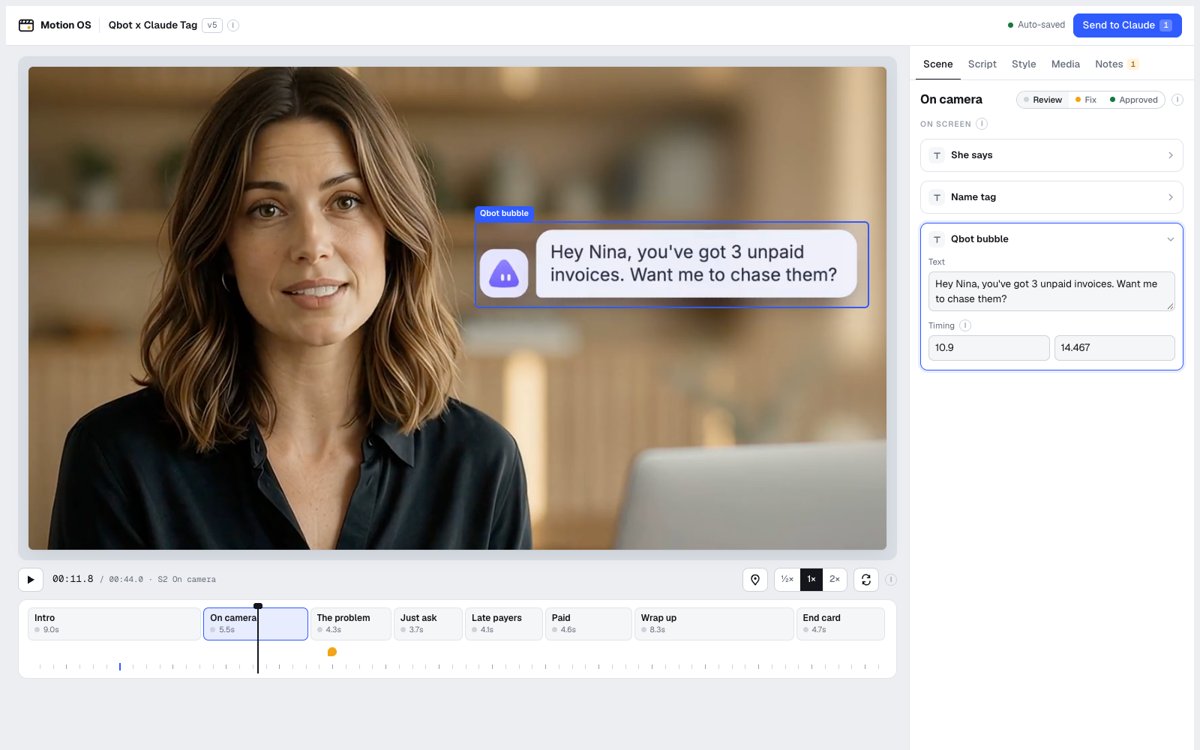
Illustration · not a resultFrom the jasonlee-breadcrumb/motion-os README — shows the whole collection, not only this skill.source ↗
Build motion graphics and launch videos in code, then open them in Motion OS, a local scene-by-scene review player where the user edits copy, pins notes on the frame, and sends one prompt back.
by jasonlee-breadcrumb·MIT license·★ 61 Stars on the repo·GitHub ↗
Files of Motion os
jasonlee-breadcrumb/
Show the full text111 lines
Motion OS
Motion OS is a workflow plus a local player. You build the video in code, render it, describe it in reel.json, and open the player. The user reviews it scene by scene, edits copy, pins notes on the frame, clicks Send to Claude, and pastes the prompt back to you. You apply it, re-render, bump the version, and the player reloads itself.
SKILL_DIR below means the folder this file is in (the player is at SKILL_DIR/player/).
1. Set up the project
<project>/
  reel.json     what the player reads: scenes, elements, copy, timings, assets
  video.mp4     the latest render ("src" in reel.json)
  assets/       images, footage, logos, music the user gives you
  src/          your motion code
Only ask for what's missing: what the video is for, length, aspect ratio, brand (colors, fonts, logo), assets, and a reference video if they have one. Defaults: 1920x1080, 30 fps, 20 to 45 seconds. If the user has no assets, recreate the reference's look so they can swap things in later.
2. Build it
- Recommended: Remotion (React). Keep every on-screen text, image path, color and timing in
reel.jsonand import it in the composition, so most feedback is "edit reel.json, re-render". - Any tool works if it outputs a video file (Hyperframes, HTML canvas, After Effects export).
- Never run
npm installinside a cloud-synced folder (Google Drive, iCloud, Dropbox). Build in a temp folder and copy the source back. - Remotion is free for individuals and companies of 3 or fewer people; larger companies need a license.
3. Render and check it yourself
npx remotion render src/index.ts Main video.mp4 --codec=h264 --crf=18
ffmpeg -v error -y -i video.mp4 -vf "fps=1,scale=320:-1,tile=6x6" -frames:v 1 sheet.jpg
Read the contact sheet before showing anything. Check text is readable, nothing overlaps faces or important UI, and audio levels are sane. Fix obvious problems first.
4. Write reel.json
See examples/qbot-tag/reel.json for a full example.
{
  "id": "acme-launch",            // stable, used to store the user's edits
  "title": "Acme launch",
  "version": 1,                   // bump on every render; the player reloads when it changes
  "path": "/abs/path/to/project", // shown in the prompt so you know where to work
  "src": "video.mp4",
  "w": 1920, "h": 1080, "fps": 30, "duration": 32.0,
  "reference": "Linear launch video",
  "brand": {
    "colors": [{"id": "accent", "name": "Accent", "v": "#5B5BF7"}],
    "fonts": [{"id": "head", "name": "Headlines", "v": "Inter Tight"}],
    "logo": "assets/logo.svg"
  },
  "audio": {"music": null, "bpm": 120, "drop": 4.0, "musicVol": 0.6, "sfxVol": 0.8},
  "assets": [{"id": "assets/logo.svg", "name": "logo.svg", "type": "image", "from": "User"}],
  "scenes": [
    {"id": "S1", "name": "Hook", "t": [0, 4.5], "els": [
      {"id": "headline", "label": "Headline", "t": [0.3, 4.3], "box": [20, 38, 60, 24], "src": "src/Hook.tsx:12",
       "props": {
         "text":   {"type": "text",   "label": "Text", "v": "Meet Acme"},
         "color":  {"type": "color",  "label": "Color", "v": "brand.accent"},
         "motion": {"type": "motion", "label": "Motion", "v": "Words blur in one by one"}
       }}
    ]}
  ],
  "notes": []
}
Rules:
- One scene per story beat. Scene
tvalues come from the actual render and cover 0 todurationwith no gaps. - An element is anything a viewer might want to change.
tis when it's visible.boxis[x, y, w, h]in percent of the frame (usenullfor voiceover or audio).srcis the file orfile:linethat draws it. - Control types:
text,longtext,number,color(a value likebrand.accentlinks it to the palette),media(an asset id),list(withcols),choice(withoptions), andmotion(free text, only you can change it). - Keep scene and element ids stable between versions. The player matches the user's edits by id.
Live projects (instant edits + Export MP4)
For Remotion projects, give the player a live renderer so Edit mode changes show for real and the user can export without you:
- Wrap each element with a
boxin a smallEdcomponent that readsboxes[id] = [x, y, w, h, nx, ny, nw, nh](reel.json box, then the edited box, % of frame) from aboxesprop and appliestranslate(nx-x %, ny-y %) scale(nw/w)withtransform-origin: x% y%. No edit means render children untouched. - Add an entry that mounts
@remotion/playerand setswindow.MotionOSLive = el => ({ref, setBoxes, setRate}). Bundle it with esbuild into the project folder and set"live": "motionos-live.js"in reel.json. - Add
"export": {"cwd": "<folder with node_modules>", "props": {...}, "cmd": "..."}. The command gets$PROPS(JSON with the edits),$RAW,$OUT(exports/<id>-<time>.mp4, never overwritten) and$PROJECT. Example:npx remotion render src/index.tsx Main "$OUT" --props="$PROPS". staticFile()paths are served from the project'spublic/folder.- Elements with a
boxmust be wrapped, or setboxto null, otherwise dragging them does nothing.
5. Open the player
Run this in the background (it keeps serving while you work):
node "$SKILL_DIR/player/serve.mjs" "<project>"
It prints the URL (port 4321, or the next free one) and opens the browser. If a server for this project is already running, keep it; it serves new files live.
Then tell the user, in two or three lines: Preview plays it; Edit (E) pauses so they can click anything, drag to move, drag a corner to resize, press N to pin a note, the Script tab has every word, and when they're done, click Send to Claude, copy the prompt and paste it here.
6. Apply feedback
When the user pastes a prompt starting with "Motion OS feedback for":
- Edits (before -> after): apply exactly, in
reel.jsonand the code. - Size and position edits come as
[x, y, w, h]in % of the frame plus a scale. Move and scale that element in the code to match, then update itsboxinreel.json. - Notes: each has a timestamp, scene, x/y position, and the element and source file it sits on. Grab that frame (
ffmpeg -ss 12.4 -i video.mp4 -frames:v 1 f.jpg) and look at it before deciding what the note means. - Links: download them into
assets/. Ask first if it isn't clearly the user's own file. - Leave scenes marked "approved" untouched.
- Re-render, check the contact sheet, update
reel.json(timings, copy) and setversionto the number the prompt asks for. The player notices within about 3 seconds and reloads. - Reply with a short list of what changed and anything you couldn't do.
| 1 | |
| 2 | name motion-os |
| 3 | description Build motion graphics and launch videos in code, then open them in Motion OS, a local scene-by-scene review player where the user edits copy, pins notes on the frame, and sends one prompt back. Use when the user asks for a motion graphic, launch video, explainer, product video or animated ad, says "motion os", or pastes feedback that starts with "Motion OS feedback for". |
| 4 | |
| 5 | |
| 6 | # Motion OS |
| 7 | |
| 8 | Motion OS is a workflow plus a local player. You build the video in code, render it, describe it in `reel.json`, and open the player. The user reviews it scene by scene, edits copy, pins notes on the frame, clicks **Send to Claude**, and pastes the prompt back to you. You apply it, re-render, bump the version, and the player reloads itself. |
| 9 | |
| 10 | `SKILL_DIR` below means the folder this file is in (the player is at `SKILL_DIR/player/`). |
| 11 | |
| 12 | ## 1. Set up the project |
| 13 | |
| 14 | |
| 15 | <project>/ |
| 16 | reel.json what the player reads: scenes, elements, copy, timings, assets |
| 17 | video.mp4 the latest render ("src" in reel.json) |
| 18 | assets/ images, footage, logos, music the user gives you |
| 19 | src/ your motion code |
| 20 | |
| 21 | |
| 22 | Only ask for what's missing: what the video is for, length, aspect ratio, brand (colors, fonts, logo), assets, and a reference video if they have one. Defaults: 1920x1080, 30 fps, 20 to 45 seconds. If the user has no assets, recreate the reference's look so they can swap things in later. |
| 23 | |
| 24 | ## 2. Build it |
| 25 | |
| 26 | Recommended: [Remotion] (React). Keep every on-screen text, image path, color and timing in `reel.json` and import it in the composition, so most feedback is "edit reel.json, re-render". |
| 27 | Any tool works if it outputs a video file (Hyperframes, HTML canvas, After Effects export). |
| 28 | Never run `npm install` inside a cloud-synced folder (Google Drive, iCloud, Dropbox). Build in a temp folder and copy the source back. |
| 29 | Remotion is free for individuals and companies of 3 or fewer people; larger companies need a license. |
| 30 | |
| 31 | ## 3. Render and check it yourself |
| 32 | |
| 33 | |
| 34 | npx remotion render src/index.ts Main video.mp4 --codec=h264 --crf=18 |
| 35 | ffmpeg -v error -y -i video.mp4 -vf "fps=1,scale=320:-1,tile=6x6" -frames:v 1 sheet.jpg |
| 36 | |
| 37 | |
| 38 | Read the contact sheet before showing anything. Check text is readable, nothing overlaps faces or important UI, and audio levels are sane. Fix obvious problems first. |
| 39 | |
| 40 | ## 4. Write reel.json |
| 41 | |
| 42 | See `examples/qbot-tag/reel.json` for a full example. |
| 43 | |
| 44 | |
| 45 | { |
| 46 | "id": "acme-launch", // stable, used to store the user's edits |
| 47 | "title": "Acme launch", |
| 48 | "version": 1, // bump on every render; the player reloads when it changes |
| 49 | "path": "/abs/path/to/project", // shown in the prompt so you know where to work |
| 50 | "src": "video.mp4", |
| 51 | "w": 1920, "h": 1080, "fps": 30, "duration": 32.0, |
| 52 | "reference": "Linear launch video", |
| 53 | "brand": { |
| 54 | "colors": [{"id": "accent", "name": "Accent", "v": "#5B5BF7"}], |
| 55 | "fonts": [{"id": "head", "name": "Headlines", "v": "Inter Tight"}], |
| 56 | "logo": "assets/logo.svg" |
| 57 | }, |
| 58 | "audio": {"music": null, "bpm": 120, "drop": 4.0, "musicVol": 0.6, "sfxVol": 0.8}, |
| 59 | "assets": [{"id": "assets/logo.svg", "name": "logo.svg", "type": "image", "from": "User"}], |
| 60 | "scenes": [ |
| 61 | {"id": "S1", "name": "Hook", "t": [0, 4.5], "els": [ |
| 62 | {"id": "headline", "label": "Headline", "t": [0.3, 4.3], "box": [20, 38, 60, 24], "src": "src/Hook.tsx:12", |
| 63 | "props": { |
| 64 | "text": {"type": "text", "label": "Text", "v": "Meet Acme"}, |
| 65 | "color": {"type": "color", "label": "Color", "v": "brand.accent"}, |
| 66 | "motion": {"type": "motion", "label": "Motion", "v": "Words blur in one by one"} |
| 67 | }} |
| 68 | ]} |
| 69 | ], |
| 70 | "notes": [] |
| 71 | } |
| 72 | |
| 73 | |
| 74 | Rules: |
| 75 | One scene per story beat. Scene `t` values come from the actual render and cover 0 to `duration` with no gaps. |
| 76 | An element is anything a viewer might want to change. `t` is when it's visible. `box` is `[x, y, w, h]` in percent of the frame (use `null` for voiceover or audio). `src` is the file or `file:line` that draws it. |
| 77 | Control types: `text`, `longtext`, `number`, `color` (a value like `brand.accent` links it to the palette), `media` (an asset id), `list` (with `cols`), `choice` (with `options`), and `motion` (free text, only you can change it). |
| 78 | Keep scene and element ids stable between versions. The player matches the user's edits by id. |
| 79 | |
| 80 | ### Live projects (instant edits + Export MP4) |
| 81 | |
| 82 | For Remotion projects, give the player a live renderer so Edit mode changes show for real and the user can export without you: |
| 83 | Wrap each element with a `box` in a small `Ed` component that reads `boxes[id] = [x, y, w, h, nx, ny, nw, nh]` (reel.json box, then the edited box, % of frame) from a `boxes` prop and applies `translate(nx-x %, ny-y %) scale(nw/w)` with `transform-origin: x% y%`. No edit means render children untouched. |
| 84 | Add an entry that mounts `@remotion/player` and sets `window.MotionOSLive = el => ({ref, setBoxes, setRate})`. Bundle it with esbuild into the project folder and set `"live": "motionos-live.js"` in reel.json. |
| 85 | Add `"export": {"cwd": "<folder with node_modules>", "props": {...}, "cmd": "..."}`. The command gets `$PROPS` (JSON with the edits), `$RAW`, `$OUT` (`exports/<id>-<time>.mp4`, never overwritten) and `$PROJECT`. Example: `npx remotion render src/index.tsx Main "$OUT" --props="$PROPS"`. |
| 86 | `staticFile()` paths are served from the project's `public/` folder. |
| 87 | Elements with a `box` must be wrapped, or set `box` to null, otherwise dragging them does nothing. |
| 88 | |
| 89 | ## 5. Open the player |
| 90 | |
| 91 | Run this in the background (it keeps serving while you work): |
| 92 | |
| 93 | |
| 94 | node "$SKILL_DIR/player/serve.mjs" "<project>" |
| 95 | |
| 96 | |
| 97 | It prints the URL (port 4321, or the next free one) and opens the browser. If a server for this project is already running, keep it; it serves new files live. |
| 98 | |
| 99 | Then tell the user, in two or three lines: Preview plays it; Edit (E) pauses so they can click anything, drag to move, drag a corner to resize, press N to pin a note, the Script tab has every word, and when they're done, click **Send to Claude**, copy the prompt and paste it here. |
| 100 | |
| 101 | ## 6. Apply feedback |
| 102 | |
| 103 | When the user pastes a prompt starting with "Motion OS feedback for": |
| 104 | **Edits** (before -> after): apply exactly, in `reel.json` and the code. |
| 105 | **Size and position** edits come as `[x, y, w, h]` in % of the frame plus a scale. Move and scale that element in the code to match, then update its `box` in `reel.json`. |
| 106 | **Notes**: each has a timestamp, scene, x/y position, and the element and source file it sits on. Grab that frame (`ffmpeg -ss 12.4 -i video.mp4 -frames:v 1 f.jpg`) and look at it before deciding what the note means. |
| 107 | **Links**: download them into `assets/`. Ask first if it isn't clearly the user's own file. |
| 108 | Leave scenes marked "approved" untouched. |
| 109 | Re-render, check the contact sheet, update `reel.json` (timings, copy) and set `version` to the number the prompt asks for. The player notices within about 3 seconds and reloads. |
| 110 | Reply with a short list of what changed and anything you couldn't do. |
| 111 |
Discussion
Alternatives
Browse more free Claude skills or everything in Product.