Long video to shorts skill
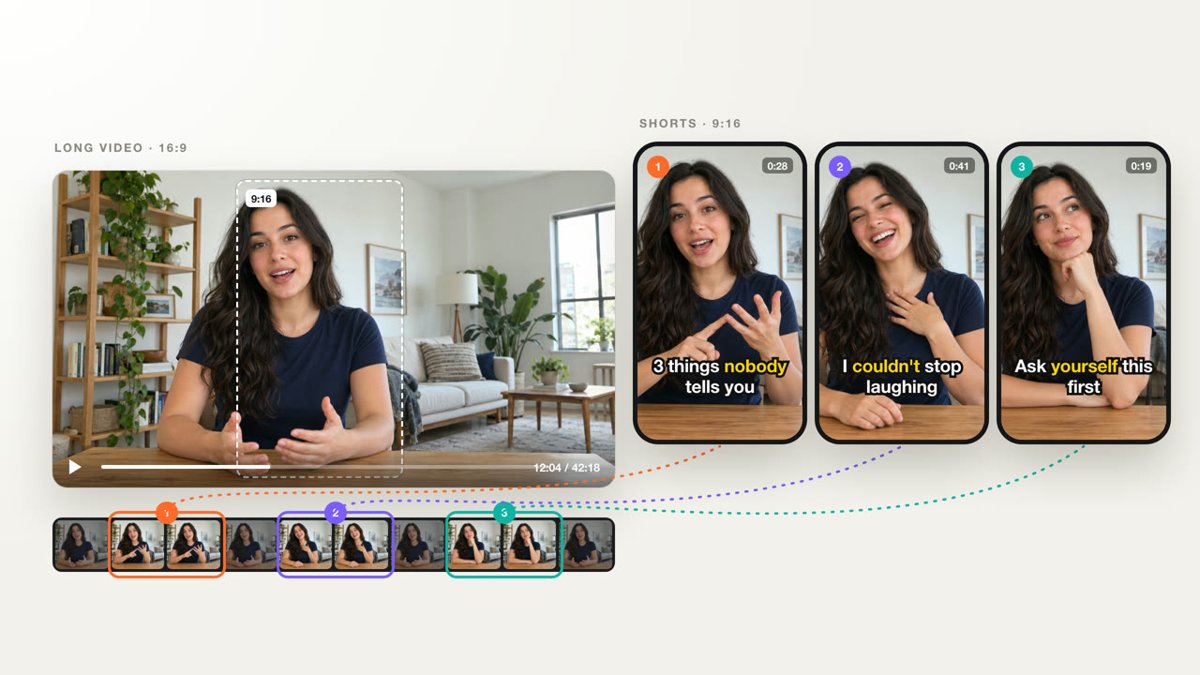
Illustration · not a resultFrom the openfilm/openfilm README — shows the whole collection, not only this skill.source ↗
Turn a long video (a talk, podcast, interview, lesson, livestream or vlog) into short vertical clips that each stand alone and hold attention from the first second.
by openfilm·MIT license·★ 975 Stars on the repo·GitHub ↗
npx degit openfilm/openfilm/packages/openfilm/skills/long-to-short#main ~/.claude/skills/long-to-shortChecked ·commit main
Files of Long video to shorts
Show the full text37 lines
Long video to shorts
Find the moments in this recording that people would stop scrolling for, and make each one a short a channel would post as it is: it opens on its strongest real line, ends on its point, and makes sense to someone who never saw the long video. The speaker, watching it, would say: yes, that is what I meant.
What has to be true
- The speaker's meaning, intact. Nothing said in different places is joined into a claim they did not make; an "if", a "not" or an "in some cases" is never cut away; an answer keeps its question. A title or any other text on screen says only what the recording says, or is plainly yours.
- It stands alone: a viewer knows who is speaking and what they are answering.
- Every word exact. The transcript says exactly what was said; names, numbers and terms you cannot confirm are named in your reply. Each cut falls in a pause: no clip starts on a clipped word or stops mid-thought.
- Made for a phone: the one who is speaking well framed at every moment, and nothing that matters where the app's buttons and captions sit.
- Worth posting: each one holds up next to the best clips on the platform, as long as its moment needs and no longer. Watch each as a viewer would; a clip you would scroll past is not done.
What you have
The recording's transcript with every word's time (npx openfilm get asr, a WebVTT beside it), from which Studio draws
the subtitles; the person sets how they look. A short is the same recording trimmed (#t=) and framed with CSS, never
cut or re-encoded into new files; a page can also play the recording, silent, with its time set from t, when the
picture has to move over it. Anything you can make titles and motion with, and your own built-in tools.
With the person
What they ask for comes before anything here. The recording, where the shorts will go, and how many they want (else the few best). Ask whether there are moments they must keep or must not use, without holding up the work. When done, list the shorts: for each, its length, its first line, and why you chose it.
| 1 | |
| 2 | name long-to-short |
| 3 | description Turn a long video (a talk, podcast, interview, lesson, livestream or vlog) into short vertical clips that each stand alone and hold attention from the first second. Use when the person gives a long recording and asks for clips, shorts, highlights or cut-downs for Douyin, Reels, Shorts or similar (长视频转短视频, 切片, 剪短视频, 高光, 拆条). |
| 4 | |
| 5 | |
| 6 | # Long video to shorts |
| 7 | |
| 8 | Find the moments in this recording that people would stop scrolling for, and make each one a short a channel would post |
| 9 | as it is: it opens on its strongest real line, ends on its point, and makes sense to someone who never saw the long |
| 10 | video. The speaker, watching it, would say: yes, that is what I meant. |
| 11 | |
| 12 | ## What has to be true |
| 13 | |
| 14 | **The speaker's meaning, intact.** Nothing said in different places is joined into a claim they did not make; an |
| 15 | "if", a "not" or an "in some cases" is never cut away; an answer keeps its question. A title or any other text on |
| 16 | screen says only what the recording says, or is plainly yours. |
| 17 | **It stands alone**: a viewer knows who is speaking and what they are answering. |
| 18 | **Every word exact.** The transcript says exactly what was said; names, numbers and terms you cannot confirm are named |
| 19 | in your reply. Each cut falls in a pause: no clip starts on a clipped word or stops mid-thought. |
| 20 | **Made for a phone**: the one who is speaking well framed at every moment, and nothing that matters where the app's |
| 21 | buttons and captions sit. |
| 22 | **Worth posting**: each one holds up next to the best clips on the platform, as long as its moment needs and no |
| 23 | longer. Watch each as a viewer would; a clip you would scroll past is not done. |
| 24 | |
| 25 | ## What you have |
| 26 | |
| 27 | The recording's transcript with every word's time (`npx openfilm get asr`, a WebVTT beside it), from which Studio draws |
| 28 | the subtitles; the person sets how they look. A short is the same recording trimmed (`#t=`) and framed with CSS, never |
| 29 | cut or re-encoded into new files; a page can also play the recording, silent, with its time set from t, when the |
| 30 | picture has to move over it. Anything you can make titles and motion with, and your own built-in tools. |
| 31 | |
| 32 | ## With the person |
| 33 | |
| 34 | What they ask for comes before anything here. The recording, where the shorts will go, and how many they want (else the |
| 35 | few best). Ask whether there are moments they must keep or must not use, without holding up the work. When done, list |
| 36 | the shorts: for each, its length, its first line, and why you chose it. |
| 37 |
Discussion
Alternatives
 Ugc style tiktok script generator for gen z skincareGenerate user-generated content style TikTok scripts for a new Gen Z skincare product as a Marketing Strategist.
Browse more free Claude skills or everything in Content creator.