jevreel: ask questions about videos skill
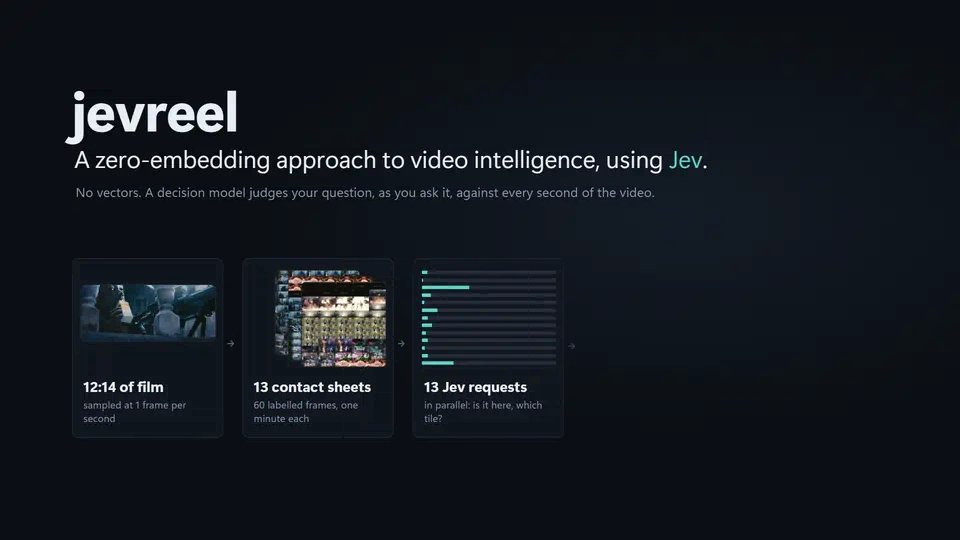
Illustration · not a resultFrom the DeepAleph/jevreel README — shows the whole collection, not only this skill.source ↗
Search and understand videos without embeddings.
by DeepAleph·MIT license·★ 33 Stars on the repo·GitHub ↗
npx degit DeepAleph/jevreel/skills/jevreel#main ~/.claude/skills/jevreelChecked ·commit main
Files of jevreel: ask questions about videos
Show the full text80 lines
jevreel: ask questions about videos
jevreel lays a video out on contact sheets at one frame per second and has Jev, TypeSafe's fast decision model, screen every sheet in parallel, then re-check the best windows on full frames. You (the main agent) then look at what it found. Jev gives typed answers and probabilities, never descriptions: reading, describing and concluding is your job.
Setup check
- A TypeSafe API key is needed for anything that asks Jev (indexing with a timeline, ask, find,
locate, whole, lenses):
TYPESAFE_API_KEY, or a key saved withjevreel login. Zoom, transcripts and timeline queries work without it. If tools report a missing key under Codex, have the user runuvx --from "jevreel[url]==0.2.0" jevreel loginthemselves (it asks for the key; never ask for it in chat). ffmpegandffprobemust be on PATH.- URLs need
jevreel[url]; videos without captions needjevreel[asr]for a transcript.
Workflow
- Index once. MCP
index_video(source)orjevreel index <file-or-url>. Later calls take the returnedid, the path, or the title ("tears of steel"). Re-indexing an indexed video returns at once. - Find moments.
ask_video(video, query)/jevreel ask <id> "<query>".- Write the query as a plain description of what would be visible or said: "a bar chart on a slide", "someone opens a laptop", "the speaker mentions pricing".
- One thing per query. Split "a red car and a dog" into two asks; Jev is most accurate on simple questions.
mode:visual(on screen only),speech(transcript only, cheapest),both, orauto.- Narrow with
start/endwhen the user names a part of the video.
- Find from a photo.
find_in_video(video, image_path, note="person")/jevreel find <id> photo.jpg --note person. - Look before you answer. Hits are leads, not facts. Verified hits come with
frame, a full-resolution image of the moment: look at it.zoom_video(video, start, end)/jevreel zoom <id> 12:00 12:10gives more frames.locate_in_frame(video, at, target)boxes and crops one thing in one frame for close reading. - What is said.
video_transcript(video, start, end)/jevreel transcript <id> --start 12:00 --end 13:00. - Whole-video questions.
ask_whole_video(video, question, kind, options)/jevreel whole <id> "Is this a tutorial?". Usekind=choicewith options, orkind=scorewith levels lowest first (at most 10).
Lenses: when the same questions matter across the whole video
When the user cares about several things throughout a video (who is on screen, safety rules, brands, weather, whether a slide is up), don't ask each one separately. Run a lens: every minute answers all of its questions in one request. Then filter the answers as often as needed, for free.
- MCP
run_lens(video, lens)with{"name": "site", "questions": [{"name": "helmet_off", "type": "noul", "ask": "Is a worker without a helmet visible?"}, {"name": "vehicle", "type": "choice", "ask": "Which vehicle is most visible?", "options": ["car", "truck", "none"]}, {"name": "crowd", "type": "score", "ask": "How crowded is it?", "levels": ["Empty", "Some", "Busy"]}]}. CLI:jevreel lens <id> lens.toml. To include a lens while indexing, pass it toindex_video(orjevreel index --lens); it then costs almost nothing extra. query_timeline(video, "helmet_off > 0.7")/jevreel query <id> "helmet_off > 0.7 and vehicle == truck". Conditions arecolumn op valuejoined byand; quote a value that contains "and" (place == 'books and a desk'). Omitwhereto see every minute and its columns. Yes/no questions also give<name>_at, the second it is most visible.- The default timeline columns are there too:
people,talking_to_camera,screen_or_slides,text_on_screen,cut,setting,activity(0-3),keyframe.
Reading results
probabilityis Jev's yes-probability;strongmeans at least 0.7. Forverifiedhits it comes from the full frames,at/timeis the frame that showed it best, andscreenedis the contact-sheet probability before. Unverified hits come from the sheet alone.shownandsaidare the screen and transcript questions, asked separately.alsolists other likely moments in the same window.- Probabilities rank well but are not guaranteed calibrated. Look before stating anything you have not seen, and say so when you have only a weak hit.
- No hits above the threshold is a real answer, but check
weakfirst: windows Jev did not rule out, including ones verification overturned. Zoom into them before saying "not found". - Cite moments by their times (for example "at 12:04"), so the user can jump there.
Costs
Jev bills input tokens only, and repeated identical requests are answered from jevreel's cache for
free (cached in results). Every ask sends each sheet in range once (one sheet per minute of
video), plus one request per verified window, so narrowing with start/end makes asks cheaper and
faster. Results report requests, cached, input_tokens and estimated_usd.
| 1 | |
| 2 | name jevreel |
| 3 | description Search and understand videos without embeddings. Use when the user asks about the content of a video file or video URL - finding moments ("when does X happen"), finding a person or object from a photo, reading what is on screen at a moment, getting what is said, tracking the same things across a whole video, or one answer about the whole video. Works through the jevreel MCP tools or the `jevreel` CLI. |
| 4 | |
| 5 | |
| 6 | # jevreel: ask questions about videos |
| 7 | |
| 8 | jevreel lays a video out on contact sheets at one frame per second and has Jev, TypeSafe's fast |
| 9 | decision model, screen every sheet in parallel, then re-check the best windows on full frames. You |
| 10 | (the main agent) then look at what it found. Jev gives typed answers and probabilities, never |
| 11 | descriptions: reading, describing and concluding is your job. |
| 12 | |
| 13 | ## Setup check |
| 14 | |
| 15 | A TypeSafe API key is needed for anything that asks Jev (indexing with a timeline, ask, find, |
| 16 | locate, whole, lenses): `TYPESAFE_API_KEY`, or a key saved with `jevreel login`. Zoom, transcripts |
| 17 | and timeline queries work without it. If tools report a missing key under Codex, have the user run |
| 18 | `uvx --from "jevreel[url]==0.2.0" jevreel login` themselves (it asks for the key; never ask for it in chat). |
| 19 | `ffmpeg` and `ffprobe` must be on PATH. |
| 20 | URLs need `jevreel[url]`; videos without captions need `jevreel[asr]` for a transcript. |
| 21 | |
| 22 | ## Workflow |
| 23 | |
| 24 | **Index once.** MCP `index_video(source)` or `jevreel index <file-or-url>`. Later calls take the |
| 25 | returned `id`, the path, or the title ("tears of steel"). Re-indexing an indexed video returns at once. |
| 26 | **Find moments.** `ask_video(video, query)` / `jevreel ask <id> "<query>"`. |
| 27 | Write the query as a plain description of what would be visible or said: |
| 28 | "a bar chart on a slide", "someone opens a laptop", "the speaker mentions pricing". |
| 29 | One thing per query. Split "a red car and a dog" into two asks; Jev is most accurate on |
| 30 | simple questions. |
| 31 | `mode`: `visual` (on screen only), `speech` (transcript only, cheapest), `both`, or `auto`. |
| 32 | Narrow with `start`/`end` when the user names a part of the video. |
| 33 | **Find from a photo.** `find_in_video(video, image_path, note="person")` / |
| 34 | `jevreel find <id> photo.jpg --note person`. |
| 35 | **Look before you answer.** Hits are leads, not facts. Verified hits come with `frame`, a |
| 36 | full-resolution image of the moment: look at it. `zoom_video(video, start, end)` / |
| 37 | `jevreel zoom <id> 12:00 12:10` gives more frames. `locate_in_frame(video, at, target)` boxes and |
| 38 | crops one thing in one frame for close reading. |
| 39 | **What is said.** `video_transcript(video, start, end)` / `jevreel transcript <id> --start 12:00 --end 13:00`. |
| 40 | **Whole-video questions.** `ask_whole_video(video, question, kind, options)` / |
| 41 | `jevreel whole <id> "Is this a tutorial?"`. Use `kind=choice` with options, or `kind=score` with |
| 42 | levels lowest first (at most 10). |
| 43 | |
| 44 | ## Lenses: when the same questions matter across the whole video |
| 45 | |
| 46 | When the user cares about several things throughout a video (who is on screen, safety rules, |
| 47 | brands, weather, whether a slide is up), don't ask each one separately. Run a lens: every minute |
| 48 | answers all of its questions in one request. Then filter the answers as often as needed, for free. |
| 49 | |
| 50 | MCP `run_lens(video, lens)` with |
| 51 | `{"name": "site", "questions": [{"name": "helmet_off", "type": "noul", "ask": "Is a worker without a helmet visible?"}, {"name": "vehicle", "type": "choice", "ask": "Which vehicle is most visible?", "options": ["car", "truck", "none"]}, {"name": "crowd", "type": "score", "ask": "How crowded is it?", "levels": ["Empty", "Some", "Busy"]}]}`. |
| 52 | CLI: `jevreel lens <id> lens.toml`. To include a lens while indexing, pass it to `index_video` |
| 53 | (or `jevreel index --lens`); it then costs almost nothing extra. |
| 54 | `query_timeline(video, "helmet_off > 0.7")` / `jevreel query <id> "helmet_off > 0.7 and vehicle == truck"`. |
| 55 | Conditions are `column op value` joined by `and`; quote a value that contains "and" |
| 56 | (`place == 'books and a desk'`). Omit `where` to see every minute and its columns. |
| 57 | Yes/no questions also give `<name>_at`, the second it is most visible. |
| 58 | The default timeline columns are there too: `people`, `talking_to_camera`, `screen_or_slides`, |
| 59 | `text_on_screen`, `cut`, `setting`, `activity` (0-3), `keyframe`. |
| 60 | |
| 61 | ## Reading results |
| 62 | |
| 63 | `probability` is Jev's yes-probability; `strong` means at least 0.7. For `verified` hits it comes |
| 64 | from the full frames, `at` / `time` is the frame that showed it best, and `screened` is the |
| 65 | contact-sheet probability before. Unverified hits come from the sheet alone. |
| 66 | `shown` and `said` are the screen and transcript questions, asked separately. |
| 67 | `also` lists other likely moments in the same window. |
| 68 | Probabilities rank well but are not guaranteed calibrated. Look before stating anything you have |
| 69 | not seen, and say so when you have only a weak hit. |
| 70 | No hits above the threshold is a real answer, but check `weak` first: windows Jev did not rule |
| 71 | out, including ones verification overturned. Zoom into them before saying "not found". |
| 72 | Cite moments by their times (for example "at 12:04"), so the user can jump there. |
| 73 | |
| 74 | ## Costs |
| 75 | |
| 76 | Jev bills input tokens only, and repeated identical requests are answered from jevreel's cache for |
| 77 | free (`cached` in results). Every ask sends each sheet in range once (one sheet per minute of |
| 78 | video), plus one request per verified window, so narrowing with `start`/`end` makes asks cheaper and |
| 79 | faster. Results report `requests`, `cached`, `input_tokens` and `estimated_usd`. |
| 80 |
Discussion
Browse more free Claude skills.