Game asset GPT image character sheet prompt
A detailed prompt for generating a professional game/animation character sheet with strict layout and consistency instructions.
by Dry Seven·CC-BY-4.0 license·via YouMind (CC BY 4.0)·Source ↗
Use now
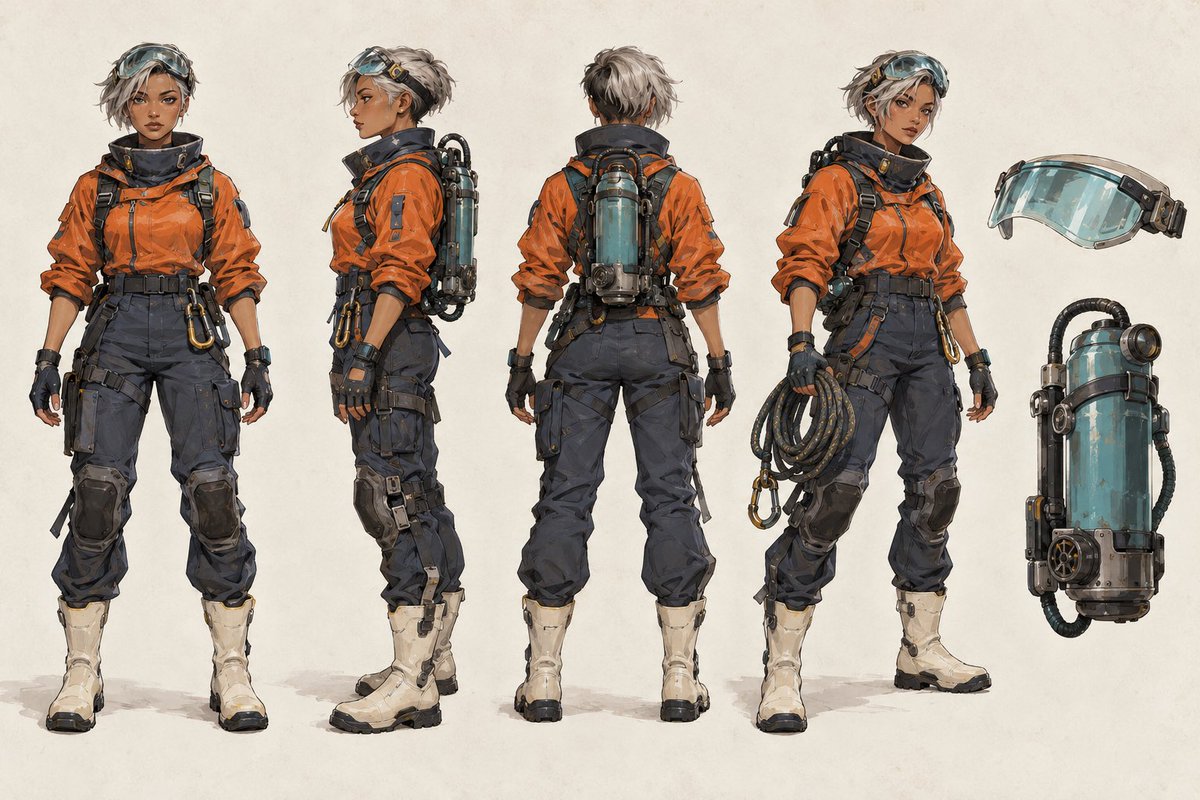
The sample the author posted with this prompt on its sourceview original
| 1 | Create a professional game/animation character sheet. Original adult female high-altitude ruin explorer: warm brown skin tone, short messy silver-gray hair, transparent cyan-green goggles, old orange technical jacket, dark gray cargo pants, off-white heavy boots, cyan-green cylindrical breathing backpack. |
| 2 | |
| 3 | Character Lock: All views must maintain completely identical facial structure, hairstyle, body proportions, clothing cuts, backpack structure, colors, and wear positions; do not redesign the character. |
| 4 | |
| 5 | Strictly arranged from left to right: Full body front -> 90-degree side -> Full body back -> 3/4 action view; The right side independently displays equipment breakdown of goggles and breathing backpack. All characters maintain the same scale, feet on the same horizontal line, no occlusion between each other. |
| 6 | |
| 7 | Off-white character design paper background, precise ink lines + restrained concept design thick painting, able to clearly see fabric seams, buckles, metal wear, and equipment connection methods; uniform soft light, no dramatic depth of field. No text, no logos, no watermarks, do not add extra characters or duplicate equipment. |
Discussion
Alternatives
 Animation vocabularyReverse-lookup glossary that turns a vague description of a web animation or motion effect into its exact term ("the bouncy thing when a popover opens" → Pop in; "the iOS rubber-band scroll" → Rubber-banding). Use when the user asks "what's it called when…", or describes a motion effect without knowing its name and wants the right word to prompt an AI or designer with. For naming an effect, not designing or building one.
 Playwright BrowserHeadless, reproducible browser automation with Playwright for any project — screenshots of web pages or local dev servers (desktop/tablet/mobile, full page or one element, single page or every page/menu of an app in one batch), frontend audits (console errors, failed requests, broken images/links, responsive overflow, axe accessibility, LCP/CLS performance), before/after visual comparison, scripted E2E flows (log in, click, fill, page through, assert), and logged-in pages via saved sessions. Use this whenever the user wants to screenshot or visually check a site, find frontend bugs, see how a page looks on mobile, compare the UI before and after a CSS/code change, reproduce a bug from an issue or ticket and capture evidence images for it, verify a UI flow works, or run/write a browser test — even if they never say "Playwright" or "browser". If Claude in Chrome could also do the job, briefly ask which to use (with a recommendation) instead of silently picking.Act as an electron frontend developerGuide users in building a desktop application using Electron with a focus on frontend development best practices.AI builderThis AI builder will create a fully functional website based on the provided details the website will be ready to publish or deploy
Browse more free AI prompts or everything in Development.