Folio skill
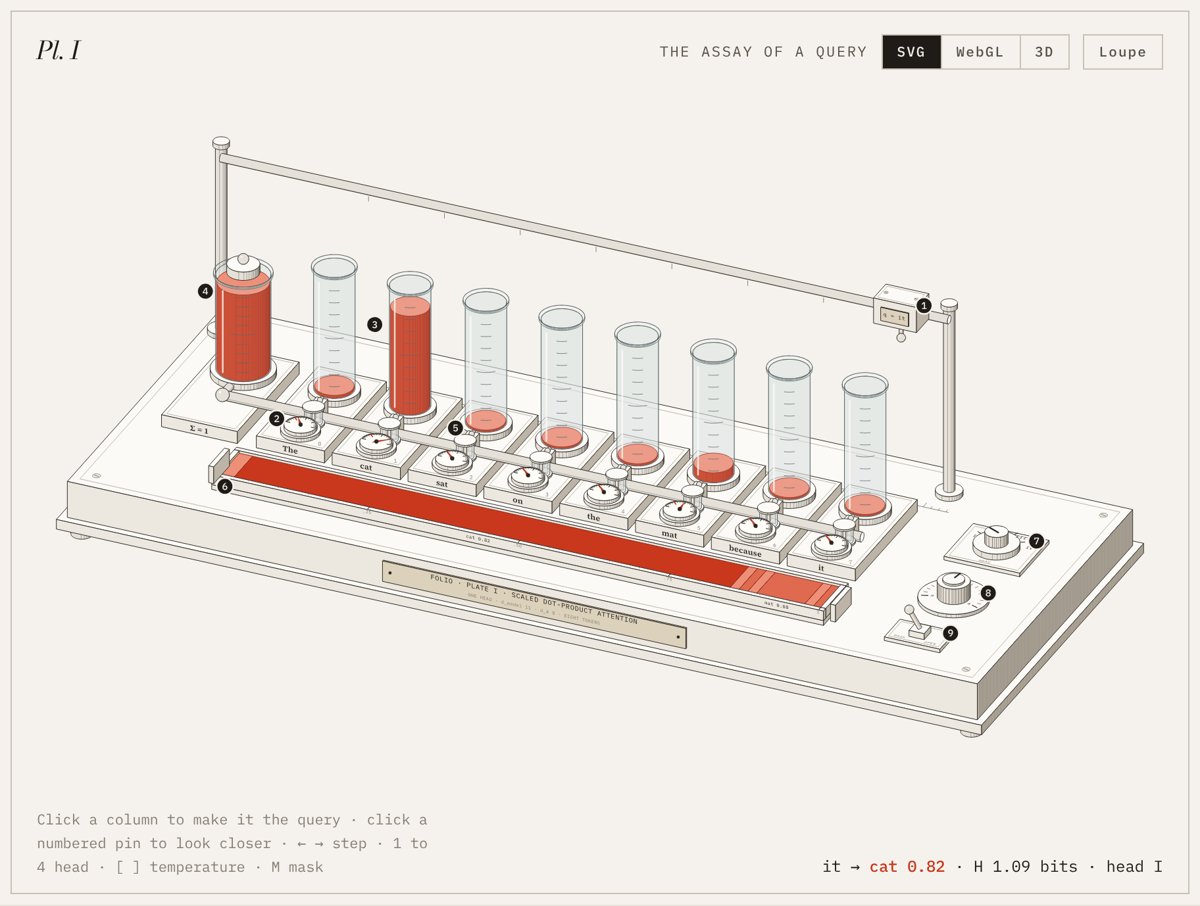
Illustration · not a resultFrom the Ramakm/folio-anatomy README — shows the whole collection, not only this skill.source ↗
Build a museum-style exhibition plate that explains a technical idea - an invented scientific instrument drawn as a live, engraved isometric figure in three views (SVG, WebGL light, and a 3D bench you can turn through 360 degrees) with internal parts that really rotate and interact, with numbered specimen pins, a catalogue key, a working model behind every number, and wall texts that walk through the formula term by term.
by Ramakm·MIT license·★ 10 Stars on the repo·GitHub ↗
Files of Folio
Ramakm/
Show the full text873 lines
Folio
A Folio plate explains an idea the way a natural history museum explains a specimen. There is one object on a mount, a numbered key beside it, and wall texts that tell you how to look at it. The object here is an instrument you invent, such as a bench, a balance, a loom or a still, whose working parts perform the idea. Readers can poke it, and every reading on it is computed.
Three commitments
- Mechanism, not metaphor. The instrument has to perform the idea, not stand beside it as an illustration. Before drawing, write one line: "When the reader does X, part Y moves, and that movement is Z in the idea."
- A single source of numbers. A small pure model computes everything: needle angles, fluid levels, the readout, the key, the tables. The page only displays what the model returns, so no two places can disagree.
- A guided reading. A good drawing still needs a guide. Each plate ships with a key, a term-by-term reading, the full working, and an honest account of what was simplified.
Getting started
- Three reference plates ship with the repo. Plate I (
examples/attention/, attention as an assay bench) is the model for ideas made of discrete steps and a formula. Plate II (examples/heart/, the human heart as a double pump) is the model for anything that runs in time: a simulation integrated every frame, continuous flow, phases, and charts redrawn after each cycle. Plate III (examples/grid/, a power grid in miniature) is the model for electricity, magnetism and energy flows, and for a bench built from free-standing machines rather than bands: a turbine, a generator with a spinning rotor, transformers, pylons and a town. Plate IV (examples/hashmap/, a hash map as a sorting office) is the model for algorithms and data structures, where the idea is a sequence of discrete operations: each operation (insert, look up, resize) expands into a short list of timed acts (lift, carry, dip to compare, fly every card to a new place), played one after another, so the reader watches the algorithm take each step. Open the closest one first. - The fastest start is to copy a reference plate:
node scripts/new-plate.mjs <name>makesexamples/<name>/from Plate I. Then replace its model, scene and texts. Building from a working plate is quicker and safer than starting blank. - Shared exhibition styles live in
kit/folio-page.css; a plate'spage.htmlputs/*CSS*/inside its<style>and adds only its own rules. node scripts/build-site.mjsbuilds every plate plus the cover page (site/index.html) intodocs/, a website ready for GitHub Pages. To add a plate, add its name toPLATESthere and a card to the cover.- Build any plate into one standalone file with
node scripts/build.mjs examples/<name> dist/<name>.html. - If only this file is installed (no repo), the appendix at the end holds the drawing library; save it as
folio-kit.js.
A plate is five files:
| File | Role |
|---|---|
folio-kit.js |
the drawing library (shared, never edited per plate) |
folio-live.js |
the three views: stage, light layer, orbit, view switch (shared) |
model.js |
the pure model; puts one object on window |
plate.js |
the instrument: static geometry, live slots, input |
page.js |
key, controls, wall texts, ledger; listens to the plate |
page.html |
the mount and styles, with /*KIT*/ /*MODEL*/ /*PLATE*/ /*PAGE*/ placeholders |
Phase A: the brief (no drawing yet)
A1. Scope. Tell the user which of these they are getting and roughly how long it will take, before starting:
| Scope | Contents | Typical time |
|---|---|---|
| Sketch | instrument + key + readout, no wall texts | under an hour |
| Plate | the full exhibition page (the default for "explain X") | one and a half to three hours |
| Series | several plates on one shared bench, scale and palette | agree the list first, then one plate at a time |
A2. The model. Write model.js before anything visual. Gather the real formula, units and magnitudes. Return plain objects: inputs in, every quantity the page will show out. Run it in Node and print a few cases. Look for edge cases now (an empty set, a masked row, a value at the limit). If anything is invented, such as toy weights or sample data, note it for the "About this specimen" wall text.
A2b. Models that run in time. When the idea is a process (a heartbeat, a queue draining, a learning curve), write it as state plus a step(s, dt) function and a read(s) that returns everything shown. Tune parameters against known values in Node before drawing, as Plate II does for a resting adult (about 115/80 mmHg, 70 mL per beat, 5 L/min). Keep the simulation running while the drawing is off screen, and skip only the painting; otherwise changing a control further down the page freezes the numbers.
A3. The instrument and its correspondence table. Look for an instrument from the world of laboratories, workshops, observatories or print shops. Then write the table that ties each term to a part:
| Term in the idea | Part of the instrument | What the reader can see |
|---|---|---|
| query | a carriage on an overhead rail | it parks above the word that is asking |
| scaled score | a dial per word | needle position |
| softmax | one sealed reservoir | the columns can only divide what it holds |
| mask | stopcocks with caps | later words are shut off |
| weighted sum | a tray of layered deposit | each layer's length is a weight |
Every row needs a part, and every major part needs a row. Some reliable mappings: a fixed total becomes a reservoir, a purse or a bag of weights. Comparison becomes a dial, a balance or calipers. Selection becomes a valve, a switch or a points lever. Accumulation becomes layers, a stack or a tally. Ordering becomes a rail, a rack or a chute.
Phase B: the bench
B1. Inventory. List the parts before placing them. Aim for 30 to 60. Group them by purpose: term parts (from the table, repeated per item), support parts (plinth, feet, posts, rails, collars, brackets), control parts (selectors, knurled knobs, levers) and mount details (catalogue plate, engraved labels, scale strips, screws). Exactly one quantity, the one the idea is about, gets the red.
B2. Bands. Use world coordinates with x along the bench, y toward the viewer and z up. Divide the bench into depth bands from back to front, and give each band one kind of part. Plate I runs rail, columns, stopcocks, manifold, dials, tray. Leave clearance between bands in world units, because a part that pokes into the next band will be painted in the wrong order. Inside a band, draw from far to near. Set the camera (az near -24 for a long bench, el 30) and fit it to the corners with Folio.fit.
B3. Static strings, live slots. Walk the bands once and push SVG strings into an ordered list. Wherever something moves, push a named slot instead. At mount time the list becomes one SVG with an empty <g> per slot. Each animation frame redraws only the slots, from eased values that chase the model's targets. Drawing stops once every value has arrived.
B4. Pins. Place 6 to 10 numbered pins directly on the parts that carry the idea, numbered in the order a newcomer should look at them. Pins are the only marks laid over the drawing. All other text is engraved into a surface: names on pad fronts, numbers on scales, a catalogue plate on the plinth.
Phase C: the mount
The page is part of the explanation. Build it from these blocks, top to bottom:
- Masthead. The series on the left, the wordmark centred, the plate number on the right.
- Title block. A display headline that names the idea as the instrument ("Attention, as an assay bench."), three sentences on what happens, and a small catalogue list: Object, Idea, Model, Catalogue.
- The mounted plate. A paper mount with a hairline inset frame. Its corners carry the plate number, a short caption, the interaction hint and a live readout.
- The key. One entry per pin, giving the part's name and one line on what it computes, with the math in mono. Hovering an entry highlights its pin, and hovering a pin highlights its entry.
- At the bench. Ordinary buttons and sliders that do what the instrument's own knobs do.
- Wall text I: reading the plate. A column for each term, in the order the formula is written: a roman numeral, a verb, the term, two sentences that refer to pins by number, and a box of current numbers.
- Wall text II: the ledger. The complete working for the current state, one row per item. Clicking a row selects that item.
- Wall text III: the wider view. Whatever the instrument shows a slice of (the full matrix, the whole sequence, every bucket), and the variants the selector chooses between.
- Wall text IV: about this specimen. Three notes: what is computed exactly, what was chosen by hand, and what was left out. Always include it.
- Colophon. Who made the plate and which typefaces it uses.
Controls answer pointer and keyboard: click a station, arrows step, digits pick a variant, brackets turn a knob, one letter flips a toggle. When nobody is interacting, the plate slowly demonstrates itself. It pauses on hover or focus, rests when scrolled away, and shows one settled frame under reduced motion. The readout uses aria-live.
Phase C2: three views
Every plate offers the same instrument three ways, chosen from a small switch in the mount's top corner (SVG · WebGL · 3D). The model, the key and the wall texts do not change between views; only the way the bench is shown does.
SVG is the engraved drawing described above. It is the default and the only view that must always work.
WebGL lays light over the drawing without redrawing it. The light lives in a canvas on top of the SVG, and it knows what is visible through a mask rendered from the drawing itself: light() clones the SVG, recolours every surface by role (red for the floor, green for vessels and pipes, blue for glass, black for everything else), keeps the painter's order, and uploads the result as a texture. Anything the drawing hides, the light cannot touch, so no separate occlusion logic is needed. Give each surface its role with a class (floor on the plinth, pad on raised receivers, pipe or the blood classes on vessels) and pass the colour rules as maskCss.
Inside the shader, onPlane(vb, z) turns a pixel back into a world point on a horizontal plane, project() goes the other way, and fall() finds where light through a part lands on the floor (the lamp sits behind the bench, so pools fall in front of parts, where the reader can see them). Use the light for the subject quantity only:
- Plate I: each column's fluid glows with its weight, a shaft of rippled light runs from each column across the bench, and pulses run along the manifold, faster while the weights are shifting.
- Plate II: pulses travel along every vessel at the true flow (the same accumulated volume that moves the SVG flow marks), each chamber throws light of its blood's colour, and the ventricles flare as they squeeze.
Accumulate light as premultiplied colour (addLight) and pick colours per theme: pale highlights and saturated pools on paper (normal blending), brighter glows on the dark ground (screen blending, set by the --light-blend token). Render only while the view is on and the plate is on screen, cap the pixel ratio at 1.5, and draw one still frame under reduced motion.
3D turns the bench all the way round. Because the whole scene is a function of the camera, stage.mount(az, el) simply builds it again from the new angle: every face is re-shaded by its facing, every round part re-silhouetted, every hatch re-spaced, and every engraved label re-projected. The painter's order has to hold from every side, so never hard-code "back to front":
- Wrap each depth band as
{ y, draw }and hand the list toapi.bands(list); it sorts them far to near for the current camera. From behind, the front band is drawn first. - Inside a band, or for a bench of separate machines, give each unit a world position and use
api.units(list)with{ at: [x, y, z], draw }. Plate III is built entirely this way. - Walls of an open vessel (a tray, a tank) are ordered with
api.backIsFarandapi.leftIsFar. - Anything mounted on one face of the plinth (a brass catalogue plate, a timing cam on a front panel) is drawn only when that face looks toward the reader: check the sign of
cam.viewfirst.faceTextalready culls itself.
orbit({ wrap: true }) lets the azimuth run past 360°, stage refits the scale at each angle (capped by orbitScale, so the bench never jumps in size), double-click returns to the default view, and Shift with the arrow keys turns it from the keyboard. Check with a grid of angles every 45° at two elevations. A full rebuild of Plate II takes about 27 ms, which is smooth enough to drag; if a plate is much heavier, memoise each slot's last output and repaint only what changed, as Plate III does.
Leaving 3D returns the camera to the default view, so the WebGL light (which assumes it) always lines up.
Phase C2b: moving internals
A plate should never be a still picture with numbers beside it. Find the parts that would really move and drive them from the model, at a rate the eye can follow:
- Things that turn. A flow wheel in a sight glass turns at the true flow (Plate I's manifold), timing cams turn once per cycle and show which phase is active (Plate II), and a generator's rotor, a water wheel and a flyball governor turn with the machine's speed (Plate III). Accumulate the angle from the model (
rot += ω·dt) rather than from the clock, so a slowing machine visibly slows. - Things that shift. Levels, pistons, valve leaflets, needles, a governor's balls flying out as speed rises, a breaker blade lifting.
- Things that interact. One part's motion should cause the next: the wheel turns the shaft, the shaft turns the rotor, the rotor's field sweeps the coils, the coils feed the line, and a factory's windows dim when the line cannot keep up.
- Fields and flows. Draw invisible quantities as moving marks: dashed flux loops through a transformer core whose dash offset swings with the alternating current, energy flow marks along a conductor whose speed is the power, field lines between rotor poles. In the WebGL view, add current waves along wires, heat glow by loss, and glow in iron cores.
Use the helpers for round machinery: ringArc(cam, c, axis, r, front) draws the back or front half of a ring on any axis (draw the back half before the rotor, the front half after), orbitPt(c, axis, r, t) places a point on a turning wheel, and prism() builds a roof or a wedge.
Algorithms as operations. When the idea is a procedure rather than a process in time, follow Plate IV. Keep the model pure (place(keys, options) rebuilds the whole structure and returns every key's home, path and cost), and let the plate turn each user action into a queue of small acts: move (a part travels between two points), dip (it touches what is there and the counter clicks), fly (every piece moves from one arrangement to the next, as in a resize), call (the model's state is committed). The drawing shows the structure as it was until the act that changes it, so nothing appears before the reader has seen why. A queued user action hurries the act in progress. Give the plate a jump(state) that skips the animation, for screenshots and tests.
Simulations of energy. For electricity, magnetism and power flows, Plate III is the reference: a swing equation for frequency, a droop governor with a lag, slower automatic control back to the set point, line losses solved exactly (P_loss = 3·I²·R), and protection that trips when a limit is crossed. Tune it in Node against known behaviour (a sudden load step should dip the frequency a few tenths of a hertz and recover within a minute), and let the page explain a trip when it happens rather than hiding it.
Phase C3: looking closer
Every plate lets the reader get close to any part, whatever the topic.
- Inspector. Give the plate a list of parts,
{ n, name, text, at }, whereatis the part's world position (or a function, for a part that moves), and alive(n)function that returns that part's current reading as a short line of HTML.inspector()then makes every pin pressable: the plate glides in on the part (the SVGviewBoxanimates; nothing is redrawn), and a card shows the part's name, what it does and its live reading, with previous and next buttons, Esc to leave, and,and.to step. Clicking a line of the key does the same, through afolio:partevent. Act on pointer-down, not click, because pins on moving parts are redrawn while the reader presses them; pins on parts that never move should be drawn once per camera, not every frame. - Loupe. A Loupe button beside the view switch turns on a magnifying glass that follows the pointer. It is a second, small SVG over the plate that shows the scene through a
<use>element, scaled 2.6 times inside a circular clip, so it always mirrors the live drawing at no extra cost.
The inspector and the loupe close each other, and entering 3D closes the inspector. Keep the plate moving while the reader watches: Plate I steps its own query along the sentence and rests only for a few seconds after a touch, and Plate II beats continuously.
Phase C4: the website
scripts/build-site.mjs builds three things from the same sources: each plate's full page, an embeddable copy of each plate (embed-<name>.html, the figure alone, which reports its height to the page around it), and the cover page from site/index.html. The cover is an essay: a live plate at the top, then numbered sections in one reading column with margin notes and a contents rail on wide screens. Add a plate to PLATES and EMBED in the build script and a card to the cover.
Phase D: proof
Check with screenshots, not assumptions. In the repo, node scripts/capture.mjs dist/<name>.html shots --crop x,y,w,h produces light, dark and phone captures, an enlarged crop in viewBox units, and a report of console errors and horizontal overflow. Pass --eval "Plate.update({...})" to capture other states. Look at every image and check:
- Depth. No part shows through one that should cover it (Plate I's first draft ran the manifold through the dials).
- Engraving. Every engraved string sits inside its surface.
- Colour. Red appears only on the subject quantity.
- Numbers. The readout, key, wall texts and ledger match
model.jsrun in Node for the same state. - Scale. Small values look small. Never inflate a level to make it visible.
- Width. The plate still reads at 390 px wide, and the page never scrolls sideways.
- Views. Switch to WebGL and 3D and capture each (
Plate.view("webgl"),Plate.turn(38, 42)). Render the light mask to a PNG once (Plate.light().maskCanvas) and check every surface carries the right role. Turn to both sides and look for parts drawn in the wrong order.
Drawing style
- Engraving over flat fills. Faces take one of four tones according to how they face the light. A large box's darkest side carries fine vertical hatching (
box(..., { hatch: 2.2 })). Round parts are hatched more densely toward their shadow side (rod), which makes them look turned. Hatch lines always end on an edge or rim. - One red. The instrument is warm grey. Red belongs only to the quantity being explained.
- Glass in three passes. Draw the rear wall, then the contents slot (at a slightly smaller radius), then the front with graduations, a highlight and a rim.
- Detail with a job. Collars, tees, slotted screws, knurling, minor and major ticks, a catalogue plate. Each detail belongs to a part, and nothing is texture for its own sake.
- Proportion. The plinth takes about 85% of the mount's width, with air above it for rails and probes.
Type and colour
Use a Didone display face for headlines, plate numbers and numerals (Bodoni Moda, often italic), a readable text serif for everything people read (Source Serif 4, at 17 px), and a mono for data and engraving (IBM Plex Mono). In light mode: warm grey wall #E5E1DA, paper #F5F2ED, ink #1F1C18, red #C9381D. In dark mode: wall #151412, paper #1D1B19, a brighter red. Every colour is a CSS custom property defined on :root and redefined under :root[data-theme="dark"], and every SVG class reads those properties. Light is the default whatever the reader's system setting; dark applies only when the reader presses the Dark switch in the masthead (<button class="theme" data-theme-toggle>). kit/folio-theme.js (inlined into the head by the build) remembers the choice and passes it to every page and embedded plate on the same site. Copy the token block from the reference plate's page.html.
A user's own brand rules override these: keep the structure and the engraving, and swap the tokens.
Library reference
folio-kit.js defines window.Folio and has no dependencies:
| Function | Purpose |
|---|---|
camera({az, el}), fit(opts, points, W, H, pad) |
orthographic camera; cam.p(x,y,z) returns screen coordinates; cam.view is the direction toward the viewer |
box(cam, x, y, z, w, d, h, opts) |
a block with visible faces only; hatch, groove, tone, topTone, cls, part |
rod(cam, p0, p1, r, opts) |
a cylinder on any axis; hatch, knurl, density, sideCls, capCls |
drum(cam, cx, cy, z, r, h, opts) |
a vertical rod |
ball(cam, centre, r) |
a sphere |
ringPath, arcPath, radialTicks, line |
marks on horizontal planes, and segments in space |
faceText(cam, origin, xDir, downDir, text, size) |
text engraved on any plane |
pin(cam, at, n), screw(cam, x, y, z, r) |
specimen pins and slotted screws |
prism(cam, base, dir, opts) |
a triangular prism: roofs, wedges, ramps |
ringArc(cam, c, axis, r, front), orbitPt(c, axis, r, t) |
half rings on any axis, drawn behind or in front of a turning part; a point on a wheel |
folio-live.js adds Folio.live:
| Function | Purpose |
|---|---|
stage({svg, W, H, az, el, points, center, build}) |
owns the camera and painter's order; mount(az, el) builds the scene from any angle and returns the camera; slots holds the live groups; the build gets api.bands, api.units, api.leftIsFar, api.backIsFar |
light({canvas, svg, W, H, frag, maskCss}) |
the WebGL layer: size(), mask(), set(name, value), draw(cam, t, dark); the shader gets onPlane, project, fall, segDist, caustic, addLight |
orbit(el, {az0, el0, wrap, azRange, elRange, enabled, onTurn, onSettle}) |
drag to turn, with inertia, all the way round with wrap; to(), nudge() |
inspector({fig, svg, W, H, parts, cam, live}), loupe({fig, svg, W, H, sceneId}) |
glide in on any part with its live reading; a magnifier over the live drawing |
views(host, {modes, current, onSelect}) |
the SVG · WebGL · 3D switch |
If the library is missing, write the three appendices below to folio-kit.js, folio-live.js and folio-theme.js exactly as given rather than recreating them.
Appendix: folio-kit.js
/* Folio kit: an orthographic isometric camera and engraved solids, drawn as SVG strings.
World units: x along the bench, y toward the viewer, z up. No dependencies. */
(function (root) {
"use strict";
const D = Math.PI / 180;
const add = (a, b) => [a[0] + b[0], a[1] + b[1], a[2] + b[2]];
const sub = (a, b) => [a[0] - b[0], a[1] - b[1], a[2] - b[2]];
const mul = (a, s) => [a[0] * s, a[1] * s, a[2] * s];
const dot = (a, b) => a[0] * b[0] + a[1] * b[1] + a[2] * b[2];
const cross = (a, b) => [a[1] * b[2] - a[2] * b[1], a[2] * b[0] - a[0] * b[2], a[0] * b[1] - a[1] * b[0]];
const len = (a) => Math.hypot(a[0], a[1], a[2]);
const norm = (a) => mul(a, 1 / (len(a) || 1));
const f = (n) => (Math.round(n * 100) / 100).toString();
/* The light comes from the upper left, slightly in front. Tones are chosen by facing. */
const LIGHT = norm([-0.55, 0.35, 0.78]);
function camera(o = {}) {
const az = o.az ?? -24, el = o.el ?? 30, k = o.k ?? 1, ox = o.ox ?? 0, oy = o.oy ?? 0;
const a = az * D, e = el * D;
const ca = Math.cos(a), sa = Math.sin(a), ce = Math.cos(e), se = Math.sin(e);
return {
az, el, k, ox, oy,
view: [-sa * ce, ca * ce, se],
p(x, y, z) {
if (Array.isArray(x)) [x, y, z] = x;
const u = x * ca + y * sa, w = -x * sa + y * ca;
return [ox + k * u, oy + k * (w * se - z * ce)];
},
depth(x, y, z) {
if (Array.isArray(x)) [x, y, z] = x;
return -x * sa * ce + y * ca * ce + z * se;
},
};
}
/* Fit a camera so that the given world points fill W x H with padding. */
function fit(o, pts, W, H, pad = 24) {
const c = camera({ ...o, k: 1, ox: 0, oy: 0 });
let x0 = Infinity, y0 = Infinity, x1 = -Infinity, y1 = -Infinity;
for (const p of pts) {
const [x, y] = c.p(p);
x0 = Math.min(x0, x); x1 = Math.max(x1, x); y0 = Math.min(y0, y); y1 = Math.max(y1, y);
}
const k = Math.min((W - 2 * pad) / (x1 - x0), (H - 2 * pad) / (y1 - y0), o.maxK ?? Infinity);
return camera({ ...o, k, ox: W / 2 - k * (x0 + x1) / 2, oy: H / 2 - k * (y0 + y1) / 2 });
}
const path = (pts, close = true) =>
"M" + pts.map((q) => f(q[0]) + " " + f(q[1])).join("L") + (close ? "Z" : "");
function toneOf(n) {
if (n[2] > 0.9) return "top";
if (n[2] < -0.9) return "s0";
const d = dot(n, LIGHT);
return d < -0.25 ? "s0" : d < 0 ? "s1" : d < 0.25 ? "s2" : "s3";
}
const attrs = (o) => {
let s = "";
if (o.id) s += ` id="${o.id}"`;
if (o.part) s += ` data-part="${o.part}"`;
return s;
};
/* A box from (x,y,z) with size (w,d,h). Draws only the faces turned to the viewer,
shaded by facing, with an optional engraved hatch on the darkest side and an inset
groove on the top. */
function box(cam, x, y, z, w, d, h, o = {}) {
const P = (a, b, c) => cam.p(a, b, c);
const X = x + w, Y = y + d, Z = z + h;
const faces = [
{ n: [0, 0, 1], q: [[x, y, Z], [X, y, Z], [X, Y, Z], [x, Y, Z]] },
{ n: [0, 1, 0], q: [[x, Y, z], [X, Y, z], [X, Y, Z], [x, Y, Z]] },
{ n: [0, -1, 0], q: [[x, y, z], [X, y, z], [X, y, Z], [x, y, Z]] },
{ n: [1, 0, 0], q: [[X, y, z], [X, Y, z], [X, Y, Z], [X, y, Z]] },
{ n: [-1, 0, 0], q: [[x, y, z], [x, Y, z], [x, Y, Z], [x, y, Z]] },
];
let s = `<g class="sol ${o.cls || ""}"${attrs(o)}>`;
let darkest = null;
for (const fc of faces) {
if (dot(fc.n, cam.view) <= 1e-6) continue;
const t = o.tone && fc.n[2] < 0.9 ? o.tone : toneOf(fc.n);
s += `<path class="f t-${fc.n[2] > 0.9 ? (o.topTone || "top") : t}" d="${path(fc.q.map((v) => P(...v)))}"/>`;
if (fc.n[2] < 0.9 && (!darkest || dot(fc.n, LIGHT) < dot(darkest.n, LIGHT))) darkest = fc;
}
if (o.hatch && darkest && h > 2) {
const sp = o.hatch === true ? 3 : o.hatch;
const n = darkest.n, along = n[0] !== 0 ? [0, 1, 0] : [1, 0, 0];
const L = n[0] !== 0 ? d : w, base = darkest.q[0];
let lines = "";
for (let t = sp; t < L - sp * 0.5; t += sp) {
const a = add(base, mul(along, t));
lines += `M${f(P(...a)[0])} ${f(P(...a)[1])}L${f(P(a[0], a[1], Z)[0])} ${f(P(a[0], a[1], Z)[1])}`;
}
s += `<path class="hatch" d="${lines}"/>`;
}
if (o.groove) {
const g = o.groove;
s += `<path class="ln faint" d="${path([[x + g, y + g, Z], [X - g, y + g, Z], [X - g, Y - g, Z], [x + g, Y - g, Z]].map((v) => P(...v)))}"/>`;
}
return s + "</g>";
}
function basis(axis) {
const n = norm(axis);
const t = Math.abs(n[2]) < 0.9 ? [0, 0, 1] : [1, 0, 0];
const u = norm(cross(n, t));
const v = cross(n, u);
return [n, u, v];
}
const ringPt = (c, u, v, r, t) => add(c, add(mul(u, r * Math.cos(t)), mul(v, r * Math.sin(t))));
/* A round bar from p0 to p1 of radius r: a post, a rail, a pipe, a knob or a drum.
The side is engraved with hatch lines whose density follows the shade, so a
curved body reads as turned metal instead of a staircase of flat tones. */
function rod(cam, p0, p1, r, o = {}) {
const N = o.seg || 44;
const [n, u, v] = basis(sub(p1, p0));
const V = cam.view;
const phi = Math.atan2(dot(v, V), dot(u, V));
const t0 = phi - Math.PI / 2, t1 = phi + Math.PI / 2;
const side = [];
for (let i = 0; i <= N; i++) side.push(cam.p(ringPt(p0, u, v, r, t0 + (t1 - t0) * i / N)));
for (let i = N; i >= 0; i--) side.push(cam.p(ringPt(p1, u, v, r, t0 + (t1 - t0) * i / N)));
const capC = dot(n, V) > 0 ? p1 : p0;
const cap = [];
for (let i = 0; i < N * 2; i++) cap.push(cam.p(ringPt(capC, u, v, r, (i / (N * 2)) * Math.PI * 2)));
let s = `<g class="sol ${o.cls || ""}"${attrs(o)}>`;
s += `<path class="f ${o.sideCls || "t-cyl"}" d="${path(side)}"/>`;
if (o.hatch !== false) {
const K = 90; let acc = 0, lines = "";
const dens = o.density ?? 1;
for (let i = 1; i < K; i++) {
const t = t0 + (t1 - t0) * i / K;
const m = add(mul(u, Math.cos(t)), mul(v, Math.sin(t)));
const dark = Math.pow(Math.max(0, 1 - (dot(m, LIGHT) + 1) / 1.6), 1.7);
acc += dark * dens * (r * cam.k) / 14;
if (acc >= 1) {
acc -= 1;
const a = cam.p(ringPt(p0, u, v, r, t)), b = cam.p(ringPt(p1, u, v, r, t));
lines += `M${f(a[0])} ${f(a[1])}L${f(b[0])} ${f(b[1])}`;
}
}
if (lines) s += `<path class="hatch" d="${lines}"/>`;
}
if (o.knurl) {
let lines = "";
for (let i = 0; i < o.knurl; i++) {
const t = t0 + (t1 - t0) * (i + 0.5) / o.knurl;
const a = cam.p(ringPt(p0, u, v, r, t)), b = cam.p(ringPt(p1, u, v, r, t));
lines += `M${f(a[0])} ${f(a[1])}L${f(b[0])} ${f(b[1])}`;
}
s += `<path class="ln lo" d="${lines}"/>`;
}
if (o.cap !== false) s += `<path class="f ${o.capCls || "t-top"}" d="${path(cap)}"/>`;
return s + "</g>";
}
/* A vertical drum standing on the floor plane. */
const drum = (cam, cx, cy, z, r, h, o) => rod(cam, [cx, cy, z], [cx, cy, z + h], r, o);
/* A ball: in an orthographic camera it projects to a circle. */
function ball(cam, c, r, o = {}) {
const [x, y] = cam.p(c);
const R = r * cam.k;
const hx = x - R * 0.35, hy = y - R * 0.4;
return `<g class="sol ${o.cls || ""}"${attrs(o)}><circle class="f t-cyl" cx="${f(x)}" cy="${f(y)}" r="${f(R)}"/>` +
`<path class="hatch" d="M${f(x + R * 0.15)} ${f(y + R * 0.92)}A${f(R)} ${f(R)} 0 0 0 ${f(x + R * 0.92)} ${f(y + R * 0.2)}"/>` +
`<circle class="glint" cx="${f(hx)}" cy="${f(hy)}" r="${f(R * 0.18)}"/></g>`;
}
/* A circle lying on a horizontal plane, as a closed path. */
function ringPath(cam, cx, cy, z, r, N = 48) {
const pts = [];
for (let i = 0; i < N; i++) { const t = (i / N) * Math.PI * 2; pts.push(cam.p(cx + r * Math.cos(t), cy + r * Math.sin(t), z)); }
return path(pts);
}
/* An arc on a horizontal plane, angles in degrees measured in world xy. */
function arcPath(cam, cx, cy, z, r, a0, a1, N = 32) {
const pts = [];
for (let i = 0; i <= N; i++) { const t = (a0 + (a1 - a0) * i / N) * D; pts.push(cam.p(cx + r * Math.cos(t), cy + r * Math.sin(t), z)); }
return path(pts, false);
}
/* Radial ticks on a horizontal plane. */
function radialTicks(cam, cx, cy, z, r0, r1, angles) {
let s = "";
for (const a of angles) {
const t = a * D;
const p = cam.p(cx + r0 * Math.cos(t), cy + r0 * Math.sin(t), z);
const q = cam.p(cx + r1 * Math.cos(t), cy + r1 * Math.sin(t), z);
s += `M${f(p[0])} ${f(p[1])}L${f(q[0])} ${f(q[1])}`;
}
return s;
}
function line(cam, a, b) {
const p = cam.p(a), q = cam.p(b);
return `M${f(p[0])} ${f(p[1])}L${f(q[0])} ${f(q[1])}`;
}
/* Text engraved in a plane: ax is the world direction of the baseline, ay the world
direction of "down" on the glyphs. Size is in world units. */
function faceText(cam, origin, ax, ay, str, size, o = {}) {
// Engraving on a face turned away from the viewer is hidden with its face.
if (o.cull !== false && dot(cross(ax, ay), cam.view) <= 0.02) return "";
const p0 = cam.p(origin);
const px = cam.p(add(origin, ax)), py = cam.p(add(origin, ay));
const a = (px[0] - p0[0]), b = (px[1] - p0[1]), c = (py[0] - p0[0]), d = (py[1] - p0[1]);
const esc = String(str).replace(/&/g, "&").replace(/</g, "<");
return `<text class="${o.cls || "engr"}" text-anchor="${o.anchor || "middle"}" font-size="${size}" transform="matrix(${f(a)} ${f(b)} ${f(c)} ${f(d)} ${f(p0[0])} ${f(p0[1])})">${esc}</text>`;
}
/* A specimen pin: a small numbered disc set on a part, never a leader line. */
function pin(cam, at, num, o = {}) {
const [x, y] = cam.p(at);
return `<g class="pin" data-pin="${num}" tabindex="-1"><circle cx="${f(x)}" cy="${f(y)}" r="7.2"/>` +
`<text x="${f(x)}" y="${f(y + 2.9)}" text-anchor="middle">${num}</text></g>`;
}
/* A screw head on a horizontal plane: a ring and a slot. */
function screw(cam, cx, cy, z, r = 2.2) {
const a = cam.p(cx - r * 0.7, cy - r * 0.2, z), b = cam.p(cx + r * 0.7, cy + r * 0.2, z);
return `<path class="f t-s3 ln-lo" d="${ringPath(cam, cx, cy, z, r, 20)}"/><path class="ln lo" d="M${f(a[0])} ${f(a[1])}L${f(b[0])} ${f(b[1])}"/>`;
}
/* A convex prism: a flat convex polygon (3D points, in order) swept along dir.
Only faces turned to the viewer are drawn, each toned by its facing. Roofs, wedges, hoppers. */
function prism(cam, base, dir, o = {}) {
const n0 = norm(cross(sub(base[1], base[0]), sub(base[2], base[0])));
const nb = dot(n0, dir) > 0 ? mul(n0, -1) : n0;
const top = base.map((p) => add(p, dir));
const cen = mul(base.reduce((a, p) => add(a, p), [0, 0, 0]), 1 / base.length);
const mid = add(cen, mul(dir, 0.5));
const faces = [{ n: nb, q: base }, { n: mul(nb, -1), q: top }];
for (let i = 0; i < base.length; i++) {
const a = base[i], b = base[(i + 1) % base.length];
let n = norm(cross(sub(b, a), dir));
const fc = mul(add(add(a, b), add(add(a, dir), add(b, dir))), 0.25);
if (dot(n, sub(fc, mid)) < 0) n = mul(n, -1);
faces.push({ n, q: [a, b, add(b, dir), add(a, dir)] });
}
let s = `<g class="sol ${o.cls || ""}"${attrs(o)}>`;
for (const fc of faces) {
if (dot(fc.n, cam.view) <= 1e-6) continue;
const t = fc.n[2] > 0.9 ? (o.topTone || "top") : (o.tone || toneOf(fc.n));
s += `<path class="f t-${t}" d="${path(fc.q.map((v) => cam.p(v)))}"/>`;
}
return s + "</g>";
}
/* The half of a ring (a circle around an axis) that lies behind or in front of its centre,
for rings that wrap another part: draw the back half first and the front half last. */
function ringArc(cam, c, axis, r, front, N = 48) {
const [, u, v] = basis(axis), cd = cam.depth(c);
let d = "", pen = false;
for (let i = 0; i <= N; i++) {
const t = (i / N) * Math.PI * 2, p = ringPt(c, u, v, r, t);
const on = front ? cam.depth(p) >= cd : cam.depth(p) < cd;
if (on) { const q = cam.p(p); d += (pen ? "L" : "M") + f(q[0]) + " " + f(q[1]); pen = true; } else pen = false;
}
return d;
}
/* A point on a ring around an axis, at angle t: for parts that orbit a shaft. */
function orbitPt(c, axis, r, t) { const [, u, v] = basis(axis); return ringPt(c, u, v, r, t); }
root.Folio = { camera, fit, path, box, rod, drum, ball, ringPath, arcPath, radialTicks, line, faceText, pin, screw, toneOf, f, add, sub, mul, dot, norm, cross, LIGHT, prism, ringArc, orbitPt };
})(typeof window !== "undefined" ? window : globalThis);
Appendix: folio-live.js
/* Folio live kit: the three views of a plate.
   - stage():  owns the camera and the painter's order; rebuilds the drawing when the camera turns.
   - light():  a WebGL layer over the SVG. Its visibility mask is rendered from the drawing itself,
               so light only lands on surfaces the reader can actually see.
   - orbit():  drag to turn the bench; the scene is re-projected and re-shaded from the new view.
   - views():  the SVG · WebGL · 3D switch on the plate's mount.
   Requires folio-kit.js. No dependencies. */
(function (root) {
  "use strict";
  const K = root.Folio;
  const D = Math.PI / 180;

  /* ---------- stage ---------- */
  function stage(o) {
    // o: { svg, W, H, az, el, points, center, build(cam, api) }
    const base = K.fit({ az: o.az, el: o.el }, o.points, o.W, o.H, o.pad ?? 22);
    const C = o.center;
    const anchor = base.p(C);
    const st = { cam: base, base, slots: {}, az: o.az, el: o.el, turned: false, sceneId: (o.svg.id || "plate") + "-scene" };
    o.svg.setAttribute("viewBox", `0 0 ${o.W} ${o.H}`);

    // Any other view is fitted to the frame afresh, but never closer than the default view,
    // so the bench stays whole however it is turned.
    st.cameraAt = (az, el) => {
      if (az === o.az && el === o.el) return base;
      return K.fit({ az, el, maxK: base.k * (o.orbitScale ?? 0.92) }, o.points, o.W, o.H, o.pad ?? 22);
    };
    st.mount = (az = st.az, el = st.el) => {
      st.az = az; st.el = el; st.turned = az !== o.az || el !== o.el;
      const cam = (st.cam = st.cameraAt(az, el));
      const order = [];
      const api = {
        S: (s) => order.push(s),
        slot: (n) => order.push({ slot: n }),
        // Units along the bench: far end first. Valid for any view from the front half.
        alongX: (list, key = (v) => v) => list.slice().sort((a, b) => cam.depth(key(a), 0, 0) - cam.depth(key(b), 0, 0)),
        farFirst: (list, pt) => list.slice().sort((a, b) => cam.depth(...pt(a)) - cam.depth(...pt(b))),
        leftIsFar: cam.depth(0, 0, 0) < cam.depth(1, 0, 0),
        backIsFar: cam.depth(0, 0, 0) < cam.depth(0, 1, 0),
        // Bands of the bench, each {y, draw}: drawn far to near from any side.
        bands: (list) => list.slice().sort((a, b) => cam.depth(0, a.y, 0) - cam.depth(0, b.y, 0)).forEach((b) => b.draw()),
        // Free-standing units, each {at:[x,y,z], draw}: drawn far to near from any angle.
        units: (list) => list.slice().sort((a, b) => cam.depth(...a.at) - cam.depth(...b.at)).forEach((u) => u.draw()),
      };
      o.build(cam, api);
      let html = "", run = "";
      for (const it of order) {
        if (typeof it === "string") run += it;
        else { html += run; run = ""; html += `<g data-slot="${it.slot}"></g>`; }
      }
      o.svg.innerHTML = `<g id="${st.sceneId}">` + html + run + "</g>";
      st.slots = {};
      o.svg.querySelectorAll("[data-slot]").forEach((g) => (st.slots[g.dataset.slot] = g));
      return cam;
    };
    return st;
  }

  /* ---------- orbit ---------- */
  function orbit(el, o) {
    // o: { az0, el0, azRange:[a,b], elRange:[a,b], onTurn(az, el), onSettle(az, el), enabled() }
    let az = o.az0, elv = o.el0, va = 0, ve = 0, drag = null, raf = 0, last = 0;
    const clamp = (v, r) => Math.max(r[0], Math.min(r[1], v));
    // With wrap, the bench turns all the way round; azimuth stays in [-180, 180).
    const turnAz = (v) => (o.wrap ? ((((v + 180) % 360) + 360) % 360) - 180 : clamp(v, o.azRange));
    const tick = (now) => {
      const dt = Math.min(0.05, (now - (last || now)) / 1000); last = now;
      if (!drag) {
        az = turnAz(az + va * dt); elv = clamp(elv + ve * dt, o.elRange);
        va *= Math.exp(-dt * 5); ve *= Math.exp(-dt * 5);
        if (Math.abs(va) + Math.abs(ve) < 2) { va = ve = 0; o.onTurn(az, elv); o.onSettle?.(az, elv); raf = 0; last = 0; return; }
      }
      o.onTurn(az, elv);
      raf = requestAnimationFrame(tick);
    };
    const kick = () => { if (!raf) raf = requestAnimationFrame(tick); };
    el.addEventListener("pointerdown", (e) => {
      if (!o.enabled()) return;
      if (e.target.closest(".hit")) return;
      drag = { x: e.clientX, y: e.clientY, t: performance.now() };
      el.setPointerCapture(e.pointerId); el.classList.add("turning"); kick();
    });
    el.addEventListener("pointermove", (e) => {
      if (!drag) return;
      const now = performance.now(), dt = Math.max(1, now - drag.t) / 1000;
      const dx = e.clientX - drag.x, dy = e.clientY - drag.y;
      const sa = -dx * 0.32, se = dy * 0.22;
      az = turnAz(az + sa); elv = clamp(elv + se, o.elRange);
      va = sa / dt; ve = se / dt;
      drag = { x: e.clientX, y: e.clientY, t: now };
    });
    const end = () => { if (!drag) return; drag = null; el.classList.remove("turning"); kick(); };
    el.addEventListener("pointerup", end); el.addEventListener("pointercancel", end);
    el.addEventListener("dblclick", () => { if (o.enabled()) api.to(o.az0, o.el0); });
    const api = {
      get: () => [az, elv],
      to(a, e) {
        // ease to a view without inertia
        let a0 = az; const e0 = elv, t0 = performance.now();
        if (o.wrap) { while (a - a0 > 180) a0 += 360; while (a0 - a > 180) a0 -= 360; }
        const step = (now) => {
          const k = Math.min(1, (now - t0) / 600), s = k * k * (3 - 2 * k);
          az = a0 + (a - a0) * s; elv = e0 + (e - e0) * s; o.onTurn(az, elv);
          if (k < 1) requestAnimationFrame(step); else o.onSettle?.(az, elv);
        };
        va = ve = 0; requestAnimationFrame(step);
      },
      nudge(da, de) { az = turnAz(az + da); elv = clamp(elv + de, o.elRange); o.onTurn(az, elv); o.onSettle?.(az, elv); },
    };
    return api;
  }

  /* ---------- light ---------- */
  const PRELUDE = `
precision highp float;
uniform vec2 uRes; uniform vec2 uVB; uniform vec3 uCam; uniform vec2 uAng;
uniform float uTime; uniform float uDark; uniform sampler2D uMask;
vec2 vbOf() { return vec2(gl_FragCoord.x, uRes.y - gl_FragCoord.y) / uRes * uVB; }
vec4 maskAt() { return texture2D(uMask, gl_FragCoord.xy / uRes); }
vec2 project(vec3 p) {
  float ca = cos(uAng.x), sa = sin(uAng.x), ce = cos(uAng.y), se = sin(uAng.y);
  float u = p.x * ca + p.y * sa, w = -p.x * sa + p.y * ca;
  return vec2(uCam.x + uCam.z * u, uCam.y + uCam.z * (w * se - p.z * ce));
}
// The world point on the horizontal plane at height z that lands on this pixel.
vec2 onPlane(vec2 vb, float z) {
  float ca = cos(uAng.x), sa = sin(uAng.x), ce = cos(uAng.y), se = sin(uAng.y);
  float u = (vb.x - uCam.x) / uCam.z;
  float w = ((vb.y - uCam.y) / uCam.z + z * ce) / se;
  return vec2(u * ca - w * sa, u * sa + w * ca);
}
float segDist(vec2 p, vec2 a, vec2 b, out float t) {
  vec2 ab = b - a; t = clamp(dot(p - a, ab) / max(dot(ab, ab), 1e-4), 0.0, 1.0);
  return length(p - a - ab * t);
}
// Where light falls: the bench is lit from a lamp behind it and to the left, so light that
// passes through a part lands on the floor in front of it.
const vec3 LAMP = vec3(-0.38, -0.62, 0.69);
vec2 fall(vec3 p, float floorZ) { vec3 L = normalize(LAMP); float h = p.z - floorZ; return p.xy - L.xy * h / L.z; }
// Accumulate premultiplied light of one colour.
void addLight(inout vec4 acc, vec3 col, float a) { a = clamp(a, 0.0, 1.0); acc.rgb += col * a * (1.0 - acc.a); acc.a += a * (1.0 - acc.a); }
float caustic(vec2 q, float t) {
  float a = sin(q.x * 0.55 + t * 1.1) + sin(q.y * 0.7 - t * 0.9) + sin((q.x + q.y) * 0.4 + t * 1.6);
  float b = sin(q.x * 0.31 - q.y * 0.52 + t * 0.7);
  return pow(clamp(1.0 - abs(a + b) * 0.42, 0.0, 1.0), 5.0);
}
`;

  function light(o) {
    // o: { canvas, svg, W, H, frag, maskCss }
    const gl = o.canvas.getContext("webgl", { premultipliedAlpha: true, alpha: true, antialias: false });
    if (!gl) return null;
    const sh = (type, src) => {
      const s = gl.createShader(type); gl.shaderSource(s, src); gl.compileShader(s);
      if (!gl.getShaderParameter(s, gl.COMPILE_STATUS)) throw new Error(gl.getShaderInfoLog(s));
      return s;
    };
    const prog = gl.createProgram();
    gl.attachShader(prog, sh(gl.VERTEX_SHADER, "attribute vec2 p; void main(){ gl_Position = vec4(p, 0.0, 1.0); }"));
    gl.attachShader(prog, sh(gl.FRAGMENT_SHADER, PRELUDE + o.frag));
    gl.linkProgram(prog);
    if (!gl.getProgramParameter(prog, gl.LINK_STATUS)) throw new Error(gl.getProgramInfoLog(prog));
    gl.useProgram(prog);
    const buf = gl.createBuffer();
    gl.bindBuffer(gl.ARRAY_BUFFER, buf);
    gl.bufferData(gl.ARRAY_BUFFER, new Float32Array([-1, -1, 3, -1, -1, 3]), gl.STATIC_DRAW);
    const loc = gl.getAttribLocation(prog, "p");
    gl.enableVertexAttribArray(loc); gl.vertexAttribPointer(loc, 2, gl.FLOAT, false, 0, 0);
    const tex = gl.createTexture();
    gl.bindTexture(gl.TEXTURE_2D, tex);
    gl.texParameteri(gl.TEXTURE_2D, gl.TEXTURE_MIN_FILTER, gl.LINEAR);
    gl.texParameteri(gl.TEXTURE_2D, gl.TEXTURE_WRAP_S, gl.CLAMP_TO_EDGE);
    gl.texParameteri(gl.TEXTURE_2D, gl.TEXTURE_WRAP_T, gl.CLAMP_TO_EDGE);
    gl.texImage2D(gl.TEXTURE_2D, 0, gl.RGBA, 1, 1, 0, gl.RGBA, gl.UNSIGNED_BYTE, new Uint8Array([0, 0, 0, 255]));
    const U = {};
    const u = (n) => (n in U ? U[n] : (U[n] = gl.getUniformLocation(prog, n)));
    let w = 0, h = 0, maskBusy = false;

    const api = {
      gl,
      size() {
        const r = Math.min(1.5, root.devicePixelRatio || 1);
        const cw = Math.max(2, Math.round(o.canvas.clientWidth * r)), ch = Math.max(2, Math.round(o.canvas.clientHeight * r));
        if (cw !== w || ch !== h) { w = o.canvas.width = cw; h = o.canvas.height = ch; gl.viewport(0, 0, w, h); return true; }
        return false;
      },
      /* Render the drawing with flat channel colours: red = floor, green = vessels, blue = glass,
         black = everything else, in the drawing's own painter's order. Occlusion comes for free. */
      async mask() {
        if (maskBusy || !w) return; maskBusy = true;
        try {
          const clone = o.svg.cloneNode(true);
          clone.setAttribute("width", w); clone.setAttribute("height", h);
          clone.setAttribute("xmlns", "http://www.w3.org/2000/svg");
          const style = document.createElementNS("http://www.w3.org/2000/svg", "style");
          style.textContent = `* { fill: #000 !important; stroke: #000 !important; opacity: 1 !important; fill-opacity: 1 !important; stroke-opacity: 1 !important; }
            .hit, .pin, .flow, text { display: none !important; }
            .ln, .hatch, .leakring { fill: none !important; } ${o.maskCss}`;
          clone.insertBefore(style, clone.firstChild);
          const img = new Image();
          img.src = "data:image/svg+xml;charset=utf-8," + encodeURIComponent(new XMLSerializer().serializeToString(clone));
          await img.decode();
          const c = document.createElement("canvas"); c.width = w; c.height = h;
          const g = c.getContext("2d"); g.fillStyle = "#000"; g.fillRect(0, 0, w, h); g.drawImage(img, 0, 0, w, h);
          api.maskCanvas = c;
          gl.bindTexture(gl.TEXTURE_2D, tex);
          gl.pixelStorei(gl.UNPACK_FLIP_Y_WEBGL, true);
          gl.texImage2D(gl.TEXTURE_2D, 0, gl.RGBA, gl.RGBA, gl.UNSIGNED_BYTE, c);
        } catch (e) { /* the light layer is an extra; the drawing stays */ }
        maskBusy = false;
      },
      set(name, v) {
        const l = u(name); if (l === null) return;
        if (typeof v === "number") gl.uniform1f(l, v);
        else if (v instanceof Float32Array) gl.uniform1fv(l, v); // an array of floats
        else if (v.length === 2) gl.uniform2fv(l, v);
        else if (v.length === 3) gl.uniform3fv(l, v);
        else if (v.length % 4 === 0) gl.uniform4fv(l, v);
      },
      draw(cam, t, dark) {
        api.set("uRes", [w, h]); api.set("uVB", [o.W, o.H]); api.set("uCam", [cam.ox, cam.oy, cam.k]);
        api.set("uAng", [cam.az * D, cam.el * D]); api.set("uTime", t); api.set("uDark", dark ? 1 : 0);
        gl.uniform1i(u("uMask"), 0);
        gl.clearColor(0, 0, 0, 0); gl.clear(gl.COLOR_BUFFER_BIT);
        gl.drawArrays(gl.TRIANGLES, 0, 3);
      },
    };
    return api;
  }

  /* ---------- the view switch ---------- */
  function views(host, o) {
    // o: { modes: [{id,label,ok}], current, onSelect(id) }
    host.innerHTML = o.modes.map((m) => `<button type="button" data-v="${m.id}" aria-pressed="${m.id === o.current}" ${m.ok === false ? "disabled title=\"Not available in this browser\"" : ""}>${m.label}</button>`).join("");
    host.addEventListener("click", (e) => {
      const b = e.target.closest("button"); if (!b || b.disabled) return;
      host.querySelectorAll("button").forEach((x) => x.setAttribute("aria-pressed", x === b));
      o.onSelect(b.dataset.v);
    });
    return { set(id) { host.querySelectorAll("button").forEach((x) => x.setAttribute("aria-pressed", x.dataset.v === id)); } };
  }


  /* ---------- inspector: look closely at one part ---------- */
  function inspector(o) {
    // o: { fig, svg, W, H, parts:[{n, name, text, at:[x,y,z]}], cam(), live(n) -> html, zoom }
    const card = document.createElement("div");
    card.className = "inspect"; card.hidden = true; card.setAttribute("role", "dialog"); card.setAttribute("aria-live", "polite");
    card.innerHTML = `<div class="inspect-top"><span class="label" data-k="num"></span><span class="inspect-nav">
      <button type="button" data-a="prev" aria-label="Previous part">←</button><button type="button" data-a="next" aria-label="Next part">→</button>
      <button type="button" data-a="close">Whole bench</button></span></div>
      <b data-k="name"></b><p data-k="text"></p><div class="inspect-live" data-k="live"></div>`;
    o.fig.appendChild(card);
    const q = (k) => card.querySelector(`[data-k="${k}"]`);
    let open = null, vb = [0, 0, o.W, o.H], anim = 0;
    const setVB = (v) => { vb = v; o.svg.setAttribute("viewBox", v.map((x) => x.toFixed(2)).join(" ")); };
    const animateTo = (to) => {
      cancelAnimationFrame(anim);
      const from = vb.slice(), t0 = performance.now(), dur = matchMedia("(prefers-reduced-motion: reduce)").matches ? 1 : 650;
      const step = (now) => {
        const k = Math.min(1, (now - t0) / dur), e = k < 0.5 ? 4 * k * k * k : 1 - Math.pow(-2 * k + 2, 3) / 2;
        setVB(from.map((f, i) => f + (to[i] - f) * e));
        if (k < 1) anim = requestAnimationFrame(step);
      };
      anim = requestAnimationFrame(step);
    };
    const lightPin = (n) => o.svg.querySelectorAll(".pin").forEach((p) => p.classList.toggle("on", String(p.dataset.pin) === String(n)));
    const api = {
      get open() { return open; },
      show(n) {
        const part = o.parts.find((p) => p.n === n); if (!part) return;
        open = n;
        const c = o.cam(), p = c.p(typeof part.at === "function" ? part.at() : part.at), z = o.zoom || 2.4, w = o.W / z, h = o.H / z;
        const x = Math.max(0, Math.min(o.W - w, p[0] - w / 2)), y = Math.max(0, Math.min(o.H - h, p[1] - h * 0.42));
        animateTo([x, y, w, h]);
        o.fig.classList.add("inspecting");
        q("num").textContent = `Part ${n} of ${o.parts.length}`;
        q("name").textContent = part.name; q("text").textContent = part.text;
        api.refresh(); card.hidden = false; lightPin(n);
        o.onChange?.(n);
      },
      close() {
        if (open === null) return;
        open = null; animateTo([0, 0, o.W, o.H]); card.hidden = true;
        o.fig.classList.remove("inspecting"); lightPin(null); o.onChange?.(null);
      },
      step(d) {
        const i = o.parts.findIndex((p) => p.n === open);
        api.show(o.parts[(i + d + o.parts.length) % o.parts.length].n);
      },
      refresh() { if (open !== null) q("live").innerHTML = o.live ? o.live(open) : ""; },
    };
    card.addEventListener("click", (e) => {
      const a = e.target.closest("button")?.dataset.a;
      if (a === "close") api.close(); else if (a === "prev") api.step(-1); else if (a === "next") api.step(1);
      e.stopPropagation();
    });
    // Pins may be redrawn while they move, so act on the press rather than waiting for a click.
    o.svg.addEventListener("pointerdown", (e) => {
      const pinEl = e.target.closest(".pin");
      if (pinEl) { const n = +pinEl.dataset.pin; open === n ? api.close() : api.show(n); e.stopPropagation(); e.preventDefault(); }
    });
    o.fig.addEventListener("keydown", (e) => {
      if (open === null) return;
      if (e.key === "Escape") api.close(); else if (e.key === ".") api.step(1); else if (e.key === ",") api.step(-1); else return;
      e.preventDefault(); e.stopPropagation();
    });
    return api;
  }

  /* ---------- loupe: a magnifying glass over the bench ---------- */
  function loupe(o) {
    // o: { fig, svg, W, H, sceneId, mag, r }
    const NS = "http://www.w3.org/2000/svg", id = o.sceneId + "-loupe";
    const layer = document.createElementNS(NS, "svg");
    layer.setAttribute("class", "loupe-layer"); layer.setAttribute("viewBox", `0 0 ${o.W} ${o.H}`); layer.setAttribute("aria-hidden", "true");
    layer.innerHTML = `<defs><clipPath id="${id}"><circle r="${o.r || 92}"/></clipPath></defs>
      <g clip-path="url(#${id})"><rect class="loupe-bg" x="-5000" y="-5000" width="10000" height="10000"/><use href="#${o.sceneId}"/></g>
      <circle class="loupe-ring" r="${o.r || 92}"/><circle class="loupe-ring2" r="${(o.r || 92) + 5}"/>
      <line class="loupe-handle" x1="0" y1="0" x2="0" y2="0"/>`;
    o.fig.appendChild(layer);
    const clip = layer.querySelector("clipPath circle"), use = layer.querySelector("use");
    const rings = layer.querySelectorAll(".loupe-ring, .loupe-ring2"), handle = layer.querySelector(".loupe-handle");
    let on = false, pos = [o.W * 0.5, o.H * 0.45];
    const r = o.r || 92, m = o.mag || 2.6;
    const place = () => {
      const [x, y] = pos;
      clip.setAttribute("cx", x); clip.setAttribute("cy", y);
      use.setAttribute("transform", `translate(${x} ${y}) scale(${m}) translate(${-x} ${-y})`);
      rings.forEach((c) => { c.setAttribute("cx", x); c.setAttribute("cy", y); });
      const a = Math.PI * 0.25;
      handle.setAttribute("x1", x + (r + 5) * Math.cos(a)); handle.setAttribute("y1", y + (r + 5) * Math.sin(a));
      handle.setAttribute("x2", x + (r + 60) * Math.cos(a)); handle.setAttribute("y2", y + (r + 60) * Math.sin(a));
    };
    const toVB = (e) => {
      const b = o.svg.getBoundingClientRect(), vb = (o.svg.getAttribute("viewBox") || `0 0 ${o.W} ${o.H}`).split(/\s+/).map(Number);
      return [vb[0] + ((e.clientX - b.left) / b.width) * vb[2], vb[1] + ((e.clientY - b.top) / b.height) * vb[3]];
    };
    o.fig.addEventListener("pointermove", (e) => { if (!on) return; pos = toVB(e); place(); });
    place();
    return {
      get on() { return on; },
      toggle(v = !on) { on = v; o.fig.classList.toggle("loupe-on", on); layer.style.display = on ? "block" : "none"; if (on) place(); },
      sync() { const vb = (o.svg.getAttribute("viewBox") || "").trim(); if (vb) layer.setAttribute("viewBox", vb); },
    };
  }

  const isDark = () => {
    return document.documentElement.dataset.theme === "dark";
  };
  const webglOK = () => { try { return !!document.createElement("canvas").getContext("webgl"); } catch (e) { return false; } };

  K.live = { stage, orbit, light, views, inspector, loupe, isDark, webglOK, PRELUDE };
})(typeof window !== "undefined" ? window : globalThis);
Appendix: folio-theme.js
/* Folio theme: light by default. Dark only when the reader chooses it; the choice is remembered
   and shared with every Folio page and embedded plate on the same site. */
(function () {
  "use strict";
  var KEY = "folio-theme", doc = document.documentElement;
  function get() { try { return localStorage.getItem(KEY) === "dark" ? "dark" : "light"; } catch (e) { return "light"; } }
  function label() {
    var t = doc.dataset.theme === "dark" ? "dark" : "light";
    document.querySelectorAll("[data-theme-toggle]").forEach(function (b) {
      b.setAttribute("aria-pressed", t === "dark");
      b.textContent = t === "dark" ? "Light" : "Dark";
      b.title = t === "dark" ? "Switch to the light theme" : "Switch to the dark theme";
    });
  }
  function apply(t) {
    doc.dataset.theme = t;
    doc.style.colorScheme = t;
    label();
    document.querySelectorAll("iframe").forEach(function (f) { try { f.contentWindow.postMessage({ folioTheme: t }, "*"); } catch (e) {} });
  }
  apply(get());
  addEventListener("storage", function (e) { if (e.key === KEY) apply(get()); });
  addEventListener("message", function (e) { var d = e.data; if (d && (d.folioTheme === "dark" || d.folioTheme === "light")) apply(d.folioTheme); });
  document.addEventListener("click", function (e) {
    var b = e.target.closest && e.target.closest("[data-theme-toggle]");
    if (!b) return;
    var t = doc.dataset.theme === "dark" ? "light" : "dark";
    try { localStorage.setItem(KEY, t); } catch (err) {}
    apply(t);
  });
  document.addEventListener("DOMContentLoaded", label);
  // a plate embedded in this page learns the theme as soon as it loads
  document.addEventListener("load", function (e) {
    if (e.target && e.target.tagName === "IFRAME") try { e.target.contentWindow.postMessage({ folioTheme: doc.dataset.theme }, "*"); } catch (err) {}
  }, true);
})();
| 1 | |
| 2 | name folio |
| 3 | description Build a museum-style exhibition plate that explains a technical idea - an invented scientific instrument drawn as a live, engraved isometric figure in three views (SVG, WebGL light, and a 3D bench you can turn through 360 degrees) with internal parts that really rotate and interact, with numbered specimen pins, a catalogue key, a working model behind every number, and wall texts that walk through the formula term by term. Use for explanatory figures, interactive explainers, "how does X work" visuals, or technical illustrations for docs, courses, posts and landing pages, even when the request never mentions museums, plates or isometric drawing. |
| 4 | |
| 5 | |
| 6 | # Folio |
| 7 | |
| 8 | A Folio plate explains an idea the way a natural history museum explains a specimen. There is one object on a mount, a numbered key beside it, and wall texts that tell you how to look at it. The object here is an instrument you invent, such as a bench, a balance, a loom or a still, whose working parts perform the idea. Readers can poke it, and every reading on it is computed. |
| 9 | |
| 10 | ## Three commitments |
| 11 | |
| 12 | **Mechanism, not metaphor.** The instrument has to *perform* the idea, not stand beside it as an illustration. Before drawing, write one line: "When the reader does X, part Y moves, and that movement is Z in the idea." |
| 13 | **A single source of numbers.** A small pure model computes everything: needle angles, fluid levels, the readout, the key, the tables. The page only displays what the model returns, so no two places can disagree. |
| 14 | **A guided reading.** A good drawing still needs a guide. Each plate ships with a key, a term-by-term reading, the full working, and an honest account of what was simplified. |
| 15 | |
| 16 | ## Getting started |
| 17 | |
| 18 | Three reference plates ship with the repo. **Plate I** (`examples/attention/`, attention as an assay bench) is the model for ideas made of discrete steps and a formula. **Plate II** (`examples/heart/`, the human heart as a double pump) is the model for anything that runs in time: a simulation integrated every frame, continuous flow, phases, and charts redrawn after each cycle. **Plate III** (`examples/grid/`, a power grid in miniature) is the model for electricity, magnetism and energy flows, and for a bench built from free-standing machines rather than bands: a turbine, a generator with a spinning rotor, transformers, pylons and a town. **Plate IV** (`examples/hashmap/`, a hash map as a sorting office) is the model for algorithms and data structures, where the idea is a sequence of discrete operations: each operation (insert, look up, resize) expands into a short list of timed acts (lift, carry, dip to compare, fly every card to a new place), played one after another, so the reader watches the algorithm take each step. Open the closest one first. |
| 19 | The fastest start is to copy a reference plate: `node scripts/new-plate.mjs <name>` makes `examples/<name>/` from Plate I. Then replace its model, scene and texts. Building from a working plate is quicker and safer than starting blank. |
| 20 | Shared exhibition styles live in `kit/folio-page.css`; a plate's `page.html` puts `/*CSS*/` inside its `<style>` and adds only its own rules. |
| 21 | `node scripts/build-site.mjs` builds every plate plus the cover page (`site/index.html`) into `docs/`, a website ready for GitHub Pages. To add a plate, add its name to `PLATES` there and a card to the cover. |
| 22 | Build any plate into one standalone file with `node scripts/build.mjs examples/<name> dist/<name>.html`. |
| 23 | If only this file is installed (no repo), the appendix at the end holds the drawing library; save it as `folio-kit.js`. |
| 24 | |
| 25 | A plate is five files: |
| 26 | |
| 27 | | File | Role | |
| 28 | |---|---| |
| 29 | | `folio-kit.js` | the drawing library (shared, never edited per plate) | |
| 30 | | `folio-live.js` | the three views: stage, light layer, orbit, view switch (shared) | |
| 31 | | `model.js` | the pure model; puts one object on `window` | |
| 32 | | `plate.js` | the instrument: static geometry, live slots, input | |
| 33 | | `page.js` | key, controls, wall texts, ledger; listens to the plate | |
| 34 | | `page.html` | the mount and styles, with `/*KIT*/ /*MODEL*/ /*PLATE*/ /*PAGE*/` placeholders | |
| 35 | |
| 36 | ## Phase A: the brief (no drawing yet) |
| 37 | |
| 38 | **A1. Scope.** Tell the user which of these they are getting and roughly how long it will take, before starting: |
| 39 | |
| 40 | | Scope | Contents | Typical time | |
| 41 | |---|---|---| |
| 42 | | Sketch | instrument + key + readout, no wall texts | under an hour | |
| 43 | | Plate | the full exhibition page (the default for "explain X") | one and a half to three hours | |
| 44 | | Series | several plates on one shared bench, scale and palette | agree the list first, then one plate at a time | |
| 45 | |
| 46 | **A2. The model.** Write `model.js` before anything visual. Gather the real formula, units and magnitudes. Return plain objects: inputs in, every quantity the page will show out. Run it in Node and print a few cases. Look for edge cases now (an empty set, a masked row, a value at the limit). If anything is invented, such as toy weights or sample data, note it for the "About this specimen" wall text. |
| 47 | |
| 48 | **A2b. Models that run in time.** When the idea is a process (a heartbeat, a queue draining, a learning curve), write it as state plus a `step(s, dt)` function and a `read(s)` that returns everything shown. Tune parameters against known values in Node before drawing, as Plate II does for a resting adult (about 115/80 mmHg, 70 mL per beat, 5 L/min). Keep the simulation running while the drawing is off screen, and skip only the painting; otherwise changing a control further down the page freezes the numbers. |
| 49 | |
| 50 | **A3. The instrument and its correspondence table.** Look for an instrument from the world of laboratories, workshops, observatories or print shops. Then write the table that ties each term to a part: |
| 51 | |
| 52 | | Term in the idea | Part of the instrument | What the reader can see | |
| 53 | |---|---|---| |
| 54 | | query | a carriage on an overhead rail | it parks above the word that is asking | |
| 55 | | scaled score | a dial per word | needle position | |
| 56 | | softmax | one sealed reservoir | the columns can only divide what it holds | |
| 57 | | mask | stopcocks with caps | later words are shut off | |
| 58 | | weighted sum | a tray of layered deposit | each layer's length is a weight | |
| 59 | |
| 60 | Every row needs a part, and every major part needs a row. Some reliable mappings: a fixed total becomes a reservoir, a purse or a bag of weights. Comparison becomes a dial, a balance or calipers. Selection becomes a valve, a switch or a points lever. Accumulation becomes layers, a stack or a tally. Ordering becomes a rail, a rack or a chute. |
| 61 | |
| 62 | ## Phase B: the bench |
| 63 | |
| 64 | **B1. Inventory.** List the parts before placing them. Aim for 30 to 60. Group them by purpose: *term parts* (from the table, repeated per item), *support parts* (plinth, feet, posts, rails, collars, brackets), *control parts* (selectors, knurled knobs, levers) and *mount details* (catalogue plate, engraved labels, scale strips, screws). Exactly one quantity, the one the idea is about, gets the red. |
| 65 | |
| 66 | **B2. Bands.** Use world coordinates with x along the bench, y toward the viewer and z up. Divide the bench into depth bands from back to front, and give each band one kind of part. Plate I runs rail, columns, stopcocks, manifold, dials, tray. Leave clearance between bands in world units, because a part that pokes into the next band will be painted in the wrong order. Inside a band, draw from far to near. Set the camera (`az` near -24 for a long bench, `el` 30) and fit it to the corners with `Folio.fit`. |
| 67 | |
| 68 | **B3. Static strings, live slots.** Walk the bands once and push SVG strings into an ordered list. Wherever something moves, push a named slot instead. At mount time the list becomes one SVG with an empty `<g>` per slot. Each animation frame redraws only the slots, from eased values that chase the model's targets. Drawing stops once every value has arrived. |
| 69 | |
| 70 | **B4. Pins.** Place 6 to 10 numbered pins directly on the parts that carry the idea, numbered in the order a newcomer should look at them. Pins are the only marks laid over the drawing. All other text is engraved into a surface: names on pad fronts, numbers on scales, a catalogue plate on the plinth. |
| 71 | |
| 72 | ## Phase C: the mount |
| 73 | |
| 74 | The page is part of the explanation. Build it from these blocks, top to bottom: |
| 75 | |
| 76 | **Masthead.** The series on the left, the wordmark centred, the plate number on the right. |
| 77 | **Title block.** A display headline that names the idea as the instrument ("Attention, as an *assay bench*."), three sentences on what happens, and a small catalogue list: Object, Idea, Model, Catalogue. |
| 78 | **The mounted plate.** A paper mount with a hairline inset frame. Its corners carry the plate number, a short caption, the interaction hint and a live readout. |
| 79 | **The key.** One entry per pin, giving the part's name and one line on what it computes, with the math in mono. Hovering an entry highlights its pin, and hovering a pin highlights its entry. |
| 80 | **At the bench.** Ordinary buttons and sliders that do what the instrument's own knobs do. |
| 81 | **Wall text I: reading the plate.** A column for each term, in the order the formula is written: a roman numeral, a verb, the term, two sentences that refer to pins by number, and a box of current numbers. |
| 82 | **Wall text II: the ledger.** The complete working for the current state, one row per item. Clicking a row selects that item. |
| 83 | **Wall text III: the wider view.** Whatever the instrument shows a slice of (the full matrix, the whole sequence, every bucket), and the variants the selector chooses between. |
| 84 | **Wall text IV: about this specimen.** Three notes: what is computed exactly, what was chosen by hand, and what was left out. Always include it. |
| 85 | **Colophon.** Who made the plate and which typefaces it uses. |
| 86 | |
| 87 | Controls answer pointer and keyboard: click a station, arrows step, digits pick a variant, brackets turn a knob, one letter flips a toggle. When nobody is interacting, the plate slowly demonstrates itself. It pauses on hover or focus, rests when scrolled away, and shows one settled frame under reduced motion. The readout uses `aria-live`. |
| 88 | |
| 89 | ## Phase C2: three views |
| 90 | |
| 91 | Every plate offers the same instrument three ways, chosen from a small switch in the mount's top corner (`SVG · WebGL · 3D`). The model, the key and the wall texts do not change between views; only the way the bench is shown does. |
| 92 | |
| 93 | **SVG** is the engraved drawing described above. It is the default and the only view that must always work. |
| 94 | |
| 95 | **WebGL** lays light over the drawing without redrawing it. The light lives in a canvas on top of the SVG, and it knows what is visible through a *mask rendered from the drawing itself*: `light()` clones the SVG, recolours every surface by role (red for the floor, green for vessels and pipes, blue for glass, black for everything else), keeps the painter's order, and uploads the result as a texture. Anything the drawing hides, the light cannot touch, so no separate occlusion logic is needed. Give each surface its role with a class (`floor` on the plinth, `pad` on raised receivers, `pipe` or the blood classes on vessels) and pass the colour rules as `maskCss`. |
| 96 | |
| 97 | Inside the shader, `onPlane(vb, z)` turns a pixel back into a world point on a horizontal plane, `project()` goes the other way, and `fall()` finds where light through a part lands on the floor (the lamp sits behind the bench, so pools fall in front of parts, where the reader can see them). Use the light for the subject quantity only: |
| 98 | |
| 99 | *Plate I:* each column's fluid glows with its weight, a shaft of rippled light runs from each column across the bench, and pulses run along the manifold, faster while the weights are shifting. |
| 100 | *Plate II:* pulses travel along every vessel at the true flow (the same accumulated volume that moves the SVG flow marks), each chamber throws light of its blood's colour, and the ventricles flare as they squeeze. |
| 101 | |
| 102 | Accumulate light as premultiplied colour (`addLight`) and pick colours per theme: pale highlights and saturated pools on paper (normal blending), brighter glows on the dark ground (screen blending, set by the `--light-blend` token). Render only while the view is on and the plate is on screen, cap the pixel ratio at 1.5, and draw one still frame under reduced motion. |
| 103 | |
| 104 | **3D** turns the bench all the way round. Because the whole scene is a function of the camera, `stage.mount(az, el)` simply builds it again from the new angle: every face is re-shaded by its facing, every round part re-silhouetted, every hatch re-spaced, and every engraved label re-projected. The painter's order has to hold from every side, so never hard-code "back to front": |
| 105 | |
| 106 | Wrap each depth band as `{ y, draw }` and hand the list to `api.bands(list)`; it sorts them far to near for the current camera. From behind, the front band is drawn first. |
| 107 | Inside a band, or for a bench of separate machines, give each unit a world position and use `api.units(list)` with `{ at: [x, y, z], draw }`. Plate III is built entirely this way. |
| 108 | Walls of an open vessel (a tray, a tank) are ordered with `api.backIsFar` and `api.leftIsFar`. |
| 109 | Anything mounted on one face of the plinth (a brass catalogue plate, a timing cam on a front panel) is drawn only when that face looks toward the reader: check the sign of `cam.view` first. `faceText` already culls itself. |
| 110 | |
| 111 | `orbit({ wrap: true })` lets the azimuth run past 360°, `stage` refits the scale at each angle (capped by `orbitScale`, so the bench never jumps in size), double-click returns to the default view, and Shift with the arrow keys turns it from the keyboard. Check with a grid of angles every 45° at two elevations. A full rebuild of Plate II takes about 27 ms, which is smooth enough to drag; if a plate is much heavier, memoise each slot's last output and repaint only what changed, as Plate III does. |
| 112 | |
| 113 | Leaving 3D returns the camera to the default view, so the WebGL light (which assumes it) always lines up. |
| 114 | |
| 115 | ## Phase C2b: moving internals |
| 116 | |
| 117 | A plate should never be a still picture with numbers beside it. Find the parts that would really move and drive them from the model, at a rate the eye can follow: |
| 118 | |
| 119 | **Things that turn.** A flow wheel in a sight glass turns at the true flow (Plate I's manifold), timing cams turn once per cycle and show which phase is active (Plate II), and a generator's rotor, a water wheel and a flyball governor turn with the machine's speed (Plate III). Accumulate the angle from the model (`rot += ω·dt`) rather than from the clock, so a slowing machine visibly slows. |
| 120 | **Things that shift.** Levels, pistons, valve leaflets, needles, a governor's balls flying out as speed rises, a breaker blade lifting. |
| 121 | **Things that interact.** One part's motion should cause the next: the wheel turns the shaft, the shaft turns the rotor, the rotor's field sweeps the coils, the coils feed the line, and a factory's windows dim when the line cannot keep up. |
| 122 | **Fields and flows.** Draw invisible quantities as moving marks: dashed flux loops through a transformer core whose dash offset swings with the alternating current, energy flow marks along a conductor whose speed is the power, field lines between rotor poles. In the WebGL view, add current waves along wires, heat glow by loss, and glow in iron cores. |
| 123 | |
| 124 | Use the helpers for round machinery: `ringArc(cam, c, axis, r, front)` draws the back or front half of a ring on any axis (draw the back half before the rotor, the front half after), `orbitPt(c, axis, r, t)` places a point on a turning wheel, and `prism()` builds a roof or a wedge. |
| 125 | |
| 126 | **Algorithms as operations.** When the idea is a procedure rather than a process in time, follow Plate IV. Keep the model pure (`place(keys, options)` rebuilds the whole structure and returns every key's home, path and cost), and let the plate turn each user action into a queue of small acts: `move` (a part travels between two points), `dip` (it touches what is there and the counter clicks), `fly` (every piece moves from one arrangement to the next, as in a resize), `call` (the model's state is committed). The drawing shows the structure as it was until the act that changes it, so nothing appears before the reader has seen why. A queued user action hurries the act in progress. Give the plate a `jump(state)` that skips the animation, for screenshots and tests. |
| 127 | |
| 128 | **Simulations of energy.** For electricity, magnetism and power flows, Plate III is the reference: a swing equation for frequency, a droop governor with a lag, slower automatic control back to the set point, line losses solved exactly (`P_loss = 3·I²·R`), and protection that trips when a limit is crossed. Tune it in Node against known behaviour (a sudden load step should dip the frequency a few tenths of a hertz and recover within a minute), and let the page explain a trip when it happens rather than hiding it. |
| 129 | |
| 130 | ## Phase C3: looking closer |
| 131 | |
| 132 | Every plate lets the reader get close to any part, whatever the topic. |
| 133 | |
| 134 | **Inspector.** Give the plate a list of parts, `{ n, name, text, at }`, where `at` is the part's world position (or a function, for a part that moves), and a `live(n)` function that returns that part's current reading as a short line of HTML. `inspector()` then makes every pin pressable: the plate glides in on the part (the SVG `viewBox` animates; nothing is redrawn), and a card shows the part's name, what it does and its live reading, with previous and next buttons, Esc to leave, and `,` and `.` to step. Clicking a line of the key does the same, through a `folio:part` event. Act on pointer-down, not click, because pins on moving parts are redrawn while the reader presses them; pins on parts that never move should be drawn once per camera, not every frame. |
| 135 | **Loupe.** A **Loupe** button beside the view switch turns on a magnifying glass that follows the pointer. It is a second, small SVG over the plate that shows the scene through a `<use>` element, scaled 2.6 times inside a circular clip, so it always mirrors the live drawing at no extra cost. |
| 136 | |
| 137 | The inspector and the loupe close each other, and entering 3D closes the inspector. Keep the plate moving while the reader watches: Plate I steps its own query along the sentence and rests only for a few seconds after a touch, and Plate II beats continuously. |
| 138 | |
| 139 | ## Phase C4: the website |
| 140 | |
| 141 | `scripts/build-site.mjs` builds three things from the same sources: each plate's full page, an embeddable copy of each plate (`embed-<name>.html`, the figure alone, which reports its height to the page around it), and the cover page from `site/index.html`. The cover is an essay: a live plate at the top, then numbered sections in one reading column with margin notes and a contents rail on wide screens. Add a plate to `PLATES` and `EMBED` in the build script and a card to the cover. |
| 142 | |
| 143 | ## Phase D: proof |
| 144 | |
| 145 | Check with screenshots, not assumptions. In the repo, `node scripts/capture.mjs dist/<name>.html shots --crop x,y,w,h` produces light, dark and phone captures, an enlarged crop in viewBox units, and a report of console errors and horizontal overflow. Pass `--eval "Plate.update({...})"` to capture other states. Look at every image and check: |
| 146 | |
| 147 | **Depth.** No part shows through one that should cover it (Plate I's first draft ran the manifold through the dials). |
| 148 | **Engraving.** Every engraved string sits inside its surface. |
| 149 | **Colour.** Red appears only on the subject quantity. |
| 150 | **Numbers.** The readout, key, wall texts and ledger match `model.js` run in Node for the same state. |
| 151 | **Scale.** Small values look small. Never inflate a level to make it visible. |
| 152 | **Width.** The plate still reads at 390 px wide, and the page never scrolls sideways. |
| 153 | **Views.** Switch to WebGL and 3D and capture each (`Plate.view("webgl")`, `Plate.turn(38, 42)`). Render the light mask to a PNG once (`Plate.light().maskCanvas`) and check every surface carries the right role. Turn to both sides and look for parts drawn in the wrong order. |
| 154 | |
| 155 | ## Drawing style |
| 156 | |
| 157 | **Engraving over flat fills.** Faces take one of four tones according to how they face the light. A large box's darkest side carries fine vertical hatching (`box(..., { hatch: 2.2 })`). Round parts are hatched more densely toward their shadow side (`rod`), which makes them look turned. Hatch lines always end on an edge or rim. |
| 158 | **One red.** The instrument is warm grey. Red belongs only to the quantity being explained. |
| 159 | **Glass in three passes.** Draw the rear wall, then the contents slot (at a slightly smaller radius), then the front with graduations, a highlight and a rim. |
| 160 | **Detail with a job.** Collars, tees, slotted screws, knurling, minor and major ticks, a catalogue plate. Each detail belongs to a part, and nothing is texture for its own sake. |
| 161 | **Proportion.** The plinth takes about 85% of the mount's width, with air above it for rails and probes. |
| 162 | |
| 163 | ## Type and colour |
| 164 | |
| 165 | Use a Didone display face for headlines, plate numbers and numerals (Bodoni Moda, often italic), a readable text serif for everything people read (Source Serif 4, at 17 px), and a mono for data and engraving (IBM Plex Mono). In light mode: warm grey wall #E5E1DA, paper #F5F2ED, ink #1F1C18, red #C9381D. In dark mode: wall #151412, paper #1D1B19, a brighter red. Every colour is a CSS custom property defined on `:root` and redefined under `:root[data-theme="dark"]`, and every SVG class reads those properties. Light is the default whatever the reader's system setting; dark applies only when the reader presses the **Dark** switch in the masthead (`<button class="theme" data-theme-toggle>`). `kit/folio-theme.js` (inlined into the head by the build) remembers the choice and passes it to every page and embedded plate on the same site. Copy the token block from the reference plate's `page.html`. |
| 166 | |
| 167 | A user's own brand rules override these: keep the structure and the engraving, and swap the tokens. |
| 168 | |
| 169 | ## Library reference |
| 170 | |
| 171 | `folio-kit.js` defines `window.Folio` and has no dependencies: |
| 172 | |
| 173 | | Function | Purpose | |
| 174 | |---|---| |
| 175 | | `camera({az, el})`, `fit(opts, points, W, H, pad)` | orthographic camera; `cam.p(x,y,z)` returns screen coordinates; `cam.view` is the direction toward the viewer | |
| 176 | | `box(cam, x, y, z, w, d, h, opts)` | a block with visible faces only; `hatch`, `groove`, `tone`, `topTone`, `cls`, `part` | |
| 177 | | `rod(cam, p0, p1, r, opts)` | a cylinder on any axis; `hatch`, `knurl`, `density`, `sideCls`, `capCls` | |
| 178 | | `drum(cam, cx, cy, z, r, h, opts)` | a vertical rod | |
| 179 | | `ball(cam, centre, r)` | a sphere | |
| 180 | | `ringPath`, `arcPath`, `radialTicks`, `line` | marks on horizontal planes, and segments in space | |
| 181 | | `faceText(cam, origin, xDir, downDir, text, size)` | text engraved on any plane | |
| 182 | | `pin(cam, at, n)`, `screw(cam, x, y, z, r)` | specimen pins and slotted screws | |
| 183 | | `prism(cam, base, dir, opts)` | a triangular prism: roofs, wedges, ramps | |
| 184 | | `ringArc(cam, c, axis, r, front)`, `orbitPt(c, axis, r, t)` | half rings on any axis, drawn behind or in front of a turning part; a point on a wheel | |
| 185 | |
| 186 | `folio-live.js` adds `Folio.live`: |
| 187 | |
| 188 | | Function | Purpose | |
| 189 | |---|---| |
| 190 | | `stage({svg, W, H, az, el, points, center, build})` | owns the camera and painter's order; `mount(az, el)` builds the scene from any angle and returns the camera; `slots` holds the live groups; the build gets `api.bands`, `api.units`, `api.leftIsFar`, `api.backIsFar` | |
| 191 | | `light({canvas, svg, W, H, frag, maskCss})` | the WebGL layer: `size()`, `mask()`, `set(name, value)`, `draw(cam, t, dark)`; the shader gets `onPlane`, `project`, `fall`, `segDist`, `caustic`, `addLight` | |
| 192 | | `orbit(el, {az0, el0, wrap, azRange, elRange, enabled, onTurn, onSettle})` | drag to turn, with inertia, all the way round with `wrap`; `to()`, `nudge()` | |
| 193 | | `inspector({fig, svg, W, H, parts, cam, live})`, `loupe({fig, svg, W, H, sceneId})` | glide in on any part with its live reading; a magnifier over the live drawing | |
| 194 | | `views(host, {modes, current, onSelect})` | the SVG · WebGL · 3D switch | |
| 195 | |
| 196 | If the library is missing, write the three appendices below to `folio-kit.js`, `folio-live.js` and `folio-theme.js` exactly as given rather than recreating them. |
| 197 | |
| 198 | ## Appendix: folio-kit.js |
| 199 | |
| 200 | |
| 201 | /* Folio kit: an orthographic isometric camera and engraved solids, drawn as SVG strings. |
| 202 | World units: x along the bench, y toward the viewer, z up. No dependencies. */ |
| 203 | (function (root) { |
| 204 | "use strict"; |
| 205 | const D = Math.PI / 180; |
| 206 | const add = (a, b) => [a[0] + b[0], a[1] + b[1], a[2] + b[2]]; |
| 207 | const sub = (a, b) => [a[0] - b[0], a[1] - b[1], a[2] - b[2]]; |
| 208 | const mul = (a, s) => [a[0] * s, a[1] * s, a[2] * s]; |
| 209 | const dot = (a, b) => a[0] * b[0] + a[1] * b[1] + a[2] * b[2]; |
| 210 | const cross = (a, b) => [a[1] * b[2] - a[2] * b[1], a[2] * b[0] - a[0] * b[2], a[0] * b[1] - a[1] * b[0]]; |
| 211 | const len = (a) => Math.hypot(a[0], a[1], a[2]); |
| 212 | const norm = (a) => mul(a, 1 / (len(a) || 1)); |
| 213 | const f = (n) => (Math.round(n * 100) / 100).toString(); |
| 214 | |
| 215 | /* The light comes from the upper left, slightly in front. Tones are chosen by facing. */ |
| 216 | const LIGHT = norm([-0.55, 0.35, 0.78]); |
| 217 | |
| 218 | function camera(o = {}) { |
| 219 | const az = o.az ?? -24, el = o.el ?? 30, k = o.k ?? 1, ox = o.ox ?? 0, oy = o.oy ?? 0; |
| 220 | const a = az * D, e = el * D; |
| 221 | const ca = Math.cos(a), sa = Math.sin(a), ce = Math.cos(e), se = Math.sin(e); |
| 222 | return { |
| 223 | az, el, k, ox, oy, |
| 224 | view: [-sa * ce, ca * ce, se], |
| 225 | p(x, y, z) { |
| 226 | if (Array.isArray(x)) [x, y, z] = x; |
| 227 | const u = x * ca + y * sa, w = -x * sa + y * ca; |
| 228 | return [ox + k * u, oy + k * (w * se - z * ce)]; |
| 229 | }, |
| 230 | depth(x, y, z) { |
| 231 | if (Array.isArray(x)) [x, y, z] = x; |
| 232 | return -x * sa * ce + y * ca * ce + z * se; |
| 233 | }, |
| 234 | }; |
| 235 | } |
| 236 | |
| 237 | /* Fit a camera so that the given world points fill W x H with padding. */ |
| 238 | function fit(o, pts, W, H, pad = 24) { |
| 239 | const c = camera({ ...o, k: 1, ox: 0, oy: 0 }); |
| 240 | let x0 = Infinity, y0 = Infinity, x1 = -Infinity, y1 = -Infinity; |
| 241 | for (const p of pts) { |
| 242 | const [x, y] = c.p(p); |
| 243 | x0 = Math.min(x0, x); x1 = Math.max(x1, x); y0 = Math.min(y0, y); y1 = Math.max(y1, y); |
| 244 | } |
| 245 | const k = Math.min((W - 2 * pad) / (x1 - x0), (H - 2 * pad) / (y1 - y0), o.maxK ?? Infinity); |
| 246 | return camera({ ...o, k, ox: W / 2 - k * (x0 + x1) / 2, oy: H / 2 - k * (y0 + y1) / 2 }); |
| 247 | } |
| 248 | |
| 249 | const path = (pts, close = true) => |
| 250 | "M" + pts.map((q) => f(q[0]) + " " + f(q[1])).join("L") + (close ? "Z" : ""); |
| 251 | |
| 252 | function toneOf(n) { |
| 253 | if (n[2] > 0.9) return "top"; |
| 254 | if (n[2] < -0.9) return "s0"; |
| 255 | const d = dot(n, LIGHT); |
| 256 | return d < -0.25 ? "s0" : d < 0 ? "s1" : d < 0.25 ? "s2" : "s3"; |
| 257 | } |
| 258 | |
| 259 | const attrs = (o) => { |
| 260 | let s = ""; |
| 261 | if (o.id) s += ` id="${o.id}"`; |
| 262 | if (o.part) s += ` data-part="${o.part}"`; |
| 263 | return s; |
| 264 | }; |
| 265 | |
| 266 | /* A box from (x,y,z) with size (w,d,h). Draws only the faces turned to the viewer, |
| 267 | shaded by facing, with an optional engraved hatch on the darkest side and an inset |
| 268 | groove on the top. */ |
| 269 | function box(cam, x, y, z, w, d, h, o = {}) { |
| 270 | const P = (a, b, c) => cam.p(a, b, c); |
| 271 | const X = x + w, Y = y + d, Z = z + h; |
| 272 | const faces = [ |
| 273 | { n: [0, 0, 1], q: [[x, y, Z], [X, y, Z], [X, Y, Z], [x, Y, Z]] }, |
| 274 | { n: [0, 1, 0], q: [[x, Y, z], [X, Y, z], [X, Y, Z], [x, Y, Z]] }, |
| 275 | { n: [0, -1, 0], q: [[x, y, z], [X, y, z], [X, y, Z], [x, y, Z]] }, |
| 276 | { n: [1, 0, 0], q: [[X, y, z], [X, Y, z], [X, Y, Z], [X, y, Z]] }, |
| 277 | { n: [-1, 0, 0], q: [[x, y, z], [x, Y, z], [x, Y, Z], [x, y, Z]] }, |
| 278 | ]; |
| 279 | let s = `<g class="sol ${o.cls || ""}"${attrs(o)}>`; |
| 280 | let darkest = null; |
| 281 | for (const fc of faces) { |
| 282 | if (dot(fc.n, cam.view) <= 1e-6) continue; |
| 283 | const t = o.tone && fc.n[2] < 0.9 ? o.tone : toneOf(fc.n); |
| 284 | s += `<path class="f t-${fc.n[2] > 0.9 ? (o.topTone || "top") : t}" d="${path(fc.q.map((v) => P(...v)))}"/>`; |
| 285 | if (fc.n[2] < 0.9 && (!darkest || dot(fc.n, LIGHT) < dot(darkest.n, LIGHT))) darkest = fc; |
| 286 | } |
| 287 | if (o.hatch && darkest && h > 2) { |
| 288 | const sp = o.hatch === true ? 3 : o.hatch; |
| 289 | const n = darkest.n, along = n[0] !== 0 ? [0, 1, 0] : [1, 0, 0]; |
| 290 | const L = n[0] !== 0 ? d : w, base = darkest.q[0]; |
| 291 | let lines = ""; |
| 292 | for (let t = sp; t < L - sp * 0.5; t += sp) { |
| 293 | const a = add(base, mul(along, t)); |
| 294 | lines += `M${f(P(...a)[0])} ${f(P(...a)[1])}L${f(P(a[0], a[1], Z)[0])} ${f(P(a[0], a[1], Z)[1])}`; |
| 295 | } |
| 296 | s += `<path class="hatch" d="${lines}"/>`; |
| 297 | } |
| 298 | if (o.groove) { |
| 299 | const g = o.groove; |
| 300 | s += `<path class="ln faint" d="${path([[x + g, y + g, Z], [X - g, y + g, Z], [X - g, Y - g, Z], [x + g, Y - g, Z]].map((v) => P(...v)))}"/>`; |
| 301 | } |
| 302 | return s + "</g>"; |
| 303 | } |
| 304 | |
| 305 | function basis(axis) { |
| 306 | const n = norm(axis); |
| 307 | const t = Math.abs(n[2]) < 0.9 ? [0, 0, 1] : [1, 0, 0]; |
| 308 | const u = norm(cross(n, t)); |
| 309 | const v = cross(n, u); |
| 310 | return [n, u, v]; |
| 311 | } |
| 312 | const ringPt = (c, u, v, r, t) => add(c, add(mul(u, r * Math.cos(t)), mul(v, r * Math.sin(t)))); |
| 313 | |
| 314 | /* A round bar from p0 to p1 of radius r: a post, a rail, a pipe, a knob or a drum. |
| 315 | The side is engraved with hatch lines whose density follows the shade, so a |
| 316 | curved body reads as turned metal instead of a staircase of flat tones. */ |
| 317 | function rod(cam, p0, p1, r, o = {}) { |
| 318 | const N = o.seg || 44; |
| 319 | const [n, u, v] = basis(sub(p1, p0)); |
| 320 | const V = cam.view; |
| 321 | const phi = Math.atan2(dot(v, V), dot(u, V)); |
| 322 | const t0 = phi - Math.PI / 2, t1 = phi + Math.PI / 2; |
| 323 | const side = []; |
| 324 | for (let i = 0; i <= N; i++) side.push(cam.p(ringPt(p0, u, v, r, t0 + (t1 - t0) * i / N))); |
| 325 | for (let i = N; i >= 0; i--) side.push(cam.p(ringPt(p1, u, v, r, t0 + (t1 - t0) * i / N))); |
| 326 | const capC = dot(n, V) > 0 ? p1 : p0; |
| 327 | const cap = []; |
| 328 | for (let i = 0; i < N * 2; i++) cap.push(cam.p(ringPt(capC, u, v, r, (i / (N * 2)) * Math.PI * 2))); |
| 329 | let s = `<g class="sol ${o.cls || ""}"${attrs(o)}>`; |
| 330 | s += `<path class="f ${o.sideCls || "t-cyl"}" d="${path(side)}"/>`; |
| 331 | if (o.hatch !== false) { |
| 332 | const K = 90; let acc = 0, lines = ""; |
| 333 | const dens = o.density ?? 1; |
| 334 | for (let i = 1; i < K; i++) { |
| 335 | const t = t0 + (t1 - t0) * i / K; |
| 336 | const m = add(mul(u, Math.cos(t)), mul(v, Math.sin(t))); |
| 337 | const dark = Math.pow(Math.max(0, 1 - (dot(m, LIGHT) + 1) / 1.6), 1.7); |
| 338 | acc += dark * dens * (r * cam.k) / 14; |
| 339 | if (acc >= 1) { |
| 340 | acc -= 1; |
| 341 | const a = cam.p(ringPt(p0, u, v, r, t)), b = cam.p(ringPt(p1, u, v, r, t)); |
| 342 | lines += `M${f(a[0])} ${f(a[1])}L${f(b[0])} ${f(b[1])}`; |
| 343 | } |
| 344 | } |
| 345 | if (lines) s += `<path class="hatch" d="${lines}"/>`; |
| 346 | } |
| 347 | if (o.knurl) { |
| 348 | let lines = ""; |
| 349 | for (let i = 0; i < o.knurl; i++) { |
| 350 | const t = t0 + (t1 - t0) * (i + 0.5) / o.knurl; |
| 351 | const a = cam.p(ringPt(p0, u, v, r, t)), b = cam.p(ringPt(p1, u, v, r, t)); |
| 352 | lines += `M${f(a[0])} ${f(a[1])}L${f(b[0])} ${f(b[1])}`; |
| 353 | } |
| 354 | s += `<path class="ln lo" d="${lines}"/>`; |
| 355 | } |
| 356 | if (o.cap !== false) s += `<path class="f ${o.capCls || "t-top"}" d="${path(cap)}"/>`; |
| 357 | return s + "</g>"; |
| 358 | } |
| 359 | |
| 360 | /* A vertical drum standing on the floor plane. */ |
| 361 | const drum = (cam, cx, cy, z, r, h, o) => rod(cam, [cx, cy, z], [cx, cy, z + h], r, o); |
| 362 | |
| 363 | /* A ball: in an orthographic camera it projects to a circle. */ |
| 364 | function ball(cam, c, r, o = {}) { |
| 365 | const [x, y] = cam.p(c); |
| 366 | const R = r * cam.k; |
| 367 | const hx = x - R * 0.35, hy = y - R * 0.4; |
| 368 | return `<g class="sol ${o.cls || ""}"${attrs(o)}><circle class="f t-cyl" cx="${f(x)}" cy="${f(y)}" r="${f(R)}"/>` + |
| 369 | `<path class="hatch" d="M${f(x + R * 0.15)} ${f(y + R * 0.92)}A${f(R)} ${f(R)} 0 0 0 ${f(x + R * 0.92)} ${f(y + R * 0.2)}"/>` + |
| 370 | `<circle class="glint" cx="${f(hx)}" cy="${f(hy)}" r="${f(R * 0.18)}"/></g>`; |
| 371 | } |
| 372 | |
| 373 | /* A circle lying on a horizontal plane, as a closed path. */ |
| 374 | function ringPath(cam, cx, cy, z, r, N = 48) { |
| 375 | const pts = []; |
| 376 | for (let i = 0; i < N; i++) { const t = (i / N) * Math.PI * 2; pts.push(cam.p(cx + r * Math.cos(t), cy + r * Math.sin(t), z)); } |
| 377 | return path(pts); |
| 378 | } |
| 379 | |
| 380 | /* An arc on a horizontal plane, angles in degrees measured in world xy. */ |
| 381 | function arcPath(cam, cx, cy, z, r, a0, a1, N = 32) { |
| 382 | const pts = []; |
| 383 | for (let i = 0; i <= N; i++) { const t = (a0 + (a1 - a0) * i / N) * D; pts.push(cam.p(cx + r * Math.cos(t), cy + r * Math.sin(t), z)); } |
| 384 | return path(pts, false); |
| 385 | } |
| 386 | |
| 387 | /* Radial ticks on a horizontal plane. */ |
| 388 | function radialTicks(cam, cx, cy, z, r0, r1, angles) { |
| 389 | let s = ""; |
| 390 | for (const a of angles) { |
| 391 | const t = a * D; |
| 392 | const p = cam.p(cx + r0 * Math.cos(t), cy + r0 * Math.sin(t), z); |
| 393 | const q = cam.p(cx + r1 * Math.cos(t), cy + r1 * Math.sin(t), z); |
| 394 | s += `M${f(p[0])} ${f(p[1])}L${f(q[0])} ${f(q[1])}`; |
| 395 | } |
| 396 | return s; |
| 397 | } |
| 398 | |
| 399 | function line(cam, a, b) { |
| 400 | const p = cam.p(a), q = cam.p(b); |
| 401 | return `M${f(p[0])} ${f(p[1])}L${f(q[0])} ${f(q[1])}`; |
| 402 | } |
| 403 | |
| 404 | /* Text engraved in a plane: ax is the world direction of the baseline, ay the world |
| 405 | direction of "down" on the glyphs. Size is in world units. */ |
| 406 | function faceText(cam, origin, ax, ay, str, size, o = {}) { |
| 407 | // Engraving on a face turned away from the viewer is hidden with its face. |
| 408 | if (o.cull !== false && dot(cross(ax, ay), cam.view) <= 0.02) return ""; |
| 409 | const p0 = cam.p(origin); |
| 410 | const px = cam.p(add(origin, ax)), py = cam.p(add(origin, ay)); |
| 411 | const a = (px[0] - p0[0]), b = (px[1] - p0[1]), c = (py[0] - p0[0]), d = (py[1] - p0[1]); |
| 412 | const esc = String(str).replace(/&/g, "&").replace(/</g, "<"); |
| 413 | return `<text class="${o.cls || "engr"}" text-anchor="${o.anchor || "middle"}" font-size="${size}" transform="matrix(${f(a)} ${f(b)} ${f(c)} ${f(d)} ${f(p0[0])} ${f(p0[1])})">${esc}</text>`; |
| 414 | } |
| 415 | |
| 416 | /* A specimen pin: a small numbered disc set on a part, never a leader line. */ |
| 417 | function pin(cam, at, num, o = {}) { |
| 418 | const [x, y] = cam.p(at); |
| 419 | return `<g class="pin" data-pin="${num}" tabindex="-1"><circle cx="${f(x)}" cy="${f(y)}" r="7.2"/>` + |
| 420 | `<text x="${f(x)}" y="${f(y + 2.9)}" text-anchor="middle">${num}</text></g>`; |
| 421 | } |
| 422 | |
| 423 | /* A screw head on a horizontal plane: a ring and a slot. */ |
| 424 | function screw(cam, cx, cy, z, r = 2.2) { |
| 425 | const a = cam.p(cx - r * 0.7, cy - r * 0.2, z), b = cam.p(cx + r * 0.7, cy + r * 0.2, z); |
| 426 | return `<path class="f t-s3 ln-lo" d="${ringPath(cam, cx, cy, z, r, 20)}"/><path class="ln lo" d="M${f(a[0])} ${f(a[1])}L${f(b[0])} ${f(b[1])}"/>`; |
| 427 | } |
| 428 | |
| 429 | |
| 430 | /* A convex prism: a flat convex polygon (3D points, in order) swept along dir. |
| 431 | Only faces turned to the viewer are drawn, each toned by its facing. Roofs, wedges, hoppers. */ |
| 432 | function prism(cam, base, dir, o = {}) { |
| 433 | const n0 = norm(cross(sub(base[1], base[0]), sub(base[2], base[0]))); |
| 434 | const nb = dot(n0, dir) > 0 ? mul(n0, -1) : n0; |
| 435 | const top = base.map((p) => add(p, dir)); |
| 436 | const cen = mul(base.reduce((a, p) => add(a, p), [0, 0, 0]), 1 / base.length); |
| 437 | const mid = add(cen, mul(dir, 0.5)); |
| 438 | const faces = [{ n: nb, q: base }, { n: mul(nb, -1), q: top }]; |
| 439 | for (let i = 0; i < base.length; i++) { |
| 440 | const a = base[i], b = base[(i + 1) % base.length]; |
| 441 | let n = norm(cross(sub(b, a), dir)); |
| 442 | const fc = mul(add(add(a, b), add(add(a, dir), add(b, dir))), 0.25); |
| 443 | if (dot(n, sub(fc, mid)) < 0) n = mul(n, -1); |
| 444 | faces.push({ n, q: [a, b, add(b, dir), add(a, dir)] }); |
| 445 | } |
| 446 | let s = `<g class="sol ${o.cls || ""}"${attrs(o)}>`; |
| 447 | for (const fc of faces) { |
| 448 | if (dot(fc.n, cam.view) <= 1e-6) continue; |
| 449 | const t = fc.n[2] > 0.9 ? (o.topTone || "top") : (o.tone || toneOf(fc.n)); |
| 450 | s += `<path class="f t-${t}" d="${path(fc.q.map((v) => cam.p(v)))}"/>`; |
| 451 | } |
| 452 | return s + "</g>"; |
| 453 | } |
| 454 | |
| 455 | /* The half of a ring (a circle around an axis) that lies behind or in front of its centre, |
| 456 | for rings that wrap another part: draw the back half first and the front half last. */ |
| 457 | function ringArc(cam, c, axis, r, front, N = 48) { |
| 458 | const [, u, v] = basis(axis), cd = cam.depth(c); |
| 459 | let d = "", pen = false; |
| 460 | for (let i = 0; i <= N; i++) { |
| 461 | const t = (i / N) * Math.PI * 2, p = ringPt(c, u, v, r, t); |
| 462 | const on = front ? cam.depth(p) >= cd : cam.depth(p) < cd; |
| 463 | if (on) { const q = cam.p(p); d += (pen ? "L" : "M") + f(q[0]) + " " + f(q[1]); pen = true; } else pen = false; |
| 464 | } |
| 465 | return d; |
| 466 | } |
| 467 | /* A point on a ring around an axis, at angle t: for parts that orbit a shaft. */ |
| 468 | function orbitPt(c, axis, r, t) { const [, u, v] = basis(axis); return ringPt(c, u, v, r, t); } |
| 469 | |
| 470 | root.Folio = { camera, fit, path, box, rod, drum, ball, ringPath, arcPath, radialTicks, line, faceText, pin, screw, toneOf, f, add, sub, mul, dot, norm, cross, LIGHT, prism, ringArc, orbitPt }; |
| 471 | })(typeof window !== "undefined" ? window : globalThis); |
| 472 | |
| 473 | |
| 474 | ## Appendix: folio-live.js |
| 475 | |
| 476 | |
| 477 | /* Folio live kit: the three views of a plate. |
| 478 | - stage(): owns the camera and the painter's order; rebuilds the drawing when the camera turns. |
| 479 | - light(): a WebGL layer over the SVG. Its visibility mask is rendered from the drawing itself, |
| 480 | so light only lands on surfaces the reader can actually see. |
| 481 | - orbit(): drag to turn the bench; the scene is re-projected and re-shaded from the new view. |
| 482 | - views(): the SVG · WebGL · 3D switch on the plate's mount. |
| 483 | Requires folio-kit.js. No dependencies. */ |
| 484 | (function (root) { |
| 485 | "use strict"; |
| 486 | const K = root.Folio; |
| 487 | const D = Math.PI / 180; |
| 488 | |
| 489 | /* ---------- stage ---------- */ |
| 490 | function stage(o) { |
| 491 | // o: { svg, W, H, az, el, points, center, build(cam, api) } |
| 492 | const base = K.fit({ az: o.az, el: o.el }, o.points, o.W, o.H, o.pad ?? 22); |
| 493 | const C = o.center; |
| 494 | const anchor = base.p(C); |
| 495 | const st = { cam: base, base, slots: {}, az: o.az, el: o.el, turned: false, sceneId: (o.svg.id || "plate") + "-scene" }; |
| 496 | o.svg.setAttribute("viewBox", `0 0 ${o.W} ${o.H}`); |
| 497 | |
| 498 | // Any other view is fitted to the frame afresh, but never closer than the default view, |
| 499 | // so the bench stays whole however it is turned. |
| 500 | st.cameraAt = (az, el) => { |
| 501 | if (az === o.az && el === o.el) return base; |
| 502 | return K.fit({ az, el, maxK: base.k * (o.orbitScale ?? 0.92) }, o.points, o.W, o.H, o.pad ?? 22); |
| 503 | }; |
| 504 | st.mount = (az = st.az, el = st.el) => { |
| 505 | st.az = az; st.el = el; st.turned = az !== o.az || el !== o.el; |
| 506 | const cam = (st.cam = st.cameraAt(az, el)); |
| 507 | const order = []; |
| 508 | const api = { |
| 509 | S: (s) => order.push(s), |
| 510 | slot: (n) => order.push({ slot: n }), |
| 511 | // Units along the bench: far end first. Valid for any view from the front half. |
| 512 | alongX: (list, key = (v) => v) => list.slice().sort((a, b) => cam.depth(key(a), 0, 0) - cam.depth(key(b), 0, 0)), |
| 513 | farFirst: (list, pt) => list.slice().sort((a, b) => cam.depth(...pt(a)) - cam.depth(...pt(b))), |
| 514 | leftIsFar: cam.depth(0, 0, 0) < cam.depth(1, 0, 0), |
| 515 | backIsFar: cam.depth(0, 0, 0) < cam.depth(0, 1, 0), |
| 516 | // Bands of the bench, each {y, draw}: drawn far to near from any side. |
| 517 | bands: (list) => list.slice().sort((a, b) => cam.depth(0, a.y, 0) - cam.depth(0, b.y, 0)).forEach((b) => b.draw()), |
| 518 | // Free-standing units, each {at:[x,y,z], draw}: drawn far to near from any angle. |
| 519 | units: (list) => list.slice().sort((a, b) => cam.depth(...a.at) - cam.depth(...b.at)).forEach((u) => u.draw()), |
| 520 | }; |
| 521 | o.build(cam, api); |
| 522 | let html = "", run = ""; |
| 523 | for (const it of order) { |
| 524 | if (typeof it === "string") run += it; |
| 525 | else { html += run; run = ""; html += `<g data-slot="${it.slot}"></g>`; } |
| 526 | } |
| 527 | o.svg.innerHTML = `<g id="${st.sceneId}">` + html + run + "</g>"; |
| 528 | st.slots = {}; |
| 529 | o.svg.querySelectorAll("[data-slot]").forEach((g) => (st.slots[g.dataset.slot] = g)); |
| 530 | return cam; |
| 531 | }; |
| 532 | return st; |
| 533 | } |
| 534 | |
| 535 | /* ---------- orbit ---------- */ |
| 536 | function orbit(el, o) { |
| 537 | // o: { az0, el0, azRange:[a,b], elRange:[a,b], onTurn(az, el), onSettle(az, el), enabled() } |
| 538 | let az = o.az0, elv = o.el0, va = 0, ve = 0, drag = null, raf = 0, last = 0; |
| 539 | const clamp = (v, r) => Math.max(r[0], Math.min(r[1], v)); |
| 540 | // With wrap, the bench turns all the way round; azimuth stays in [-180, 180). |
| 541 | const turnAz = (v) => (o.wrap ? ((((v + 180) % 360) + 360) % 360) - 180 : clamp(v, o.azRange)); |
| 542 | const tick = (now) => { |
| 543 | const dt = Math.min(0.05, (now - (last || now)) / 1000); last = now; |
| 544 | if (!drag) { |
| 545 | az = turnAz(az + va * dt); elv = clamp(elv + ve * dt, o.elRange); |
| 546 | va *= Math.exp(-dt * 5); ve *= Math.exp(-dt * 5); |
| 547 | if (Math.abs(va) + Math.abs(ve) < 2) { va = ve = 0; o.onTurn(az, elv); o.onSettle?.(az, elv); raf = 0; last = 0; return; } |
| 548 | } |
| 549 | o.onTurn(az, elv); |
| 550 | raf = requestAnimationFrame(tick); |
| 551 | }; |
| 552 | const kick = () => { if (!raf) raf = requestAnimationFrame(tick); }; |
| 553 | el.addEventListener("pointerdown", (e) => { |
| 554 | if (!o.enabled()) return; |
| 555 | if (e.target.closest(".hit")) return; |
| 556 | drag = { x: e.clientX, y: e.clientY, t: performance.now() }; |
| 557 | el.setPointerCapture(e.pointerId); el.classList.add("turning"); kick(); |
| 558 | }); |
| 559 | el.addEventListener("pointermove", (e) => { |
| 560 | if (!drag) return; |
| 561 | const now = performance.now(), dt = Math.max(1, now - drag.t) / 1000; |
| 562 | const dx = e.clientX - drag.x, dy = e.clientY - drag.y; |
| 563 | const sa = -dx * 0.32, se = dy * 0.22; |
| 564 | az = turnAz(az + sa); elv = clamp(elv + se, o.elRange); |
| 565 | va = sa / dt; ve = se / dt; |
| 566 | drag = { x: e.clientX, y: e.clientY, t: now }; |
| 567 | }); |
| 568 | const end = () => { if (!drag) return; drag = null; el.classList.remove("turning"); kick(); }; |
| 569 | el.addEventListener("pointerup", end); el.addEventListener("pointercancel", end); |
| 570 | el.addEventListener("dblclick", () => { if (o.enabled()) api.to(o.az0, o.el0); }); |
| 571 | const api = { |
| 572 | get: () => [az, elv], |
| 573 | to(a, e) { |
| 574 | // ease to a view without inertia |
| 575 | let a0 = az; const e0 = elv, t0 = performance.now(); |
| 576 | if (o.wrap) { while (a - a0 > 180) a0 += 360; while (a0 - a > 180) a0 -= 360; } |
| 577 | const step = (now) => { |
| 578 | const k = Math.min(1, (now - t0) / 600), s = k * k * (3 - 2 * k); |
| 579 | az = a0 + (a - a0) * s; elv = e0 + (e - e0) * s; o.onTurn(az, elv); |
| 580 | if (k < 1) requestAnimationFrame(step); else o.onSettle?.(az, elv); |
| 581 | }; |
| 582 | va = ve = 0; requestAnimationFrame(step); |
| 583 | }, |
| 584 | nudge(da, de) { az = turnAz(az + da); elv = clamp(elv + de, o.elRange); o.onTurn(az, elv); o.onSettle?.(az, elv); }, |
| 585 | }; |
| 586 | return api; |
| 587 | } |
| 588 | |
| 589 | /* ---------- light ---------- */ |
| 590 | const PRELUDE = ` |
| 591 | precision highp float; |
| 592 | uniform vec2 uRes; uniform vec2 uVB; uniform vec3 uCam; uniform vec2 uAng; |
| 593 | uniform float uTime; uniform float uDark; uniform sampler2D uMask; |
| 594 | vec2 vbOf() { return vec2(gl_FragCoord.x, uRes.y - gl_FragCoord.y) / uRes * uVB; } |
| 595 | vec4 maskAt() { return texture2D(uMask, gl_FragCoord.xy / uRes); } |
| 596 | vec2 project(vec3 p) { |
| 597 | float ca = cos(uAng.x), sa = sin(uAng.x), ce = cos(uAng.y), se = sin(uAng.y); |
| 598 | float u = p.x * ca + p.y * sa, w = -p.x * sa + p.y * ca; |
| 599 | return vec2(uCam.x + uCam.z * u, uCam.y + uCam.z * (w * se - p.z * ce)); |
| 600 | } |
| 601 | // The world point on the horizontal plane at height z that lands on this pixel. |
| 602 | vec2 onPlane(vec2 vb, float z) { |
| 603 | float ca = cos(uAng.x), sa = sin(uAng.x), ce = cos(uAng.y), se = sin(uAng.y); |
| 604 | float u = (vb.x - uCam.x) / uCam.z; |
| 605 | float w = ((vb.y - uCam.y) / uCam.z + z * ce) / se; |
| 606 | return vec2(u * ca - w * sa, u * sa + w * ca); |
| 607 | } |
| 608 | float segDist(vec2 p, vec2 a, vec2 b, out float t) { |
| 609 | vec2 ab = b - a; t = clamp(dot(p - a, ab) / max(dot(ab, ab), 1e-4), 0.0, 1.0); |
| 610 | return length(p - a - ab * t); |
| 611 | } |
| 612 | // Where light falls: the bench is lit from a lamp behind it and to the left, so light that |
| 613 | // passes through a part lands on the floor in front of it. |
| 614 | const vec3 LAMP = vec3(-0.38, -0.62, 0.69); |
| 615 | vec2 fall(vec3 p, float floorZ) { vec3 L = normalize(LAMP); float h = p.z - floorZ; return p.xy - L.xy * h / L.z; } |
| 616 | // Accumulate premultiplied light of one colour. |
| 617 | void addLight(inout vec4 acc, vec3 col, float a) { a = clamp(a, 0.0, 1.0); acc.rgb += col * a * (1.0 - acc.a); acc.a += a * (1.0 - acc.a); } |
| 618 | float caustic(vec2 q, float t) { |
| 619 | float a = sin(q.x * 0.55 + t * 1.1) + sin(q.y * 0.7 - t * 0.9) + sin((q.x + q.y) * 0.4 + t * 1.6); |
| 620 | float b = sin(q.x * 0.31 - q.y * 0.52 + t * 0.7); |
| 621 | return pow(clamp(1.0 - abs(a + b) * 0.42, 0.0, 1.0), 5.0); |
| 622 | } |
| 623 | `; |
| 624 | |
| 625 | function light(o) { |
| 626 | // o: { canvas, svg, W, H, frag, maskCss } |
| 627 | const gl = o.canvas.getContext("webgl", { premultipliedAlpha: true, alpha: true, antialias: false }); |
| 628 | if (!gl) return null; |
| 629 | const sh = (type, src) => { |
| 630 | const s = gl.createShader(type); gl.shaderSource(s, src); gl.compileShader(s); |
| 631 | if (!gl.getShaderParameter(s, gl.COMPILE_STATUS)) throw new Error(gl.getShaderInfoLog(s)); |
| 632 | return s; |
| 633 | }; |
| 634 | const prog = gl.createProgram(); |
| 635 | gl.attachShader(prog, sh(gl.VERTEX_SHADER, "attribute vec2 p; void main(){ gl_Position = vec4(p, 0.0, 1.0); }")); |
| 636 | gl.attachShader(prog, sh(gl.FRAGMENT_SHADER, PRELUDE + o.frag)); |
| 637 | gl.linkProgram(prog); |
| 638 | if (!gl.getProgramParameter(prog, gl.LINK_STATUS)) throw new Error(gl.getProgramInfoLog(prog)); |
| 639 | gl.useProgram(prog); |
| 640 | const buf = gl.createBuffer(); |
| 641 | gl.bindBuffer(gl.ARRAY_BUFFER, buf); |
| 642 | gl.bufferData(gl.ARRAY_BUFFER, new Float32Array([-1, -1, 3, -1, -1, 3]), gl.STATIC_DRAW); |
| 643 | const loc = gl.getAttribLocation(prog, "p"); |
| 644 | gl.enableVertexAttribArray(loc); gl.vertexAttribPointer(loc, 2, gl.FLOAT, false, 0, 0); |
| 645 | const tex = gl.createTexture(); |
| 646 | gl.bindTexture(gl.TEXTURE_2D, tex); |
| 647 | gl.texParameteri(gl.TEXTURE_2D, gl.TEXTURE_MIN_FILTER, gl.LINEAR); |
| 648 | gl.texParameteri(gl.TEXTURE_2D, gl.TEXTURE_WRAP_S, gl.CLAMP_TO_EDGE); |
| 649 | gl.texParameteri(gl.TEXTURE_2D, gl.TEXTURE_WRAP_T, gl.CLAMP_TO_EDGE); |
| 650 | gl.texImage2D(gl.TEXTURE_2D, 0, gl.RGBA, 1, 1, 0, gl.RGBA, gl.UNSIGNED_BYTE, new Uint8Array([0, 0, 0, 255])); |
| 651 | const U = {}; |
| 652 | const u = (n) => (n in U ? U[n] : (U[n] = gl.getUniformLocation(prog, n))); |
| 653 | let w = 0, h = 0, maskBusy = false; |
| 654 | |
| 655 | const api = { |
| 656 | gl, |
| 657 | size() { |
| 658 | const r = Math.min(1.5, root.devicePixelRatio || 1); |
| 659 | const cw = Math.max(2, Math.round(o.canvas.clientWidth * r)), ch = Math.max(2, Math.round(o.canvas.clientHeight * r)); |
| 660 | if (cw !== w || ch !== h) { w = o.canvas.width = cw; h = o.canvas.height = ch; gl.viewport(0, 0, w, h); return true; } |
| 661 | return false; |
| 662 | }, |
| 663 | /* Render the drawing with flat channel colours: red = floor, green = vessels, blue = glass, |
| 664 | black = everything else, in the drawing's own painter's order. Occlusion comes for free. */ |
| 665 | async mask() { |
| 666 | if (maskBusy || !w) return; maskBusy = true; |
| 667 | try { |
| 668 | const clone = o.svg.cloneNode(true); |
| 669 | clone.setAttribute("width", w); clone.setAttribute("height", h); |
| 670 | clone.setAttribute("xmlns", "http://www.w3.org/2000/svg"); |
| 671 | const style = document.createElementNS("http://www.w3.org/2000/svg", "style"); |
| 672 | style.textContent = `* { fill: #000 !important; stroke: #000 !important; opacity: 1 !important; fill-opacity: 1 !important; stroke-opacity: 1 !important; } |
| 673 | .hit, .pin, .flow, text { display: none !important; } |
| 674 | .ln, .hatch, .leakring { fill: none !important; } ${o.maskCss}`; |
| 675 | clone.insertBefore(style, clone.firstChild); |
| 676 | const img = new Image(); |
| 677 | img.src = "data:image/svg+xml;charset=utf-8," + encodeURIComponent(new XMLSerializer().serializeToString(clone)); |
| 678 | await img.decode(); |
| 679 | const c = document.createElement("canvas"); c.width = w; c.height = h; |
| 680 | const g = c.getContext("2d"); g.fillStyle = "#000"; g.fillRect(0, 0, w, h); g.drawImage(img, 0, 0, w, h); |
| 681 | api.maskCanvas = c; |
| 682 | gl.bindTexture(gl.TEXTURE_2D, tex); |
| 683 | gl.pixelStorei(gl.UNPACK_FLIP_Y_WEBGL, true); |
| 684 | gl.texImage2D(gl.TEXTURE_2D, 0, gl.RGBA, gl.RGBA, gl.UNSIGNED_BYTE, c); |
| 685 | } catch (e) { /* the light layer is an extra; the drawing stays */ } |
| 686 | maskBusy = false; |
| 687 | }, |
| 688 | set(name, v) { |
| 689 | const l = u(name); if (l === null) return; |
| 690 | if (typeof v === "number") gl.uniform1f(l, v); |
| 691 | else if (v instanceof Float32Array) gl.uniform1fv(l, v); // an array of floats |
| 692 | else if (v.length === 2) gl.uniform2fv(l, v); |
| 693 | else if (v.length === 3) gl.uniform3fv(l, v); |
| 694 | else if (v.length % 4 === 0) gl.uniform4fv(l, v); |
| 695 | }, |
| 696 | draw(cam, t, dark) { |
| 697 | api.set("uRes", [w, h]); api.set("uVB", [o.W, o.H]); api.set("uCam", [cam.ox, cam.oy, cam.k]); |
| 698 | api.set("uAng", [cam.az * D, cam.el * D]); api.set("uTime", t); api.set("uDark", dark ? 1 : 0); |
| 699 | gl.uniform1i(u("uMask"), 0); |
| 700 | gl.clearColor(0, 0, 0, 0); gl.clear(gl.COLOR_BUFFER_BIT); |
| 701 | gl.drawArrays(gl.TRIANGLES, 0, 3); |
| 702 | }, |
| 703 | }; |
| 704 | return api; |
| 705 | } |
| 706 | |
| 707 | /* ---------- the view switch ---------- */ |
| 708 | function views(host, o) { |
| 709 | // o: { modes: [{id,label,ok}], current, onSelect(id) } |
| 710 | host.innerHTML = o.modes.map((m) => `<button type="button" data-v="${m.id}" aria-pressed="${m.id === o.current}" ${m.ok === false ? "disabled title=\"Not available in this browser\"" : ""}>${m.label}</button>`).join(""); |
| 711 | host.addEventListener("click", (e) => { |
| 712 | const b = e.target.closest("button"); if (!b || b.disabled) return; |
| 713 | host.querySelectorAll("button").forEach((x) => x.setAttribute("aria-pressed", x === b)); |
| 714 | o.onSelect(b.dataset.v); |
| 715 | }); |
| 716 | return { set(id) { host.querySelectorAll("button").forEach((x) => x.setAttribute("aria-pressed", x.dataset.v === id)); } }; |
| 717 | } |
| 718 | |
| 719 | |
| 720 | /* ---------- inspector: look closely at one part ---------- */ |
| 721 | function inspector(o) { |
| 722 | // o: { fig, svg, W, H, parts:[{n, name, text, at:[x,y,z]}], cam(), live(n) -> html, zoom } |
| 723 | const card = document.createElement("div"); |
| 724 | card.className = "inspect"; card.hidden = true; card.setAttribute("role", "dialog"); card.setAttribute("aria-live", "polite"); |
| 725 | card.innerHTML = `<div class="inspect-top"><span class="label" data-k="num"></span><span class="inspect-nav"> |
| 726 | <button type="button" data-a="prev" aria-label="Previous part">←</button><button type="button" data-a="next" aria-label="Next part">→</button> |
| 727 | <button type="button" data-a="close">Whole bench</button></span></div> |
| 728 | <b data-k="name"></b><p data-k="text"></p><div class="inspect-live" data-k="live"></div>`; |
| 729 | o.fig.appendChild(card); |
| 730 | const q = (k) => card.querySelector(`[data-k="${k}"]`); |
| 731 | let open = null, vb = [0, 0, o.W, o.H], anim = 0; |
| 732 | const setVB = (v) => { vb = v; o.svg.setAttribute("viewBox", v.map((x) => x.toFixed(2)).join(" ")); }; |
| 733 | const animateTo = (to) => { |
| 734 | cancelAnimationFrame(anim); |
| 735 | const from = vb.slice(), t0 = performance.now(), dur = matchMedia("(prefers-reduced-motion: reduce)").matches ? 1 : 650; |
| 736 | const step = (now) => { |
| 737 | const k = Math.min(1, (now - t0) / dur), e = k < 0.5 ? 4 * k * k * k : 1 - Math.pow(-2 * k + 2, 3) / 2; |
| 738 | setVB(from.map((f, i) => f + (to[i] - f) * e)); |
| 739 | if (k < 1) anim = requestAnimationFrame(step); |
| 740 | }; |
| 741 | anim = requestAnimationFrame(step); |
| 742 | }; |
| 743 | const lightPin = (n) => o.svg.querySelectorAll(".pin").forEach((p) => p.classList.toggle("on", String(p.dataset.pin) === String(n))); |
| 744 | const api = { |
| 745 | get open() { return open; }, |
| 746 | show(n) { |
| 747 | const part = o.parts.find((p) => p.n === n); if (!part) return; |
| 748 | open = n; |
| 749 | const c = o.cam(), p = c.p(typeof part.at === "function" ? part.at() : part.at), z = o.zoom || 2.4, w = o.W / z, h = o.H / z; |
| 750 | const x = Math.max(0, Math.min(o.W - w, p[0] - w / 2)), y = Math.max(0, Math.min(o.H - h, p[1] - h * 0.42)); |
| 751 | animateTo([x, y, w, h]); |
| 752 | o.fig.classList.add("inspecting"); |
| 753 | q("num").textContent = `Part ${n} of ${o.parts.length}`; |
| 754 | q("name").textContent = part.name; q("text").textContent = part.text; |
| 755 | api.refresh(); card.hidden = false; lightPin(n); |
| 756 | o.onChange?.(n); |
| 757 | }, |
| 758 | close() { |
| 759 | if (open === null) return; |
| 760 | open = null; animateTo([0, 0, o.W, o.H]); card.hidden = true; |
| 761 | o.fig.classList.remove("inspecting"); lightPin(null); o.onChange?.(null); |
| 762 | }, |
| 763 | step(d) { |
| 764 | const i = o.parts.findIndex((p) => p.n === open); |
| 765 | api.show(o.parts[(i + d + o.parts.length) % o.parts.length].n); |
| 766 | }, |
| 767 | refresh() { if (open !== null) q("live").innerHTML = o.live ? o.live(open) : ""; }, |
| 768 | }; |
| 769 | card.addEventListener("click", (e) => { |
| 770 | const a = e.target.closest("button")?.dataset.a; |
| 771 | if (a === "close") api.close(); else if (a === "prev") api.step(-1); else if (a === "next") api.step(1); |
| 772 | e.stopPropagation(); |
| 773 | }); |
| 774 | // Pins may be redrawn while they move, so act on the press rather than waiting for a click. |
| 775 | o.svg.addEventListener("pointerdown", (e) => { |
| 776 | const pinEl = e.target.closest(".pin"); |
| 777 | if (pinEl) { const n = +pinEl.dataset.pin; open === n ? api.close() : api.show(n); e.stopPropagation(); e.preventDefault(); } |
| 778 | }); |
| 779 | o.fig.addEventListener("keydown", (e) => { |
| 780 | if (open === null) return; |
| 781 | if (e.key === "Escape") api.close(); else if (e.key === ".") api.step(1); else if (e.key === ",") api.step(-1); else return; |
| 782 | e.preventDefault(); e.stopPropagation(); |
| 783 | }); |
| 784 | return api; |
| 785 | } |
| 786 | |
| 787 | /* ---------- loupe: a magnifying glass over the bench ---------- */ |
| 788 | function loupe(o) { |
| 789 | // o: { fig, svg, W, H, sceneId, mag, r } |
| 790 | const NS = "http://www.w3.org/2000/svg", id = o.sceneId + "-loupe"; |
| 791 | const layer = document.createElementNS(NS, "svg"); |
| 792 | layer.setAttribute("class", "loupe-layer"); layer.setAttribute("viewBox", `0 0 ${o.W} ${o.H}`); layer.setAttribute("aria-hidden", "true"); |
| 793 | layer.innerHTML = `<defs><clipPath id="${id}"><circle r="${o.r || 92}"/></clipPath></defs> |
| 794 | <g clip-path="url(#${id})"><rect class="loupe-bg" x="-5000" y="-5000" width="10000" height="10000"/><use href="#${o.sceneId}"/></g> |
| 795 | <circle class="loupe-ring" r="${o.r || 92}"/><circle class="loupe-ring2" r="${(o.r || 92) + 5}"/> |
| 796 | <line class="loupe-handle" x1="0" y1="0" x2="0" y2="0"/>`; |
| 797 | o.fig.appendChild(layer); |
| 798 | const clip = layer.querySelector("clipPath circle"), use = layer.querySelector("use"); |
| 799 | const rings = layer.querySelectorAll(".loupe-ring, .loupe-ring2"), handle = layer.querySelector(".loupe-handle"); |
| 800 | let on = false, pos = [o.W * 0.5, o.H * 0.45]; |
| 801 | const r = o.r || 92, m = o.mag || 2.6; |
| 802 | const place = () => { |
| 803 | const [x, y] = pos; |
| 804 | clip.setAttribute("cx", x); clip.setAttribute("cy", y); |
| 805 | use.setAttribute("transform", `translate(${x} ${y}) scale(${m}) translate(${-x} ${-y})`); |
| 806 | rings.forEach((c) => { c.setAttribute("cx", x); c.setAttribute("cy", y); }); |
| 807 | const a = Math.PI * 0.25; |
| 808 | handle.setAttribute("x1", x + (r + 5) * Math.cos(a)); handle.setAttribute("y1", y + (r + 5) * Math.sin(a)); |
| 809 | handle.setAttribute("x2", x + (r + 60) * Math.cos(a)); handle.setAttribute("y2", y + (r + 60) * Math.sin(a)); |
| 810 | }; |
| 811 | const toVB = (e) => { |
| 812 | const b = o.svg.getBoundingClientRect(), vb = (o.svg.getAttribute("viewBox") || `0 0 ${o.W} ${o.H}`).split(/\s+/).map(Number); |
| 813 | return [vb[0] + ((e.clientX - b.left) / b.width) * vb[2], vb[1] + ((e.clientY - b.top) / b.height) * vb[3]]; |
| 814 | }; |
| 815 | o.fig.addEventListener("pointermove", (e) => { if (!on) return; pos = toVB(e); place(); }); |
| 816 | place(); |
| 817 | return { |
| 818 | get on() { return on; }, |
| 819 | toggle(v = !on) { on = v; o.fig.classList.toggle("loupe-on", on); layer.style.display = on ? "block" : "none"; if (on) place(); }, |
| 820 | sync() { const vb = (o.svg.getAttribute("viewBox") || "").trim(); if (vb) layer.setAttribute("viewBox", vb); }, |
| 821 | }; |
| 822 | } |
| 823 | |
| 824 | const isDark = () => { |
| 825 | return document.documentElement.dataset.theme === "dark"; |
| 826 | }; |
| 827 | const webglOK = () => { try { return !!document.createElement("canvas").getContext("webgl"); } catch (e) { return false; } }; |
| 828 | |
| 829 | K.live = { stage, orbit, light, views, inspector, loupe, isDark, webglOK, PRELUDE }; |
| 830 | })(typeof window !== "undefined" ? window : globalThis); |
| 831 | |
| 832 | |
| 833 | ## Appendix: folio-theme.js |
| 834 | |
| 835 | |
| 836 | /* Folio theme: light by default. Dark only when the reader chooses it; the choice is remembered |
| 837 | and shared with every Folio page and embedded plate on the same site. */ |
| 838 | (function () { |
| 839 | "use strict"; |
| 840 | var KEY = "folio-theme", doc = document.documentElement; |
| 841 | function get() { try { return localStorage.getItem(KEY) === "dark" ? "dark" : "light"; } catch (e) { return "light"; } } |
| 842 | function label() { |
| 843 | var t = doc.dataset.theme === "dark" ? "dark" : "light"; |
| 844 | document.querySelectorAll("[data-theme-toggle]").forEach(function (b) { |
| 845 | b.setAttribute("aria-pressed", t === "dark"); |
| 846 | b.textContent = t === "dark" ? "Light" : "Dark"; |
| 847 | b.title = t === "dark" ? "Switch to the light theme" : "Switch to the dark theme"; |
| 848 | }); |
| 849 | } |
| 850 | function apply(t) { |
| 851 | doc.dataset.theme = t; |
| 852 | doc.style.colorScheme = t; |
| 853 | label(); |
| 854 | document.querySelectorAll("iframe").forEach(function (f) { try { f.contentWindow.postMessage({ folioTheme: t }, "*"); } catch (e) {} }); |
| 855 | } |
| 856 | apply(get()); |
| 857 | addEventListener("storage", function (e) { if (e.key === KEY) apply(get()); }); |
| 858 | addEventListener("message", function (e) { var d = e.data; if (d && (d.folioTheme === "dark" || d.folioTheme === "light")) apply(d.folioTheme); }); |
| 859 | document.addEventListener("click", function (e) { |
| 860 | var b = e.target.closest && e.target.closest("[data-theme-toggle]"); |
| 861 | if (!b) return; |
| 862 | var t = doc.dataset.theme === "dark" ? "light" : "dark"; |
| 863 | try { localStorage.setItem(KEY, t); } catch (err) {} |
| 864 | apply(t); |
| 865 | }); |
| 866 | document.addEventListener("DOMContentLoaded", label); |
| 867 | // a plate embedded in this page learns the theme as soon as it loads |
| 868 | document.addEventListener("load", function (e) { |
| 869 | if (e.target && e.target.tagName === "IFRAME") try { e.target.contentWindow.postMessage({ folioTheme: doc.dataset.theme }, "*"); } catch (err) {} |
| 870 | }, true); |
| 871 | })(); |
| 872 | |
| 873 |
Discussion
Alternatives
 “How It Works” Educational DioramasCreate a clear, 45° top-down isometric miniature 3D educational diorama explaining [PROCESS / CONCEPT].3D games3D game development principles. Rendering, shaders, physics, cameras.3D web experienceExpert in building 3D experiences for the web - Three.js, React Three Fiber, Spline, WebGL, and interactive 3D scenes. Covers product configurators, 3D portfolios, immersive websites, and bringing depth to web experiences. Use when: 3D website, three.js, WebGL, react three fiber, 3D experience.Pascal 3DConnect to Pascal and use its MCP tools to create, inspect, edit, validate, save, or hand off editable 3D building scenes. Use this skill whenever a user asks an agent to work in Pascal, make a room or building model, inspect a Pascal project, perform spatial edits, connect Pascal MCP, or return a verified Pascal editor link. It also governs safe local, existing-account, and explicitly authorized autonomous setup.
Browse more free Claude skills or everything in Content creator.