Run any server from the Docker MCP Catalog in its own
Docker MCP gateway
Docker's own CLI plugin: run any server from the Docker MCP Catalog in its own container, behind one connection, with secrets kept out of env vars.
# Docker MCP Plugin and Docker MCP Gateway  The [MCP Toolkit](https://docs.docker.com/ai/mcp-catalog-and-toolkit/toolkit/), in Docker Desktop, allows developers to configure and consume MCP servers from the [Docker MCP Catalog](https://hub.docker.com/mcp). Underneath, the Toolkit is powered by a docker CLI plugin: `docker-mcp`. This repository is the code of this CLI plugin. It can work in Docker Desktop or independently. The main feature of this CLI is the **Docker MCP Gateway** which allows easy and secure running and deployment of MCP servers. See [Features](#Features) for a list of all the features. ## What is MCP? The [Model Context Protocol (MCP)](https://spec.modelcontextprotocol.io/) is an open protocol that standardizes how AI applications connect to external data sources and tools. It provides a secure, controlled way for language models to access and interact with various services, databases, and APIs. ## Overview Developers face criticial barriers when integrating Model Context Protocol (MCP) tools into production workflows:
Overview
The MCP Toolkit, in Docker Desktop, allows developers to configure and consume MCP servers from the Docker MCP Catalog.
What you get
- 🐳 Container-based Servers: Run MCP servers as Docker containers with proper iso
- 🔧 Server Management: List, inspect, and call MCP tools, resources and prompts f
- 🔐 Secrets Management: Secure handling of API keys and credentials via Docker De
- 🌐 OAuth Integration: Built-in OAuth flows for service authentication.
- 📋 Server Catalog: Manage and configure multiple MCP catalogs.
- 🔍 Dynamic Discovery: Automatic tool, prompt, and resource discovery from runnin
Manual install (npx, ZIP)
mkdir -p ~/.claude/agents && curl -sL https://raw.githubusercontent.com/docker/mcp-gateway/a34df45d4ec0e941a9853ad768c4f6cd818966b3/README.md \
-o ~/.claude/agents/README.mdNew-Item -ItemType Directory -Force "$HOME\.claude\agents" | Out-Null; Invoke-WebRequest "https://raw.githubusercontent.com/docker/mcp-gateway/a34df45d4ec0e941a9853ad768c4f6cd818966b3/README.md" -OutFile "$HOME\.claude\agents\README.md"Connects with Agent Alley MCP · agentalley.io/mcp
Files included
README.md11.5 KB
Read the files here
docker/
Shared references3SKILL.md reads these from elsewhere in the repo. Not in the ZIP.
Get them on GitHub ↗Show the full text344 lines
Docker MCP Plugin and Docker MCP Gateway

The MCP Toolkit, in Docker Desktop, allows developers to configure and consume MCP servers from the Docker MCP Catalog.
Underneath, the Toolkit is powered by a docker CLI plugin: docker-mcp. This repository is the code of this CLI plugin. It can work in Docker Desktop or independently.
The main feature of this CLI is the Docker MCP Gateway which allows easy and secure running and deployment of MCP servers. See Features for a list of all the features.
What is MCP?
The Model Context Protocol (MCP) is an open protocol that standardizes how AI applications connect to external data sources and tools. It provides a secure, controlled way for language models to access and interact with various services, databases, and APIs.
Overview
Developers face criticial barriers when integrating Model Context Protocol (MCP) tools into production workflows:
- Managing MCP server lifecycle Each local MCP sever in the catalog runs in an isolated Docker container. npx and uvx servers are granted minimal host privileges.
- Providing a unified interface AI models access MCP servers through a single Gateway.
- Handling authentication and security Keep secrets out of environment variables using Docker Desktop's secrets management.
- Supports dynamic tool discovery and configuration. Each MCP client (eg VS Code, Cursor, Claude Desktop, etc.) connects to the same Gateway configuration, ensuring consistency across different clients.
- Enables OAuth flows for MCPs that require OAuth access token service connections.
Features
- 🐳 Container-based Servers: Run MCP servers as Docker containers with proper isolation.
- 🔧 Server Management: List, inspect, and call MCP tools, resources and prompts from multiple servers.
- 🔐 Secrets Management: Secure handling of API keys and credentials via Docker Desktop.
- 🌐 OAuth Integration: Built-in OAuth flows for service authentication.
- 📋 Server Catalog: Manage and configure multiple MCP catalogs.
- 🔍 Dynamic Discovery: Automatic tool, prompt, and resource discovery from running servers.
- 📊 Monitoring: Built-in logging and call tracing capabilities.
Installation
Prerequisites
- Docker Desktop
4.59+(with MCP Toolkit feature enabled)
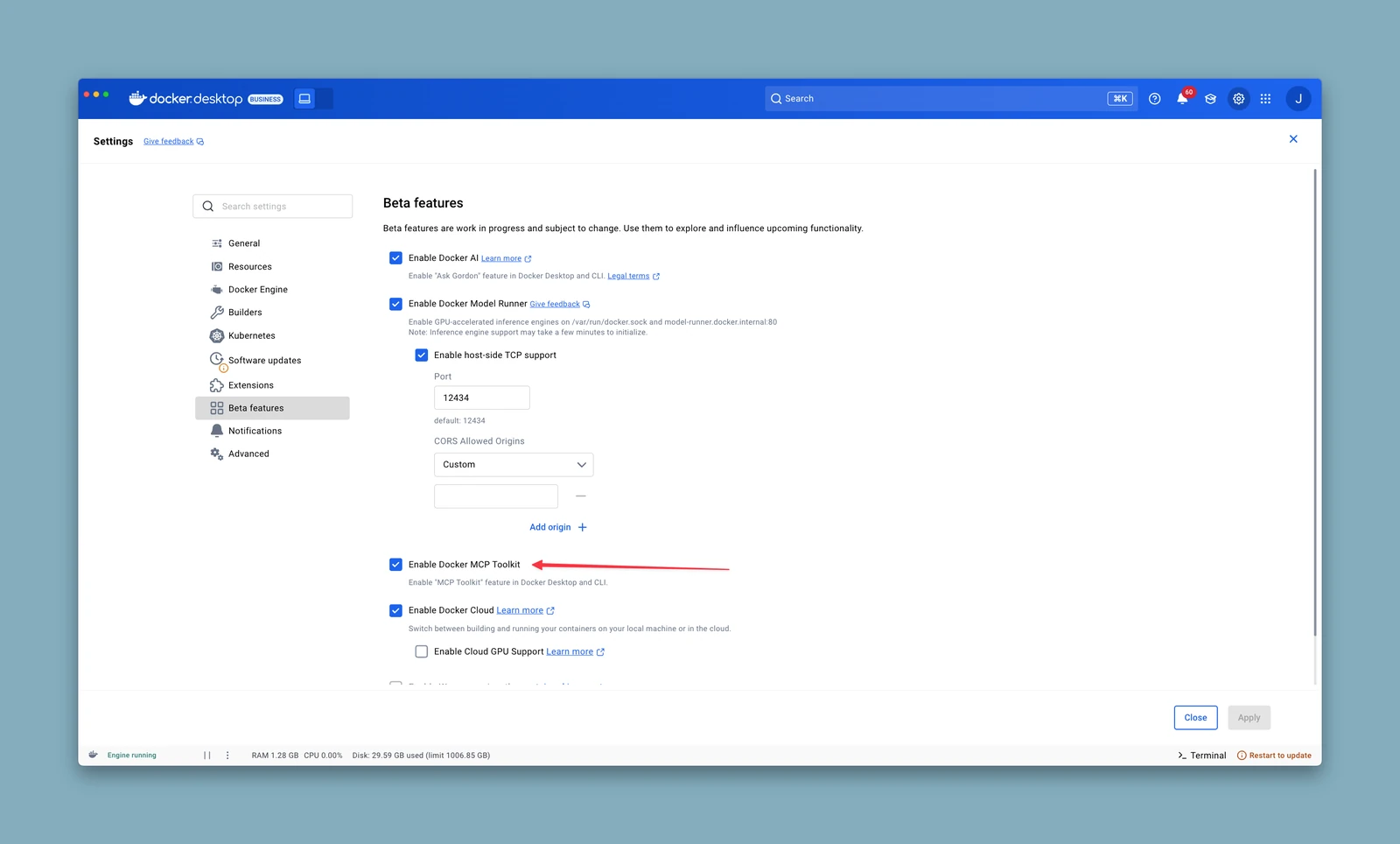
Install as Docker CLI Plugin
The MCP cli will already be installed on recent versions of Docker Desktop but you can build and install the latest version by following these steps:
# Clone the repository
git clone https://github.com/docker/mcp-gateway.git
cd mcp-gateway
mkdir -p "$HOME/.docker/cli-plugins/"

# Build and install the plugin
make docker-mcp
After installation, the plugin will be available as:
docker mcp --help
Usage
[!NOTE] Running without Docker Desktop Feature Flags
If you encounter "Docker Desktop is not running" errors when the Docker daemon is active, you can bypass Desktop feature checks by setting:
export DOCKER_MCP_IN_CONTAINER=1This is useful when running in WSL2, containerized environments, or Docker CE where Desktop backend sockets are unavailable.
[!NOTE] Enabling Profiles outside Docker Desktop
Profiles are enabled automatically in Docker Desktop. If you are using the CLI independently (e.g. Docker CE, WSL2, or a containerized environment), enable the profiles feature first:
docker mcp feature enable profiles
Profile Management
Servers are organized into profiles. A profile groups related MCP servers together and can be connected to clients, exported, and shared via OCI registries.
Servers in a profile can reference multiple sources:
- Catalog references:
catalog://mcp/docker-mcp-catalog/github - OCI image references:
docker://my-server:latest - MCP Registry references:
https://registry.modelcontextprotocol.io/v0/servers/<id> - Local file references:
file://./server.yaml
# Make sure to `docker mcp catalog pull mcp/docker-mcp-catalog` first.

# Create a new profile
docker mcp profile create --name dev-tools \
  --server catalog://mcp/docker-mcp-catalog/github

# Create a profile and connect it to a client
docker mcp profile create --name dev-tools \
  --server catalog://mcp/docker-mcp-catalog/github \
  --connect cursor

# List all profiles
docker mcp profile list

# Show profile details
docker mcp profile show <profile-id>

# Remove a profile
docker mcp profile remove <profile-id>

# Export/import profiles
docker mcp profile export <profile-id> output.yaml
docker mcp profile import input.yaml

# Push/pull profiles to OCI registries
docker mcp profile push <profile-id> <oci-reference>
docker mcp profile pull <oci-reference>
Manage servers in a profile
# List servers across all profiles
docker mcp profile server ls

# Filter servers by name or profile
docker mcp profile server ls --filter name=github
docker mcp profile server ls --filter profile=dev-tools

# Add servers to a profile
docker mcp profile server add dev-tools \
  --server catalog://mcp/docker-mcp-catalog/notion

# Remove servers from a profile
docker mcp profile server remove dev-tools github slack
Configure servers in a profile
# Set configuration values (<server-name>.<config-key>=<value>)
docker mcp profile config <profile-id> --set github.timeout=30

# Get configuration values (<server-name>.<config-key>)
docker mcp profile config <profile-id> --get github.timeout

# Get all configuration
docker mcp profile config <profile-id> --get-all

# Delete configuration values (<server-name>.<config-key>)
docker mcp profile config <profile-id> --del github.timeout
Manage tool allowlists in a profile
# Enable specific tools (dot notation: <server>.<tool>)
docker mcp profile tools <profile-id> --enable github.create_issue --enable github.list_repos

# Disable specific tools
docker mcp profile tools <profile-id> --disable github.search_code

# Enable/disable all tools for a server
docker mcp profile tools <profile-id> --enable-all github
docker mcp profile tools <profile-id> --disable-all github
Catalog Management
Manage the OCI-based catalogs available to the MCP gateway. The default catalog is the image mcp/docker-mcp-catalog.
# List catalogs
docker mcp catalog ls

# Show a catalog
docker mcp catalog show <oci-reference>

# Create a catalog from server references
docker mcp catalog create myorg/catalog:latest --title "My Catalog" \
  --server catalog://mcp/docker-mcp-catalog/github \
  --server file://./my-server.yaml

# Create a catalog from an existing profile
docker mcp catalog create myorg/catalog:latest --from-profile dev-tools

# Create a catalog from the community registry
docker mcp catalog create myorg/catalog:latest \
  --from-community-registry registry.modelcontextprotocol.io

# Push/pull catalogs to OCI registries
docker mcp catalog push <oci-reference>
docker mcp catalog pull <oci-reference>

# Manage servers within a catalog
docker mcp catalog server ls <oci-reference>
docker mcp catalog server add <oci-reference> --server docker://my-server:latest
docker mcp catalog server remove <oci-reference> github
docker mcp catalog server inspect <oci-reference> <server-name>

# Remove a catalog
docker mcp catalog remove <oci-reference>

# Tag a catalog
docker mcp catalog tag <source>:<tag> <target>:<tag>
More about importing from the OSS MCP Community Registry.
MCP Gateway Operations
Start up an MCP Gateway. This can be used for one client, or to service multiple clients if using either sse or streaming transports.
# Run the MCP gateway (stdio, using the default profile)
docker mcp gateway run

# Run with a specific profile
docker mcp gateway run --profile dev-tools

# Run the MCP gateway (streaming)
docker mcp gateway run --port 8080 --transport streaming
If no --profile flag is provided, the gateway uses the default profile.
- more about the MCP Gateway
Client Connection
Connect AI clients to the MCP gateway.
# List client configurations
docker mcp client ls

# Connect a client to a profile
docker mcp client connect <client-name> --profile <profile-id>

# Disconnect from a client
docker mcp client disconnect <client-name>
Secrets and OAuth
Configure MCP servers that require either secrets or OAuth.
# Manage secrets
docker mcp secret --help

# Handle OAuth flows
docker mcp oauth --help

# export any desktop secrets needed by either server1 or server2
#   (temporary requirement to export secrets for docker cloud runs - this command
#    will no longer be required once Docker Cloud can access secret stores)
docker mcp secret export server1 server2
Tool Management
# Count available tools
docker mcp tools count

# List all available MCP tools
docker mcp tools ls

# List all available MCP tools in JSON format
docker mcp tools ls --format=json

# Inspect a specific tool
docker mcp tools inspect <tool-name>

# Call a tool with arguments
docker mcp tools call <tool-name> [arguments...]

# Enable/disable tools for a server in a profile
docker mcp profile tools <profile-id> --enable <server>.<tool>
docker mcp profile tools <profile-id> --disable <server>.<tool>
Configuration
Configuration is stored in a local database. Profiles, catalogs, and server configuration are managed through the docker mcp profile and docker mcp catalog commands. Feature flags are stored in ~/.docker/config.json.
Environment Variables
The MCP CLI respects the following environment variables for client configuration:
CLAUDE_CONFIG_DIR: Override the default Claude Code configuration directory (~/.claude). When set, Claude Code will use$CLAUDE_CONFIG_DIR/.claude.jsoninstead of~/.claude.jsonfor its MCP server configuration. This is useful for:- Maintaining separate Claude Code installations for work and personal use
- Testing configuration changes in isolation
- Managing multiple Claude Code profiles
Example usage:
# Set custom Claude Code configuration directory
export CLAUDE_CONFIG_DIR=/path/to/custom/config

# Connect MCP Gateway to Claude Code
docker mcp client connect claude-code --profile dev-tools --global

# Claude Code will now use /path/to/custom/config/.claude.json
Architecture
The Docker MCP CLI implements a gateway pattern:
AI Client → MCP Gateway → MCP Servers (Docker Containers)
- AI Client: Language model or AI application
- MCP Gateway: This CLI tool managing protocol translation and routing
- MCP Servers: Individual MCP servers running in Docker containers
See docs/message-flow.md for detailed message flow diagrams.
Contributing
The build instructions are available in the contribution guide.
License
This project is licensed under the MIT License - see the LICENSE file for details.
Support
| 1 | # Docker MCP Plugin and Docker MCP Gateway |
| 2 | |
| 3 | ![build] |
| 4 | |
| 5 | The [MCP Toolkit], in Docker Desktop, allows |
| 6 | developers to configure and consume MCP servers from the [Docker MCP Catalog]. |
| 7 | |
| 8 | Underneath, the Toolkit is powered by a docker CLI plugin: `docker-mcp`. This repository is the code of this CLI plugin. It can work in Docker Desktop or independently. |
| 9 | |
| 10 | The main feature of this CLI is the **Docker MCP Gateway** which allows easy and secure running and deployment of MCP servers. See [Features] for a list of all the features. |
| 11 | |
| 12 | ## What is MCP? |
| 13 | |
| 14 | The [Model Context Protocol (MCP)] is an open protocol that standardizes how AI applications connect to external data sources and tools. It provides a secure, controlled way for language models to access and interact with various services, databases, and APIs. |
| 15 | |
| 16 | ## Overview |
| 17 | |
| 18 | Developers face criticial barriers when integrating Model Context Protocol (MCP) tools into production workflows: |
| 19 | |
| 20 | **Managing MCP server lifecycle** Each local MCP sever in the catalog runs in an isolated Docker container. npx and uvx servers are granted minimal host privileges. |
| 21 | **Providing a unified interface** AI models access MCP servers through a single Gateway. |
| 22 | **Handling authentication and security** Keep secrets out of environment variables using Docker Desktop's secrets management. |
| 23 | **Supports dynamic tool discovery** and configuration. Each MCP client (eg VS Code, Cursor, Claude Desktop, etc.) connects to the same Gateway configuration, ensuring consistency across different clients. |
| 24 | **Enables OAuth flows** for MCPs that require OAuth access token service connections. |
| 25 | |
| 26 | ## Features |
| 27 | |
| 28 | 🐳 **Container-based Servers**: Run MCP servers as Docker containers with proper isolation. |
| 29 | 🔧 **Server Management**: List, inspect, and call MCP tools, resources and prompts from multiple servers. |
| 30 | 🔐 **Secrets Management**: Secure handling of API keys and credentials via Docker Desktop. |
| 31 | 🌐 **OAuth Integration**: Built-in OAuth flows for service authentication. |
| 32 | 📋 **Server Catalog**: Manage and configure multiple MCP catalogs. |
| 33 | 🔍 **Dynamic Discovery**: Automatic tool, prompt, and resource discovery from running servers. |
| 34 | 📊 **Monitoring**: Built-in logging and call tracing capabilities. |
| 35 | |
| 36 | ## Installation |
| 37 | |
| 38 | ### Prerequisites |
| 39 | |
| 40 | Docker Desktop `4.59+` (with MCP Toolkit feature enabled) |
| 41 | |
| 42 | <div align="left"> |
| 43 | <img src="./img/enable_toolkit.png" width="400"/> |
| 44 | </div> |
| 45 | Go 1.24+ (for development) |
| 46 | |
| 47 | ### Install as Docker CLI Plugin |
| 48 | |
| 49 | The MCP cli will already be installed on recent versions of Docker Desktop but you can build and install the latest version by following these steps: |
| 50 | |
| 51 | |
| 52 | # Clone the repository |
| 53 | git clone https://github.com/docker/mcp-gateway.git |
| 54 | cd mcp-gateway |
| 55 | mkdir -p "$HOME/.docker/cli-plugins/" |
| 56 | |
| 57 | # Build and install the plugin |
| 58 | make docker-mcp |
| 59 | |
| 60 | |
| 61 | After installation, the plugin will be available as: |
| 62 | |
| 63 | |
| 64 | docker mcp --help |
| 65 | |
| 66 | |
| 67 | ## Usage |
| 68 | |
| 69 | > [!NOTE] |
| 70 | > **Running without Docker Desktop Feature Flags** |
| 71 | > |
| 72 | > If you encounter "Docker Desktop is not running" errors when the Docker daemon is active, you can bypass Desktop feature checks by setting: |
| 73 | > ```bash |
| 74 | > export DOCKER_MCP_IN_CONTAINER=1 |
| 75 | > ``` |
| 76 | > This is useful when running in WSL2, containerized environments, or Docker CE where Desktop backend sockets are unavailable. |
| 77 | |
| 78 | > [!NOTE] |
| 79 | > **Enabling Profiles outside Docker Desktop** |
| 80 | > |
| 81 | > Profiles are enabled automatically in Docker Desktop. If you are using the CLI independently (e.g. Docker CE, WSL2, or a containerized environment), enable the profiles feature first: |
| 82 | > ```bash |
| 83 | > docker mcp feature enable profiles |
| 84 | > ``` |
| 85 | |
| 86 | ### Profile Management |
| 87 | |
| 88 | Servers are organized into **profiles**. A profile groups related MCP servers together and can be connected to clients, exported, and shared via OCI registries. |
| 89 | |
| 90 | Servers in a profile can reference multiple sources: |
| 91 | **Catalog references**: `catalog://mcp/docker-mcp-catalog/github` |
| 92 | **OCI image references**: `docker://my-server:latest` |
| 93 | **MCP Registry references**: `https://registry.modelcontextprotocol.io/v0/servers/<id>` |
| 94 | **Local file references**: `file://./server.yaml` |
| 95 | |
| 96 | |
| 97 | # Make sure to `docker mcp catalog pull mcp/docker-mcp-catalog` first. |
| 98 | |
| 99 | # Create a new profile |
| 100 | docker mcp profile create --name dev-tools \ |
| 101 | --server catalog://mcp/docker-mcp-catalog/github |
| 102 | |
| 103 | # Create a profile and connect it to a client |
| 104 | docker mcp profile create --name dev-tools \ |
| 105 | --server catalog://mcp/docker-mcp-catalog/github \ |
| 106 | --connect cursor |
| 107 | |
| 108 | # List all profiles |
| 109 | docker mcp profile list |
| 110 | |
| 111 | # Show profile details |
| 112 | docker mcp profile show <profile-id> |
| 113 | |
| 114 | # Remove a profile |
| 115 | docker mcp profile remove <profile-id> |
| 116 | |
| 117 | # Export/import profiles |
| 118 | docker mcp profile export <profile-id> output.yaml |
| 119 | docker mcp profile import input.yaml |
| 120 | |
| 121 | # Push/pull profiles to OCI registries |
| 122 | docker mcp profile push <profile-id> <oci-reference> |
| 123 | docker mcp profile pull <oci-reference> |
| 124 | |
| 125 | |
| 126 | #### Manage servers in a profile |
| 127 | |
| 128 | |
| 129 | # List servers across all profiles |
| 130 | docker mcp profile server ls |
| 131 | |
| 132 | # Filter servers by name or profile |
| 133 | docker mcp profile server ls --filter name=github |
| 134 | docker mcp profile server ls --filter profile=dev-tools |
| 135 | |
| 136 | # Add servers to a profile |
| 137 | docker mcp profile server add dev-tools \ |
| 138 | --server catalog://mcp/docker-mcp-catalog/notion |
| 139 | |
| 140 | # Remove servers from a profile |
| 141 | docker mcp profile server remove dev-tools github slack |
| 142 | |
| 143 | |
| 144 | #### Configure servers in a profile |
| 145 | |
| 146 | |
| 147 | # Set configuration values (<server-name>.<config-key>=<value>) |
| 148 | docker mcp profile config <profile-id> --set github.timeout=30 |
| 149 | |
| 150 | # Get configuration values (<server-name>.<config-key>) |
| 151 | docker mcp profile config <profile-id> --get github.timeout |
| 152 | |
| 153 | # Get all configuration |
| 154 | docker mcp profile config <profile-id> --get-all |
| 155 | |
| 156 | # Delete configuration values (<server-name>.<config-key>) |
| 157 | docker mcp profile config <profile-id> --del github.timeout |
| 158 | |
| 159 | |
| 160 | #### Manage tool allowlists in a profile |
| 161 | |
| 162 | |
| 163 | # Enable specific tools (dot notation: <server>.<tool>) |
| 164 | docker mcp profile tools <profile-id> --enable github.create_issue --enable github.list_repos |
| 165 | |
| 166 | # Disable specific tools |
| 167 | docker mcp profile tools <profile-id> --disable github.search_code |
| 168 | |
| 169 | # Enable/disable all tools for a server |
| 170 | docker mcp profile tools <profile-id> --enable-all github |
| 171 | docker mcp profile tools <profile-id> --disable-all github |
| 172 | |
| 173 | |
| 174 | ### Catalog Management |
| 175 | |
| 176 | Manage the OCI-based catalogs available to the MCP gateway. The [default catalog] is the image `mcp/docker-mcp-catalog`. |
| 177 | |
| 178 | |
| 179 | # List catalogs |
| 180 | docker mcp catalog ls |
| 181 | |
| 182 | # Show a catalog |
| 183 | docker mcp catalog show <oci-reference> |
| 184 | |
| 185 | # Create a catalog from server references |
| 186 | docker mcp catalog create myorg/catalog:latest --title "My Catalog" \ |
| 187 | --server catalog://mcp/docker-mcp-catalog/github \ |
| 188 | --server file://./my-server.yaml |
| 189 | |
| 190 | # Create a catalog from an existing profile |
| 191 | docker mcp catalog create myorg/catalog:latest --from-profile dev-tools |
| 192 | |
| 193 | # Create a catalog from the community registry |
| 194 | docker mcp catalog create myorg/catalog:latest \ |
| 195 | --from-community-registry registry.modelcontextprotocol.io |
| 196 | |
| 197 | # Push/pull catalogs to OCI registries |
| 198 | docker mcp catalog push <oci-reference> |
| 199 | docker mcp catalog pull <oci-reference> |
| 200 | |
| 201 | # Manage servers within a catalog |
| 202 | docker mcp catalog server ls <oci-reference> |
| 203 | docker mcp catalog server add <oci-reference> --server docker://my-server:latest |
| 204 | docker mcp catalog server remove <oci-reference> github |
| 205 | docker mcp catalog server inspect <oci-reference> <server-name> |
| 206 | |
| 207 | # Remove a catalog |
| 208 | docker mcp catalog remove <oci-reference> |
| 209 | |
| 210 | # Tag a catalog |
| 211 | docker mcp catalog tag <source>:<tag> <target>:<tag> |
| 212 | |
| 213 | |
| 214 | |
| 215 | More about [importing from the OSS MCP Community Registry]. |
| 216 | |
| 217 | ### MCP Gateway Operations |
| 218 | |
| 219 | Start up an MCP Gateway. This can be used for one client, or to service multiple clients if using either `sse` or `streaming` transports. |
| 220 | |
| 221 | |
| 222 | # Run the MCP gateway (stdio, using the default profile) |
| 223 | docker mcp gateway run |
| 224 | |
| 225 | # Run with a specific profile |
| 226 | docker mcp gateway run --profile dev-tools |
| 227 | |
| 228 | # Run the MCP gateway (streaming) |
| 229 | docker mcp gateway run --port 8080 --transport streaming |
| 230 | |
| 231 | |
| 232 | If no `--profile` flag is provided, the gateway uses the `default` profile. |
| 233 | |
| 234 | more about [the MCP Gateway] |
| 235 | |
| 236 | ### Client Connection |
| 237 | |
| 238 | Connect AI clients to the MCP gateway. |
| 239 | |
| 240 | |
| 241 | # List client configurations |
| 242 | docker mcp client ls |
| 243 | |
| 244 | # Connect a client to a profile |
| 245 | docker mcp client connect <client-name> --profile <profile-id> |
| 246 | |
| 247 | # Disconnect from a client |
| 248 | docker mcp client disconnect <client-name> |
| 249 | |
| 250 | |
| 251 | ### Secrets and OAuth |
| 252 | |
| 253 | Configure MCP servers that require either secrets or OAuth. |
| 254 | |
| 255 | |
| 256 | # Manage secrets |
| 257 | docker mcp secret --help |
| 258 | |
| 259 | # Handle OAuth flows |
| 260 | docker mcp oauth --help |
| 261 | |
| 262 | # export any desktop secrets needed by either server1 or server2 |
| 263 | # (temporary requirement to export secrets for docker cloud runs - this command |
| 264 | # will no longer be required once Docker Cloud can access secret stores) |
| 265 | docker mcp secret export server1 server2 |
| 266 | |
| 267 | |
| 268 | ### Tool Management |
| 269 | |
| 270 | |
| 271 | # Count available tools |
| 272 | docker mcp tools count |
| 273 | |
| 274 | # List all available MCP tools |
| 275 | docker mcp tools ls |
| 276 | |
| 277 | # List all available MCP tools in JSON format |
| 278 | docker mcp tools ls --format=json |
| 279 | |
| 280 | # Inspect a specific tool |
| 281 | docker mcp tools inspect <tool-name> |
| 282 | |
| 283 | # Call a tool with arguments |
| 284 | docker mcp tools call <tool-name> [arguments...] |
| 285 | |
| 286 | # Enable/disable tools for a server in a profile |
| 287 | docker mcp profile tools <profile-id> --enable <server>.<tool> |
| 288 | docker mcp profile tools <profile-id> --disable <server>.<tool> |
| 289 | |
| 290 | |
| 291 | ## Configuration |
| 292 | |
| 293 | Configuration is stored in a local database. Profiles, catalogs, and server configuration are managed through the `docker mcp profile` and `docker mcp catalog` commands. Feature flags are stored in `~/.docker/config.json`. |
| 294 | |
| 295 | ### Environment Variables |
| 296 | |
| 297 | The MCP CLI respects the following environment variables for client configuration: |
| 298 | |
| 299 | **`CLAUDE_CONFIG_DIR`**: Override the default Claude Code configuration directory (`~/.claude`). When set, Claude Code will use `$CLAUDE_CONFIG_DIR/.claude.json` instead of `~/.claude.json` for its MCP server configuration. This is useful for: |
| 300 | Maintaining separate Claude Code installations for work and personal use |
| 301 | Testing configuration changes in isolation |
| 302 | Managing multiple Claude Code profiles |
| 303 | |
| 304 | Example usage: |
| 305 | |
| 306 | # Set custom Claude Code configuration directory |
| 307 | export CLAUDE_CONFIG_DIR=/path/to/custom/config |
| 308 | |
| 309 | # Connect MCP Gateway to Claude Code |
| 310 | docker mcp client connect claude-code --profile dev-tools --global |
| 311 | |
| 312 | # Claude Code will now use /path/to/custom/config/.claude.json |
| 313 | |
| 314 | |
| 315 | ## Architecture |
| 316 | |
| 317 | The Docker MCP CLI implements a gateway pattern: |
| 318 | |
| 319 | |
| 320 | AI Client → MCP Gateway → MCP Servers (Docker Containers) |
| 321 | |
| 322 | |
| 323 | **AI Client**: Language model or AI application |
| 324 | **MCP Gateway**: This CLI tool managing protocol translation and routing |
| 325 | **MCP Servers**: Individual MCP servers running in Docker containers |
| 326 | |
| 327 | See [docs/message-flow.md] for detailed message flow diagrams. |
| 328 | |
| 329 | ## Contributing |
| 330 | |
| 331 | The build instructions are available in the [contribution guide]. |
| 332 | |
| 333 | ## License |
| 334 | |
| 335 | This project is licensed under the MIT License - see the [LICENSE] file for details. |
| 336 | |
| 337 | ## Support |
| 338 | |
| 339 | 💬 [Troubleshooting] |
| 340 | 📖 [MCP Specification] |
| 341 | 🐳 [Docker Desktop Documentation] |
| 342 | 🐛 [Report Issues] |
| 343 | 💬 [Discussions] |
| 344 |
Details
- Updated
- Sep 16, 2026
- License
- MIT
- Stars on the repo
- ★ 1,579
- Checked
- Source
- docker/mcp-gateway ↗
- Creator
- docker · 1 listing
Similar MCP servers
See all → SkillFrom a business idea, app ideaAzure app onboard
 microsoft/skills · by microsoftEnd-to-end orchestrator: from a business idea, app idea, or existing app to running Azure deployment with cost estimates and pre-deploy approval. Analyzes your app, auto-detects the right Azure services, scaffolds infrastructure code, and deploys — tailored to your app, not a template. Handles moving existing apps to Azure without rewriting or with minimal changes. WHEN: bring your app to Azure, plan my app, cost to run, is my code ready to deploy, deploy my app to the cloud, deploy all my services, what Azure services do I need, plan my Azure deployment, deploy my new app to Azure, one-click deploy, I have an app and want it on Azure, migrate my app to Azure, help me get started, build an app, no code yet, starter project. DO NOT USE FOR: use azd for deployment(use azure-deploy), optimizing existing costs (use cost-optimization), code readiness checks only (use azure-app-onboard-prereq).★ 3.1k GitHub stars
 SkillAssess whether source code is ready to deploy to AzureAzure App Onboard Prereq — Repository Evaluationmicrosoft/skills · by microsoftAssess whether source code is ready to deploy to Azure — the check BEFORE infrastructure work. Evaluates build health, app completeness, dependencies and local services, stack compatibility, and deployment feasibility. Answers questions about what your app needs before it can be deployed — frameworks, dependencies, and configuration. Checks whether dependencies are compatible and identifies deployment blockers and unsupported frameworks. WHEN: "evaluate my repo", "is my app ready to deploy", "what does my app need to deploy", "what do I need before deploying", "does my app need", "can I ship this to Azure", "scan my repo for issues", "is this app deployable", "check if my app is ready for Azure", "do I need a Dockerfile", "what's blocking my deployment", "are there any blockers", "are my dependencies compatible", "does Azure support my framework", "what needs to change before deploying", "check my app configuration".★ 3.1k GitHub stars
 SkillConfigure Azure API Management as an AI Gateway for AIAzure aigatewaymicrosoft/azure-skills · by microsoftConfigure Azure API Management as an AI Gateway for AI models, MCP tools, and agents. WHEN: semantic caching, token limit, content safety, load balancing, AI model governance, MCP rate limiting, jailbreak detection, add Azure OpenAI backend, add AI Foundry model, test AI gateway, LLM policies, configure AI backend, token metrics, AI cost control, convert API to MCP, import OpenAPI to gateway.★ 1.6k GitHub stars
 SkillQuery and analyze data in Azure Data Explorer using KQLAzure Data Explorer (Kusto) Query & Analyticsmicrosoft/azure-skills · by microsoftQuery and analyze data in Azure Data Explorer (Kusto/ADX) using KQL for log analytics, telemetry, and time series analysis. WHEN: KQL queries, Kusto database queries, Azure Data Explorer, ADX clusters, log analytics, time series data, IoT telemetry, anomaly detection.★ 1.6k GitHub stars
 MCPOpen infrastructure for AI agents to discover and pay eachElisym
 elisymlabs/elisym · by elisymlabsOpen infrastructure for AI agents to discover and pay each other★ 17 GitHub stars
 PromptA prompt designed to guide a deep technical analysisTechnical Codebase Discovery & Onboarding Prompt
 f/prompts.chat · by Valdecir CarvalhoA prompt designed to guide a deep technical analysis of a code repository to accelerate developer onboarding. It instructs an AI to analyze the entire codebase and generate a structured Markdown document covering architecture, technology stack, key components, execution and data flows, integrations, testing, security, and build/deployment, serving as a technical reference guide.New listing