Caption & Hashtags skill
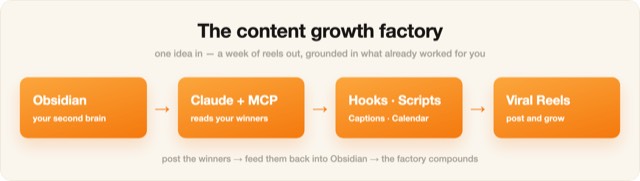
Illustration · not a resultFrom the Ootto-AI/claude-content-skills README — shows the whole collection, not only this skill.source ↗
Write the caption, hashtag set, and first comment for a reel or post.
by Ootto-AI·MIT license·★ 139 Stars on the repo·GitHub ↗
npx degit Ootto-AI/claude-content-skills/skills/caption-and-hashtags#main ~/.claude/skills/caption-and-hashtagsChecked ·commit main

Illustration · not a resultFrom the Ootto-AI/claude-content-skills README — shows the whole collection, not only this skill.view on GitHub
Files of Caption & Hashtags
Show the full text51 lines
Caption & Hashtags
Write the caption, a tiered hashtag set, and a first comment that drives saves, follows, and reach.
When to use
The video's done — now you need the copy that gets it shared and the hashtags that get it found, without looking spammy.
What you'll need
What the reel is about, the platform, your niche, and the goal (saves / follows / comments / link). Optional: your handle and brand voice.
Instructions
Run this prompt:
You are my social copywriter. Write the post copy for this reel.

Reel: [what it's about]   Platform: [Reels/TikTok/Shorts]   Niche: [niche]
Goal: [saves / follows / comments / DMs]

Give me:
1. CAPTION — a strong first line (it's the only line shown before "more"), then 2-4 short lines of value, then one clear CTA. No hashtag soup in the caption.
2. HASHTAGS — 12-15, tiered: a few broad (1M+), several mid (100k-1M), several niche (<100k). Put them in the first comment, not the caption.
3. FIRST COMMENT — the hashtags + a question that sparks replies (comments boost reach).
4. ALT TEXT — one accessible description of the video.

Match the niche's language. No emojis-as-bullets unless on-brand.
Obsidian memory tip: With your vault connected (Filesystem MCP), ask Claude to "reuse the hashtag sets and CTA style from my best-saved posts." Your proven tags beat a generic list.
Tip: The first line of the caption is a second hook. Make it earn the "…more" tap.
Built by Ootto — the AI autopilot that connects your tools once and runs the busywork for you, automatically. Book a demo →
| 1 | |
| 2 | name caption-and-hashtags |
| 3 | description > |
| 4 | Write the caption, hashtag set, and first comment for a reel or post. Use when |
| 5 | the user says "caption", "hashtags", "write the description", "what do I write |
| 6 | under this", "first comment", or "post copy". |
| 7 | user-invokable true |
| 8 | argument-hint "[what the reel/post is about]" |
| 9 | license MIT |
| 10 | metadata |
| 11 | author Ootto |
| 12 | version "1.0.0" |
| 13 | category content |
| 14 | |
| 15 | |
| 16 | # Caption & Hashtags |
| 17 | |
| 18 | Write the caption, a tiered hashtag set, and a first comment that drives saves, follows, and reach. |
| 19 | |
| 20 | ## When to use |
| 21 | The video's done — now you need the copy that gets it shared and the hashtags that get it found, without looking spammy. |
| 22 | |
| 23 | ## What you'll need |
| 24 | What the reel is about, the platform, your niche, and the goal (saves / follows / comments / link). Optional: your handle and brand voice. |
| 25 | |
| 26 | ## Instructions |
| 27 | Run this prompt: |
| 28 | |
| 29 | |
| 30 | You are my social copywriter. Write the post copy for this reel. |
| 31 | |
| 32 | Reel: [what it's about] Platform: [Reels/TikTok/Shorts] Niche: [niche] |
| 33 | Goal: [saves / follows / comments / DMs] |
| 34 | |
| 35 | Give me: |
| 36 | 1. CAPTION — a strong first line (it's the only line shown before "more"), then 2-4 short lines of value, then one clear CTA. No hashtag soup in the caption. |
| 37 | 2. HASHTAGS — 12-15, tiered: a few broad (1M+), several mid (100k-1M), several niche (<100k). Put them in the first comment, not the caption. |
| 38 | 3. FIRST COMMENT — the hashtags + a question that sparks replies (comments boost reach). |
| 39 | 4. ALT TEXT — one accessible description of the video. |
| 40 | |
| 41 | Match the niche's language. No emojis-as-bullets unless on-brand. |
| 42 | |
| 43 | |
| 44 | **Obsidian memory tip:** With your vault connected (Filesystem MCP), ask Claude to "reuse the hashtag sets and CTA style from my best-saved posts." Your proven tags beat a generic list. |
| 45 | |
| 46 | **Tip:** The first line of the caption is a second hook. Make it earn the "…more" tap. |
| 47 | |
| 48 | |
| 49 | |
| 50 | Built by **[Ootto]** — the AI autopilot that connects your tools once and runs the busywork for you, automatically. [Book a demo →] |
| 51 |
Discussion
Alternatives
 Gemini carouselGenerate a branded slide-by-slide LinkedIn carousel using Gemini. Takes source content, builds a design brief, waits for approval, then outputs per-slide image generation prompts. 1080x1350 vertical format. Use this skill whenever the user says "carousel", "build a carousel", "turn this into a carousel", "gemini carousel", or wants multi-slide LinkedIn content. Always includes an approval gate between brief and image generation.Li carouselBuild a LinkedIn document post (carousel) - slide-by-slide copy, the cover that earns the swipe, and the PDF to upload. Use when the user says carousel", "document post", "slides for LinkedIn", "turn this into a carousel", or has a list-shaped idea that would die as a text post.
 Instagram Caption WriterDraft an Instagram caption with the hook in the first 125 characters, a skimmable body, and one clear CTA, using a 2026 hook formula chosen by goal (saves, shares, comments, follows). Runs the humanizer pass and, on approval, publishes with the image or video you supply via the Publora media flow. Use to caption a single image or a Reel. Not for slide-by-slide carousels (use ig-carousel-planner) or auditing a draft (use ig-humanizer --mode audit).Instagram Carousel PlannerPlan an Instagram carousel slide by slide, up to 10 slides, with a hook slide that opens a loop, value slides that front-load the payoff, and a payoff slide that earns the save and follow. Picks a 2026 carousel formula (listicle, before/after, myth-buster, framework) by goal (saves, shares, follows), drafts each slide's text plus the caption, then publishes the images you supply via Publora. Use to structure a multi-slide carousel. Not for single-image captions (use ig-caption-writer).
Browse more free Claude skills or everything in Content creator.