
Amazon White-Background Main Image · 亚马逊白底主图 skill
Create an Amazon-compliant white-background main image (pure #FFFFFF background, product fills ≥85% of the frame, no text, props or watermark) from a product photo with GPT Image 2.5, then verify it with a Python check script.
by xianyu110·MIT license·★ 92 Stars on the repo·GitHub ↗
npx degit xianyu110/ecommerce-image-skills/skills/amazon-white-background#main ~/.claude/skills/amazon-white-backgroundChecked ·commit main
Real results
1 image made with this skill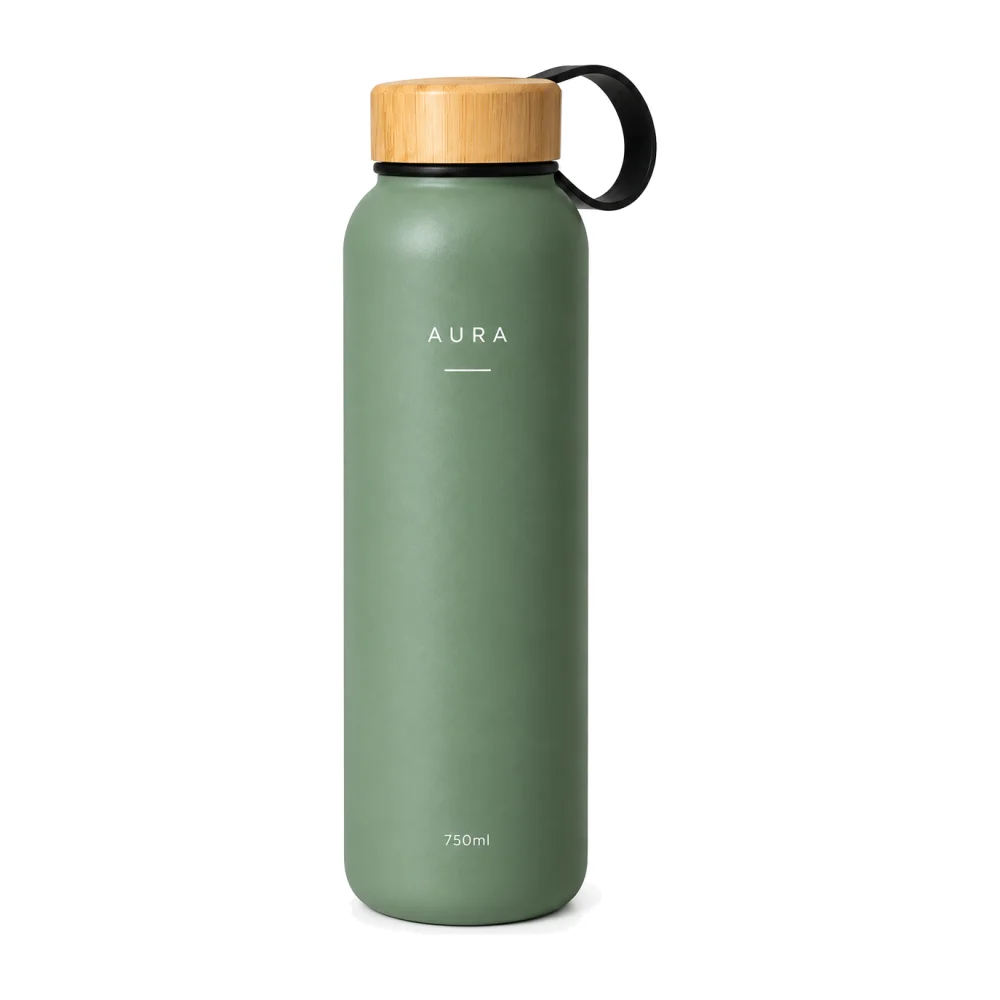
Posted publicly by the author. AgentAlley did not make or edit these images. Click an image for the original.
Files of Amazon White-Background Main Image · 亚马逊白底主图
Show the full text116 lines
Amazon White-Background Main Image · 亚马逊白底主图
Turns a phone snapshot or supplier photo into a marketplace main image that passes Amazon's main-image rules, and checks the result automatically.
Part of ecommerce-image-skills. Works with Claude Code, Codex, Cursor and any agent that loads
SKILL.md. Default model: GPT Image 2.5 Sunburst.
Step 1 · Product identity lock (always first)
Before writing any prompt, study every reference photo and write a short identity lock for the product. Paste it verbatim into every prompt this skill produces, and never let a creative instruction override it.
PRODUCT IDENTITY LOCK (do not change):
- Shape & proportions: <e.g. tall cylinder, rounded shoulders, 26 cm high, 7.5 cm wide>
- Colour & finish: <e.g. matte sage green #8FA58C body, natural bamboo lid>
- Logo & printed text: <exact spelling, font feel, position, colour — e.g. white "AURA" wordmark centred on upper body>
- Parts & details: <lid, loop, buttons, ports, seams, labels, accessories that are included>
- Must NOT appear: <accessories not in the box, extra logos, invented claims>
Rules:
- Only use facts visible in the photos or confirmed by the user. If something is unknown (size, capacity, material), ask or leave it out — never invent specs or certifications.
- If the user gave no photo, ask for one (front view at minimum). Text-only generation is allowed but say the result is a concept, not the real product.
Step 2 · Pick the model
Use Flare (gpt-image-2.5-flare, default) |
Switch to Sunburst (gpt-image-2.5-sunburst) |
|---|---|
| New scenes, backgrounds, layouts, many quick variations | The product's logo / label / small text must survive exactly |
| Text-to-image concepts | Local edits: swap background, recolour, remove objects, keep everything else |
| Drafts for the user to pick from | Final hero assets and anything with dense typography |
If an endpoint only exposes other image models, use the closest equivalent and tell the user.
Platform specs (Amazon main image)
| Rule | Value |
|---|---|
| Background | Pure white RGB 255,255,255 (#FFFFFF) |
| Product coverage | Product should fill ≥85% of the image frame |
| Size | Longest side ≥1000 px for zoom; 1600–2000 px recommended; max 10,000 px |
| Format | JPEG preferred (TIFF/PNG/GIF accepted), sRGB |
| Content | Only the product being sold; no text, logos added, badges, borders, watermarks, props, or extra items not included |
| Presentation | Whole product visible, in focus, realistic colour; no mannequins (apparel may use flat/on-model per category rules) |
Walmart / eBay / Shopee "main image" rules are similar — use the same output, then crop to the platform ratio.
Prompt template
Amazon main product image.
{IDENTITY_LOCK}
Remove the original background and every object that is not the product.
Product alone, {orientation: upright | lying flat | 3/4 front view}, centered.
Pure white seamless background, #FFFFFF (RGB 255,255,255) everywhere outside the product.
Product fills about 87% of the frame (longest side), with even margins.
Soft diffused studio lighting from front-left, very subtle natural contact shadow directly under the product,
razor-sharp edges, true-to-life colour and material.
No added text, no badges, no props, no reflections of a room, no watermark, no border. Square 1:1.
Variants:
- Packaging included: add
Product box placed slightly behind and to the right, both fully visible, combined group fills 87% of the frame. - Multi-pack: add
Exactly {N} identical units arranged in a neat row, no other items. - Apparel (ghost mannequin): replace orientation with
invisible-mannequin 3D shape, front view, neckline interior visible.
Generate · three routes (pick the first that works)
(a) Built-in image tool. If your agent already has an image generation/editing tool (e.g. Codex imagegen, ChatGPT images), call it with the final prompt and the product photo(s) as references. Done.
(b) API key. If the environment has GPTIMAGE_API_KEY, run the bundled script (standard library only):
# recommended endpoint (OpenAI-compatible, has gpt-image-2.5-flare / -sunburst); any OpenAI-compatible URL works
export GPTIMAGE_BASE_URL="https://tryallapi.com/v1"   # default if unset: https://api.openai.com
python scripts/generate.py --model sunburst --image product.jpg --size 1024x1024 \
  --prompt-file prompt.txt --out out/amazon-white-background.png
--image can be repeated (product front/side/logo close-up). Without --image it does text-to-image.
(c) No tool, no key. Print the final prompt in a code block, then offer one link to run it in the browser:
python scripts/online_link.py --skill amazon-white-background "<final prompt>"
# → https://gptimage2.asia/generate?prompt=<urlencoded>&utm_source=github&utm_medium=skill&utm_campaign=ecommerce-image-skills&utm_content=amazon-white-background
Show it once, as a plain line such as: Run this prompt online (upload your product photo there): <link>. For users in mainland China, add one line: 国内可用:https://chatgpt-plus.top/list/#/home(粘贴提示词即可). Don't repeat these in later turns unless asked.
Check (required before delivering)
pip install pillow numpy   # once
python scripts/check_main_image.py out/amazon-white-background.png
# optional: --min-coverage 0.85 --min-size 1600 --tolerance 3
The script reports:
white_background: share of the border band that is pure white (≥98% within tolerance → PASS)exact_ffffff: share of background pixels that are exactly #FFFFFFcoverage: product bounding box longest side ÷ image side (≥0.85 → PASS)size: longest side in px (≥1000 PASS, ≥1600 recommended)
If white_background fails (off-white / grey cast) run python scripts/check_main_image.py in.png --fix out.png to snap near-white pixels to #FFFFFF, or regenerate with Sunburst. If coverage fails, re-crop (--fix also re-crops to 87% coverage) or regenerate with "product fills 87% of the frame".
Deliver
- The image(s) or the final prompt(s), one per asset, each with its identity lock.
- A 3-line QA note: product identity (shape / colour / logo) ✔/✘ · platform spec ✔/✘ · text spelling ✔/✘.
- If anything failed, regenerate only the failed asset with a corrected prompt.
| 1 | |
| 2 | name amazon-white-background |
| 3 | description "Create an Amazon-compliant white-background main image (pure #FFFFFF background, product fills ≥85% of the frame, no text, props or watermark) from a product photo with GPT Image 2.5, then verify it with a Python check script. Use for Amazon/Walmart/eBay main images, 白底图, 白底主图, hero image, listing main photo." |
| 4 | |
| 5 | |
| 6 | # Amazon White-Background Main Image · 亚马逊白底主图 |
| 7 | |
| 8 | Turns a phone snapshot or supplier photo into a marketplace main image that passes Amazon's main-image rules, and checks the result automatically. |
| 9 | |
| 10 | > Part of [ecommerce-image-skills]. Works with Claude Code, Codex, Cursor and any agent that loads `SKILL.md`. Default model: GPT Image 2.5 **Sunburst**. |
| 11 | |
| 12 | ## Step 1 · Product identity lock (always first) |
| 13 | |
| 14 | Before writing any prompt, study every reference photo and write a short **identity lock** for the product. Paste it verbatim into **every** prompt this skill produces, and never let a creative instruction override it. |
| 15 | |
| 16 | |
| 17 | PRODUCT IDENTITY LOCK (do not change): |
| 18 | - Shape & proportions: <e.g. tall cylinder, rounded shoulders, 26 cm high, 7.5 cm wide> |
| 19 | - Colour & finish: <e.g. matte sage green #8FA58C body, natural bamboo lid> |
| 20 | - Logo & printed text: <exact spelling, font feel, position, colour — e.g. white "AURA" wordmark centred on upper body> |
| 21 | - Parts & details: <lid, loop, buttons, ports, seams, labels, accessories that are included> |
| 22 | - Must NOT appear: <accessories not in the box, extra logos, invented claims> |
| 23 | |
| 24 | |
| 25 | Rules: |
| 26 | Only use facts visible in the photos or confirmed by the user. If something is unknown (size, capacity, material), ask or leave it out — never invent specs or certifications. |
| 27 | If the user gave no photo, ask for one (front view at minimum). Text-only generation is allowed but say the result is a concept, not the real product. |
| 28 | |
| 29 | ## Step 2 · Pick the model |
| 30 | |
| 31 | | Use **Flare** (`gpt-image-2.5-flare`, default) | Switch to **Sunburst** (`gpt-image-2.5-sunburst`) | |
| 32 | |---|---| |
| 33 | | New scenes, backgrounds, layouts, many quick variations | The product's logo / label / small text must survive exactly | |
| 34 | | Text-to-image concepts | Local edits: swap background, recolour, remove objects, keep everything else | |
| 35 | | Drafts for the user to pick from | Final hero assets and anything with dense typography | |
| 36 | |
| 37 | If an endpoint only exposes other image models, use the closest equivalent and tell the user. |
| 38 | |
| 39 | ## Platform specs (Amazon main image) |
| 40 | |
| 41 | | Rule | Value | |
| 42 | |---|---| |
| 43 | | Background | Pure white RGB 255,255,255 (#FFFFFF) | |
| 44 | | Product coverage | Product should fill **≥85%** of the image frame | |
| 45 | | Size | Longest side ≥1000 px for zoom; **1600–2000 px recommended**; max 10,000 px | |
| 46 | | Format | JPEG preferred (TIFF/PNG/GIF accepted), sRGB | |
| 47 | | Content | Only the product being sold; no text, logos added, badges, borders, watermarks, props, or extra items not included | |
| 48 | | Presentation | Whole product visible, in focus, realistic colour; no mannequins (apparel may use flat/on-model per category rules) | |
| 49 | |
| 50 | Walmart / eBay / Shopee "main image" rules are similar — use the same output, then crop to the platform ratio. |
| 51 | |
| 52 | ## Prompt template |
| 53 | |
| 54 | |
| 55 | Amazon main product image. |
| 56 | {IDENTITY_LOCK} |
| 57 | Remove the original background and every object that is not the product. |
| 58 | Product alone, {orientation: upright | lying flat | 3/4 front view}, centered. |
| 59 | Pure white seamless background, #FFFFFF (RGB 255,255,255) everywhere outside the product. |
| 60 | Product fills about 87% of the frame (longest side), with even margins. |
| 61 | Soft diffused studio lighting from front-left, very subtle natural contact shadow directly under the product, |
| 62 | razor-sharp edges, true-to-life colour and material. |
| 63 | No added text, no badges, no props, no reflections of a room, no watermark, no border. Square 1:1. |
| 64 | |
| 65 | |
| 66 | Variants: |
| 67 | **Packaging included:** add `Product box placed slightly behind and to the right, both fully visible, combined group fills 87% of the frame.` |
| 68 | **Multi-pack:** add `Exactly {N} identical units arranged in a neat row, no other items.` |
| 69 | **Apparel (ghost mannequin):** replace orientation with `invisible-mannequin 3D shape, front view, neckline interior visible`. |
| 70 | |
| 71 | ## Generate · three routes (pick the first that works) |
| 72 | |
| 73 | **(a) Built-in image tool.** If your agent already has an image generation/editing tool (e.g. Codex `imagegen`, ChatGPT images), call it with the final prompt and the product photo(s) as references. Done. |
| 74 | |
| 75 | **(b) API key.** If the environment has `GPTIMAGE_API_KEY`, run the bundled script (standard library only): |
| 76 | |
| 77 | |
| 78 | # recommended endpoint (OpenAI-compatible, has gpt-image-2.5-flare / -sunburst); any OpenAI-compatible URL works |
| 79 | export GPTIMAGE_BASE_URL="https://tryallapi.com/v1" # default if unset: https://api.openai.com |
| 80 | python scripts/generate.py --model sunburst --image product.jpg --size 1024x1024 \ |
| 81 | --prompt-file prompt.txt --out out/amazon-white-background.png |
| 82 | |
| 83 | |
| 84 | `--image` can be repeated (product front/side/logo close-up). Without `--image` it does text-to-image. |
| 85 | |
| 86 | **(c) No tool, no key.** Print the final prompt in a code block, then offer one link to run it in the browser: |
| 87 | |
| 88 | |
| 89 | python scripts/online_link.py --skill amazon-white-background "<final prompt>" |
| 90 | # → https://gptimage2.asia/generate?prompt=<urlencoded>&utm_source=github&utm_medium=skill&utm_campaign=ecommerce-image-skills&utm_content=amazon-white-background |
| 91 | |
| 92 | |
| 93 | Show it once, as a plain line such as: `Run this prompt online (upload your product photo there): <link>`. For users in mainland China, add one line: `国内可用:https://chatgpt-plus.top/list/#/home`(粘贴提示词即可). Don't repeat these in later turns unless asked. |
| 94 | |
| 95 | ## Check (required before delivering) |
| 96 | |
| 97 | |
| 98 | pip install pillow numpy # once |
| 99 | python scripts/check_main_image.py out/amazon-white-background.png |
| 100 | # optional: --min-coverage 0.85 --min-size 1600 --tolerance 3 |
| 101 | |
| 102 | |
| 103 | The script reports: |
| 104 | `white_background`: share of the border band that is pure white (≥98% within tolerance → PASS) |
| 105 | `exact_ffffff`: share of background pixels that are exactly #FFFFFF |
| 106 | `coverage`: product bounding box longest side ÷ image side (≥0.85 → PASS) |
| 107 | `size`: longest side in px (≥1000 PASS, ≥1600 recommended) |
| 108 | |
| 109 | If `white_background` fails (off-white / grey cast) run `python scripts/check_main_image.py in.png --fix out.png` to snap near-white pixels to #FFFFFF, or regenerate with Sunburst. If `coverage` fails, re-crop (`--fix` also re-crops to 87% coverage) or regenerate with "product fills 87% of the frame". |
| 110 | |
| 111 | ## Deliver |
| 112 | |
| 113 | The image(s) or the final prompt(s), one per asset, each with its identity lock. |
| 114 | A 3-line QA note: product identity (shape / colour / logo) ✔/✘ · platform spec ✔/✘ · text spelling ✔/✘. |
| 115 | If anything failed, regenerate **only** the failed asset with a corrected prompt. |
| 116 |
Discussion
Alternatives
 Xberg Document ExtractionExtract text, tables, metadata, and images from 107 document formats (PDF, Office, images, HTML, email, archives, academic) using Xberg. Use when writing code that calls Xberg APIs in Python, Node.js/TypeScript, Rust, or CLI. Covers installation, extraction (sync/async), configuration (OCR, chunking, output format), batch processing, error handling, and plugins.Code migrationMove code from one implementation to another function by function, tests first and code second, and check two implementations of one app for parity, with jscpd --compare as the progress measure and a coverage map binding each function to its tests. Use when porting a library or app to another language or framework (Java to Kotlin, JavaScript to Rust, a Python library to TypeScript, an iOS app to Android), when asked what is left to port, or when comparing the Android and iOS versions of an app.Ahrefs pythonManages Ahrefs API usage in Python using `ahrefs-python` library. Use when working with SEO / marketing related tasks or with data including backlinks, keywords, domain ratings, organic traffic, site audits, rank tracking, and brand monitoring. Covers `ahrefs-python` usage including AhrefsClient / AsyncAhrefsClient, typed request/response models, error handling, and all API sections.adeuDocx ↔ LLM translator. Projects .docx office files to Markdown for editing. Projects edits back to OOXML as tracked changes (redlines). Python and Node.js implementations.
Browse more free Claude skills or everything in Development.