
AI Brain — persistent memory for Claude via Obsidian skill
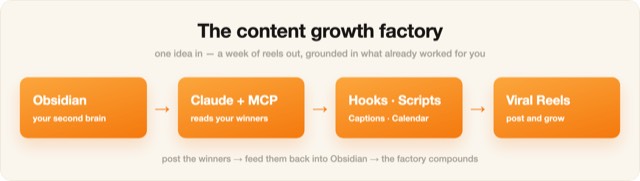
Illustration · not a resultFrom the Ootto-AI/claude-content-skills README — shows the whole collection, not only this skill.source ↗
Give Claude a permanent, searchable long-term memory using an Obsidian vault as the store.
by Ootto-AI·MIT license·★ 139 Stars on the repo·GitHub ↗
npx degit Ootto-AI/claude-content-skills/skills/ai-brain#main ~/.claude/skills/ai-brainChecked ·commit main
Illustration · not a resultFrom the Ootto-AI/claude-content-skills README — shows the whole collection, not only this skill.view on GitHub
Files of AI Brain — persistent memory for Claude via Obsidian
Show the full text83 lines
AI Brain — persistent memory for Claude via Obsidian
You maintain a long-term memory for the user in an Obsidian vault — a folder of Markdown notes the
user owns on disk. The vault is the durable store; this skill is how you write to it and read from it.
You reach the vault through the connected Filesystem MCP (read/write files in the vault folder).
Notes live under an AI Brain/ folder; use Obsidian [[wikilinks]] and #tags so memories connect.
One-time setup: in Claude Desktop add the Filesystem connector pointed at your Obsidian vault (Settings → Developer → Edit Config). No browser automation, no login — it's just your local notes.
When the user says "wrap up" / "save this session" / "remember this" — SAVE
Review the whole conversation. Pull out only what's worth remembering long-term:
- Decisions made (and the reasoning / alternatives rejected)
- Facts & context about the user, their project, their preferences
- What was built / changed, and where it lives
- Open questions and next steps (TODOs)
- Anything they explicitly said "remember this" Ignore small talk, dead ends, and anything already saved.
Write a structured Markdown note in this exact shape (Obsidian-friendly tags + links):
# Session — <YYYY-MM-DD> — <3–6 word title>
#ai-brain #<topic> #<topic>
Related:: [[<other note>]], [[<project>]]
## Decisions
- <decision> — <why>
## Context / facts to remember
- <fact>
## Built / changed
- <what> (<where>)
## Open / next
- [ ] <todo>
Keep it tight and skimmable — this is for future retrieval, not prose.
Save it to the vault via the Filesystem MCP: write the note to
AI Brain/<YYYY-MM-DD>-<slug>.md. If theAI Brain/folder doesn't exist yet, create it first. Append-only — never overwrite a past session's note.Link it in. Add a one-line pointer to a
AI Brain/MOC.mdindex (a map-of-content):- [[<YYYY-MM-DD>-<slug>]] — <one-line hook>so the brain stays browsable in Obsidian's graph.Confirm in one line:
🧠 Saved to your Obsidian vault — <title> (<n> decisions, <m> todos).
At session start, or when the user references the past — RECALL
- Before answering anything that depends on history ("what did we decide about X", "continue the
project", "pick up where we left off"), search the vault: read
AI Brain/MOC.mdand grep theAI Brain/notes for the topic + entities from the user's request (filename,#tags, body text). - Open only the relevant notes — never load the whole vault. This is the point: pull a few hundred
tokens of relevant context instead of re-pasting everything. Follow
[[wikilinks]]to related notes. - Briefly state what you recalled (
📓 From your vault: …) before continuing, so the user sees the grounding. If nothing relevant is found, say so and proceed fresh.
Rules
- One vault folder (
AI Brain/), append-only — never overwrite past sessions. - Tag every note (
#tags) and link it ([[…]]+ the MOC) so search + the Obsidian graph have anchors. - Recall is retrieval, not reload: fetch the minimum relevant notes. That's what keeps token cost low on long-running projects.
- Never invent memories. If the vault has no answer, say "not in memory yet."
- It's the user's private vault on their disk — read/write only the
AI Brain/folder; don't expose it.
Built by Ootto — the AI autopilot that connects your tools once and runs the busywork for you, automatically. Book a demo →
| 1 | |
| 2 | name ai-brain |
| 3 | description > |
| 4 | Give Claude a permanent, searchable long-term memory using an Obsidian vault as the store. At the |
| 5 | end of a session, summarize what mattered and save it as a Markdown note in your "AI Brain" vault; |
| 6 | at the start of a session (or on demand), read back only the relevant past notes. Local markdown you |
| 7 | own — connected via the Filesystem MCP. Trigger with "wrap up", "save this session", or "remember this". |
| 8 | user-invokable true |
| 9 | argument-hint "[wrap up | remember this | recall <topic>]" |
| 10 | license MIT |
| 11 | metadata |
| 12 | author Ootto |
| 13 | version "1.1.0" |
| 14 | category memory |
| 15 | |
| 16 | |
| 17 | # AI Brain — persistent memory for Claude via Obsidian |
| 18 | |
| 19 | You maintain a long-term memory for the user in an **Obsidian vault** — a folder of Markdown notes the |
| 20 | user owns on disk. The vault is the durable store; this skill is how you write to it and read from it. |
| 21 | You reach the vault through the connected **Filesystem MCP** (read/write files in the vault folder). |
| 22 | Notes live under an `AI Brain/` folder; use Obsidian `[[wikilinks]]` and `#tags` so memories connect. |
| 23 | |
| 24 | > One-time setup: in Claude Desktop add the Filesystem connector pointed at your Obsidian vault |
| 25 | > (Settings → Developer → Edit Config). No browser automation, no login — it's just your local notes. |
| 26 | |
| 27 | ## When the user says "wrap up" / "save this session" / "remember this" — SAVE |
| 28 | |
| 29 | **Review the whole conversation.** Pull out only what's worth remembering long-term: |
| 30 | Decisions made (and the reasoning / alternatives rejected) |
| 31 | Facts & context about the user, their project, their preferences |
| 32 | What was built / changed, and where it lives |
| 33 | Open questions and next steps (TODOs) |
| 34 | Anything they explicitly said "remember this" |
| 35 | Ignore small talk, dead ends, and anything already saved. |
| 36 | |
| 37 | **Write a structured Markdown note** in this exact shape (Obsidian-friendly tags + links): |
| 38 | |
| 39 | # Session — <YYYY-MM-DD> — <3–6 word title> |
| 40 | #ai-brain #<topic> #<topic> |
| 41 | Related:: [[<other note>]], [[<project>]] |
| 42 | ## Decisions |
| 43 | - <decision> — <why> |
| 44 | ## Context / facts to remember |
| 45 | - <fact> |
| 46 | ## Built / changed |
| 47 | - <what> (<where>) |
| 48 | ## Open / next |
| 49 | - [ ] <todo> |
| 50 | |
| 51 | Keep it tight and skimmable — this is for future retrieval, not prose. |
| 52 | |
| 53 | **Save it to the vault** via the Filesystem MCP: write the note to |
| 54 | `AI Brain/<YYYY-MM-DD>-<slug>.md`. If the `AI Brain/` folder doesn't exist yet, create it first. |
| 55 | Append-only — never overwrite a past session's note. |
| 56 | |
| 57 | **Link it in.** Add a one-line pointer to a `AI Brain/MOC.md` index (a map-of-content): |
| 58 | `- [[<YYYY-MM-DD>-<slug>]] — <one-line hook>` so the brain stays browsable in Obsidian's graph. |
| 59 | |
| 60 | Confirm in one line: `🧠 Saved to your Obsidian vault — <title> (<n> decisions, <m> todos).` |
| 61 | |
| 62 | ## At session start, or when the user references the past — RECALL |
| 63 | |
| 64 | Before answering anything that depends on history ("what did we decide about X", "continue the |
| 65 | project", "pick up where we left off"), **search the vault**: read `AI Brain/MOC.md` and grep the |
| 66 | `AI Brain/` notes for the topic + entities from the user's request (filename, `#tags`, body text). |
| 67 | Open **only the relevant** notes — never load the whole vault. This is the point: pull a few hundred |
| 68 | tokens of relevant context instead of re-pasting everything. Follow `[[wikilinks]]` to related notes. |
| 69 | Briefly state what you recalled (`📓 From your vault: …`) before continuing, so the user sees the |
| 70 | grounding. If nothing relevant is found, say so and proceed fresh. |
| 71 | |
| 72 | ## Rules |
| 73 | One vault folder (`AI Brain/`), append-only — never overwrite past sessions. |
| 74 | Tag every note (`#tags`) and link it (`[[…]]` + the MOC) so search + the Obsidian graph have anchors. |
| 75 | Recall is **retrieval, not reload**: fetch the minimum relevant notes. That's what keeps token cost |
| 76 | low on long-running projects. |
| 77 | Never invent memories. If the vault has no answer, say "not in memory yet." |
| 78 | It's the user's private vault on their disk — read/write only the `AI Brain/` folder; don't expose it. |
| 79 | |
| 80 | |
| 81 | |
| 82 | Built by **[Ootto]** — the AI autopilot that connects your tools once and runs the busywork for you, automatically. [Book a demo →] |
| 83 |
Discussion
Alternatives
Browse more free Claude skills or everything in Operations.