Sugra API MCP agent
Sugra MCP: connector between LLM agents and world data.
by Sugra-Systems·MIT license·★ 3 Stars on the repo·GitHub ↗
Files of Sugra API MCP
Sugra-Systems/
Show the full text545 lines
sugra-api-mcp






Published in Anthropic's Connectors Directory. Available in Claude on the web, desktop and mobile, Claude Code and Cowork.
Published in the official OpenAI Plugins Directory. Available for ChatGPT and Codex.
Give any AI agent access to 1,600+ data endpoints across markets, economics, companies, government, news, climate, maritime and entity screening - through one MCP server.
Works with ChatGPT, Claude, Gemini, xAI, Cursor, VS Code and any MCP client.
Official Model Context Protocol server for the Sugra API: one connector, a bundled endpoint catalog, and structured tool results with source attribution on every answer.
See it in action
An agent answering a real question end to end - resolving entities, pulling live snapshots and history, and citing the source and freshness on every number:
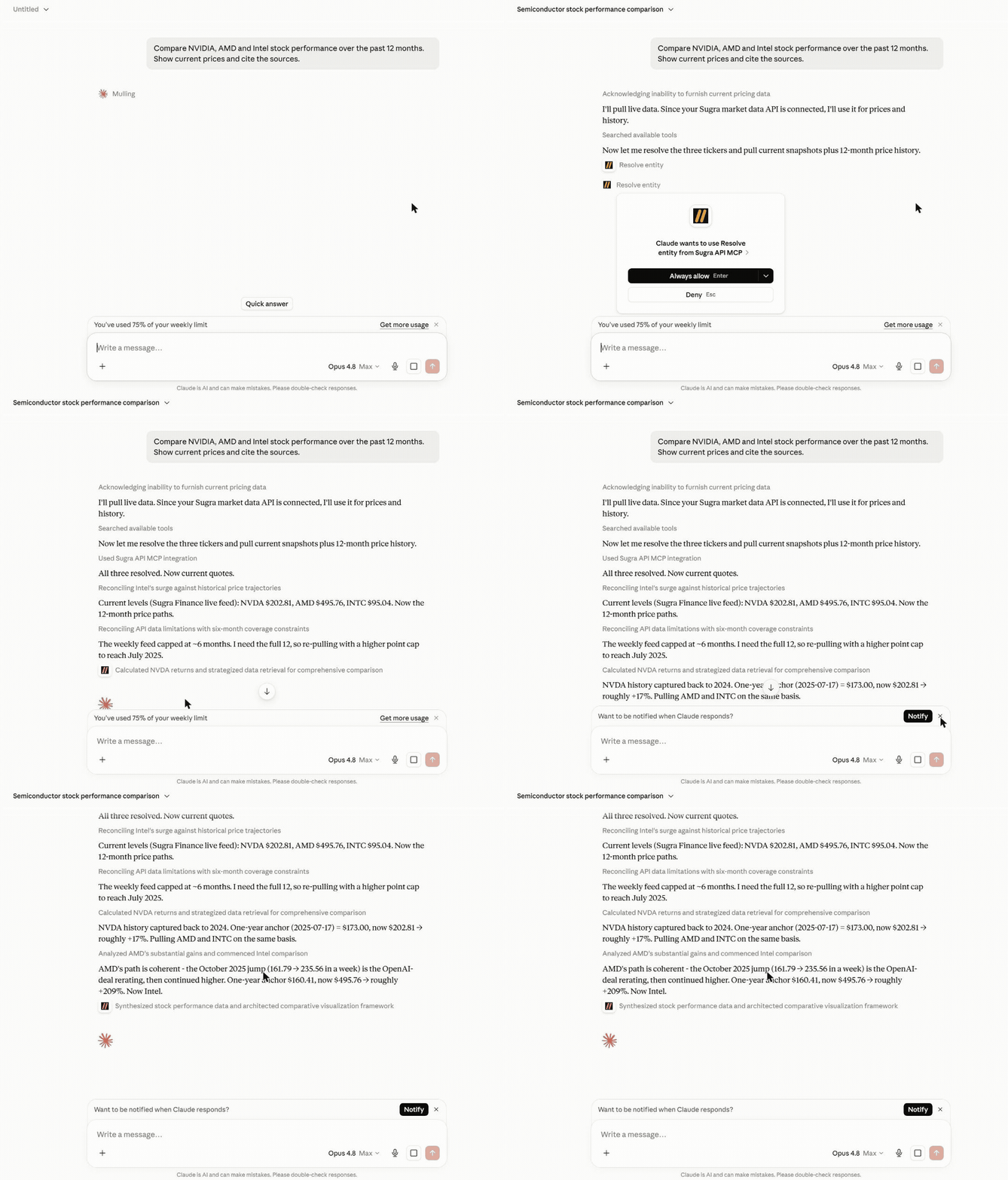
More examples:
Macro research - one prompt builds a full G7 inflation and policy-rate table, each cell dated and sourced, with the unavailable ones flagged rather than faked:
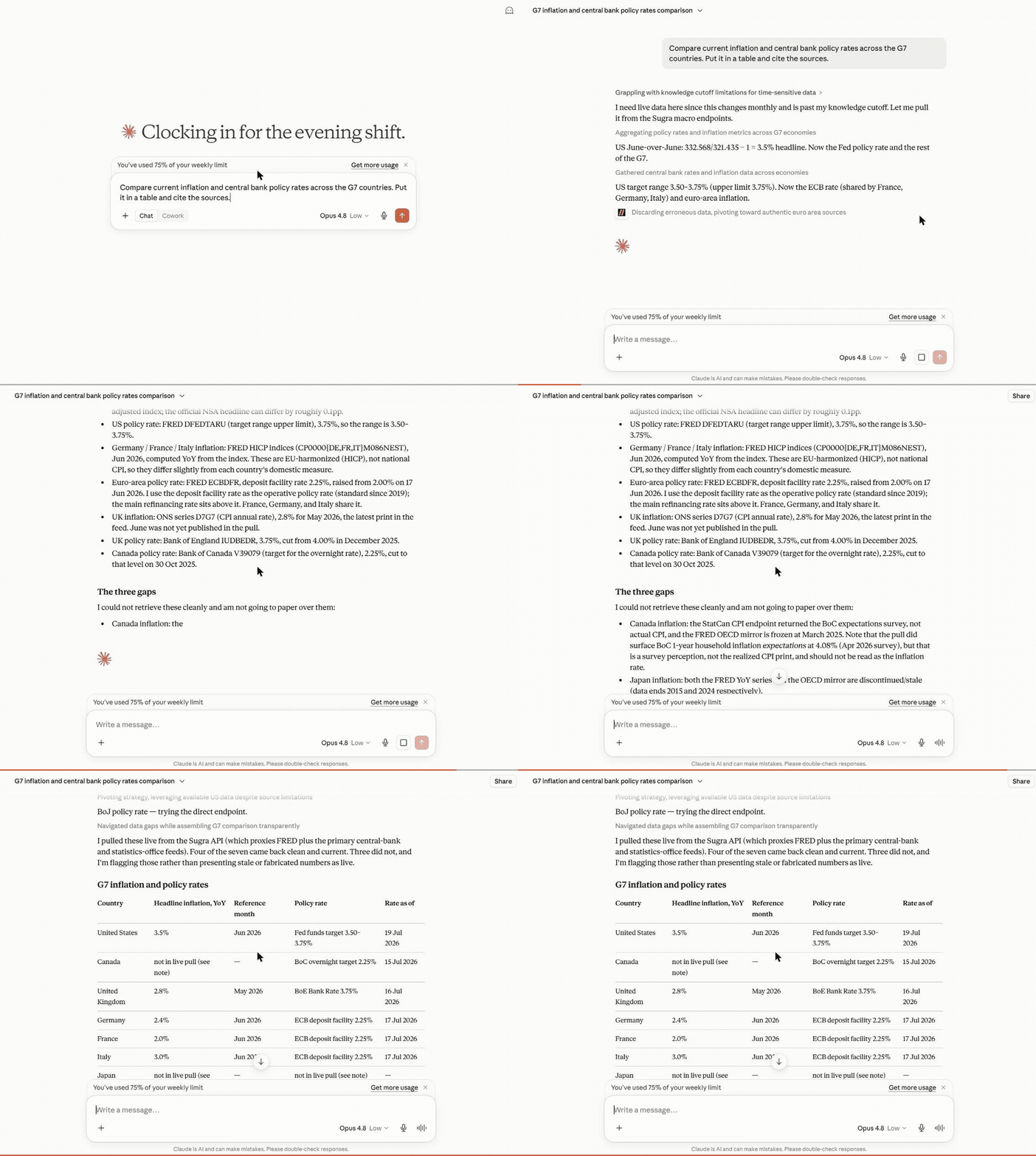
Cross-domain snapshot - Brent crude, marine weather and regional risk pulled together for a shipping desk, each with its source and timestamp:
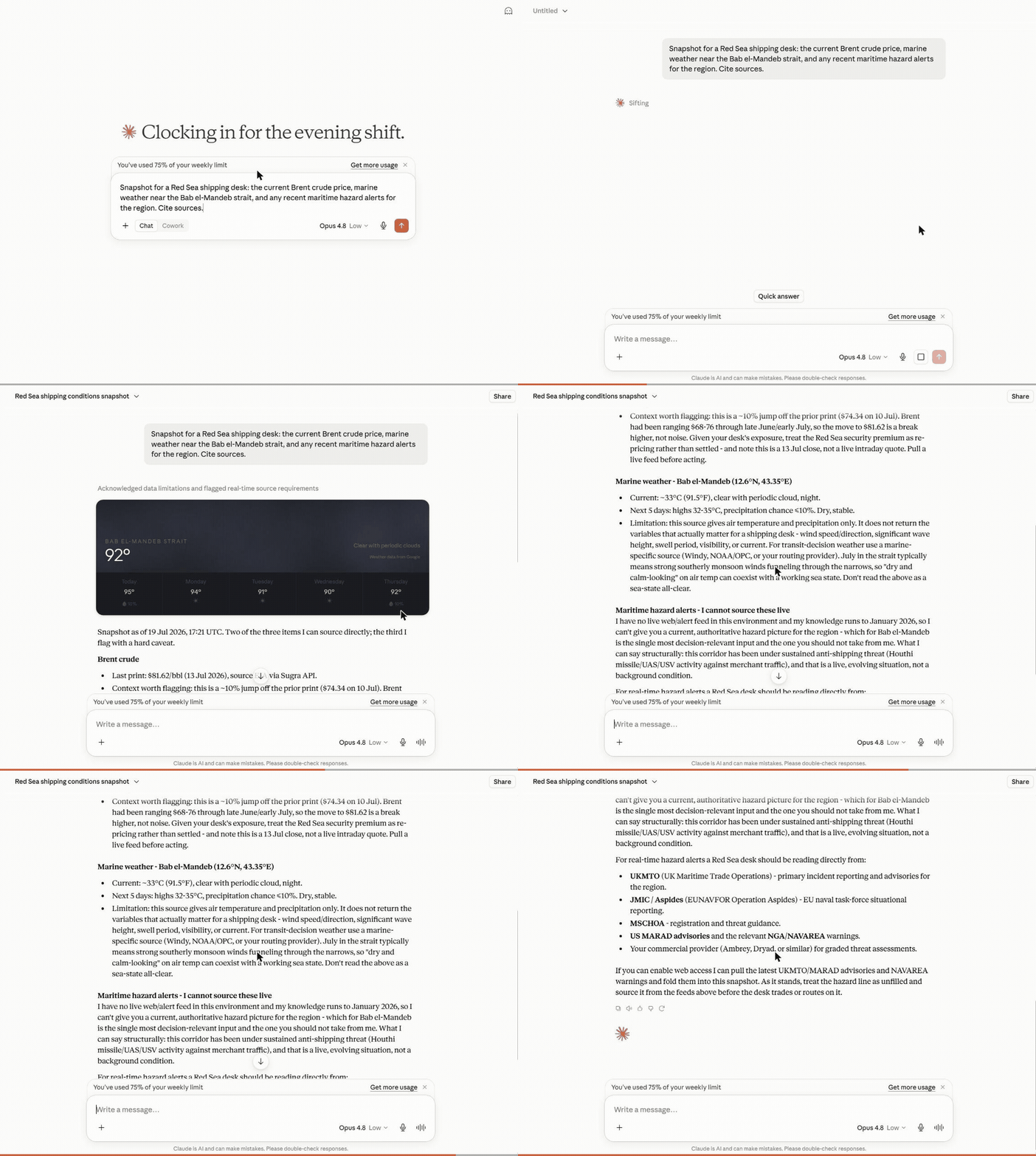
What a session looks like
Hosted MCP transcript (the three composed tools shown here run on the hosted endpoint). Captured example - wording and figures vary by run and as new BLS data is published:
User: Where does US inflation stand, and how has it trended over the past year?

resolve_entity("US inflation")
  -> macro indicator cpi_us (U.S. Bureau of Labor Statistics)
get_snapshot("cpi_us")
  -> latest reading with freshness, provenance and quota cost
get_timeseries("cpi_us", metric="macro_series", range="1y")
  -> 12 monthly points with an explicit downsampling flag

Agent: US CPI printed 2.9% year over year in the latest release, down from
3.5% twelve months earlier - a steady decline since spring.
Source: U.S. Bureau of Labor Statistics via the Sugra API.
Every tool result carries structured metadata - source attribution, freshness, and rate-limit cost - so agents can cite sources and budget requests instead of guessing.
How it works
flowchart LR
    A["AI agent<br/>(ChatGPT, Claude, Gemini, xAI, IDEs)"] --> B["Sugra MCP<br/>gateway tools, plus agent tools when hosted"]
    B --> C["Sugra API<br/>1,600+ endpoints, 36 data domains"]
    C --> D["160+ primary sources<br/>markets, economics, government,<br/>news, climate, maritime"]
Behind the gateway sits the Sugra API: 160+ primary sources - sovereign statistics agencies, central banks, intergovernmental bodies and more - feeding 1,600+ endpoints across 36 data domains. The server ships a bundled catalog of the full endpoint surface, so discovery (search, describe, toolsets) runs locally without network calls; only actual data requests hit the API.
What agents build with it
The Sugra API skills live in Sugra-Systems/sugra-api-skills. The server serves five of them as MCP resources (sugra://skills/...) from a pinned commit of that repository: resources/read the URI after connect.
Agent skills
These skills teach the catalog loop. They do not add MCP tools. Connect the Sugra MCP server separately (hosted or local). The plugin package for each agent lives in Sugra-Systems/sugra-api-plugins.
Claude Code
/plugin marketplace add Sugra-Systems/sugra-api-plugins
/plugin install sugra-api@sugra-api-plugins
Skills appear as /sugra-api:<skill>, for example /sugra-api:discover-and-call.
Codex
codex plugin marketplace add Sugra-Systems/sugra-api-plugins
codex plugin add sugra-api@sugra-api-plugins
Grok
grok plugin install Sugra-Systems/sugra-api-plugins#xai
Cursor, Gemini CLI and other agents
npx skills add https://mcp.sugra.ai
Or copy the skill folders of sugra-api-skills into the agent's skills directory.
ChatGPT
The skills install from OpenAI's Plugins Directory. The MCP server attaches as a hosted connector at https://mcp.sugra.ai/mcp (permanent alias https://app.sugra.ai/mcp).
Six workflow prompts ship with the server and turn these into one-click flows in clients that surface MCP prompts:
- Market and macro research - "Compare inflation and central bank policy rates across the G7." (
macro_briefing) - Equity snapshots with sources - "Where does NVIDIA stand today - price, profile, and market backdrop?" (
market_snapshot) - Sanctions and compliance screening - "Screen this supplier and resolve its LEI identity." (
sanctions_screening) - Sector comparison - "Energy versus technology: valuations and flows side by side." (
sector_compare) - Climate, maritime and trade intelligence - "Red Sea shipping this week: chokepoint transits, crude price, and weather on the route." (
earth_conditionsplus the transport and commodities catalog) - Source discovery - "What does the catalog offer for fixed income, and from which institutions?" (
source_overview)
Every answer carries source attribution and freshness metadata, so agents cite instead of guessing.
Hosted MCP (recommended)
No install. In Claude, ChatGPT and Codex, add the Sugra API MCP server from a directory:
- Claude (web, desktop, mobile, Claude Code and Cowork): Add to Claude opens the Sugra API MCP server in Anthropic's Connectors Directory; connect it and sign in with your Sugra account. In claude.ai the directory is under Customize > Connectors. Claude Code signed in with a claude.ai account picks the connector up automatically;
/mcplists it. - ChatGPT and Codex: Add to ChatGPT opens the Sugra API MCP server in the OpenAI Plugins Directory.
Any other MCP client, or a manual setup, points at the hosted Streamable HTTP endpoint:
https://mcp.sugra.ai/mcp
- The gateway tools plus the composed agent tools
resolve_entity,get_snapshotandget_timeseries - OAuth sign-in through the Claude and ChatGPT connector flows, or
Authorization: Bearer sugra_xxx_...with an API key - As a custom connector in claude.ai: Customize -> Connectors -> Add custom connector
- In ChatGPT: Settings -> Connectors -> Add MCP server
Already added Sugra to Claude as a custom connector? That connection keeps working and shows under "Custom". Connecting the Sugra API MCP server from the directory as well gives you two connections, so remove the custom one first, then connect from the directory.
Local package
Runs on your machine over stdio (or self-hosted HTTP) with an API key:
pip install sugra-api-mcp
- Eight gateway tools
- stdio for desktop clients and IDEs, Streamable HTTP for self-hosting
- Authenticates with
SUGRA_API_KEY
Get a free API key at app.sugra.ai/register (Free tier: 50 req/day).
Quick start
pip install sugra-api-mcp
export SUGRA_API_KEY=sugra_xxx_...   # free key: app.sugra.ai/register
sugra-api-mcp call quotes_symbol_price --params '{"symbol":"AAPL"}'
The same call through an agent: connect the server to your client (next section) and ask "What is AAPL trading at? Use Sugra." The agent finds quotes_symbol_price in the catalog and calls it with the symbol.
Connect your client
Supported clients:
- Anthropic Claude: Claude Desktop, Claude Code (CLI), claude.ai (web)
- OpenAI GPT: ChatGPT (via MCP connector)
- Google Gemini: Gemini CLI, Gemini Code Assist (VS Code + JetBrains)
- xAI: Remote MCP Tools in xAI SDK and Responses API
- IDEs: VS Code (native), Cursor, Zed, Cline, Continue.dev, Windsurf
- Custom agents: anything built on the Python or TypeScript MCP SDK
Claude Desktop (stdio)
Add to claude_desktop_config.json:
- macOS:
~/Library/Application Support/Claude/claude_desktop_config.json - Windows:
%APPDATA%\Claude\claude_desktop_config.json - Linux: Claude Desktop has no Linux build. On Linux,
pip install sugra-api-mcpand use Claude Code (CLI), an IDE client, or the hosted HTTP endpoint below.
{
  "mcpServers": {
    "sugra": {
      "command": "sugra-api-mcp",
      "env": {
        "SUGRA_API_KEY": "sugra_xxx_yourkey..."
      }
    }
  }
}
Restart Claude Desktop. Sugra tools appear in the tools menu.
Claude Code (Anthropic CLI)
Signed in to Claude Code with a claude.ai account? Add to Claude connects the Sugra API MCP server from the Connectors Directory in claude.ai, and it appears in /mcp without any local install. To run the local package instead:
claude mcp add sugra -- sugra-api-mcp
# then set the env var that sugra-api-mcp reads
export SUGRA_API_KEY=sugra_xxx_...
Or edit ~/.claude/config.json manually with the same shape as Claude Desktop above.
To install the skills as a plugin (separate from the MCP server):
/plugin marketplace add Sugra-Systems/sugra-api-plugins
/plugin install sugra-api@sugra-api-plugins
Usage with Gemini CLI
Gemini CLI reads MCP servers from ~/.gemini/settings.json (user scope) or
.gemini/settings.json in the project. For a local stdio install, add:
{
  "mcpServers": {
    "sugra": {
      "command": "sugra-api-mcp",
      "env": {
        "SUGRA_API_KEY": "sugra_xxx_yourkey..."
      }
    }
  }
}
If the console script is not on PATH, use "command": "python" with
"args": ["-m", "sugra_api_mcp"] instead. The equivalent Gemini CLI command
is:
gemini mcp add --scope user -e SUGRA_API_KEY=sugra_xxx_yourkey... sugra sugra-api-mcp
Or connect to the hosted endpoint without installing the package:
gemini mcp add --scope user --transport http \
  --header "Authorization: Bearer sugra_xxx_yourkey..." \
  sugra https://app.sugra.ai/mcp
Run gemini mcp list to check the connection, then enter /mcp in an
interactive session to inspect the available tools. A local stdio connection
shows the eight gateway tools in Tool reference; the hosted
endpoint also shows the three hosted-only agent tools.
If a local server does not connect from a new directory, review and trust that
workspace with gemini trust before retrying.
These examples were checked against the Gemini CLI MCP documentation and Gemini CLI v0.51.0.
Cursor, Zed, Cline, Continue.dev, Windsurf
Each of these has an MCP settings file (typically mcp.json or equivalent) with the same stdio config shape as Claude Desktop.
ChatGPT
Add to ChatGPT installs the Sugra API MCP server from the OpenAI Plugins Directory. Or add the hosted HTTP endpoint (below) as an MCP connector, since ChatGPT does not launch local stdio processes.
HTTP (claude.ai, ChatGPT, remote agents)
In claude.ai, Add to Claude connects the Sugra API MCP server from Anthropic's Connectors Directory; in ChatGPT, Add to ChatGPT installs it from the OpenAI Plugins Directory. For a manual setup or any other Streamable HTTP MCP client, use the hosted endpoint:
https://mcp.sugra.ai/mcp
Authenticate with OAuth in the connector flow or with Authorization: Bearer sugra_xxx_....
As a custom connector in claude.ai: Customize -> Connectors -> Add custom connector. In ChatGPT: Settings -> Connectors -> Add MCP server.
Tool reference
The local package exposes eight gateway tools. The hosted endpoint adds three composed analysis tools on top (see Hosted MCP above). The package exposes exactly eight tools:
| Tool | Purpose |
|---|---|
fetch_data |
One-step: find best endpoint for a natural-language query and call it. Combines search + call in one round trip. |
search_endpoints |
Search the bundled endpoint catalog. Runtime search does not fetch /openapi.json. |
describe_endpoint |
Inspect an endpoint by operation_id, including path, method, parameters, required inputs, agent_hints, and request_body_schema for JSON-body POST operations. |
call_endpoint |
Call a Sugra API operation by operation_id. Arbitrary path calls are no longer supported. |
list_toolsets |
List catalog groups with endpoint counts and descriptions. |
list_sources |
Show bundled catalog source metadata. |
sugra_entity_screen |
Screen a name against sanctions and watchlists (Sugra Entity). |
sugra_entity_lookup |
Composed entity lookup by identifier - anchor is lei or vat, plus the identifier value; returns registry identity + screening (Sugra Entity). |
call_endpoint and fetch_data both support response shaping with limit, fields, and include_raw. Shaping works on enveloped ({"data": ...}) and envelope-less payloads alike; fields entries may use dotted paths into nested objects (geo.city), and meta.shaped reports what was actually applied (fields_applied / fields_unmatched, limit_applied, records_path, order, kept_end) rather than echoing the request. limit and fields work on the records list: the envelope data list, a bare top-level array, or the one list inside an object data when exactly one of data, entries, events, history, items, observations, points, records, results, rows, series, timeseries holds a list (for example data.items on the latest news, data.observations on a FRED series). When data has no such single list but every one of its values is an object holding exactly one list named observations, as with several named sub-series side by side, limit bounds each data.<key>.observations list on its own; fields there still names keys of data. Keys beside that list, such as total and count, stay as sent, and lists nested inside records are never truncated. A fields entry that names a key of data itself projects that object instead, and a projection that matches nothing leaves the payload whole. meta.shaped.limit_applied says whether the bound took effect, and meta.shaped.records_path names the list used (data, data.<key>, data.*.observations, or null when no records list was used). limit keeps the newest end of the records list when every record carries one date or period key (such as date, period or year) in one format and the list runs one way by it: the last N records of an oldest-first list, in their order, or the first N of a newest-first list. Otherwise it keeps the first N records. Whenever a limit bounds a records list, meta.shaped.order says asc, desc or unknown and meta.shaped.kept_end says newest or first, each as a map by sub-series name for sibling sub-series. A top-level JSON array (or scalar) is always wrapped as {"data": ...} so the MCP result stays an object; otherwise FastMCP output validation reports the successful call as an error and drops the rows.
fields takes at most 32 paths, each at most 256 characters and 16 dotted parts; past any of these the call answers projection_too_large before any request is made. With fields, one projection also visits at most 100,000 list items, runs for at most 5 seconds, and takes a response of at most 2,000,000 characters of JSON before projection. That bound sits far above the 18,000-character limit on the result, which applies after projection: a 16-day weather forecast is about 295,000 characters before fields=["daily"] cuts it to fit. None of these bounds applies without fields. Shaping runs on its own pool of two worker threads, never on the event loop: at most 8 jobs run or wait for a worker, 4 of them for one caller, and a call that finds no free slot within 2 seconds answers server_busy with scope shaping or caller_shaping.
describe_endpoint returns computed agent_hints per endpoint so agents can budget time and parallelism before calling:
duration_class-fast(under ~2s, snapshot-backed),slow(live upstream proxying, occasionally 15s+), orheavy(per-item upstream work, large batches can exceed the gateway timeout)max_concurrency- advisory ceiling for parallel calls from one sessionbulk_cost- on per-item bulk endpoints: 1 request credit per item in the request body (the API reports the total in theX-RateLimit-Costresponse header)
Hosted-only agent tools (app.sugra.ai/mcp)
The hosted MCP endpoint at https://app.sugra.ai/mcp serves the same eight tools PLUS three composed agent tools that are not available on stdio or self-hosted installs:
| Tool | Purpose |
|---|---|
resolve_entity |
Free text (ticker, company, indicator, coin, currency pair) to a canonical market or macro entity. Ambiguous matches return ranked candidates, never a silent pick. |
get_snapshot |
Entity plus a named recipe to one composed current view with freshness, provenance, coverage, and billing blocks. Composed calls charge a fixed recipe cost (1-2 requests) from the daily quota. |
get_timeseries |
Entity plus metric (price, macro_series, etf_flows, etf_monthly_flows) to a bounded series with an explicit downsampling flag. etf_flows estimates at filing cadence; etf_monthly_flows is the fund's own NPORT-P monthly creations and redemptions. |
These three tools wrap an internal composed plane that requires an infrastructure credential available only on the hosted deployment. The tool code ships inside the package, but it is registered only by the hosted HTTP entry point and only when that credential is present - pip install sugra-api-mcp (stdio and self-hosted HTTP) always exposes the classic eight-tool gateway. Hosted-only examples in any documentation are labeled as such. For compliance entity lookups (LEI / VAT, sanctions screening) use sugra_entity_lookup and sugra_entity_screen, which work on every transport.
CLI
Server startup is unchanged:
sugra-api-mcp
sugra-api-mcp --transport streamable-http --port 8001
Catalog and gateway helpers:
sugra-api-mcp doctor
sugra-api-mcp list-toolsets
sugra-api-mcp search "NASDAQ futures"
sugra-api-mcp describe cot_financial
sugra-api-mcp call quotes_symbol_price --params '{"symbol":"AAPL"}'
Environment variables
User-facing configuration for local installs, MCP clients, Docker stdio, and directory sandboxes (for example Glama Try in Browser). Set only this:
| Variable | Required | Default | Description |
|---|---|---|---|
SUGRA_API_KEY |
For API calls | - | Your Sugra API key (sugra_...). Get a free key at app.sugra.ai/register (Free tier: 50 req/day). Not needed to start the server: catalog tools (search_endpoints, describe_endpoint, list_toolsets, list_sources) work without it; API-calling tools return a structured missing_api_key error until it is set. In HTTP mode with a client Bearer token this is only a fallback. |
Optional overrides (leave unset unless you need them):
| Variable | Default | Description |
|---|---|---|
SUGRA_API_BASE |
https://sugra.ai |
Override the Sugra API base URL (self-hosted or beta API only). |
SUGRA_TIMEOUT |
30 |
Downstream HTTP timeout in seconds for calls from this server to the Sugra API. |
Operator-only settings for self-hosted Streamable HTTP (reverse proxy CORS/hosts,
OAuth authorization-server wiring, and shared secrets) are documented in
docs/self-hosting.md. Do not put operator secrets into
public directory sandboxes. SUGRA_MCP_TRUST_PROXY_HEADERS (off by default)
makes the server read X-Real-IP and X-Forwarded-Host; set it only behind a
reverse proxy that overwrites both on every request, and never where clients
can reach the process directly (details in the same guide).
SUGRA_MCP_LIMITS (off by default) turns on request limits counted in the
server's own memory; the same guide lists its settings.
HTTP transport with OAuth
When running with --transport streamable-http the server allows unauthenticated MCP discovery requests (initialize, notifications/initialized, tools/list, resources/list, prompts/list, and ping) so ChatGPT Apps and other mixed-auth clients can discover tool metadata. Tool calls still require Authorization: Bearer .... Two token formats are accepted:
- Raw API key (
sugra_...) - passed through as the downstreamx-api-key. Compatible with earlier local API-key setups. - OAuth JWT - signature verified against the issuer's JWKS. The audience must match
https://app.sugra.ai/mcp, the token must includesugra:read, and hosted access is validated against APP before resolving the user's primary API key. Successful hosted OAuth requests update MCP connection activity in APP.
Most users should use the hosted endpoint https://app.sugra.ai/mcp instead of
self-hosting OAuth. If you run your own HTTP process, see
docs/self-hosting.md.
Timeouts and the error contract
SUGRA_TIMEOUT caps each downstream HTTP call from this server to the Sugra API (default 30 seconds). It is one link in a longer chain; when a tool call fails, elapsed_ms in the error payload tells you which link cut it:
MCP client (agent harness)         own tool timeout, often 60-180s, client-controlled
  -> hosted proxy (app.sugra.ai)   86400s, effectively unlimited
    -> this server (httpx)         SUGRA_TIMEOUT, default 30s
      -> Sugra API -> upstreams    15-60s per upstream call, server-side
Tool failures return structured JSON instead of raising, so agents can pick a retry strategy:
error value |
Meaning | Retry strategy |
|---|---|---|
upstream_timeout |
No response within SUGRA_TIMEOUT (elapsed_ms close to timeout_s x 1000) |
Retry once: the aborted attempt usually completes server-side and warms upstream caches. Then narrow the request (smaller batch, tighter filters). |
upstream_connect_error |
Could not reach the Sugra API (DNS failure, connection refused) | Retry after a short delay. |
upstream_transport_error |
Connection dropped mid-request | Retry once. |
free-text string + status_code |
The API answered with HTTP 4xx/5xx; retry_after included when the API sent a Retry-After header |
Honor retry_after for 429/503; fix the request for 4xx. |
tool_execution_failed |
Unexpected failure inside the gateway (exception_type included) |
Report if persistent. |
query_too_long |
A search_endpoints or fetch_data query has more than 64 terms or 1000 characters (max_terms and max_chars included). A term is a run of two or more ASCII letters or digits, and repeats count; nothing was searched |
Shorten the query to the instrument, series, place or task. |
projection_too_large |
A fields projection passed one of its bounds. limit_kind names it: fields (more than 32 paths), path_chars (a path over 256 characters), path_parts (a path over 16 dotted parts), rows (over 100,000 list items visited), shaping_ms (over 5 seconds) or raw_chars (a response over 2,000,000 characters before projection). limit, actual, field_index (from 0, for path_chars and path_parts) and operation_id are included, never the field text; the first three kinds are refused before any request is made |
Name fewer or shorter fields, add limit, narrow the request, or omit fields. |
server_busy |
A concurrency limit was reached. scope is tool_calls, search or shaping for a server-wide limit, caller_tool_calls, caller_search or caller_shaping for the limit on one caller. With shaping or caller_shaping the API request was already made and its response was dropped; with any other scope the call did no work |
Retry after a few seconds. |
All error payloads carry elapsed_ms. url is present on transport and HTTP errors (not on tool_execution_failed, which can fire before a URL exists). On the three transport errors status_code is null (no HTTP status was received) - consumers comparing status_code numerically should guard for that. If a tool call instead fails with a bare client-side message and no structured JSON, the timeout fired in your agent harness above this server: raise the client's tool timeout, not SUGRA_TIMEOUT.
Examples
Ask Claude:
- "Search Sugra endpoints for NASDAQ futures."
- "Describe the
cot_financialoperation." - "Call
quotes_symbol_pricewith symbol AAPL and return only symbol and price." - "List available Sugra toolsets."
Troubleshooting
Looking for get_market_price, get_macro_indicator, or get_news? Those curated tool names appear in some older directory listings and never shipped in this package - use fetch_data for one-step natural-language calls or search_endpoints plus call_endpoint for explicit routing.
missing_api_key in tool responses
The server starts and lists its tools without a key, but API-calling tools (call_endpoint, fetch_data, the entity tools) return {"error": "missing_api_key"} until the server can find one. Depending on how you run it:
- As an MCP tool from your client (Claude, ChatGPT, Gemini, xAI, IDE, etc.): check the
envblock in your MCP config file. Value should be a full key likesugra_ao1_..., not empty and not wrapped in extra quotes. - Shell / CI:
export SUGRA_API_KEY=sugra_...before runningsugra-api-mcp. - HTTP mode: set via
.envor systemdEnvironmentFile, not the shell.
sugra-api-mcp doctor reports whether the key is visible to the process.
401 Unauthorized or 403 Forbidden in tool responses
Key accepted but rejected. Common causes:
- Key was regenerated in app.sugra.ai/developer/keys and your config still has the old one.
- Typo - key contains only lowercase letters and digits, no spaces, no trailing newlines.
- Free tier was deactivated. Sign in to verify status.
429 Too Many Requests
Hit your plan's daily limit. Response headers include X-RateLimit-Reset with the UTC timestamp when the counter resets (midnight UTC). Over MCP the tool result carries reason: daily_limit_reached, status_code: 429, retry_after, and daily_limit and plan when the API named them. Plans: sugra.systems/api/pricing.
Invalid Host header (only if self-hosting HTTP mode)
FastMCP has DNS rebinding protection for public hostnames behind a reverse proxy. See docs/self-hosting.md for the allowed-hosts setting.
Tool result truncated with meta.truncated notice
Some endpoints return very large payloads (long price histories, hourly forecasts, full catalogs). A result is capped at 18,000 characters of JSON with ASCII escapes, so a CJK or accented character counts as its six-character escape and non-ASCII text is counted generously. Clients limit what they pass to the model in their own ways: Claude Code writes a tool result over 50,000 characters to a file instead of handing it to the model, and Codex limits a tool result by tokens, with a budget the user sets, and cuts the middle out beyond it. Every shape we measured at 18,000 characters, the densest included, stayed within Codex's default budget; a denser result, or a lower budget set in the client, can still be trimmed by the client. The cap is the same for every client. A larger result is cut to fit, whatever its shape: the lists at most two levels under data (data, data.<key>, data.<key>.<key>, whatever the key is called) are measured record by record, a big list is cut before small ones beside it, and a cut list keeps at least one record. A list keeps the newest end by the same order rule as limit, else its first records; through call_endpoint, a forecast or calendar keeps its records from today onward instead, oldest-first or newest-first alike, with kept_end nearest. fetch_data keeps the newest or first records and its hints name no parameter yet. The cut runs on the shaping pool, never on the event loop, so a full pool answers server_busy; it has a 5-second clock, read between records, and past it the result is refused; the fixed tools stop waiting for a cut half a second after that clock, and call_endpoint half a second after two such clocks, as its fields projection has its own; both then answer response_too_large, and a cut that cannot start within the pool's 2-second wait answers server_busy. The fixed tools gate an error body like any other result; an error payload over the cap that call_endpoint passes on as it came is refused without being measured. meta.truncated says what was cut: reason (exceeds_response_size_cap), path of the largest list cut with its original_count, kept_count, order and kept_end, the sizes original_chars, kept_chars and cap_chars, a lists entry per path (with kept_range, the first and last date kept) when several lists were cut, and a retry_hint that names what was kept and only the parameters the operation has. A forecast of up to about two weeks keeps the hours from today and its whole daily list, and the hint offers fields=["daily"] or a smaller params.forecast_days; a 16-day forecast can lose its last days as well, and its hint then offers only a smaller params.forecast_days, although fields=["daily"] returns all 16 days within the cap; a quote history keeps its newest bars, and the hint offers params.limit or a narrower params.start to params.end. When no cut fits, the result is a response_too_large error whose message gives the size and the limit in characters and names the large part: a record that is larger than the limit by itself, a record that does not fit beside the rest of the response (with both sizes), or the part outside the lists that is too large, and when it can, the fields that leave the large part out. The refusal itself always fits the cap: when it would not, it keeps only the size line and a URL cut to 300 characters.
Python version 3.11 or higher is required
sugra-api-mcp requires Python 3.11+. Check: python --version. If you have 3.10 or older:
- Ubuntu: install Python 3.11 or newer from your distribution packages or the deadsnakes PPA.
- macOS:
brew install [email protected] - Windows: download from python.org
Then recreate your venv.
Hosted app.sugra.ai/mcp returns 5xx
The hosted endpoint can briefly restart after deploys. Wait 60 seconds and retry. If persistent, email [email protected].
Debugging tool calls locally
Run with stdio and log JSON-RPC messages:
SUGRA_API_KEY=sugra_... sugra-api-mcp 2>&1 | tee mcp-debug.log
Send manual JSON-RPC from a second terminal using nc or an MCP inspector.
Development
git clone https://github.com/Sugra-Systems/sugra-api-mcp
cd sugra-api-mcp
pip install -e ".[dev,http]"
export SUGRA_API_KEY=sugra_...
python -m sugra_api_mcp  # stdio mode
python -m sugra_api_mcp --transport streamable-http --port 8001  # HTTP mode
python scripts/build_endpoint_catalog.py  # rebuild bundled catalog from sibling API openapi.json
python scripts/build_endpoint_catalog.py --source https://sugra.ai/openapi.json  # from the live spec
# On DRIFT, catalog-parity.yml opens or updates PR branch ci/catalog-resync.
Run tests:
pytest
Docker
Build the image from the repository root:
docker build -t sugra-api-mcp .
Run in stdio mode (the default entrypoint) for MCP clients that spawn a local process:
docker run -i --rm -e SUGRA_API_KEY=sugra_... sugra-api-mcp
Run the Streamable HTTP transport on port 8001 with Docker Compose:
export SUGRA_API_KEY=sugra_...
docker compose up -d
Then point your MCP client at http://localhost:8001/mcp. The compose service
passes SUGRA_API_KEY and the optional overrides (SUGRA_API_BASE,
SUGRA_TIMEOUT) from your shell when set, and checks container health against
http://localhost:8001/health. Reverse-proxy and OAuth operator settings are
documented in docs/self-hosting.md.
Every response the application sends, errors included, carries the header
Server: sugra-api-mcp. So does uvicorn's own 400 for a request it cannot
parse under the httptools parser, which the http extra installs and uvicorn
picks by default; under the h11 parser that 400 goes out without the header.
Set SUGRA_MCP_SERVER_VERSION=1 (or true, yes, on) in the server's
environment to add the package version to that header
(sugra-api-mcp/<version>) and to the /health response, which leaves the
version out otherwise.
A note on auth: no environment variable is baked into the image and none is
required for the container to start. In HTTP mode clients authenticate per
request with Authorization: Bearer sugra_..., so SUGRA_API_KEY on the
container is only a fallback for requests without a Bearer token.
License
MIT © 2026 Sugra Systems, Inc.
| 1 | # sugra-api-mcp |
| 2 | |
| 3 | <!-- mcp-name: ai.sugra/api-mcp --> |
| 4 | |
| 5 | <p align="center"> |
| 6 | <img src="https://app.sugra.ai/images/brand/sugra-app-icon.svg" alt="sugra.ai" width="112" height="112" /> |
| 7 | </p> |
| 8 | |
| 9 | <p align="center"> |
| 10 | <a href="https://pypi.org/project/sugra-api-mcp/"><img src="https://img.shields.io/pypi/v/sugra-api-mcp?label=PyPI&color=F5A623" alt="PyPI"></a> |
| 11 | <a href="https://pypi.org/project/sugra-api-mcp/"><img src="https://img.shields.io/pypi/pyversions/sugra-api-mcp?label=Python" alt="Python versions"></a> |
| 12 | <a href="https://github.com/Sugra-Systems/sugra-api-mcp/blob/main/LICENSE"><img src="https://img.shields.io/github/license/Sugra-Systems/sugra-api-mcp?label=License" alt="License"></a> |
| 13 | <a href="https://smithery.ai/servers/sugra-systems/sugra-api"><img src="https://smithery.ai/badge/sugra-systems/sugra-api" alt="Smithery"></a> |
| 14 | </p> |
| 15 | |
| 16 | <p align="center"> |
| 17 | <a href="https://url.sugra.ai/claude"><img src="https://img.shields.io/badge/Add_to_Claude-F5A623?style=for-the-badge" alt="Add to Claude"></a> |
| 18 | <a href="https://url.sugra.ai/openai"><img src="https://img.shields.io/badge/Add_to_ChatGPT-F5A623?style=for-the-badge" alt="Add to ChatGPT"></a> |
| 19 | </p> |
| 20 | |
| 21 | <p align="center"> |
| 22 | <sub>Published in Anthropic's Connectors Directory. Available in Claude on the web, desktop and mobile, Claude Code and Cowork.</sub><br> |
| 23 | <sub>Published in the official OpenAI Plugins Directory. Available for ChatGPT and Codex.</sub> |
| 24 | </p> |
| 25 | |
| 26 | **Give any AI agent access to 1,600+ data endpoints across markets, economics, companies, government, news, climate, maritime and entity screening - through one MCP server.** |
| 27 | |
| 28 | Works with ChatGPT, Claude, Gemini, xAI, Cursor, VS Code and any MCP client. |
| 29 | |
| 30 | Official [Model Context Protocol] server for the [Sugra API]: one connector, a bundled endpoint catalog, and structured tool results with source attribution on every answer. |
| 31 | |
| 32 | ## See it in action |
| 33 | |
| 34 | An agent answering a real question end to end - resolving entities, pulling live snapshots and history, and citing the source and freshness on every number: |
| 35 | |
| 36 | ![Compare NVIDIA, AMD and Intel over the past 12 months, answered live through the Sugra MCP] |
| 37 | |
| 38 | More examples: |
| 39 | |
| 40 | **Macro research** - one prompt builds a full G7 inflation and policy-rate table, each cell dated and sourced, with the unavailable ones flagged rather than faked: |
| 41 | |
| 42 | ![A G7 inflation and central bank policy rate table assembled live from the Sugra API] |
| 43 | |
| 44 | **Cross-domain snapshot** - Brent crude, marine weather and regional risk pulled together for a shipping desk, each with its source and timestamp: |
| 45 | |
| 46 | ![A Red Sea shipping snapshot combining Brent crude, marine weather and hazard sourcing] |
| 47 | |
| 48 | |
| 49 | ## What a session looks like |
| 50 | |
| 51 | Hosted MCP transcript (the three composed tools shown here run on the hosted endpoint). Captured example - wording and figures vary by run and as new BLS data is published: |
| 52 | |
| 53 | |
| 54 | User: Where does US inflation stand, and how has it trended over the past year? |
| 55 | |
| 56 | resolve_entity("US inflation") |
| 57 | -> macro indicator cpi_us (U.S. Bureau of Labor Statistics) |
| 58 | get_snapshot("cpi_us") |
| 59 | -> latest reading with freshness, provenance and quota cost |
| 60 | get_timeseries("cpi_us", metric="macro_series", range="1y") |
| 61 | -> 12 monthly points with an explicit downsampling flag |
| 62 | |
| 63 | Agent: US CPI printed 2.9% year over year in the latest release, down from |
| 64 | 3.5% twelve months earlier - a steady decline since spring. |
| 65 | Source: U.S. Bureau of Labor Statistics via the Sugra API. |
| 66 | |
| 67 | |
| 68 | Every tool result carries structured metadata - source attribution, freshness, and rate-limit cost - so agents can cite sources and budget requests instead of guessing. |
| 69 | |
| 70 | ## How it works |
| 71 | |
| 72 | |
| 73 | flowchart LR |
| 74 | A["AI agent<br/>(ChatGPT, Claude, Gemini, xAI, IDEs)"] --> B["Sugra MCP<br/>gateway tools, plus agent tools when hosted"] |
| 75 | B --> C["Sugra API<br/>1,600+ endpoints, 36 data domains"] |
| 76 | C --> D["160+ primary sources<br/>markets, economics, government,<br/>news, climate, maritime"] |
| 77 | |
| 78 | |
| 79 | Behind the gateway sits the Sugra API: 160+ primary sources - sovereign statistics agencies, central banks, intergovernmental bodies and more - feeding 1,600+ endpoints across 36 data domains. The server ships a bundled catalog of the full endpoint surface, so discovery (search, describe, toolsets) runs locally without network calls; only actual data requests hit the API. |
| 80 | |
| 81 | ## What agents build with it |
| 82 | |
| 83 | The Sugra API skills live in [Sugra-Systems/sugra-api-skills]. The server serves five of them as MCP resources (`sugra://skills/...`) from a pinned commit of that repository: `resources/read` the URI after connect. |
| 84 | |
| 85 | ## Agent skills |
| 86 | |
| 87 | These skills teach the catalog loop. They do not add MCP tools. Connect the Sugra MCP server separately (hosted or local). The plugin package for each agent lives in [Sugra-Systems/sugra-api-plugins]. |
| 88 | |
| 89 | ### Claude Code |
| 90 | |
| 91 | |
| 92 | /plugin marketplace add Sugra-Systems/sugra-api-plugins |
| 93 | /plugin install sugra-api@sugra-api-plugins |
| 94 | |
| 95 | |
| 96 | Skills appear as `/sugra-api:<skill>`, for example `/sugra-api:discover-and-call`. |
| 97 | |
| 98 | ### Codex |
| 99 | |
| 100 | |
| 101 | codex plugin marketplace add Sugra-Systems/sugra-api-plugins |
| 102 | codex plugin add sugra-api@sugra-api-plugins |
| 103 | |
| 104 | |
| 105 | ### Grok |
| 106 | |
| 107 | |
| 108 | grok plugin install Sugra-Systems/sugra-api-plugins#xai |
| 109 | |
| 110 | |
| 111 | ### Cursor, Gemini CLI and other agents |
| 112 | |
| 113 | |
| 114 | npx skills add https://mcp.sugra.ai |
| 115 | |
| 116 | |
| 117 | Or copy the skill folders of sugra-api-skills into the agent's skills directory. |
| 118 | |
| 119 | ### ChatGPT |
| 120 | |
| 121 | The skills install from [OpenAI's Plugins Directory]. The MCP server attaches as a hosted connector at `https://mcp.sugra.ai/mcp` (permanent alias `https://app.sugra.ai/mcp`). |
| 122 | |
| 123 | Six workflow prompts ship with the server and turn these into one-click flows in clients that surface MCP prompts: |
| 124 | |
| 125 | **Market and macro research** - "Compare inflation and central bank policy rates across the G7." (`macro_briefing`) |
| 126 | **Equity snapshots with sources** - "Where does NVIDIA stand today - price, profile, and market backdrop?" (`market_snapshot`) |
| 127 | **Sanctions and compliance screening** - "Screen this supplier and resolve its LEI identity." (`sanctions_screening`) |
| 128 | **Sector comparison** - "Energy versus technology: valuations and flows side by side." (`sector_compare`) |
| 129 | **Climate, maritime and trade intelligence** - "Red Sea shipping this week: chokepoint transits, crude price, and weather on the route." (`earth_conditions` plus the transport and commodities catalog) |
| 130 | **Source discovery** - "What does the catalog offer for fixed income, and from which institutions?" (`source_overview`) |
| 131 | |
| 132 | Every answer carries source attribution and freshness metadata, so agents cite instead of guessing. |
| 133 | |
| 134 | ## Hosted MCP (recommended) |
| 135 | |
| 136 | No install. In Claude, ChatGPT and Codex, add the Sugra API MCP server from a directory: |
| 137 | |
| 138 | **Claude** (web, desktop, mobile, Claude Code and Cowork): [Add to Claude] opens the Sugra API MCP server in Anthropic's Connectors Directory; connect it and sign in with your Sugra account. In claude.ai the directory is under [Customize > Connectors]. Claude Code signed in with a claude.ai account picks the connector up automatically; `/mcp` lists it. |
| 139 | **ChatGPT and Codex**: [Add to ChatGPT] opens the Sugra API MCP server in the OpenAI Plugins Directory. |
| 140 | |
| 141 | Any other MCP client, or a manual setup, points at the hosted Streamable HTTP endpoint: |
| 142 | |
| 143 | |
| 144 | https://mcp.sugra.ai/mcp |
| 145 | |
| 146 | |
| 147 | The gateway tools plus the composed agent tools `resolve_entity`, `get_snapshot` and `get_timeseries` |
| 148 | OAuth sign-in through the Claude and ChatGPT connector flows, or `Authorization: Bearer sugra_xxx_...` with an API key |
| 149 | As a custom connector in claude.ai: Customize -> Connectors -> Add custom connector |
| 150 | In ChatGPT: Settings -> Connectors -> Add MCP server |
| 151 | |
| 152 | Already added Sugra to Claude as a custom connector? That connection keeps working and shows under "Custom". Connecting the Sugra API MCP server from the directory as well gives you two connections, so remove the custom one first, then connect from the directory. |
| 153 | |
| 154 | ## Local package |
| 155 | |
| 156 | Runs on your machine over stdio (or self-hosted HTTP) with an API key: |
| 157 | |
| 158 | |
| 159 | pip install sugra-api-mcp |
| 160 | |
| 161 | |
| 162 | Eight gateway tools |
| 163 | stdio for desktop clients and IDEs, Streamable HTTP for self-hosting |
| 164 | Authenticates with `SUGRA_API_KEY` |
| 165 | |
| 166 | Get a free API key at [app.sugra.ai/register] (Free tier: 50 req/day). |
| 167 | |
| 168 | ## Quick start |
| 169 | |
| 170 | |
| 171 | pip install sugra-api-mcp |
| 172 | export SUGRA_API_KEY=sugra_xxx_... # free key: app.sugra.ai/register |
| 173 | sugra-api-mcp call quotes_symbol_price --params '{"symbol":"AAPL"}' |
| 174 | |
| 175 | |
| 176 | The same call through an agent: connect the server to your client (next section) and ask "What is AAPL trading at? Use Sugra." The agent finds `quotes_symbol_price` in the catalog and calls it with the symbol. |
| 177 | |
| 178 | ## Connect your client |
| 179 | |
| 180 | Supported clients: |
| 181 | |
| 182 | **Anthropic Claude**: Claude Desktop, Claude Code (CLI), claude.ai (web) |
| 183 | **OpenAI GPT**: ChatGPT (via MCP connector) |
| 184 | **Google Gemini**: Gemini CLI, Gemini Code Assist (VS Code + JetBrains) |
| 185 | **xAI**: Remote MCP Tools in xAI SDK and Responses API |
| 186 | **IDEs**: VS Code (native), Cursor, Zed, Cline, Continue.dev, Windsurf |
| 187 | **Custom agents**: anything built on the Python or TypeScript MCP SDK |
| 188 | |
| 189 | ### Claude Desktop (stdio) |
| 190 | |
| 191 | Add to `claude_desktop_config.json`: |
| 192 | |
| 193 | macOS: `~/Library/Application Support/Claude/claude_desktop_config.json` |
| 194 | Windows: `%APPDATA%\Claude\claude_desktop_config.json` |
| 195 | Linux: Claude Desktop has no Linux build. On Linux, `pip install sugra-api-mcp` and use Claude Code (CLI), an IDE client, or the hosted HTTP endpoint below. |
| 196 | |
| 197 | |
| 198 | { |
| 199 | "mcpServers": { |
| 200 | "sugra": { |
| 201 | "command": "sugra-api-mcp", |
| 202 | "env": { |
| 203 | "SUGRA_API_KEY": "sugra_xxx_yourkey..." |
| 204 | } |
| 205 | } |
| 206 | } |
| 207 | } |
| 208 | |
| 209 | |
| 210 | Restart Claude Desktop. Sugra tools appear in the tools menu. |
| 211 | |
| 212 | ### Claude Code (Anthropic CLI) |
| 213 | |
| 214 | Signed in to Claude Code with a claude.ai account? [Add to Claude] connects the Sugra API MCP server from the Connectors Directory in claude.ai, and it appears in `/mcp` without any local install. To run the local package instead: |
| 215 | |
| 216 | |
| 217 | claude mcp add sugra -- sugra-api-mcp |
| 218 | # then set the env var that sugra-api-mcp reads |
| 219 | export SUGRA_API_KEY=sugra_xxx_... |
| 220 | |
| 221 | |
| 222 | Or edit `~/.claude/config.json` manually with the same shape as Claude Desktop above. |
| 223 | |
| 224 | To install the skills as a plugin (separate from the MCP server): |
| 225 | |
| 226 | |
| 227 | /plugin marketplace add Sugra-Systems/sugra-api-plugins |
| 228 | /plugin install sugra-api@sugra-api-plugins |
| 229 | |
| 230 | |
| 231 | ### Usage with Gemini CLI |
| 232 | |
| 233 | Gemini CLI reads MCP servers from `~/.gemini/settings.json` (user scope) or |
| 234 | `.gemini/settings.json` in the project. For a local stdio install, add: |
| 235 | |
| 236 | |
| 237 | { |
| 238 | "mcpServers": { |
| 239 | "sugra": { |
| 240 | "command": "sugra-api-mcp", |
| 241 | "env": { |
| 242 | "SUGRA_API_KEY": "sugra_xxx_yourkey..." |
| 243 | } |
| 244 | } |
| 245 | } |
| 246 | } |
| 247 | |
| 248 | |
| 249 | If the console script is not on `PATH`, use `"command": "python"` with |
| 250 | `"args": ["-m", "sugra_api_mcp"]` instead. The equivalent Gemini CLI command |
| 251 | is: |
| 252 | |
| 253 | |
| 254 | gemini mcp add --scope user -e SUGRA_API_KEY=sugra_xxx_yourkey... sugra sugra-api-mcp |
| 255 | |
| 256 | |
| 257 | Or connect to the hosted endpoint without installing the package: |
| 258 | |
| 259 | |
| 260 | gemini mcp add --scope user --transport http \ |
| 261 | --header "Authorization: Bearer sugra_xxx_yourkey..." \ |
| 262 | sugra https://app.sugra.ai/mcp |
| 263 | |
| 264 | |
| 265 | Run `gemini mcp list` to check the connection, then enter `/mcp` in an |
| 266 | interactive session to inspect the available tools. A local stdio connection |
| 267 | shows the eight gateway tools in [Tool reference]; the hosted |
| 268 | endpoint also shows the three [hosted-only agent tools]. |
| 269 | If a local server does not connect from a new directory, review and trust that |
| 270 | workspace with `gemini trust` before retrying. |
| 271 | |
| 272 | These examples were checked against the |
| 273 | [Gemini CLI MCP documentation] |
| 274 | and Gemini CLI v0.51.0. |
| 275 | |
| 276 | ### Cursor, Zed, Cline, Continue.dev, Windsurf |
| 277 | |
| 278 | Each of these has an MCP settings file (typically `mcp.json` or equivalent) with the same stdio config shape as Claude Desktop. |
| 279 | |
| 280 | ### ChatGPT |
| 281 | |
| 282 | [Add to ChatGPT] installs the Sugra API MCP server from the OpenAI Plugins Directory. Or add the hosted HTTP endpoint (below) as an MCP connector, since ChatGPT does not launch local stdio processes. |
| 283 | |
| 284 | ### HTTP (claude.ai, ChatGPT, remote agents) |
| 285 | |
| 286 | In claude.ai, [Add to Claude] connects the Sugra API MCP server from Anthropic's Connectors Directory; in ChatGPT, [Add to ChatGPT] installs it from the OpenAI Plugins Directory. For a manual setup or any other Streamable HTTP MCP client, use the hosted endpoint: |
| 287 | |
| 288 | |
| 289 | https://mcp.sugra.ai/mcp |
| 290 | |
| 291 | |
| 292 | Authenticate with OAuth in the connector flow or with `Authorization: Bearer sugra_xxx_...`. |
| 293 | |
| 294 | As a custom connector in claude.ai: Customize -> Connectors -> Add custom connector. |
| 295 | In ChatGPT: Settings -> Connectors -> Add MCP server. |
| 296 | |
| 297 | ## Tool reference |
| 298 | |
| 299 | The local package exposes eight gateway tools. The hosted endpoint adds three composed analysis tools on top (see Hosted MCP above). The package exposes exactly eight tools: |
| 300 | |
| 301 | | Tool | Purpose | |
| 302 | |---|---| |
| 303 | | `fetch_data` | One-step: find best endpoint for a natural-language query and call it. Combines search + call in one round trip. | |
| 304 | | `search_endpoints` | Search the bundled endpoint catalog. Runtime search does not fetch `/openapi.json`. | |
| 305 | | `describe_endpoint` | Inspect an endpoint by `operation_id`, including path, method, parameters, required inputs, `agent_hints`, and `request_body_schema` for JSON-body POST operations. | |
| 306 | | `call_endpoint` | Call a Sugra API operation by `operation_id`. Arbitrary path calls are no longer supported. | |
| 307 | | `list_toolsets` | List catalog groups with endpoint counts and descriptions. | |
| 308 | | `list_sources` | Show bundled catalog source metadata. | |
| 309 | | `sugra_entity_screen` | Screen a name against sanctions and watchlists (Sugra Entity). | |
| 310 | | `sugra_entity_lookup` | Composed entity lookup by identifier - `anchor` is `lei` or `vat`, plus the identifier `value`; returns registry identity + screening (Sugra Entity). | |
| 311 | |
| 312 | `call_endpoint` and `fetch_data` both support response shaping with `limit`, `fields`, and `include_raw`. Shaping works on enveloped (`{"data": ...}`) and envelope-less payloads alike; `fields` entries may use dotted paths into nested objects (`geo.city`), and `meta.shaped` reports what was actually applied (`fields_applied` / `fields_unmatched`, `limit_applied`, `records_path`, `order`, `kept_end`) rather than echoing the request. `limit` and `fields` work on the records list: the envelope `data` list, a bare top-level array, or the one list inside an object `data` when exactly one of `data`, `entries`, `events`, `history`, `items`, `observations`, `points`, `records`, `results`, `rows`, `series`, `timeseries` holds a list (for example `data.items` on the latest news, `data.observations` on a FRED series). When `data` has no such single list but every one of its values is an object holding exactly one list named `observations`, as with several named sub-series side by side, `limit` bounds each `data.<key>.observations` list on its own; `fields` there still names keys of `data`. Keys beside that list, such as `total` and `count`, stay as sent, and lists nested inside records are never truncated. A `fields` entry that names a key of `data` itself projects that object instead, and a projection that matches nothing leaves the payload whole. `meta.shaped.limit_applied` says whether the bound took effect, and `meta.shaped.records_path` names the list used (`data`, `data.<key>`, `data.*.observations`, or null when no records list was used). `limit` keeps the newest end of the records list when every record carries one date or period key (such as `date`, `period` or `year`) in one format and the list runs one way by it: the last N records of an oldest-first list, in their order, or the first N of a newest-first list. Otherwise it keeps the first N records. Whenever a limit bounds a records list, `meta.shaped.order` says `asc`, `desc` or `unknown` and `meta.shaped.kept_end` says `newest` or `first`, each as a map by sub-series name for sibling sub-series. A top-level JSON array (or scalar) is always wrapped as `{"data": ...}` so the MCP result stays an object; otherwise FastMCP output validation reports the successful call as an error and drops the rows. |
| 313 | |
| 314 | `fields` takes at most 32 paths, each at most 256 characters and 16 dotted parts; past any of these the call answers `projection_too_large` before any request is made. With `fields`, one projection also visits at most 100,000 list items, runs for at most 5 seconds, and takes a response of at most 2,000,000 characters of JSON before projection. That bound sits far above the 18,000-character limit on the result, which applies after projection: a 16-day weather forecast is about 295,000 characters before `fields=["daily"]` cuts it to fit. None of these bounds applies without `fields`. Shaping runs on its own pool of two worker threads, never on the event loop: at most 8 jobs run or wait for a worker, 4 of them for one caller, and a call that finds no free slot within 2 seconds answers `server_busy` with scope `shaping` or `caller_shaping`. |
| 315 | |
| 316 | `describe_endpoint` returns computed `agent_hints` per endpoint so agents can budget time and parallelism before calling: |
| 317 | |
| 318 | `duration_class` - `fast` (under ~2s, snapshot-backed), `slow` (live upstream proxying, occasionally 15s+), or `heavy` (per-item upstream work, large batches can exceed the gateway timeout) |
| 319 | `max_concurrency` - advisory ceiling for parallel calls from one session |
| 320 | `bulk_cost` - on per-item bulk endpoints: 1 request credit per item in the request body (the API reports the total in the `X-RateLimit-Cost` response header) |
| 321 | |
| 322 | ### Hosted-only agent tools (app.sugra.ai/mcp) |
| 323 | |
| 324 | The hosted MCP endpoint at `https://app.sugra.ai/mcp` serves the same eight tools PLUS three composed agent tools that are not available on stdio or self-hosted installs: |
| 325 | |
| 326 | | Tool | Purpose | |
| 327 | |---|---| |
| 328 | | `resolve_entity` | Free text (ticker, company, indicator, coin, currency pair) to a canonical market or macro entity. Ambiguous matches return ranked candidates, never a silent pick. | |
| 329 | | `get_snapshot` | Entity plus a named recipe to one composed current view with freshness, provenance, coverage, and billing blocks. Composed calls charge a fixed recipe cost (1-2 requests) from the daily quota. | |
| 330 | | `get_timeseries` | Entity plus metric (`price`, `macro_series`, `etf_flows`, `etf_monthly_flows`) to a bounded series with an explicit downsampling flag. `etf_flows` estimates at filing cadence; `etf_monthly_flows` is the fund's own NPORT-P monthly creations and redemptions. | |
| 331 | |
| 332 | These three tools wrap an internal composed plane that requires an infrastructure credential available only on the hosted deployment. The tool code ships inside the package, but it is registered only by the hosted HTTP entry point and only when that credential is present - `pip install sugra-api-mcp` (stdio and self-hosted HTTP) always exposes the classic eight-tool gateway. Hosted-only examples in any documentation are labeled as such. For compliance entity lookups (LEI / VAT, sanctions screening) use `sugra_entity_lookup` and `sugra_entity_screen`, which work on every transport. |
| 333 | |
| 334 | ## CLI |
| 335 | |
| 336 | Server startup is unchanged: |
| 337 | |
| 338 | |
| 339 | sugra-api-mcp |
| 340 | sugra-api-mcp --transport streamable-http --port 8001 |
| 341 | |
| 342 | |
| 343 | Catalog and gateway helpers: |
| 344 | |
| 345 | |
| 346 | sugra-api-mcp doctor |
| 347 | sugra-api-mcp list-toolsets |
| 348 | sugra-api-mcp search "NASDAQ futures" |
| 349 | sugra-api-mcp describe cot_financial |
| 350 | sugra-api-mcp call quotes_symbol_price --params '{"symbol":"AAPL"}' |
| 351 | |
| 352 | |
| 353 | ## Environment variables |
| 354 | |
| 355 | User-facing configuration for local installs, MCP clients, Docker stdio, and |
| 356 | directory sandboxes (for example Glama Try in Browser). Set only this: |
| 357 | |
| 358 | | Variable | Required | Default | Description | |
| 359 | |---|---|---|---| |
| 360 | | `SUGRA_API_KEY` | For API calls | - | Your Sugra API key (`sugra_...`). Get a free key at [app.sugra.ai/register] (Free tier: 50 req/day). Not needed to start the server: catalog tools (`search_endpoints`, `describe_endpoint`, `list_toolsets`, `list_sources`) work without it; API-calling tools return a structured `missing_api_key` error until it is set. In HTTP mode with a client Bearer token this is only a fallback. | |
| 361 | |
| 362 | Optional overrides (leave unset unless you need them): |
| 363 | |
| 364 | | Variable | Default | Description | |
| 365 | |---|---|---| |
| 366 | | `SUGRA_API_BASE` | `https://sugra.ai` | Override the Sugra API base URL (self-hosted or beta API only). | |
| 367 | | `SUGRA_TIMEOUT` | `30` | Downstream HTTP timeout in seconds for calls from this server to the Sugra API. | |
| 368 | |
| 369 | Operator-only settings for self-hosted Streamable HTTP (reverse proxy CORS/hosts, |
| 370 | OAuth authorization-server wiring, and shared secrets) are documented in |
| 371 | [docs/self-hosting.md]. Do not put operator secrets into |
| 372 | public directory sandboxes. `SUGRA_MCP_TRUST_PROXY_HEADERS` (off by default) |
| 373 | makes the server read `X-Real-IP` and `X-Forwarded-Host`; set it only behind a |
| 374 | reverse proxy that overwrites both on every request, and never where clients |
| 375 | can reach the process directly (details in the same guide). |
| 376 | `SUGRA_MCP_LIMITS` (off by default) turns on request limits counted in the |
| 377 | server's own memory; the same guide lists its settings. |
| 378 | |
| 379 | ### HTTP transport with OAuth |
| 380 | |
| 381 | When running with `--transport streamable-http` the server allows unauthenticated MCP discovery requests (`initialize`, `notifications/initialized`, `tools/list`, `resources/list`, `prompts/list`, and `ping`) so ChatGPT Apps and other mixed-auth clients can discover tool metadata. Tool calls still require `Authorization: Bearer ...`. Two token formats are accepted: |
| 382 | |
| 383 | Raw API key (`sugra_...`) - passed through as the downstream `x-api-key`. Compatible with earlier local API-key setups. |
| 384 | OAuth JWT - signature verified against the issuer's JWKS. The audience must match `https://app.sugra.ai/mcp`, the token must include `sugra:read`, and hosted access is validated against APP before resolving the user's primary API key. Successful hosted OAuth requests update MCP connection activity in APP. |
| 385 | |
| 386 | Most users should use the hosted endpoint `https://app.sugra.ai/mcp` instead of |
| 387 | self-hosting OAuth. If you run your own HTTP process, see |
| 388 | [docs/self-hosting.md]. |
| 389 | |
| 390 | ## Timeouts and the error contract |
| 391 | |
| 392 | `SUGRA_TIMEOUT` caps each downstream HTTP call from this server to the Sugra API (default 30 seconds). It is one link in a longer chain; when a tool call fails, `elapsed_ms` in the error payload tells you which link cut it: |
| 393 | |
| 394 | |
| 395 | MCP client (agent harness) own tool timeout, often 60-180s, client-controlled |
| 396 | -> hosted proxy (app.sugra.ai) 86400s, effectively unlimited |
| 397 | -> this server (httpx) SUGRA_TIMEOUT, default 30s |
| 398 | -> Sugra API -> upstreams 15-60s per upstream call, server-side |
| 399 | |
| 400 | |
| 401 | Tool failures return structured JSON instead of raising, so agents can pick a retry strategy: |
| 402 | |
| 403 | | `error` value | Meaning | Retry strategy | |
| 404 | |---|---|---| |
| 405 | | `upstream_timeout` | No response within `SUGRA_TIMEOUT` (`elapsed_ms` close to `timeout_s` x 1000) | Retry once: the aborted attempt usually completes server-side and warms upstream caches. Then narrow the request (smaller batch, tighter filters). | |
| 406 | | `upstream_connect_error` | Could not reach the Sugra API (DNS failure, connection refused) | Retry after a short delay. | |
| 407 | | `upstream_transport_error` | Connection dropped mid-request | Retry once. | |
| 408 | | free-text string + `status_code` | The API answered with HTTP 4xx/5xx; `retry_after` included when the API sent a Retry-After header | Honor `retry_after` for 429/503; fix the request for 4xx. | |
| 409 | | `tool_execution_failed` | Unexpected failure inside the gateway (`exception_type` included) | Report if persistent. | |
| 410 | | `query_too_long` | A `search_endpoints` or `fetch_data` query has more than 64 terms or 1000 characters (`max_terms` and `max_chars` included). A term is a run of two or more ASCII letters or digits, and repeats count; nothing was searched | Shorten the query to the instrument, series, place or task. | |
| 411 | | `projection_too_large` | A `fields` projection passed one of its bounds. `limit_kind` names it: `fields` (more than 32 paths), `path_chars` (a path over 256 characters), `path_parts` (a path over 16 dotted parts), `rows` (over 100,000 list items visited), `shaping_ms` (over 5 seconds) or `raw_chars` (a response over 2,000,000 characters before projection). `limit`, `actual`, `field_index` (from 0, for `path_chars` and `path_parts`) and `operation_id` are included, never the field text; the first three kinds are refused before any request is made | Name fewer or shorter fields, add `limit`, narrow the request, or omit `fields`. | |
| 412 | | `server_busy` | A concurrency limit was reached. `scope` is `tool_calls`, `search` or `shaping` for a server-wide limit, `caller_tool_calls`, `caller_search` or `caller_shaping` for the limit on one caller. With `shaping` or `caller_shaping` the API request was already made and its response was dropped; with any other scope the call did no work | Retry after a few seconds. | |
| 413 | |
| 414 | All error payloads carry `elapsed_ms`. `url` is present on transport and HTTP errors (not on `tool_execution_failed`, which can fire before a URL exists). On the three transport errors `status_code` is `null` (no HTTP status was received) - consumers comparing `status_code` numerically should guard for that. If a tool call instead fails with a bare client-side message and no structured JSON, the timeout fired in your agent harness above this server: raise the client's tool timeout, not `SUGRA_TIMEOUT`. |
| 415 | |
| 416 | ## Examples |
| 417 | |
| 418 | Ask Claude: |
| 419 | |
| 420 | "Search Sugra endpoints for NASDAQ futures." |
| 421 | "Describe the `cot_financial` operation." |
| 422 | "Call `quotes_symbol_price` with symbol AAPL and return only symbol and price." |
| 423 | "List available Sugra toolsets." |
| 424 | |
| 425 | ## Troubleshooting |
| 426 | |
| 427 | **Looking for `get_market_price`, `get_macro_indicator`, or `get_news`?** Those curated tool names appear in some older directory listings and never shipped in this package - use `fetch_data` for one-step natural-language calls or `search_endpoints` plus `call_endpoint` for explicit routing. |
| 428 | |
| 429 | |
| 430 | **`missing_api_key` in tool responses** |
| 431 | |
| 432 | The server starts and lists its tools without a key, but API-calling tools (`call_endpoint`, `fetch_data`, the entity tools) return `{"error": "missing_api_key"}` until the server can find one. Depending on how you run it: |
| 433 | As an MCP tool from your client (Claude, ChatGPT, Gemini, xAI, IDE, etc.): check the `env` block in your MCP config file. Value should be a full key like `sugra_ao1_...`, not empty and not wrapped in extra quotes. |
| 434 | Shell / CI: `export SUGRA_API_KEY=sugra_...` before running `sugra-api-mcp`. |
| 435 | HTTP mode: set via `.env` or systemd `EnvironmentFile`, not the shell. |
| 436 | |
| 437 | `sugra-api-mcp doctor` reports whether the key is visible to the process. |
| 438 | |
| 439 | **`401 Unauthorized` or `403 Forbidden` in tool responses** |
| 440 | |
| 441 | Key accepted but rejected. Common causes: |
| 442 | Key was regenerated in [app.sugra.ai/developer/keys] and your config still has the old one. |
| 443 | Typo - key contains only lowercase letters and digits, no spaces, no trailing newlines. |
| 444 | Free tier was deactivated. Sign in to verify status. |
| 445 | |
| 446 | **`429 Too Many Requests`** |
| 447 | |
| 448 | Hit your plan's daily limit. Response headers include `X-RateLimit-Reset` with the UTC timestamp when the counter resets (midnight UTC). Over MCP the tool result carries `reason: daily_limit_reached`, `status_code: 429`, `retry_after`, and `daily_limit` and `plan` when the API named them. Plans: [sugra.systems/api/pricing]. |
| 449 | |
| 450 | **`Invalid Host header`** (only if self-hosting HTTP mode) |
| 451 | |
| 452 | FastMCP has DNS rebinding protection for public hostnames behind a reverse |
| 453 | proxy. See [docs/self-hosting.md] for the allowed-hosts |
| 454 | setting. |
| 455 | |
| 456 | **Tool result truncated with `meta.truncated` notice** |
| 457 | |
| 458 | Some endpoints return very large payloads (long price histories, hourly forecasts, full catalogs). A result is capped at 18,000 characters of JSON with ASCII escapes, so a CJK or accented character counts as its six-character escape and non-ASCII text is counted generously. Clients limit what they pass to the model in their own ways: Claude Code writes a tool result over 50,000 characters to a file instead of handing it to the model, and Codex limits a tool result by tokens, with a budget the user sets, and cuts the middle out beyond it. Every shape we measured at 18,000 characters, the densest included, stayed within Codex's default budget; a denser result, or a lower budget set in the client, can still be trimmed by the client. The cap is the same for every client. A larger result is cut to fit, whatever its shape: the lists at most two levels under `data` (`data`, `data.<key>`, `data.<key>.<key>`, whatever the key is called) are measured record by record, a big list is cut before small ones beside it, and a cut list keeps at least one record. A list keeps the newest end by the same order rule as `limit`, else its first records; through `call_endpoint`, a forecast or calendar keeps its records from today onward instead, oldest-first or newest-first alike, with `kept_end` `nearest`. `fetch_data` keeps the newest or first records and its hints name no parameter yet. The cut runs on the shaping pool, never on the event loop, so a full pool answers `server_busy`; it has a 5-second clock, read between records, and past it the result is refused; the fixed tools stop waiting for a cut half a second after that clock, and `call_endpoint` half a second after two such clocks, as its `fields` projection has its own; both then answer `response_too_large`, and a cut that cannot start within the pool's 2-second wait answers `server_busy`. The fixed tools gate an error body like any other result; an error payload over the cap that `call_endpoint` passes on as it came is refused without being measured. `meta.truncated` says what was cut: `reason` (`exceeds_response_size_cap`), `path` of the largest list cut with its `original_count`, `kept_count`, `order` and `kept_end`, the sizes `original_chars`, `kept_chars` and `cap_chars`, a `lists` entry per path (with `kept_range`, the first and last date kept) when several lists were cut, and a `retry_hint` that names what was kept and only the parameters the operation has. A forecast of up to about two weeks keeps the hours from today and its whole `daily` list, and the hint offers `fields=["daily"]` or a smaller `params.forecast_days`; a 16-day forecast can lose its last days as well, and its hint then offers only a smaller `params.forecast_days`, although `fields=["daily"]` returns all 16 days within the cap; a quote history keeps its newest bars, and the hint offers `params.limit` or a narrower `params.start` to `params.end`. When no cut fits, the result is a `response_too_large` error whose message gives the size and the limit in characters and names the large part: a record that is larger than the limit by itself, a record that does not fit beside the rest of the response (with both sizes), or the part outside the lists that is too large, and when it can, the `fields` that leave the large part out. The refusal itself always fits the cap: when it would not, it keeps only the size line and a URL cut to 300 characters. |
| 459 | |
| 460 | **`Python version 3.11 or higher is required`** |
| 461 | |
| 462 | sugra-api-mcp requires Python 3.11+. Check: `python --version`. If you have 3.10 or older: |
| 463 | Ubuntu: install Python 3.11 or newer from your distribution packages or the deadsnakes PPA. |
| 464 | macOS: `brew install [email protected]` |
| 465 | Windows: download from [python.org] |
| 466 | |
| 467 | Then recreate your venv. |
| 468 | |
| 469 | **Hosted `app.sugra.ai/mcp` returns 5xx** |
| 470 | |
| 471 | The hosted endpoint can briefly restart after deploys. Wait 60 seconds and retry. If persistent, email [email protected]. |
| 472 | |
| 473 | **Debugging tool calls locally** |
| 474 | |
| 475 | Run with stdio and log JSON-RPC messages: |
| 476 | |
| 477 | SUGRA_API_KEY=sugra_... sugra-api-mcp 2>&1 | tee mcp-debug.log |
| 478 | |
| 479 | Send manual JSON-RPC from a second terminal using `nc` or an MCP inspector. |
| 480 | |
| 481 | ## Development |
| 482 | |
| 483 | |
| 484 | git clone https://github.com/Sugra-Systems/sugra-api-mcp |
| 485 | cd sugra-api-mcp |
| 486 | pip install -e ".[dev,http]" |
| 487 | export SUGRA_API_KEY=sugra_... |
| 488 | python -m sugra_api_mcp # stdio mode |
| 489 | python -m sugra_api_mcp --transport streamable-http --port 8001 # HTTP mode |
| 490 | python scripts/build_endpoint_catalog.py # rebuild bundled catalog from sibling API openapi.json |
| 491 | python scripts/build_endpoint_catalog.py --source https://sugra.ai/openapi.json # from the live spec |
| 492 | # On DRIFT, catalog-parity.yml opens or updates PR branch ci/catalog-resync. |
| 493 | |
| 494 | |
| 495 | Run tests: |
| 496 | |
| 497 | |
| 498 | pytest |
| 499 | |
| 500 | |
| 501 | ## Docker |
| 502 | |
| 503 | Build the image from the repository root: |
| 504 | |
| 505 | |
| 506 | docker build -t sugra-api-mcp . |
| 507 | |
| 508 | |
| 509 | Run in stdio mode (the default entrypoint) for MCP clients that spawn a local process: |
| 510 | |
| 511 | |
| 512 | docker run -i --rm -e SUGRA_API_KEY=sugra_... sugra-api-mcp |
| 513 | |
| 514 | |
| 515 | Run the Streamable HTTP transport on port 8001 with Docker Compose: |
| 516 | |
| 517 | |
| 518 | export SUGRA_API_KEY=sugra_... |
| 519 | docker compose up -d |
| 520 | |
| 521 | |
| 522 | Then point your MCP client at `http://localhost:8001/mcp`. The compose service |
| 523 | passes `SUGRA_API_KEY` and the optional overrides (`SUGRA_API_BASE`, |
| 524 | `SUGRA_TIMEOUT`) from your shell when set, and checks container health against |
| 525 | `http://localhost:8001/health`. Reverse-proxy and OAuth operator settings are |
| 526 | documented in [docs/self-hosting.md]. |
| 527 | |
| 528 | Every response the application sends, errors included, carries the header |
| 529 | `Server: sugra-api-mcp`. So does uvicorn's own 400 for a request it cannot |
| 530 | parse under the httptools parser, which the `http` extra installs and uvicorn |
| 531 | picks by default; under the h11 parser that 400 goes out without the header. |
| 532 | Set `SUGRA_MCP_SERVER_VERSION=1` (or `true`, `yes`, `on`) in the server's |
| 533 | environment to add the package version to that header |
| 534 | (`sugra-api-mcp/<version>`) and to the `/health` response, which leaves the |
| 535 | version out otherwise. |
| 536 | |
| 537 | A note on auth: no environment variable is baked into the image and none is |
| 538 | required for the container to start. In HTTP mode clients authenticate per |
| 539 | request with `Authorization: Bearer sugra_...`, so `SUGRA_API_KEY` on the |
| 540 | container is only a fallback for requests without a Bearer token. |
| 541 | |
| 542 | ## License |
| 543 | |
| 544 | MIT © 2026 Sugra Systems, Inc. |
| 545 |
Discussion
Alternatives
 Browser testing with devtoolsTests in real browsers via Chrome DevTools MCP. Use when building or debugging anything that runs in a browser. Use when you need to inspect the DOM, capture console errors, analyze network requests, profile performance, or verify visual output with real runtime data. Requires the chrome-devtools MCP server to be configured.
 Everything MCP ServerThis MCP server attempts to exercise all the features of the MCP protocol. It is not intended to be a useful server, but rather a test…Fetch MCP ServerA Model Context Protocol server that provides web content fetching capabilities. This server enables LLMs to retrieve and process content…Filesystem MCP ServerNode.js server implementing Model Context Protocol (MCP) for filesystem operations.
Browse more free AI agents or everything in Development.