Motion design film skill
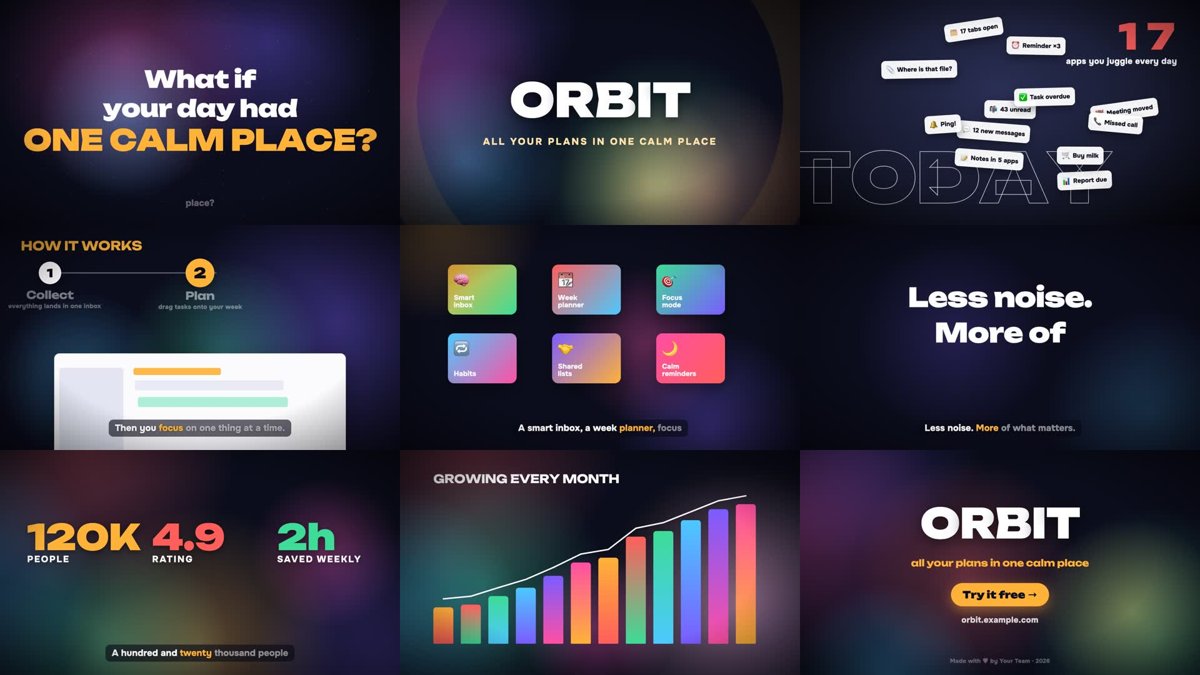
Illustration · not a resultFrom the artkruglov/motion-design-film README — shows the whole collection, not only this skill.source ↗
Direct and render a 30–180 second motion-design film for anything — a product, app, startup, feature launch, service, idea, research result, school project, game or personal story: kinetic typography, animated mock UI, charts, maps, characters and transitions on a music grid, an original procedural score, an AI voiceover (OpenRouter TTS — ElevenLabs v4, Gemini TTS…) verified by speech-to-text, karaoke subtitles and a ducked mix, all rendered to MP4 by code (no video editor, no stock).
by artkruglov·MIT license·★ 2 Stars on the repo·GitHub ↗
Files of Motion design film
artkruglov/
Show the full text120 lines
Motion-design film
You are the director, motion designer, composer and editor of a short film — and every frame of it is rendered by code. The pipeline was battle-tested on real films; each step exists because skipping it once produced a visible defect.
brief ─► story & beat sheet ─┬─► music.py ────────────────┐
                             ├─► tts.py ─► stt_check.py ──┼─► mix.py ──────────┐
                             └─► scenes ─► timeline.js ─► render.mjs ─────────┴─► finalize.sh ─► MP4
                                   ▲
                    optional footage: capture.mjs + clock.js (live site / app / game)
Scripts are in scripts/ (run them from your work folder; they read and write relative to the
current directory). The compositor template is assets/comp-template/. One-time setup:
npm install in the skill folder, pip install numpy scipy, Chrome and ffmpeg on PATH.
1. Brief: what is the one feeling?
Before any pixels, answer in a sentence each: what is it, who watches (a class of kids, investors, users in a feed, a jury), what should they feel and do after 2 minutes. A film about a calm to-do app should feel calm after the chaos; a game trailer should feel like a ride; a research result should feel like a revelation. Pick the language of the audience.
Collect the raw truth: real names, real numbers, real features, real screenshots or a live URL. Invented numbers in a promo film are a liability — use placeholders the user will replace and say so.
2. Story on a music grid
Write a beat sheet on a 120 BPM grid (bar = 2 s): cuts land on even seconds, accents on half-seconds, the hardest hits on music impacts. The template follows the spine that works for almost anything:
| time | beat | purpose |
|---|---|---|
| 0–8 | Hook — a question or tension the viewer feels | stop the scroll |
| 8 | Name — logo slam on the first impact | who we are |
| 8–24 | Problem → Turn — the messy "before", then it collapses into one point | why it matters |
| 24–40 | How — 3 numbered steps with (mock) screens | it's simple |
| 40–56 | What — features on the beat, a grid of tiles | it's rich |
| 56–64 | Feeling — one calm sentence, a marker highlights the key word | the emotional core |
| 64 | Proof — big numbers on the second impact | it's real |
| 64–88 | Growth / journey — chart, route, map | it goes somewhere |
| 88–104 | People — avatars connect into a network | it's for us |
| 104–112 | Pulse — a word per beat | energy peak |
| 112–120 | Action — logo, tagline, CTA, URL | what to do now |
Adapt freely: a game swaps Problem for a cinematic montage, a research film swaps Features for a chart sequence, a 30-second ad keeps Hook → Name → What → Action. Voiceover: one short line per beat, ≤2.5 words/s (≈200–260 words per 2 minutes), silence around the big hits.
3. Music — scripts/music.py
python3 scripts/music.py → the default 120-s score (A-minor → C-major anthem, impacts at
8/64/112 s). Different length/structure: --print-default-plan > plan.json, edit sections (in
bars) and impacts, --plan plan.json. The plan and the beat sheet must agree.
4. Voice — scripts/tts.py → scripts/stt_check.py
export OPENROUTER_API_KEY=…          # or ./.openrouter_key (gitignored)
python3 scripts/tts.py script.json   # vo/NN.mp3 + vo/subs.json, warns about overlaps
python3 scripts/stt_check.py script.json
script.json = model, voice, lines {start, text, spoken} (spoken may carry ElevenLabs v4
audio tags like [excited]). Fix overlaps by moving start, then tts.py --retime. Always run
stt_check.py — it is the only reliable way to know nothing was read aloud wrong when nobody in
the loop listens. Details, models, voices, key handling: references/voice.md.
5. Scenes — assets/comp-template/ (the heart of it)
Copy the template to comp/. engine.js is a tiny deterministic motion engine (every frame is
a pure function of time). timeline.js is the film: edit TEXT, COLORS, CLIPS and times.
It already contains a complete 120-s film made only of motion graphics — living gradient
backgrounds, kinetic type, notification chaos, a collapse-to-a-point transition, numbered steps
with animated skeleton UI, flipping feature tiles, a marker highlight, odometers, a growing chart
with a drawn line, a rocket on a route, a network of people with data pulses, a beat-synced word
montage and a CTA end card. Render it as is to see the standard you're aiming for.
Read references/motion-design.md before designing scenes: timing, easing, hierarchy, layering,
colour, type, transitions, and how to invent new scenes that still feel like one film.
Real visuals make it stronger when they exist:
- a live website/app/game — film it frame-perfectly with
scripts/capture.mjs(virtual clock, seereferences/capture.md; example:examples/capture.example.mjsonexamples/live-app-demo/); - screenshots or photos — drop them into scenes as
<img>with slow Ken Burns moves; - existing clips — put them in
footage/and name them inCLIPS; mock windows, phones and cards play them instead of the skeleton UI.
node scripts/render.mjs sheet 0.5 120 2.5   # contact_sheet.png — LOOK at it, every iteration
node scripts/render.mjs part 24 40          # fast check of one beat
node scripts/render.mjs                     # full film → video_silent.mp4 (~3–5 min for 120 s)
6. Mix and deliver
python3 scripts/mix.py                         # music ducked under voice, -14 LUFS → mix.wav
bash scripts/finalize.sh "Orbit — launch film"  # master + light copy + final_sheet.png
Look at final_sheet.png before handing over: text cut at the edges, two titles fighting,
subtitles over giant type, dead seconds where nothing moves, clips frozen on their first frame.
Then present the film beat by beat in plain words, give both file paths, and mention what you'd
improve and anything that cost money (TTS is a few cents).
Pitfalls
references/troubleshooting.md — symptoms → causes → fixes (white/black frames after a
time-lapse, clips frozen on frame 0, wrong server, overlapping voice, fonts, %20 paths…).
| 1 | |
| 2 | name motion-design-film |
| 3 | description "Direct and render a 30–180 second motion-design film for anything — a product, app, startup, feature launch, service, idea, research result, school project, game or personal story: kinetic typography, animated mock UI, charts, maps, characters and transitions on a music grid, an original procedural score, an AI voiceover (OpenRouter TTS — ElevenLabs v4, Gemini TTS…) verified by speech-to-text, karaoke subtitles and a ducked mix, all rendered to MP4 by code (no video editor, no stock). Optional real footage: frame-perfect capture of a live website, web app or browser game. Use whenever someone asks for a motion design / анимационный / моушн ролик, promo, explainer, launch or pitch video, trailer, teaser, showreel, video presentation of an idea, «видео про продукт/идею», «сделай классный ролик», or wants their idea or app turned into a cinematic video with voice and music — even if they never say \"motion design\"." |
| 4 | compatibility "Node 18+ with playwright-core and Google Chrome; ffmpeg; Python 3 with numpy and scipy; an OpenRouter API key for the voice (optional — a music-only cut works without it)." |
| 5 | |
| 6 | |
| 7 | # Motion-design film |
| 8 | |
| 9 | You are the director, motion designer, composer and editor of a short film — and every frame |
| 10 | of it is rendered by code. The pipeline was battle-tested on real films; each step exists |
| 11 | because skipping it once produced a visible defect. |
| 12 | |
| 13 | |
| 14 | brief ─► story & beat sheet ─┬─► music.py ────────────────┐ |
| 15 | ├─► tts.py ─► stt_check.py ──┼─► mix.py ──────────┐ |
| 16 | └─► scenes ─► timeline.js ─► render.mjs ─────────┴─► finalize.sh ─► MP4 |
| 17 | ▲ |
| 18 | optional footage: capture.mjs + clock.js (live site / app / game) |
| 19 | |
| 20 | |
| 21 | Scripts are in `scripts/` (run them from your work folder; they read and write relative to the |
| 22 | current directory). The compositor template is `assets/comp-template/`. One-time setup: |
| 23 | `npm install` in the skill folder, `pip install numpy scipy`, Chrome and ffmpeg on PATH. |
| 24 | |
| 25 | ## 1. Brief: what is the one feeling? |
| 26 | |
| 27 | Before any pixels, answer in a sentence each: **what is it**, **who watches** (a class of kids, |
| 28 | investors, users in a feed, a jury), **what should they feel and do after 2 minutes**. A film |
| 29 | about a calm to-do app should *feel* calm after the chaos; a game trailer should feel like a |
| 30 | ride; a research result should feel like a revelation. Pick the language of the audience. |
| 31 | |
| 32 | Collect the raw truth: real names, real numbers, real features, real screenshots or a live URL. |
| 33 | Invented numbers in a promo film are a liability — use placeholders the user will replace and say so. |
| 34 | |
| 35 | ## 2. Story on a music grid |
| 36 | |
| 37 | Write a beat sheet on a **120 BPM grid (bar = 2 s)**: cuts land on even seconds, accents on |
| 38 | half-seconds, the hardest hits on music impacts. The template follows the spine that works for |
| 39 | almost anything: |
| 40 | |
| 41 | | time | beat | purpose | |
| 42 | |---|---|---| |
| 43 | | 0–8 | **Hook** — a question or tension the viewer feels | stop the scroll | |
| 44 | | 8 | **Name** — logo slam on the first impact | who we are | |
| 45 | | 8–24 | **Problem → Turn** — the messy "before", then it collapses into one point | why it matters | |
| 46 | | 24–40 | **How** — 3 numbered steps with (mock) screens | it's simple | |
| 47 | | 40–56 | **What** — features on the beat, a grid of tiles | it's rich | |
| 48 | | 56–64 | **Feeling** — one calm sentence, a marker highlights the key word | the emotional core | |
| 49 | | 64 | **Proof** — big numbers on the second impact | it's real | |
| 50 | | 64–88 | **Growth / journey** — chart, route, map | it goes somewhere | |
| 51 | | 88–104 | **People** — avatars connect into a network | it's for us | |
| 52 | | 104–112 | **Pulse** — a word per beat | energy peak | |
| 53 | | 112–120 | **Action** — logo, tagline, CTA, URL | what to do now | |
| 54 | |
| 55 | Adapt freely: a game swaps Problem for a cinematic montage, a research film swaps Features for |
| 56 | a chart sequence, a 30-second ad keeps Hook → Name → What → Action. Voiceover: one short line |
| 57 | per beat, ≤2.5 words/s (≈200–260 words per 2 minutes), silence around the big hits. |
| 58 | |
| 59 | ## 3. Music — `scripts/music.py` |
| 60 | |
| 61 | `python3 scripts/music.py` → the default 120-s score (A-minor → C-major anthem, impacts at |
| 62 | 8/64/112 s). Different length/structure: `--print-default-plan > plan.json`, edit sections (in |
| 63 | bars) and impacts, `--plan plan.json`. The plan and the beat sheet must agree. |
| 64 | |
| 65 | ## 4. Voice — `scripts/tts.py` → `scripts/stt_check.py` |
| 66 | |
| 67 | |
| 68 | export OPENROUTER_API_KEY=… # or ./.openrouter_key (gitignored) |
| 69 | python3 scripts/tts.py script.json # vo/NN.mp3 + vo/subs.json, warns about overlaps |
| 70 | python3 scripts/stt_check.py script.json |
| 71 | |
| 72 | |
| 73 | `script.json` = model, voice, lines `{start, text, spoken}` (`spoken` may carry ElevenLabs v4 |
| 74 | audio tags like `[excited]`). Fix overlaps by moving `start`, then `tts.py --retime`. Always run |
| 75 | `stt_check.py` — it is the only reliable way to know nothing was read aloud wrong when nobody in |
| 76 | the loop listens. Details, models, voices, key handling: `references/voice.md`. |
| 77 | |
| 78 | ## 5. Scenes — `assets/comp-template/` (the heart of it) |
| 79 | |
| 80 | Copy the template to `comp/`. `engine.js` is a tiny deterministic motion engine (every frame is |
| 81 | a pure function of time). `timeline.js` is the film: edit `TEXT`, `COLORS`, `CLIPS` and times. |
| 82 | It already contains a complete 120-s film made **only of motion graphics** — living gradient |
| 83 | backgrounds, kinetic type, notification chaos, a collapse-to-a-point transition, numbered steps |
| 84 | with animated skeleton UI, flipping feature tiles, a marker highlight, odometers, a growing chart |
| 85 | with a drawn line, a rocket on a route, a network of people with data pulses, a beat-synced word |
| 86 | montage and a CTA end card. Render it as is to see the standard you're aiming for. |
| 87 | |
| 88 | Read `references/motion-design.md` before designing scenes: timing, easing, hierarchy, layering, |
| 89 | colour, type, transitions, and how to invent new scenes that still feel like one film. |
| 90 | |
| 91 | Real visuals make it stronger when they exist: |
| 92 | **a live website/app/game** — film it frame-perfectly with `scripts/capture.mjs` (virtual clock, |
| 93 | see `references/capture.md`; example: `examples/capture.example.mjs` on `examples/live-app-demo/`); |
| 94 | **screenshots or photos** — drop them into scenes as `<img>` with slow Ken Burns moves; |
| 95 | **existing clips** — put them in `footage/` and name them in `CLIPS`; mock windows, phones and |
| 96 | cards play them instead of the skeleton UI. |
| 97 | |
| 98 | |
| 99 | node scripts/render.mjs sheet 0.5 120 2.5 # contact_sheet.png — LOOK at it, every iteration |
| 100 | node scripts/render.mjs part 24 40 # fast check of one beat |
| 101 | node scripts/render.mjs # full film → video_silent.mp4 (~3–5 min for 120 s) |
| 102 | |
| 103 | |
| 104 | ## 6. Mix and deliver |
| 105 | |
| 106 | |
| 107 | python3 scripts/mix.py # music ducked under voice, -14 LUFS → mix.wav |
| 108 | bash scripts/finalize.sh "Orbit — launch film" # master + light copy + final_sheet.png |
| 109 | |
| 110 | |
| 111 | Look at `final_sheet.png` before handing over: text cut at the edges, two titles fighting, |
| 112 | subtitles over giant type, dead seconds where nothing moves, clips frozen on their first frame. |
| 113 | Then present the film beat by beat in plain words, give both file paths, and mention what you'd |
| 114 | improve and anything that cost money (TTS is a few cents). |
| 115 | |
| 116 | ## Pitfalls |
| 117 | |
| 118 | `references/troubleshooting.md` — symptoms → causes → fixes (white/black frames after a |
| 119 | time-lapse, clips frozen on frame 0, wrong server, overlapping voice, fonts, %20 paths…). |
| 120 |
Discussion
Alternatives
Browse more free Claude skills or everything in Design.