MCP analytics agent
The statistical analyst in your AI chat — bring data and a question, own a citable, re-runnable analysis.
by embeddedlayers·MIT license·★ 7 Stars on the repo·GitHub ↗
Files of MCP analytics
embeddedlayers/
Show the full text517 lines
MCP Analytics Suite
The statistical analyst in your AI chat. Bring a CSV (or connect a live source) and a question. A standing team of specialist agents builds a custom analysis specific to your data, validates the methodology, and ships back a citable, interactive report. The analysis is yours — it lives in your library, reruns on fresh data for a fraction of the creation cost, and is queryable from Claude, Cursor, or any MCP client. The work compounds.
This is the public listing and documentation repository. Issues, feature requests, and examples live here. The API server code is maintained separately.
Sample Reports → • Try Demo → • Pricing →
Try it before installing anything. The free tools run in the browser on a CSV you upload — no account, no key, no MCP client. Each one is a real analysis with the method written out: PCA, correlation, forecasting, RFM segmentation, regression (GLM).





Hire the team. Own the analysis. Rerun forever.
🚀 Quick Start • 🔄 How It Works • 🛠️ MCP Tools • 🛡️ Security • 📖 Documentation
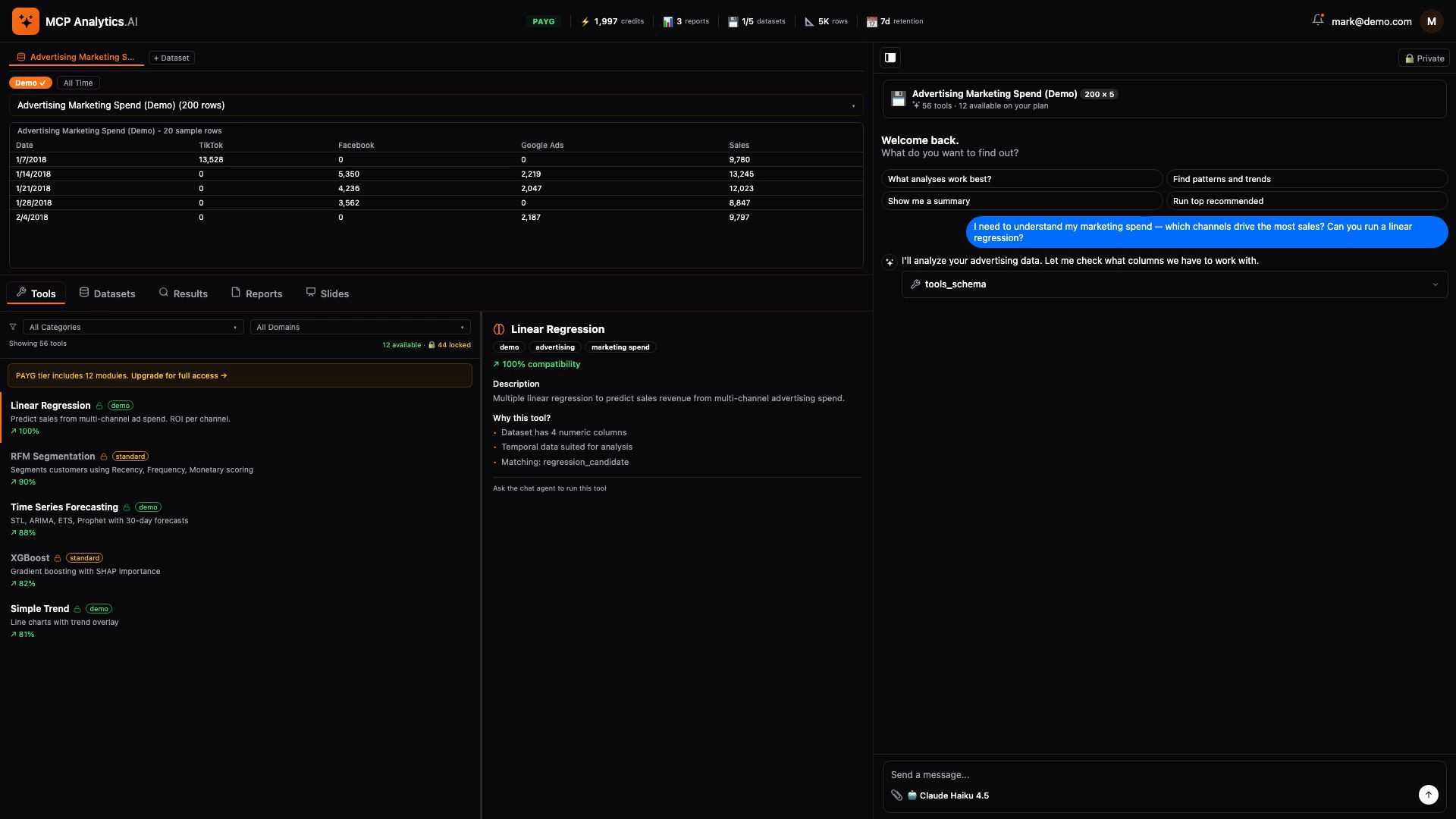
Click to watch: Ask a question → upload data → get an interactive report with AI insights
Overview
You bring data and a question. A pipeline of specialist agents — spec drafter, builder, verifier, fixer, deployer — turns your question into a custom analysis for your data. The result is an interactive report: charts, AI-narrated insights, exportable PDF, embedded source code, citable. Every commissioned analysis joins your private library — query it from any MCP client, rerun on fresh data with one call, share with collaborators on your terms.
Cornerstone modules ship pre-built (t-tests, regression, churn, segmentation, forecasting, customer LTV, A/B testing, time series, survival analysis, and more) so you can see a finished report in under a minute and verify the team can build things that work. Custom analysis creation is the named revenue event — pay once to build the capability, own it, rerun for a fraction of the creation price. A build that fails is never billed.
Connect data however it lives: CSV upload, public URL, or live OAuth connectors for Google Analytics 4 and Google Search Console (more coming). Once a connector is linked, every rerun pulls fresh data automatically — no re-export step.
Choose Your Depth — Four Tiers
Every analysis runs through the same pipeline — you choose how far it goes:
| Tier | What you get | Time |
|---|---|---|
| Snapshot | One chart and a verified insight — an instant read of your data, covered by your welcome credits | ~2 min |
| JSON | One computed statistical answer — the numbers and the method — deployed as a tool you re-run on fresh data | ~5 min |
| Brief | The computed answer, presented — chart, key figures, and method on a single shareable page | ~7 min |
| Deck | The full study — a complete statistical report built to your brief and independently verified; a durable module you own and re-run forever | 30–45 min |
More rigor outranks more charts: going deeper buys real statistical methods — hypothesis tests, regression, diagnostics — not just more cards. You pay for depth, and only if the build succeeds. How the tiers work →
Why MCP Analytics
- Citable — APA / MLA / Chicago / BibTeX in one click, ready for papers, decks, and regulatory filings
- Sourceable — R source code embedded in every report; a skeptical reader can run it and get the same answer
- Reproducible — fixed seeds, Docker isolation, named methods; same input → same output, forever
- Yours — every commissioned module is private to your account; rerun on fresh data, query across your portfolio
- MCP-native — query the library from Claude, Cursor, Windsurf, or any MCP client
- Secure — OAuth2, encryption at rest, isolated container processing per analysis
- Honest — when an analysis has issues, the team gives you a free re-run; the relationship is built on the report being right
Quick Start
1. Get an API Key
Sign up free at account.mcpanalytics.ai, go to account settings, and copy your API key (starts with mcp_). You get 9,000 welcome credits, no credit card required. That covers about seven full analyses at any depth, plus re-runs.
2. Connect
Three options — all connect to the same platform with the same tools.
Option A: npx Install (Recommended)
Works with Claude Desktop, Cursor, Windsurf, and any stdio MCP client. Requires Node.js 18+.
Claude Desktop — add to ~/Library/Application Support/Claude/claude_desktop_config.json (macOS) or %APPDATA%\Claude\claude_desktop_config.json (Windows):
{
  "mcpServers": {
    "mcpanalytics": {
      "command": "npx",
      "args": ["-y", "@mcp-analytics/mcp-analytics"],
      "env": {
        "MCP_ANALYTICS_API_KEY": "mcp_your_key_here"
      }
    }
  }
}
Cursor / Windsurf — add to .cursor/mcp.json:
{
  "mcpServers": {
    "mcpanalytics": {
      "command": "npx",
      "args": ["-y", "@mcp-analytics/mcp-analytics"],
      "env": {
        "MCP_ANALYTICS_API_KEY": "mcp_your_key_here"
      }
    }
  }
}
Claude Code — run in your terminal:
claude mcp add mcpanalytics -- npx -y @mcp-analytics/mcp-analytics
# Then set MCP_ANALYTICS_API_KEY in your environment
Option B: Direct API Key (No npm)
For MCP clients that support Streamable HTTP transport with custom headers:
{
  "mcpServers": {
    "mcpanalytics": {
      "url": "https://api.mcpanalytics.ai/mcp/api-key",
      "headers": {
        "X-API-Key": "mcp_your_key_here"
      }
    }
  }
}
Option C: OAuth2 (No API Key)
Zero-config — a browser opens for login on first connection:
{
  "mcpServers": {
    "mcpanalytics": {
      "url": "https://api.mcpanalytics.ai/auth0"
    }
  }
}
Browse Tools First (No Account Needed)
Explore the full tool catalog before signing up:
# Static metadata (tool names, descriptions, all transport options)
curl https://api.mcpanalytics.ai/.well-known/mcp.json

# MCP protocol discovery (no auth — works with any MCP client)
curl -X POST https://api.mcpanalytics.ai/mcp/discover \
  -H 'Content-Type: application/json' \
  -d '{"jsonrpc":"2.0","method":"tools/list","id":1,"params":{}}'
3. Start Analyzing
Restart your MCP client. Ask:
- "Upload sales.csv and find what drives revenue"
- "What statistical test should I use for this survey data?"
- "Forecast next quarter's sales from this time series"
How It Works
The MCP Analytics Workflow
- Upload your data —
datasets_uploadsecurely processes your CSV (or reuse an existing dataset / connected source) - Commission the analysis —
create_analysistakes your question in plain language, your dataset, and the tier you choose (snapshot, json, brief, or deck) - Watch it build —
build_statusreports progress, queue position, and the report link when done - Get the report —
reports_viewdelivers the interactive report;report_cardsdisplays individual cards inline - Rerun forever —
run_analysisre-runs any analysis you own on fresh data for a fraction of the creation cost
User: "What drives our sales growth?"
MCP Analytics:
  → Scopes the right statistical method for your data's shape
  → Writes R in an isolated container — deterministic, fixed seeds
  → Runs it, then independently verifies numbers and narrative
  → Returns a citable, interactive report you own
MCP Tools
The platform provides a complete suite of MCP tools for end-to-end analytics:
Analysis
create_analysis- Commission a new analysis from a plain-language question, at the tier you choosebuild_status- Track a build: stage progress, queue position, report linkrun_analysis- Run an analysis you own (or one discovered viadiscover_tools) on fresh datamodify_analysis- Turn an existing analysis into a new version — reword the question, change the framing
Discovery
discover_tools- Browse what you can run: your commissioned analyses plus the prebuilt librarytools_schema- Get an analysis's parameter schema — always call this beforerun_analysis
Data Management
datasets_upload- Secure data upload with encryptiondatasets_list- List and search your uploaded datasets
Connectors
connectors_list- List available data source connectionsconnectors_query- Pull live data from a connected source
Reporting & Insights
reports_view- Get a shareable browser link for a reportreports_list- Your report library — every analysis delivered, searchable in plain languagereport_cards- Browse a delivered report's individual cards (charts, tables, insights)ask_library- Ask one question across all your delivered analyses; get a synthesized answer with citations back to each source reportagent_advisor- AI help desk — which analysis fits your question, and how to read the result
Platform Tools
billing- Usage and credit managementaccount_link- Link to the right account page for anything not doable in chatabout- Platform documentation and info — how it works, tiers, usage
Browse the catalog yourself, without an account:
curl -X POST https://api.mcpanalytics.ai/mcp/discover -H 'Content-Type: application/json' -d '{"jsonrpc":"2.0","method":"tools/list","id":1,"params":{}}'Discovery returns the 15 tools that work pre-auth;billing,connectors_list, andconnectors_queryappear once you connect with a key or via OAuth.
Features
Natural Language Interface
Just describe what you need:
"What drives our revenue growth?"
"Find customer segments in our data"
"Forecast next quarter's sales"
"Did our marketing campaign work?"
Comprehensive Analysis Suite
Statistical Methods
|
Machine Learning
|
Time Series
|
Business Analytics
|
Seamless Workflow
graph LR
    A[Ask in Claude/Cursor] --> B[MCP Analytics]
    B --> C[Secure Processing]
    C --> D[Interactive Report]
    D --> E[Share Results]
Example Usage
Basic Regression
User: "I have a CSV with house prices. Can you predict price based on size and location?"
Claude: [Runs linear regression, provides R², coefficients, and diagnostic plots]
Customer Segmentation
User: "Segment my customers in sales_data.csv into meaningful groups"
Claude: [Performs k-means clustering, creates segment profiles with visualizations]
Time Series Forecasting
User: "Forecast next quarter's revenue using our historical data"
Claude: [Applies ARIMA, generates predictions with confidence intervals]
Security & Compliance
Enterprise Security Features
- Authentication: OAuth2 via Auth0 with PKCE
- Encryption: TLS 1.3 for all data transfers
- Processing: Isolated Docker containers per analysis
- Data Handling: Ephemeral processing, no persistence
- Access Control: OAuth 2.0 scoped permissions with usage limits
- Audit Trail: Complete logging for compliance
Privacy & Data Handling
- Data Privacy: Ephemeral processing, no data retention
- User Rights: Data deletion upon request
- Secure Processing: Isolated containers per analysis
- Enterprise Options: Contact us for compliance requirements
Read full security documentation →
Architecture
flowchart TB
    subgraph "Client Integration"
        CLI[CLI/SDK]
        Claude[Claude Desktop]
        Cursor[Cursor IDE]
        MCP[MCP Protocol]
    end

    subgraph "API Gateway"
        LB[Load Balancer]
        Auth[OAuth 2.0/Auth0]
        Rate[Rate Limiting]
    end

    subgraph "Processing Layer"
        Router[Request Router]
        Queue[Job Queue]
        Workers[Processing Workers]
        Docker[Docker Containers]
    end

    subgraph "Analytics Engine"
        Stats[Statistical Methods]
        ML[Machine Learning]
        TS[Time Series]
        Report[Report Generation]
    end

    subgraph "Data Layer"
        Cache[Results Cache]
        Storage[Secure Storage]
        Encrypt[Encryption Layer]
    end

    CLI --> LB
    Claude --> LB
    Cursor --> LB
    MCP --> LB

    LB --> Auth
    Auth --> Rate
    Rate --> Router

    Router --> Queue
    Queue --> Workers
    Workers --> Docker

    Docker --> Stats
    Docker --> ML
    Docker --> TS

    Stats --> Report
    ML --> Report
    TS --> Report

    Report --> Cache
    Cache --> Storage
    Storage --> Encrypt

    style Auth fill:#e8f5e9
    style Docker fill:#fff3e0
    style Report fill:#e3f2fd
Performance
- Dataset Size: Handles large datasets
- Processing Time: Fast cloud-based processing
- Secure Infrastructure: Isolated Docker containers
- API Access: RESTful API with authentication
Getting Started
Visit our website for pricing and signup →
Documentation
- Quick Start Guide - Get running in under a minute
- Architecture - How the platform works
- Connectors - GA4, GSC, and CSV data sources
- Pricing - Credits, tiers, and plans
- How Credits Work - The credit model explained
- Security - Security & compliance details
- Tutorials - Step-by-step guides
Support
- Issues: GitHub Issues
- Email: [email protected]
- Docs: mcpanalytics.ai/docs
- Enterprise: [email protected]
Comparison with Other MCP Servers
| Feature | MCP Analytics | Google Analytics MCP | PostgreSQL MCP | Filesystem MCP |
|---|---|---|---|---|
| Use Case | Statistical Analysis | Web Metrics | Database Queries | File Access |
| Setup Time | 30 seconds | OAuth + Config | Connection string | Path config |
| Data Sources | Any CSV/JSON/URL | GA4 Only | PostgreSQL Only | Local files |
| Analysis Tools | Full Suite | GA4 Metrics | SQL Only | Read/Write |
| Machine Learning | ✅ Full Suite | ❌ | ❌ | ❌ |
| Visualizations | ✅ Interactive | ✅ Dashboards | ❌ | ❌ |
| Shareable Reports | ✅ | ❌ | ❌ | ❌ |
About MCP Analytics
MCP Analytics is built by data scientists and engineers passionate about making advanced statistical analysis accessible through AI assistants. The platform runs deterministic analysis modules — the same data and tool produce the same result every time, unlike LLM code generation.
Testing & Support
Testing Your Connection
After installation, restart your MCP client and look for "MCP Analytics" in the available tools. You should see tools like create_analysis, discover_tools, datasets_upload, etc.
# Test the stdio proxy directly:
MCP_ANALYTICS_API_KEY=mcp_your_key npx -y @mcp-analytics/mcp-analytics
# Should output a "[mcp-analytics] Connected to https://api.mcpanalytics.ai" line with the tool count
Troubleshooting
If MCP Analytics doesn't appear after installation:
- Ensure your config file is valid JSON
- Restart your MCP client completely
- Verify your API key starts with
mcp_ - Check the client's developer console for errors
- Try running the npx command in a terminal to see errors
For support: [email protected]
Contributing
While the core server is proprietary, we welcome contributions to:
- Documentation improvements
- Example notebooks and use cases
- Bug reports and feature requests
- Community tools and integrations
See CONTRIBUTING.md for guidelines.
License
Copyright © 2026 PeopleDrivenAI LLC. All Rights Reserved.
MCP Analytics is a product of PeopleDrivenAI LLC.
This is commercial software. Use of the MCP Analytics service is subject to our:
Ready to transform your data analysis workflow?
Get Started Free | Read Docs | View Demo
Built by MCP Analytics | Powered by R & Python
If MCP Analytics saves you time, a ⭐ on GitHub helps others find it.
Tags: mcp mcp-server model-context-protocol analytics data-analytics shopify-analytics stripe-analytics csv-analysis statistics machine-learning time-series clustering regression business-intelligence claude cursor ai-tools no-code-analytics forecasting customer-analytics
| 1 | # MCP Analytics Suite |
| 2 | |
| 3 | **The statistical analyst in your AI chat.** Bring a CSV (or connect a live source) and a question. A standing team of specialist agents builds a custom analysis specific to your data, validates the methodology, and ships back a citable, interactive report. The analysis is **yours** — it lives in your library, reruns on fresh data for a fraction of the creation cost, and is queryable from Claude, Cursor, or any MCP client. The work compounds. |
| 4 | |
| 5 | > **This is the public listing and documentation repository.** Issues, feature requests, and examples live here. The API server code is maintained separately. |
| 6 | |
| 7 | [Sample Reports →] • [Try Demo →] • [Pricing →] |
| 8 | |
| 9 | **Try it before installing anything.** The [free tools] run in the browser on a CSV you upload — no account, no key, no MCP client. Each one is a real analysis with the method written out: [PCA], [correlation], [forecasting], [RFM segmentation], [regression (GLM)]. |
| 10 | |
| 11 | <div align="center"> |
| 12 | |
| 13 | [![Glama Score]](https://glama.ai/mcp/servers/embeddedlayers/mcp-analytics) |
| 14 | [![npm]](https://www.npmjs.com/package/@mcp-analytics/mcp-analytics) |
| 15 | [![License]](LICENSE) |
| 16 | [![Platform]](https://mcpanalytics.ai/install) |
| 17 | [![Docs]](https://mcpanalytics.ai/docs) |
| 18 | |
| 19 | **Hire the team. Own the analysis. Rerun forever.** |
| 20 | |
| 21 | [🚀 Quick Start] • [🔄 How It Works] • [🛠️ MCP Tools] • [🛡️ Security] • [📖 Documentation] |
| 22 | |
| 23 | </div> |
| 24 | |
| 25 | <div align="center"> |
| 26 | |
| 27 | [![Demo Video]](https://github.com/embeddedlayers/mcp-analytics/releases/download/v1.0.4/demo.mp4) |
| 28 | |
| 29 | *Click to watch: Ask a question → upload data → get an interactive report with AI insights* |
| 30 | |
| 31 | </div> |
| 32 | |
| 33 | |
| 34 | |
| 35 | ## Overview |
| 36 | |
| 37 | You bring data and a question. A pipeline of specialist agents — spec drafter, builder, verifier, fixer, deployer — turns your question into a custom analysis for your data. The result is an interactive report: charts, AI-narrated insights, exportable PDF, embedded source code, citable. Every commissioned analysis joins your private library — query it from any MCP client, rerun on fresh data with one call, share with collaborators on your terms. |
| 38 | |
| 39 | **Cornerstone modules** ship pre-built (t-tests, regression, churn, segmentation, forecasting, customer LTV, A/B testing, time series, survival analysis, and more) so you can see a finished report in under a minute and verify the team can build things that work. **Custom analysis creation** is the named revenue event — pay once to build the capability, own it, rerun for a fraction of the creation price. A build that fails is never billed. |
| 40 | |
| 41 | Connect data however it lives: CSV upload, public URL, or live OAuth connectors for Google Analytics 4 and Google Search Console (more coming). Once a connector is linked, every rerun pulls fresh data automatically — no re-export step. |
| 42 | |
| 43 | ### Choose Your Depth — Four Tiers |
| 44 | |
| 45 | Every analysis runs through the same pipeline — you choose how far it goes: |
| 46 | |
| 47 | | Tier | What you get | Time | |
| 48 | |------|-------------|------| |
| 49 | | **Snapshot** | One chart and a verified insight — an instant read of your data, covered by your welcome credits | ~2 min | |
| 50 | | **JSON** | One computed statistical answer — the numbers and the method — deployed as a tool you re-run on fresh data | ~5 min | |
| 51 | | **Brief** | The computed answer, presented — chart, key figures, and method on a single shareable page | ~7 min | |
| 52 | | **Deck** | The full study — a complete statistical report built to your brief and independently verified; a durable module you own and re-run forever | 30–45 min | |
| 53 | |
| 54 | More rigor outranks more charts: going deeper buys real statistical methods — hypothesis tests, regression, diagnostics — not just more cards. You pay for depth, and only if the build succeeds. [How the tiers work →] |
| 55 | |
| 56 | ### Why MCP Analytics |
| 57 | |
| 58 | **Citable** — APA / MLA / Chicago / BibTeX in one click, ready for papers, decks, and regulatory filings |
| 59 | **Sourceable** — R source code embedded in every report; a skeptical reader can run it and get the same answer |
| 60 | **Reproducible** — fixed seeds, Docker isolation, named methods; same input → same output, forever |
| 61 | **Yours** — every commissioned module is private to your account; rerun on fresh data, query across your portfolio |
| 62 | **MCP-native** — query the library from Claude, Cursor, Windsurf, or any MCP client |
| 63 | **Secure** — OAuth2, encryption at rest, isolated container processing per analysis |
| 64 | **Honest** — when an analysis has issues, the team gives you a free re-run; the relationship is built on the report being right |
| 65 | |
| 66 | ## Quick Start |
| 67 | |
| 68 | ### 1. Get an API Key |
| 69 | |
| 70 | Sign up free at [account.mcpanalytics.ai], go to account settings, and copy your API key (starts with `mcp_`). You get **9,000 welcome credits**, no credit card required. That covers about seven full analyses at any depth, plus re-runs. |
| 71 | |
| 72 | ### 2. Connect |
| 73 | |
| 74 | Three options — all connect to the same platform with the same tools. |
| 75 | |
| 76 | #### Option A: npx Install (Recommended) |
| 77 | |
| 78 | Works with Claude Desktop, Cursor, Windsurf, and any stdio MCP client. Requires Node.js 18+. |
| 79 | |
| 80 | **Claude Desktop** — add to `~/Library/Application Support/Claude/claude_desktop_config.json` (macOS) or `%APPDATA%\Claude\claude_desktop_config.json` (Windows): |
| 81 | |
| 82 | |
| 83 | { |
| 84 | "mcpServers": { |
| 85 | "mcpanalytics": { |
| 86 | "command": "npx", |
| 87 | "args": ["-y", "@mcp-analytics/mcp-analytics"], |
| 88 | "env": { |
| 89 | "MCP_ANALYTICS_API_KEY": "mcp_your_key_here" |
| 90 | } |
| 91 | } |
| 92 | } |
| 93 | } |
| 94 | |
| 95 | |
| 96 | **Cursor / Windsurf** — add to `.cursor/mcp.json`: |
| 97 | |
| 98 | |
| 99 | { |
| 100 | "mcpServers": { |
| 101 | "mcpanalytics": { |
| 102 | "command": "npx", |
| 103 | "args": ["-y", "@mcp-analytics/mcp-analytics"], |
| 104 | "env": { |
| 105 | "MCP_ANALYTICS_API_KEY": "mcp_your_key_here" |
| 106 | } |
| 107 | } |
| 108 | } |
| 109 | } |
| 110 | |
| 111 | |
| 112 | **Claude Code** — run in your terminal: |
| 113 | |
| 114 | |
| 115 | claude mcp add mcpanalytics -- npx -y @mcp-analytics/mcp-analytics |
| 116 | # Then set MCP_ANALYTICS_API_KEY in your environment |
| 117 | |
| 118 | |
| 119 | #### Option B: Direct API Key (No npm) |
| 120 | |
| 121 | For MCP clients that support Streamable HTTP transport with custom headers: |
| 122 | |
| 123 | |
| 124 | { |
| 125 | "mcpServers": { |
| 126 | "mcpanalytics": { |
| 127 | "url": "https://api.mcpanalytics.ai/mcp/api-key", |
| 128 | "headers": { |
| 129 | "X-API-Key": "mcp_your_key_here" |
| 130 | } |
| 131 | } |
| 132 | } |
| 133 | } |
| 134 | |
| 135 | |
| 136 | #### Option C: OAuth2 (No API Key) |
| 137 | |
| 138 | Zero-config — a browser opens for login on first connection: |
| 139 | |
| 140 | |
| 141 | { |
| 142 | "mcpServers": { |
| 143 | "mcpanalytics": { |
| 144 | "url": "https://api.mcpanalytics.ai/auth0" |
| 145 | } |
| 146 | } |
| 147 | } |
| 148 | |
| 149 | |
| 150 | #### Browse Tools First (No Account Needed) |
| 151 | |
| 152 | Explore the full tool catalog before signing up: |
| 153 | |
| 154 | |
| 155 | # Static metadata (tool names, descriptions, all transport options) |
| 156 | curl https://api.mcpanalytics.ai/.well-known/mcp.json |
| 157 | |
| 158 | # MCP protocol discovery (no auth — works with any MCP client) |
| 159 | curl -X POST https://api.mcpanalytics.ai/mcp/discover \ |
| 160 | -H 'Content-Type: application/json' \ |
| 161 | -d '{"jsonrpc":"2.0","method":"tools/list","id":1,"params":{}}' |
| 162 | |
| 163 | |
| 164 | ### 3. Start Analyzing |
| 165 | |
| 166 | Restart your MCP client. Ask: |
| 167 | |
| 168 | *"Upload sales.csv and find what drives revenue"* |
| 169 | *"What statistical test should I use for this survey data?"* |
| 170 | *"Forecast next quarter's sales from this time series"* |
| 171 | |
| 172 | ## How It Works |
| 173 | |
| 174 | ### The MCP Analytics Workflow |
| 175 | |
| 176 | **Upload your data** — `datasets_upload` securely processes your CSV (or reuse an existing dataset / connected source) |
| 177 | **Commission the analysis** — `create_analysis` takes your question in plain language, your dataset, and the tier you choose (snapshot, json, brief, or deck) |
| 178 | **Watch it build** — `build_status` reports progress, queue position, and the report link when done |
| 179 | **Get the report** — `reports_view` delivers the interactive report; `report_cards` displays individual cards inline |
| 180 | **Rerun forever** — `run_analysis` re-runs any analysis you own on fresh data for a fraction of the creation cost |
| 181 | |
| 182 | |
| 183 | User: "What drives our sales growth?" |
| 184 | MCP Analytics: |
| 185 | → Scopes the right statistical method for your data's shape |
| 186 | → Writes R in an isolated container — deterministic, fixed seeds |
| 187 | → Runs it, then independently verifies numbers and narrative |
| 188 | → Returns a citable, interactive report you own |
| 189 | |
| 190 | |
| 191 | ## MCP Tools |
| 192 | |
| 193 | The platform provides a complete suite of MCP tools for end-to-end analytics: |
| 194 | |
| 195 | ### Analysis |
| 196 | **`create_analysis`** - Commission a new analysis from a plain-language question, at the tier you choose |
| 197 | **`build_status`** - Track a build: stage progress, queue position, report link |
| 198 | **`run_analysis`** - Run an analysis you own (or one discovered via `discover_tools`) on fresh data |
| 199 | **`modify_analysis`** - Turn an existing analysis into a new version — reword the question, change the framing |
| 200 | |
| 201 | ### Discovery |
| 202 | **`discover_tools`** - Browse what you can run: your commissioned analyses plus the prebuilt library |
| 203 | **`tools_schema`** - Get an analysis's parameter schema — always call this before `run_analysis` |
| 204 | |
| 205 | ### Data Management |
| 206 | **`datasets_upload`** - Secure data upload with encryption |
| 207 | **`datasets_list`** - List and search your uploaded datasets |
| 208 | |
| 209 | ### Connectors |
| 210 | **`connectors_list`** - List available data source connections |
| 211 | **`connectors_query`** - Pull live data from a connected source |
| 212 | |
| 213 | ### Reporting & Insights |
| 214 | **`reports_view`** - Get a shareable browser link for a report |
| 215 | **`reports_list`** - Your report library — every analysis delivered, searchable in plain language |
| 216 | **`report_cards`** - Browse a delivered report's individual cards (charts, tables, insights) |
| 217 | **`ask_library`** - Ask one question across *all* your delivered analyses; get a synthesized answer with citations back to each source report |
| 218 | **`agent_advisor`** - AI help desk — which analysis fits your question, and how to read the result |
| 219 | |
| 220 | ### Platform Tools |
| 221 | **`billing`** - Usage and credit management |
| 222 | **`account_link`** - Link to the right account page for anything not doable in chat |
| 223 | **`about`** - Platform documentation and info — how it works, tiers, usage |
| 224 | |
| 225 | > Browse the catalog yourself, without an account: |
| 226 | > `curl -X POST https://api.mcpanalytics.ai/mcp/discover -H 'Content-Type: application/json' -d '{"jsonrpc":"2.0","method":"tools/list","id":1,"params":{}}'` |
| 227 | > Discovery returns the 15 tools that work pre-auth; `billing`, `connectors_list`, |
| 228 | > and `connectors_query` appear once you connect with a key or via OAuth. |
| 229 | |
| 230 | ## Features |
| 231 | |
| 232 | ### Natural Language Interface |
| 233 | |
| 234 | Just describe what you need: |
| 235 | |
| 236 | |
| 237 | "What drives our revenue growth?" |
| 238 | "Find customer segments in our data" |
| 239 | "Forecast next quarter's sales" |
| 240 | "Did our marketing campaign work?" |
| 241 | |
| 242 | |
| 243 | ### Comprehensive Analysis Suite |
| 244 | |
| 245 | <table> |
| 246 | <tr> |
| 247 | <td width="50%"> |
| 248 | |
| 249 | **Statistical Methods** |
| 250 | Regression Analysis |
| 251 | Advanced Modeling |
| 252 | Hypothesis Testing |
| 253 | Survival Analysis |
| 254 | Bayesian Methods |
| 255 | |
| 256 | </td> |
| 257 | <td width="50%"> |
| 258 | |
| 259 | **Machine Learning** |
| 260 | Ensemble Methods |
| 261 | Boosting Algorithms |
| 262 | Neural Networks |
| 263 | Clustering |
| 264 | Dimensionality Reduction |
| 265 | |
| 266 | </td> |
| 267 | </tr> |
| 268 | <tr> |
| 269 | <td width="50%"> |
| 270 | |
| 271 | **Time Series** |
| 272 | Forecasting |
| 273 | Seasonal Analysis |
| 274 | Trend Detection |
| 275 | Multivariate Models |
| 276 | Causal Analysis |
| 277 | |
| 278 | </td> |
| 279 | <td width="50%"> |
| 280 | |
| 281 | **Business Analytics** |
| 282 | Customer Analytics |
| 283 | Market Analysis |
| 284 | Pricing Models |
| 285 | Predictive Analytics |
| 286 | Experimental Design |
| 287 | |
| 288 | </td> |
| 289 | </tr> |
| 290 | </table> |
| 291 | |
| 292 | ### Seamless Workflow |
| 293 | |
| 294 | |
| 295 | graph LR |
| 296 | A[Ask in Claude/Cursor] --> B[MCP Analytics] |
| 297 | B --> C[Secure Processing] |
| 298 | C --> D[Interactive Report] |
| 299 | D --> E[Share Results] |
| 300 | |
| 301 | |
| 302 | |
| 303 | ## Example Usage |
| 304 | |
| 305 | ### Basic Regression |
| 306 | |
| 307 | User: "I have a CSV with house prices. Can you predict price based on size and location?" |
| 308 | Claude: [Runs linear regression, provides R², coefficients, and diagnostic plots] |
| 309 | |
| 310 | |
| 311 | ### Customer Segmentation |
| 312 | |
| 313 | User: "Segment my customers in sales_data.csv into meaningful groups" |
| 314 | Claude: [Performs k-means clustering, creates segment profiles with visualizations] |
| 315 | |
| 316 | |
| 317 | ### Time Series Forecasting |
| 318 | |
| 319 | User: "Forecast next quarter's revenue using our historical data" |
| 320 | Claude: [Applies ARIMA, generates predictions with confidence intervals] |
| 321 | |
| 322 | |
| 323 | ## Security & Compliance |
| 324 | |
| 325 | ### Enterprise Security Features |
| 326 | |
| 327 | **Authentication**: OAuth2 via Auth0 with PKCE |
| 328 | **Encryption**: TLS 1.3 for all data transfers |
| 329 | **Processing**: Isolated Docker containers per analysis |
| 330 | **Data Handling**: Ephemeral processing, no persistence |
| 331 | **Access Control**: OAuth 2.0 scoped permissions with usage limits |
| 332 | **Audit Trail**: Complete logging for compliance |
| 333 | |
| 334 | ### Privacy & Data Handling |
| 335 | |
| 336 | **Data Privacy**: Ephemeral processing, no data retention |
| 337 | **User Rights**: Data deletion upon request |
| 338 | **Secure Processing**: Isolated containers per analysis |
| 339 | **Enterprise Options**: Contact us for compliance requirements |
| 340 | |
| 341 | [**Read full security documentation →**] |
| 342 | |
| 343 | ## Architecture |
| 344 | |
| 345 | |
| 346 | flowchart TB |
| 347 | subgraph "Client Integration" |
| 348 | CLI[CLI/SDK] |
| 349 | Claude[Claude Desktop] |
| 350 | Cursor[Cursor IDE] |
| 351 | MCP[MCP Protocol] |
| 352 | end |
| 353 | |
| 354 | subgraph "API Gateway" |
| 355 | LB[Load Balancer] |
| 356 | Auth[OAuth 2.0/Auth0] |
| 357 | Rate[Rate Limiting] |
| 358 | end |
| 359 | |
| 360 | subgraph "Processing Layer" |
| 361 | Router[Request Router] |
| 362 | Queue[Job Queue] |
| 363 | Workers[Processing Workers] |
| 364 | Docker[Docker Containers] |
| 365 | end |
| 366 | |
| 367 | subgraph "Analytics Engine" |
| 368 | Stats[Statistical Methods] |
| 369 | ML[Machine Learning] |
| 370 | TS[Time Series] |
| 371 | Report[Report Generation] |
| 372 | end |
| 373 | |
| 374 | subgraph "Data Layer" |
| 375 | Cache[Results Cache] |
| 376 | Storage[Secure Storage] |
| 377 | Encrypt[Encryption Layer] |
| 378 | end |
| 379 | |
| 380 | CLI --> LB |
| 381 | Claude --> LB |
| 382 | Cursor --> LB |
| 383 | MCP --> LB |
| 384 | |
| 385 | LB --> Auth |
| 386 | Auth --> Rate |
| 387 | Rate --> Router |
| 388 | |
| 389 | Router --> Queue |
| 390 | Queue --> Workers |
| 391 | Workers --> Docker |
| 392 | |
| 393 | Docker --> Stats |
| 394 | Docker --> ML |
| 395 | Docker --> TS |
| 396 | |
| 397 | Stats --> Report |
| 398 | ML --> Report |
| 399 | TS --> Report |
| 400 | |
| 401 | Report --> Cache |
| 402 | Cache --> Storage |
| 403 | Storage --> Encrypt |
| 404 | |
| 405 | style Auth fill:#e8f5e9 |
| 406 | style Docker fill:#fff3e0 |
| 407 | style Report fill:#e3f2fd |
| 408 | |
| 409 | |
| 410 | ## Performance |
| 411 | |
| 412 | **Dataset Size**: Handles large datasets |
| 413 | **Processing Time**: Fast cloud-based processing |
| 414 | **Secure Infrastructure**: Isolated Docker containers |
| 415 | **API Access**: RESTful API with authentication |
| 416 | |
| 417 | ## Getting Started |
| 418 | |
| 419 | [**Visit our website for pricing and signup →**] |
| 420 | |
| 421 | ## Documentation |
| 422 | |
| 423 | [**Quick Start Guide**] - Get running in under a minute |
| 424 | [**Architecture**] - How the platform works |
| 425 | [**Connectors**] - GA4, GSC, and CSV data sources |
| 426 | [**Pricing**] - Credits, tiers, and plans |
| 427 | [**How Credits Work**] - The credit model explained |
| 428 | [**Security**] - Security & compliance details |
| 429 | [**Tutorials**] - Step-by-step guides |
| 430 | |
| 431 | ## Support |
| 432 | |
| 433 | **Issues**: [GitHub Issues] |
| 434 | **Email**: [email protected] |
| 435 | **Docs**: [mcpanalytics.ai/docs] |
| 436 | **Enterprise**: [email protected] |
| 437 | |
| 438 | ## Comparison with Other MCP Servers |
| 439 | |
| 440 | | Feature | MCP Analytics | Google Analytics MCP | PostgreSQL MCP | Filesystem MCP | |
| 441 | |---------|--------------|---------------------|----------------|----------------| |
| 442 | | **Use Case** | Statistical Analysis | Web Metrics | Database Queries | File Access | |
| 443 | | **Setup Time** | 30 seconds | OAuth + Config | Connection string | Path config | |
| 444 | | **Data Sources** | Any CSV/JSON/URL | GA4 Only | PostgreSQL Only | Local files | |
| 445 | | **Analysis Tools** | Full Suite | GA4 Metrics | SQL Only | Read/Write | |
| 446 | | **Machine Learning** | ✅ Full Suite | ❌ | ❌ | ❌ | |
| 447 | | **Visualizations** | ✅ Interactive | ✅ Dashboards | ❌ | ❌ | |
| 448 | | **Shareable Reports** | ✅ | ❌ | ❌ | ❌ | |
| 449 | |
| 450 | [**Detailed comparison →**] |
| 451 | |
| 452 | ## About MCP Analytics |
| 453 | |
| 454 | MCP Analytics is built by data scientists and engineers passionate about making advanced statistical analysis accessible through AI assistants. The platform runs deterministic analysis modules — the same data and tool produce the same result every time, unlike LLM code generation. |
| 455 | |
| 456 | ## Testing & Support |
| 457 | |
| 458 | ### Testing Your Connection |
| 459 | |
| 460 | After installation, restart your MCP client and look for "MCP Analytics" in the available tools. You should see tools like `create_analysis`, `discover_tools`, `datasets_upload`, etc. |
| 461 | |
| 462 | |
| 463 | # Test the stdio proxy directly: |
| 464 | MCP_ANALYTICS_API_KEY=mcp_your_key npx -y @mcp-analytics/mcp-analytics |
| 465 | # Should output a "[mcp-analytics] Connected to https://api.mcpanalytics.ai" line with the tool count |
| 466 | |
| 467 | |
| 468 | ### Troubleshooting |
| 469 | |
| 470 | If MCP Analytics doesn't appear after installation: |
| 471 | Ensure your config file is valid JSON |
| 472 | Restart your MCP client completely |
| 473 | Verify your API key starts with `mcp_` |
| 474 | Check the client's developer console for errors |
| 475 | Try running the npx command in a terminal to see errors |
| 476 | |
| 477 | For support: [email protected] |
| 478 | |
| 479 | ## Contributing |
| 480 | |
| 481 | While the core server is proprietary, we welcome contributions to: |
| 482 | |
| 483 | Documentation improvements |
| 484 | Example notebooks and use cases |
| 485 | Bug reports and feature requests |
| 486 | Community tools and integrations |
| 487 | |
| 488 | See [CONTRIBUTING.md] for guidelines. |
| 489 | |
| 490 | ## License |
| 491 | |
| 492 | Copyright © 2026 PeopleDrivenAI LLC. All Rights Reserved. |
| 493 | |
| 494 | MCP Analytics is a product of PeopleDrivenAI LLC. |
| 495 | |
| 496 | This is commercial software. Use of the MCP Analytics service is subject to our: |
| 497 | [Terms of Service] |
| 498 | [Privacy Policy] |
| 499 | |
| 500 | |
| 501 | |
| 502 | <div align="center"> |
| 503 | |
| 504 | **Ready to transform your data analysis workflow?** |
| 505 | |
| 506 | [**Get Started Free**] | [**Read Docs**] | [**View Demo**] |
| 507 | |
| 508 | Built by [MCP Analytics] | Powered by R & Python |
| 509 | |
| 510 | </div> |
| 511 | |
| 512 | |
| 513 | |
| 514 | If MCP Analytics saves you time, a ⭐ on GitHub helps others find it. |
| 515 | |
| 516 | **Tags**: `mcp` `mcp-server` `model-context-protocol` `analytics` `data-analytics` `shopify-analytics` `stripe-analytics` `csv-analysis` `statistics` `machine-learning` `time-series` `clustering` `regression` `business-intelligence` `claude` `cursor` `ai-tools` `no-code-analytics` `forecasting` `customer-analytics` |
| 517 |
Discussion
Alternatives
 Browser testing with devtoolsTests in real browsers via Chrome DevTools MCP. Use when building or debugging anything that runs in a browser. Use when you need to inspect the DOM, capture console errors, analyze network requests, profile performance, or verify visual output with real runtime data. Requires the chrome-devtools MCP server to be configured.
 Everything MCP ServerThis MCP server attempts to exercise all the features of the MCP protocol. It is not intended to be a useful server, but rather a test…Fetch MCP ServerA Model Context Protocol server that provides web content fetching capabilities. This server enables LLMs to retrieve and process content…Filesystem MCP ServerNode.js server implementing Model Context Protocol (MCP) for filesystem operations.
Browse more free AI agents or everything in Development.