comic skill
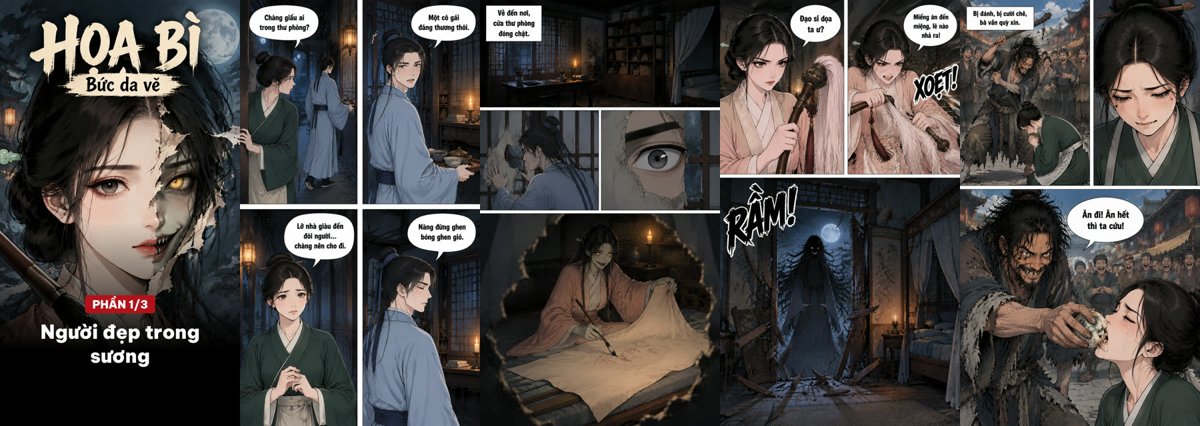
Illustration · not a resultFrom the huynhcongdac/comic-skill README — shows the whole collection, not only this skill.source ↗
Turn a story idea, a script or a full public-domain story into a multi-page comic (webtoon/manhwa style, 9:16 phone pages) with consistent characters, multiple outfits ("looks") per character, speech bubbles lettered in the target language, split into parts for TikTok/Facebook carousels, plus PDF/CBZ.
by huynhcongdac·MIT license·★ 4 Stars on the repo·GitHub ↗
Files of comic
huynhcongdac/
Show the full text115 lines
Comic skill
You (the agent) write the script, run the scripts, look at every page yourself and fix problems. Images come from an image API (sangtao.ai by default — about 100–400 VND per image depending on the plan, up to 20 reference images per image; OpenAI Images also works).
0. Setup (once)
pip install pillow numpy
cp .env.example .env          # then fill in SANGTAO_API_KEY (or OPENAI_API_KEY + IMAGE_PROVIDER=openai)
Ask the user for the key if .env is missing. Never print or commit it. A sangtao.ai key needs an image plan or
credit (no free tier on the API): https://sangtao.ai/vi/imagine?tab=pricing · docs: https://sangtao.ai/vi/api-docs/chatgpt-image.
Comics look best at SANGTAO_RESOLUTION=2K.
1. Write the script → <project>/comic.json
Ask the user for: the story (idea, script or full text), language of the lettering, art style, how long. If it is someone else's copyrighted story, stop: only the user's own story, public-domain works, or works they may adapt. Retell public-domain stories in your own words — translations have their own copyright.
There is no default page count — the story decides it. If the user asked for a length ("a 10-page short", "a 20-part series"), respect it and tell them which beats will be compressed. Otherwise:
- List every beat first (setup, motive, warnings ignored, reveal, cost, resolution, closing line). A long source (a novel, many chapters) → outline chapter by chapter first, then beats per chapter.
- Size each beat by what happens in it, not by a target total: a single action ≈ 1 page; a process the reader must feel (a ghost slowly becoming human, a friendship forming, a long journey) needs several pages — never one caption. Add establishing panels when the place changes and reaction panels after every shock.
- Check for abrupt spots before showing the plan: a character who appears and vanishes in one panel, a decision with no visible reason, a relationship with no scene of its own. Each one needs more pages.
- Split into parts of 8–10 pages, each ending on a cliffhanger (one social post per part). A long story is simply more parts — generate and proofread part by part so the user can stop or change direction early.
Squeezing a story to fit a number is what makes comics feel abrupt. When unsure, err on the longer side and tell the user the page count and image estimate.
Copy examples/hoa-bi/comic.json and keep its structure:
{
  "title": "HỌA BÌ", "language": "Vietnamese", "aspectRatio": "9:16",
  "visualStyle": "Chinese manhua horror comic art, ink lines, flat muted colors… NOT photorealistic",   // ONE style for everything
  "anchor": "1-01",                       // first approved page = style reference for every later page
  "characters": {
    "vuong": { "name": "Vương sinh",
      "appearance": "Chinese man aged 30. BODY: … FACE: … HAIR: …",          // English, no outfit here
      "looks": { "day": "OUTFIT: pale blue scholar robe…", "night": "OUTFIT: white sleeping robe…" } }   // ≥1 look
  },
  "locations": { "thuphong": { "name": "Thư phòng", "description": "English description" } },
  "props":     { "phattran": { "name": "Phất trần", "description": "English description" } },
  "parts": { "1": { "title": "Người đẹp trong sương", "recap": ["1-03", "1-09"], "summary": "1–2 sentences", "endBg": "1-09" } },
  "pages": [
    { "id": "cover", "refs": ["nang@beauty"], "p": "A comic BOOK COVER … Big title lettering: \"HỌA BÌ\" …" },
    { "id": "1-01", "part": 1, "layout": "1-2", "refs": ["vuong@day", "nang@beauty", "duong"],
      "panels": [ "Wide: misty road at dawn. Caption box: \"Thái Nguyên, một buổi sớm sương mù.\"",
                  "Vương sinh (vuong@day) notices a lone young woman (nang@beauty) ahead.",
                  "Vương sinh speaks. Speech bubble: \"Cô nương đi đâu sớm vậy?\"" ] }
  ]
}
Rules that matter:
- Looks: a character can have several outfits/forms (
doctor,casual,demon…). Writename (char@look)in a panel and listchar@lookin the pagerefs. The first look is drawn from the description; later looks reuse the first look's sheet as reference, so the face stays identical. - refs: every look / location / prop that appears on the page (max ~19 — the anchor page takes one slot).
- Layout (panel count must match):
1-22-12x21-2-bigbig-22-big1-big-1tall+2splash1-1-1. Wide = establishing; split = dialogue/reaction; tall = full body/action;big/splash= the reveal. Max 4 panels per page. - Lettering: put every bubble/caption/sound effect in double quotes. ≤ 12 words per bubble, ≤ 3 bubbles per panel. If a word keeps coming out wrong, rephrase the line instead of redrawing again.
- Describe panels in English (scene, camera, emotion); only the quoted text is in the target language.
- No gore: imply violence (silhouettes, aftermath). Stylized art passes content filters more easily than photos; rephrase if a page is refused.
Show the user the beat list and page count before generating. Then run estimate and tell them roughly how many images it will use.
2. Generate
python scripts/comic.py <project> estimate
python scripts/comic.py <project> sheets            # look at the sheets: same face across looks?
python scripts/comic.py <project> pages cover 1-01  # approve the anchor page (style, text size) before the rest
python scripts/comic.py <project> pages             # all remaining pages
Re-running never pays twice: job ids are saved immediately and resumed.
3. Proofread — you do it, with your own eyes
python scripts/comic.py <project> proof # crops every panel into proof/ + proof/checklist.md
Open proof/checklist.md, then open each crop image and compare the drawn text with the expected text character by
character (tone marks!). Also check the right character/outfit is in the panel and nothing extra is drawn
(stray letters, another script). Ignore punctuation differences and tiny glitches a reader would not notice.
python scripts/comic.py <project> redo 1-07 2-01 # failed pages only — each page is redrawn AT MOST ONCE
Proofread the redrawn pages once more and accept them. Do not loop: the user pays per image.
4. Export
python scripts/comic.py <project> cards     # part covers, "previously…", "to be continued" / "the end" (exact text)
python scripts/comic.py <project> export    # out/part_N/ (numbered, one post per part) + out/<title>.pdf + .cbz
TikTok photo posts take up to 35 images (best 5–10); Instagram carousels up to 20. Tell the user where the files are.
| 1 | |
| 2 | name comic |
| 3 | description Turn a story idea, a script or a full public-domain story into a multi-page comic (webtoon/manhwa style, 9:16 phone pages) with consistent characters, multiple outfits ("looks") per character, speech bubbles lettered in the target language, split into parts for TikTok/Facebook carousels, plus PDF/CBZ. Use when the user asks for a comic, truyện tranh, manga/manhwa/webtoon pages, or a comic series from a story. |
| 4 | |
| 5 | |
| 6 | # Comic skill |
| 7 | |
| 8 | You (the agent) write the script, run the scripts, **look at every page yourself** and fix problems. |
| 9 | Images come from an image API (sangtao.ai by default — about 100–400 VND per image depending on the plan, |
| 10 | up to 20 reference images per image; OpenAI Images also works). |
| 11 | |
| 12 | ## 0. Setup (once) |
| 13 | |
| 14 | |
| 15 | pip install pillow numpy |
| 16 | cp .env.example .env # then fill in SANGTAO_API_KEY (or OPENAI_API_KEY + IMAGE_PROVIDER=openai) |
| 17 | |
| 18 | Ask the user for the key if `.env` is missing. Never print or commit it. A sangtao.ai key needs an image plan or |
| 19 | credit (no free tier on the API): https://sangtao.ai/vi/imagine?tab=pricing · docs: https://sangtao.ai/vi/api-docs/chatgpt-image. |
| 20 | Comics look best at `SANGTAO_RESOLUTION=2K`. |
| 21 | |
| 22 | ## 1. Write the script → `<project>/comic.json` |
| 23 | |
| 24 | Ask the user for: the story (idea, script or full text), language of the lettering, art style, how long. |
| 25 | **If it is someone else's copyrighted story, stop**: only the user's own story, public-domain works, or works they may adapt. |
| 26 | Retell public-domain stories in your own words — translations have their own copyright. |
| 27 | |
| 28 | **There is no default page count — the story decides it.** If the user asked for a length ("a 10-page short", |
| 29 | "a 20-part series"), respect it and tell them which beats will be compressed. Otherwise: |
| 30 | |
| 31 | **List every beat first** (setup, motive, warnings ignored, reveal, cost, resolution, closing line). |
| 32 | A long source (a novel, many chapters) → outline chapter by chapter first, then beats per chapter. |
| 33 | **Size each beat by what happens in it**, not by a target total: a single action ≈ 1 page; a *process* the reader must |
| 34 | feel (a ghost slowly becoming human, a friendship forming, a long journey) needs several pages — never one caption. |
| 35 | Add establishing panels when the place changes and reaction panels after every shock. |
| 36 | **Check for abrupt spots** before showing the plan: a character who appears and vanishes in one panel, a decision |
| 37 | with no visible reason, a relationship with no scene of its own. Each one needs more pages. |
| 38 | **Split into parts of 8–10 pages**, each ending on a cliffhanger (one social post per part). A long story is simply |
| 39 | more parts — generate and proofread part by part so the user can stop or change direction early. |
| 40 | |
| 41 | Squeezing a story to fit a number is what makes comics feel abrupt. When unsure, err on the longer side and tell the |
| 42 | user the page count and image estimate. |
| 43 | |
| 44 | Copy `examples/hoa-bi/comic.json` and keep its structure: |
| 45 | |
| 46 | |
| 47 | { |
| 48 | "title": "HỌA BÌ", "language": "Vietnamese", "aspectRatio": "9:16", |
| 49 | "visualStyle": "Chinese manhua horror comic art, ink lines, flat muted colors… NOT photorealistic", // ONE style for everything |
| 50 | "anchor": "1-01", // first approved page = style reference for every later page |
| 51 | "characters": { |
| 52 | "vuong": { "name": "Vương sinh", |
| 53 | "appearance": "Chinese man aged 30. BODY: … FACE: … HAIR: …", // English, no outfit here |
| 54 | "looks": { "day": "OUTFIT: pale blue scholar robe…", "night": "OUTFIT: white sleeping robe…" } } // ≥1 look |
| 55 | }, |
| 56 | "locations": { "thuphong": { "name": "Thư phòng", "description": "English description" } }, |
| 57 | "props": { "phattran": { "name": "Phất trần", "description": "English description" } }, |
| 58 | "parts": { "1": { "title": "Người đẹp trong sương", "recap": ["1-03", "1-09"], "summary": "1–2 sentences", "endBg": "1-09" } }, |
| 59 | "pages": [ |
| 60 | { "id": "cover", "refs": ["nang@beauty"], "p": "A comic BOOK COVER … Big title lettering: \"HỌA BÌ\" …" }, |
| 61 | { "id": "1-01", "part": 1, "layout": "1-2", "refs": ["vuong@day", "nang@beauty", "duong"], |
| 62 | "panels": [ "Wide: misty road at dawn. Caption box: \"Thái Nguyên, một buổi sớm sương mù.\"", |
| 63 | "Vương sinh (vuong@day) notices a lone young woman (nang@beauty) ahead.", |
| 64 | "Vương sinh speaks. Speech bubble: \"Cô nương đi đâu sớm vậy?\"" ] } |
| 65 | ] |
| 66 | } |
| 67 | |
| 68 | |
| 69 | Rules that matter: |
| 70 | **Looks**: a character can have several outfits/forms (`doctor`, `casual`, `demon`…). Write `name (char@look)` in a panel |
| 71 | and list `char@look` in the page `refs`. The first look is drawn from the description; later looks reuse the first |
| 72 | look's sheet as reference, so the face stays identical. |
| 73 | **refs**: every look / location / prop that appears on the page (max ~19 — the anchor page takes one slot). |
| 74 | **Layout** (panel count must match): `1-2` `2-1` `2x2` `1-2-big` `big-2` `2-big` `1-big-1` `tall+2` `splash` `1-1-1`. |
| 75 | Wide = establishing; split = dialogue/reaction; tall = full body/action; `big`/`splash` = the reveal. Max 4 panels per page. |
| 76 | **Lettering**: put every bubble/caption/sound effect in double quotes. ≤ 12 words per bubble, ≤ 3 bubbles per panel. |
| 77 | If a word keeps coming out wrong, rephrase the line instead of redrawing again. |
| 78 | Describe panels in English (scene, camera, emotion); only the quoted text is in the target language. |
| 79 | No gore: imply violence (silhouettes, aftermath). Stylized art passes content filters more easily than photos; |
| 80 | rephrase if a page is refused. |
| 81 | |
| 82 | Show the user the beat list and page count before generating. Then run `estimate` and tell them roughly how many images it will use. |
| 83 | |
| 84 | ## 2. Generate |
| 85 | |
| 86 | |
| 87 | python scripts/comic.py <project> estimate |
| 88 | python scripts/comic.py <project> sheets # look at the sheets: same face across looks? |
| 89 | python scripts/comic.py <project> pages cover 1-01 # approve the anchor page (style, text size) before the rest |
| 90 | python scripts/comic.py <project> pages # all remaining pages |
| 91 | |
| 92 | Re-running never pays twice: job ids are saved immediately and resumed. |
| 93 | |
| 94 | ## 3. Proofread — you do it, with your own eyes |
| 95 | |
| 96 | |
| 97 | python scripts/comic.py <project> proof # crops every panel into proof/ + proof/checklist.md |
| 98 | |
| 99 | Open `proof/checklist.md`, then open **each crop image** and compare the drawn text with the expected text character by |
| 100 | character (tone marks!). Also check the right character/outfit is in the panel and nothing extra is drawn |
| 101 | (stray letters, another script). Ignore punctuation differences and tiny glitches a reader would not notice. |
| 102 | |
| 103 | |
| 104 | python scripts/comic.py <project> redo 1-07 2-01 # failed pages only — each page is redrawn AT MOST ONCE |
| 105 | |
| 106 | Proofread the redrawn pages once more and accept them. Do not loop: the user pays per image. |
| 107 | |
| 108 | ## 4. Export |
| 109 | |
| 110 | |
| 111 | python scripts/comic.py <project> cards # part covers, "previously…", "to be continued" / "the end" (exact text) |
| 112 | python scripts/comic.py <project> export # out/part_N/ (numbered, one post per part) + out/<title>.pdf + .cbz |
| 113 | |
| 114 | TikTok photo posts take up to 35 images (best 5–10); Instagram carousels up to 20. Tell the user where the files are. |
| 115 |
Discussion
Browse more free Claude skills.