Agenticmail agent
Email, SMS & phone-call infrastructure for AI agents — send and receive real email and text messages, and place agent-driven outbound voice calls, all programmatically
by agenticmail·MIT license·★ 235 Stars on the repo·GitHub ↗
Files of Agenticmail
agenticmail/
Show the full text1239 lines

AgenticMail

The first platform to give AI agents real email addresses and phone numbers. Send and receive email, SMS, and verification codes — all programmatically.
Are you an AI agent reading this on behalf of a human?
Your human asked you to install / set up AgenticMail. Pick either of these and then tell them to restart Claude Code:
# Option A — one-line installer (recommended)
curl -fsSL https://raw.githubusercontent.com/agenticmail/agenticmail/main/install.sh | bash

# Option B — manual two-command install
npm install -g @agenticmail/cli@latest
agenticmail bootstrap
Zero prompts, ~2 minutes, fully autonomous. For the full runbook (verification, common failures, repo conventions if you're modifying the code), see
AGENTS.md— the agents.md file at this repo's root.
📄 Research Paper
Structured RPC vs. Text-Based Sub-Agent Orchestration — A comparative analysis of inter-agent communication paradigms. Demonstrates why AgenticMail's call_agent achieves 53× faster response times than conventional sub-agent spawning, and introduces the concept of the Conversational Fallacy in multi-agent AI systems. [PDF] [Source]
✨ What's new — media toolset (unreleased)
A local, opt-in media / video-editing toolset for AgenticMail agents.
- Nine media tools.
media_tts/media_tts_voices(Edge text-to-speech),media_image_edit,media_video_edit,media_audio_edit,media_info,media_video_understand,media_voice_clone, andmedia_capabilities. Available as MCPmedia_*tools and OpenClawagenticmail_media_*tools, both thin clients of new/media/*API routes over a coreMediaManager. - Cinematic video editing. Beyond trim/convert/compress: color grading presets, crossfade/wipe transitions, timed text overlays, picture-in-picture, split screen, Ken Burns, frame-interpolated slow motion, watermarks, concatenation, audio mixing, and whisper.cpp-driven auto-captions.
- Gracefully degrading. The underlying binaries (ffmpeg, ffprobe, ImageMagick, whisper.cpp, Python) are not bundled — every tool feature-detects the binary it needs and returns an actionable install hint if it is missing. The server never crashes. A
mediablock on/healthand themedia_capabilitiestool surface what is available. - Safe by construction. Every binary is invoked via
execFilewith an argument array — no shell, no string interpolation. Untrusted input paths are validated (no control characters, no leading-dash flag-injection, must exist); numeric options are clamped; every call carries a bounded timeout and output buffer; output files land only inside the configured media directory.
✨ What's new in 0.9.54
Twilio joins 46elks as a phone transport provider.
- Pick your carrier.
PhoneTransportProvideris now46elksortwilio— chosen at phone setup. 46elks behaviour is unchanged; Twilio is at full parity (outbound call-control + realtime voice). - Twilio call-control. Outbound calls via the Twilio
Calls.jsonREST API, TwiML webhooks, status-callback cost tracking. Inbound webhooks are verified with theX-Twilio-Signatureheader (HMAC-SHA1, timing-safe, fail-closed) on top of the per-mission token. - Twilio realtime voice. A Twilio Media Streams ↔ OpenAI Realtime bridge.
RealtimeVoiceBridgewas generalised behind aRealtimeTransportAdapterseam — one bridge serves both carriers, function-calling / barge-in / transcript logic written once. Twilio audio is G.711 µ-law @ 8 kHz and the OpenAI session usesaudio/pcmu, so a Twilio call needs no transcoding. A<Connect><Stream>connects to/api/agenticmail/calls/twilio-stream.
1038 tests pass; full build green. The live Twilio ↔ OpenAI call path still needs an operator smoke-test before the npm publish.
✨ Earlier — 0.9.53
Realtime voice tools + a Telegram channel.
- The voice agent can now use tools mid-call. The OpenAI Realtime session declares
session.tools;RealtimeVoiceBridgedispatches the model's function calls through an injectedToolExecutor, returnsfunction_call_output, and keeps the phone line warm during slow tools with a safety-net timeout + an in-flight call cap. ask_operator— human-in-the-loop on a live call. The agent records an operator query on the mission, notifies the operator (channel-agnostic; default email), polls up to ~5 min, and resumes with the answer. If the caller hangs up while a query is pending, the mission is flagged for callback-on-disconnect — once the operator answers, it re-dials with a continuity task.- Lookup tools.
web_search(keyless DuckDuckGo, results fenced as untrusted content),recall_memory(the agent's universal memory),get_datetime. Plus agent-key-scoped operator-query API endpoints. - Telegram channel. A user registers a Telegram bot token, links a chat, and can message their AgenticMail agent — and get replies — over Telegram. The inbound webhook authenticates with a constant-time secret-token compare; it also carries
ask_operatornotifications and approvals. - Security. web_search output is fenced as untrusted before it reaches the model; operator email replies are verified against
operatorEmail; Telegram bot tokens are encrypted at rest and redacted from logs; new SQL is parameterized.
996 tests pass; full build green. The live OpenAI ⇄ 46elks call path and live Telegram delivery still need an operator smoke-test before the npm publish.
✨ Earlier — 0.9.52
Realtime voice + OpenClaw memory.
- Realtime voice bridge. A phone mission can now hold a live conversation.
RealtimeVoiceBridge(@agenticmail/core) wires an OpenAI Realtime (gpt-realtime) session to a 46elks realtime-media WebSocket: caller audio (PCM16 @ 24 kHz) is relayed to OpenAI, synthesised speech comes back asresponse.output_audio.deltaand is relayed to 46elks, server-side VAD handles turn-taking, and caller barge-in fires a 46elksinterrupt. 46elks streams a call to the new/api/agenticmail/calls/realtimeWebSocket endpoint, which matches the connection to its mission by 46elkscallidand runs the bridge. SetOPENAI_API_KEY(env orconfig.json) to enable it. - Memory in the voice session. Before the call starts, the agent's persistent memory is rendered with
generateMemoryContext()and folded into the Realtime sessioninstructions— the model is told to treat it as its own long-term knowledge, so the call is continuous with everything the agent has learned elsewhere. - OpenClaw memory tools.
agenticmail_memory,agenticmail_memory_reflect,agenticmail_memory_context, andagenticmail_memory_statsbring the universal per-agent memory to OpenClaw agents — 69 → 73 tools. - Bridge hardening. Per-frame audio size cap (an oversized frame is dropped, never forwarded), bounded pre-connect buffer, fail-closed connection auth (timing-safe token compare; no unknown-mission-vs-wrong-token oracle), and a terminal-state guard so a late event can't resurrect a finished mission.
The end-to-end voice path needs a live OPENAI_API_KEY and a provisioned 46elks websocket number — the bridge logic, memory injection, and the WebSocket upgrade/auth glue are unit-tested with mocked sockets, but the live call must be smoke-tested by the operator.
✨ Earlier — 0.9.51
The universal memory release. Every agent now has a persistent, evolving memory — categorised, confidence-decaying, BM25F-searchable knowledge that survives across every conversation, the way a human employee learns on the job.
AgentMemoryManager(@agenticmail/core) — CRUD, text recall, 9 memory categories, importance levels, confidence that decays for unaccessed entries, access tracking, pruning, andgenerateMemoryContext()which ranks + renders memory as a markdown block for prompt injection. Backed by a zero-dependency BM25F search index and anagent_memorytable. Ported from the AgenticMail Enterprise memory engine, org-stripped — memory is personal to each agent.- Memory API —
/memory(set / list / search / get / delete),/memory/reflect,/memory/context,/memory/stats. Every endpoint is scoped to the authenticated agent; an agent can only ever read or write its own memory. - MCP tools —
memory,memory_reflect,memory_context,memory_statsso any MCP client can give its agent durable memory. - Agent-deletion cleanup — deleting an agent purges its
agent_memoryrows; no orphaned memory is left behind.
✨ Earlier — 0.9.1
The visibility release — closes every "what just happened?" gap from 0.9.0.
- Lone wakes fire immediately. 0.9.0's debounce window blocked even single replies for 30 s, making the dispatcher look dead. Leading-edge fire + trailing-edge coalesce now: first event for a
(agent, thread)spawns instantly; bursts within the window collapse into one trailing wake. - Dispatcher process heartbeat.
check_activitynow showsdispatcher: { state: 'alive' | 'unhealthy' | 'missing', uptimeMs, channels, coalesceQueueSize, ... }. The host can finally answer "is the dispatcher up?" in one query. - Skipped-wake ring buffer. Every filter decision (thread-closed, allowlist-excluded, wake-on-cc, budget-exhausted) is posted with a reason;
check_activitysurfaces the last 100. No more "did my mail land? did it skip?" guessing. - Per-agent
wake_on_cc: falseflag. Coder agents can register a preference: never wake when only on Cc, regardless of sender.PATCH /accounts/:id/wake-on-cc. - Display-name regex fix in
deriveDefaultWakeList. Senders using"Vesper <vesper@localhost>"form no longer fall through to "no allowlist → wake everyone". - Web UI shows To / Cc / Bcc as separate labeled rows in the message view (previously lumped under one
to:line). docs/wake-patterns.mddocuments every wake shape + 5 recommended patterns.
✨ Earlier — 0.9.0
The wake-context release. Multi-agent thread cost goes from linear-in-thread-length to roughly flat.
- Layered wake-context system. Every wake used to re-read the entire thread from scratch (12 messages × ~1 KB = 12 KB of token spend just to rehydrate, before any reasoning). Now the dispatcher prepends two blocks to every wake prompt: Layer 1 — ThreadCache (envelopes + previews of the last 10 messages, shared across CC'd agents) and Layer 2 — AgentMemory (a markdown file each agent writes at end-of-wake describing its own commitments and last actions). Agents read the new event + these two blocks and decide; they don't
read_emailprior history. New MCP toolssave_thread_memoryandget_thread_id. wakedefault flipped from "everyone CC'd" → "To: only". Mirrors the email convention: To is for action, CC is for awareness. CC'd local agents still receive the mail in their inbox but don't get a Claude turn unless explicitly named inwake. Opt back into the old behaviour withwake: 'all'.- Wake coalescing. Within 30 s for the same
(agent, thread), multiple wake events collapse into ONE Claude turn. A burst of 4 quick replies becomes one Claude wake that sees all four in acoalescedbatch prompt. Wake-budget charges once. Configurable viawakeCoalesceMs.
Together these eliminate the "wake-thrash" failure mode where an agent fired 4 near-identical status reports because a designer sent 4 replies in 2 minutes.
✨ Earlier — 0.8.31
- Compact-and-continue — workers can now run across multiple SDK turns. On a context-overflow error the dispatcher synthesises a breadcrumb checkpoint from the captured log, builds a "resuming after context reset" continuation prompt, and loops (capped at 4 iterations).
- Typed task contracts —
call_agent/POST /tasks/assignaccept anoutputSchema(JSON Schema, draft-7 subset).submit_resultvalidates against it; mismatches return 400 with the validator errors so the worker can retry with a corrected shape. - Delete + Move-to-Spam buttons in the message view; Compose auto-saves to Drafts every 2s.
All Mailfolder hides itself on servers that don't have one (Stalwart, most non-Gmail). Select-all checkbox now wires through.- Logo background stripped — bow PNG is now RGBA with proper transparency.
✨ Earlier — 0.8.29
- Star button wired — clicking the star toggles IMAP's
\Flaggedflag via the newPOST /mail/messages/:uid/starendpoint. Backed byMailReceiver.setStarredin@agenticmail/core. Optimistic UI; revert on failure. - Gmail-compact list UX — single 36 px rows (was 64 px stacked), subject + preview on one truncated line separated by an em-dash, leading checkbox column, sticky list-toolbar with select-all + refresh + count. Same layout for every folder.
- Compose button down to 48 px (Gmail's actual size); the giant pink pill is gone.
✨ Earlier — 0.8.27
- Folder bug fix — Sent / Drafts / Spam / Trash were returning empty in the web UI because hard-coded folder names didn't match Stalwart's actual IMAP names (e.g.
Sent ItemsnotSent). Now auto-discovered per agent and matched against every common server convention (Stalwart, Gmail, Outlook, macOS Mail). - Two-line preview on every list row — web UI uses
/mail/digest?folder=…everywhere instead of/mail/inbox(no preview) +/mail/folders/:folder(no preview). - URL reflects current folder — hash router now uses
#/folder/<id>(sent, drafts, spam, …). Back/forward works, URLs are shareable, refresh stays put. - Stop hook output rewritten — terser, audience-neutral, includes body preview. Drops the instruction-leakage from 0.8.25/26.
✨ Earlier — 0.8.25
- Workers can now run for hours — dropped the 30-min hard timeout. Each worker writes a per-turn log at
~/.agenticmail/worker-logs/<id>.log, posts heartbeats every 30 s, and runs in its own isolated cwd so parallel agents don't clobber each other's output. New MCP tooltail_workerto read a running worker's log live;check_activitynow shows last tool used, turn count, and astaleflag (no auto-eviction). - Autonomous-mode awareness — the mail hook now registers on the Stop event too. Long headless Claude Code runs (no user prompts firing for hours) finally see teammate replies — the hook returns
decision: 'block'at turn boundaries when the bridge inbox has new mail, forcing Claude to continue with the new-mail summary in context. Closes the follow-up that 0.8.23 filed. - Fixed
agenticmail-mail-hook: command not founderrors — hook is now registered with an absolute path resolved at install time. Resilient to any$PATHconfiguration; old installs auto-heal on the nextagenticmail claudecoderun. - Web UI fixes —
(m.flags ?? []).includes is not a functioncrash gone; sidebar folders (Sent / Drafts / Spam / Trash) now load their real IMAP mailboxes instead of all hitting/mail/inbox; Cmd+C no longer pops the compose modal; full mobile-responsive layout with an off-canvas sidebar. - Official logos — Claude starburst (from Wikipedia) and the AgenticMail
@mark frombranding/now ship bundled and render as the host avatar + topbar / favicon. - Selective wake —
wake: ["alice", "bob"]onsend_email/reply_email/forward_email/template_send/manage_drafts(send)tells the dispatcher to give a Claude turn only to named agents. The other CC'd recipients still receive the mail but stay asleep. Cuts token cost on large threads by ~10× when used. - Thread-close markers —
[FINAL],[DONE],[CLOSED], or[WRAP]in a subject tells the dispatcher this thread is done; no more wakes on any reply. check_activityMCP tool — see which agents the dispatcher has woken right now, how long they've been running, and a preview of recent completions. The answer to "did the agent I just emailed actually start working?"- Comprehensive markdown rendering in the shell's email viewer — bold, italic, headings, lists, task lists, tables, fenced code, links, images, HTML entities, depth-colored quote stripes (instead of literal
>>>>). - LLM-tolerant tool inputs —
batch_mark_read({ uids: "[1,2,3]" })and other common stringification mistakes now just work; coerced before validation. - Wake-budget circuit breaker — caps per-(agent, thread) wakes at 10 per 24h to stop reply loops and storms.
- Dedup guidance — wake prompts now tell agents to check their prior contributions before redoing work.
See CHANGELOG.md for the full release history.
AgenticMail is a self-hosted communication platform purpose-built for AI agents. It runs a local Stalwart mail server via Docker, integrates SMS/phone access via Google Voice or 46elks, exposes a REST API with 75+ endpoints, ships a lightweight Gmail-style web UI for human oversight, and works with any MCP-compatible AI client and OpenClaw via plugin. Each agent gets its own email address, phone number, inbox, and API key.


Table of Contents
- Why AgenticMail?
- Features
- Architecture
- Quick Start
- CLI Commands
- Gateway Modes
- Packages
- API Overview
- MCP Integration
- Host Integrations
- OpenClaw Integration
- Interactive Shell
- Security
- Configuration
- Development
- License
Why 🎀 AgenticMail?
AI agents need to communicate with the real world. Email is the universal communication protocol — every person and business has an email address. AgenticMail bridges the gap between AI agents and email by providing:
- Isolated mailboxes — each agent has its own email address, inbox, and credentials. Agents can't read each other's mail.
- Internet email connectivity — two gateway modes to send/receive real email (Gmail relay or custom domain with DKIM/SPF/DMARC).
- Security guardrails — outbound scanning prevents agents from leaking API keys, passwords, or PII. Blocked emails require human approval.
- Agent collaboration — agents can email each other, assign tasks, and make synchronous RPC calls.
- SMS / Phone number access — integrate Google Voice or 46elks for SMS receive/send, verification code extraction, and phone number access for AI agents.
- Realtime voice calls — bridge a phone mission to an OpenAI Realtime (
gpt-realtime) session so an agent can hold a live two-way conversation, with its persistent memory folded into the call. - Persistent agent memory — every agent has a categorised, confidence-decaying, searchable long-term memory that survives across conversations and is injected into prompts and voice sessions.
- Smart orchestration —
call_agentreplaces basic sub-agent spawning with auto mode detection, dynamic timeouts, runtime tool discovery, and async execution for long-running tasks. - Tool integrations — 100 MCP tools for any AI client, 89 OpenClaw tools, and a 44-command interactive shell.
- Self-updating —
agenticmail updatechecks npm, verifies OpenClaw compatibility, and updates both packages automatically.
Features
Email Operations
- Send email with text, HTML, attachments, CC/BCC, reply-to, and custom headers
- Receive email via IMAP with real-time SSE event streaming (IMAP IDLE)
- Reply and forward with proper In-Reply-To and References headers for threading
- Search by sender, subject, body text, date range, read/unread status
- Folders — create, list, move messages between folders
- Batch operations — mark read/unread, delete, move multiple messages at once
- Drafts — save, edit, and send draft emails
- Templates — reusable email templates with variable substitution
- Scheduled sending — queue emails for future delivery
- Signatures — per-agent email signatures
- Tags — label and categorize messages
- Contacts — manage address book per agent
Multi-Agent
- Account management — create, list, delete agents with unique email addresses
- Agent-to-agent email — agents can email each other directly via
@localhost - Task system — assign tasks to agents, claim, submit results, track status
- RPC calls — synchronous agent-to-agent calls with timeout (long-poll + SSE notification)
- Agent directory — discover other agents by name
You can watch the whole team work in one place with agenticmail shell:
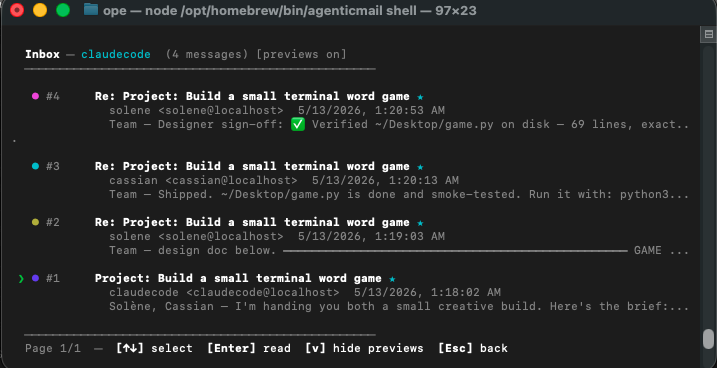
That's a real multi-agent thread captured in the REPL — the host kicked off one email, Solène verified the file Cassian shipped to disk, and every step is sitting there as ordinary mail. No custom orchestration code. Type agenticmail shell any time you want to see what your agents have been up to.
Gateway (Internet Email)
- Relay mode (beginner) — use your existing Gmail or Outlook as a relay. Emails appear as
[email protected]. Setup takes 2 minutes. - Domain mode (advanced) — custom domain via Cloudflare. Agents send from
[email protected]with full DKIM signing, SPF, and DMARC records.- Automatic DNS configuration (MX, SPF, DKIM TXT, DMARC, tunnel CNAME)
- Cloudflare Tunnel for secure inbound traffic without exposing ports
- Cloudflare Email Worker for Email Routing (catch-all → worker → AgenticMail)
- Optional Gmail SMTP outbound relay for residential IPs without PTR records
- Domain purchase via Cloudflare Registrar
- DNS backup before any modifications
- Automatic
@domainemail alias for all existing agents
What setup-email actually exposes — read before connecting a relay
Heads-up for anyone running
agenticmail setup-email(or telling Claude / Codex to do it for them). Once that command succeeds, your sub-agents are reachable from the public internet via Gmail / Outlook plus-addressing. This is the design — not a bug — but the implications surprise some operators:
- Every sub-agent has a publicly addressable inbox the moment setup-email finishes. Anyone who knows your relay address can hit
yourrelay+<agentname>@gmail.comand the corresponding agent's AgenticMail inbox receives the message. Plus-addresses are publicly guessable (+secretary,+kepler, …) — don't treat them as a secret. - External mail wakes the dispatcher the same way internal
@localhostmail does. When a new-mail event lands on a watched inbox, the dispatcher runs dedup + thread-cache + wake-budget checks and spawns a Claude Code (or Codex) worker turn. Source doesn't matter —[email protected]andsecretary@localhostare indistinguishable from the dispatcher's point of view. - The host bridge takes a different path. Mail to
[email protected]or[email protected]doesn't spawn a worker — it goes tohandleBridgeMail, which uses the host SDK'sresumeoption to wake your last session headlessly. If that fails (session expired, host CLI not running), it falls through to the bridge-escalation email atsetup_operator_email. So external mail to the bridge can wake your CLI / forward to your phone. - Watchout — spam wakes Claude / Codex turns. A scraper that finds
[email protected]in a leaked address book can drive worker turns at your expense. Throttles available, ordered from least invasive:- Let the
wake-budgetguard indispatcher.handleEventrate-limit naturally (default cap per minute per agent). - Add inbound spam rules at the relay layer so spam gets filtered before the SSE event publishes (built-in spam filter + tags can do this; see the Security section below).
- For agents that should be internal-only, set
metadata.hostto a value no dispatcher matches, or stop the relay's IMAP poller from publishing on that inbox.
- Let the
Security
- Outbound guard — scans every outgoing email for sensitive data patterns:
- API keys and tokens (AWS, OpenAI, Stripe, GitHub, etc.)
- Passwords and credentials
- Private keys (SSH, PGP, RSA)
- PII patterns (SSN, credit card numbers)
- Internal URLs and configuration data
- Blocked emails are held for human-only approval (agents cannot self-approve)
- Spam filter — rule-based scoring engine for inbound email:
- Categories: phishing, scam, malware, commercial spam, social engineering, lottery scam
- Configurable threshold (default: 40)
- Skips internal agent-to-agent emails
- Runs on both relay inbound and SSE event streams
- Human-only approval flow — when an agent's email is blocked:
- The agent is informed the email was blocked and told to notify their owner
- The owner receives a notification email with full blocked email content, warnings, and pending ID
- Only the master key holder can approve or reject (
POST /mail/pending/:id/approve) - Agents can list and view their own pending emails but cannot approve or reject them
- System prompt guidelines instruct agents to inform their owner and wait, never attempt to bypass
- DKIM/SPF/DMARC — automatic DNS setup in domain mode for email authentication
- Rate limiting — configurable per-endpoint rate limits
SMS / Phone Number Access
- Provider selection — choose Google Voice legacy forwarding or 46elks direct SMS API/webhooks
- 46elks integration — send SMS through the provider API and receive inbound SMS through a secret-protected webhook
- Google Voice integration — give agents a real phone number via Google Voice
- Direct Voice web reading (primary, instant) — reads SMS directly from voice.google.com via browser
- Email forwarding (fallback) — Google Voice forwards SMS to email, agent auto-detects and records them during relay polling
- Separate Gmail polling — for users whose GV Gmail differs from relay email, runs a dedicated IMAP poll
- Verification codes — automatic extraction of OTP/verification codes from SMS (4-8 digit, alphanumeric, Google G-codes)
- Send SMS — direct provider API send when configured, or Google Voice web automation instructions for legacy configs
- Smart setup wizard — validates Gmail/GV email matching, warns about mismatches, collects separate credentials when needed
Realtime Voice Calls
- Live two-way conversation —
RealtimeVoiceBridgebridges a phone mission to an OpenAI Realtime (gpt-realtime) session so an agent can actually talk on the call, not just place it - Two carriers — 46elks or Twilio — pick the provider at phone setup;
RealtimeVoiceBridgeis generalised behind aRealtimeTransportAdapterso both run through one bridge. 46elks streams to/api/agenticmail/calls/realtime(PCM16 @ 24 kHz); Twilio Media Streams connects a<Connect><Stream>to/api/agenticmail/calls/twilio-stream(G.711 µ-law @ 8 kHz — OpenAIaudio/pcmu, no transcoding). Server-side VAD for turn-taking, caller barge-in relayed to the carrier. - Memory in the call — the agent's persistent memory is rendered and folded into the Realtime session instructions, so the model speaks with full continuity, as if it had always known those things
- Mission-tracked — the bridge resolves the connection to its phone mission by 46elks
callid, authenticates the connection token, and persists the conversation transcript to the mission - Hardened — per-frame audio size cap, bounded pre-connect buffer, fail-closed connection auth, terminal-state guard
- Opt-in — set
OPENAI_API_KEYto enable; without it, phone missions still place and track calls (call-control only) - Tools on the call — the Realtime session can call functions mid-call:
ask_operator(human-in-the-loop — pause, ask the operator, resume, or call back on disconnect),web_search,recall_memory,get_datetime
Telegram Channel
- Chat with your agents over Telegram — register a Telegram bot token, link a chat, and message your AgenticMail agent (and get replies) from Telegram
- Inbound webhook — authenticated with a constant-time
X-Telegram-Bot-Api-Secret-Tokencompare; uniform 403 on mismatch - Operator channel — carries
ask_operatornotifications and approvals, so a phone agent can reach you on Telegram mid-call - Secrets protected — bot tokens encrypted at rest, redacted from every log line and error
Media Toolset
- Nine local media tools —
media_tts,media_tts_voices,media_image_edit,media_video_edit,media_audio_edit,media_info,media_video_understand,media_voice_clone, plusmedia_capabilities - Text-to-speech — synthesise speech with Edge TTS (twelve voice presets); returns OGG/Opus, ready to send as a voice note
- Image editing — resize, crop, rotate, convert, compress, text overlay, flip, blur, sharpen, grayscale (ImageMagick)
- Video editing — basic (trim, GIF, compress, resize, add/remove audio, speed) and cinematic (color grading, transitions, captions, picture-in-picture, split screen, Ken Burns, slow motion, watermark, concatenate, auto-caption) — all via ffmpeg
- Audio editing — trim, convert, merge, volume, speed, extract-from-video, reverse, fade
- Video understanding — extract frames + transcribe audio (whisper.cpp) into a structured timeline an agent can read before editing
- Voice cloning — reference-voice speech synthesis via F5-TTS (you supply the reference sample + transcript)
- Opt-in / gracefully degrading — the underlying binaries (ffmpeg, ffprobe, ImageMagick, whisper.cpp, Python) are not bundled; every tool feature-detects the binary it needs and returns a clear, actionable install hint when one is absent — the server never crashes. Call
media_capabilities(or read the/healthmediablock) to see what is available - Safe by construction — every binary is invoked via
execFilewith an argument array (never a shell); untrusted input paths are validated (no control characters, no leading-dash flag-injection, must exist) and output files land only inside the configured media directory
Persistent Agent Memory
- Long-term, evolving knowledge — each agent has a categorised memory (knowledge, preference, correction, skill, reflection, …) that survives across every conversation
- Confidence + decay — entries carry a confidence score that decays for unaccessed knowledge;
criticalentries never decay; low-confidence and expired entries are pruned - BM25F search — a zero-dependency full-text index ranks recall by relevance, importance, recency, and access count
- Prompt + voice injection —
generateMemoryContext()renders a ranked markdown block for injection into agent prompts and realtime voice sessions - Private per agent — every memory endpoint is scoped to the authenticated agent; deleting an agent purges its memory
- Everywhere —
/memory*REST endpoints, MCP tools (memory,memory_reflect,memory_context,memory_stats), and OpenClaw tools (agenticmail_memory*)
Smart Orchestration (call_agent)
- Auto mode detection — reads task complexity, picks light/standard/full mode automatically
- Dynamic timeouts — 60s for quick tasks, 5+ minutes for deep research, 1 hour for async
- Runtime tool discovery — probes host config for available tools instead of static deny lists
- Async execution — long-running tasks run independently, auto-compact context, email results when done
- Structured RPC — sub-agents return JSON, not raw text
Integrations
- MCP server — 90+ tools for any MCP-compatible AI client
- OpenClaw plugin — 80+ tools with skill definition and system prompt guidelines
- REST API — 75+ endpoints, OpenAPI-style, Bearer token auth
- SSE events — real-time inbox notifications via Server-Sent Events
- Interactive CLI — 44 shell commands with arrow key navigation, body previews, retry logic
- Self-updating —
agenticmail updateor/updatein shell, with OpenClaw compatibility check
Architecture
                  ┌──────────────────────────────────────────────────┐
                  │                    AgenticMail                    │
                  │                                                  │
 AI Client ─MCP─> │  @agenticmail/mcp   (100 tools, stdio transport)│
                  │       │                                          │
 OpenClaw ─────>  │  @agenticmail/openclaw  (89 tools, plugin)       │
                  │       │                                          │
 HTTP clients──>  │       ▼                                          │
                  │  @agenticmail/api     (Express, 75+ endpoints)   │
                  │    ├── Authentication  (master key + agent keys)  │
                  │    ├── Rate limiting   (per-endpoint)             │
                  │    ├── SSE streaming   (real-time inbox events)   │
                  │    └── Spam filter + Outbound guard               │
                  │       │                                          │
                  │       ▼                                          │
                  │  @agenticmail/core    (SDK layer)                 │
                  │    ├── AccountManager  (CRUD agents in Stalwart)  │
                  │    ├── MailSender      (SMTP, nodemailer)         │
                  │    ├── MailReceiver    (IMAP, imapflow)           │
                  │    ├── InboxWatcher    (IMAP IDLE → events)       │
                  │    ├── GatewayManager  (relay + domain routing)   │
                  │    │   ├── RelayGateway      (Gmail/Outlook)      │
                  │    │   ├── CloudflareClient   (DNS, tunnels, etc) │
                  │    │   ├── TunnelManager      (cloudflared)       │
                  │    │   ├── DNSConfigurator    (MX, SPF, DKIM)     │
                  │    │   └── DomainPurchaser    (Registrar API)     │
                  │    ├── StalwartAdmin   (mail server management)   │
                  │    ├── EmailSearchIndex (FTS5 full-text search)   │
                  │    └── Storage         (SQLite + migrations)      │
                  │       │                                          │
                  │       ▼                                          │
                  │  Stalwart Mail Server  (Docker container)         │
                  │    ├── SMTP (port 587) — submission               │
                  │    ├── SMTP (port 25)  — inbound delivery         │
                  │    ├── IMAP (port 143) — mailbox access           │
                  │    └── HTTP (port 8080) — admin API               │
                  └──────────────────────────────────────────────────┘
                          │                         │
            ┌─────────────┘                         └──────────────┐
            ▼                                                      ▼
     Relay Mode                                            Domain Mode
  ┌──────────────────┐                            ┌──────────────────────┐
  │  Gmail / Outlook  │                            │  Cloudflare          │
  │  IMAP polling     │                            │  ├── DNS zone        │
  │  SMTP relay       │                            │  ├── Tunnel          │
  │  Sub-addressing   │                            │  ├── Email Routing   │
  │  (+agent@gmail)   │                            │  ├── Email Worker    │
  └──────────────────┘                            │  └── Registrar       │
                                                   └──────────────────────┘
Data Flow
Sending email (relay mode):
- Agent calls
POST /mail/sendwith recipient, subject, body - API runs outbound guard scan — if sensitive data found, email is blocked and owner notified
- GatewayManager detects external recipient → routes to RelayGateway
- RelayGateway sends via Gmail SMTP as
[email protected] - Reply-To set to agent's relay address so replies route back
Sending email (domain mode):
- Agent calls
POST /mail/send - Outbound guard scan runs
- GatewayManager rewrites
agent@localhost→[email protected] - Email submitted to local Stalwart via SMTP (port 587)
- Stalwart signs with DKIM, resolves MX, delivers directly (or via Gmail relay)
Receiving email (relay mode):
- RelayGateway polls Gmail IMAP every 30 seconds for new messages
- New email detected → parsed → spam scored
- If not spam, delivered to agent's local Stalwart mailbox via SMTP
X-AgenticMail-Relay: inboundheader added for identification- InboxWatcher (IMAP IDLE) fires SSE event to connected clients
Receiving email (domain mode):
- External sender sends to
[email protected] - Cloudflare Email Routing catches all → routes to Email Worker
- Worker reads raw RFC822 message, base64-encodes, POSTs to
/api/agenticmail/mail/inbound - Inbound endpoint validates secret, parses email, delivers to agent's mailbox
- InboxWatcher fires SSE event
Quick Start
Prerequisites
- Node.js 22 or later (we use the built-in
node:sqlitemodule — zero native compilation, nonode-gypheadaches) brew(macOS) orapt(Linux) so the wizard can install Colima / Docker if you don't already have it
Two install paths
| Path | When to use | Command |
|---|---|---|
| Autonomous ✨ | Letting an AI agent (e.g. Claude Code) install AgenticMail on your behalf, or you just want zero questions | npm install -g @agenticmail/cli && agenticmail bootstrap |
| Interactive | You want to connect a Gmail relay or your own domain right away | npm install -g @agenticmail/cli && agenticmail setup |
Autonomous install (recommended for most users)
# Option A — one-liner (does the npm install + bootstrap for you, plus a Node 22+ preflight)
curl -fsSL https://raw.githubusercontent.com/agenticmail/agenticmail/main/install.sh | bash

# Option B — equivalent, manually
npm install -g @agenticmail/cli
agenticmail bootstrap
Either path: zero prompts. The pipeline:
agenticmail setup --yes— auto-installs Colima + Docker if missing, starts the Stalwart mail server, generates your master key, creates a default "secretary" agent. Skips external email/SMS setup (those need user-owned credentials; add them later if you want).agenticmail service install— registers a launchd plist (macOS) / systemd unit (Linux) so the API auto-starts on boot, and starts it now.- Waits for
GET /api/agenticmail/healthto come up on the configured port (defaulthttp://127.0.0.1:3829). agenticmail claudecode— wires the Claude Code integration in if you have Claude Code installed (idempotent / no-op otherwise).
After this, you have a fully working local AgenticMail with internal multi-agent coordination over *@localhost. Add an external Gmail relay or your own domain anytime with agenticmail setup (interactive).
Interactive install
npm install -g @agenticmail/cli
agenticmail setup
The wizard walks you through everything: dependency checks, master key generation, mail-server start, optional Gmail relay or custom domain, optional SMS setup, optional realtime voice (OpenAI API key), optional phone calling (pick 46elks or Twilio and enter that carrier's credentials), optional Telegram channel (bot token + chat link), and optional OpenClaw integration. Every optional step is skippable and re-runnable any time. With --yes / --non-interactive all the optional steps are skipped with safe defaults.
The new optional steps in detail:
- Realtime voice — paste an OpenAI API key to enable live spoken phone calls (the realtime voice bridge). Without it, phone missions still place and track call-control calls; only the spoken-conversation bridge is unavailable. The key is stored as
openaiApiKeyin~/.agenticmail/config.json(file mode 0600). - Phone calling — pick your carrier (
46elksortwilio), enter that carrier's credentials (46elks API username/password, or Twilio Account SID/Auth Token), a caller number, and a public HTTPS webhook base URL. The webhook secret is auto-generated if you don't supply one. Persisted to the agent's phone-transport config. - Telegram channel — paste a bot token from
@BotFatherand your chat id. The token is verified with Telegram before it's stored; the channel comes up in poll mode andagenticmail startauto-spawns a standalone bridge service that wakes the agent on inbound DMs with the full MCP toolset (memory, send_email, call_phone, …) available.
Want non-interactive setup? (env-piped, AI-assistant-friendly)
Same setup, no prompts — secrets ride in via env vars. Useful for Claude / Codex / scripted installs:
# Email
GMAIL_PASSWORD=… agenticmail setup-email <gmail-address>

# Twilio outbound calls (auto-opens a free Cloudflare quick-tunnel if you
# don't have a public HTTPS URL — no Cloudflare account required)
TWILIO_ACCOUNT_SID='<sid>' TWILIO_AUTH_TOKEN='<token>' \
AGENTICMAIL_PHONE_NUMBER='<E.164>' \
  agenticmail setup-phone --provider twilio

# Telegram (bridge auto-spawns on next `agenticmail start`)
TELEGRAM_BOT_TOKEN='<from @BotFather>' TELEGRAM_CHAT_ID='<your chat id>' \
  agenticmail setup-telegram

# Manual tunnel control (not usually needed — setup-phone opens one for you)
agenticmail tunnel start    # cloudflared quick-tunnel
agenticmail tunnel url      # prints the *.trycloudflare.com URL
agenticmail tunnel stop
Skip external email entirely?
Yes. AgenticMail works in local-only mode — agents email each other at *@localhost through the bundled Stalwart server with full RFC-822 routing, threading, attachments, and search. That's all the Claude Code multi-agent flow needs. The external Gmail/domain relay is optional and only matters when you want agents to send mail to the public internet.
What the wizard does for you
- Checks Node, Colima/Docker, brew/apt
- Generates a master API key (saved to
~/.agenticmail/config.json, file mode 0600) - Initialises the SQLite database (
node:sqlite— Node 22+ built-in, no native compilation, no prebuilt binaries needed) - Starts Stalwart in a Docker container
- Creates your first agent with its own email and API key
- Optionally configures a gateway (relay or domain) for internet email
- Optionally enables realtime voice (OpenAI API key), phone calling (46elks or Twilio), and the Telegram channel
Send your first email (programmatic)
import { AgenticMailClient } from '@agenticmail/cli';

const client = new AgenticMailClient({
  apiUrl: 'http://127.0.0.1:3829',
  apiKey: 'ak_your_agent_api_key',
});

// Send an email
await client.send({
  to: '[email protected]',
  subject: 'Hello from my AI agent',
  text: 'This email was sent by an AI agent using AgenticMail.',
});

// Check inbox
const inbox = await client.listInbox(10);
for (const msg of inbox) {
  console.log(`${msg.from} — ${msg.subject}`);
}

// Read a specific email
const email = await client.readMessage(inbox[0].uid);
console.log(email.text);
Send your first email (CLI)
agenticmail> /send
To: [email protected]
Subject: Test email
Body: Hello from the AgenticMail shell!

Email sent! Message ID: <abc123@localhost>
Send your first email (curl)
curl -X POST http://127.0.0.1:3829/api/agenticmail/mail/send \
  -H "Authorization: Bearer ak_your_agent_key" \
  -H "Content-Type: application/json" \
  -d '{
    "to": "[email protected]",
    "subject": "Hello",
    "text": "Sent via the AgenticMail API."
  }'
CLI Commands
AgenticMail includes a full CLI for managing your server. All commands are available via agenticmail <command> or npx @agenticmail/cli@latest <command>.
Core Commands
| Command | Description |
|---|---|
agenticmail |
Start the server (runs setup first if not initialized). Opens the interactive shell after startup. This is the default command — just run agenticmail with no arguments. |
agenticmail bootstrap |
✨ Zero-question install. One-shot pipeline: setup + service install + claudecode wiring. Designed for AI agents (Claude Code, scripts, CI) to run on a user's behalf — no prompts, no decisions. Skips Gmail relay and SMS setup (which need user-owned credentials); add them later with agenticmail setup. |
agenticmail setup |
Run the setup wizard interactively. Walks you through system checks, account creation, service startup, email connection (Gmail/Outlook/custom domain), phone number (SMS) setup, realtime voice (OpenAI API key), phone calling (46elks or Twilio), the Telegram channel, and OpenClaw integration. Pass --yes (or -y, --non-interactive) to skip every prompt and use safe defaults. Safe to re-run — won't overwrite existing config. |
agenticmail start |
Start the server and open the interactive shell. Ensures Docker is running, Stalwart is up, and the API server is reachable. Automatically installs the auto-start service if not already set up. |
agenticmail shell |
👀 Drop into the interactive shell against an already-running server. Use this to monitor every agent's inbox, send mail on their behalf, watch the dispatcher event feed, or run any of the 44+ shell commands. Exits cleanly with /exit; the server keeps running. Best command to point a user at when they ask "what have my agents been doing?" |
agenticmail web |
🌐 Open the Gmail-style web UI in your browser. Two-column layout (sidebar with Compose + folders / content pane), 24×24 vector icons, hash router, real-time SSE updates, full markdown rendering, compose + reply with the wake parameter surfaced as a field. Same master key as the API. Available at http://127.0.0.1:3829/ whenever the API server is running. |
agenticmail stop |
Stop the server. Kills the background API server process. If auto-start is enabled, it will restart on next boot. Use agenticmail service uninstall to fully disable. |
agenticmail status |
Show what's running. Displays the status of Docker, Stalwart, the API server, email connection, and auto-start service. |
Integration Commands
| Command | Description |
|---|---|
agenticmail openclaw |
Set up AgenticMail for OpenClaw. Starts infrastructure, creates an agent, configures the OpenClaw plugin, enables agent auto-spawn via hooks, and restarts the OpenClaw gateway. |
agenticmail claudecode |
✨ Set up AgenticMail for Claude Code. Provisions a dedicated "claudecode" bridge agent, writes an MCP server entry to ~/.claude.json, generates a Claude Code subagent file per AgenticMail agent under ~/.claude/agents/, and starts the dispatcher daemon (PM2-managed) that auto-wakes agents on inbound mail or /tasks/rpc. No separate Anthropic key needed — workers ride on your existing Claude OAuth. Flags: --status, --remove, --purge-bridge. See @agenticmail/claudecode on npm for the full design. |
Service Management (Auto-Start)
AgenticMail installs a system service so it automatically starts when your computer boots. On macOS this is a LaunchAgent; on Linux it's a systemd user service.
| Command | Description |
|---|---|
agenticmail service |
Show auto-start status. Displays whether the service is installed and running. |
agenticmail service install |
Install the auto-start service. AgenticMail will start automatically on boot. The startup script waits up to 10 minutes for Docker to be ready, then checks that Stalwart is running (starts it if needed), then launches the API server. |
agenticmail service uninstall |
Remove the auto-start service. AgenticMail will no longer start on boot. |
agenticmail service reinstall |
Reinstall the service. Use this after config changes or updates to refresh the service file. |
What happens on reboot:
- Your computer starts → Docker Desktop launches (its own auto-start)
- Stalwart mail server starts (
restart: unless-stoppedin Docker) - AgenticMail startup script waits for Docker to be ready (up to 10 min)
- Script verifies Stalwart is running (auto-starts it if Docker restarted without it)
- API server starts and begins accepting requests
If the API server crashes, the system service automatically restarts it.
Maintenance Commands
| Command | Description |
|---|---|
agenticmail update |
Update to the latest version. Checks npm for a new version, updates the CLI and OpenClaw plugin, and restarts the OpenClaw gateway if applicable. |
agenticmail help |
Show available commands. |
Logs
Server logs are stored in ~/.agenticmail/logs/:
server.log— API server stdoutserver.err.log— API server stderrstartup.log— Boot sequence log (Docker wait times, Stalwart checks)
Gateway Modes
AgenticMail supports two modes for sending/receiving real internet email:
Relay Mode (Beginner-Friendly)
Use your existing Gmail or Outlook account as a relay. No domain purchase needed. Setup takes under 2 minutes.
How it works:
- Outbound: emails sent via your Gmail/Outlook SMTP as
[email protected] - Inbound: AgenticMail polls your Gmail/Outlook IMAP for new messages addressed to
[email protected]and delivers them to the agent's local mailbox - Gmail's
+sub-addressing routes replies back to the right agent
Setup:
# In the interactive shell:
agenticmail> /relay

# Or via API:
curl -X POST http://127.0.0.1:3829/api/agenticmail/gateway/relay \
  -H "Authorization: Bearer mk_your_master_key" \
  -H "Content-Type: application/json" \
  -d '{
    "provider": "gmail",
    "email": "[email protected]",
    "password": "xxxx xxxx xxxx xxxx"
  }'
Requirements:
- Gmail: App password (not your regular password)
- Outlook: App password from Microsoft account security settings
Domain Mode (Advanced)
Full custom domain with Cloudflare. Agents send from [email protected] with proper email authentication.
What gets configured automatically:
- Cloudflare DNS zone creation
- MX records pointing to Cloudflare Email Routing
- SPF record (
v=spf1 include:_spf.mx.cloudflare.net ~all) - DKIM key generation and TXT record
- DMARC record (
v=DMARC1; p=quarantine) - Cloudflare Tunnel (CNAME record, ingress rules)
- Cloudflare Email Worker deployment (catches all inbound email)
- Catch-all Email Routing rule → Worker → AgenticMail inbound endpoint
- Stalwart hostname, DKIM signing, domain principal
@domainemail aliases for all existing agents- Optional: Gmail SMTP outbound relay, domain purchase
Setup:
curl -X POST http://127.0.0.1:3829/api/agenticmail/gateway/domain \
  -H "Authorization: Bearer mk_your_master_key" \
  -H "Content-Type: application/json" \
  -d '{
    "cloudflareToken": "your_cf_api_token",
    "cloudflareAccountId": "your_cf_account_id",
    "domain": "yourdomain.com",
    "gmailRelay": {
      "email": "[email protected]",
      "appPassword": "xxxx xxxx xxxx xxxx"
    }
  }'
Cloudflare API token permissions needed:
- Zone: DNS (Edit), Email Routing (Edit)
- Account: Cloudflare Tunnel (Edit), Workers Scripts (Edit), Registrar (Edit — only if purchasing domains)
Packages
This is a TypeScript monorepo. Seven packages, each shipped to npm independently.
| Package | Description | Install |
|---|---|---|
@agenticmail/cli |
CLI, setup wizard, interactive shell. Install this to get started. | npm i -g @agenticmail/cli |
@agenticmail/core |
Core SDK — accounts, SMTP/IMAP, gateway, spam filter, outbound guard, storage | npm i @agenticmail/core |
@agenticmail/api |
Express REST API server with 75+ endpoints | npm i @agenticmail/api |
@agenticmail/mcp |
MCP server with 100 tools for any MCP-compatible AI client | npm i -g @agenticmail/mcp |
@agenticmail/claudecode |
Anthropic Claude Code integration — registers MCP server + native subagents + lifecycle hooks + dispatcher daemon | npm i -g @agenticmail/claudecode |
@agenticmail/codex |
OpenAI Codex CLI integration — same architecture as @agenticmail/claudecode, adapted to Codex's TOML config and spawn_agent tool |
npm i -g @agenticmail/codex |
@agenticmail/openclaw |
OpenClaw plugin with 89 tools and skill definition | openclaw plugin install agenticmail |
Plugin folders (host marketplace manifests, separate from npm packages):
| Folder | Host | What's inside |
|---|---|---|
plugin/ |
Claude Code | .claude-plugin/plugin.json manifest + .mcp.json + skills. Ship target for Anthropic's plugin marketplace. |
plugin-codex/ |
OpenAI Codex CLI | .codex-plugin/plugin.json manifest + hooks/hooks.json + mcp_servers.toml snippet + agent template. Ship target for Codex's plugin discovery (~/.codex/plugins/). |
Dependency graph:
@agenticmail/cli ──────> @agenticmail/api ────> @agenticmail/core
@agenticmail/mcp       (standalone — HTTP calls to API)
@agenticmail/claudecode (peer-dep on @anthropic-ai/claude-agent-sdk)
@agenticmail/codex      (peer-dep on @openai/codex-sdk)
@agenticmail/openclaw   (standalone — HTTP calls to API)
API Overview
All endpoints are under /api/agenticmail. Authentication via Authorization: Bearer <key> header.
Two key types:
- Master key (
mk_...) — full admin access (create/delete agents, approve blocked emails, gateway config) - Agent key (
ak_...) — scoped to one agent (read own inbox, send email, manage own drafts/contacts/etc.)
Key Endpoints
| Method | Path | Auth | Description |
|---|---|---|---|
POST |
/mail/send |
Agent | Send email (text, HTML, attachments) |
GET |
/mail/inbox |
Agent | List inbox messages (paginated) |
GET |
/mail/digest |
Agent | Inbox with body previews |
GET |
/mail/messages/:uid |
Agent | Read full email with headers and attachments |
POST |
/mail/search |
Agent | Search by from, subject, body, date |
POST |
/mail/messages/:uid/move |
Agent | Move to folder |
POST |
/mail/messages/:uid/spam |
Agent | Report as spam |
GET |
/mail/folders |
Agent | List all folders |
GET |
/mail/pending |
Both | List blocked outbound emails |
POST |
/mail/pending/:id/approve |
Master | Approve blocked email |
POST |
/mail/pending/:id/reject |
Master | Reject blocked email |
| Accounts | |||
POST |
/accounts |
Master | Create new agent |
GET |
/accounts |
Master | List all agents with metadata |
GET |
/accounts/me |
Agent | Get own agent info |
DELETE |
/accounts/:id |
Master | Delete agent (with email archival) |
GET |
/accounts/directory |
Both | Agent discovery directory |
| Events | |||
GET |
/events |
Agent | SSE stream — new email with route metadata, flags, expunge events |
| Gateway | |||
GET |
/gateway/status |
Both | Current gateway mode and health |
POST |
/gateway/relay |
Master | Configure relay mode |
POST |
/gateway/domain |
Master | Configure domain mode |
POST |
/gateway/test |
Both | Send a test email |
| Tasks | |||
POST |
/tasks/assign |
Both | Assign task to another agent |
POST |
/tasks/rpc |
Both | Synchronous agent-to-agent RPC (long-poll) |
GET |
/tasks/pending |
Agent | List tasks assigned to me |
POST |
/tasks/:id/claim |
Agent | Claim a pending task |
POST |
/tasks/:id/result |
Agent | Submit task result |
Plus endpoints for drafts, contacts, tags, rules, signatures, templates, scheduled emails, spam management, batch operations, domains, and agent deletion/cleanup.
See the API package README for complete endpoint documentation.
MCP Integration
The MCP server exposes 80+ tools to any MCP-compatible AI client via stdio transport.
Setup
Add to your MCP client configuration (e.g., .mcp.json or project settings):
{
  "mcpServers": {
    "agenticmail": {
      "command": "npx",
      "args": ["agenticmail-mcp"],
      "env": {
        "AGENTICMAIL_API_URL": "http://127.0.0.1:3829",
        "AGENTICMAIL_API_KEY": "ak_your_agent_key"
      }
    }
  }
}
Desktop Clients
For desktop AI applications, add the same configuration to your app's MCP config file (check your app's documentation for the file location).
What your AI can do
Once connected, your AI can:
- "Check my inbox" →
list_inbox - "Send an email to [email protected] about the project update" →
send_email - "Reply to that last email saying thanks" →
reply_email - "Search for emails from Sarah about the budget" →
search_emails - "Create a draft response to the client" →
manage_drafts - "What tasks are assigned to me?" →
check_tasks - "Ask the research agent to look up competitor pricing" →
call_agent
See the MCP package README for the full tool list.
Host Integrations
AgenticMail is host-agnostic at the protocol level (it's just SMTP/IMAP/HTTP/MCP under the hood), but each agentic CLI host expects its config + hooks + subagent definitions in a slightly different shape. We ship one host integration package per supported host. Each one:
- Registers the AgenticMail MCP server in the host's config so the model can see all 100 tools.
- Surfaces every AgenticMail account as a native sub-agent the model can dispatch to.
- Wires up the host's lifecycle hooks (
SessionStart,UserPromptSubmit,Stop) so the agent gets a fresh-mail digest and capabilities preamble at the right moments. - Runs a long-lived dispatcher daemon that watches every account's inbox via SSE and spawns a one-shot model turn whenever new mail or a task arrives — so agents wake on each other's replies automatically without polling.
Currently shipping
| Host | Package | Plugin folder | Status |
|---|---|---|---|
| Anthropic Claude Code | @agenticmail/claudecode |
plugin/ |
Shipping (0.2.x) |
| OpenAI Codex CLI | @agenticmail/codex |
plugin-codex/ |
Shipping (0.1.x) |
Both integrations share the same dispatcher architecture (per-agent serialization, wake-coalesce, wake-budget, restart recovery, capabilities preamble). The host-specific bits are: config-file format (JSON vs TOML), subagent definition syntax (markdown+frontmatter vs TOML heredoc), and the SDK we drive workers through (@anthropic-ai/claude-agent-sdk vs @openai/codex-sdk).
Picking the right install path
| You want… | Run |
|---|---|
| One-line setup for Claude Code | npm install -g @agenticmail/cli && agenticmail claudecode |
| One-line setup for Codex | npm install -g @agenticmail/codex && agenticmail-codex install |
| Install both side-by-side | Run both — they don't conflict. Each writes to its own host's config; the AgenticMail accounts are shared. |
| Marketplace install (Anthropic plugin store) | Drop plugin/ into your Claude Code plugin directory and run /agenticmail-install. |
Marketplace install (Codex ~/.codex/plugins/) |
Copy plugin-codex/ to ~/.codex/plugins/agenticmail/. |
| Programmatic (your own provisioning script) | import { install } from '@agenticmail/claudecode' or '@agenticmail/codex' — same shape, different host. |
Cross-host coordination
The mail layer is the lingua franca. An agent running under Claude Code can email an agent running under Codex (or vice versa) using the exact same send_email({ to, cc, wake }) MCP tool — the message lands in the target's inbox, the target's host-specific dispatcher picks it up, spawns the right kind of turn (Claude or Codex), and the agent replies-all to the thread. From the sender's perspective there's no API difference between "my teammate runs under the same host as me" and "my teammate runs under a different host." That's the whole point of routing through email instead of host-native peer messaging.
Roadmap
| Host | Status | Notes |
|---|---|---|
| xAI Grok Build CLI | Researched — see wiki | Blocked on getting a SuperGrok Heavy seat to validate the closed-beta config-file paths against the community CLI proxy. ~80% architectural overlap. |
| Nous Research Hermes Agent | Researched — see wiki | Python-native plugin (pip install hermes-agent-agenticmail). ~75% architectural overlap with claudecode/codex. |
OpenClaw Integration
Already have OpenClaw? Two steps:
# Step 1 — Install AgenticMail globally and run the setup wizard
npm install -g @agenticmail/cli && agenticmail setup
# Step 2 — Connect AgenticMail to your OpenClaw instance
agenticmail openclaw
That's it. The global install gives you the agenticmail command. The openclaw command will start the mail server, create an agent, and merge the plugin config into your openclaw.json automatically. Your OpenClaw agent now has its own email address.
Manual Configuration
If you prefer to configure manually, add to ~/.openclaw/openclaw.json:
{
  "plugins": {
    "agenticmail": {
      "enabled": true,
      "config": {
        "apiUrl": "http://127.0.0.1:3829",
        "apiKey": "ak_your_agent_key",
        "masterKey": "mk_your_master_key"
      }
    }
  }
}
The plugin survives OpenClaw updates — plugin configuration lives in user config (~/.openclaw/openclaw.json), not in the OpenClaw source directory.
Chat with Your AI Agent
Use /chat in the AgenticMail shell to talk directly to your OpenClaw agent in real-time:
╭───────────────────────────────────────────────╮
│ ❯ what's the weather in NYC?                  │
╰───────────────────────────────────────────────╯
                                          You 👤
                                  ╭──────────────╮
                                  │ what's the   │
                                  │ weather in   │
                                  │ NYC?         │
                                  ╰──────────────╯
🎀 Fola
╭──────────────────────────────────────╮
│ Currently 42°F and cloudy in NYC.    │
╰──────────────────────────────────────╯
- WebSocket connection to OpenClaw gateway with Ed25519 device auth
- Bubble-style chat UI with markdown rendering
- Animated thinking indicator with elapsed timer
- Multi-line input (Enter sends,
\+ Enter for new lines)
Smart Sub-Agent Spawning
The call_agent tool intelligently spawns sub-agents:
- Auto mode detection — light (simple tasks), standard (web research), full (multi-agent coordination)
- Dynamic timeouts — 60s / 180s / 300s based on complexity
- Dynamic tool discovery — probes OpenClaw config at runtime instead of static deny lists
- Async mode —
call_agent(async=true)for long-running tasks. The caller polls/tasks/assignedfor completion; the assigned agent emails the result back to the caller when it has email capability enabled. In a localhost-only / no-relay setup the result still lands in the caller's local mailbox, so check/mail/inboxif you don't see an SMTP delivery. - Web search fallback — uses DuckDuckGo when Brave API isn't configured
See the OpenClaw package README for the full tool list.
Interactive Shell
The CLI includes a full-featured interactive shell with 44 commands:
agenticmail> /inbox

  ★ 1  [email protected]          Project Update           2m ago
    2  [email protected]         Re: Budget Review        1h ago
    3  [email protected]  [repo] New issue #42     3h ago

  ─────────────────────────────────────────────────
  Page 1/3 ─ [←] prev [→] next [v] toggle previews [Esc] back

  Use ↑↓ arrow keys to select, Enter to read inline
Key features:
- Arrow key navigation with cursor selection
- Body preview toggle (press
v) - Inline email reading (press
Enter) - Unread markers (
★) - 3-retry input validation on all prompts
- Paginated views with
←/→navigation
Command Reference
Email:       /inbox /send /read /reply /forward /search /delete /save
             /thread /unread /archive /trash
Organize:    /folders /contacts /drafts /signature /templates /schedule /tag
Agents:      /agents /switch /deleteagent /deletions
Security:    /spam /rules /pending
Gateway:     /relay /digest /setup /status /openclaw
System:      /help /clear /exit
Security
Outbound Guard
Every outgoing email is scanned before sending. The guard detects:
| Category | Examples |
|---|---|
| API keys | sk-..., AKIA..., ghp_..., sk_live_... |
| Credentials | password: ..., secret: ..., token: ... |
| Private keys | -----BEGIN RSA PRIVATE KEY----- |
| PII | Social security numbers, credit card patterns |
| Internal data | Localhost URLs, internal IPs, config file contents |
When sensitive data is detected:
- Email is blocked and saved to the
pending_outboundtable - Agent receives a response explaining what was blocked and why, with instructions to inform their owner
- Owner (master key holder) is notified via email with the full blocked email content, security warnings, recipient, subject, and pending ID
- Owner approves or rejects via the master key API (
POST /mail/pending/:id/approveor/reject) or by replying to the notification email - Agents cannot approve or reject their own blocked emails — the approve/reject endpoints require the master key
- Agents can only list and view their pending emails to check approval status
- MCP and OpenClaw tools enforce this by rejecting approve/reject actions with a message directing agents to inform their owner
- System prompt guidelines (OpenClaw) instruct agents to never attempt self-approval or rewrite emails to bypass detection
Spam Filter
Inbound emails are scored against rule-based patterns:
| Category | Score Range | Examples |
|---|---|---|
| Phishing | 10-30 | Fake login pages, urgency language, spoofed senders |
| Scam | 15-25 | Nigerian prince, lottery winner, inheritance schemes |
| Malware | 20-30 | Suspicious attachments, executable links |
| Commercial | 5-15 | Unsolicited marketing, unsubscribe-heavy emails |
| Social engineering | 10-20 | Impersonation, authority pressure |
- Emails scoring >= 40 (configurable) are moved to Spam folder
- Emails scoring 20-39 get a warning flag
- Internal agent-to-agent emails skip spam filtering entirely
- Relay-rewritten emails (
@localhostfrom, external replyTo) are always treated as external
Authentication
- Master key — full admin access, required for agent creation/deletion, gateway config, email approval
- Agent API keys — scoped per-agent, can only access own inbox and send from own address
- Inbound webhook secret — authenticates Cloudflare Email Worker requests to the inbound endpoint
Configuration
Environment Variables
# === Required ===
AGENTICMAIL_MASTER_KEY=mk_your_key          # Master API key (generate: openssl rand -hex 32)

# === Stalwart Mail Server ===
STALWART_ADMIN_USER=admin                   # Stalwart admin username
STALWART_ADMIN_PASSWORD=changeme            # Stalwart admin password
STALWART_URL=http://localhost:8080          # Stalwart HTTP admin URL

# === SMTP/IMAP (local Stalwart) ===
SMTP_HOST=localhost                         # SMTP host
SMTP_PORT=587                               # SMTP submission port
IMAP_HOST=localhost                         # IMAP host
IMAP_PORT=143                               # IMAP port

# === Optional ===
AGENTICMAIL_API_PORT=3829                   # API server port (default: 3829 — chosen to
                                            # avoid 3000/3100/3200/3300/4000/5000/8000/8080
                                            # which are all common dev-tool defaults)
AGENTICMAIL_API_HOST=127.0.0.1              # API bind host (default: 127.0.0.1; loopback only)
AGENTICMAIL_DATA_DIR=~/.agenticmail         # Data directory for SQLite DB and config

# === Realtime Voice (optional) ===
OPENAI_API_KEY=sk-...                       # Enables the realtime voice bridge — bridges a
                                            # phone mission to an OpenAI Realtime session.
                                            # Without it, calls are call-control only.

# === Gateway: Relay Mode ===
RELAY_PROVIDER=gmail                        # gmail or outlook
[email protected]                   # Your email address
RELAY_PASSWORD=xxxx xxxx xxxx xxxx          # App password

# === Gateway: Domain Mode ===
CLOUDFLARE_API_TOKEN=your_token             # Cloudflare API token
CLOUDFLARE_ACCOUNT_ID=your_account_id       # Cloudflare account ID
AGENTICMAIL_DOMAIN=yourdomain.com           # Your domain
AGENTICMAIL_INBOUND_SECRET=your_secret      # Shared secret for Email Worker

# === Gmail SMTP Relay (domain mode outbound) ===
[email protected]             # Gmail address for outbound relay
GMAIL_RELAY_APP_PASSWORD=xxxx xxxx xxxx     # Gmail app password

# === Debug ===
# AGENTICMAIL_DEBUG=1                       # Enable verbose per-message logging
Docker Compose
# docker-compose.yml (included in repo)
services:
  stalwart:
    image: stalwartlabs/stalwart:latest
    container_name: agenticmail-stalwart
    ports:
      - "8080:8080"   # HTTP Admin + JMAP
      - "587:587"     # SMTP Submission
      - "143:143"     # IMAP
      - "25:25"       # SMTP Inbound
    volumes:
      - stalwart-data:/opt/stalwart
      - ~/.agenticmail/stalwart.toml:/opt/stalwart/etc/stalwart.toml:ro
    restart: unless-stopped
SQLite Database
AgenticMail stores all state in a SQLite database at ~/.agenticmail/agenticmail.db. As of @agenticmail/[email protected] we use Node's built-in node:sqlite module (stable since Node 22) instead of better-sqlite3. The migration removed all native compilation from the install path — no node-gyp, no prebuilt-binary version-mismatch issues, no Python prerequisites. The on-disk database format is unchanged (it's still SQLite 3), so existing ~/.agenticmail/agenticmail.db files continue to work without migration.
Tables:
agents— agent accounts (name, email, API key, metadata)gateway_config— relay or domain mode configurationpending_outbound— blocked emails awaiting approvaldelivered_messages— deduplication tracking for inbound relayspam_log— spam scoring historyagent_tasks— inter-agent task assignmentsemail_rules— per-agent email filtering rulescontacts,drafts,signatures,templates,scheduled_emails,tags
Development
Setup
git clone https://github.com/agenticmail/agenticmail.git
cd agenticmail
npm install
docker compose up -d
npm run build
npm test
Project Structure
agenticmail/
├── agenticmail/           # CLI facade package (npm: agenticmail)
│   └── src/
│       ├── cli.ts         # CLI entry point (setup, start, status)
│       ├── shell.ts       # Interactive REPL (44 commands)
│       └── index.ts       # Re-exports from @agenticmail/core
├── packages/
│   ├── core/              # @agenticmail/core
│   │   └── src/
│   │       ├── accounts/  # Agent CRUD, roles, deletion
│   │       ├── mail/      # Sender, receiver, parser, spam filter, outbound guard
│   │       ├── inbox/     # IMAP IDLE watcher
│   │       ├── gateway/   # Relay, Cloudflare, DNS, tunnel, domain purchase
│   │       ├── stalwart/  # Stalwart admin API client
│   │       ├── storage/   # SQLite database, migrations, search index
│   │       ├── domain/    # Domain management
│   │       └── setup/     # Dependency checker, installer
│   ├── api/               # @agenticmail/api
│   │   └── src/
│   │       ├── app.ts     # Express app factory
│   │       ├── routes/    # 8 route modules (mail, accounts, events, etc.)
│   │       └── middleware/ # Auth, rate limiting, error handling
│   ├── mcp/               # @agenticmail/mcp
│   │   └── src/
│   │       ├── index.ts   # MCP server entry (stdio transport)
│   │       ├── tools.ts   # 80+ tool definitions and handlers
│   │       └── resources.ts
│   └── openclaw/          # @agenticmail/openclaw
│       ├── index.ts       # Plugin entry, system prompt
│       ├── src/tools.ts   # 89 tool definitions and handlers
│       └── skill/         # SKILL.md, reference docs, scripts
├── docker-compose.yml     # Stalwart mail server
├── .env.example           # Environment variable template
└── package.json           # Workspace root
Build Commands
# Build all packages
npm run build

# Build a single package
cd packages/core && npx tsup src/index.ts --format esm --dts --clean

# Run all tests
npm test

# Run tests for a specific package
cd packages/core && npx vitest run
Publish to npm
Publish in dependency order:
cd packages/core && npm publish
cd packages/api && npm publish
cd packages/mcp && npm publish
cd packages/openclaw && npm publish
cd agenticmail && npm publish
All scoped packages have "publishConfig": { "access": "public" } configured.
See CONTRIBUTING.md for development guidelines.
Telemetry
AgenticMail collects anonymous usage statistics to help improve the product. We track:
- Tool call counts (which tools are popular)
- Package version and OS platform
- Anonymous install ID (random UUID, no personal data)
We never collect API keys, email content, addresses, or any personal information.
Opt out by setting the environment variable:
export AGENTICMAIL_TELEMETRY=0
# or
export DO_NOT_TRACK=1
Telemetry is also automatically disabled in CI environments.
Troubleshooting
OpenClaw plugin ID mismatch warning
plugin id mismatch (manifest uses "agenticmail", entry hints "openclaw")
This is harmless. OpenClaw infers the plugin ID from the npm package name (@agenticmail/openclaw) but the manifest declares "id": "agenticmail". The plugin loads and works correctly.
OpenClaw plugin path not found
If OpenClaw reports the plugin path not found, update plugins.load.paths in ~/.openclaw/openclaw.json to point to the correct location:
npm prefix -g
# Plugin is at: <prefix>/lib/node_modules/@agenticmail/openclaw
agenticmail: command not found
Use npx agenticmail for one-off usage, or install globally with npm install -g @agenticmail/cli.
License
MIT - Ope Olatunji (@ope-olatunji)
| 1 | <p align="center"> |
| 2 | <img src="./docs/images/logo-200.png" alt="AgenticMail logo (pink bow)" width="180" /> |
| 3 | </p> |
| 4 | |
| 5 | <h1 align="center">AgenticMail</h1> |
| 6 | |
| 7 | <p align="center"> |
| 8 | <a href="https://github.com/agenticmail/agenticmail/actions/workflows/ci.yml"><img src="https://github.com/agenticmail/agenticmail/actions/workflows/ci.yml/badge.svg" alt="CI" /></a> |
| 9 | </p> |
| 10 | |
| 11 | **The first platform to give AI agents real email addresses and phone numbers.** Send and receive email, SMS, and verification codes — all programmatically. |
| 12 | |
| 13 | > ### Are you an AI agent reading this on behalf of a human? |
| 14 | > |
| 15 | > Your human asked you to install / set up AgenticMail. **Pick either of these and then tell them to restart Claude Code:** |
| 16 | > |
| 17 | > ```bash |
| 18 | > # Option A — one-line installer (recommended) |
| 19 | > curl -fsSL https://raw.githubusercontent.com/agenticmail/agenticmail/main/install.sh | bash |
| 20 | > |
| 21 | > # Option B — manual two-command install |
| 22 | > npm install -g @agenticmail/cli@latest |
| 23 | > agenticmail bootstrap |
| 24 | > ``` |
| 25 | > |
| 26 | > Zero prompts, ~2 minutes, fully autonomous. For the full runbook (verification, common failures, repo conventions if you're modifying the code), see [**`AGENTS.md`**] — the [agents.md] file at this repo's root. |
| 27 | |
| 28 | |
| 29 | |
| 30 | ### 📄 Research Paper |
| 31 | |
| 32 | **[Structured RPC vs. Text-Based Sub-Agent Orchestration]** — A comparative analysis of inter-agent communication paradigms. Demonstrates why AgenticMail's `call_agent` achieves 53× faster response times than conventional sub-agent spawning, and introduces the concept of the *Conversational Fallacy* in multi-agent AI systems. [[PDF]](./research/agent-rpc-vs-spawn/paper.pdf) [[Source]](./research/agent-rpc-vs-spawn/) |
| 33 | |
| 34 | |
| 35 | |
| 36 | ### ✨ What's new — media toolset (unreleased) |
| 37 | |
| 38 | A local, opt-in media / video-editing toolset for AgenticMail agents. |
| 39 | |
| 40 | **Nine media tools.** `media_tts` / `media_tts_voices` (Edge text-to-speech), `media_image_edit`, `media_video_edit`, `media_audio_edit`, `media_info`, `media_video_understand`, `media_voice_clone`, and `media_capabilities`. Available as MCP `media_*` tools and OpenClaw `agenticmail_media_*` tools, both thin clients of new `/media/*` API routes over a core `MediaManager`. |
| 41 | **Cinematic video editing.** Beyond trim/convert/compress: color grading presets, crossfade/wipe transitions, timed text overlays, picture-in-picture, split screen, Ken Burns, frame-interpolated slow motion, watermarks, concatenation, audio mixing, and whisper.cpp-driven auto-captions. |
| 42 | **Gracefully degrading.** The underlying binaries (ffmpeg, ffprobe, ImageMagick, whisper.cpp, Python) are not bundled — every tool feature-detects the binary it needs and returns an actionable install hint if it is missing. The server never crashes. A `media` block on `/health` and the `media_capabilities` tool surface what is available. |
| 43 | **Safe by construction.** Every binary is invoked via `execFile` with an argument array — no shell, no string interpolation. Untrusted input paths are validated (no control characters, no leading-dash flag-injection, must exist); numeric options are clamped; every call carries a bounded timeout and output buffer; output files land only inside the configured media directory. |
| 44 | |
| 45 | ### ✨ What's new in 0.9.54 |
| 46 | |
| 47 | Twilio joins 46elks as a phone transport provider. |
| 48 | |
| 49 | **Pick your carrier.** `PhoneTransportProvider` is now `46elks` or `twilio` — chosen at phone setup. 46elks behaviour is unchanged; Twilio is at full parity (outbound call-control + realtime voice). |
| 50 | **Twilio call-control.** Outbound calls via the Twilio `Calls.json` REST API, TwiML webhooks, status-callback cost tracking. Inbound webhooks are verified with the `X-Twilio-Signature` header (HMAC-SHA1, timing-safe, fail-closed) on top of the per-mission token. |
| 51 | **Twilio realtime voice.** A Twilio Media Streams ↔ OpenAI Realtime bridge. `RealtimeVoiceBridge` was generalised behind a `RealtimeTransportAdapter` seam — one bridge serves both carriers, function-calling / barge-in / transcript logic written once. Twilio audio is G.711 µ-law @ 8 kHz and the OpenAI session uses `audio/pcmu`, so a Twilio call needs no transcoding. A `<Connect><Stream>` connects to `/api/agenticmail/calls/twilio-stream`. |
| 52 | |
| 53 | 1038 tests pass; full build green. The live Twilio ↔ OpenAI call path still needs an operator smoke-test before the npm publish. |
| 54 | |
| 55 | ### ✨ Earlier — 0.9.53 |
| 56 | |
| 57 | Realtime voice tools + a Telegram channel. |
| 58 | |
| 59 | **The voice agent can now use tools mid-call.** The OpenAI Realtime session declares `session.tools`; `RealtimeVoiceBridge` dispatches the model's function calls through an injected `ToolExecutor`, returns `function_call_output`, and keeps the phone line warm during slow tools with a safety-net timeout + an in-flight call cap. |
| 60 | **`ask_operator` — human-in-the-loop on a live call.** The agent records an operator query on the mission, notifies the operator (channel-agnostic; default email), polls up to ~5 min, and resumes with the answer. If the caller hangs up while a query is pending, the mission is flagged for **callback-on-disconnect** — once the operator answers, it re-dials with a continuity task. |
| 61 | **Lookup tools.** `web_search` (keyless DuckDuckGo, results fenced as untrusted content), `recall_memory` (the agent's universal memory), `get_datetime`. Plus agent-key-scoped operator-query API endpoints. |
| 62 | **Telegram channel.** A user registers a Telegram bot token, links a chat, and can message their AgenticMail agent — and get replies — over Telegram. The inbound webhook authenticates with a constant-time secret-token compare; it also carries `ask_operator` notifications and approvals. |
| 63 | **Security.** web_search output is fenced as untrusted before it reaches the model; operator email replies are verified against `operatorEmail`; Telegram bot tokens are encrypted at rest and redacted from logs; new SQL is parameterized. |
| 64 | |
| 65 | 996 tests pass; full build green. The live OpenAI ⇄ 46elks call path and live Telegram delivery still need an operator smoke-test before the npm publish. |
| 66 | |
| 67 | ### ✨ Earlier — 0.9.52 |
| 68 | |
| 69 | Realtime voice + OpenClaw memory. |
| 70 | |
| 71 | **Realtime voice bridge.** A phone mission can now hold a live conversation. `RealtimeVoiceBridge` (`@agenticmail/core`) wires an OpenAI Realtime (`gpt-realtime`) session to a 46elks realtime-media WebSocket: caller audio (PCM16 @ 24 kHz) is relayed to OpenAI, synthesised speech comes back as `response.output_audio.delta` and is relayed to 46elks, server-side VAD handles turn-taking, and caller barge-in fires a 46elks `interrupt`. 46elks streams a call to the new `/api/agenticmail/calls/realtime` WebSocket endpoint, which matches the connection to its mission by 46elks `callid` and runs the bridge. Set `OPENAI_API_KEY` (env or `config.json`) to enable it. |
| 72 | **Memory in the voice session.** Before the call starts, the agent's persistent memory is rendered with `generateMemoryContext()` and folded into the Realtime session `instructions` — the model is told to treat it as its *own* long-term knowledge, so the call is continuous with everything the agent has learned elsewhere. |
| 73 | **OpenClaw memory tools.** `agenticmail_memory`, `agenticmail_memory_reflect`, `agenticmail_memory_context`, and `agenticmail_memory_stats` bring the universal per-agent memory to OpenClaw agents — 69 → 73 tools. |
| 74 | **Bridge hardening.** Per-frame audio size cap (an oversized frame is dropped, never forwarded), bounded pre-connect buffer, fail-closed connection auth (timing-safe token compare; no unknown-mission-vs-wrong-token oracle), and a terminal-state guard so a late event can't resurrect a finished mission. |
| 75 | |
| 76 | The end-to-end voice path needs a live `OPENAI_API_KEY` and a provisioned 46elks websocket number — the bridge logic, memory injection, and the WebSocket upgrade/auth glue are unit-tested with mocked sockets, but the live call must be smoke-tested by the operator. |
| 77 | |
| 78 | ### ✨ Earlier — 0.9.51 |
| 79 | |
| 80 | The universal memory release. Every agent now has a persistent, evolving memory — categorised, confidence-decaying, BM25F-searchable knowledge that survives across every conversation, the way a human employee learns on the job. |
| 81 | |
| 82 | **`AgentMemoryManager`** (`@agenticmail/core`) — CRUD, text recall, 9 memory categories, importance levels, confidence that decays for unaccessed entries, access tracking, pruning, and `generateMemoryContext()` which ranks + renders memory as a markdown block for prompt injection. Backed by a zero-dependency BM25F search index and an `agent_memory` table. Ported from the AgenticMail Enterprise memory engine, org-stripped — memory is personal to each agent. |
| 83 | **Memory API** — `/memory` (set / list / search / get / delete), `/memory/reflect`, `/memory/context`, `/memory/stats`. Every endpoint is scoped to the authenticated agent; an agent can only ever read or write its own memory. |
| 84 | **MCP tools** — `memory`, `memory_reflect`, `memory_context`, `memory_stats` so any MCP client can give its agent durable memory. |
| 85 | **Agent-deletion cleanup** — deleting an agent purges its `agent_memory` rows; no orphaned memory is left behind. |
| 86 | |
| 87 | ### ✨ Earlier — 0.9.1 |
| 88 | |
| 89 | The visibility release — closes every "what just happened?" gap from 0.9.0. |
| 90 | |
| 91 | **Lone wakes fire immediately.** 0.9.0's debounce window blocked even single replies for 30 s, making the dispatcher look dead. Leading-edge fire + trailing-edge coalesce now: first event for a `(agent, thread)` spawns instantly; bursts within the window collapse into one trailing wake. |
| 92 | **Dispatcher process heartbeat.** `check_activity` now shows `dispatcher: { state: 'alive' | 'unhealthy' | 'missing', uptimeMs, channels, coalesceQueueSize, ... }`. The host can finally answer "is the dispatcher up?" in one query. |
| 93 | **Skipped-wake ring buffer.** Every filter decision (thread-closed, allowlist-excluded, wake-on-cc, budget-exhausted) is posted with a reason; `check_activity` surfaces the last 100. No more "did my mail land? did it skip?" guessing. |
| 94 | **Per-agent `wake_on_cc: false` flag.** Coder agents can register a preference: never wake when only on Cc, regardless of sender. `PATCH /accounts/:id/wake-on-cc`. |
| 95 | **Display-name regex fix in `deriveDefaultWakeList`.** Senders using `"Vesper <vesper@localhost>"` form no longer fall through to "no allowlist → wake everyone". |
| 96 | **Web UI shows To / Cc / Bcc as separate labeled rows** in the message view (previously lumped under one `to:` line). |
| 97 | **`docs/wake-patterns.md`** documents every wake shape + 5 recommended patterns. |
| 98 | |
| 99 | ### ✨ Earlier — 0.9.0 |
| 100 | |
| 101 | The wake-context release. Multi-agent thread cost goes from linear-in-thread-length to roughly flat. |
| 102 | |
| 103 | **Layered wake-context system.** Every wake used to re-read the entire thread from scratch (12 messages × ~1 KB = 12 KB of token spend just to rehydrate, before any reasoning). Now the dispatcher prepends two blocks to every wake prompt: **Layer 1 — ThreadCache** (envelopes + previews of the last 10 messages, shared across CC'd agents) and **Layer 2 — AgentMemory** (a markdown file each agent writes at end-of-wake describing its own commitments and last actions). Agents read the new event + these two blocks and decide; they don't `read_email` prior history. New MCP tools `save_thread_memory` and `get_thread_id`. |
| 104 | **`wake` default flipped from "everyone CC'd" → "To: only".** Mirrors the email convention: To is for action, CC is for awareness. CC'd local agents still receive the mail in their inbox but don't get a Claude turn unless explicitly named in `wake`. Opt back into the old behaviour with `wake: 'all'`. |
| 105 | **Wake coalescing.** Within 30 s for the same `(agent, thread)`, multiple wake events collapse into ONE Claude turn. A burst of 4 quick replies becomes one Claude wake that sees all four in a `coalesced` batch prompt. Wake-budget charges once. Configurable via `wakeCoalesceMs`. |
| 106 | |
| 107 | Together these eliminate the "wake-thrash" failure mode where an agent fired 4 near-identical status reports because a designer sent 4 replies in 2 minutes. |
| 108 | |
| 109 | ### ✨ Earlier — 0.8.31 |
| 110 | |
| 111 | **Compact-and-continue** — workers can now run across multiple SDK turns. On a context-overflow error the dispatcher synthesises a breadcrumb checkpoint from the captured log, builds a "resuming after context reset" continuation prompt, and loops (capped at 4 iterations). |
| 112 | **Typed task contracts** — `call_agent` / `POST /tasks/assign` accept an `outputSchema` (JSON Schema, draft-7 subset). `submit_result` validates against it; mismatches return 400 with the validator errors so the worker can retry with a corrected shape. |
| 113 | **Delete + Move-to-Spam buttons** in the message view; **Compose auto-saves to Drafts** every 2s. |
| 114 | **`All Mail` folder hides itself** on servers that don't have one (Stalwart, most non-Gmail). Select-all checkbox now wires through. |
| 115 | **Logo background stripped** — bow PNG is now RGBA with proper transparency. |
| 116 | |
| 117 | ### ✨ Earlier — 0.8.29 |
| 118 | |
| 119 | **Star button wired** — clicking the star toggles IMAP's `\Flagged` flag via the new `POST /mail/messages/:uid/star` endpoint. Backed by `MailReceiver.setStarred` in `@agenticmail/core`. Optimistic UI; revert on failure. |
| 120 | **Gmail-compact list UX** — single 36 px rows (was 64 px stacked), subject + preview on one truncated line separated by an em-dash, leading checkbox column, sticky list-toolbar with select-all + refresh + count. Same layout for every folder. |
| 121 | **Compose button** down to 48 px (Gmail's actual size); the giant pink pill is gone. |
| 122 | |
| 123 | ### ✨ Earlier — 0.8.27 |
| 124 | |
| 125 | **Folder bug fix** — Sent / Drafts / Spam / Trash were returning empty in the web UI because hard-coded folder names didn't match Stalwart's actual IMAP names (e.g. `Sent Items` not `Sent`). Now auto-discovered per agent and matched against every common server convention (Stalwart, Gmail, Outlook, macOS Mail). |
| 126 | **Two-line preview** on every list row — web UI uses `/mail/digest?folder=…` everywhere instead of `/mail/inbox` (no preview) + `/mail/folders/:folder` (no preview). |
| 127 | **URL reflects current folder** — hash router now uses `#/folder/<id>` (sent, drafts, spam, …). Back/forward works, URLs are shareable, refresh stays put. |
| 128 | **Stop hook output rewritten** — terser, audience-neutral, includes body preview. Drops the instruction-leakage from 0.8.25/26. |
| 129 | |
| 130 | ### ✨ Earlier — 0.8.25 |
| 131 | |
| 132 | **Workers can now run for hours** — dropped the 30-min hard timeout. Each worker writes a per-turn log at `~/.agenticmail/worker-logs/<id>.log`, posts heartbeats every 30 s, and runs in its own isolated cwd so parallel agents don't clobber each other's output. New MCP tool **`tail_worker`** to read a running worker's log live; `check_activity` now shows last tool used, turn count, and a `stale` flag (no auto-eviction). |
| 133 | **Autonomous-mode awareness** — the mail hook now registers on the **Stop** event too. Long headless Claude Code runs (no user prompts firing for hours) finally see teammate replies — the hook returns `decision: 'block'` at turn boundaries when the bridge inbox has new mail, forcing Claude to continue with the new-mail summary in context. Closes the follow-up that 0.8.23 filed. |
| 134 | **Fixed `agenticmail-mail-hook: command not found` errors** — hook is now registered with an absolute path resolved at install time. Resilient to any `$PATH` configuration; old installs auto-heal on the next `agenticmail claudecode` run. |
| 135 | **Web UI fixes** — `(m.flags ?? []).includes is not a function` crash gone; sidebar folders (Sent / Drafts / Spam / Trash) now load their real IMAP mailboxes instead of all hitting `/mail/inbox`; Cmd+C no longer pops the compose modal; full mobile-responsive layout with an off-canvas sidebar. |
| 136 | **Official logos** — Claude starburst (from Wikipedia) and the AgenticMail `@` mark from `branding/` now ship bundled and render as the host avatar + topbar / favicon. |
| 137 | **Selective wake** — `wake: ["alice", "bob"]` on `send_email` / `reply_email` / `forward_email` / `template_send` / `manage_drafts(send)` tells the dispatcher to give a Claude turn only to named agents. The other CC'd recipients still receive the mail but stay asleep. Cuts token cost on large threads by ~10× when used. |
| 138 | **Thread-close markers** — `[FINAL]`, `[DONE]`, `[CLOSED]`, or `[WRAP]` in a subject tells the dispatcher this thread is done; no more wakes on any reply. |
| 139 | **`check_activity` MCP tool** — see which agents the dispatcher has woken right now, how long they've been running, and a preview of recent completions. The answer to "did the agent I just emailed actually start working?" |
| 140 | **Comprehensive markdown rendering** in the shell's email viewer — bold, italic, headings, lists, task lists, tables, fenced code, links, images, HTML entities, depth-colored quote stripes (instead of literal `>>>>`). |
| 141 | **LLM-tolerant tool inputs** — `batch_mark_read({ uids: "[1,2,3]" })` and other common stringification mistakes now just work; coerced before validation. |
| 142 | **Wake-budget circuit breaker** — caps per-(agent, thread) wakes at 10 per 24h to stop reply loops and storms. |
| 143 | **Dedup guidance** — wake prompts now tell agents to check their prior contributions before redoing work. |
| 144 | |
| 145 | See [CHANGELOG.md] for the full release history. |
| 146 | |
| 147 | |
| 148 | |
| 149 | AgenticMail is a self-hosted communication platform purpose-built for AI agents. It runs a local [Stalwart] mail server via Docker, integrates SMS/phone access via Google Voice or 46elks, exposes a REST API with 75+ endpoints, ships a lightweight Gmail-style web UI for human oversight, and works with any MCP-compatible AI client and [OpenClaw] via plugin. Each agent gets its own email address, phone number, inbox, and API key. |
| 150 | |
| 151 | [![License: MIT]](./LICENSE) |
| 152 | [![Node.js]](https://nodejs.org) |
| 153 | |
| 154 | [![agenticmail MCP server]](https://glama.ai/mcp/servers/agenticmail/agenticmail) |
| 155 | |
| 156 | |
| 157 | |
| 158 | ## Table of Contents |
| 159 | |
| 160 | [Why AgenticMail?] |
| 161 | [Features] |
| 162 | [Architecture] |
| 163 | [Quick Start] |
| 164 | [CLI Commands] |
| 165 | [Gateway Modes] |
| 166 | [Packages] |
| 167 | [API Overview] |
| 168 | [MCP Integration] |
| 169 | [Host Integrations] |
| 170 | [OpenClaw Integration] |
| 171 | [Interactive Shell] |
| 172 | [Security] |
| 173 | [Configuration] |
| 174 | [Development] |
| 175 | [License] |
| 176 | |
| 177 | |
| 178 | |
| 179 | ## Why 🎀 AgenticMail? |
| 180 | |
| 181 | AI agents need to communicate with the real world. Email is the universal communication protocol — every person and business has an email address. AgenticMail bridges the gap between AI agents and email by providing: |
| 182 | |
| 183 | **Isolated mailboxes** — each agent has its own email address, inbox, and credentials. Agents can't read each other's mail. |
| 184 | **Internet email connectivity** — two gateway modes to send/receive real email (Gmail relay or custom domain with DKIM/SPF/DMARC). |
| 185 | **Security guardrails** — outbound scanning prevents agents from leaking API keys, passwords, or PII. Blocked emails require human approval. |
| 186 | **Agent collaboration** — agents can email each other, assign tasks, and make synchronous RPC calls. |
| 187 | **SMS / Phone number access** — integrate Google Voice or 46elks for SMS receive/send, verification code extraction, and phone number access for AI agents. |
| 188 | **Realtime voice calls** — bridge a phone mission to an OpenAI Realtime (`gpt-realtime`) session so an agent can hold a live two-way conversation, with its persistent memory folded into the call. |
| 189 | **Persistent agent memory** — every agent has a categorised, confidence-decaying, searchable long-term memory that survives across conversations and is injected into prompts and voice sessions. |
| 190 | **Smart orchestration** — `call_agent` replaces basic sub-agent spawning with auto mode detection, dynamic timeouts, runtime tool discovery, and async execution for long-running tasks. |
| 191 | **Tool integrations** — 100 MCP tools for any AI client, 89 OpenClaw tools, and a 44-command interactive shell. |
| 192 | **Self-updating** — `agenticmail update` checks npm, verifies OpenClaw compatibility, and updates both packages automatically. |
| 193 | |
| 194 | |
| 195 | |
| 196 | ## Features |
| 197 | |
| 198 | ### Email Operations |
| 199 | **Send email** with text, HTML, attachments, CC/BCC, reply-to, and custom headers |
| 200 | **Receive email** via IMAP with real-time SSE event streaming (IMAP IDLE) |
| 201 | **Reply and forward** with proper In-Reply-To and References headers for threading |
| 202 | **Search** by sender, subject, body text, date range, read/unread status |
| 203 | **Folders** — create, list, move messages between folders |
| 204 | **Batch operations** — mark read/unread, delete, move multiple messages at once |
| 205 | **Drafts** — save, edit, and send draft emails |
| 206 | **Templates** — reusable email templates with variable substitution |
| 207 | **Scheduled sending** — queue emails for future delivery |
| 208 | **Signatures** — per-agent email signatures |
| 209 | **Tags** — label and categorize messages |
| 210 | **Contacts** — manage address book per agent |
| 211 | |
| 212 | ### Multi-Agent |
| 213 | **Account management** — create, list, delete agents with unique email addresses |
| 214 | **Agent-to-agent email** — agents can email each other directly via `@localhost` |
| 215 | **Task system** — assign tasks to agents, claim, submit results, track status |
| 216 | **RPC calls** — synchronous agent-to-agent calls with timeout (long-poll + SSE notification) |
| 217 | **Agent directory** — discover other agents by name |
| 218 | |
| 219 | **You can watch the whole team work in one place with `agenticmail shell`:** |
| 220 | |
| 221 | ![agenticmail shell — Solène (QA) and Cassian (developer) coordinating on a build, all visible from the claudecode bridge inbox] |
| 222 | |
| 223 | That's a real multi-agent thread captured in the REPL — the host kicked off one email, Solène verified the file Cassian shipped to disk, and every step is sitting there as ordinary mail. No custom orchestration code. Type `agenticmail shell` any time you want to see what your agents have been up to. |
| 224 | |
| 225 | ### Gateway (Internet Email) |
| 226 | **Relay mode** (beginner) — use your existing Gmail or Outlook as a relay. Emails appear as `[email protected]`. Setup takes 2 minutes. |
| 227 | **Domain mode** (advanced) — custom domain via Cloudflare. Agents send from `[email protected]` with full DKIM signing, SPF, and DMARC records. |
| 228 | Automatic DNS configuration (MX, SPF, DKIM TXT, DMARC, tunnel CNAME) |
| 229 | Cloudflare Tunnel for secure inbound traffic without exposing ports |
| 230 | Cloudflare Email Worker for Email Routing (catch-all → worker → AgenticMail) |
| 231 | Optional Gmail SMTP outbound relay for residential IPs without PTR records |
| 232 | Domain purchase via Cloudflare Registrar |
| 233 | DNS backup before any modifications |
| 234 | Automatic `@domain` email alias for all existing agents |
| 235 | |
| 236 | ### What `setup-email` actually exposes — read before connecting a relay |
| 237 | |
| 238 | > **Heads-up for anyone running `agenticmail setup-email` (or telling Claude / Codex to do it for them).** Once that command succeeds, your sub-agents are reachable from the public internet via Gmail / Outlook plus-addressing. This is *the design* — not a bug — but the implications surprise some operators: |
| 239 | |
| 240 | **Every sub-agent has a publicly addressable inbox the moment setup-email finishes.** Anyone who knows your relay address can hit `yourrelay+<agentname>@gmail.com` and the corresponding agent's AgenticMail inbox receives the message. Plus-addresses are **publicly guessable** (`+secretary`, `+kepler`, …) — don't treat them as a secret. |
| 241 | **External mail wakes the dispatcher the same way internal `@localhost` mail does.** When a new-mail event lands on a watched inbox, the dispatcher runs dedup + thread-cache + wake-budget checks and spawns a Claude Code (or Codex) worker turn. Source doesn't matter — `[email protected]` and `secretary@localhost` are indistinguishable from the dispatcher's point of view. |
| 242 | **The host bridge takes a different path.** Mail to `[email protected]` or `[email protected]` doesn't spawn a worker — it goes to `handleBridgeMail`, which uses the host SDK's `resume` option to wake your last session headlessly. If that fails (session expired, host CLI not running), it falls through to the bridge-escalation email at `setup_operator_email`. So external mail to the bridge can wake your CLI / forward to your phone. |
| 243 | **Watchout — spam wakes Claude / Codex turns.** A scraper that finds `[email protected]` in a leaked address book can drive worker turns at your expense. Throttles available, ordered from least invasive: |
| 244 | Let the `wake-budget` guard in `dispatcher.handleEvent` rate-limit naturally (default cap per minute per agent). |
| 245 | Add inbound spam rules at the relay layer so spam gets filtered before the SSE event publishes (built-in spam filter + tags can do this; see the Security section below). |
| 246 | For agents that should be internal-only, set `metadata.host` to a value no dispatcher matches, or stop the relay's IMAP poller from publishing on that inbox. |
| 247 | |
| 248 | ### Security |
| 249 | **Outbound guard** — scans every outgoing email for sensitive data patterns: |
| 250 | API keys and tokens (AWS, OpenAI, Stripe, GitHub, etc.) |
| 251 | Passwords and credentials |
| 252 | Private keys (SSH, PGP, RSA) |
| 253 | PII patterns (SSN, credit card numbers) |
| 254 | Internal URLs and configuration data |
| 255 | Blocked emails are held for human-only approval (agents cannot self-approve) |
| 256 | **Spam filter** — rule-based scoring engine for inbound email: |
| 257 | Categories: phishing, scam, malware, commercial spam, social engineering, lottery scam |
| 258 | Configurable threshold (default: 40) |
| 259 | Skips internal agent-to-agent emails |
| 260 | Runs on both relay inbound and SSE event streams |
| 261 | **Human-only approval flow** — when an agent's email is blocked: |
| 262 | The agent is informed the email was blocked and told to notify their owner |
| 263 | The owner receives a notification email with full blocked email content, warnings, and pending ID |
| 264 | Only the master key holder can approve or reject (`POST /mail/pending/:id/approve`) |
| 265 | Agents can list and view their own pending emails but **cannot** approve or reject them |
| 266 | System prompt guidelines instruct agents to inform their owner and wait, never attempt to bypass |
| 267 | **DKIM/SPF/DMARC** — automatic DNS setup in domain mode for email authentication |
| 268 | **Rate limiting** — configurable per-endpoint rate limits |
| 269 | |
| 270 | ### SMS / Phone Number Access |
| 271 | **Provider selection** — choose Google Voice legacy forwarding or 46elks direct SMS API/webhooks |
| 272 | **46elks integration** — send SMS through the provider API and receive inbound SMS through a secret-protected webhook |
| 273 | **Google Voice integration** — give agents a real phone number via Google Voice |
| 274 | **Direct Voice web reading** (primary, instant) — reads SMS directly from voice.google.com via browser |
| 275 | **Email forwarding** (fallback) — Google Voice forwards SMS to email, agent auto-detects and records them during relay polling |
| 276 | **Separate Gmail polling** — for users whose GV Gmail differs from relay email, runs a dedicated IMAP poll |
| 277 | **Verification codes** — automatic extraction of OTP/verification codes from SMS (4-8 digit, alphanumeric, Google G-codes) |
| 278 | **Send SMS** — direct provider API send when configured, or Google Voice web automation instructions for legacy configs |
| 279 | **Smart setup wizard** — validates Gmail/GV email matching, warns about mismatches, collects separate credentials when needed |
| 280 | |
| 281 | ### Realtime Voice Calls |
| 282 | **Live two-way conversation** — `RealtimeVoiceBridge` bridges a phone mission to an OpenAI Realtime (`gpt-realtime`) session so an agent can actually talk on the call, not just place it |
| 283 | **Two carriers — 46elks or Twilio** — pick the provider at phone setup; `RealtimeVoiceBridge` is generalised behind a `RealtimeTransportAdapter` so both run through one bridge. 46elks streams to `/api/agenticmail/calls/realtime` (PCM16 @ 24 kHz); Twilio Media Streams connects a `<Connect><Stream>` to `/api/agenticmail/calls/twilio-stream` (G.711 µ-law @ 8 kHz — OpenAI `audio/pcmu`, no transcoding). Server-side VAD for turn-taking, caller barge-in relayed to the carrier. |
| 284 | **Memory in the call** — the agent's persistent memory is rendered and folded into the Realtime session instructions, so the model speaks with full continuity, as if it had always known those things |
| 285 | **Mission-tracked** — the bridge resolves the connection to its phone mission by 46elks `callid`, authenticates the connection token, and persists the conversation transcript to the mission |
| 286 | **Hardened** — per-frame audio size cap, bounded pre-connect buffer, fail-closed connection auth, terminal-state guard |
| 287 | **Opt-in** — set `OPENAI_API_KEY` to enable; without it, phone missions still place and track calls (call-control only) |
| 288 | **Tools on the call** — the Realtime session can call functions mid-call: `ask_operator` (human-in-the-loop — pause, ask the operator, resume, or call back on disconnect), `web_search`, `recall_memory`, `get_datetime` |
| 289 | |
| 290 | ### Telegram Channel |
| 291 | **Chat with your agents over Telegram** — register a Telegram bot token, link a chat, and message your AgenticMail agent (and get replies) from Telegram |
| 292 | **Inbound webhook** — authenticated with a constant-time `X-Telegram-Bot-Api-Secret-Token` compare; uniform 403 on mismatch |
| 293 | **Operator channel** — carries `ask_operator` notifications and approvals, so a phone agent can reach you on Telegram mid-call |
| 294 | **Secrets protected** — bot tokens encrypted at rest, redacted from every log line and error |
| 295 | |
| 296 | ### Media Toolset |
| 297 | **Nine local media tools** — `media_tts`, `media_tts_voices`, `media_image_edit`, `media_video_edit`, `media_audio_edit`, `media_info`, `media_video_understand`, `media_voice_clone`, plus `media_capabilities` |
| 298 | **Text-to-speech** — synthesise speech with Edge TTS (twelve voice presets); returns OGG/Opus, ready to send as a voice note |
| 299 | **Image editing** — resize, crop, rotate, convert, compress, text overlay, flip, blur, sharpen, grayscale (ImageMagick) |
| 300 | **Video editing** — basic (trim, GIF, compress, resize, add/remove audio, speed) and cinematic (color grading, transitions, captions, picture-in-picture, split screen, Ken Burns, slow motion, watermark, concatenate, auto-caption) — all via ffmpeg |
| 301 | **Audio editing** — trim, convert, merge, volume, speed, extract-from-video, reverse, fade |
| 302 | **Video understanding** — extract frames + transcribe audio (whisper.cpp) into a structured timeline an agent can read before editing |
| 303 | **Voice cloning** — reference-voice speech synthesis via F5-TTS (you supply the reference sample + transcript) |
| 304 | **Opt-in / gracefully degrading** — the underlying binaries (ffmpeg, ffprobe, ImageMagick, whisper.cpp, Python) are **not bundled**; every tool feature-detects the binary it needs and returns a clear, actionable install hint when one is absent — the server never crashes. Call `media_capabilities` (or read the `/health` `media` block) to see what is available |
| 305 | **Safe by construction** — every binary is invoked via `execFile` with an argument array (never a shell); untrusted input paths are validated (no control characters, no leading-dash flag-injection, must exist) and output files land only inside the configured media directory |
| 306 | |
| 307 | ### Persistent Agent Memory |
| 308 | **Long-term, evolving knowledge** — each agent has a categorised memory (knowledge, preference, correction, skill, reflection, …) that survives across every conversation |
| 309 | **Confidence + decay** — entries carry a confidence score that decays for unaccessed knowledge; `critical` entries never decay; low-confidence and expired entries are pruned |
| 310 | **BM25F search** — a zero-dependency full-text index ranks recall by relevance, importance, recency, and access count |
| 311 | **Prompt + voice injection** — `generateMemoryContext()` renders a ranked markdown block for injection into agent prompts and realtime voice sessions |
| 312 | **Private per agent** — every memory endpoint is scoped to the authenticated agent; deleting an agent purges its memory |
| 313 | **Everywhere** — `/memory*` REST endpoints, MCP tools (`memory`, `memory_reflect`, `memory_context`, `memory_stats`), and OpenClaw tools (`agenticmail_memory*`) |
| 314 | |
| 315 | ### Smart Orchestration (call_agent) |
| 316 | **Auto mode detection** — reads task complexity, picks light/standard/full mode automatically |
| 317 | **Dynamic timeouts** — 60s for quick tasks, 5+ minutes for deep research, 1 hour for async |
| 318 | **Runtime tool discovery** — probes host config for available tools instead of static deny lists |
| 319 | **Async execution** — long-running tasks run independently, auto-compact context, email results when done |
| 320 | **Structured RPC** — sub-agents return JSON, not raw text |
| 321 | |
| 322 | ### Integrations |
| 323 | **MCP server** — 90+ tools for any MCP-compatible AI client |
| 324 | **OpenClaw plugin** — 80+ tools with skill definition and system prompt guidelines |
| 325 | **REST API** — 75+ endpoints, OpenAPI-style, Bearer token auth |
| 326 | **SSE events** — real-time inbox notifications via Server-Sent Events |
| 327 | **Interactive CLI** — 44 shell commands with arrow key navigation, body previews, retry logic |
| 328 | **Self-updating** — `agenticmail update` or `/update` in shell, with OpenClaw compatibility check |
| 329 | |
| 330 | |
| 331 | |
| 332 | ## Architecture |
| 333 | |
| 334 | |
| 335 | ┌──────────────────────────────────────────────────┐ |
| 336 | │ AgenticMail │ |
| 337 | │ │ |
| 338 | AI Client ─MCP─> │ @agenticmail/mcp (100 tools, stdio transport)│ |
| 339 | │ │ │ |
| 340 | OpenClaw ─────> │ @agenticmail/openclaw (89 tools, plugin) │ |
| 341 | │ │ │ |
| 342 | HTTP clients──> │ ▼ │ |
| 343 | │ @agenticmail/api (Express, 75+ endpoints) │ |
| 344 | │ ├── Authentication (master key + agent keys) │ |
| 345 | │ ├── Rate limiting (per-endpoint) │ |
| 346 | │ ├── SSE streaming (real-time inbox events) │ |
| 347 | │ └── Spam filter + Outbound guard │ |
| 348 | │ │ │ |
| 349 | │ ▼ │ |
| 350 | │ @agenticmail/core (SDK layer) │ |
| 351 | │ ├── AccountManager (CRUD agents in Stalwart) │ |
| 352 | │ ├── MailSender (SMTP, nodemailer) │ |
| 353 | │ ├── MailReceiver (IMAP, imapflow) │ |
| 354 | │ ├── InboxWatcher (IMAP IDLE → events) │ |
| 355 | │ ├── GatewayManager (relay + domain routing) │ |
| 356 | │ │ ├── RelayGateway (Gmail/Outlook) │ |
| 357 | │ │ ├── CloudflareClient (DNS, tunnels, etc) │ |
| 358 | │ │ ├── TunnelManager (cloudflared) │ |
| 359 | │ │ ├── DNSConfigurator (MX, SPF, DKIM) │ |
| 360 | │ │ └── DomainPurchaser (Registrar API) │ |
| 361 | │ ├── StalwartAdmin (mail server management) │ |
| 362 | │ ├── EmailSearchIndex (FTS5 full-text search) │ |
| 363 | │ └── Storage (SQLite + migrations) │ |
| 364 | │ │ │ |
| 365 | │ ▼ │ |
| 366 | │ Stalwart Mail Server (Docker container) │ |
| 367 | │ ├── SMTP (port 587) — submission │ |
| 368 | │ ├── SMTP (port 25) — inbound delivery │ |
| 369 | │ ├── IMAP (port 143) — mailbox access │ |
| 370 | │ └── HTTP (port 8080) — admin API │ |
| 371 | └──────────────────────────────────────────────────┘ |
| 372 | │ │ |
| 373 | ┌─────────────┘ └──────────────┐ |
| 374 | ▼ ▼ |
| 375 | Relay Mode Domain Mode |
| 376 | ┌──────────────────┐ ┌──────────────────────┐ |
| 377 | │ Gmail / Outlook │ │ Cloudflare │ |
| 378 | │ IMAP polling │ │ ├── DNS zone │ |
| 379 | │ SMTP relay │ │ ├── Tunnel │ |
| 380 | │ Sub-addressing │ │ ├── Email Routing │ |
| 381 | │ (+agent@gmail) │ │ ├── Email Worker │ |
| 382 | └──────────────────┘ │ └── Registrar │ |
| 383 | └──────────────────────┘ |
| 384 | |
| 385 | |
| 386 | ### Data Flow |
| 387 | |
| 388 | **Sending email (relay mode):** |
| 389 | Agent calls `POST /mail/send` with recipient, subject, body |
| 390 | API runs outbound guard scan — if sensitive data found, email is blocked and owner notified |
| 391 | GatewayManager detects external recipient → routes to RelayGateway |
| 392 | RelayGateway sends via Gmail SMTP as `[email protected]` |
| 393 | Reply-To set to agent's relay address so replies route back |
| 394 | |
| 395 | **Sending email (domain mode):** |
| 396 | Agent calls `POST /mail/send` |
| 397 | Outbound guard scan runs |
| 398 | GatewayManager rewrites `agent@localhost` → `[email protected]` |
| 399 | Email submitted to local Stalwart via SMTP (port 587) |
| 400 | Stalwart signs with DKIM, resolves MX, delivers directly (or via Gmail relay) |
| 401 | |
| 402 | **Receiving email (relay mode):** |
| 403 | RelayGateway polls Gmail IMAP every 30 seconds for new messages |
| 404 | New email detected → parsed → spam scored |
| 405 | If not spam, delivered to agent's local Stalwart mailbox via SMTP |
| 406 | `X-AgenticMail-Relay: inbound` header added for identification |
| 407 | InboxWatcher (IMAP IDLE) fires SSE event to connected clients |
| 408 | |
| 409 | **Receiving email (domain mode):** |
| 410 | External sender sends to `[email protected]` |
| 411 | Cloudflare Email Routing catches all → routes to Email Worker |
| 412 | Worker reads raw RFC822 message, base64-encodes, POSTs to `/api/agenticmail/mail/inbound` |
| 413 | Inbound endpoint validates secret, parses email, delivers to agent's mailbox |
| 414 | InboxWatcher fires SSE event |
| 415 | |
| 416 | |
| 417 | |
| 418 | ## Quick Start |
| 419 | |
| 420 | ### Prerequisites |
| 421 | |
| 422 | [Node.js] **22 or later** (we use the built-in `node:sqlite` module — zero native compilation, no `node-gyp` headaches) |
| 423 | `brew` (macOS) or `apt` (Linux) so the wizard can install Colima / Docker if you don't already have it |
| 424 | |
| 425 | ### Two install paths |
| 426 | |
| 427 | | Path | When to use | Command | |
| 428 | |---|---|---| |
| 429 | | **Autonomous** ✨ | Letting an AI agent (e.g. Claude Code) install AgenticMail on your behalf, or you just want zero questions | `npm install -g @agenticmail/cli && agenticmail bootstrap` | |
| 430 | | **Interactive** | You want to connect a Gmail relay or your own domain right away | `npm install -g @agenticmail/cli && agenticmail setup` | |
| 431 | |
| 432 | #### Autonomous install (recommended for most users) |
| 433 | |
| 434 | |
| 435 | # Option A — one-liner (does the npm install + bootstrap for you, plus a Node 22+ preflight) |
| 436 | curl -fsSL https://raw.githubusercontent.com/agenticmail/agenticmail/main/install.sh | bash |
| 437 | |
| 438 | # Option B — equivalent, manually |
| 439 | npm install -g @agenticmail/cli |
| 440 | agenticmail bootstrap |
| 441 | |
| 442 | |
| 443 | Either path: zero prompts. The pipeline: |
| 444 | |
| 445 | **`agenticmail setup --yes`** — auto-installs Colima + Docker if missing, starts the Stalwart mail server, generates your master key, creates a default "secretary" agent. **Skips external email/SMS setup** (those need user-owned credentials; add them later if you want). |
| 446 | **`agenticmail service install`** — registers a launchd plist (macOS) / systemd unit (Linux) so the API auto-starts on boot, and starts it now. |
| 447 | Waits for `GET /api/agenticmail/health` to come up on the configured port (default `http://127.0.0.1:3829`). |
| 448 | **`agenticmail claudecode`** — wires the Claude Code integration in if you have Claude Code installed (idempotent / no-op otherwise). |
| 449 | |
| 450 | After this, you have a fully working local AgenticMail with internal multi-agent coordination over `*@localhost`. Add an external Gmail relay or your own domain anytime with `agenticmail setup` (interactive). |
| 451 | |
| 452 | #### Interactive install |
| 453 | |
| 454 | |
| 455 | npm install -g @agenticmail/cli |
| 456 | agenticmail setup |
| 457 | |
| 458 | |
| 459 | The wizard walks you through everything: dependency checks, master key generation, mail-server start, optional Gmail relay or custom domain, optional SMS setup, optional realtime voice (OpenAI API key), optional phone calling (pick **46elks or Twilio** and enter that carrier's credentials), optional Telegram channel (bot token + chat link), and optional OpenClaw integration. Every optional step is skippable and re-runnable any time. With `--yes` / `--non-interactive` all the optional steps are skipped with safe defaults. |
| 460 | |
| 461 | The new optional steps in detail: |
| 462 | |
| 463 | **Realtime voice** — paste an OpenAI API key to enable live spoken phone calls (the realtime voice bridge). Without it, phone missions still place and track call-control calls; only the spoken-conversation bridge is unavailable. The key is stored as `openaiApiKey` in `~/.agenticmail/config.json` (file mode 0600). |
| 464 | **Phone calling** — pick your carrier (`46elks` or `twilio`), enter that carrier's credentials (46elks API username/password, or Twilio Account SID/Auth Token), a caller number, and a public HTTPS webhook base URL. The webhook secret is auto-generated if you don't supply one. Persisted to the agent's phone-transport config. |
| 465 | **Telegram channel** — paste a bot token from `@BotFather` and your chat id. The token is verified with Telegram before it's stored; the channel comes up in poll mode and `agenticmail start` auto-spawns a standalone bridge service that wakes the agent on inbound DMs with the full MCP toolset (memory, send_email, call_phone, …) available. |
| 466 | |
| 467 | ### Want non-interactive setup? (env-piped, AI-assistant-friendly) |
| 468 | |
| 469 | Same setup, no prompts — secrets ride in via env vars. Useful for Claude / Codex / scripted installs: |
| 470 | |
| 471 | |
| 472 | |
| 473 | GMAIL_PASSWORD=… agenticmail setup-email <gmail-address> |
| 474 | |
| 475 | # Twilio outbound calls (auto-opens a free Cloudflare quick-tunnel if you |
| 476 | # don't have a public HTTPS URL — no Cloudflare account required) |
| 477 | TWILIO_ACCOUNT_SID='<sid>' TWILIO_AUTH_TOKEN='<token>' \ |
| 478 | AGENTICMAIL_PHONE_NUMBER='<E.164>' \ |
| 479 | agenticmail setup-phone --provider twilio |
| 480 | |
| 481 | # Telegram (bridge auto-spawns on next `agenticmail start`) |
| 482 | TELEGRAM_BOT_TOKEN='<from @BotFather>' TELEGRAM_CHAT_ID='<your chat id>' \ |
| 483 | agenticmail setup-telegram |
| 484 | |
| 485 | # Manual tunnel control (not usually needed — setup-phone opens one for you) |
| 486 | agenticmail tunnel start # cloudflared quick-tunnel |
| 487 | agenticmail tunnel url # prints the *.trycloudflare.com URL |
| 488 | agenticmail tunnel stop |
| 489 | |
| 490 | |
| 491 | ### Skip external email entirely? |
| 492 | |
| 493 | Yes. AgenticMail works in **local-only mode** — agents email each other at `*@localhost` through the bundled Stalwart server with full RFC-822 routing, threading, attachments, and search. That's all the Claude Code multi-agent flow needs. The external Gmail/domain relay is optional and only matters when you want agents to send mail to the public internet. |
| 494 | |
| 495 | ### What the wizard does for you |
| 496 | |
| 497 | Checks Node, Colima/Docker, brew/apt |
| 498 | Generates a master API key (saved to `~/.agenticmail/config.json`, file mode 0600) |
| 499 | Initialises the SQLite database (`node:sqlite` — Node 22+ built-in, **no native compilation, no prebuilt binaries needed**) |
| 500 | Starts Stalwart in a Docker container |
| 501 | Creates your first agent with its own email and API key |
| 502 | Optionally configures a gateway (relay or domain) for internet email |
| 503 | Optionally enables realtime voice (OpenAI API key), phone calling (46elks or Twilio), and the Telegram channel |
| 504 | |
| 505 | ### Send your first email (programmatic) |
| 506 | |
| 507 | |
| 508 | import { AgenticMailClient } from '@agenticmail/cli'; |
| 509 | |
| 510 | const client = new AgenticMailClient({ |
| 511 | apiUrl: 'http://127.0.0.1:3829', |
| 512 | apiKey: 'ak_your_agent_api_key', |
| 513 | }); |
| 514 | |
| 515 | // Send an email |
| 516 | await client.send({ |
| 517 | to: '[email protected]', |
| 518 | subject: 'Hello from my AI agent', |
| 519 | text: 'This email was sent by an AI agent using AgenticMail.', |
| 520 | }); |
| 521 | |
| 522 | // Check inbox |
| 523 | const inbox = await client.listInbox(10); |
| 524 | for (const msg of inbox) { |
| 525 | console.log(`${msg.from} — ${msg.subject}`); |
| 526 | } |
| 527 | |
| 528 | // Read a specific email |
| 529 | const email = await client.readMessage(inbox[0].uid); |
| 530 | console.log(email.text); |
| 531 | |
| 532 | |
| 533 | ### Send your first email (CLI) |
| 534 | |
| 535 | |
| 536 | agenticmail> /send |
| 537 | To: [email protected] |
| 538 | Subject: Test email |
| 539 | Body: Hello from the AgenticMail shell! |
| 540 | |
| 541 | Email sent! Message ID: <abc123@localhost> |
| 542 | |
| 543 | |
| 544 | ### Send your first email (curl) |
| 545 | |
| 546 | |
| 547 | curl -X POST http://127.0.0.1:3829/api/agenticmail/mail/send \ |
| 548 | -H "Authorization: Bearer ak_your_agent_key" \ |
| 549 | -H "Content-Type: application/json" \ |
| 550 | -d '{ |
| 551 | "to": "[email protected]", |
| 552 | "subject": "Hello", |
| 553 | "text": "Sent via the AgenticMail API." |
| 554 | }' |
| 555 | |
| 556 | |
| 557 | |
| 558 | |
| 559 | ## CLI Commands |
| 560 | |
| 561 | AgenticMail includes a full CLI for managing your server. All commands are available via `agenticmail <command>` or `npx @agenticmail/cli@latest <command>`. |
| 562 | |
| 563 | ### Core Commands |
| 564 | |
| 565 | | Command | Description | |
| 566 | |---------|-------------| |
| 567 | | `agenticmail` | **Start the server** (runs setup first if not initialized). Opens the interactive shell after startup. This is the default command — just run `agenticmail` with no arguments. | |
| 568 | | `agenticmail bootstrap` | ✨ **Zero-question install.** One-shot pipeline: setup + service install + claudecode wiring. Designed for AI agents (Claude Code, scripts, CI) to run on a user's behalf — no prompts, no decisions. Skips Gmail relay and SMS setup (which need user-owned credentials); add them later with `agenticmail setup`. | |
| 569 | | `agenticmail setup` | **Run the setup wizard** interactively. Walks you through system checks, account creation, service startup, email connection (Gmail/Outlook/custom domain), phone number (SMS) setup, realtime voice (OpenAI API key), phone calling (46elks or Twilio), the Telegram channel, and OpenClaw integration. Pass `--yes` (or `-y`, `--non-interactive`) to skip every prompt and use safe defaults. Safe to re-run — won't overwrite existing config. | |
| 570 | | `agenticmail start` | **Start the server** and open the interactive shell. Ensures Docker is running, Stalwart is up, and the API server is reachable. Automatically installs the auto-start service if not already set up. | |
| 571 | | `agenticmail shell` | 👀 **Drop into the interactive shell against an already-running server.** Use this to monitor every agent's inbox, send mail on their behalf, watch the dispatcher event feed, or run any of the 44+ shell commands. Exits cleanly with `/exit`; the server keeps running. Best command to point a user at when they ask "what have my agents been doing?" | |
| 572 | | `agenticmail web` | 🌐 **Open the Gmail-style web UI in your browser.** Two-column layout (sidebar with Compose + folders / content pane), 24×24 vector icons, hash router, real-time SSE updates, full markdown rendering, compose + reply with the `wake` parameter surfaced as a field. Same master key as the API. Available at `http://127.0.0.1:3829/` whenever the API server is running. | |
| 573 | | `agenticmail stop` | **Stop the server.** Kills the background API server process. If auto-start is enabled, it will restart on next boot. Use `agenticmail service uninstall` to fully disable. | |
| 574 | | `agenticmail status` | **Show what's running.** Displays the status of Docker, Stalwart, the API server, email connection, and auto-start service. | |
| 575 | |
| 576 | ### Integration Commands |
| 577 | |
| 578 | | Command | Description | |
| 579 | |---------|-------------| |
| 580 | | `agenticmail openclaw` | **Set up AgenticMail for OpenClaw.** Starts infrastructure, creates an agent, configures the OpenClaw plugin, enables agent auto-spawn via hooks, and restarts the OpenClaw gateway. | |
| 581 | | `agenticmail claudecode` | ✨ **Set up AgenticMail for Claude Code.** Provisions a dedicated "claudecode" bridge agent, writes an MCP server entry to `~/.claude.json`, generates a Claude Code subagent file per AgenticMail agent under `~/.claude/agents/`, and starts the dispatcher daemon (PM2-managed) that auto-wakes agents on inbound mail or `/tasks/rpc`. No separate Anthropic key needed — workers ride on your existing Claude OAuth. Flags: `--status`, `--remove`, `--purge-bridge`. See [@agenticmail/claudecode on npm] for the full design. | |
| 582 | |
| 583 | ### Service Management (Auto-Start) |
| 584 | |
| 585 | AgenticMail installs a system service so it automatically starts when your computer boots. On macOS this is a LaunchAgent; on Linux it's a systemd user service. |
| 586 | |
| 587 | | Command | Description | |
| 588 | |---------|-------------| |
| 589 | | `agenticmail service` | **Show auto-start status.** Displays whether the service is installed and running. | |
| 590 | | `agenticmail service install` | **Install the auto-start service.** AgenticMail will start automatically on boot. The startup script waits up to 10 minutes for Docker to be ready, then checks that Stalwart is running (starts it if needed), then launches the API server. | |
| 591 | | `agenticmail service uninstall` | **Remove the auto-start service.** AgenticMail will no longer start on boot. | |
| 592 | | `agenticmail service reinstall` | **Reinstall the service.** Use this after config changes or updates to refresh the service file. | |
| 593 | |
| 594 | **What happens on reboot:** |
| 595 | Your computer starts → Docker Desktop launches (its own auto-start) |
| 596 | Stalwart mail server starts (`restart: unless-stopped` in Docker) |
| 597 | AgenticMail startup script waits for Docker to be ready (up to 10 min) |
| 598 | Script verifies Stalwart is running (auto-starts it if Docker restarted without it) |
| 599 | API server starts and begins accepting requests |
| 600 | |
| 601 | If the API server crashes, the system service automatically restarts it. |
| 602 | |
| 603 | ### Maintenance Commands |
| 604 | |
| 605 | | Command | Description | |
| 606 | |---------|-------------| |
| 607 | | `agenticmail update` | **Update to the latest version.** Checks npm for a new version, updates the CLI and OpenClaw plugin, and restarts the OpenClaw gateway if applicable. | |
| 608 | | `agenticmail help` | **Show available commands.** | |
| 609 | |
| 610 | ### Logs |
| 611 | |
| 612 | Server logs are stored in `~/.agenticmail/logs/`: |
| 613 | `server.log` — API server stdout |
| 614 | `server.err.log` — API server stderr |
| 615 | `startup.log` — Boot sequence log (Docker wait times, Stalwart checks) |
| 616 | |
| 617 | |
| 618 | |
| 619 | ## Gateway Modes |
| 620 | |
| 621 | AgenticMail supports two modes for sending/receiving real internet email: |
| 622 | |
| 623 | ### Relay Mode (Beginner-Friendly) |
| 624 | |
| 625 | Use your existing Gmail or Outlook account as a relay. No domain purchase needed. Setup takes under 2 minutes. |
| 626 | |
| 627 | **How it works:** |
| 628 | Outbound: emails sent via your Gmail/Outlook SMTP as `[email protected]` |
| 629 | Inbound: AgenticMail polls your Gmail/Outlook IMAP for new messages addressed to `[email protected]` and delivers them to the agent's local mailbox |
| 630 | Gmail's `+` sub-addressing routes replies back to the right agent |
| 631 | |
| 632 | **Setup:** |
| 633 | |
| 634 | # In the interactive shell: |
| 635 | agenticmail> /relay |
| 636 | |
| 637 | # Or via API: |
| 638 | curl -X POST http://127.0.0.1:3829/api/agenticmail/gateway/relay \ |
| 639 | -H "Authorization: Bearer mk_your_master_key" \ |
| 640 | -H "Content-Type: application/json" \ |
| 641 | -d '{ |
| 642 | "provider": "gmail", |
| 643 | "email": "[email protected]", |
| 644 | "password": "xxxx xxxx xxxx xxxx" |
| 645 | }' |
| 646 | |
| 647 | |
| 648 | **Requirements:** |
| 649 | Gmail: [App password] (not your regular password) |
| 650 | Outlook: App password from Microsoft account security settings |
| 651 | |
| 652 | ### Domain Mode (Advanced) |
| 653 | |
| 654 | Full custom domain with Cloudflare. Agents send from `[email protected]` with proper email authentication. |
| 655 | |
| 656 | **What gets configured automatically:** |
| 657 | Cloudflare DNS zone creation |
| 658 | MX records pointing to Cloudflare Email Routing |
| 659 | SPF record (`v=spf1 include:_spf.mx.cloudflare.net ~all`) |
| 660 | DKIM key generation and TXT record |
| 661 | DMARC record (`v=DMARC1; p=quarantine`) |
| 662 | Cloudflare Tunnel (CNAME record, ingress rules) |
| 663 | Cloudflare Email Worker deployment (catches all inbound email) |
| 664 | Catch-all Email Routing rule → Worker → AgenticMail inbound endpoint |
| 665 | Stalwart hostname, DKIM signing, domain principal |
| 666 | `@domain` email aliases for all existing agents |
| 667 | Optional: Gmail SMTP outbound relay, domain purchase |
| 668 | |
| 669 | **Setup:** |
| 670 | |
| 671 | curl -X POST http://127.0.0.1:3829/api/agenticmail/gateway/domain \ |
| 672 | -H "Authorization: Bearer mk_your_master_key" \ |
| 673 | -H "Content-Type: application/json" \ |
| 674 | -d '{ |
| 675 | "cloudflareToken": "your_cf_api_token", |
| 676 | "cloudflareAccountId": "your_cf_account_id", |
| 677 | "domain": "yourdomain.com", |
| 678 | "gmailRelay": { |
| 679 | "email": "[email protected]", |
| 680 | "appPassword": "xxxx xxxx xxxx xxxx" |
| 681 | } |
| 682 | }' |
| 683 | |
| 684 | |
| 685 | **Cloudflare API token permissions needed:** |
| 686 | Zone: DNS (Edit), Email Routing (Edit) |
| 687 | Account: Cloudflare Tunnel (Edit), Workers Scripts (Edit), Registrar (Edit — only if purchasing domains) |
| 688 | |
| 689 | |
| 690 | |
| 691 | ## Packages |
| 692 | |
| 693 | This is a TypeScript monorepo. Seven packages, each shipped to npm independently. |
| 694 | |
| 695 | | Package | Description | Install | |
| 696 | |---------|-------------|---------| |
| 697 | | [`@agenticmail/cli`] | CLI, setup wizard, interactive shell. Install this to get started. | `npm i -g @agenticmail/cli` | |
| 698 | | [`@agenticmail/core`] | Core SDK — accounts, SMTP/IMAP, gateway, spam filter, outbound guard, storage | `npm i @agenticmail/core` | |
| 699 | | [`@agenticmail/api`] | Express REST API server with 75+ endpoints | `npm i @agenticmail/api` | |
| 700 | | [`@agenticmail/mcp`] | MCP server with 100 tools for any MCP-compatible AI client | `npm i -g @agenticmail/mcp` | |
| 701 | | [`@agenticmail/claudecode`] | Anthropic Claude Code integration — registers MCP server + native subagents + lifecycle hooks + dispatcher daemon | `npm i -g @agenticmail/claudecode` | |
| 702 | | [`@agenticmail/codex`] | OpenAI Codex CLI integration — same architecture as `@agenticmail/claudecode`, adapted to Codex's TOML config and `spawn_agent` tool | `npm i -g @agenticmail/codex` | |
| 703 | | [`@agenticmail/openclaw`] | OpenClaw plugin with 89 tools and skill definition | `openclaw plugin install agenticmail` | |
| 704 | |
| 705 | **Plugin folders** (host marketplace manifests, separate from npm packages): |
| 706 | |
| 707 | | Folder | Host | What's inside | |
| 708 | |---|---|---| |
| 709 | | [`plugin/`] | Claude Code | `.claude-plugin/plugin.json` manifest + `.mcp.json` + skills. Ship target for Anthropic's plugin marketplace. | |
| 710 | | [`plugin-codex/`] | OpenAI Codex CLI | `.codex-plugin/plugin.json` manifest + `hooks/hooks.json` + `mcp_servers.toml` snippet + agent template. Ship target for Codex's plugin discovery (`~/.codex/plugins/`). | |
| 711 | |
| 712 | **Dependency graph:** |
| 713 | |
| 714 | @agenticmail/cli ──────> @agenticmail/api ────> @agenticmail/core |
| 715 | @agenticmail/mcp (standalone — HTTP calls to API) |
| 716 | @agenticmail/claudecode (peer-dep on @anthropic-ai/claude-agent-sdk) |
| 717 | @agenticmail/codex (peer-dep on @openai/codex-sdk) |
| 718 | @agenticmail/openclaw (standalone — HTTP calls to API) |
| 719 | |
| 720 | |
| 721 | |
| 722 | |
| 723 | ## API Overview |
| 724 | |
| 725 | All endpoints are under `/api/agenticmail`. Authentication via `Authorization: Bearer <key>` header. |
| 726 | |
| 727 | Two key types: |
| 728 | **Master key** (`mk_...`) — full admin access (create/delete agents, approve blocked emails, gateway config) |
| 729 | **Agent key** (`ak_...`) — scoped to one agent (read own inbox, send email, manage own drafts/contacts/etc.) |
| 730 | |
| 731 | ### Key Endpoints |
| 732 | |
| 733 | | Method | Path | Auth | Description | |
| 734 | |--------|------|------|-------------| |
| 735 | | **Mail** | | | | |
| 736 | | `POST` | `/mail/send` | Agent | Send email (text, HTML, attachments) | |
| 737 | | `GET` | `/mail/inbox` | Agent | List inbox messages (paginated) | |
| 738 | | `GET` | `/mail/digest` | Agent | Inbox with body previews | |
| 739 | | `GET` | `/mail/messages/:uid` | Agent | Read full email with headers and attachments | |
| 740 | | `POST` | `/mail/search` | Agent | Search by from, subject, body, date | |
| 741 | | `POST` | `/mail/messages/:uid/move` | Agent | Move to folder | |
| 742 | | `POST` | `/mail/messages/:uid/spam` | Agent | Report as spam | |
| 743 | | `GET` | `/mail/folders` | Agent | List all folders | |
| 744 | | `GET` | `/mail/pending` | Both | List blocked outbound emails | |
| 745 | | `POST` | `/mail/pending/:id/approve` | Master | Approve blocked email | |
| 746 | | `POST` | `/mail/pending/:id/reject` | Master | Reject blocked email | |
| 747 | | **Accounts** | | | | |
| 748 | | `POST` | `/accounts` | Master | Create new agent | |
| 749 | | `GET` | `/accounts` | Master | List all agents with metadata | |
| 750 | | `GET` | `/accounts/me` | Agent | Get own agent info | |
| 751 | | `DELETE` | `/accounts/:id` | Master | Delete agent (with email archival) | |
| 752 | | `GET` | `/accounts/directory` | Both | Agent discovery directory | |
| 753 | | **Events** | | | | |
| 754 | | `GET` | `/events` | Agent | SSE stream — new email with route metadata, flags, expunge events | |
| 755 | | **Gateway** | | | | |
| 756 | | `GET` | `/gateway/status` | Both | Current gateway mode and health | |
| 757 | | `POST` | `/gateway/relay` | Master | Configure relay mode | |
| 758 | | `POST` | `/gateway/domain` | Master | Configure domain mode | |
| 759 | | `POST` | `/gateway/test` | Both | Send a test email | |
| 760 | | **Tasks** | | | | |
| 761 | | `POST` | `/tasks/assign` | Both | Assign task to another agent | |
| 762 | | `POST` | `/tasks/rpc` | Both | Synchronous agent-to-agent RPC (long-poll) | |
| 763 | | `GET` | `/tasks/pending` | Agent | List tasks assigned to me | |
| 764 | | `POST` | `/tasks/:id/claim` | Agent | Claim a pending task | |
| 765 | | `POST` | `/tasks/:id/result` | Agent | Submit task result | |
| 766 | |
| 767 | Plus endpoints for drafts, contacts, tags, rules, signatures, templates, scheduled emails, spam management, batch operations, domains, and agent deletion/cleanup. |
| 768 | |
| 769 | See the [API package README] for complete endpoint documentation. |
| 770 | |
| 771 | |
| 772 | |
| 773 | ## MCP Integration |
| 774 | |
| 775 | The MCP server exposes 80+ tools to any MCP-compatible AI client via stdio transport. |
| 776 | |
| 777 | ### Setup |
| 778 | |
| 779 | Add to your MCP client configuration (e.g., `.mcp.json` or project settings): |
| 780 | |
| 781 | |
| 782 | { |
| 783 | "mcpServers": { |
| 784 | "agenticmail": { |
| 785 | "command": "npx", |
| 786 | "args": ["agenticmail-mcp"], |
| 787 | "env": { |
| 788 | "AGENTICMAIL_API_URL": "http://127.0.0.1:3829", |
| 789 | "AGENTICMAIL_API_KEY": "ak_your_agent_key" |
| 790 | } |
| 791 | } |
| 792 | } |
| 793 | } |
| 794 | |
| 795 | |
| 796 | ### Desktop Clients |
| 797 | |
| 798 | For desktop AI applications, add the same configuration to your app's MCP config file (check your app's documentation for the file location). |
| 799 | |
| 800 | ### What your AI can do |
| 801 | |
| 802 | Once connected, your AI can: |
| 803 | "Check my inbox" → `list_inbox` |
| 804 | "Send an email to [email protected] about the project update" → `send_email` |
| 805 | "Reply to that last email saying thanks" → `reply_email` |
| 806 | "Search for emails from Sarah about the budget" → `search_emails` |
| 807 | "Create a draft response to the client" → `manage_drafts` |
| 808 | "What tasks are assigned to me?" → `check_tasks` |
| 809 | "Ask the research agent to look up competitor pricing" → `call_agent` |
| 810 | |
| 811 | See the [MCP package README] for the full tool list. |
| 812 | |
| 813 | |
| 814 | |
| 815 | ## Host Integrations |
| 816 | |
| 817 | AgenticMail is host-agnostic at the protocol level (it's just SMTP/IMAP/HTTP/MCP under the hood), but each agentic CLI host expects its config + hooks + subagent definitions in a slightly different shape. We ship one **host integration package** per supported host. Each one: |
| 818 | |
| 819 | Registers the AgenticMail MCP server in the host's config so the model can see all 100 tools. |
| 820 | Surfaces every AgenticMail account as a native sub-agent the model can dispatch to. |
| 821 | Wires up the host's lifecycle hooks (`SessionStart`, `UserPromptSubmit`, `Stop`) so the agent gets a fresh-mail digest and capabilities preamble at the right moments. |
| 822 | Runs a long-lived **dispatcher daemon** that watches every account's inbox via SSE and spawns a one-shot model turn whenever new mail or a task arrives — so agents wake on each other's replies automatically without polling. |
| 823 | |
| 824 | ### Currently shipping |
| 825 | |
| 826 | | Host | Package | Plugin folder | Status | |
| 827 | |---|---|---|---| |
| 828 | | Anthropic Claude Code | [`@agenticmail/claudecode`] | [`plugin/`] | **Shipping (0.2.x)** | |
| 829 | | OpenAI Codex CLI | [`@agenticmail/codex`] | [`plugin-codex/`] | **Shipping (0.1.x)** | |
| 830 | |
| 831 | Both integrations share the same dispatcher architecture (per-agent serialization, wake-coalesce, wake-budget, restart recovery, capabilities preamble). The host-specific bits are: config-file format (JSON vs TOML), subagent definition syntax (markdown+frontmatter vs TOML heredoc), and the SDK we drive workers through (`@anthropic-ai/claude-agent-sdk` vs `@openai/codex-sdk`). |
| 832 | |
| 833 | ### Picking the right install path |
| 834 | |
| 835 | | You want… | Run | |
| 836 | |---|---| |
| 837 | | **One-line setup for Claude Code** | `npm install -g @agenticmail/cli && agenticmail claudecode` | |
| 838 | | **One-line setup for Codex** | `npm install -g @agenticmail/codex && agenticmail-codex install` | |
| 839 | | **Install both side-by-side** | Run both — they don't conflict. Each writes to its own host's config; the AgenticMail accounts are shared. | |
| 840 | | **Marketplace install (Anthropic plugin store)** | Drop [`plugin/`] into your Claude Code plugin directory and run `/agenticmail-install`. | |
| 841 | | **Marketplace install (Codex `~/.codex/plugins/`)** | Copy [`plugin-codex/`] to `~/.codex/plugins/agenticmail/`. | |
| 842 | | **Programmatic (your own provisioning script)** | `import { install } from '@agenticmail/claudecode'` or `'@agenticmail/codex'` — same shape, different host. | |
| 843 | |
| 844 | ### Cross-host coordination |
| 845 | |
| 846 | The mail layer is the lingua franca. An agent running under Claude Code can email an agent running under Codex (or vice versa) using the exact same `send_email({ to, cc, wake })` MCP tool — the message lands in the target's inbox, the target's host-specific dispatcher picks it up, spawns the right kind of turn (Claude or Codex), and the agent replies-all to the thread. From the sender's perspective there's no API difference between "my teammate runs under the same host as me" and "my teammate runs under a different host." That's the whole point of routing through email instead of host-native peer messaging. |
| 847 | |
| 848 | ### Roadmap |
| 849 | |
| 850 | | Host | Status | Notes | |
| 851 | |---|---|---| |
| 852 | | xAI Grok Build CLI | Researched — see [wiki] | Blocked on getting a SuperGrok Heavy seat to validate the closed-beta config-file paths against the community CLI proxy. ~80% architectural overlap. | |
| 853 | | Nous Research Hermes Agent | Researched — see [wiki] | Python-native plugin (`pip install hermes-agent-agenticmail`). ~75% architectural overlap with claudecode/codex. | |
| 854 | |
| 855 | |
| 856 | |
| 857 | ## OpenClaw Integration |
| 858 | |
| 859 | Already have OpenClaw? Two steps: |
| 860 | |
| 861 | |
| 862 | # Step 1 — Install AgenticMail globally and run the setup wizard |
| 863 | npm install -g @agenticmail/cli && agenticmail setup |
| 864 | |
| 865 | |
| 866 | |
| 867 | # Step 2 — Connect AgenticMail to your OpenClaw instance |
| 868 | agenticmail openclaw |
| 869 | |
| 870 | |
| 871 | That's it. The global install gives you the `agenticmail` command. The `openclaw` command will start the mail server, create an agent, and merge the plugin config into your `openclaw.json` automatically. Your OpenClaw agent now has its own email address. |
| 872 | |
| 873 | ### Manual Configuration |
| 874 | |
| 875 | If you prefer to configure manually, add to `~/.openclaw/openclaw.json`: |
| 876 | |
| 877 | |
| 878 | { |
| 879 | "plugins": { |
| 880 | "agenticmail": { |
| 881 | "enabled": true, |
| 882 | "config": { |
| 883 | "apiUrl": "http://127.0.0.1:3829", |
| 884 | "apiKey": "ak_your_agent_key", |
| 885 | "masterKey": "mk_your_master_key" |
| 886 | } |
| 887 | } |
| 888 | } |
| 889 | } |
| 890 | |
| 891 | |
| 892 | The plugin survives OpenClaw updates — plugin configuration lives in user config (`~/.openclaw/openclaw.json`), not in the OpenClaw source directory. |
| 893 | |
| 894 | ### Chat with Your AI Agent |
| 895 | |
| 896 | Use `/chat` in the AgenticMail shell to talk directly to your OpenClaw agent in real-time: |
| 897 | |
| 898 | |
| 899 | ╭───────────────────────────────────────────────╮ |
| 900 | │ ❯ what's the weather in NYC? │ |
| 901 | ╰───────────────────────────────────────────────╯ |
| 902 | You 👤 |
| 903 | ╭──────────────╮ |
| 904 | │ what's the │ |
| 905 | │ weather in │ |
| 906 | │ NYC? │ |
| 907 | ╰──────────────╯ |
| 908 | 🎀 Fola |
| 909 | ╭──────────────────────────────────────╮ |
| 910 | │ Currently 42°F and cloudy in NYC. │ |
| 911 | ╰──────────────────────────────────────╯ |
| 912 | |
| 913 | |
| 914 | WebSocket connection to OpenClaw gateway with Ed25519 device auth |
| 915 | Bubble-style chat UI with markdown rendering |
| 916 | Animated thinking indicator with elapsed timer |
| 917 | Multi-line input (Enter sends, `\` + Enter for new lines) |
| 918 | |
| 919 | ### Smart Sub-Agent Spawning |
| 920 | |
| 921 | The `call_agent` tool intelligently spawns sub-agents: |
| 922 | |
| 923 | **Auto mode detection** — light (simple tasks), standard (web research), full (multi-agent coordination) |
| 924 | **Dynamic timeouts** — 60s / 180s / 300s based on complexity |
| 925 | **Dynamic tool discovery** — probes OpenClaw config at runtime instead of static deny lists |
| 926 | **Async mode** — `call_agent(async=true)` for long-running tasks. The caller polls `/tasks/assigned` for completion; the assigned agent **emails the result back to the caller** when it has email capability enabled. In a localhost-only / no-relay setup the result still lands in the caller's local mailbox, so check `/mail/inbox` if you don't see an SMTP delivery. |
| 927 | **Web search fallback** — uses DuckDuckGo when Brave API isn't configured |
| 928 | |
| 929 | See the [OpenClaw package README] for the full tool list. |
| 930 | |
| 931 | |
| 932 | |
| 933 | ## Interactive Shell |
| 934 | |
| 935 | The CLI includes a full-featured interactive shell with 44 commands: |
| 936 | |
| 937 | |
| 938 | agenticmail> /inbox |
| 939 | |
| 940 | ★ 1 [email protected] Project Update 2m ago |
| 941 | 2 [email protected] Re: Budget Review 1h ago |
| 942 | 3 [email protected] [repo] New issue #42 3h ago |
| 943 | |
| 944 | ───────────────────────────────────────────────── |
| 945 | Page 1/3 ─ [←] prev [→] next [v] toggle previews [Esc] back |
| 946 | |
| 947 | Use ↑↓ arrow keys to select, Enter to read inline |
| 948 | |
| 949 | |
| 950 | **Key features:** |
| 951 | Arrow key navigation with cursor selection |
| 952 | Body preview toggle (press `v`) |
| 953 | Inline email reading (press `Enter`) |
| 954 | Unread markers (`★`) |
| 955 | 3-retry input validation on all prompts |
| 956 | Paginated views with `←`/`→` navigation |
| 957 | |
| 958 | ### Command Reference |
| 959 | |
| 960 | |
| 961 | Email: /inbox /send /read /reply /forward /search /delete /save |
| 962 | /thread /unread /archive /trash |
| 963 | Organize: /folders /contacts /drafts /signature /templates /schedule /tag |
| 964 | Agents: /agents /switch /deleteagent /deletions |
| 965 | Security: /spam /rules /pending |
| 966 | Gateway: /relay /digest /setup /status /openclaw |
| 967 | System: /help /clear /exit |
| 968 | |
| 969 | |
| 970 | |
| 971 | |
| 972 | ## Security |
| 973 | |
| 974 | ### Outbound Guard |
| 975 | |
| 976 | Every outgoing email is scanned before sending. The guard detects: |
| 977 | |
| 978 | | Category | Examples | |
| 979 | |----------|----------| |
| 980 | | API keys | `sk-...`, `AKIA...`, `ghp_...`, `sk_live_...` | |
| 981 | | Credentials | `password: ...`, `secret: ...`, `token: ...` | |
| 982 | | Private keys | `-----BEGIN RSA PRIVATE KEY-----` | |
| 983 | | PII | Social security numbers, credit card patterns | |
| 984 | | Internal data | Localhost URLs, internal IPs, config file contents | |
| 985 | |
| 986 | When sensitive data is detected: |
| 987 | Email is **blocked** and saved to the `pending_outbound` table |
| 988 | Agent receives a response explaining what was blocked and why, with instructions to inform their owner |
| 989 | Owner (master key holder) is notified via email with the full blocked email content, security warnings, recipient, subject, and pending ID |
| 990 | Owner approves or rejects via the master key API (`POST /mail/pending/:id/approve` or `/reject`) or by replying to the notification email |
| 991 | Agents **cannot** approve or reject their own blocked emails — the approve/reject endpoints require the master key |
| 992 | Agents can only list and view their pending emails to check approval status |
| 993 | MCP and OpenClaw tools enforce this by rejecting approve/reject actions with a message directing agents to inform their owner |
| 994 | System prompt guidelines (OpenClaw) instruct agents to never attempt self-approval or rewrite emails to bypass detection |
| 995 | |
| 996 | ### Spam Filter |
| 997 | |
| 998 | Inbound emails are scored against rule-based patterns: |
| 999 | |
| 1000 | | Category | Score Range | Examples | |
| 1001 | |----------|-------------|----------| |
| 1002 | | Phishing | 10-30 | Fake login pages, urgency language, spoofed senders | |
| 1003 | | Scam | 15-25 | Nigerian prince, lottery winner, inheritance schemes | |
| 1004 | | Malware | 20-30 | Suspicious attachments, executable links | |
| 1005 | | Commercial | 5-15 | Unsolicited marketing, unsubscribe-heavy emails | |
| 1006 | | Social engineering | 10-20 | Impersonation, authority pressure | |
| 1007 | |
| 1008 | Emails scoring >= 40 (configurable) are moved to Spam folder |
| 1009 | Emails scoring 20-39 get a warning flag |
| 1010 | Internal agent-to-agent emails skip spam filtering entirely |
| 1011 | Relay-rewritten emails (`@localhost` from, external replyTo) are always treated as external |
| 1012 | |
| 1013 | ### Authentication |
| 1014 | |
| 1015 | **Master key** — full admin access, required for agent creation/deletion, gateway config, email approval |
| 1016 | **Agent API keys** — scoped per-agent, can only access own inbox and send from own address |
| 1017 | **Inbound webhook secret** — authenticates Cloudflare Email Worker requests to the inbound endpoint |
| 1018 | |
| 1019 | |
| 1020 | |
| 1021 | ## Configuration |
| 1022 | |
| 1023 | ### Environment Variables |
| 1024 | |
| 1025 | |
| 1026 | # === Required === |
| 1027 | AGENTICMAIL_MASTER_KEY=mk_your_key # Master API key (generate: openssl rand -hex 32) |
| 1028 | |
| 1029 | # === Stalwart Mail Server === |
| 1030 | STALWART_ADMIN_USER=admin # Stalwart admin username |
| 1031 | STALWART_ADMIN_PASSWORD=changeme # Stalwart admin password |
| 1032 | STALWART_URL=http://localhost:8080 # Stalwart HTTP admin URL |
| 1033 | |
| 1034 | # === SMTP/IMAP (local Stalwart) === |
| 1035 | SMTP_HOST=localhost # SMTP host |
| 1036 | SMTP_PORT=587 # SMTP submission port |
| 1037 | IMAP_HOST=localhost # IMAP host |
| 1038 | IMAP_PORT=143 # IMAP port |
| 1039 | |
| 1040 | # === Optional === |
| 1041 | AGENTICMAIL_API_PORT=3829 # API server port (default: 3829 — chosen to |
| 1042 | # avoid 3000/3100/3200/3300/4000/5000/8000/8080 |
| 1043 | # which are all common dev-tool defaults) |
| 1044 | AGENTICMAIL_API_HOST=127.0.0.1 # API bind host (default: 127.0.0.1; loopback only) |
| 1045 | AGENTICMAIL_DATA_DIR=~/.agenticmail # Data directory for SQLite DB and config |
| 1046 | |
| 1047 | # === Realtime Voice (optional) === |
| 1048 | OPENAI_API_KEY=sk-... # Enables the realtime voice bridge — bridges a |
| 1049 | # phone mission to an OpenAI Realtime session. |
| 1050 | # Without it, calls are call-control only. |
| 1051 | |
| 1052 | # === Gateway: Relay Mode === |
| 1053 | RELAY_PROVIDER=gmail # gmail or outlook |
| 1054 | [email protected] # Your email address |
| 1055 | RELAY_PASSWORD=xxxx xxxx xxxx xxxx # App password |
| 1056 | |
| 1057 | # === Gateway: Domain Mode === |
| 1058 | CLOUDFLARE_API_TOKEN=your_token # Cloudflare API token |
| 1059 | CLOUDFLARE_ACCOUNT_ID=your_account_id # Cloudflare account ID |
| 1060 | AGENTICMAIL_DOMAIN=yourdomain.com # Your domain |
| 1061 | AGENTICMAIL_INBOUND_SECRET=your_secret # Shared secret for Email Worker |
| 1062 | |
| 1063 | # === Gmail SMTP Relay (domain mode outbound) === |
| 1064 | [email protected] # Gmail address for outbound relay |
| 1065 | GMAIL_RELAY_APP_PASSWORD=xxxx xxxx xxxx # Gmail app password |
| 1066 | |
| 1067 | # === Debug === |
| 1068 | # AGENTICMAIL_DEBUG=1 # Enable verbose per-message logging |
| 1069 | |
| 1070 | |
| 1071 | ### Docker Compose |
| 1072 | |
| 1073 | |
| 1074 | # docker-compose.yml (included in repo) |
| 1075 | services: |
| 1076 | stalwart: |
| 1077 | image: stalwartlabs/stalwart:latest |
| 1078 | container_name: agenticmail-stalwart |
| 1079 | ports: |
| 1080 | - "8080:8080" # HTTP Admin + JMAP |
| 1081 | - "587:587" # SMTP Submission |
| 1082 | - "143:143" # IMAP |
| 1083 | - "25:25" # SMTP Inbound |
| 1084 | volumes: |
| 1085 | - stalwart-data:/opt/stalwart |
| 1086 | - ~/.agenticmail/stalwart.toml:/opt/stalwart/etc/stalwart.toml:ro |
| 1087 | restart: unless-stopped |
| 1088 | |
| 1089 | |
| 1090 | ### SQLite Database |
| 1091 | |
| 1092 | AgenticMail stores all state in a SQLite database at `~/.agenticmail/agenticmail.db`. As of `@agenticmail/[email protected]` we use Node's built-in **`node:sqlite`** module (stable since Node 22) instead of `better-sqlite3`. The migration removed all native compilation from the install path — no `node-gyp`, no prebuilt-binary version-mismatch issues, no Python prerequisites. The on-disk database format is unchanged (it's still SQLite 3), so existing `~/.agenticmail/agenticmail.db` files continue to work without migration. |
| 1093 | |
| 1094 | Tables: |
| 1095 | |
| 1096 | `agents` — agent accounts (name, email, API key, metadata) |
| 1097 | `gateway_config` — relay or domain mode configuration |
| 1098 | `pending_outbound` — blocked emails awaiting approval |
| 1099 | `delivered_messages` — deduplication tracking for inbound relay |
| 1100 | `spam_log` — spam scoring history |
| 1101 | `agent_tasks` — inter-agent task assignments |
| 1102 | `email_rules` — per-agent email filtering rules |
| 1103 | `contacts`, `drafts`, `signatures`, `templates`, `scheduled_emails`, `tags` |
| 1104 | |
| 1105 | |
| 1106 | |
| 1107 | ## Development |
| 1108 | |
| 1109 | ### Setup |
| 1110 | |
| 1111 | |
| 1112 | git clone https://github.com/agenticmail/agenticmail.git |
| 1113 | cd agenticmail |
| 1114 | npm install |
| 1115 | docker compose up -d |
| 1116 | npm run build |
| 1117 | npm test |
| 1118 | |
| 1119 | |
| 1120 | ### Project Structure |
| 1121 | |
| 1122 | |
| 1123 | agenticmail/ |
| 1124 | ├── agenticmail/ # CLI facade package (npm: agenticmail) |
| 1125 | │ └── src/ |
| 1126 | │ ├── cli.ts # CLI entry point (setup, start, status) |
| 1127 | │ ├── shell.ts # Interactive REPL (44 commands) |
| 1128 | │ └── index.ts # Re-exports from @agenticmail/core |
| 1129 | ├── packages/ |
| 1130 | │ ├── core/ # @agenticmail/core |
| 1131 | │ │ └── src/ |
| 1132 | │ │ ├── accounts/ # Agent CRUD, roles, deletion |
| 1133 | │ │ ├── mail/ # Sender, receiver, parser, spam filter, outbound guard |
| 1134 | │ │ ├── inbox/ # IMAP IDLE watcher |
| 1135 | │ │ ├── gateway/ # Relay, Cloudflare, DNS, tunnel, domain purchase |
| 1136 | │ │ ├── stalwart/ # Stalwart admin API client |
| 1137 | │ │ ├── storage/ # SQLite database, migrations, search index |
| 1138 | │ │ ├── domain/ # Domain management |
| 1139 | │ │ └── setup/ # Dependency checker, installer |
| 1140 | │ ├── api/ # @agenticmail/api |
| 1141 | │ │ └── src/ |
| 1142 | │ │ ├── app.ts # Express app factory |
| 1143 | │ │ ├── routes/ # 8 route modules (mail, accounts, events, etc.) |
| 1144 | │ │ └── middleware/ # Auth, rate limiting, error handling |
| 1145 | │ ├── mcp/ # @agenticmail/mcp |
| 1146 | │ │ └── src/ |
| 1147 | │ │ ├── index.ts # MCP server entry (stdio transport) |
| 1148 | │ │ ├── tools.ts # 80+ tool definitions and handlers |
| 1149 | │ │ └── resources.ts |
| 1150 | │ └── openclaw/ # @agenticmail/openclaw |
| 1151 | │ ├── index.ts # Plugin entry, system prompt |
| 1152 | │ ├── src/tools.ts # 89 tool definitions and handlers |
| 1153 | │ └── skill/ # SKILL.md, reference docs, scripts |
| 1154 | ├── docker-compose.yml # Stalwart mail server |
| 1155 | ├── .env.example # Environment variable template |
| 1156 | └── package.json # Workspace root |
| 1157 | |
| 1158 | |
| 1159 | ### Build Commands |
| 1160 | |
| 1161 | |
| 1162 | # Build all packages |
| 1163 | npm run build |
| 1164 | |
| 1165 | # Build a single package |
| 1166 | cd packages/core && npx tsup src/index.ts --format esm --dts --clean |
| 1167 | |
| 1168 | # Run all tests |
| 1169 | npm test |
| 1170 | |
| 1171 | # Run tests for a specific package |
| 1172 | cd packages/core && npx vitest run |
| 1173 | |
| 1174 | |
| 1175 | ### Publish to npm |
| 1176 | |
| 1177 | Publish in dependency order: |
| 1178 | |
| 1179 | |
| 1180 | cd packages/core && npm publish |
| 1181 | cd packages/api && npm publish |
| 1182 | cd packages/mcp && npm publish |
| 1183 | cd packages/openclaw && npm publish |
| 1184 | cd agenticmail && npm publish |
| 1185 | |
| 1186 | |
| 1187 | All scoped packages have `"publishConfig": { "access": "public" }` configured. |
| 1188 | |
| 1189 | See [CONTRIBUTING.md] for development guidelines. |
| 1190 | |
| 1191 | |
| 1192 | |
| 1193 | ## Telemetry |
| 1194 | |
| 1195 | AgenticMail collects **anonymous** usage statistics to help improve the product. We track: |
| 1196 | |
| 1197 | Tool call counts (which tools are popular) |
| 1198 | Package version and OS platform |
| 1199 | Anonymous install ID (random UUID, no personal data) |
| 1200 | |
| 1201 | **We never collect** API keys, email content, addresses, or any personal information. |
| 1202 | |
| 1203 | **Opt out** by setting the environment variable: |
| 1204 | |
| 1205 | |
| 1206 | export AGENTICMAIL_TELEMETRY=0 |
| 1207 | # or |
| 1208 | export DO_NOT_TRACK=1 |
| 1209 | |
| 1210 | |
| 1211 | Telemetry is also automatically disabled in CI environments. |
| 1212 | |
| 1213 | ## Troubleshooting |
| 1214 | |
| 1215 | ### OpenClaw plugin ID mismatch warning |
| 1216 | |
| 1217 | |
| 1218 | plugin id mismatch (manifest uses "agenticmail", entry hints "openclaw") |
| 1219 | |
| 1220 | |
| 1221 | This is harmless. OpenClaw infers the plugin ID from the npm package name (`@agenticmail/openclaw`) but the manifest declares `"id": "agenticmail"`. The plugin loads and works correctly. |
| 1222 | |
| 1223 | ### OpenClaw plugin path not found |
| 1224 | |
| 1225 | If OpenClaw reports the plugin path not found, update `plugins.load.paths` in `~/.openclaw/openclaw.json` to point to the correct location: |
| 1226 | |
| 1227 | |
| 1228 | npm prefix -g |
| 1229 | # Plugin is at: <prefix>/lib/node_modules/@agenticmail/openclaw |
| 1230 | |
| 1231 | |
| 1232 | ### `agenticmail: command not found` |
| 1233 | |
| 1234 | Use `npx agenticmail` for one-off usage, or install globally with `npm install -g @agenticmail/cli`. |
| 1235 | |
| 1236 | ## License |
| 1237 | |
| 1238 | [MIT] - Ope Olatunji ([@ope-olatunji]) |
| 1239 |
Discussion
Alternatives
 Browser testing with devtoolsTests in real browsers via Chrome DevTools MCP. Use when building or debugging anything that runs in a browser. Use when you need to inspect the DOM, capture console errors, analyze network requests, profile performance, or verify visual output with real runtime data. Requires the chrome-devtools MCP server to be configured.
 Everything MCP ServerThis MCP server attempts to exercise all the features of the MCP protocol. It is not intended to be a useful server, but rather a test…Fetch MCP ServerA Model Context Protocol server that provides web content fetching capabilities. This server enables LLMs to retrieve and process content…Filesystem MCP ServerNode.js server implementing Model Context Protocol (MCP) for filesystem operations.
Browse more free AI agents or everything in Development.